
Back to Blog opensource
 gemma
gemma community
 ai
ai ai
ai githubactions
 ai
ai
I Built a Tinder-Style GitHub Discovery App (And Ran Into Some Interesting API Problems)
Osman March 8, 2026
0 views
Scrolling through GitHub to find interesting repositories can feel exhausting. You search for...
Scrolling through GitHub to find interesting repositories can feel exhausting.
You search for something like Python tools or Swift libraries and suddenly you’re staring at hundreds of repositories.
Lists... More lists... Endless scrolling...
So I started thinking: What if discovering repositories worked like Tinder?
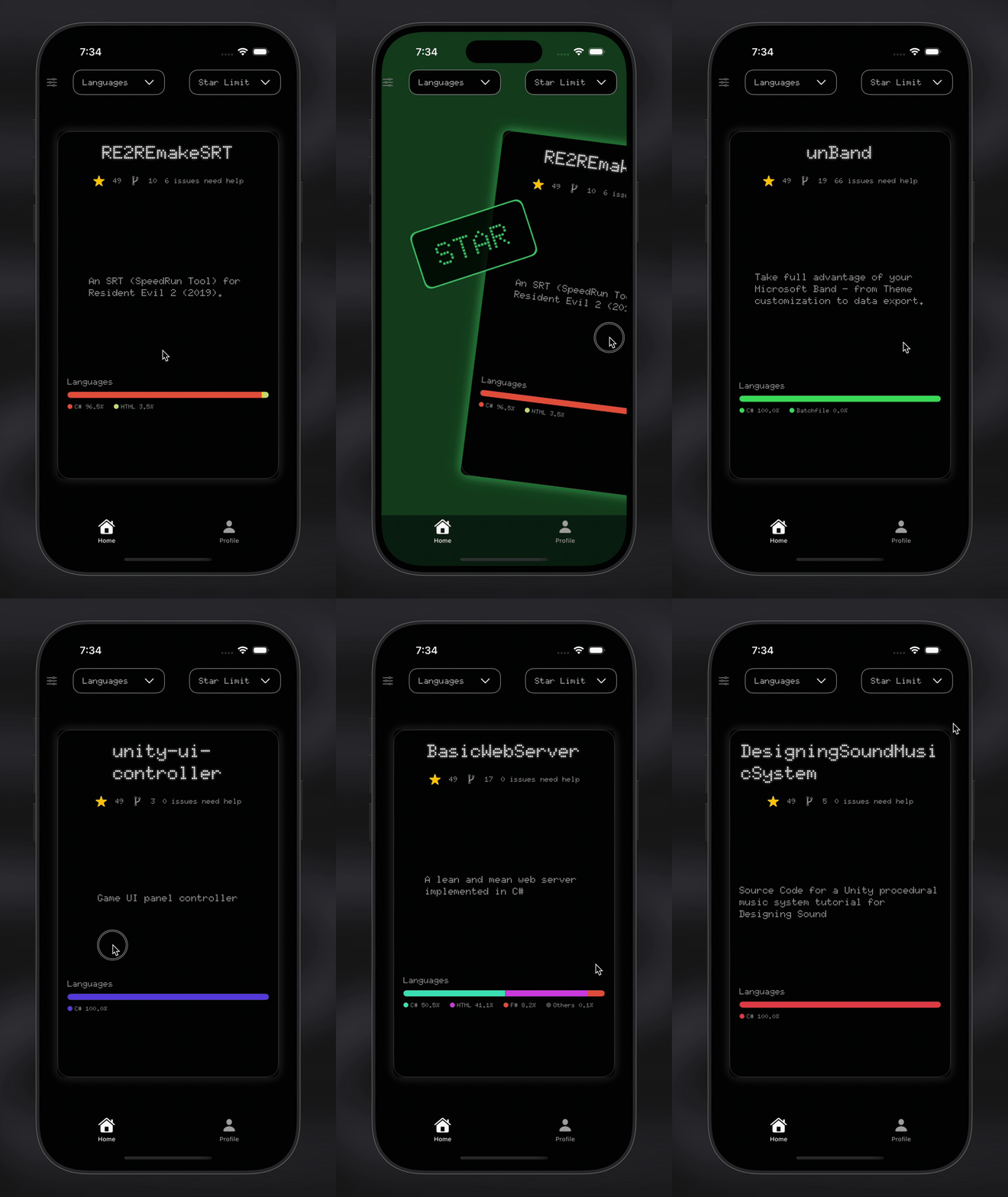
Instead of scrolling through hundreds of repos, you would see one repository at a time and simply swipe.
Right → ⭐ Star Left → ❌ Skip
That idea became _gitinder, a SwiftUI-based iOS app that lets developers discover GitHub repositories using swipe gestures.
But building it turned out to be a great learning experience about:
- OAuth authentication
- API limitations
- local state management
- configuration handling in mobile apps
Here are a few things I learned along the way.
The OAuth Problem (PKCE vs Backend)
Authentication is always the first real challenge when integrating with GitHub.
Initially I wanted to implement OAuth with PKCE, since it’s the recommended approach for mobile apps.
But after experimenting with PKCE for a while, I kept running into issues with GitHub’s OAuth implementation and the flow wasn’t behaving as expected in the iOS environment.
Instead of spending more time fighting the flow, I switched to a simpler and reliable architecture.
I created a tiny backend service whose only job is to exchange the authorization code for an access token.
The authentication flow now looks like this:
- The app opens GitHub’s OAuth authorization page
- GitHub redirects back to the app with an authorization code
- The app sends that code to the backend
- The backend exchanges it for an access token
- The token is returned to the app and stored in the Keychain
The important part is that the client secret never exists inside the mobile app.
The backend itself is extremely small and only performs the token exchange.
The GitHub Search API and the OR Query Problem
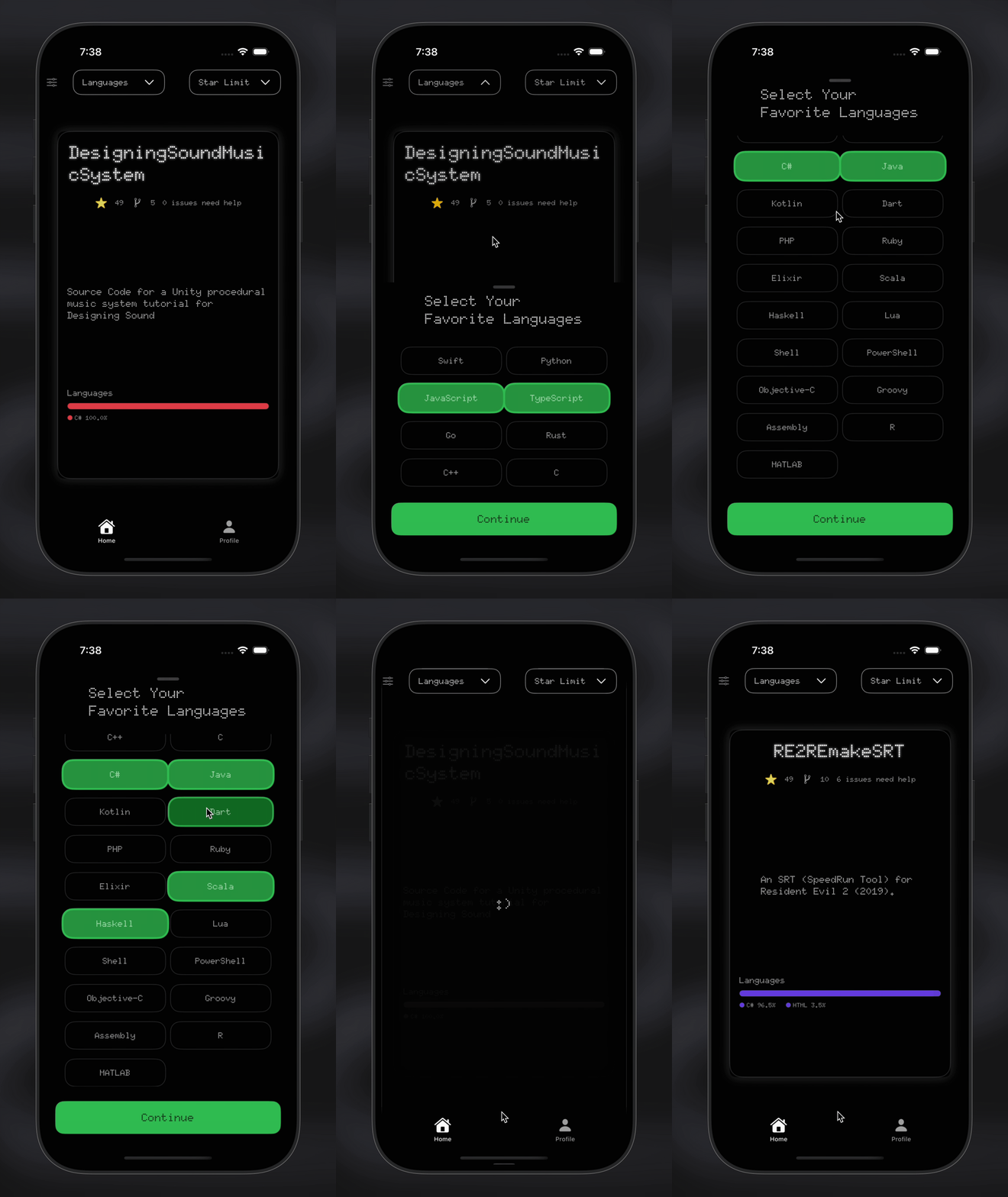
One of the core features of _gitinder is filtering repositories by programming language.
My first attempt looked something like this:
language:Swift OR language:Python OR language:Rust
Simple, right?
However, GitHub’s search API has a hard limit on logical operators. If too many OR conditions are used, the API returns a validation error.
This forced me to rethink how filtering should work.
Instead of one large query, I split the requests into multiple smaller queries, each targeting a specific language.
For example:
- language:Swift
- language:Python
- language:Rust
The results are then combined inside the app.
This solution works, but I have to admit something: ✨ It’s not ideal!!
Right now the app sends multiple requests to GitHub’s API, which increases the number of API calls and makes the system less efficient than I would like.
It solved the immediate problem, but it’s definitely something I want to improve in the future.
If anyone has ideas on how to better structure the query or reduce the number of API requests while keeping language filtering flexible, I would love to hear your thoughts.
This is an open-source project, and contributions or suggestions are always welcome.
Handling Multiple API Requests
Another interesting challenge appeared while implementing the star and unstar system.
At first, every time the user swiped right to star a repository, the app would immediately send a request to GitHub:
PUT /user/starred/{owner}/{repo}
This worked, but it quickly became inefficient.
Imagine a user swiping through many repositories quickly. The app could end up sending dozens of API requests in a very short time, which is not great for performance or rate limits.
So I decided to rethink the approach.
Instead of immediately sending requests to GitHub, the app collects star and unstar actions locally.
Inside the authentication manager, I store them like this:
@Published var pendingStars: [(owner: String, repo: String)] = []
@Published var pendingUnstars: [(owner: String, repo: String)] = []
Whenever the user swipes right on a repository in HomeView, the app:
- adds the repository to a local starred list
- appends the action to pendingStars
Similarly, when a repository is removed from the starred list in ProfileView, the action is added to pendingUnstars.
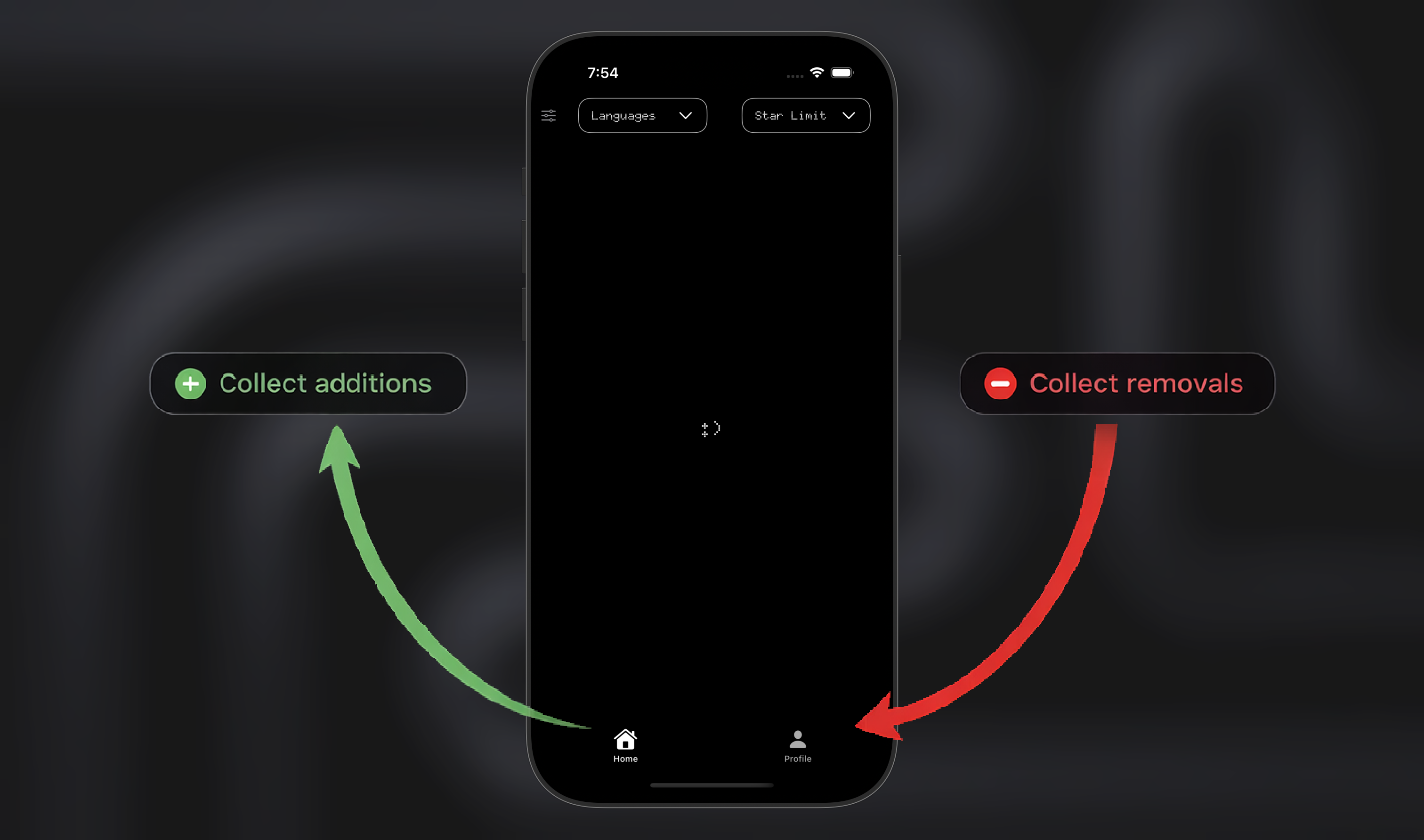
But the interesting part is when the API requests are actually sent.
Instead of firing them immediately, I trigger synchronization when the user switches views.
.onDisappear {
    auth.syncStarChanges()
}
This creates a nice flow inside the app:
- Home tab (left side) Users discover repositories and swipe right to star them. These actions are collected locally.
- When the user navigates to Profile tab (right side) All pending star actions are sent to GitHub in one batch.
- Profile tab allows users to remove starred repositories. Those removals are also collected locally.
- When the user navigates back to Home, all pending unstar actions are synchronized.
In other words: Home → collects stars Profile → collects unstars
And the API is only called when switching between tabs.
This approach dramatically reduces the number of API requests and keeps the UI responsive.
It also creates a surprisingly natural mental model for the user:
Discover on the left. Manage on the right.
Managing Secrets the Right Way (.env + xcconfig)
Another important lesson was how to handle secrets properly.
For the backend, I used a classic approach:
.env
This file stores sensitive information like:
- CLIENT_ID
- CLIENT_SECRET
The .env file is ignored by Git and never pushed to GitHub.
However, mobile apps have a different challenge. Environment variables are not as straightforward as they are in backend environments.
After some research, I implemented a more professional solution using:
xcconfig
With this setup:
- OAuth client IDs are defined in Config.xcconfig
- The value is injected into Info.plist
- The Swift code reads it from the app bundle
This approach keeps configuration separate from the codebase and allows other developers to easily configure the app locally.
The “-1 Star Limit” Easter Egg
While building the preferences system, I added an option where users can limit repository results by star count.
For example:
- < 100
- < 500
- < 1000
But while testing the feature I thought: “What happens if the limit is… -1?”
So I added a small easter egg.
When the star limit is set to -1, the app stops searching GitHub entirely and instead shows something very important: ✨My own repositories...✨
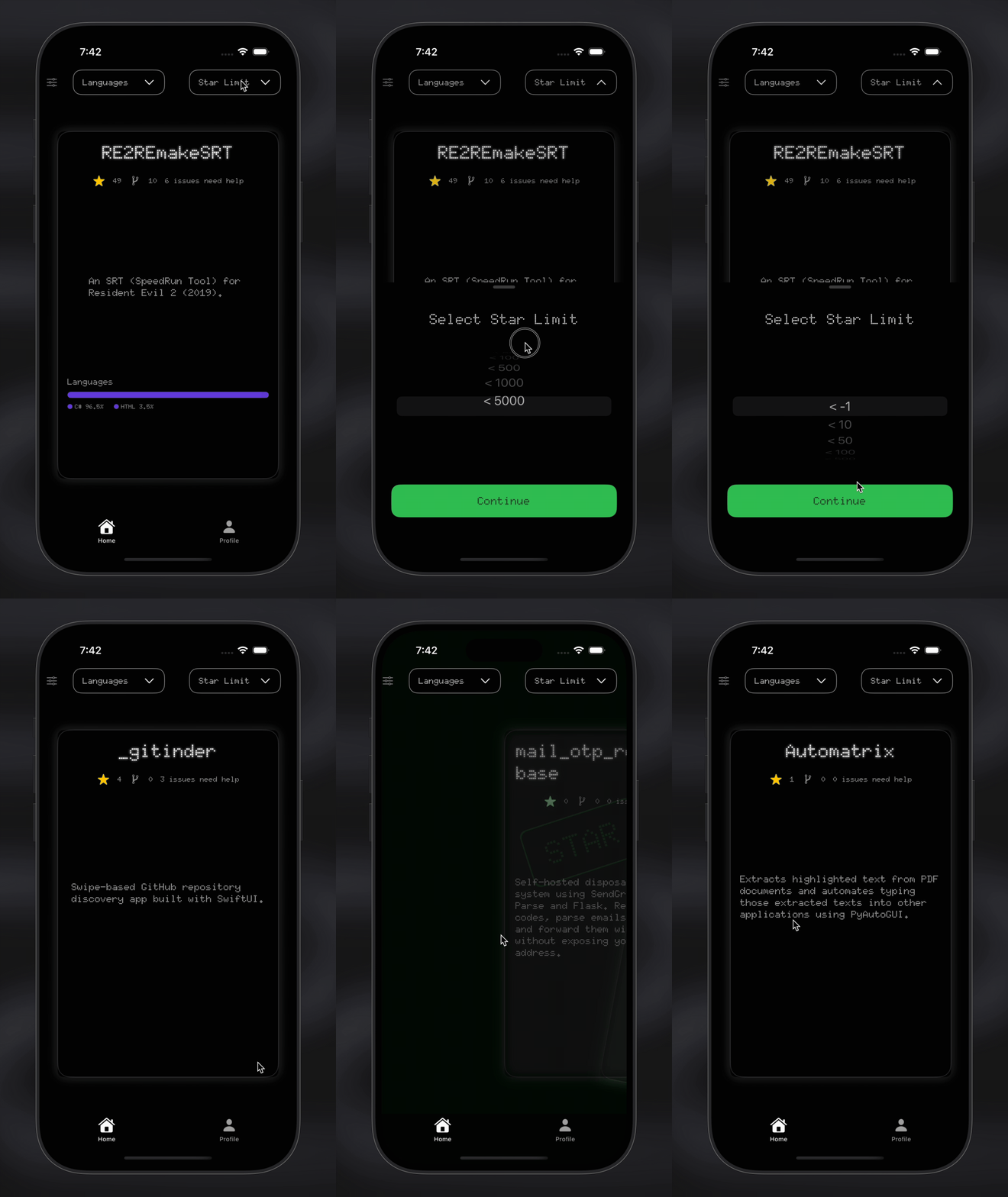
Purely for scientific reasons, of course.
It’s a completely unnecessary feature, but I like the idea that somewhere in the settings there is a hidden option that quietly turns the app into:
"Discover Osman’s projects instead."
Every serious software project needs at least one completely unnecessary feature. This one just happens to promote my GitHub profile.
What I Learned
Building _gitinder taught me several valuable lessons:
- Authentication flows in mobile apps require careful design.
- APIs do not always behave exactly as expected, especially when rate limits or caching are involved.
- Local state management can dramatically improve the user experience.
- Configuration management is an important part of building professional software.
- Most importantly, building something end-to-end teaches far more than reading documentation.
Final Thoughts
_gitinder started as a small idea: making GitHub discovery more interactive.
But during development, it became a great opportunity to explore real-world engineering problems:
- OAuth authentication
- API limitations
- State synchronization
- Configuration management
If you’re interested in the project, you can check it out here:
{% embed https://github.com/Osman-Kahraman/_gitinder %}
And if you like the idea; maybe give it a ⭐ or just swipe left...
Comments
More Blog
View allgemmaFive Gemma-4 models, one accelerator: what porting E2B 31B to AWS Inferentia2 taught me
I ported the whole Gemma-4 family — E2B, E4B, 12B, 31B, and the 26B-A4B MoE — to run on...
X
xbillcommunityHey DEV, I'm Tobore. Let's actually connect.
Hey DEV, I'm Tobore. Let's actually connect. I've been on here for a while now, mostly writing and...
L
Laurina AyarahaiI burned through thousands of AI tokens. Then a friend did it for free
(yep, kinda clickbait, just for the funsies 😊) At the beginning of the year, I relaunched my...
P
Paulo HenriqueaiClaude might be saturating your machine
My laptop was sitting idle with the fan at full tilt. Nothing was running that I knew of. The culprit...
S
Sidhant PandagithubactionsAutomated GitHub Code Reviews Using Google Gemini
I Built a Thing! TL;DR — Google Gemini-based Pull Request reviews and Issue Triaging for...
D
Darren "Dazbo" LesteraiWhat is an "agentic harness," actually?
I've been hearing the word "harness" thrown around a lot lately. I assumed it just meant "the IDE" or...
T
Tilde A. ThuriumReady-made automations for this
Workflows from the Neura Market marketplace related to this DeepSeek resource
- Automated LinkedIn Profile Discovery with Airtable and Google Searchn8n · $4.99 · Related topic
- Multi-Platform Source Discovery with SerpAPI, DuckDuckGo, GitHub, Reddit, & Blueskyn8n · $24.99 · Related topic
- AI-Driven Local Event Discovery Using Multi-Tool Searchn8n · $14.99 · Related topic
- Automate Monitoring of Multiple GitHub Repositories with Webhooksn8n · $14.99 · Related topic