
Back to Blog![Stop Wasting Tokens: Building Deterministic Custom Agents with Google ADK [GDE]](https://media2.dev.to/dynamic/image/width=1000,height=420,fit=cover,gravity=auto,format=auto/https%3A%2F%2Fdev-to-uploads.s3.amazonaws.com%2Fuploads%2Farticles%2Fz44ccb8ysfrceeyxy1eo.jpg) gemini
gemini
 gemma
gemma community
 ai
ai ai
ai githubactions
 ai
ai
Stop Wasting Tokens: Building Deterministic Custom Agents with Google ADK [GDE]
Connie Leung March 29, 2026
0 views
In the world of AI orchestration, it's tempting to use a Large Language Model (LLM) for every step of...
In the world of AI orchestration, it's tempting to use a Large Language Model (LLM) for every step of a workflow. However, as applications scale, the "LLM-first" approach can introduce unnecessary latency, costs, and unpredictability. The Google Agent Development Kit (ADK) provides a powerful alternative: the BaseAgent.
This post explores how to create a custom, programmatic agent—specifically an Email Agent—that handles deterministic tasks while still participating seamlessly in an AI-driven ecosystem.
Why is the Email Agent a Custom Agent?
The agent is 100% deterministic and relies on external APIs to format text and send emails.
It uses the marked library to convert a Markdown string into HTML and the nodemailer library to send mail to an SMTP server.
On the contrary, if I created a LlmAgent, the instruction, tool, and structured output would introduce LLM latency, input, and output tokens.
The Benefits of Programmatic Execution
Using a custom agent instead of an LLM-wrapped prompt offers several critical advantages:
| Agent Type | Llm Agent | Custom Agent |
|---|---|---|
| Latency | Time-intensive (generation delay) | Low-latency (direct execution) |
| Cost | Pay for tokens consumed | Zero cost |
| Determinism | Probabilistic and hallucinate when agent does not follow the instruction or the instruction is unclear | 100% deterministic and does not require AI capabilities |
| Testability | Incorrect result when the model hallucinates | Test results are predictable |
| Integration | Delegate responsibility to tools | Call libraries directly in the class |
Demo Overview
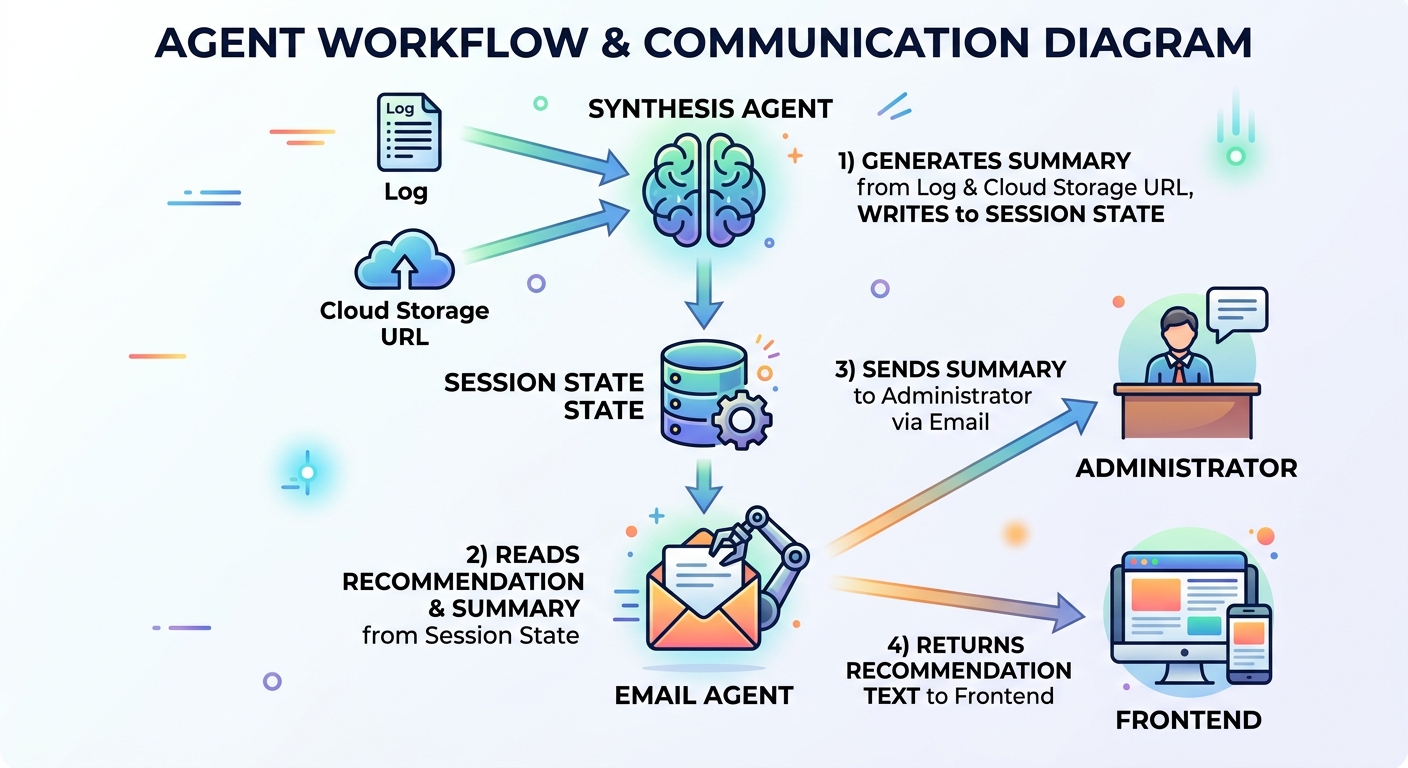
The EmailAgent is the final subagent of the Decision Tree multi-agent system. The Decision Tree agent evaluates the feasibility of applying an agent architecture to a project. It starts with a project description, determines whether an agent architecture should be used, generates a recommendation, returns the recommendation to the client, and sends an email to the administrator as a side effect.
The EmailAgent retrieves the recommendation and summary from the session state, returns the recommendation text to the frontend, and sends both to the administrator's email address.
The agent does not require an LLM or tool use; therefore, an LlmAgent is overkill. My solution was to use a custom agent to handle email to save time and cost.
Architecture
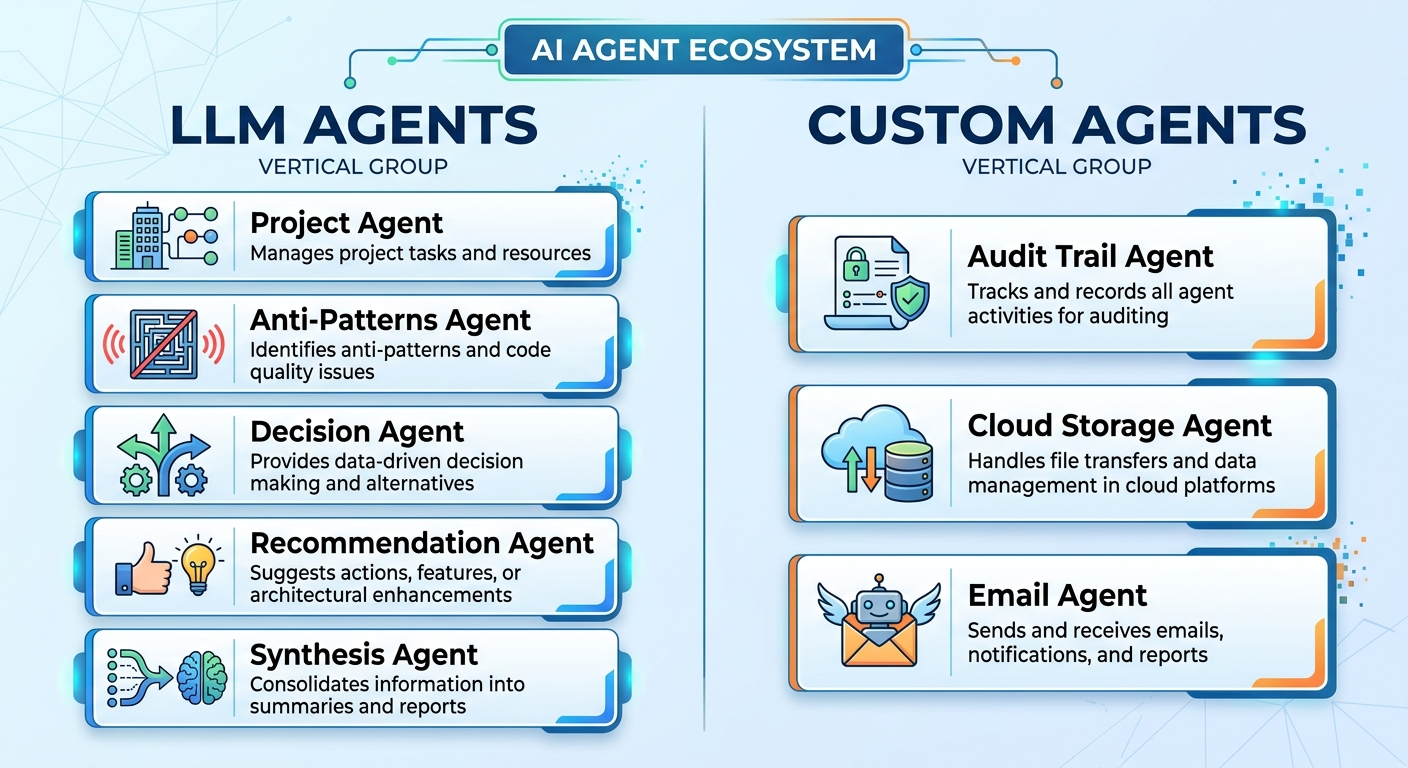
The project, anti-patterns, decision, recommendation, and synthesis agents are LLM agents. These agents require Gemini to reason and generate text responses.
The Audit Trail, Cloud Storage, and Email agents integrate with external APIs or resources that trigger deterministic actions.
Prerequisites
Requirements
- TypeScript 5.9.3 or later
- Node.js 24.13.0 or later
- npm 11.8.0 or later
- Docker (For running MailHog locally)
- Google ADK (For building the custom agent)
- Gemini in Vertex AI (to call the model in LLM agents, although not required for the custom agent)
Note: I used Gemini in Vertex AI for authentication due to regional availability. Gemini is blocked in Hong Kong currently, so I used Gemini in Vertex AI instead.
Install npm dependencies
npm i --save-exact @google/adk
npm i --save-dev --save-exact @google/adk-devtools
npm i --save-exact nodemailer
npm i --save-dev --save-exact @types/nodemailer rimraf
npm i --save-exact marked
npm i --save-exact zod
I installed the required dependencies for building ADK agents, converting Markdown string to HTML and sending emails to MailHog in local testing.
Pinned dependencies ensure the versioning is the same in development and production environments for enterprise-level applications.
Environment variables
Copy .env.example to .env and fill in the credentials:
GEMINI_MODEL_NAME="gemini-3-flash-preview"
GOOGLE_CLOUD_PROJECT="<Google Cloud Project ID>"
GOOGLE_CLOUD_LOCATION="global"
GOOGLE_GENAI_USE_VERTEXAI=TRUE

# SMTP Settings (MailHog)
SMTP_HOST="localhost"
SMTP_PORT=1025
SMTP_USER=""
SMTP_PASS=""
SMTP_FROM="no-reply@test.local"
ADMIN_EMAIL="admin@test.local"
SMTP_HOST, SMTP_PORT, SMTP_USER, SMTP_PASS, are required to set up MailHog for local email testing.
SMTP_FROM is a from email address that can be any string in local testing.
ADMIN_EMAIL is an administrator email address receiving emails that the EmailAgent sends. It is an environment variable in my use case because it is the only recipient. If another scenario requires sending emails to customers, the environment variable should be removed.
Environment Setup
I pulled the latest version of the MailHog docker image from Docker Hub and started it locally to receive test emails and display them in the Web UI. The docker-compose.yml file contains the setup configuration.
services:
  mailhog:
    image: mailhog/mailhog
    container_name: mailhog
    ports:
      - "1025:1025" # SMTP port
      - "8025:8025" # HTTP (Web UI) port
    restart: always
    networks:
      - decision-tree-agent-network

networks:
  decision-tree-agent-network:
The SMTP port is 1025 and the URL of the Web UI port is http://localhost:8025.
docker compose up -d
Start MailHog in Docker.
ADK Multi-Agent Architecture
process.loadEnvFile();

const model = process.env.GEMINI_MODEL_NAME || '';
if (!model) {
  throw new Error('GEMINI_MODEL_NAME is not set');
}
The model variable specifies the gemini-3-flash-preview model. If model is undefined, an error is thrown.
The demo uses Node 20+, so the process.loadEnvFile() is provided to load variables from the environment file. Otherwise, developers should consider using dotenv to load environment variables.
export const RECOMMENDATION_KEY = 'recommendation';
export const MERGED_RESULTS_KEY = 'mergedResults';
export const PROJECT_DESCRIPTION_KEY = 'project_description';
import { FunctionTool, LlmAgent, SequentialAgent } from '@google/adk';
import { z } from 'zod';
import { initWorkflowAgent } from './init.js';
import {
  MERGED_RESULTS_KEY,
  PROJECT_DESCRIPTION_KEY,
  VALIDATION_ATTEMPTS_KEY,
} from './sub-agents/output-keys.js';

const prepareEvaluationTool = new FunctionTool({
  name: 'prepare_evaluation',
  parameters: z.object({
    description: z.string()
  }),
  execute: async ({ description }, context) => {
    if (!context || !context.state) {
      return { status: 'ERROR', message: 'No session state found.' };
    }

    const state = context.state;

    // Clear all previous evaluation data
    state.set(MERGED_RESULTS_KEY, null);
    state.set(VALIDATION_ATTEMPTS_KEY, 0);

    // Set the new description
    state.set(PROJECT_DESCRIPTION_KEY, description);

    return { status: 'SUCCESS', message: 'State reset and description updated.' };
  },
});

export const SequentialEvaluationAgent = new SequentialAgent({
  name: 'SequentialEvaluationAgent',
  subAgents: initWorkflowAgent(model),
});
prepareEvaluationTool is a tool that reset the variables in the session state before the agent starts the project evaluation.
SequentialEvaluationAgent is a sequential agent that consists of subagents.
export function initWorkflowAgent(model: string) {
  return [
    createMergerAgent(model),
    createEmailAgent(),
  ];
}
The initWorkflowAgent calls createMergerAgent and createEmailAgent factory functions to return the merger agent and the email agent. The merger agent is a LlmAgent because it requires Gemini to generate a summary whereas the email agent is a custom agent that does not require Gemini.
export const rootAgent = new LlmAgent({
  name: 'ProjectEvaluationAgent',
  model,
  instruction: `... instruction...`,
  tools: [prepareEvaluationTool],
  subAgents: [SequentialEvaluationAgent],
});
The rootAgent is an orchestrator that routes the project description to SequentialEvaluationAgent to evaluate.
Email Agent Factory Function
export type SmtpConfig = {
  host: string;
  port: number;
  user?: string;
  pass?: string;
  from: string;
  email: string;
};
export function createEmailAgent(): BaseAgent {
  const email = process.env.ADMIN_EMAIL || 'admin@test.local';
  const host = process.env.SMTP_HOST || 'localhost';
  const port = parseInt(process.env.SMTP_PORT || '1025');
  const user = process.env.SMTP_USER || '';
  const pass = process.env.SMTP_PASS || '';
  const from = process.env.SMTP_FROM || 'no-reply@test.local';

  const smtpConfig: SmtpConfig = {
    host,
    port,
    user,
    pass,
    from,
    email,
  };

  return new EmailAgent(smtpConfig);
}
The createEmailAgent function retrieves the host, port, user, password, sender email, and administrator email from the environment variables to construct an instance of SmtpConfig.
Pass the SmtpConfig object to the constructor of the EmailAgent class to construct a custom agent. Finally, the function returns the email agent to become the last subagent of SequentialEvaluationAgent.
Implementing the Email Agent
Let’s look at the core structure of the EmailAgent.
1. The Class Definition and State
The EmailAgent has a readonly SmtpConfig instance member that is initialized in the constructor. The constructor calls super to initialize its name and description.
class EmailAgent extends BaseAgent {
  readonly smtpConfig: SmtpConfig;

  constructor(smtpConfig: SmtpConfig) {
    super({
      name: 'EmailAgent',
      description: 'Send a recommendation and summary email to the administrator.',
    });

    this.smtpConfig = smtpConfig;
  }
}
2. Accessing the Context
import { z } from 'zod';

export const recommendationSchema = z.object({
  text: z.string(),
});

export type Recommendation = z.infer<typeof recommendationSchema>;

export const mergerSchema = z.object({
  summary: z.string(),
});

export type Merger = z.infer<typeof mergerSchema>;
The text property stores the recommendation of the Recommendation type. Similarly, the summary property of the Merger type stores the summary.
export function getEvaluationContext(context: ReadonlyContext | undefined) {
  if (!context || !context.state) {
    return {
      recommendation: null,
    };
  }

  const state = context.state;
  return {
    recommendation: state.get<Recommendation>(RECOMMENDATION_KEY) ?? null,
  };
}

export function getMergerContext(context: ReadonlyContext | undefined) {
  if (!context || !context.state) {
    return {
      merger: null,
    };
  }

  const state = context.state;
  return {
    merger: state.get<Merger>(MERGED_RESULTS_KEY) ?? null,
  };
}
getEvaluationContext and getMergerContext are helper functions to obtain recommendation and summary from the session state.
3. Implement the Concrete Methods
The EmailAgent extends the BaseAgent and all subclasses must implement two abstract methods: runAsyncImpl and runLiveImpl.
  protected async *runAsyncImpl(context: InvocationContext): AsyncGenerator<Event, void, void> {
    for await (const event of this.runLiveImpl(context)) {
      yield event;
    }
  }
Implement runAsyncImpl by wrapping runLiveImpl. It invokes a for-await loop to iterate this.runLiveImpl(context) and yields each event.
protected async *runLiveImpl(context: InvocationContext): AsyncGenerator<Event, void, void> {
    const readonlyCtx = new ReadonlyContext(context);
    const { merger } = getMergerContext(readonlyCtx);
    const { recommendation } = getEvaluationContext(readonlyCtx);
    const recommendationText = recommendation?.text || 'No recommendation available.';

    const emit = (status: 'success' | 'error', author: string) =>
      createEmailStatusEvent({
        author,
        context,
        status,
        recommendationText,
      });

    if (!merger) {
      yield emit('error', this.name);
      return;
    }

    try {
      const emailContent = `${recommendation?.text || ''}\n\n## Summary\n\n${merger.summary}`;
      await sendEmail(this.smtpConfig, 'Project Evaluation Results', emailContent);
      yield emit('success', this.name);
    } catch (e) {
      console.error(e);
      yield emit('error', this.name);
    }
  }
The runLiveImpl method handles three cases: an undefined merger, a successful email dispatch, and an email dispatch failure. When email dispatch is successful, the inner emit arrow function yields a success event. Otherwise, the catch block logs the error and yields an error event.
import { marked } from 'marked';
import nodemailer from 'nodemailer';

export async function sendEmail(smtpConfig: SmtpConfig, subject: string, text: string) {
  const { host, port, user, pass, from, email: to } = smtpConfig;
  const transporter = nodemailer.createTransport({
    host,
    port,
    auth: user && pass ? { user, pass } : undefined,
    secure: false,
  });

  const html = await marked.parse(text);
  const mailOptions = {
    from,
    to,
    subject,
    text,
    html,
  };
  return transporter.sendMail(mailOptions);
}
The sendEmail function uses the nodemailer to create a transporter using the SMTP host, port, user, and password. The marked library parses the Markdown text and converts it to HTML. The transporter has a sendMail method that accepts mail options to send an email to the to email address in both text and html formats.
4. Returning Data in the Output
Next, implement createEmailStatusEvent to return an email status event.
export type EmailStatusOptions = {
  author: string;
  context: InvocationContext;
  status: 'success' | 'error';
  recommendationText: string;
};

export function createEmailStatusEvent(options: EmailStatusOptions): Event {
  return createEvent({
    invocationId: options.context.invocationId,
    author: options.author,
    branch: options.context.branch || '',
    content: {
      role: 'model',
      parts: [
        {
          text: JSON.stringify({
            status: options.status,
            recommendationText: options.recommendationText,
            sessionId: options.context.session.id,
            invocationId: options.context.invocationId,
          }),
        },
      ],
    },
  });
}
The EmailStatusOptions provide the invocation ID, branch, author (the agent name), status, and recommendation text.
The createEmailStatusEvent function reuses the createEvent function to return the invocation ID, branch, author, and a JSON-stringified object consisting of the status, session ID, invocation ID, and recommendation text.
The client can examine the status to determine whether or not to display the recommendation text.
Returning both session and invocation IDs to the client is recommended. The client can reuse the session ID to call the agent in a conversational flow to seek evaluations for additional project descriptions. The invocation ID allows querying an error-tracking service like Datadog to identify the server status.
Testing
Add scripts to package.json to build and start the ADK web interface.
  "scripts": {
    "prebuild": "rimraf dist",
    "build": "npx tsc --project tsconfig.json",
    "web": "npm run build && npx @google/adk-devtools web --host 127.0.0.1 dist/agent.js"
  },
- Open a terminal and type
npm run webto start the API server. - Open a new browser tab and type
http://localhost:8000. - Paste the following into the message box:
One of my favorite tech influencers just tweeted about a 'breakthrough in solid-state batteries.' Find which public company they might be referring to, check that company’s recent patent filings to see if it’s true, and then check their stock price to see if the market has already 'priced it in'.
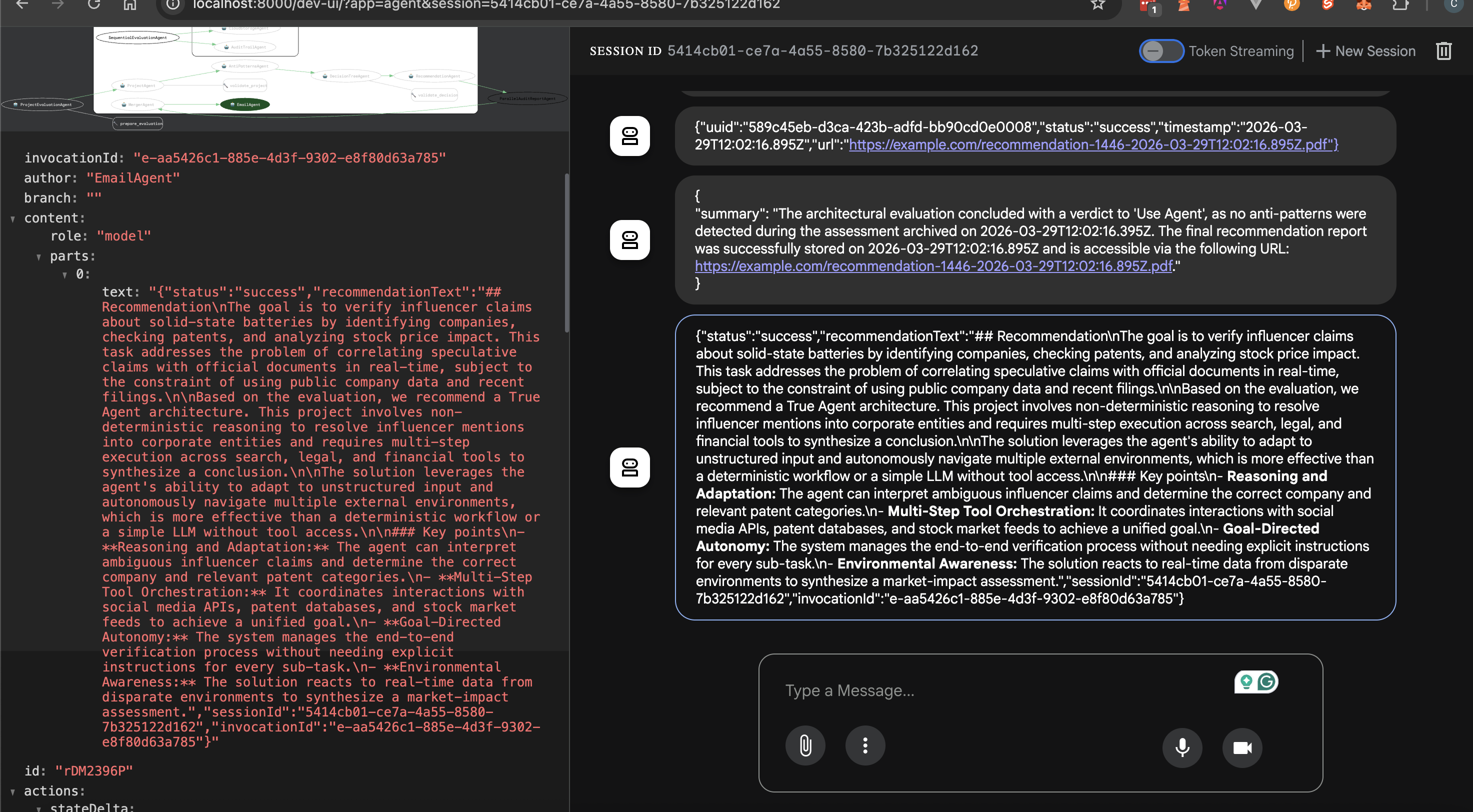
- Ensure the root agent executes and halts when the email agent terminates.
- Open another tab and navigate to
http://localhost:8025to open the MailHog web UI
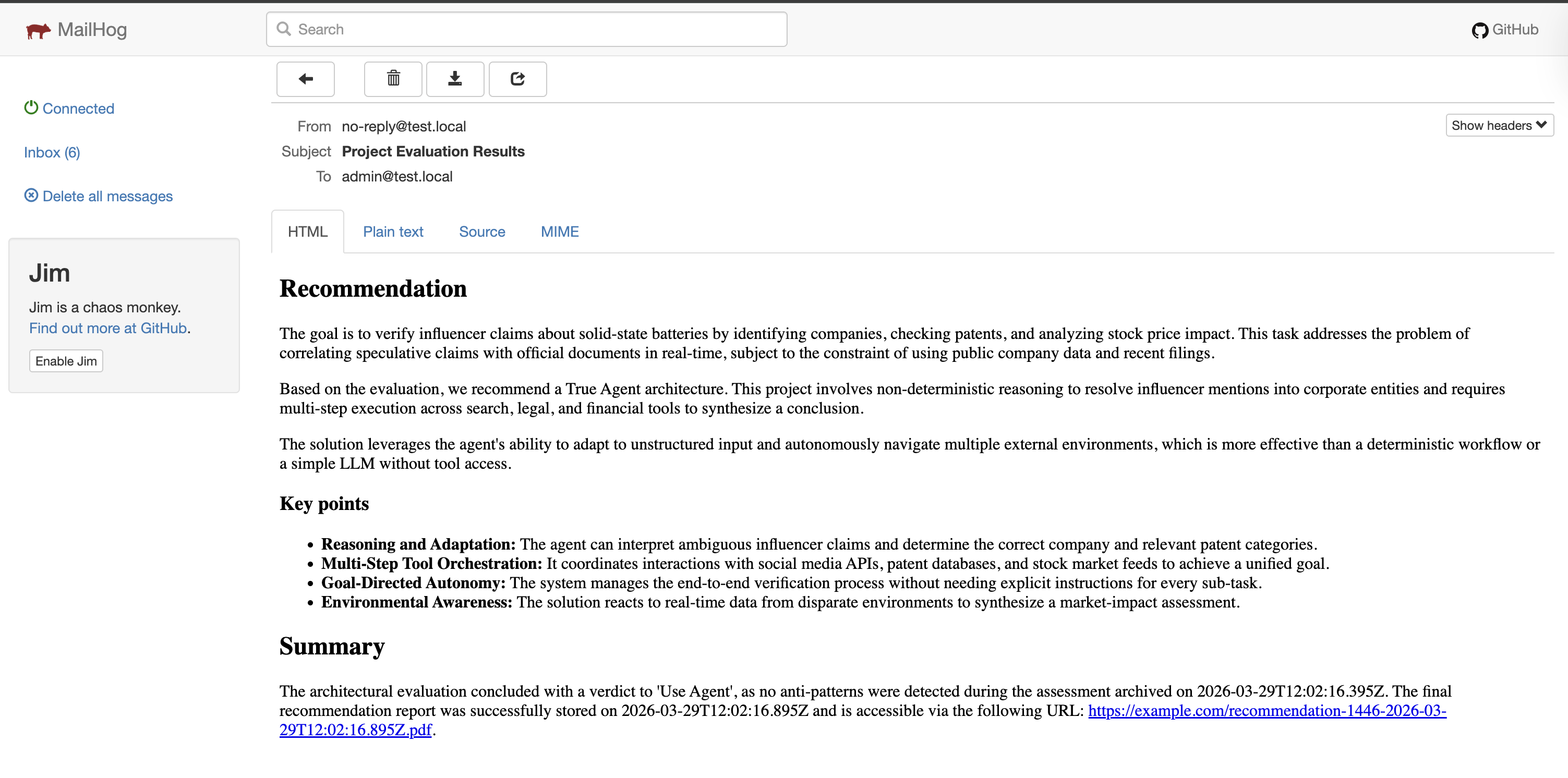
- The MailHog Web UI displays the recommendation and summary that summarizes the decision, any clear anti-patterns, and the URL of the cloud storage.
Conclusion
Custom agents are essential components of an ADK application. While ADK offers sequential, parallel, loop, and LLM agents, these agents may not meet the requirements in some occasions. BaseAgent is the generic Agent class that enables developers to write their logic and design their agentic workflow.
The takeaway: avoid using an LLM-based agent for tasks that do not require probabilistic reasoning, tool calling, or response generation.
Resources
Comments
More Blog
View allgemmaFive Gemma-4 models, one accelerator: what porting E2B 31B to AWS Inferentia2 taught me
I ported the whole Gemma-4 family — E2B, E4B, 12B, 31B, and the 26B-A4B MoE — to run on...
X
xbillcommunityHey DEV, I'm Tobore. Let's actually connect.
Hey DEV, I'm Tobore. Let's actually connect. I've been on here for a while now, mostly writing and...
L
Laurina AyarahaiI burned through thousands of AI tokens. Then a friend did it for free
(yep, kinda clickbait, just for the funsies 😊) At the beginning of the year, I relaunched my...
P
Paulo HenriqueaiClaude might be saturating your machine
My laptop was sitting idle with the fan at full tilt. Nothing was running that I knew of. The culprit...
S
Sidhant PandagithubactionsAutomated GitHub Code Reviews Using Google Gemini
I Built a Thing! TL;DR — Google Gemini-based Pull Request reviews and Issue Triaging for...
D
Darren "Dazbo" LesteraiWhat is an "agentic harness," actually?
I've been hearing the word "harness" thrown around a lot lately. I assumed it just meant "the IDE" or...
T
Tilde A. ThuriumReady-made automations for this
Workflows from the Neura Market marketplace related to this DeepSeek resource
- Extract Named Entities from Web Pages with Google Natural Language APIn8n · $4.99 · Related topic
- Automate Profile List Building with Airtop and Google Sheetsn8n · $4.99 · Related topic
- Build AI Agents with Think-Plan-Act Architecture Using Llama-4 Reasoningn8n · $24.99 · Related topic
- Building a RAG Chatbot for Movie Recommendations with Qdrant and OpenAIn8n · $14.99 · Related topic