
Back to Blog rust
rust
 gemma
gemma community
 ai
ai ai
ai githubactions
 ai
ai
🖥️ Weekend Project: A CLI to Manage Multi-Monitor Layouts on Windows
OsirisFrik March 30, 2026
0 views
A lightweight Rust CLI to manage multi-monitor layouts on Windows. If you frequently change your screen layout, this tool can help by saving configurations as profiles and applying them with a single command.
title: 🖥️ Weekend Project: A CLI to Manage Multi-Monitor Layouts on Windows published: true description: A lightweight Rust CLI to manage multi-monitor layouts on Windows. If you frequently change your screen layout, this tool can help by saving configurations as profiles and applying them with a single command. tags: #rust #cli #windows #scoop cover_image: https://dev-to-uploads.s3.amazonaws.com/uploads/articles/wfenmb1a232w2r519zdu.png
Use a ratio of 100:42 for best results.
published_at: 2026-03-30 19:37 +0000
This weekend I built a small tool to solve a very real (and annoying) problem…
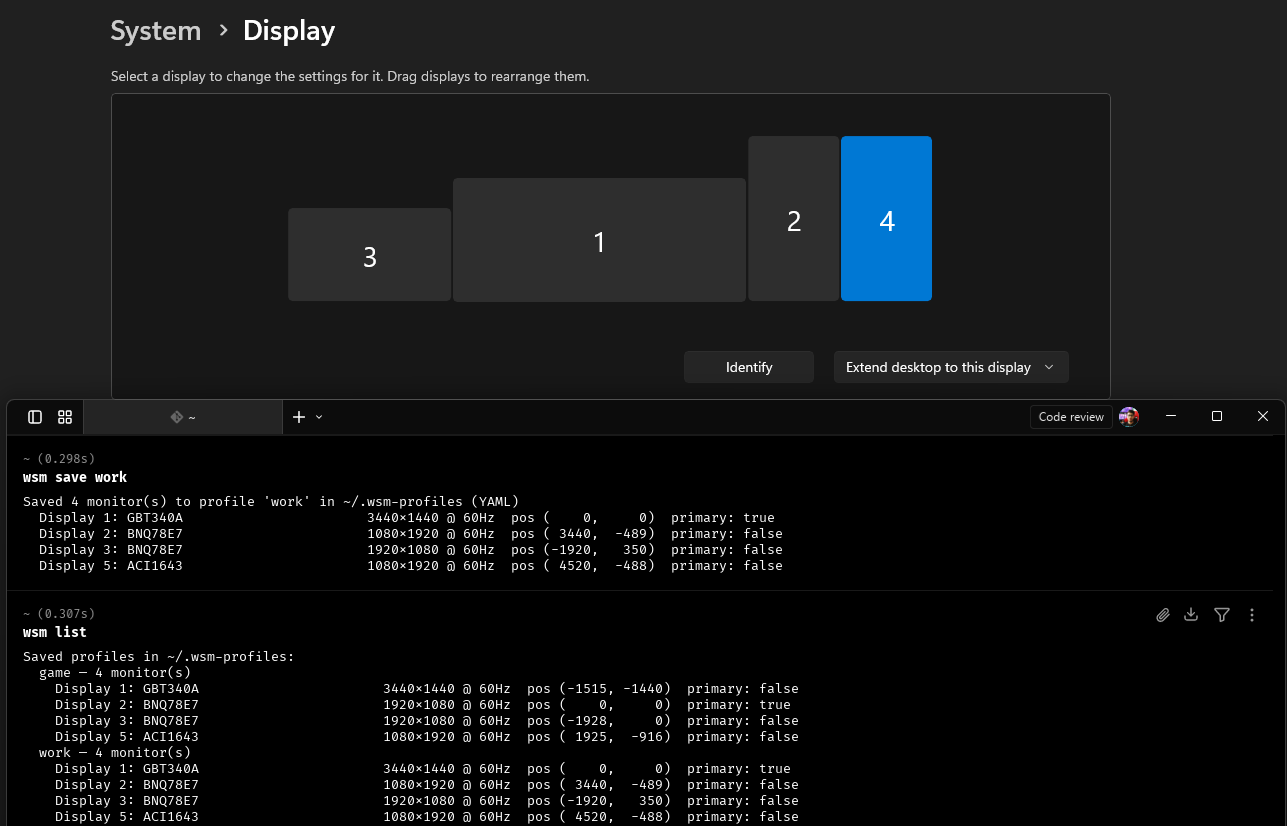
I’ve been working with 4 monitors for a while now. My setup includes an ultrawide monitor as primary when I work, but, when I want play videogames I preffer use a 24" monitor (when isn't a simrace game), so, here are two cases were I need change my screens layout.
Every time I move between those setups, I have to manually rearrange monitors in Windows.
Doing that repeatedly? Not fun 😅, some times I do that 3 times peer day 🫠.
##🤔 Looking for a solution
I tried to find an existing tool to automate monitor layouts, but nothing quite matched what I needed.
So I decided to build a simple CLI:
👉 wsm — Windows Screen Manager
A lightweight tool to save and restore monitor configurations as profiles.
##⚡ What it does
The idea is simple:
- Save your current monitor layout
- Store it as a profile (YAML or JSON)
- Restore it instantly with a command
wsm save work -- save current layout
wsm load game -- load saved layout
If you frequently change your screen layout, this can save you a lot of time.
wsm list
Saved profiles in ~/.wsm-profiles:
  game — 4 monitor(s)
    Display 1: GBT340A                       3440x1440 @ 60Hz  pos (-1515, -1440)  primary: false
    Display 2: BNQ78E7                       1920x1080 @ 60Hz  pos (    0,     0)  primary: true
    Display 3: BNQ78E7                       1920x1080 @ 60Hz  pos (-1928,     0)  primary: false
    Display 5: ACI1643                       1080x1920 @ 60Hz  pos ( 1925,  -916)  primary: false
  work — 4 monitor(s)
    Display 1: GBT340A                       3440x1440 @ 60Hz  pos (    0,     0)  primary: true
    Display 2: BNQ78E7                       1080x1920 @ 60Hz  pos ( 3440,  -562)  primary: false
    Display 3: BNQ78E7                       1920x1080 @ 60Hz  pos (-1920,   350)  primary: false
    Display 5: ACI1643                       1080x1920 @ 60Hz  pos ( 4520,  -552)  primary: false
##📦 How it works
Under the hood, the CLI:
- Reads all active monitors
- Captures:
- resolution
- refresh rate
- position in virtual desktop
- primary display
- orientation
- Stores everything in ~/.wsm-profiles
Example YAML:
profiles:
  office:
    monitors:
      - device_name: '\\.\DISPLAY1'
        friendly_name: 'Display 1: GS34WQCA'
        position_x: 0
        position_y: 0
        width: 3440
        height: 1440
        refresh_rate: 144
        bits_per_pel: 32
        orientation: 0
        is_primary: true
      - device_name: '\\.\DISPLAY2'
        friendly_name: 'Display 2: P2419H'
        position_x: 3440
        position_y: 180
        width: 1920
        height: 1080
        refresh_rate: 60
        bits_per_pel: 32
        orientation: 0
        is_primary: false
🧠 Atomic configuration changes
One important detail: applying layouts is done atomically.
Instead of changing monitors one by one (which can cause flickering or broken states), the tool:
- stages all changes using Windows APIs
- commits them in a single operation
This avoids intermediate invalid configurations.
Also:
- The primary display is always staged first
- Missing/disconnected monitors are handled gracefully
##🧪 Built with AI
I built this using Claude, and had a working version in under an hour.
That said, it wasn’t just “generate and done”:
- There were bugs
- Edge cases around Windows APIs
- Iterations to get things stable
The AI helped a lot, but I still had to guide it and understand what was going on.
##📈 Iterating on the idea
The first version was pretty basic:
- JSON files
- One file per configuration
Then I improved it:
- YAML as default (more readable)
- Profiles instead of separate files
- Still supports JSON if needed
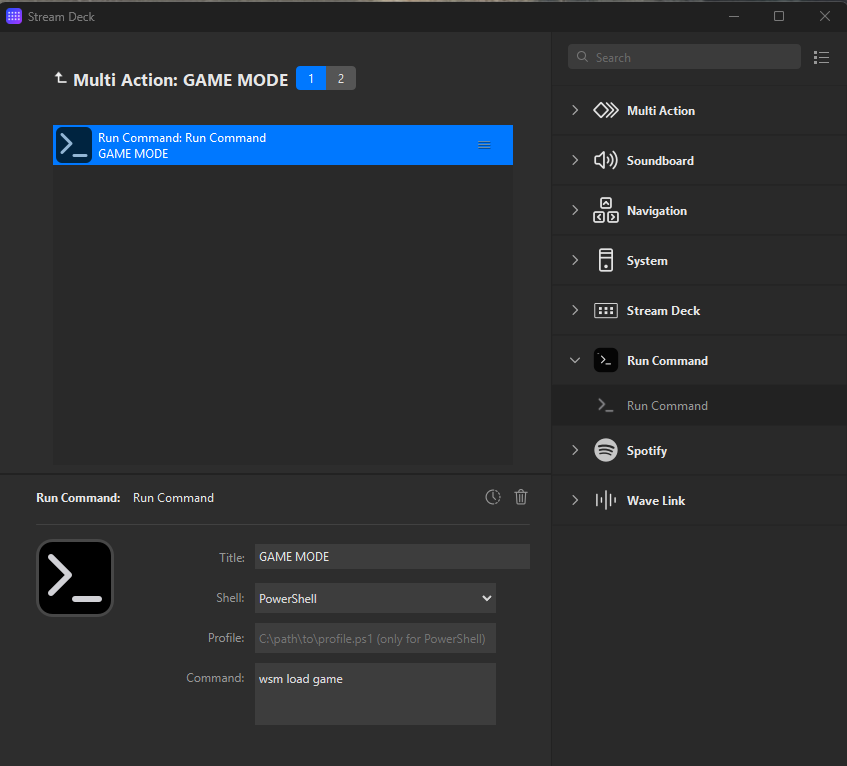
##🎛️ Stream Deck integration
Running commands is fine… but I wanted something faster.
So I built a plugin for the Elgato Stream Deck, this can run anny command on powershell or cmd.
Now I can switch my entire setup with a single button press.
##🧠 A reminder about AI
I’ve been in software development for about 10 years.
Back then, the advice was:
“It’s fine to copy from Stack Overflow… but understand what you’re copying.”
That still applies today.
AI is powerful, but:
- It makes mistakes
- It hallucinates
- It doesn’t replace understanding
If something breaks, you still need to know how to fix it.
##🚀 Try it out
If you’re on Windows and frequently change your monitor layout, this might be useful:
Comments
More Blog
View allgemmaFive Gemma-4 models, one accelerator: what porting E2B 31B to AWS Inferentia2 taught me
I ported the whole Gemma-4 family — E2B, E4B, 12B, 31B, and the 26B-A4B MoE — to run on...
X
xbillcommunityHey DEV, I'm Tobore. Let's actually connect.
Hey DEV, I'm Tobore. Let's actually connect. I've been on here for a while now, mostly writing and...
L
Laurina AyarahaiI burned through thousands of AI tokens. Then a friend did it for free
(yep, kinda clickbait, just for the funsies 😊) At the beginning of the year, I relaunched my...
P
Paulo HenriqueaiClaude might be saturating your machine
My laptop was sitting idle with the fan at full tilt. Nothing was running that I knew of. The culprit...
S
Sidhant PandagithubactionsAutomated GitHub Code Reviews Using Google Gemini
I Built a Thing! TL;DR — Google Gemini-based Pull Request reviews and Issue Triaging for...
D
Darren "Dazbo" LesteraiWhat is an "agentic harness," actually?
I've been hearing the word "harness" thrown around a lot lately. I assumed it just meant "the IDE" or...
T
Tilde A. ThuriumReady-made automations for this
Workflows from the Neura Market marketplace related to this DeepSeek resource
- Enrich Pipedrive CRM Contact Data with LinkedIn Profiles Using GPT & Multi-CRM Supportn8n · $24.99 · Related topic
- Build Comprehensive Entity Profiles with GPT-4, Wikipedia & Vector DB for Contentn8n · $24.99 · Related topic
- Collect Company Social Media Profiles with Extruct AI to Google Sheetsn8n · $9.99 · Related topic
- Scrape TikTok Influencer Profiles with Bright Data API to Google Sheetsn8n · $9.99 · Related topic