
Back to Blog googlecloud
 gemma
gemma community
 ai
ai ai
ai githubactions
 ai
ai
Cloud Run Jobs vs. Cloud Batch: Choosing Your Engine for Run-to-Completion Workloads
Maciej Strzelczyk March 31, 2026
0 views
Google Cloud offers plenty of different products and services, some of which seem to be covering...
Google Cloud offers plenty of different products and services, some of which seem to be covering overlapping needs. There are multiple storage solutions (Cloud Storage, Filestore), database products (Cloud SQL, Spanner, BigQuery) or ways to run containerized applications (Cloud Run and GKE). The breadth of options to choose from can be overwhelming and lead to situations where it’s not obvious which way to go to achieve your goal.
Similar situation applies to offline processing (aka batch processing). This is a situation where you have some data and want to run the same operation on each piece of this data. For example: transcoding a big video collection, resizing an image gallery or running inference against a prepared set of prompts. The recommended way to handle such situations is to use proper tools that will automatically scale, handle errors and guarantee that all data has been processed.
Cloud Batch and Cloud Run Jobs are two of the options to consider when you want to handle an offline processing task. In this article, I’ll explain what those two products have in common and what are their main differences. We will finish with a couple of examples showing when to best use each of these products.
The Similarities
Cloud Batch and Cloud Run Jobs are fundamentally aligned in their purpose and share many core features, making them both excellent choices for asynchronous, run-to-completion tasks like data conversion, media processing, and offline processing.
Both services allow you to run your code in standard Open Container Initiative (OCI) images, completely abstracting away the operational headache of managing permanent clusters. They share critical ecosystem features: both can be triggered for periodic execution using Cloud Scheduler and orchestrated into complex, multi-step data pipelines via Cloud Workflows.
Security is standardized, with both offering native integration with Secret Manager to keep credentials safe, and both fully supporting VPC Service Controls (VPC-SC) to define security perimeters.
Furthermore, the services are designed for workload portability through a compatible task indexing system; both inject environment variables like CLOUD_RUN_TASK_INDEX and BATCH_TASK_INDEX to partition data across parallel tasks. This engineering choice allows container images optimized for Cloud Run to be seamlessly migrated and executed on Cloud Batch.
Finally, both offer native support for mounting Google Cloud Storage buckets (using Cloud Storage FUSE) and NFS network shares to efficiently handle large-scale data ingestion and output.
The Differences
Core Architectural Paradigms
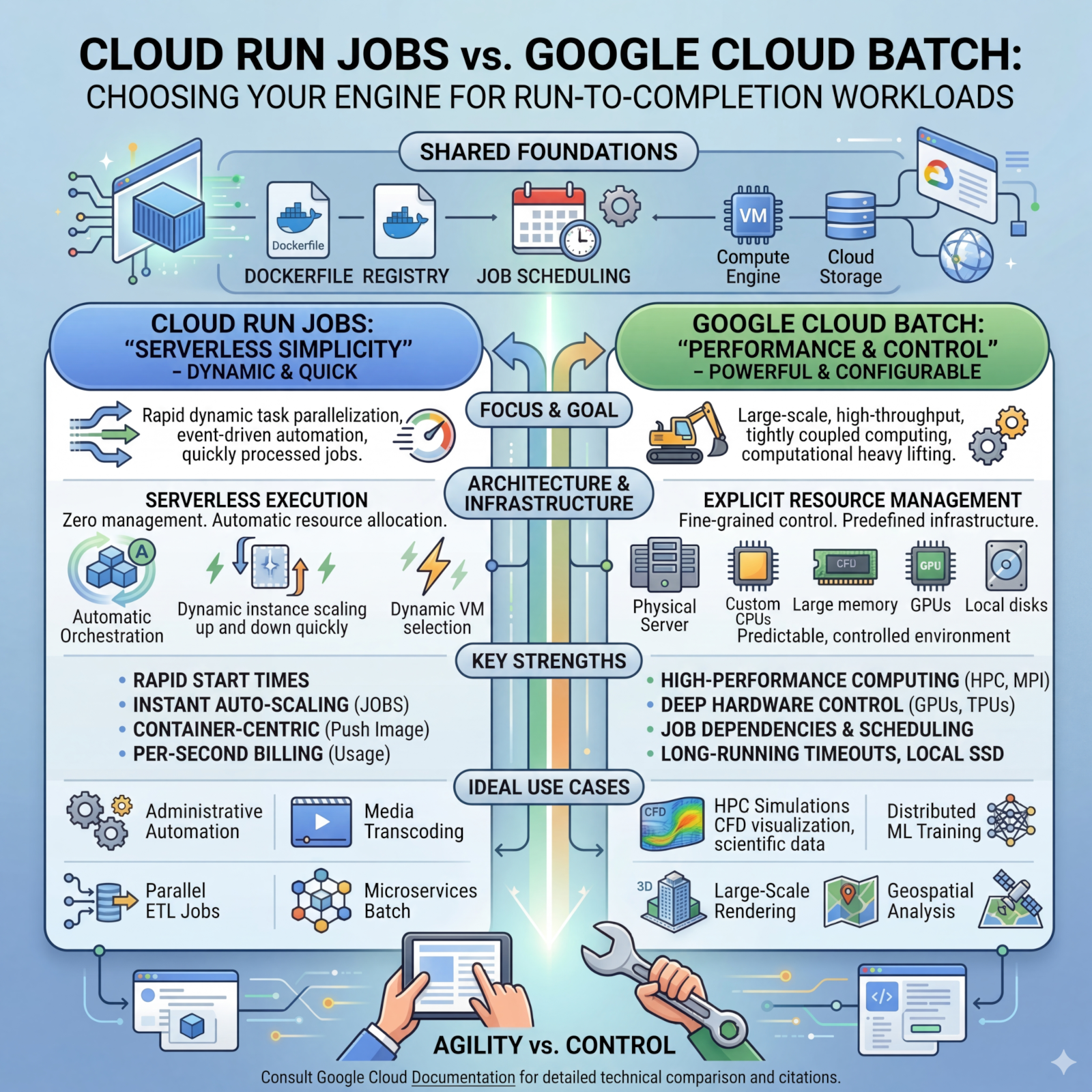
The fundamental choice between Cloud Run Jobs and Google Cloud Batch often comes down to the desired level of abstraction versus the required level of infrastructure control. Cloud Run Jobs represents the serverless ideal, prioritizing developer velocity and rapid scaling by entirely abstracting the underlying hardware platform. In contrast, Google Cloud Batch operates as a highly configurable orchestration layer sitting directly atop Compute Engine, granting granular control over virtual machine (VM) shapes and deep hardware integrations.
GPU Ecosystem and Support
Cloud Run Jobs supports a curated, fully managed GPU experience optimized for inference and video transcoding, though it strictly enforces a limit of one GPU per instance and a 1-hour maximum timeout for GPU-based tasks. Google Cloud Batch unlocks the entire Compute Engine accelerator portfolio, allowing users to attach multiple GPUs (up to 8 per VM) and supporting multi-day training runs with advanced interconnects like NVLink.
Task Communication
The architectural divergence between the two services is further highlighted by their approach to inter-task communication. Cloud Run Jobs operates on a "shared nothing" architecture, where parallel tasks are entirely isolated and possess no native mechanism to communicate with one another directly. This is in stark contrast to Google Cloud Batch, which is specifically engineered to support "tightly coupled" workloads, such as multi-physics simulations or complex weather forecasting. Batch facilitates high-performance communication by supporting Message Passing Interface (MPI) libraries and provisioning compute clusters with Cloud RDMA (Remote Direct Memory Access) technology. This allows nodes to exchange state data with ultra-low latency and high bandwidth, making Batch the requisite choice for sophisticated high-performance computing (HPC) scenarios.
Financial Models and Billing
Cloud Run Jobs utilizes instance-based billing, measured in 100-millisecond increments with a generous recurring free tier for vCPU and memory. Google Cloud Batch has no base service fee; users are billed strictly for the underlying Compute Engine infrastructure consumed. Batch offers significant financial leverage through Spot VMs, providing big discounts for fault-tolerant workloads.
Constraints, Limits, and Maximum Scalability
The fundamental difference in architecture directly impacts the scale, concurrency, and duration of workloads each service can handle. Cloud Run Jobs is optimized for relatively bounded workloads, while Google Cloud Batch is engineered for massive, unbounded computational scale.
Execution and Task Limits
A single Cloud Run job is limited to a maximum of 10,000 independent tasks per execution. The maximum execution length for a standard CPU-based task is 168 hours (7 days), but any task utilizing a GPU is severely restricted to a 1-hour maximum timeout. Fault tolerance allows up to 10 retries per failed task.
Google Cloud Batch is built for a significantly larger scale. A single job definition can encompass up to 100,000 tasks within a task group and supports executing up to 5,000 of these tasks in parallel. Execution duration is highly permissive; a Batch task can remain in the RUNNING state for up to 14 days by default. This extended timeout applies even to GPU-based tasks, making Batch mandatory for multi-day distributed training runs.
| Specification | Cloud Run Jobs | Google Cloud Batch |
|---|---|---|
| Max Tasks Per Job | 10,000 | 100,000 |
| Max Parallel Tasks | Regional Quota Dependent | 5,000 |
| Max CPU Task Timeout | 168 Hours (7 Days) | 14 Days (Default limit) |
| Max GPU Task Timeout | 1 Hour | 14 Days (Default limit) |
| Max Retries Per Task | 10 | Configurable |
| Max Concurrent VMs | N/A (Serverless) | 2,000 (single-zone) or 4,000 (multi-zone) |
Use Case Examples
Example 1: Administrative Automation and Nightly ETL
Recommended Service: Cloud Run Jobs
Scenario: A SaaS platform must execute a nightly script to migrate localized data into a central BigQuery warehouse, generate daily PDF invoices for thousands of clients, and perform routine database schema migrations.
Justification: These tasks are typically I/O bound, complete within a few minutes or hours (well under the 168-hour limit), and do not require specialized CPU instruction sets. Cloud Run Jobs excels here because it requires zero infrastructure scaffolding; the team simply containerised scripts and schedules them via Cloud Scheduler.
Example 2: Massively Parallel Document and Media Processing
Recommended Service: Cloud Run Jobs (with GPU if visual processing is required)
Scenario: A media or e-commerce company must process thousands of user-uploaded videos or images daily, requiring video transcoding via FFmpeg or lightweight AI inference (e.g., YOLO object detection).
Justification: This represents an extremely parallel problem where each file can be processed independently using the task index to assign files. Cloud Run can spin up hundreds of L4-backed containers in seconds and scale to zero immediately upon completion.
Example 3: High-Performance Computing (HPC) and Multi-Physics Simulation
Recommended Service: Google Cloud Batch
Scenario: A climate research institute runs physics-based simulations for weather forecasting, or a pharmaceutical company performs massive simulations for drug discovery.
Justification: These are "tightly coupled" workloads where parallel processes must exchange state data. Batch is mandatory as it supports MPI configurations and Cloud RDMA for ultra-low latency inter-node communication.
Example 4: Distributed Machine Learning Training
Recommended Service: Google Cloud Batch
Scenario: An AI laboratory pre-training a 70-billion parameter model or performing extensive fine-tuning across terabytes of data over several days.
Justification: Cloud Run Jobs is disqualified due to the 1-hour GPU timeout and 1-GPU-per-instance limit. Batch allows provisioning A3 or A4 machine series with up to 8 GPUs per VM interconnected via NVLink for multi-day training runs.
Happy Processing!
I hope this article has helped you better understand the difference between Cloud Batch and Cloud Run Jobs - the two products designed for processing tasks to completion. Lightweight Cloud Run containers and heavy-duty Cloud Batch machines will definitely help you with all the computations tasks you may have. Try them out by creating a Cloud Run Job (code lab) or by scheduling a Cloud Batch job!
To stay up to date with all that's happening in the Google Cloud world keep an eye on Google Cloud blog and Google Cloud YouTube channel to not miss any updates!
Comments
More Blog
View allgemmaFive Gemma-4 models, one accelerator: what porting E2B 31B to AWS Inferentia2 taught me
I ported the whole Gemma-4 family — E2B, E4B, 12B, 31B, and the 26B-A4B MoE — to run on...
X
xbillcommunityHey DEV, I'm Tobore. Let's actually connect.
Hey DEV, I'm Tobore. Let's actually connect. I've been on here for a while now, mostly writing and...
L
Laurina AyarahaiI burned through thousands of AI tokens. Then a friend did it for free
(yep, kinda clickbait, just for the funsies 😊) At the beginning of the year, I relaunched my...
P
Paulo HenriqueaiClaude might be saturating your machine
My laptop was sitting idle with the fan at full tilt. Nothing was running that I knew of. The culprit...
S
Sidhant PandagithubactionsAutomated GitHub Code Reviews Using Google Gemini
I Built a Thing! TL;DR — Google Gemini-based Pull Request reviews and Issue Triaging for...
D
Darren "Dazbo" LesteraiWhat is an "agentic harness," actually?
I've been hearing the word "harness" thrown around a lot lately. I assumed it just meant "the IDE" or...
T
Tilde A. ThuriumReady-made automations for this
Workflows from the Neura Market marketplace related to this DeepSeek resource
- Compare Different LLM Responses Side-by-Side with Google Sheetsn8n · $14.99 · Related topic
- Update Google Sheets rows on different sheets based on ChatGPT responsesmake · $4.99 · Related topic
- Automate Google Sheets Row Filtering and Completion with ChatGPTmake · $3.99 · Related topic
- Create a new Google Doc for every ChatGPT completion via a custom webhookmake · $3.99 · Related topic