
Back to Blog googleadk
 gemma
gemma community
 ai
ai ai
ai githubactions
 ai
ai
Multi-Agent Deployment with the Agent Development Kit(ADK), GKE, GKE MCP Server, and Gemini CLI
xbill April 12, 2026
0 views
Leveraging the Google Agent Development Kit (ADK) and the underlying Gemini LLM to build Multi-Agent...
title: Multi-Agent Deployment with the Agent Development Kit(ADK), GKE, GKE MCP Server, and Gemini CLI published: true series: ADK date: 2026-04-12 20:05:02 UTC tags: googleadk,gke,mcpserver,geminicli canonical_url: https://xbill999.medium.com/multi-agent-deployment-with-the-agent-development-kit-adk-gke-gke-mcp-server-and-gemini-cli-f517ea7436db
Leveraging the Google Agent Development Kit (ADK) and the underlying Gemini LLM to build Multi-Agent Applications with A2A protocol support using the Python programming language deployed to Google Cloud GKE. The Google GKE MCP server was then used to validate the deployment.
Aren’t There a Billion Python ADK Demos?
Yes there are.
Python has traditionally been the main coding language for ML and AI tools. The goal of this article is to provide a multi-agent test bed for building, debugging, and deploying multi-agent applications.
Where is the Beef?
So what is different about this lab compared to all the others out there?
This is one of the first deep dives into a Multi-Agent application leveraging the advanced tooling of Gemini CLI. The starting point for the demo was an existing Codelab- which was updated and re-engineered with Gemini CLI.
The original Codelab- is here:
Building a Multi-Agent System | Google Codelabs
Python Version Management
One of the downsides of the wide deployment of Python has been managing the language versions across platforms and maintaining a supported version.
The pyenv tool enables deploying consistent versions of Python:
GitHub - pyenv/pyenv: Simple Python version management
As of writing — the mainstream python version is 3.13. To validate your current Python:
python --version
Python 3.13.13
Google Kubernates Engine (GKE)
Google Kubernetes Engine (GKE) is a managed, production-ready environment for deploying and scaling containerized applications on Google Cloud. It utilizes Kubernetes to automate container management, including deployment, updates, scaling, and networking, reducing operational overhead. GKE supports two modes: Autopilot (fully managed nodes) and Standard (manual node management).
Full details are available here:
Google Kubernetes Engine (GKE)
Google now provides a MCP server for direct interaction with the backend GKE services:
Announcing official MCP support for Google services | Google Cloud Blog
Full details on the GKE MCP server are here:
Gemini CLI
If not pre-installed you can download the Gemini CLI to interact with the source files and provide real-time assistance:
npm install -g @google/gemini-cli
Testing the Gemini CLI Environment
Once you have all the tools and the correct Node.js version in place- you can test the startup of Gemini CLI. You will need to authenticate with a Key or your Google Account:
▝▜▄ Gemini CLI v0.33.1
    ▝▜▄
   ▗▟▀ Logged in with Google /auth
  ▝▀ Gemini Code Assist Standard /upgrade no sandbox (see /docs) /model Auto (Gemini 3) | 239.8 MB
Node Version Management
Gemini CLI needs a consistent, up to date version of Node. The nvm command can be used to get a standard Node environment:
Agent Development Kit
The Google Agent Development Kit (ADK) is an open-source, Python-based framework designed to streamline the creation, deployment, and orchestration of sophisticated, multi-agent AI systems. It treats agent development like software engineering, offering modularity, state management, and built-in tools (like Google Search) to build autonomous agents.
The ADK can be installed from here:
Agent Skills
Gemini CLI can be customized to work with ADK agents. Both an Agent Development MCP server, and specific Agent skills are available.
More details are here:
To get the Agent Skills in Gemini CLI:
> /skills list
Available Agent Skills:
and the ADK documentation:
> /mcp list
Configured MCP servers:
🟢 adk-docs-mcp (from adk-docs-ext) - Ready (2 tools)
  Tools:
  - mcp_adk-docs-mcp_fetch_docs
  - mcp_adk-docs-mcp_list_doc_sources
Where do I start?
The strategy for starting multi agent development is a incremental step by step approach.
First, the basic development environment is setup with the required system variables, and a working Gemini CLI configuration.
Then, ADK Multi-Agent is built, debugged, and tested locally. Finally — the entire solution is deployed to Google Cloud Run.
Setup the Basic Environment
At this point you should have a working Python environment and a working Gemini CLI installation. All of the relevant code examples and documentation is available in GitHub.
The next step is to clone the GitHub repository to your local environment:
cd ~
git clone https://github.com/xbill9/multi-agent
Then run init2.sh from the cloned directory.
The script will attempt to determine your shell environment and set the correct variables:
source init2.sh
If your session times out or you need to re-authenticate- you can run the set_env.sh script to reset your environment variables:
source set_env.sh
Variables like PROJECT_ID need to be setup for use in the various build scripts- so the set_env script can be used to reset the environment if you time-out.
Finally install the packages and dependencies:
make install
Verify The ADK Installation
To verify the setup, run the ADK CLI locally with the researcher agent:
xbill@penguin:~/multi-agent/agents$ adk run researcher
/home/xbill/.pyenv/versions/3.13.13/lib/python3.13/site-packages/google/adk/features/_feature_decorator.py:72: UserWarning: [EXPERIMENTAL] feature FeatureName.PLUGGABLE_AUTH is enabled.
  check_feature_enabled()
Log setup complete: /tmp/agents_log/agent.20260410_174725.log
To access latest log: tail -F /tmp/agents_log/agent.latest.log
{"asctime": "2026-04-10 17:47:25,496", "name": "root", "levelname": "INFO", "message": "Logging initialized for researcher", "filename": "logging_config.py", "lineno": 54, "service": "researcher", "log_level": "INFO"}
{"asctime": "2026-04-10 17:47:25,496", "name": "researcher.agent", "levelname": "INFO", "message": "Initialized researcher agent with model: gemini-2.5-flash", "filename": "agent.py", "lineno": 85}
{"asctime": "2026-04-10 17:47:25,497", "name": "google_adk.google.adk.cli.utils.envs", "levelname": "INFO", "message": "Loaded .env file for researcher at /home/xbill/multi-agent/agents/researcher/.env", "filename": "envs.py", "lineno": 83}
{"asctime": "2026-04-10 17:47:25,497", "name": "google_adk.google.adk.cli.utils.local_storage", "levelname": "INFO", "message": "Using per-agent session storage rooted at /home/xbill/multi-agent/agents", "filename": "local_storage.py", "lineno": 84}
{"asctime": "2026-04-10 17:47:25,497", "name": "google_adk.google.adk.cli.utils.local_storage", "levelname": "INFO", "message": "Using file artifact service at /home/xbill/multi-agent/agents/researcher/.adk/artifacts", "filename": "local_storage.py", "lineno": 110}
{"asctime": "2026-04-10 17:47:25,498", "name": "google_adk.google.adk.cli.utils.service_factory", "levelname": "INFO", "message": "Using in-memory memory service", "filename": "service_factory.py", "lineno": 266}
{"asctime": "2026-04-10 17:47:25,501", "name": "google_adk.google.adk.cli.utils.local_storage", "levelname": "INFO", "message": "Creating local session service at /home/xbill/multi-agent/agents/researcher/.adk/session.db", "filename": "local_storage.py", "lineno": 60}
Running agent researcher, type exit to exit.
[user]:
Test The ADK Web Interface
This tests the ADK agent interactions with a browser:
xbill@penguin:~/multi-agent/agents$ adk web --host 0.0.0.0
/home/xbill/.pyenv/versions/3.13.13/lib/python3.13/site-packages/google/adk/features/_feature_decorator.py:72: UserWarning: [EXPERIMENTAL] feature FeatureName.PLUGGABLE_AUTH is enabled.
  check_feature_enabled()
2026-04-10 17:49:11,850 - INFO - service_factory.py:266 - Using in-memory memory service
2026-04-10 17:49:11,850 - INFO - local_storage.py:84 - Using per-agent session storage rooted at /home/xbill/multi-agent/agents
2026-04-10 17:49:11,850 - INFO - local_storage.py:110 - Using file artifact service at /home/xbill/multi-agent/agents/.adk/artifacts
/home/xbill/.pyenv/versions/3.13.13/lib/python3.13/site-packages/google/adk/cli/fast_api.py:198: UserWarning: [EXPERIMENTAL] InMemoryCredentialService: This feature is experimental and may change or be removed in future versions without notice. It may introduce breaking changes at any time.
  credential_service = InMemoryCredentialService()
/home/xbill/.pyenv/versions/3.13.13/lib/python3.13/site-packages/google/adk/auth/credential_service/in_memory_credential_service.py:33: UserWarning: [EXPERIMENTAL] BaseCredentialService: This feature is experimental and may change or be removed in future versions without notice. It may introduce breaking changes at any time.
  super(). __init__ ()
INFO: Started server process [16063]
INFO: Waiting for application startup.
Then use the web interface — either on the local interface 127.0.0.1 or the catch-all web interface 0.0.0.0 -depending on your environment:
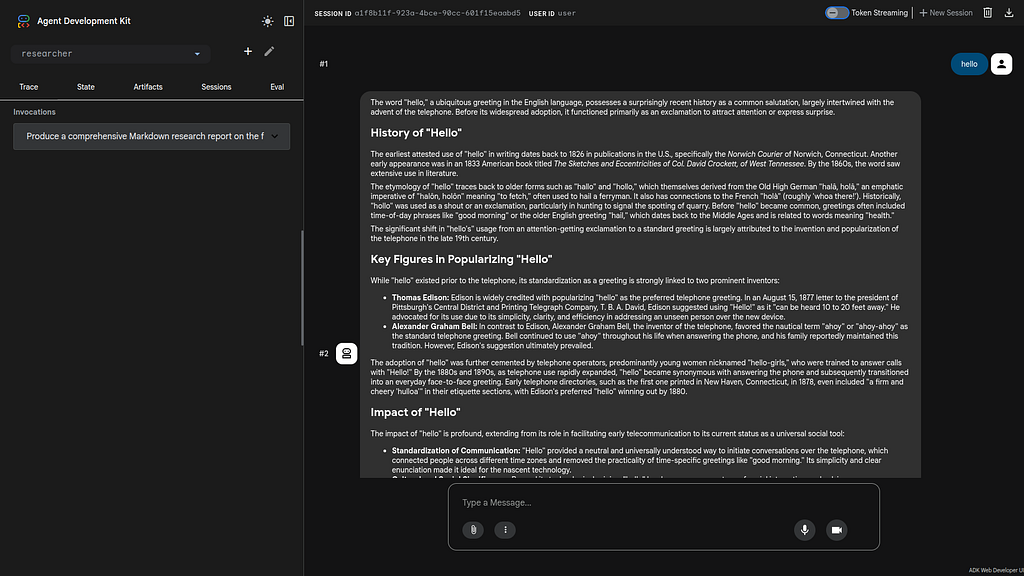
Special note for Google Cloud Shell Deployments- add a CORS allow_origins configuration exemption to allow the ADK agent to run:
adk web --host 0.0.0.0 --allow_origins 'regex:.*'
Configure GKE MCP Server
Basic setup instructions are available here:
Authenticate to Google and Google Cloud MCP servers | Google Cloud Documentation
A sample GKE MCP server script is here:
source gke-mcp.sh
This will enable the GKE MCP server:
--- Setting up GKE MCP for project: aisprint-491218 ---
Enabling Services...
Operation "operations/acat.p2-289270257791-6c5ec831-6f9a-4d44-b221-9ad9f3734f5e" finished successfully.
Enabling GKE MCP server...
Testing the MCP server:
> /mcp list
Configured MCP servers:

🟢 mcp_gke - Ready (8 tools)
  Tools:
  - mcp_gke_get_cluster
  - mcp_gke_get_node_pool
  - mcp_gke_get_operation
  - mcp_gke_kube_api_resources
  - mcp_gke_kube_get
  - mcp_gke_list_clusters
  - mcp_gke_list_node_pools
  - mcp_gke_list_operations
Multi Agent Design
The multi-agent deployment consists of 5 agents:
- Researcher
- Judge
- Orchestrator
- Content Builder
- Course Builder
For a detailed analysis of the multi-agent architecture- this article provides the background information:
Multi-Agent A2A with the Agent Development Kit(ADK), Cloud Run, and Gemini CLI
Running/Testing/Debugging Locally
The main Makefile has been extended with extensive targets for managing the agents on the local development environment.
The key targets include:
xbill@penguin:~/multi-agent$ make help
Available commands:
  install - Install all dependencies for root, agents, and app
  start - Start all services locally (alias for start-local)
  stop - Stop all local services (alias for stop-local)
  run - Start all services locally (alias for start-local)
  local - Show local service URLs
  start-local - Start all local services in background
  stop-local - Stop all local processes
  test - Run all tests (pytest)
  test-researcher - Test the Researcher agent directly
  test-judge - Test the Judge agent directly
  test-orchestrator - Test the Orchestrator logic
  lint - Run linting checks (ruff)
  deploy - Deploy all services to Cloud Run
  destroy - Delete all Cloud Run services
  clean - Remove caches and logs
First check for local running agents:
xbill@penguin:~/multi-agent$ make status
Checking status of locally running agents and servers...
--- Network Status ---
No services listening on expected ports (8000-8004, 5173).
--- Process Status ---
No matching processes found.
Then all the agents can be started together:
xbill@penguin:~/multi-agent$ make start
Stopping any existing agent and server processes...
Starting all agents in background...
Waiting for sub-agents to start...
All agents started. Logs: researcher.log, judge.log, content_builder.log, orchestrator.log
Starting App Backend in background...
Starting Frontend dev server in background...
All services started. Logs: researcher.log, judge.log, content_builder.log, orchestrator.log, backend.log, frontend.log
Frontend: http://localhost:5173
Backend: http://localhost:8000

make status

--- Local Service URLs ---
Frontend: http://localhost:5173
Backend: http://localhost:8000 (main app)
Agents:
  Researcher: http://localhost:8001
  Judge: http://localhost:8002
  Content Builder: http://localhost:8003
  Orchestrator: http://localhost:8004
Then connect to the front end locally:
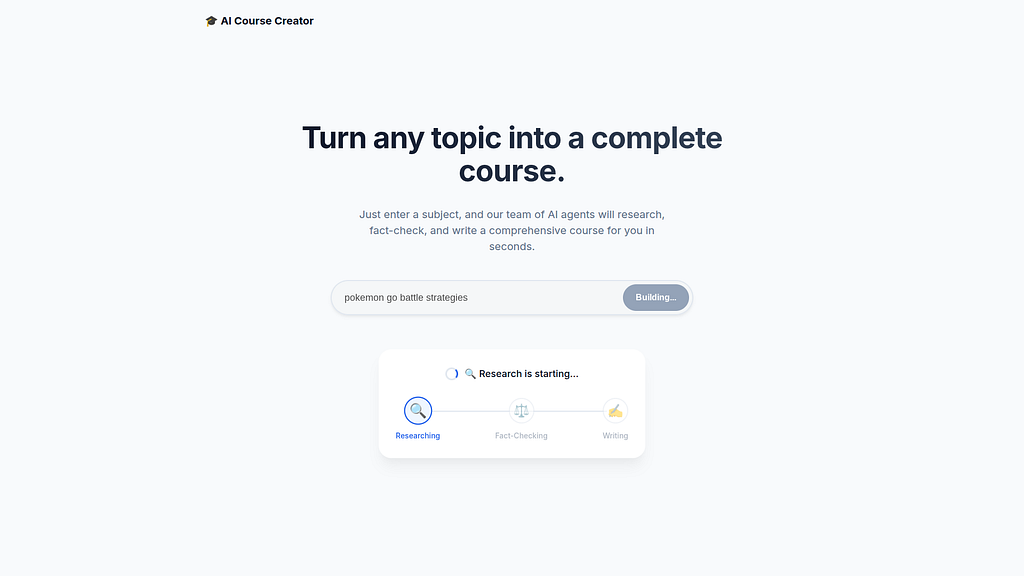
And the entire agent system will run in the local environment:
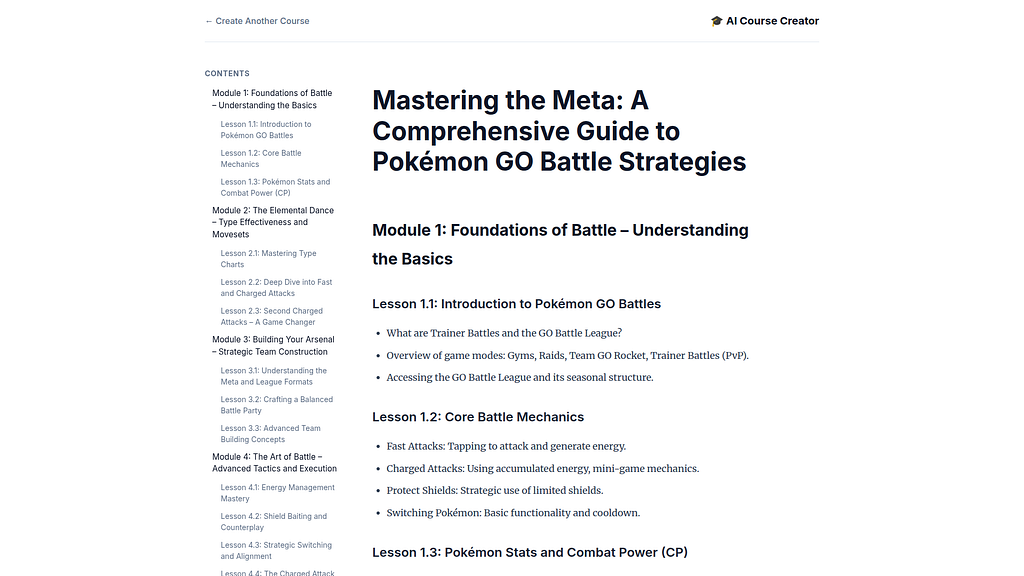
Local Logging / Debugging
Gemini CLI has full access to the local agent logs for debugging and troubleshooting:
> review the local logs for the multi-agent run
✦ I will check run_local.sh and the project structure to determine where logs are stored or how they are generated.
This will verify the local operation of the code:
✦ The local logs confirm a successful multi-agent run for the topic "the history of the internet." Here is a summary of the execution flow:
   * Orchestrator (orchestrator.log): Successfully managed the pipeline. It captured the topic, coordinated the Research-Judge loop, and escalated to
     content generation after the first iteration.
   * Researcher (researcher.log): Gathered approximately 9.2KB of research data using the google_search tool. It completed its task with a 200 OK
     response.
   * Judge (judge.log): Evaluated the findings and gave a "pass" status. The judge noted that the research was "comprehensive, accurate, and
     well-structured," making it an "excellent foundation for educational content."
   * Content Builder (content_builder.log): Successfully transformed the validated research into a structured Markdown course module and finished
     execution.
   * Backend & Frontend (backend.log, frontend.log): The FastAPI backend (port 8000) and Vite frontend (port 5173) are running and communicating with
     the orchestrator as expected.

All services are currently active and logged at the DEBUG level as specified in run_local.sh.
Deploying to Google Kubernates Engine (GKE)
The project level Makefile has targets for managing the Agent deployment to serverless endpoints. A utility script checks the deployment status:
✦ The make status command confirms that all local services are running correctly:

   * Frontend: http://localhost:5173 (Node/Vite)
   * Backend: http://localhost:8000 (Python)
   * Researcher: http://localhost:8001 (ADK Agent)
   * Judge: http://localhost:8002 (ADK Agent)
   * Content Builder: http://localhost:8003 (ADK Agent)
   * Orchestrator: http://localhost:8004 (ADK Agent)

 Network & Processes:
  All expected ports (8000-8004 and 5173) are in the LISTEN state, and the corresponding Python and Node processes are active.

You can submit the build for GKE deployment:

make deploy-gke
Once the containers are deployed- you can then get the endpoint:
╭───────────────────────────────────────────────────────────────────────────────────────────────────────────────────────────────────────────────╮
│ ✓ Shell make deploy-gke [current working directory /home/xbill/multi-agent] │
│ │
│ ... first 259 lines hidden (Ctrl+O to show) ... │
│ service/content-builder unchanged │
│ deployment.apps/content-builder unchanged │
│ service/orchestrator unchanged │
│ deployment.apps/orchestrator unchanged │
│ service/course-creator unchanged │
│ deployment.apps/course-creator unchanged │
│ Deployment to GKE initiated. │
│ You can check the status with: make status-gke │
│ Once the external IP is ready, you can run the E2E test with: make test-e2e-gke │
│ Output too long and was saved to: │
│ /home/xbill/.gemini/tmp/multi-agent/tool-outputs/session-2ef16e9c-d93c-4a5c-a9bc-352ef7d7cf43/run_shell_command_1776009994296_0.txt │
╰───────────────────────────────────────────────────────────────────────────────────────────────────────────────────────────────────────────────╯

✦ The deployment to GKE was initiated successfully. All container images were built and pushed to Google Container Registry, and the Kubernetes
  manifests were applied to the cluster.
The status can then be checked:
> make status-gke
✦ I will run make status-gke to check the current status of the GKE deployments, services, and pods.

╭───────────────────────────────────────────────────────────────────────────────────────────────────────────────────────────────────────────────╮
│ ✓ Shell make status-gke [current working directory /home/xbill/multi-agent] │
│ │
│ ... first 14 lines hidden (Ctrl+O to show) ... │
│ pod/researcher-69d9967b57-hcslz 1/1 Running 0 139m │
│ │
│ NAME TYPE CLUSTER-IP EXTERNAL-IP PORT(S) AGE │
│ service/content-builder ClusterIP 34.118.225.221 <none> 8000/TCP 139m │
│ service/course-creator LoadBalancer 34.118.234.192 136.112.156.20 80:31431/TCP 139m │
│ service/judge ClusterIP 34.118.229.88 <none> 8000/TCP 139m │
│ service/kubernetes ClusterIP 34.118.224.1 <none> 443/TCP 167m │
│ service/orchestrator ClusterIP 34.118.225.48 <none> 8000/TCP 139m │
│ service/researcher ClusterIP 34.118.231.2 <none> 8000/TCP 139m │
╰───────────────────────────────────────────────────────────────────────────────────────────────────────────────────────────────────────────────

✦ The GKE deployment is fully operational:

  * Pods: All pods (content-builder, course-creator, judge, orchestrator, researcher) are in the Running state and ready.
   * Services:
       * The course-creator (main frontend/backend) is exposed via a LoadBalancer at the external IP: 136.112.156.20.
       * The other sub-agents are correctly configured as ClusterIP services for internal communication within the cluster.
The service will be visible in the GKE console:
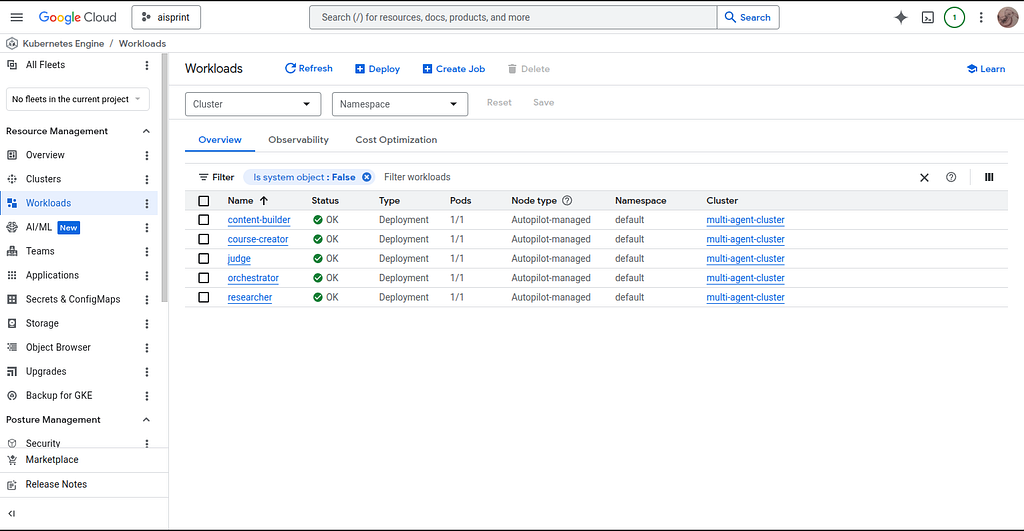
And the entire system can be tested:
E2E Test Summary:
   * Endpoint: http://136.112.156.20
   * Health Check: Passed (/health returned ok).
   * Flow Test: Created a course on "The history of the frisbee."
   * Validation: Successfully received a structured response with 6,633 characters, confirming the orchestrator correctly coordinated the researcher,
     judge, and content builder agents.
  Your multi-agent system is now fully deployed and production-ready on GKE!
Running the Web Interface
Start a connection to the Cloud Run deployed app:
http://136.112.156.20
Then connect to the app :
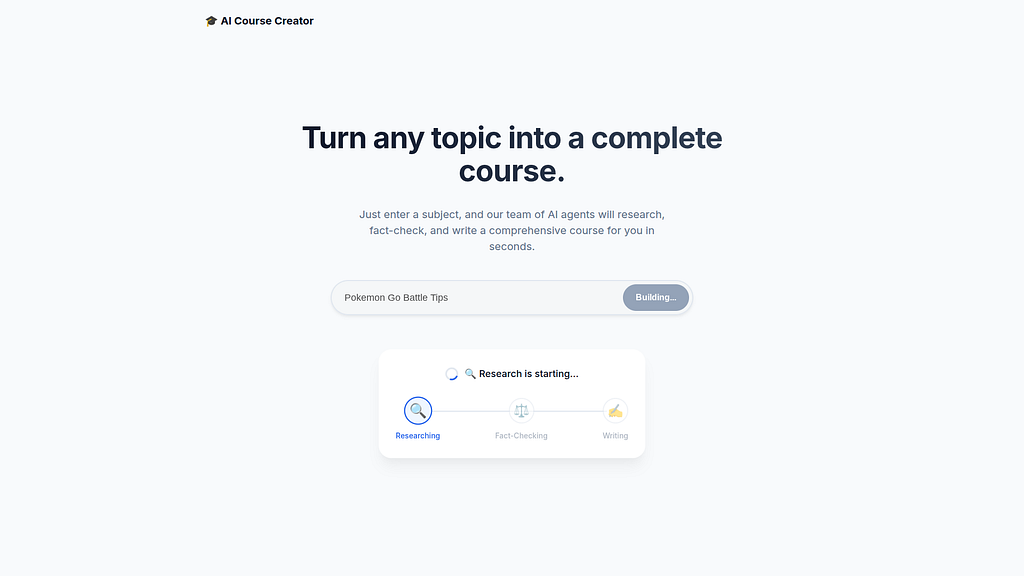
Then use online course generator:

GKE MCP Server with Gemini CLI
Once the entire agent system has been deployed. The GKE MCP server can be used for visiblity of the application directly from Gemini CLI:
> /mcp list
Configured MCP servers:

🟢 mcp_gke - Ready (8 tools)
  Tools:
  - mcp_gke_get_cluster
  - mcp_gke_get_node_pool
  - mcp_gke_get_operation
  - mcp_gke_kube_api_resources
  - mcp_gke_kube_get
  - mcp_gke_list_clusters
  - mcp_gke_list_node_pools
  - mcp_gke_list_operations
The cluster status can be checked:
✦ The multi-agent-cluster is RUNNING on GKE with Autopilot enabled. Here are the key details:

   * Location: us-central1
   * Version: 1.35.1-gke.1396002 (Regular Release Channel)
   * Endpoint: 35.239.170.41
   * Node Count: 3 (Managed by Autopilot)
   * Status: RUNNING
   * Node Pools: Includes default-pool, pool-1, pool-2, and pool-3, all in a RUNNING state.

  This confirms the cluster is properly provisioned and currently hosting your multi-agent system.
and GKE API Resources:
✦ The multi-agent-cluster supports a wide range of standard and GKE-specific API resources. Key groups include:

   * Core (v1): pods, services, configmaps, secrets, nodes, namespaces, persistentvolumeclaims.
   * Apps (apps/v1): deployments, statefulsets, daemonsets, replicasets.
   * Networking: ingresses, networkpolicies, and GKE-specific resources like backendconfigs, managedcertificates, and gateways.
   * Autoscaling: horizontalpodautoscalers (v2), verticalpodautoscalers.
   * Monitoring (monitoring.googleapis.com/v1): podmonitorings, clusterpodmonitorings, rules.
   * Batch (batch/v1): jobs, cronjobs.

  This confirms the cluster has all the necessary APIs for deploying and managing complex multi-agent workloads, including advanced GKE features like
  Autopilot's resource management and Cloud Monitoring integration.
And deployed Agent services:
✦ The current applications running in your GKE cluster include the following:

   * Multi-Agent Services (Default Namespace):
       * content-builder (1/1 Ready)
       * course-creator (1/1 Ready)
       * judge (1/1 Ready)
       * orchestrator (1/1 Ready)
       * researcher (1/1 Ready)

   * System Services (Managed by GKE):
       * GKE Managed Prometheus (gke-gmp-system): gmp-operator, rule-evaluator.
       * Kubernetes Core (kube-system): kube-dns, metrics-server, konnectivity-agent, event-exporter, l7-default-backend, and various controllers for
         networking and autoscaling.

  All of your application deployments are currently healthy and fully operational.
Final Gemini CLI Code Review
As a final step — Gemini CLI was used for a full code review of the project:
✦ This multi-agent project is a well-engineered application of ADK 2.5 and the A2A protocol. The separation of specialized agents (Researcher,
  Judge, Content Builder) coordinated by a central Orchestrator demonstrates a mature microservice-oriented design.

Key Strengths
   * Coordinated Orchestration: The use of SequentialAgent and LoopAgent creates a robust, iterative research-judge cycle.
   * Resilient State Flow: The strategy of passing data through event content and "recovering" it via before_agent_callback heuristics is a clever
     way to handle state across distributed, independent session stores.
   * Polished Streaming: The web app's SSE implementation, specifically the greedy overlap deduplication (merge_strings) and system message
     cleanup, ensures a high-quality user experience despite the inherent noise in multi-agent LLM streams.
   * Cloud-Native Readiness: Using Identity Tokens for authenticated service-to-service communication and middleware for dynamic A2A URL rewriting
     makes the system ready for production deployment on Cloud Run.
Summary
The Agent Development Kit (ADK) was used to build a multi-agent system with A2A support using the Gemini Flash LLM Model. This application was tested locally with Gemini CLI and then deployed to GKE. The GKE MCP server was used from Gemini CLI to check the deployment. Finally, Gemini CLI was used for a complete project code review.
Comments
More Blog
View allgemmaFive Gemma-4 models, one accelerator: what porting E2B 31B to AWS Inferentia2 taught me
I ported the whole Gemma-4 family — E2B, E4B, 12B, 31B, and the 26B-A4B MoE — to run on...
X
xbillcommunityHey DEV, I'm Tobore. Let's actually connect.
Hey DEV, I'm Tobore. Let's actually connect. I've been on here for a while now, mostly writing and...
L
Laurina AyarahaiI burned through thousands of AI tokens. Then a friend did it for free
(yep, kinda clickbait, just for the funsies 😊) At the beginning of the year, I relaunched my...
P
Paulo HenriqueaiClaude might be saturating your machine
My laptop was sitting idle with the fan at full tilt. Nothing was running that I knew of. The culprit...
S
Sidhant PandagithubactionsAutomated GitHub Code Reviews Using Google Gemini
I Built a Thing! TL;DR — Google Gemini-based Pull Request reviews and Issue Triaging for...
D
Darren "Dazbo" LesteraiWhat is an "agentic harness," actually?
I've been hearing the word "harness" thrown around a lot lately. I assumed it just meant "the IDE" or...
T
Tilde A. ThuriumReady-made automations for this
Workflows from the Neura Market marketplace related to this DeepSeek resource
- Readable Workflow Export & Deployment Pipeline for Multi-Environment CI/CDn8n · $14.99 · Related topic
- Automate Docker Immich Deployment for WHMCS/WISECP with n8nn8n · $19.99 · Related topic
- Automate Docker and Grafana Deployment for WHMCS/WISECP with n8nn8n · $19.99 · Related topic
- Automate MVP Creation and Deployment with AI, GitHub, and Verceln8n · $19.99 · Related topic