
Back to Blog frontend
 gemma
gemma community
 ai
ai ai
ai githubactions
 ai
ai
Building the DEV Community Homepage with Pure Canvas
ouzz April 14, 2026
0 views
Building the DEV Community Homepage with Pure Canvas In modern frontend development, we...
title: Building the DEV Community Homepage with Pure Canvas published: true description: tags:
cover_image: https://dev-to-uploads.s3.amazonaws.com/uploads/articles/nfy28joopy0p1xbe5gyv.png
Use a ratio of 100:42 for best results.
published_at: 2026-04-14 07:43 +0000
Building the DEV Community Homepage with Pure Canvas
In modern frontend development, we are accustomed to building user interfaces with HTML and CSS. But have you ever wondered what it would be like to completely abandon the DOM tree and use pure Canvas to draw a complex modern web page (like the DEV Community homepage)?
In the react-canvas project, we took on a hardcore challenge: building the DEV Community homepage from scratch using a custom React renderer, powered by Skia (CanvasKit) and the Yoga layout engine.
🔗 Live Demo: https://react-canvas-design.vercel.app/#/devto
💻 GitHub Repository: https://github.com/ouzhou/react-canvas
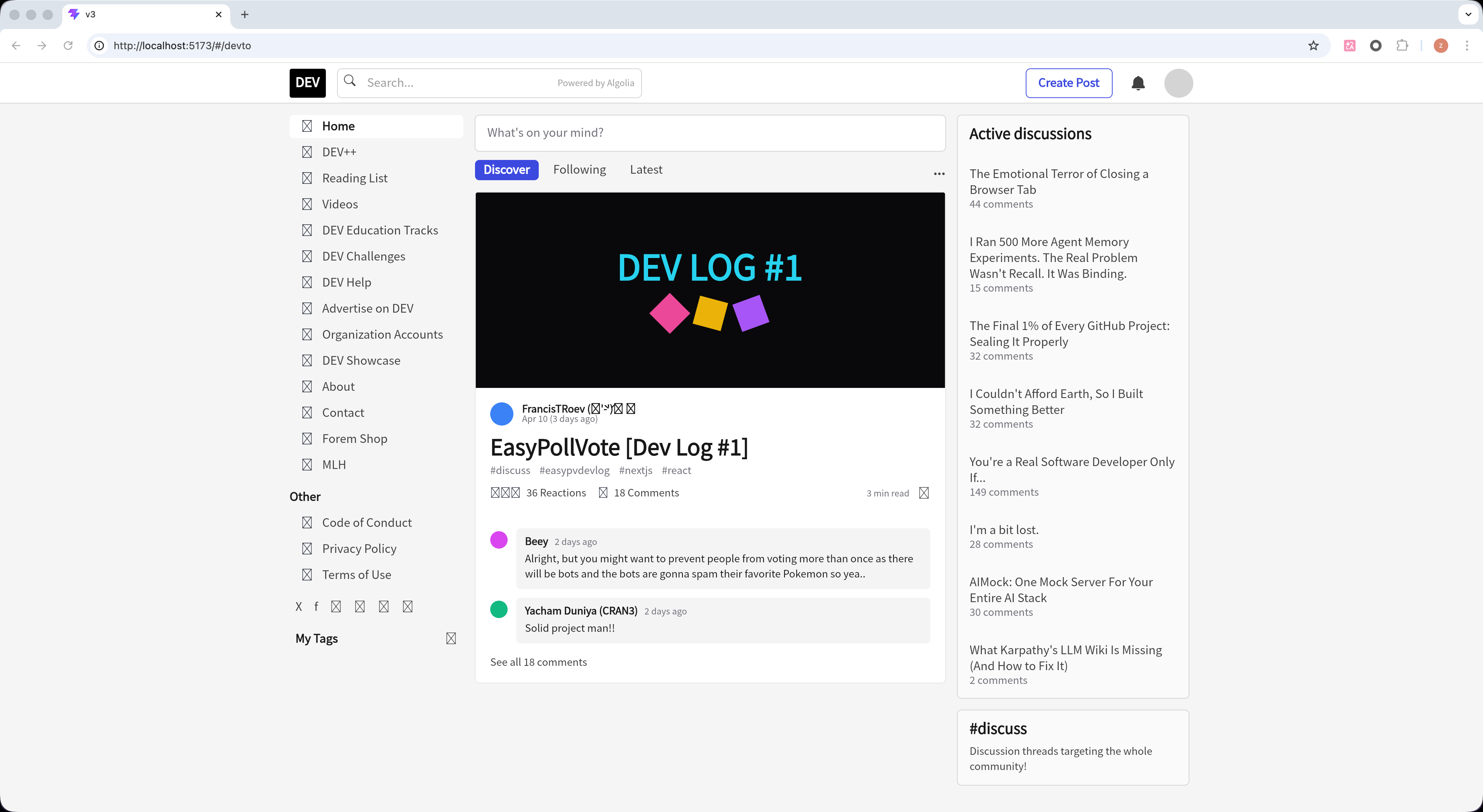
preview
Unveiling the Tech Stack
To achieve this goal, we couldn't use the standard react-dom. Our underlying infrastructure includes:
- CanvasKit (Skia WebAssembly): Serves as the underlying 2D graphics rendering engine, responsible for drawing all rectangles, text, images, and SVG paths.
- Yoga Layout: A cross-platform Flexbox layout engine open-sourced by Facebook. Since Canvas itself has no concept of layout, we use Yoga to calculate the coordinates and dimensions of each element.
- @react-canvas/react-v2: Our custom-built React renderer that maps the React component tree to the underlying rendering nodes.
Core Implementation Concepts
In the world of pure Canvas, there are no <div>, <span>, or <img> tags. Everything is a custom node.
1. Basic Component Mapping
We replaced traditional HTML tags with the basic components provided by react-canvas:
<div>-><View>: Acts as the basic container, supporting Flexbox layout.<span>/<p>-><Text>: Used for text rendering, calling Skia's Paragraph API under the hood.<img>-><Image>: Used for rendering network images.<svg>-><SvgPath>: Used for rendering vector icons.- Scrollable areas ->
<ScrollView>: Since Canvas has no native scrollbars, we have to handle scroll events and viewport clipping ourselves.
2. Canvas Initialization
We use CanvasProvider at the outermost layer to initialize the runtime and load the necessary fonts:
import { CanvasProvider, Canvas, View, Text } from "@react-canvas/react-v2";
import localParagraphFontUrl from "../assets/NotoSansSC-Regular.otf?url";

<CanvasProvider initOptions={{ defaultParagraphFontUrl: localParagraphFontUrl }}>
  {({ isReady, runtime }) => (
    <Canvas
      width={vw}
      height={vh}
      paragraphFontProvider={runtime.paragraphFontProvider}
      defaultParagraphFontFamily={runtime.defaultParagraphFontFamily}
    >
      {/* Page Content */}
    </Canvas>
  )}
</CanvasProvider>
3. Flexbox Layout & Styling
Thanks to Yoga, we can use Flexbox layout just like in React Native. All styles are inline JS objects rather than CSS classes:
// Example layout for the DEV top navigation bar
<View
  style={{
    width: vw,
    height: 56,
    backgroundColor: "#ffffff",
    flexDirection: "row",
    alignItems: "center",
    justifyContent: "space-between",
    paddingLeft: 16,
    paddingRight: 16,
  }}
>
  {/* Logo and Navigation Items */}
</View>
4. Interactive States (Hover)
In the DOM, we typically use the :hover pseudo-class to handle mouse hover states. In react-canvas, the style property supports passing a function that receives the current interaction state:
<View
  style={({ hovered }) => ({
    padding: 16,
    backgroundColor: hovered ? "rgba(59, 73, 223, 0.1)" : "transparent", // Change background on hover
    cursor: "pointer",
  })}
>
  <Text style={({ hovered }) => ({ color: hovered ? "#3b49df" : "#404040" })}>
    Home
  </Text>
</View>
5. Drawing Details: Borders and Dividers
In traditional CSS, we can easily write border-bottom: 1px solid #e5e5e5. However, in our current custom renderer, support for single-sided borders is still being refined.
To draw perfect 1px dividers in Canvas, we use absolutely positioned <View> elements to simulate them:
// Simulating border-bottom
<View style={{
  position: "absolute",
  bottom: 0,
  left: 0,
  right: 0,
  height: 1,
  backgroundColor: "#e5e5e5"
}} />
The Final Result
By combining these basic capabilities, we successfully replicated the complex layout of the DEV Community homepage 1:1, including:
- A fixed top navigation bar (with search box, icons, and the "Create Post" button).
- A left sidebar with navigation links and social icons.
- The main article feed (featuring the "What's on your mind?" input, tabs, and detailed article cards with nested comments).
- A right sidebar with "Active discussions" and trending tags.
All rendering is done entirely within a single <canvas> tag!
Conclusion
Building complex Web UIs with pure Canvas is a fascinating exploration. While it loses the accessibility (A11y), SEO, and native text selection capabilities provided by the DOM, it offers ultimate rendering control and cross-platform consistency (the exact same code can easily be ported to native mobile apps or even desktop environments).
This is the core appeal of technologies like Flutter and React Native Skia. Through react-canvas, we've brought this "pixel-perfect control" experience to the Web.
Comments
More Blog
View allgemmaFive Gemma-4 models, one accelerator: what porting E2B 31B to AWS Inferentia2 taught me
I ported the whole Gemma-4 family — E2B, E4B, 12B, 31B, and the 26B-A4B MoE — to run on...
X
xbillcommunityHey DEV, I'm Tobore. Let's actually connect.
Hey DEV, I'm Tobore. Let's actually connect. I've been on here for a while now, mostly writing and...
L
Laurina AyarahaiI burned through thousands of AI tokens. Then a friend did it for free
(yep, kinda clickbait, just for the funsies 😊) At the beginning of the year, I relaunched my...
P
Paulo HenriqueaiClaude might be saturating your machine
My laptop was sitting idle with the fan at full tilt. Nothing was running that I knew of. The culprit...
S
Sidhant PandagithubactionsAutomated GitHub Code Reviews Using Google Gemini
I Built a Thing! TL;DR — Google Gemini-based Pull Request reviews and Issue Triaging for...
D
Darren "Dazbo" LesteraiWhat is an "agentic harness," actually?
I've been hearing the word "harness" thrown around a lot lately. I assumed it just meant "the IDE" or...
T
Tilde A. ThuriumReady-made automations for this
Workflows from the Neura Market marketplace related to this DeepSeek resource
- Building a RAG Chatbot for Movie Recommendations with Qdrant and OpenAIn8n · $14.99 · Related topic
- Track n8n Community Topics with Keywords and Save to Google Sheetsn8n · $9.99 · Related topic
- Generate Community Insights from Hacker News Comments with Qdrant and OpenAIn8n · $19.99 · Related topic
- Automate Community Monitoring with AI-Powered Reddit and Forum Digestsn8n · $14.99 · Related topic