
Back to Blog playwright
 gemma
gemma community
 ai
ai ai
ai githubactions
 ai
ai
Playwright in Pictures: Fully Parallel Mode
Vitaliy Potapov April 15, 2026
0 views
Playwright’s fullyParallel mode is often treated as a simple performance switch. In practice, it...
Playwright’s fullyParallel mode is often treated as a simple performance switch. In practice, it changes how the runner schedules work, which leads to different execution shapes for the same test suite.
In this post I’ll show a visual comparison of different modes and highlight when fully parallel is slower.
Example Setup
I use a minimal suite:
spec1.test.ts→ 1 testspec2.test.ts→ 5 testsworkers→ 2
This setup is enough to expose how scheduling works.
Non-Fully Parallel
By default, Playwright assigns entire files to workers. Once a worker picks a file, it runs all tests in that file in order.
Running the example suite:
npx playwright test --workers 2
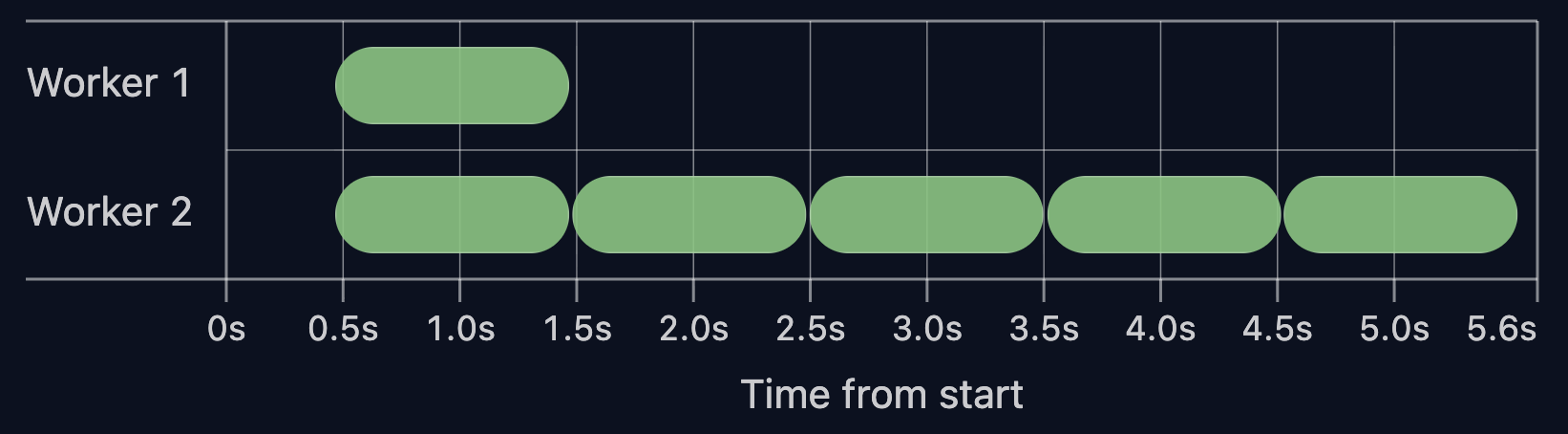
produces the following timeline:
<small>Click the screenshot to open the live report ↗</small>
In this setup, Worker 1 runs the single test from spec1, while Worker 2 executes all 5 tests from spec2.
Tests inside a file cannot move to another worker. Even if one worker is idle, it cannot pick up remaining tests from other running files.
In practice, the total run time is defined by the longest file, not by the total amount of work.
Fully Parallel
With --fully-parallel enabled, Playwright schedules individual tests instead of files. File boundaries stop mattering. Workers take the next available test.
Running the example suite with --fully-parallel:
npx playwright test --workers 2 --fully-parallel
The timeline:
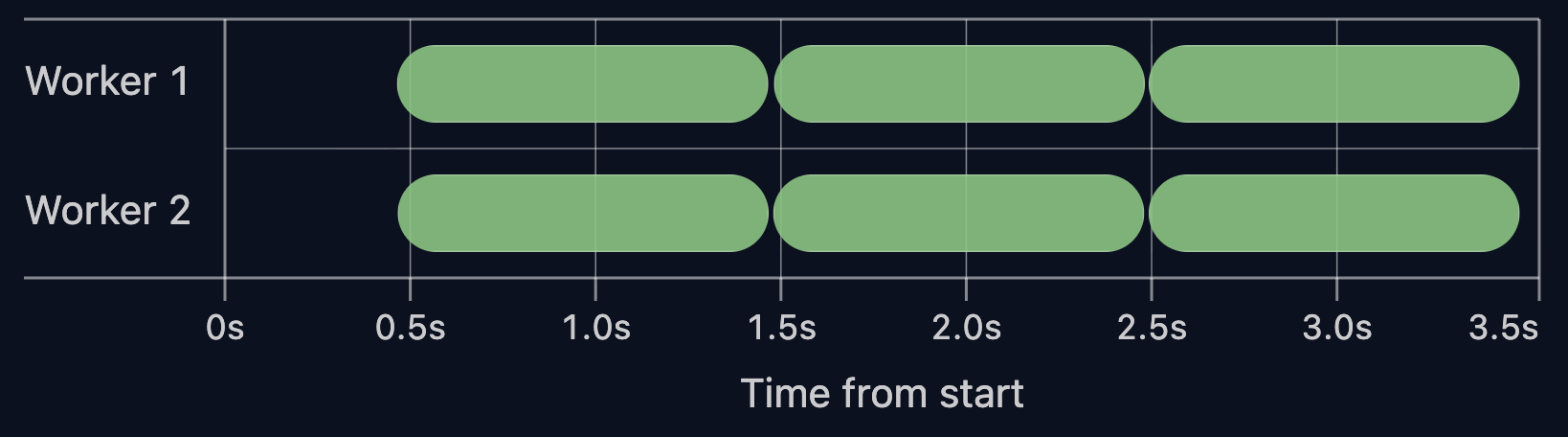
With the same setup, the 5 tests from spec2 are split across both workers, keeping the timeline balanced.
The total run time drops from 5.6s to 3.5s.
This shifts the execution model. It now follows individual tests instead of the longest file.
Is Fully Parallel Always Faster? No.
Fully parallel mode may be slower if tests rely on heavy worker hooks or worker fixtures.
To illustrate this, I added a heavy beforeAll hook to spec2:
test.beforeAll(async () => {
  await expensiveSetup()
});
Running the tests without fully parallel:
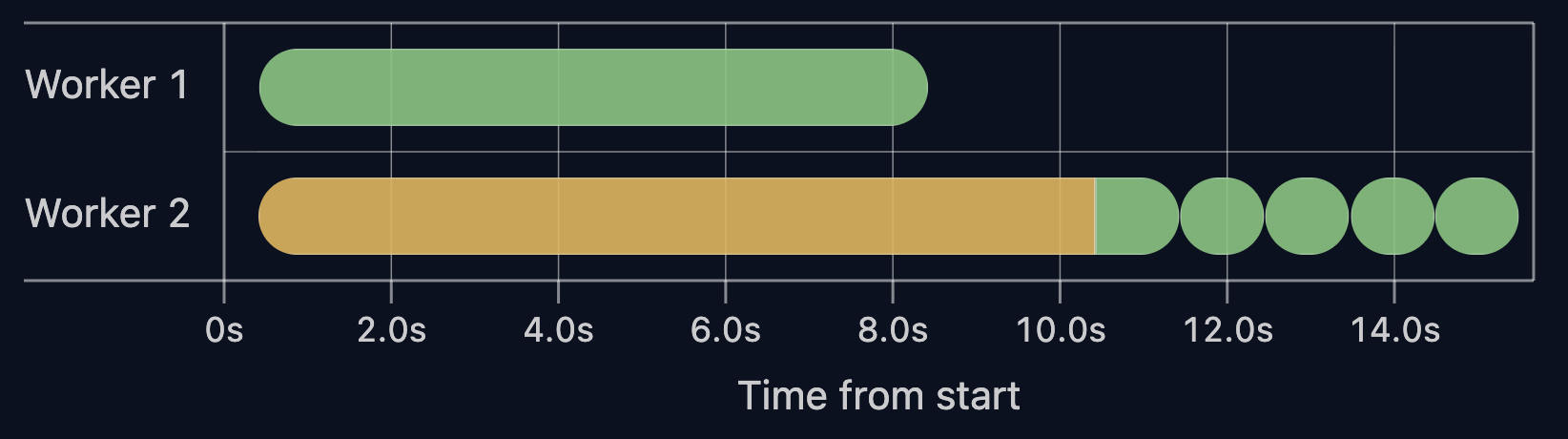
The beforeAll setup cost (yellow bar) is paid once in Worker 2 and reused across all tests in that file.
Now run the same suite with --fully-parallel:
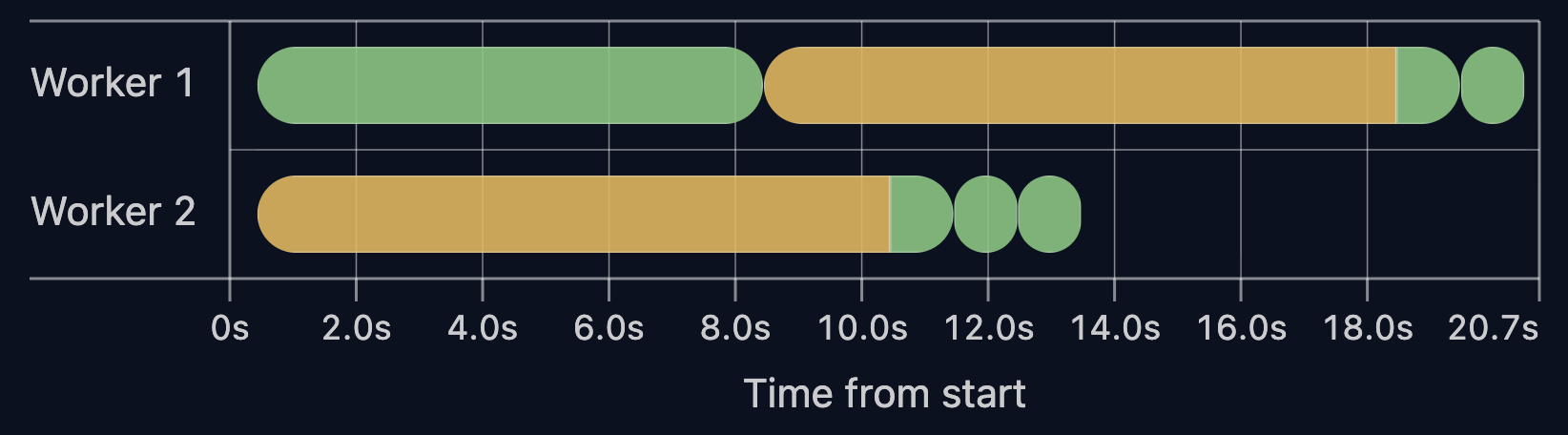
Here, beforeAll runs twice, once per worker. As the number of workers grows, the setup is repeated more times.
Total run time increases from 15s to 20s after enabling fully parallel mode.
When setup dominates test time, --fully-parallel makes the run slower.
Key Takeaways
- By default, Playwright runs tests per file: files are split across workers, tests inside a file run sequentially.
- With fully parallel mode, tests are split across workers and run independently.
- Fully parallel mode can slow tests down. Check your test distribution and setup before enabling it.
Comments
More Blog
View allgemmaFive Gemma-4 models, one accelerator: what porting E2B 31B to AWS Inferentia2 taught me
I ported the whole Gemma-4 family — E2B, E4B, 12B, 31B, and the 26B-A4B MoE — to run on...
X
xbillcommunityHey DEV, I'm Tobore. Let's actually connect.
Hey DEV, I'm Tobore. Let's actually connect. I've been on here for a while now, mostly writing and...
L
Laurina AyarahaiI burned through thousands of AI tokens. Then a friend did it for free
(yep, kinda clickbait, just for the funsies 😊) At the beginning of the year, I relaunched my...
P
Paulo HenriqueaiClaude might be saturating your machine
My laptop was sitting idle with the fan at full tilt. Nothing was running that I knew of. The culprit...
S
Sidhant PandagithubactionsAutomated GitHub Code Reviews Using Google Gemini
I Built a Thing! TL;DR — Google Gemini-based Pull Request reviews and Issue Triaging for...
D
Darren "Dazbo" LesteraiWhat is an "agentic harness," actually?
I've been hearing the word "harness" thrown around a lot lately. I assumed it just meant "the IDE" or...
T
Tilde A. ThuriumReady-made automations for this
Workflows from the Neura Market marketplace related to this DeepSeek resource
- SmartLead to HubSpot Performance Analyticsn8n · $14.99 · Related topic
- Send search term performance stats from Google Ads in an emailmake · $4.99 · Related topic
- Automate Restaurant Daily Performance Reports with AI Insightsn8n · $24.99 · Related topic
- Automate Sales Performance Tracking with AI and Google Sheetsn8n · $14.99 · Related topic