 DeepSeek
Back to Blog tutorial
 discuss
 devchallenge
 googlecloud
 gemma
gemma nvidia
 oracle
Local image generation with llamadart for the Llama Village storybook
Jhin Lee October 15, 2026
0 views
Beyond chat with llamadart · Part 4 Dash missed it. Pip’s scarf is by the pond, and all he has is...
Beyond chat with llamadart · Part 4
Dash missed it. Pip’s scarf is by the pond, and all he has is the journal entry. Could a local image model draw the moment for the village storybook?
Concept cover made with image generation. The local model outputs below have a different, much simpler style.
Llama Village already retells a run with its journal and captured pictures. For this standalone experiment, I used llamadart’s ImageGenerationEngine to imagine a scene from a sample event. Two local models, three prompts, one thing to look for: can you find the scarf?
Give the picture one job
Our sample event is small: a red scarf caught in reeds beside the village pond. We build the prompt in Dart. No language model is needed to rewrite it.
const memory = (
  subject: 'a red wool scarf caught in green reeds',
  place: 'beside a small village pond',
);
final prompt = '${memory.subject}, ${memory.place}, '
    'rainy evening, gentle storybook illustration, no lettering';
These are example journal fields, not an existing Llama Village API. Keeping facts separate from the art direction lets the game decide what the picture is about.
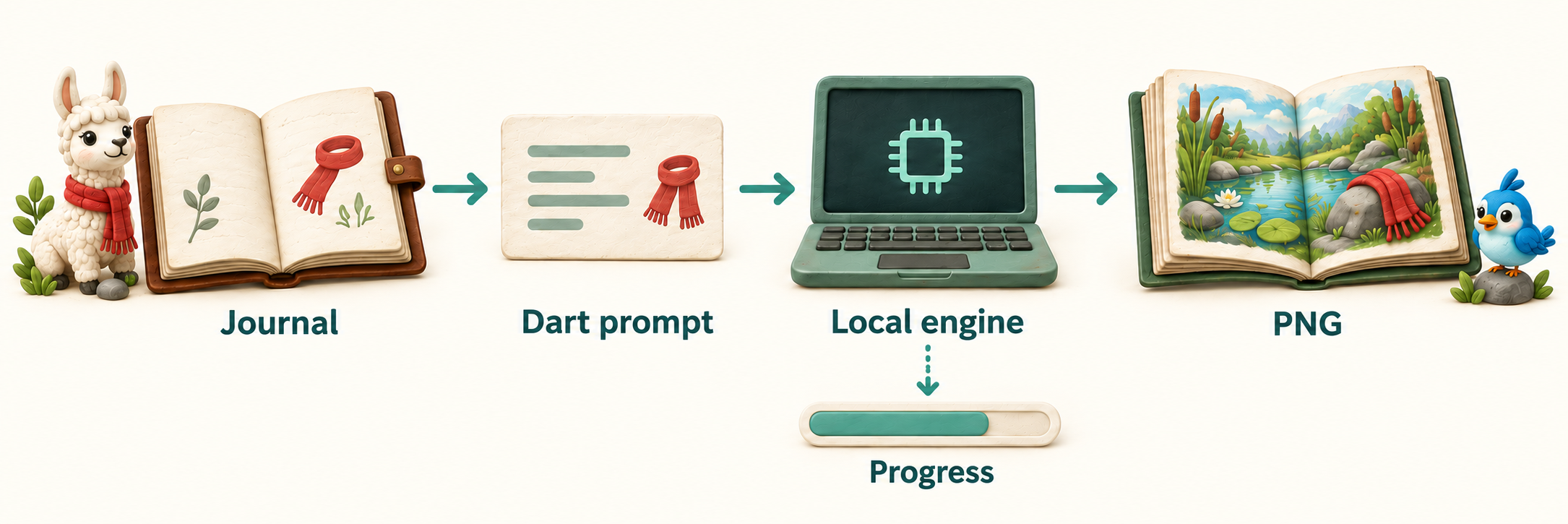
Concept diagram: Dart builds the prompt; ImageGenerationEngine produces the image and reports progress separately. The illustrated book here is explanatory artwork.
The engine runs stable-diffusion.cpp locally. For this first attempt I chose SDXS: one model file, about 683 MB, and a recipe that uses one generation step.
A lovely pond. Where is the scarf?
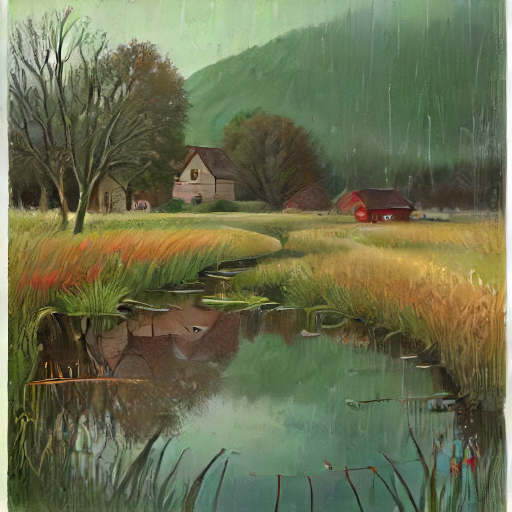
Actual output: SDXS Q8_0, 512 × 512, one step, guidance 1, seed 42.
There are reeds, water, houses, and rain. I like the atmosphere. But I cannot identify the scarf, which is the reason this scene belongs in the book.
Would a brighter scene make it easier to see? I changed only “rainy evening” → “clear morning”, keeping the model, seed, dimensions, and other settings:
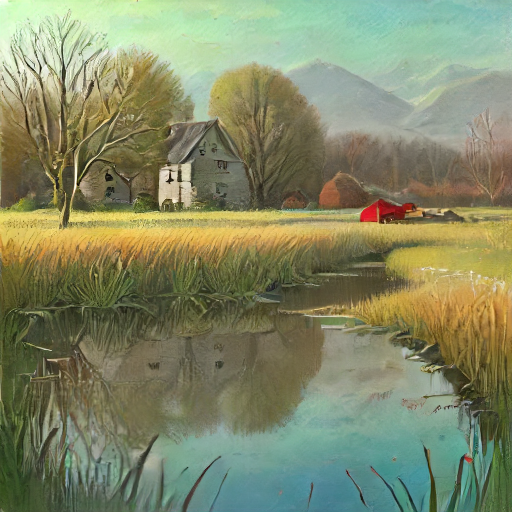
The sky brightens and the rain disappears. The scarf is still missing.
A fixed seed helps us compare prompts on this setup. It does not lock the composition or guarantee identical pixels across runtime versions and devices.
Put the important thing in the foreground
The weather changed; the missing object did not return. For the third image, I asked the model to put the scarf right in front of us:
Close-up of one red knitted wool scarf tangled in green reeds, the scarf fills the foreground, pond water behind it, rainy evening, gentle storybook illustration, no lettering
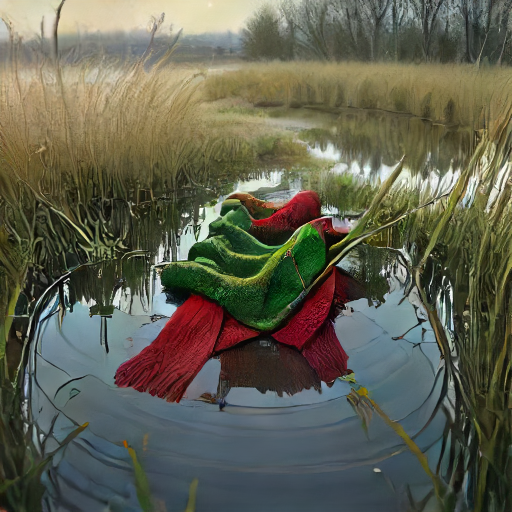
Now there is recognizable red knitted fabric. There is also extra green fabric, and the rain is not obvious. The prompt helped; it did not make the picture an exact record.
That is the storybook’s boundary: the journal says what happened; the illustration imagines how it looked. If the game needs exact character faces, positions, or evidence of an event, keep the captured screenshot.
Can SD-Turbo find the scarf?
Perhaps a larger model would follow the scene more closely. I tried the same three prompts with SD-Turbo Q8_0 + TAESD: 512 × 512, one step, guidance 1, seed 42. TAESD is the small decoder in the documented recipe, so this compares the complete recipes.
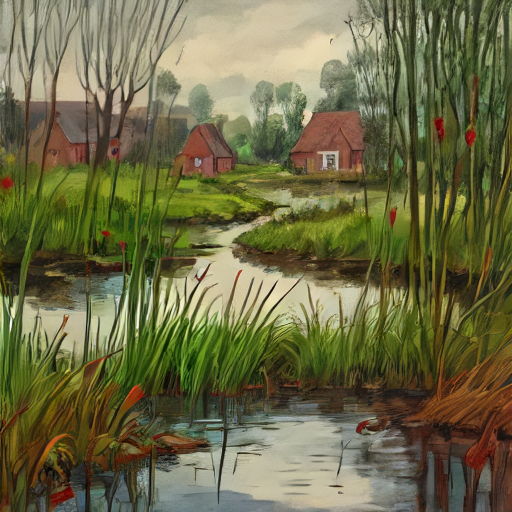
SD-Turbo, rainy evening. More distinct foreground reeds, but still no clearly recognizable scarf. The rain is less obvious than in the SDXS image.
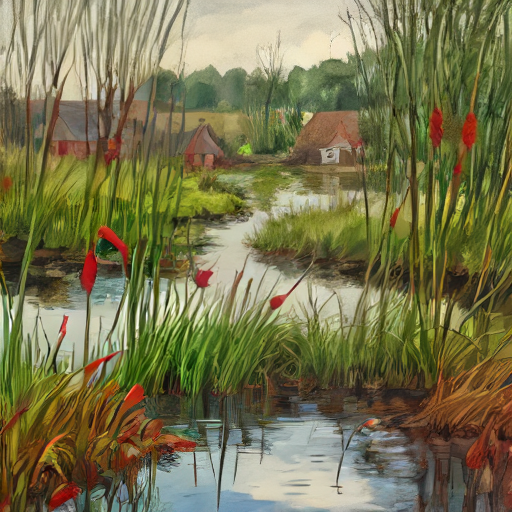
SD-Turbo, clear morning. Red shapes appear among the reeds, but they do not read clearly as one wool scarf. The weather change is subtle.
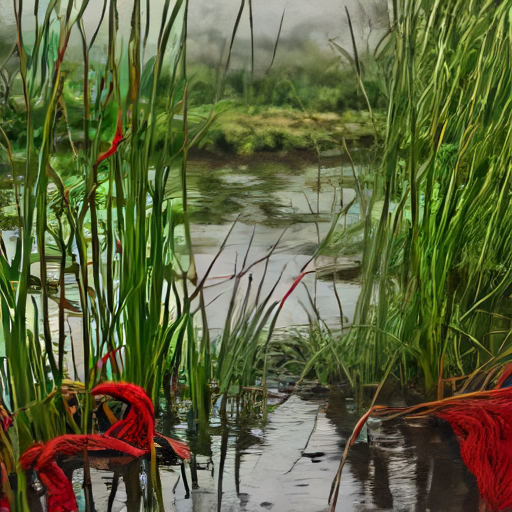
SD-Turbo, close-up. Recognizable red knitted pieces appear at both edges. It misses the request for one scarf filling the foreground.
For this storybook scene, I prefer SDXS’s softer style. Neither model reliably follows every detail. This is a visual judgment about three prompts at one seed, not a general quality ranking.
| Recipe | Model files | Warm generation median | Peak process RSS |
|---|---|---|---|
| SDXS Q8_0 | 0.68 GB | 0.39 s | 1.51 GiB |
| SD-Turbo Q8_0 + TAESD | 2.03 GB | 0.58 s | 2.92 GiB |
Almost twice the process memory and three times the model storage still did not give us a clear picture of the event. I would keep SDXS for this prototype. That choice is specific to these scenes and settings; more SD-Turbo steps or its full decoder could change the result.
Measurement details
M4 Max, 64 GB, Metal, Dart 3.13.5, llamadart 0.11.1. Each recipe ran alone in a fresh process with cached files. After one warm-up pass over all three prompts, I measured three more passes: nine generations per recipe.
-
Generation: 0.383–0.387 s for SDXS; 0.545–0.622 s for SD-Turbo. Timing ends at
task.result, before PNG encoding or disk writes. Downloads and model loading are excluded. -
Memory: process RSS sampled every 20 ms across setup, loading, generation, and saving. This does not measure total device or GPU memory.
-
Conditions: renderer off, on a development machine rather than an isolated benchmark.
The comparison uses TAESD, not SD-Turbo’s full VAE. Four-step generation and the full decoder were not tested. Both model revisions and the decoder revision are pinned in the runnable program.
What the Dart code does
To try the scarf scene yourself, the program follows four calls:
// 1. Check this build and device before downloading weights.
final runtime = await ImageGenerationEngine.checkRuntime();

// 2. Load a pinned ModelSource; the download manager caches it.
final engine = await ImageGenerationEngine.load(model);

// 3. Start a task, then listen for progress while it runs.
final task = await engine.generate(request);

// 4. Await completion and save the resulting pixels as PNG.
final result = await task.result;
await File('memory.png').writeAsBytes(result.images.first.toPng());
This is the API outline. The complete program defines model and request inline, handles an unsupported runtime, and disposes the engine.
task.events reports phases such as prompt encoding, sampling, and decoding. It does not stream finished pictures. Await task.result for the image or a failure. The program cancels its event subscription in finally and disposes the engine after all three pictures.
For SDXS, explicitly use steps: 1 and guidanceScale: 1. Those settings belong to this distilled model; copying them to an arbitrary image model is not a useful comparison.
Try the same three pictures
I ran the complete program on an M4 Max with Dart 3.13.5 and llamadart 0.11.1. dart analyze passed and both modes produced all three PNGs. Allow about 683 MB for SDXS, or 2.03 GB for SD-Turbo plus TAESD, plus the package and opt-in native runtime. The first run downloads the files; cached runs generate locally.
Create an empty directory, save this as pubspec.yaml, then run dart pub get:
name: llama_storybook
publish_to: none
environment:
  sdk: ^3.10.7
dependencies:
  llamadart: 0.11.1
hooks:
  user_defines:
    llamadart:
      llamadart_native_runtimes: [stable_diffusion]
Image generation is a Preview API. This example is native Dart on macOS; Web has no image runtime. For Flutter Apple apps, follow the image-generation setup guide for the companion package and platform requirements.
<details> <summary>Complete runnable program</summary>Create a bin directory and save this as bin/illustrate.dart:
import 'dart:convert';
import 'dart:io';

import 'package:llamadart/llamadart.dart';

Future<void> main(List<String> args) async {
  if (args.any((arg) => arg != '--turbo')) {
    stderr.writeln('Usage: dart run bin/illustrate.dart [--turbo]');
    exitCode = 64;
    return;
  }
  final turbo = args.contains('--turbo');
  final runtime = await ImageGenerationEngine.checkRuntime();
  if (!runtime.isSupported) {
    stderr.writeln(runtime.unsupportedReason);
    exitCode = 1;
    return;
  }
  final engine = await ImageGenerationEngine.load(
    turbo
        ? ImageGenerationModel(
            ModelSource.huggingFace(
              repoId: 'Green-Sky/SD-Turbo-GGUF',
              revision: '19a31586d02d64a73b4419bc193b3ecfaf38e1f0',
              filePath: 'sd_turbo-f16-q8_0.gguf',
            ),
            components: [
              ImageModelComponent.auto(
                ModelSource.huggingFace(
                  repoId: 'madebyollin/taesd',
                  revision: '614f76814bbe30edbe2e627ace1c2234c81a2c0e',
                  filePath: 'diffusion_pytorch_model.safetensors',
                ),
              ),
            ],
          )
        : ImageGenerationModel(
            ModelSource.huggingFace(
              repoId: 'concedo/sdxs-512-tinySDdistilled-GGUF',
              revision: '3144d898d61492f8382ffcabec055733fc5b2a0e',
              filePath: 'sdxs-512-tinySDdistilled_Q8_0.gguf',
            ),
          ),
  );
  try {
    // A sample journal event. The game supplies these facts.
    const memory = (
      subject: 'a red wool scarf caught in green reeds',
      place: 'beside a small village pond',
    );
    for (final setting in ['rainy evening', 'clear morning', 'close up']) {
      final prompt = setting == 'close up'
          ? 'Close-up of one red knitted wool scarf tangled in green reeds, '
                'the scarf fills the foreground, pond water behind it, '
                'rainy evening, gentle storybook illustration, no lettering'
          : '${memory.subject}, ${memory.place}, '
                '$setting, gentle storybook illustration, no lettering';
      final watch = Stopwatch()..start();
      final task = await engine.generate(
        ImageGenerationRequest(
          prompt: prompt,
          width: 512,
          height: 512,
          steps: 1,
          guidanceScale: 1,
          seed: 42,
        ),
      );
      final progress = task.events.listen((event) {
        if (event case ImageGenerationProgressEvent(
          :final phase,
          :final step,
          :final steps,
        )) {
          stdout.writeln('$phase $step/$steps');
        }
      });
      try {
        final result = await task.result;
        final generationMs = watch.elapsedMilliseconds;
        final prefix = turbo ? 'turbo-' : '';
        final name = '$prefix${setting.replaceAll(' ', '-')}';
        final image = result.images.first;
        await File('$name.png').writeAsBytes(image.toPng());
        await File('$name.json').writeAsString(
          const JsonEncoder.withIndent('  ').convert({
            'prompt': prompt,
            'seed': result.seed,
            'width': image.width,
            'height': image.height,
            'steps': 1,
            'guidanceScale': 1,
            'generationMs': generationMs,
          }),
        );
        stdout.writeln('Saved $name.png in $generationMs ms');
      } finally {
        await progress.cancel();
      }
    }
  } finally {
    await engine.dispose();
  }
}
Run it from the project directory:
# SDXS
dart run bin/illustrate.dart

# SD-Turbo with TAESD
dart run bin/illustrate.dart --turbo
The default run writes rainy-evening.png, clear-morning.png, and close-up.png, each with a JSON file recording the prompt, seed, settings, and generation time. Turbo filenames start with turbo-, so you can compare both sets.
For another scene, replace the scarf with a blue umbrella in both memory.subject and the separate close-up prompt. Does moving the umbrella into the foreground help?
Back to Dash’s storybook
The next step would be adding this to the game. When Dash opens the storybook, show the journal immediately. After dialogue and speech work finishes, generate the illustration, use progress events for the loading indicator, and replace the placeholder when the PNG is ready. If generation fails, keep the journal and any captured picture available.
Before putting this into the game, I would repeat the measurements with the renderer running and the other models loaded. That is the memory and latency budget the player will experience.
Dash could get an illustrated version of the moment he missed. But I would keep the journal beside the picture. A lovely pond is enough to set the mood; it is not enough to tell us what happened to Pip’s scarf.
Comments
More Blog
View alldiscussDev Opportunity Radar #21: $500K Y Combinator Funding, Bolt Builders Week, and AI Safety Research Residency
TL;DR Welcome back to Dev Opportunity Radar! This is a weekly series where I share opportunities,...
H
Hemapriya KanagaladevchallengeCongrats to the Hacktoberfest Open-Source AI Challenge: Touch Grass Winners!
We are so excited to announce the winners of the Hacktoberfest Open-Source AI Challenge: Touch...
J
JemgooglecloudBuilding Production-Ready Open-Weights AI Agents with Gemma, Google ADK, and Cloud Run GPUs
How I designed, connected, scaled, governed, evaluated, and QLoRA fine-tuned an enterprise SecOps & FinOps agent on Google Cloud.
R
Robina MirbahargemmaDo Drafters Work on Small Models? Gemma 4 E2B and E4B on Two Small GPUs
Yes. Speculative decoding with Google's 59 MB QAT multi-token prediction (MTP) drafters speeds up Gemma 4 E4B 1.72x and E2B 1.40x on an 8 GB RTX 3050, and 1.49x and 1.18x on a 4 GB laptop GTX 1650 Ti, served by llama.cpp one request at a time, with unchanged GSM8K and BFCL scores.
X
xbillnvidiaDon't Assume Your Cloud T4 Runs at Spec: Gemma 4 Decode Falls 7% as the Card Warms
The same Tesla T4 on the same Google Cloud VM decoded Gemma 4 E2B at 115 tokens/s at 45 °C and 107 at 77 °C. The card sits at its 70 W limit, a hotter chip draws more power at the same clock, so the clock drops. No thermal throttle fires, and no spec sheet mentions it.
X
xbilloracleBuilding ora-tui with Google Antigravity & Gemini 4 Argon: An MS-DOS Retro TUI & OpenTelemetry Exporter for Oracle RAC, DB & SAN Multipath
How I pair-programmed with Google Antigravity powered by Gemini 4 Argon to build a zero-dependency Go TUI and OpenTelemetry/Prometheus observability stack for Oracle Databases and Linux SAN storage.
M
Mario EzquerroReady-made automations for this
Workflows from the Neura Market marketplace related to this DeepSeek resource
- End-to-End Blog Generation for WordPress with LLM Agents & Image - GPT-5 Optimizedn8n · $24.99 · Related topic
- Automated Local Business Lead Generation with Google Maps & GPT-4n8n · $14.99 · Related topic
- Generate & Publish SEO Articles with Claude AI, Webflow, & Image Generationn8n · $14.99 · Related topic
- Text-to-Image Generation with Flux AI, Google Drive Storage & Sheets Loggingn8n · $9.99 · Related topic