
Back to Blog python
 ai
ai googleadk
 googleadk
 python
 python
 googleadk
Cross Cloud ADK with Python, and the Azure App Service
xbill March 26, 2026
0 views
Leveraging Gemini CLI and the underlying Gemini LLM to build Model Context Protocol (MCP) AI...
---
title: Cross Cloud ADK with Python, and the Azure App Service
published: true
series: Azure
date: 2026-03-25 18:48:13 UTC
tags: python,azure,googleadk,geminicli
canonical_url: https://xbill999.medium.com/cross-cloud-adk-with-python-and-the-azure-app-service-041b5aed725b
---
Leveraging Gemini CLI and the underlying Gemini LLM to build Model Context Protocol (MCP) AI applications with Python with a local development environment deployed to the Azure App Service container runtime.
#### What is Gemini CLI?
The Gemini CLI is an open-source, terminal-based AI agent from Google that allows developers to interact directly with Gemini models, such as Gemini 2.5 Pro, for coding, content creation, and workflow automation. It supports file operations, shell commands, and connects to external tools via the Model Context Protocol (MCP).
The full details on Gemini CLI are available here:
[Build, debug & deploy with AI](https://geminicli.com/)
#### Azure App Service
Azure App Service is a fully managed Platform-as-a-Service (PaaS) that enables developers to build, deploy, and scale web applications, APIs, and mobile backends quickly. It supports multiple languages ([.NET](https://www.google.com/search?q=.NET&rlz=1CAIWTJ_enUS1155&oq=what+is+azure+app+service&gs_lcrp=EgZjaHJvbWUyBggAEEUYOTIHCAEQABiABDIHCAIQABiABDIHCAMQABiABDIHCAQQABiABDIHCAUQABiABDIICAYQABgWGB4yCAgHEAAYFhgeMggICBAAGBYYHjIICAkQABgWGB7SAQgzNzkzajBqN6gCALACAA&sourceid=chrome&ie=UTF-8&ved=2ahUKEwiLxOi4mKWTAxUfkYkEHW3NNloQgK4QegYIAQgAEAQ), [Java](https://www.google.com/search?q=Java&rlz=1CAIWTJ_enUS1155&oq=what+is+azure+app+service&gs_lcrp=EgZjaHJvbWUyBggAEEUYOTIHCAEQABiABDIHCAIQABiABDIHCAMQABiABDIHCAQQABiABDIHCAUQABiABDIICAYQABgWGB4yCAgHEAAYFhgeMggICBAAGBYYHjIICAkQABgWGB7SAQgzNzkzajBqN6gCALACAA&sourceid=chrome&ie=UTF-8&ved=2ahUKEwiLxOi4mKWTAxUfkYkEHW3NNloQgK4QegYIAQgAEAU), [Node.js](https://www.google.com/search?q=Node.js&rlz=1CAIWTJ_enUS1155&oq=what+is+azure+app+service&gs_lcrp=EgZjaHJvbWUyBggAEEUYOTIHCAEQABiABDIHCAIQABiABDIHCAMQABiABDIHCAQQABiABDIHCAUQABiABDIICAYQABgWGB4yCAgHEAAYFhgeMggICBAAGBYYHjIICAkQABgWGB7SAQgzNzkzajBqN6gCALACAA&sourceid=chrome&ie=UTF-8&ved=2ahUKEwiLxOi4mKWTAxUfkYkEHW3NNloQgK4QegYIAQgAEAY), [Python](https://www.google.com/search?q=Python&rlz=1CAIWTJ_enUS1155&oq=what+is+azure+app+service&gs_lcrp=EgZjaHJvbWUyBggAEEUYOTIHCAEQABiABDIHCAIQABiABDIHCAMQABiABDIHCAQQABiABDIHCAUQABiABDIICAYQABgWGB4yCAgHEAAYFhgeMggICBAAGBYYHjIICAkQABgWGB7SAQgzNzkzajBqN6gCALACAA&sourceid=chrome&ie=UTF-8&ved=2ahUKEwiLxOi4mKWTAxUfkYkEHW3NNloQgK4QegYIAQgAEAc), PHP) on Windows or Linux, offering built-in CI/CD, auto-scaling, and high security.
[https://azure.microsoft.com/en-us/products/app-service](https://azure.microsoft.com/en-us/products/app-service)
#### Why would I want Gemini CLI with Azure? Isn’t that a Google Thing?
Yes- Gemini CLI leverages the Google Cloud console and Gemini models but it is also open source and platform agnostic. Many applications are already cross-cloud so this enables familiar tools to be run natively on Microsoft Azure.
#### Node Version Management
Gemini CLI needs a consistent, up to date version of Node. The **nvm** command can be used to get a standard Node environment:
[GitHub - nvm-sh/nvm: Node Version Manager - POSIX-compliant bash script to manage multiple active node.js versions](https://github.com/nvm-sh/nvm)
#### Gemini CLI Installation
You can then download the Gemini CLI :
```shell
npm install -g @google/gemini-cli
```
You will see the log messages:
```console
azureuser@azure-new:~/gemini-cli-azure$ npm install -g @google/gemini-cli
npm warn deprecated [email protected]: No longer maintained. Please contact the author of the relevant native addon; alternatives are available.
npm warn deprecated [email protected]: Use your platform's native DOMException instead
npm warn deprecated [email protected]: Old versions of glob are not supported, and contain widely publicized security vulnerabilities, which have been fixed in the current version. Please update. Support for old versions may be purchased (at exorbitant rates) by contacting [email protected]
```
#### Testing the Gemini CLI Environment
Once you have all the tools and the correct Node.js version in place- you can test the startup of Gemini CLI. You will need to authenticate with a Key or your Google Account:
```shell
gemini
```
#### Authentication
Several authentication options are available. To use an existing Code Assist licence — authenticate with a Google Account:
```plaintext
> /auth
▄▄▄▄▄▄▄▄▄▄▄▄▄▄▄▄▄▄▄▄▄▄▄▄▄▄▄▄▄▄▄▄▄▄▄▄▄▄▄▄▄▄▄▄▄▄▄▄▄▄▄▄▄▄▄▄▄▄▄▄▄▄▄▄▄▄▄▄▄▄▄▄▄▄▄▄▄▄▄▄▄▄▄▄▄▄▄▄▄▄▄▄▄▄▄▄▄▄▄▄▄▄▄▄▄▄▄▄▄▄▄▄▄▄▄▄▄▄▄▄▄▄▄▄▄▄▄▄▄▄▄▄▄▄▄▄▄▄▄▄▄▄▄▄▄▄▄▄▄▄▄▄▄▄▄▄▄▄▄▄
╭──────────────────────────────────────────────────────────────────────────────────────────────────────────────────────────────────────────────────────────────╮
│ │
│ ? Get started │
│ │
│ How would you like to authenticate for this project? │
│ │
│ ● 1. Login with Google │
│ 2. Use Gemini API Key │
│ 3. Vertex AI │
│ │
│ (Use Enter to select) │
│ │
│ Terms of Services and Privacy Notice for Gemini CLI │
│ │
│ https://geminicli.com/docs/resources/tos-privacy/ │
│ │
╰──────────────────────────────────────────────────────────────────────────────────────────────────────────────────────────────────────────────────────────────╯
```
Then set the GOOGLE\_CLOUD\_PROJECT to a valid project setup on the Google Cloud console:
```shell
~ $ export GOOGLE_CLOUD_PROJECT=comglitn
~ $
```
Other options include Google Cloud API Key that can be generated directly from the Google Cloud Console.
#### Installing Google Cloud Tools
To simplify working with Google Cloud — install the Google Cloud Tools:
```plaintext
https://docs.cloud.google.com/sdk/docs/install-sdk
```
Once the installation is completed — you can verify the setup:
```console
william@Azure:~$ gcloud auth list
Credentialed Accounts
ACTIVE ACCOUNT
* [email protected]
```
#### Installing Azure Customized GEMINI.md
A sample GitHub repo contains tools for working with Gemini CLI on Azure. This repo is available here:
```shell
git clone https://gitHub.com/xbill9/gemini-cli-azure
```
A sample **GEMINI.md** customized for the Azure environment is provided in the repo:
```markdown
This is a multi linux git repo hosted at:
github.com/xbill9/gemini-cli-azure
You are a cross platform developer working with
Microsoft Azure and Google Cloud
You can use the Azure CLI :
https://learn.microsoft.com/en-us/cli/azure/install-azure-cli
https://learn.microsoft.com/en-us/cli/azure/
https://learn.microsoft.com/en-us/cli/azure/reference
https://learn.microsoft.com/en-us/cli/azure/install-azure-cli-linux?view=azure-cli-latest&pivots=apt
## Azure CLI Tools
You can use the Azure CLI to manage resources across Azure Storage, Virtual Machines, and other services.
- **List Resource Groups** : `az group list -o table`
- **List Storage Accounts** : `az storage account list -o table`
- **List Virtual Machines** : `az vm list -d -o table`
### Azure Update Script
- `azure-update`: This script is specifically for Azure Linux environments. It updates all packages and ensures necessary libraries are installed.
## Automation Scripts
This repository contains scripts for updating various Linux environments and tools:
- `linux-update`: Detects OS (Debian/Ubuntu/Azure Linux) and runs the corresponding update scripts.
- `azure-update`: Updates Azure Linux packages and installs necessary dependencies.
- `debian-update`: Updates Debian/Ubuntu packages and installs `git`.
- `gemini-update`: Updates the `@google/gemini-cli` via npm and checks versions of Node.js and Gemini.
- `nvm-update`: Installs NVM (Node Version Manager) and Node.js version 25.
```
#### Agent Development Kit
The [Google Agent Development Kit](https://www.google.com/search?q=Google+Agent+Development+Kit&rlz=1CAIWTJ_enUS1114&oq=what+is+the+adk+google&gs_lcrp=EgZjaHJvbWUyBggAEEUYOTIICAEQABgWGB4yCAgCEAAYFhgeMggIAxAAGBYYHjIICAQQABgWGB4yCAgFEAAYFhgeMggIBhAAGBYYHjIKCAcQABgKGBYYHjINCAgQABiGAxiABBiKBTIKCAkQABiABBiiBNIBCDMxODlqMGo3qAIAsAIA&sourceid=chrome&ie=UTF-8&mstk=AUtExfB5Oo7ZHHcDEHu7aqZiPBA2l1c-QGh5dB7xkkDPIiYcn8O1Imt2IHNR7bzA6JnyDCSDCUGpGWTeBW14namlN_QqzJLLI5-px1BE9jfSxwli6njPDPERjm5pRqNP3uC6HhUKiRcTJ1T8x5LHQrCkVxylw7QWg0N8B4dQDIcWpnVX9Gc&csui=3&ved=2ahUKEwjYu-G8p-uSAxXrv4kEHUbpLo0QgK4QegQIARAB) (ADK) is an open-source, Python-based framework designed to streamline the creation, deployment, and orchestration of sophisticated, multi-agent AI systems. It treats agent development like software engineering, offering modularity, state management, and built-in tools (like Google Search) to build autonomous agents.
The ADK can be installed from here:
[Agent Development Kit (ADK)](https://google.github.io/adk-docs/)
#### This seems like a lot of Configuration!
Getting the key tools in place is the first step to working across Cloud environments. For a deeper dive- a project with a similar setup can be found here:
[MCP Development with Python, and the Azure App Service](https://xbill999.medium.com/mcp-development-with-python-and-the-azure-app-service-683e68e1f7f0)
#### Where do I start?
The strategy for starting low code agent development is a incremental step by step approach.
The agents in the demo are based on the original code lab:
[Create and deploy low code ADK (Agent Deployment Kit) agents using ADK Visual Builder | Google Codelabs](https://codelabs.developers.google.com/codelabs/create-low-code-agent-with-ADK-visual-builder#0)
First, the basic development environment is setup with the required system variables, and a working Gemini CLI configuration.
Then, a minimal ADK Agent is built with the visual builder. Next — the entire solution is deployed to Google Cloud Run.
#### Setup the Basic Environment
At this point you should have a working Python environment and a working Gemini CLI installation. The next step is to clone the GitHub samples repository with support scripts:
```shell
cd ~
git clone https://github.com/xbill9/gemini-cli-azure
cd adkui-appservice
```
Then run **init.sh** from the cloned directory.
The script will attempt to determine your shell environment and set the correct variables:
```shell
source init.sh
```
If your session times out or you need to re-authenticate- you can run the **set\_env.sh** script to reset your environment variables:
```shell
source set_env.sh
```
Variables like PROJECT\_ID need to be setup for use in the various build scripts- so the **set\_env** script can be used to reset the environment if you time-out.
#### Verify The ADK Installation
To verify the setup, run the ADK CLI locally with Agent1:
```console
xbill@penguin:~/gemini-cli-azure/adkui-appservice$ adk run Agent1
Log setup complete: /tmp/agents_log/agent.20260323_180232.log
To access latest log: tail -F /tmp/agents_log/agent.latest.log
/home/xbill/.pyenv/versions/3.13.12/lib/python3.13/site-packages/google/adk/cli/utils/agent_loader.py:248: UserWarning: [EXPERIMENTAL] _load_from_yaml_config: This feature is experimental and may change or be removed in future versions without notice. It may introduce breaking changes at any time.
if root_agent := self._load_from_yaml_config(actual_agent_name, agents_dir):
/home/xbill/.pyenv/versions/3.13.12/lib/python3.13/site-packages/google/adk/features/_feature_decorator.py:81: UserWarning: [EXPERIMENTAL] feature FeatureName.AGENT_CONFIG is enabled.
check_feature_enabled()
/home/xbill/.pyenv/versions/3.13.12/lib/python3.13/site-packages/google/adk/cli/cli.py:204: UserWarning: [EXPERIMENTAL] InMemoryCredentialService: This feature is experimental and may change or be removed in future versions without notice. It may introduce breaking changes at any time.
credential_service = InMemoryCredentialService()
/home/xbill/.pyenv/versions/3.13.12/lib/python3.13/site-packages/google/adk/auth/credential_service/in_memory_credential_service.py:33: UserWarning: [EXPERIMENTAL] BaseCredentialService: This feature is experimental and may change or be removed in future versions without notice. It may introduce breaking changes at any time.
super(). __init__ ()
Running agent Agent1, type exit to exit.
[user]: hello
[Agent1]: Hello! How can I help you today?
[user]: what is the weather in Whitby Ontario
[Agent1]: The weather in Whitby, Ontario, on Monday, March 23, 2026, is a mix of sun and clouds with a high of 4°C. It is partly cloudy with temperatures around -2°C. In the morning, it feels like -7°C, and in the afternoon, it feels like -2°C.
For tonight, it is expected to be partly cloudy with a low temperature around -1°C (30°F).
[user]:
```
#### Deploying to Azure App Services
The first step is to refresh the Azuer credentials in the current build environment:
```console
xbill@penguin:~/gemini-cli-azure/adkui-appservice$ az login
[Warning] The login output has been updated. Please be aware that it no longer displays the full list of available subscriptions by default.
xbill@penguin:~/gemini-cli-azure/adkui-appservice$
```
Run the deploy version on the local system:
```make
xbill@penguin:~/gemini-cli-azure/adkui-appservice$ make deploy
Building the Docker image...
docker build -t adk-image .
[+] Building 1.1s (12/12) FINISHED docker:default 0.0s 0.0s
```
You can validate the final result by checking the messages:
```plaintext
Deployment complete. Visit: http://adk-app-penguin.azurewebsites.net
```
Once the container is deployed:
```console
xbill@penguin:~/gemini-cli-azure/adkui-appservice$ make status
Checking Azure App Service status for adk-app-penguin...
Name State Host
--------------- ------- ---------------------------------
adk-app-penguin Running adk-app-penguin.azurewebsites.net
xbill@penguin:~/gemini-cli-azure/adkui-appservice$
```
You can then get the endpoint:
```make
xbill@penguin:~/gemini-cli-azure/adkui-appservice$ make endpoint
--- Azure Endpoint ---
adk-app-penguin.azurewebsites.net
```
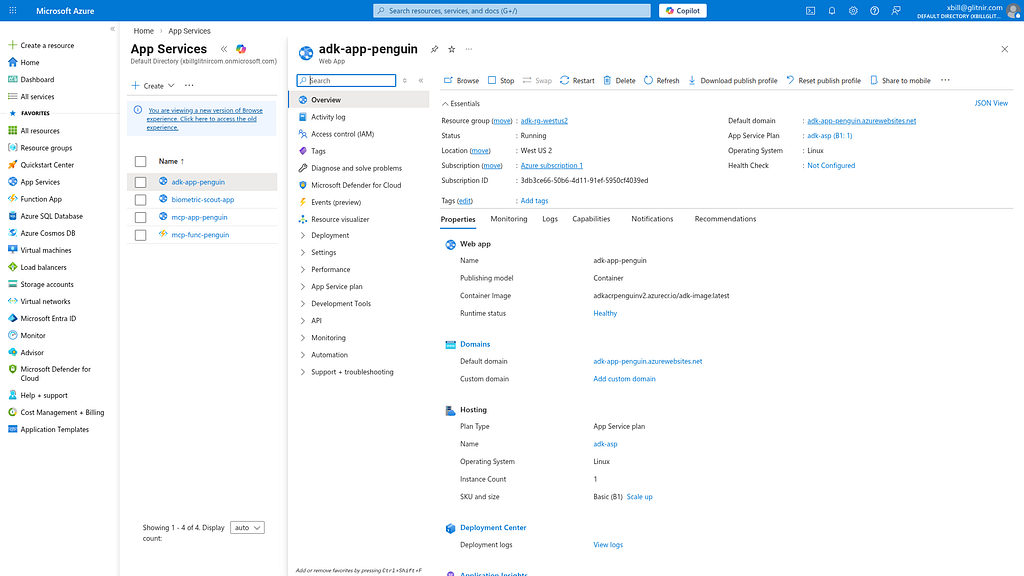
The service will be visible in the Azure console:
[https://portal.azure.com/#browse/Microsoft.Web%2Fsites](https://portal.azure.com/#browse/Microsoft.Web%2Fsites)
#### Running the ADK Web Interface
Start a connection to the Lightsail Deployed ADK:
```plaintext
adk-app-penguin.azurewebsites.net
```
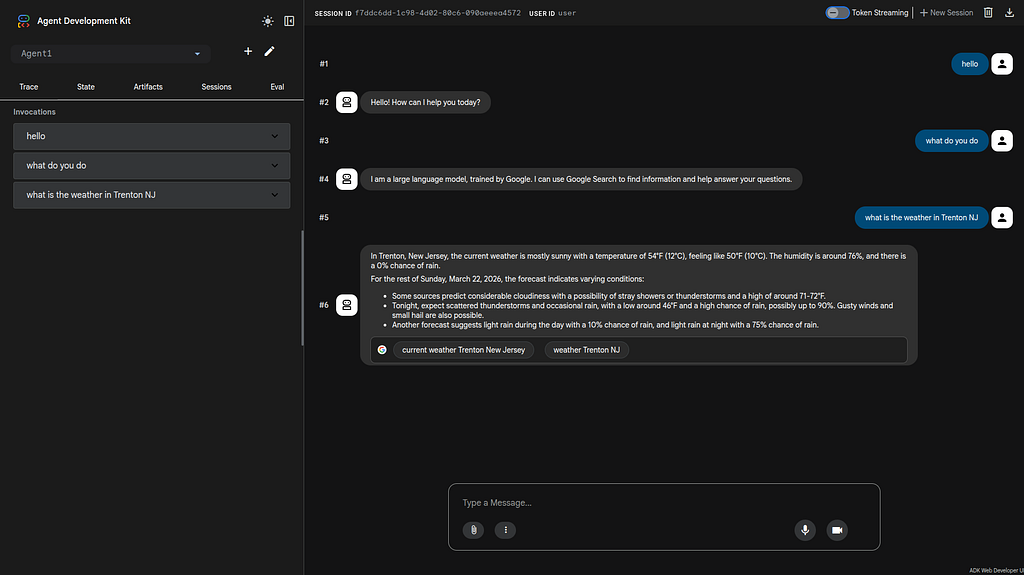
This will bring up the ADK UI. Select the sub-agent “Agent1”:
#### Run a Second Sub Agent
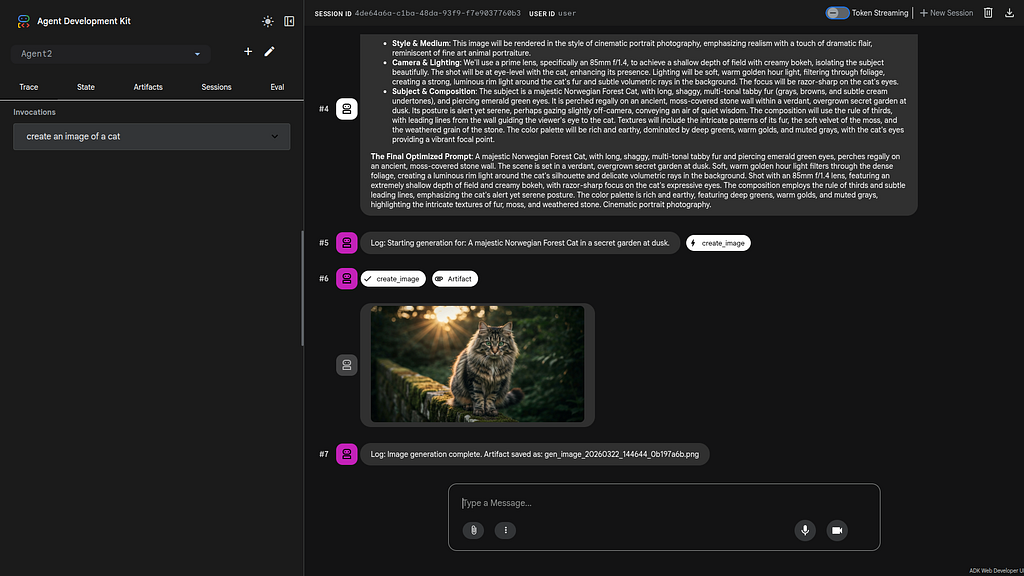
Connect to the ADK and select “Agent2”. Give the Agent this prompt:
```plaintext
Create an image of a cat.
```
The sub agent will then generate the cat image:
#### Visual Build an Agent
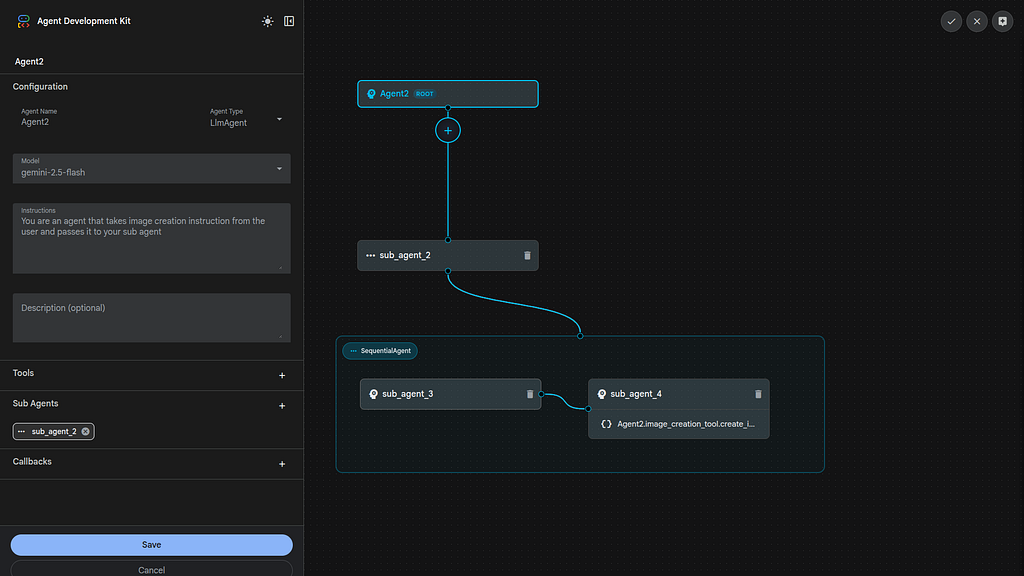
To use the ADK visual builder- select the pencil Icon next to Agent 2. You can drill down into the Agent design:
#### Summary
The Agent Development Kit was used to visually define a basic agent and added the Google Search Tool. This Agent was tested locally with the CLI and then with the ADK web tool. Then, several sample ADK agents were run directly from the App Service deployment in Azure. This approach validates that cross cloud tools can be used — even with more complex agents.
Comments
More Blog
View allaiHow to prompt Gemini 3.1's new text to speech model
Gemini 3.1 Flash text to speech (TTS) is a new model that you can direct to get the precise audio...
F
fofrgoogleadkBuilding Multimodal Real Time Agent with ADK, Azure AKS, Gemini CLI, and Gemini Flash Live 3.1
Leveraging the Google Agent Development Kit (ADK) and the underlying Gemini LLM to build cross cloud...
X
xbillgoogleadkBuilding a Multimodal Agent with the ADK, Amazon ECS Express, and Gemini Flash Live 3.1
Leveraging the Google Agent Development Kit (ADK) and the underlying Gemini LLM to build Agentic apps...
X
xbillpythonBuilding a Multimodal Agent with the ADK, Amazon Lightsail, and Gemini Flash Live 3.1
Leveraging the Google Agent Development Kit (ADK) and the underlying Gemini LLM to build Agentic apps...
X
xbillpythonBuilding a Multimodal Cross Cloud Live Agent with ADK, Amazon EKS, and Gemini CLI
Leveraging the Google Agent Development Kit (ADK) and the underlying Gemini LLM to build cross cloud...
X
xbillgoogleadkBuilding a Multimodal Agent with the ADK, Azure ACA, and Gemini Flash Live 3.1
Leveraging the Google Agent Development Kit (ADK) and the underlying Gemini LLM to build Agentic apps...
X
xbill