
Back to Blog azure
azure ai
ai googleadk
 googleadk
 python
 python
 googleadk
Deploying ADK Agents on Azure Fabric
xbill April 6, 2026
0 views
Leveraging the Google Agent Development Kit (ADK) and the underlying Gemini LLM to build Agents in...
---
title: Deploying ADK Agents on Azure Fabric
published: true
series: Azure
date: 2026-04-06 13:07:27 UTC
tags: azure,geminicli,python,googleadk
canonical_url: https://xbill999.medium.com/deploying-adk-agents-on-azure-fabric-9bb9d4c3a849
---
Leveraging the Google Agent Development Kit (ADK) and the underlying Gemini LLM to build Agents in the Python programming language deployed on the Azure Cloud platform.
#### What is Gemini CLI?
The Gemini CLI is an open-source, terminal-based AI agent from Google that allows developers to interact directly with Gemini models, such as Gemini 2.5 Pro, for coding, content creation, and workflow automation. It supports file operations, shell commands, and connects to external tools via the Model Context Protocol (MCP).
The full details on Gemini CLI are available here:
[Build, debug & deploy with AI](https://geminicli.com/)
#### Azure Fabric
Microsoft Fabric is a comprehensive, AI-powered cloud platform that unifies data engineering, data warehousing, data science, and business intelligence (using Power BI) into a single SaaS solution, built on the [OneLake](https://azure.microsoft.com/en-us/blog/introducing-microsoft-fabric-data-analytics-for-the-era-of-ai/) storage system. It simplifies data management by reducing reliance on disparate, siloed tools.
More details are here:
[What is Microsoft Fabric - Microsoft Fabric](https://learn.microsoft.com/en-us/fabric/fundamentals/microsoft-fabric-overview)
#### Why would I want Gemini CLI with Azure? Isn’t that a Google Thing?
Yes- Gemini CLI leverages the Google Cloud console and Gemini models but it is also open source and platform agnostic. Many applications are already cross-cloud so this enables familiar tools to be run natively on Microsoft Azure.
#### Python Version Management
One of the downsides of the wide deployment of Python has been managing the language versions across platforms and maintaining a supported version.
The **pyenv** tool enables deploying consistent versions of Python:
[GitHub - pyenv/pyenv: Simple Python version management](https://github.com/pyenv/pyenv)
As of writing — the mainstream python version is 3.13. To validate your current Python:
```console
python --version
Python 3.13.12
```
#### Gemini CLI
If not pre-installed you can download the Gemini CLI to interact with the source files and provide real-time assistance:
```console
npm install -g @google/gemini-cli
```
#### Testing the Gemini CLI Environment
Once you have all the tools and the correct Node.js version in place- you can test the startup of Gemini CLI. You will need to authenticate with a Key or your Google Account:
```console
azureuser@azure-new:~/gemini-cli-azure$ gemini
▝▜▄ Gemini CLI v0.33.1
▝▜▄
▗▟▀ Logged in with Google /auth
▝▀ Gemini Code Assist Standard /upgrade
```
#### Node Version Management
Gemini CLI needs a consistent, up to date version of Node. The **nvm** command can be used to get a standard Node environment:
[GitHub - nvm-sh/nvm: Node Version Manager - POSIX-compliant bash script to manage multiple active node.js versions](https://github.com/nvm-sh/nvm)
To verify the Node version:
```console
node --version
v25.9.0
nvm --version
0.40.3
npm --version
11.12.1
```
#### Agent Development Kit
The [Google Agent Development Kit](https://www.google.com/search?q=Google+Agent+Development+Kit&rlz=1CAIWTJ_enUS1114&oq=what+is+the+adk+google&gs_lcrp=EgZjaHJvbWUyBggAEEUYOTIICAEQABgWGB4yCAgCEAAYFhgeMggIAxAAGBYYHjIICAQQABgWGB4yCAgFEAAYFhgeMggIBhAAGBYYHjIKCAcQABgKGBYYHjINCAgQABiGAxiABBiKBTIKCAkQABiABBiiBNIBCDMxODlqMGo3qAIAsAIA&sourceid=chrome&ie=UTF-8&mstk=AUtExfB5Oo7ZHHcDEHu7aqZiPBA2l1c-QGh5dB7xkkDPIiYcn8O1Imt2IHNR7bzA6JnyDCSDCUGpGWTeBW14namlN_QqzJLLI5-px1BE9jfSxwli6njPDPERjm5pRqNP3uC6HhUKiRcTJ1T8x5LHQrCkVxylw7QWg0N8B4dQDIcWpnVX9Gc&csui=3&ved=2ahUKEwjYu-G8p-uSAxXrv4kEHUbpLo0QgK4QegQIARAB) (ADK) is an open-source, Python-based framework designed to streamline the creation, deployment, and orchestration of sophisticated, multi-agent AI systems. It treats agent development like software engineering, offering modularity, state management, and built-in tools (like Google Search) to build autonomous agents.
The ADK can be installed from here:
[Agent Development Kit (ADK)](https://google.github.io/adk-docs/)
#### Where do I start?
The strategy for starting Agent development is a incremental step by step approach.
The agents in the demo are based on the original code lab:
[Create and deploy low code ADK (Agent Deployment Kit) agents using ADK Visual Builder | Google Codelabs](https://codelabs.developers.google.com/codelabs/create-low-code-agent-with-ADK-visual-builder#0)
First, the basic development environment is setup with the required system variables, and a working Gemini CLI configuration.
Then, a minimal ADK Agent is built with the visual builder. Next — the entire solution is deployed to Google Cloud Run.
#### Setup the Basic Environment
At this point you should have a working Python environment and a working Gemini CLI installation. The next step is to clone the GitHub samples repository with support scripts:
```console
cd ~
git clone https://github.com/xbill9/gemini-cli-azure
```
Then run **init.sh** from the cloned directory.
The script will attempt to determine your shell environment and set the correct variables:
```console
source init.sh
```
If your session times out or you need to re-authenticate- you can run the **set\_env.sh** script to reset your environment variables:
```console
source set_env.sh
```
Variables like PROJECT\_ID need to be setup for use in the various build scripts- so the **set\_env** script can be used to reset the environment if you time-out.
#### Azure Login
All of the deployment is done with the az CLI tool- but it also needs an active login on the Azure environment. To check the version:
```console
xbill@penguin:~/gemini-cli-azure/adkui-aci$ az --version
azure-cli 2.84.0
core 2.84.0
telemetry 1.1.0
Dependencies:
msal 1.35.0b1
azure-mgmt-resource 24.0.0
Python location '/opt/az/bin/python3'
Config directory '/home/xbill/.azure'
Extensions directory '/home/xbill/.azure/cliextensions'
Python (Linux) 3.13.11 (main, Feb 25 2026, 02:29:30) [GCC 12.2.0]
Legal docs and information: aka.ms/AzureCliLegal
Your CLI is up-to-date.
To login to Azure:
az login
You have logged into Microsoft Azure!
You can close this window, or we will redirect you to the Azure CLI documentation in 1 minute.
```
#### Verify The ADK Installation
To verify the setup, run the ADK CLI with Agent3:
```console
xbill@penguin:~/gemini-cli-azure/adkui-fabric$ adk run Agent3
Log setup complete: /tmp/agents_log/agent.20260402_182048.log
To access latest log: tail -F /tmp/agents_log/agent.latest.log
/home/xbill/.local/lib/python3.13/site-packages/google/adk/cli/utils/agent_loader.py:277: UserWarning: [EXPERIMENTAL] _load_from_yaml_config: This feature is experimental and may change or be removed in future versions without notice. It may introduce breaking changes at any time.
if root_agent := self._load_from_yaml_config(actual_agent_name, agents_dir):
/home/xbill/.local/lib/python3.13/site-packages/google/adk/features/_feature_decorator.py:81: UserWarning: [EXPERIMENTAL] feature FeatureName.AGENT_CONFIG is enabled.
check_feature_enabled()
/home/xbill/.local/lib/python3.13/site-packages/google/adk/cli/cli.py:204: UserWarning: [EXPERIMENTAL] InMemoryCredentialService: This feature is experimental and may change or be removed in future versions without notice. It may introduce breaking changes at any time.
credential_service = InMemoryCredentialService()
/home/xbill/.local/lib/python3.13/site-packages/google/adk/auth/credential_service/in_memory_credential_service.py:33: UserWarning: [EXPERIMENTAL] BaseCredentialService: This feature is experimental and may change or be removed in future versions without notice. It may introduce breaking changes at any time.
super(). __init__ ()
Running agent studio_director, type exit to exit.
[user]:
```
#### Running the ADK Web Interface
First- start the ADK interface:
```console
xbill@penguin:~/gemini-cli-azure/adkui-fabric$ adk web --host 0.0.0.0
2026-04-02 18:22:15,410 - INFO - service_factory.py:266 - Using in-memory memory service
2026-04-02 18:22:15,410 - INFO - local_storage.py:84 - Using per-agent session storage rooted at /home/xbill/gemini-cli-azure/adkui-fabric
2026-04-02 18:22:15,410 - INFO - local_storage.py:110 - Using file artifact service at /home/xbill/gemini-cli-azure/adkui-fabric/.adk/artifacts
/home/xbill/.local/lib/python3.13/site-packages/google/adk/cli/fast_api.py:192: UserWarning: [EXPERIMENTAL] InMemoryCredentialService: This feature is experimental and may change or be removed in future versions without notice. It may introduce breaking changes at any time.
credential_service = InMemoryCredentialService()
/home/xbill/.local/lib/python3.13/site-packages/google/adk/auth/credential_service/in_memory_credential_service.py:33: UserWarning: [EXPERIMENTAL] BaseCredentialService: This feature is experimental and may change or be removed in future versions without notice. It may introduce breaking changes at any time.
super(). __init__ ()
INFO: Started server process [27984]
INFO: Waiting for application startup.
+-----------------------------------------------------------------------------+
| ADK Web Server started |
| |
| For local testing, access at [http://0.0.0.0:8000](http://0.0.0.0:8000). |
+-----------------------------------------------------------------------------+
INFO: Application startup complete.
INFO: Uvicorn running on [http://0.0.0.0:8000](http://0.0.0.0:8000) (Press CTRL+C to quit)
```
#### Connecting to the ADK
The ADK web interface is started with the place holder 0.0.0.0 address — which tells the service to listen on all interfaces. Depending on your local environment setup- you may need to use the actual local interface. There are 2 potential options:
```plaintext
http://0.0.0.0:8000
http://127.0.0.1:8000
```
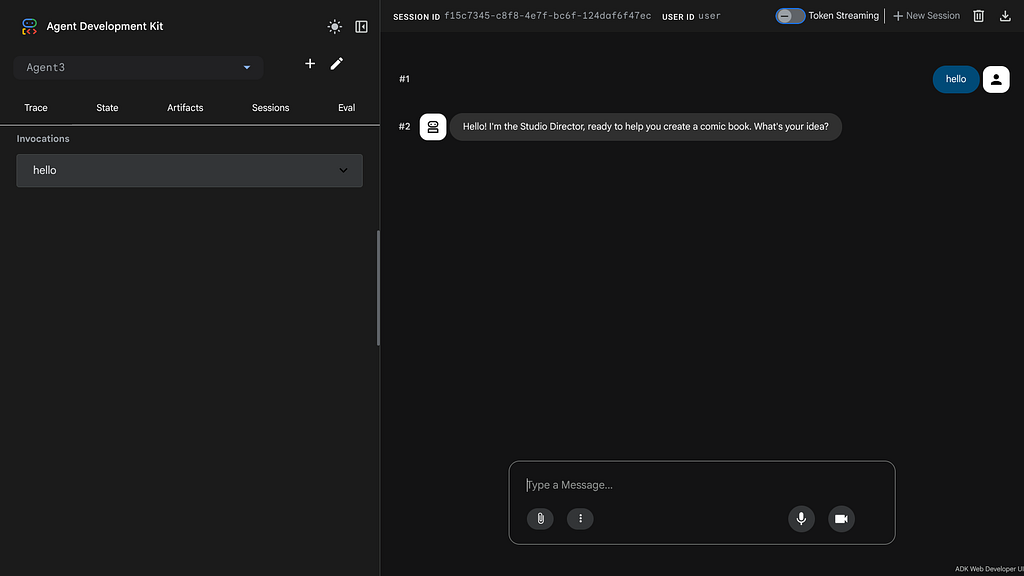
This will bring up the ADK UI:
#### Run a Sub Agent
Connect to the ADK and select “Agent3”:
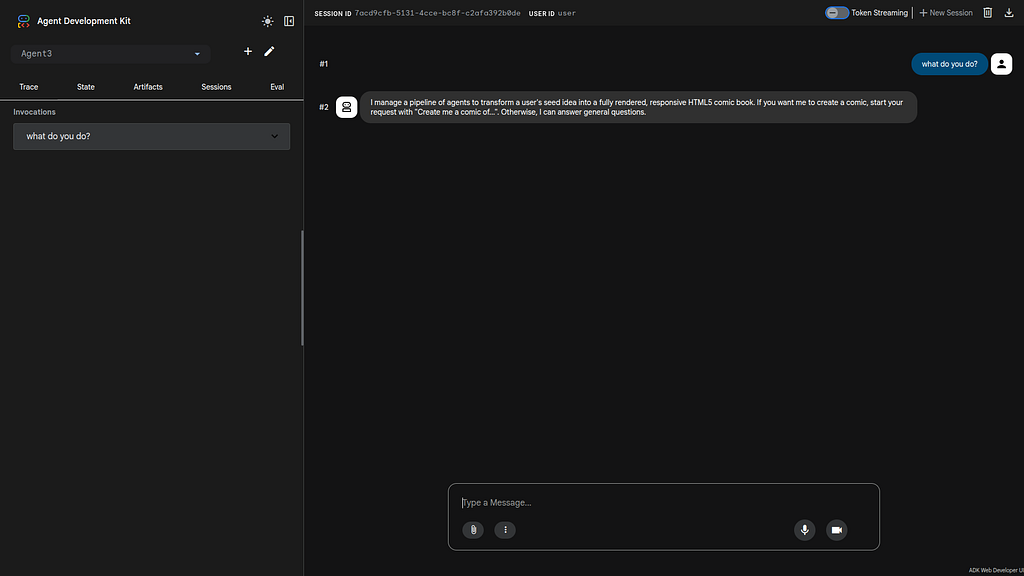
The first interaction just verifies the connection to the agent:
```plaintext
what do you do?
I manage a linear pipeline of four ADK Sequential Agents to transform a user's seed idea into a fully rendered, responsive HTML5 comic book. If your request starts with "Create me a comic of...", I'll delegate the task to my sub-agent to begin the comic creation pipeline. Otherwise, I'll answer your question directly.
```
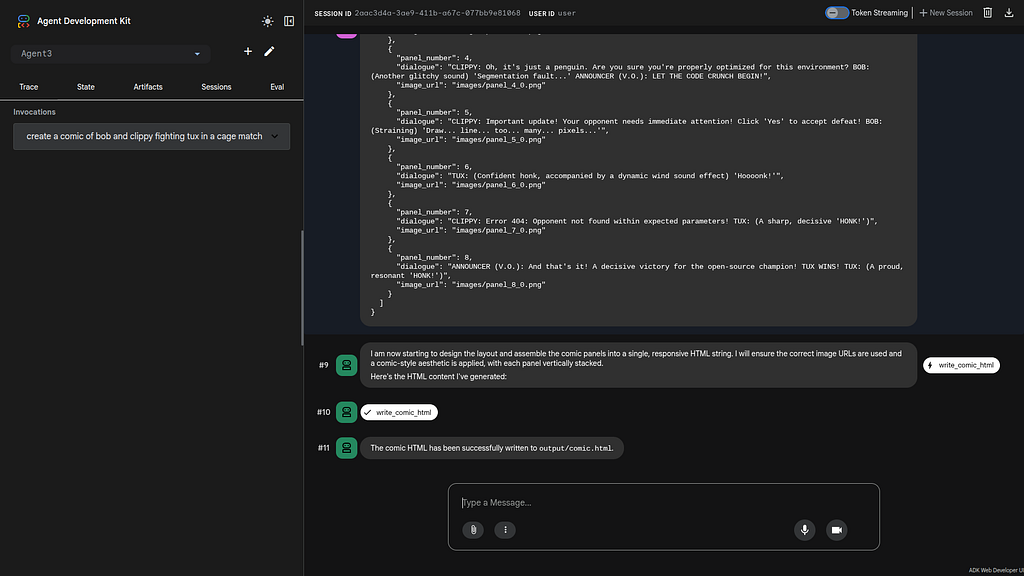
Give the Agent this prompt:
```plaintext
Create a comic of Bob and Clippy in a Battle Royal with Tux.
```
The sub agent will then generate the comic book images:
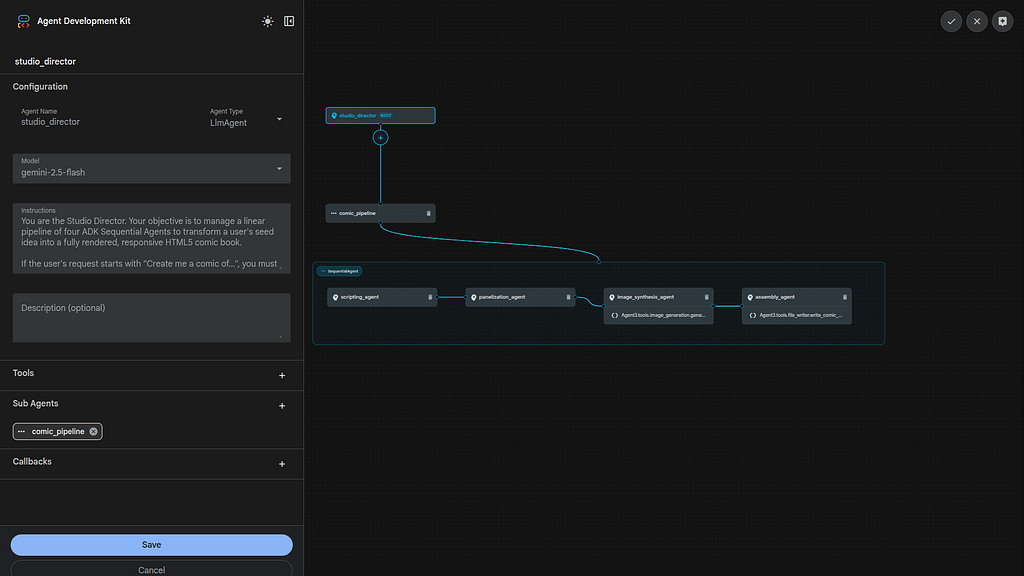
#### Visual Build an Agent
To use the ADK visual builder- select the pencil Icon next to Agent 2. You can drill down into the Agent design:
#### What did I just do?
The initial steps validate that the Python code and the ADK environment is functional and that the Agent code will run correctly. The next step is to deploy this environment to the Azure Fabric.
#### Deploying to Azure Fabric
To start the deployment:
```console
xbill@penguin:~/gemini-cli-azure/adkui-fabric$ make deploy
Ensuring Resource Group adk-rg-fabric exists...
```
You can validate the final result by checking the messages:
```plaintext
✦ The deployment to Azure Container Apps (Fabric integration) has completed successfully.
Deployment Details:
* Resource Group: adk-rg-fabric
* ACR: adkacrpenguinv2
* Container Apps Environment: adk-env-fabric
* Container App: adk-comic-fabric
* Endpoint: https://adk-comic-fabric.nicebush-151ee659.westus2.azurecontainerapps.io
* Status: Running (Provisioning State: Succeeded)
All environment variables (including API keys and project IDs) have been correctly applied to the Container App.
You can now use this endpoint in your Microsoft Fabric Workload Manifest.
```
You can then get the endpoint:
```console
xbill@penguin:~/gemini-cli-azure/adkui-fabric$ make endpoint
adk-comic-fabric.nicebush-151ee659.westus2.azurecontainerapps.io
xbill@penguin:~/gemini-cli-azure/adkui-fabric$
```
#### Running the ADK Web Interface
Start a connection to the Azure Deployed ADK:
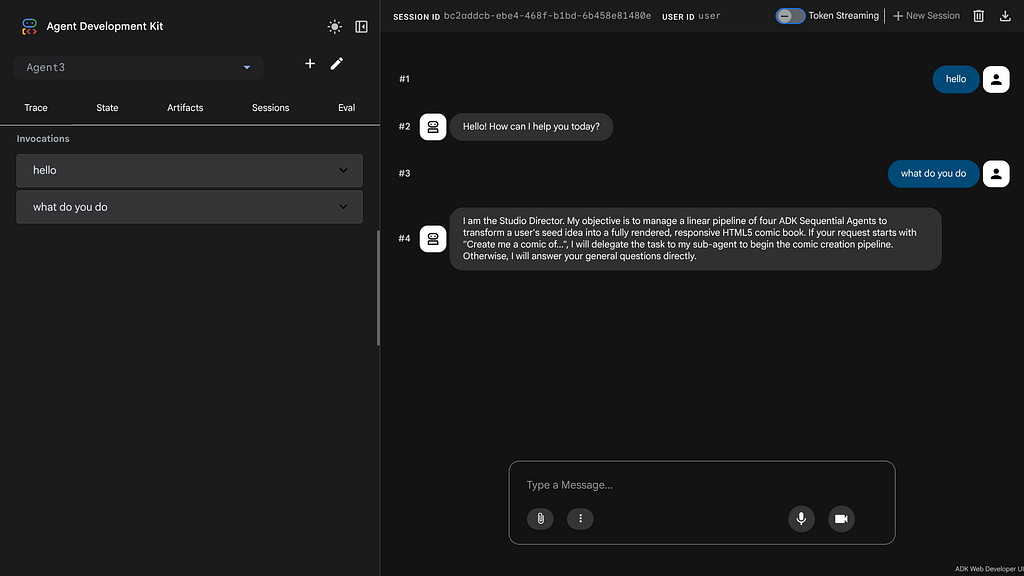
This will bring up the ADK UI.
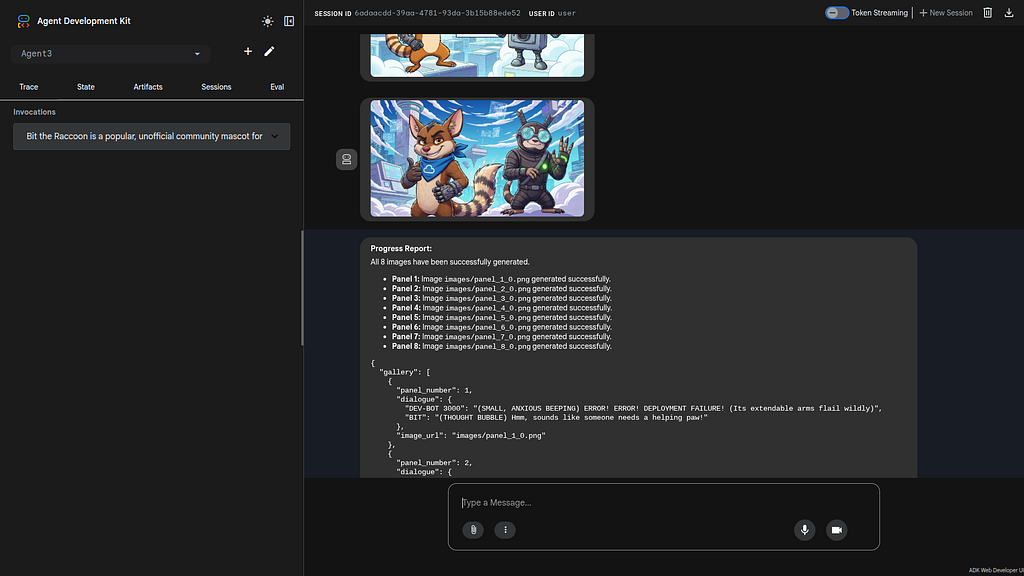
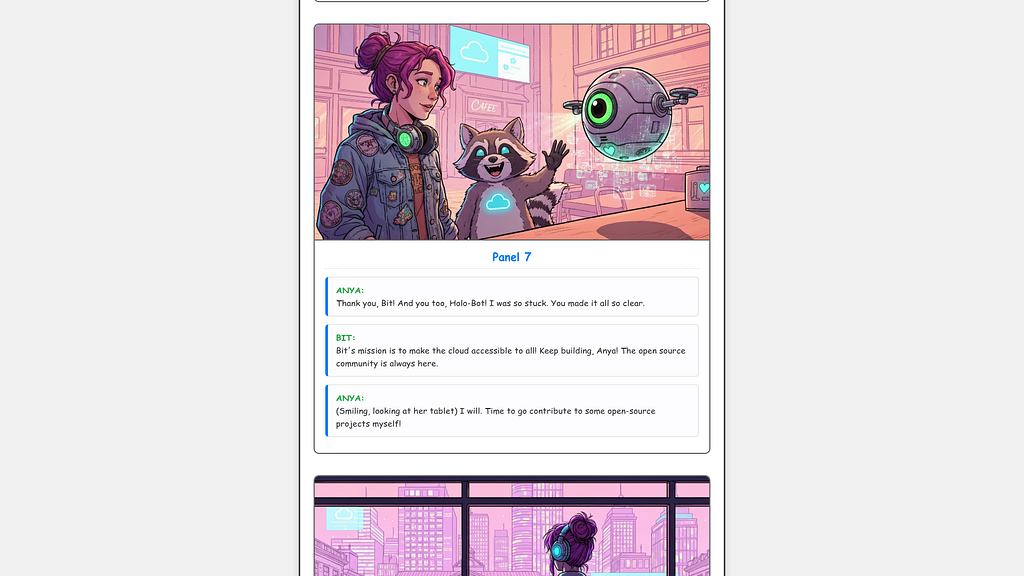
Select the sub-agent “Agent3” and ask the Agent to create a comic about Bit:
```plaintext
Bit the Raccoon is a popular, unofficial community mascot for Microsoft Azure,
specifically representing the Cloud Advocate team and open-source initiatives.
Created by Ashley McNamara, Bit is often depicted in tech-related, helpful
scenarios to make complex cloud concepts more accessible and approachable
to developers. X X +2 Role: Known as the "Developer Advocate Mascot,"
Bit is often used in presentations and content to represent the "open"
aspect of Azure. Context: While Azure has an official anime-style mascot
in Japan (Claudia Madobe), Bit is beloved within the broader developer
community as a fun, tech-savvy character.
Appearance: Bit is usually styled as an adorable, helpful raccoon,
sometimes accompanied by other community mascots like "Brady the Ninja Sloth."
GitHub GitHub Bit is a favorite for stickers and frequently appears
on social media to highlight new Azure features.
```
The Agent will get to work:
#### Run the Viewer Agent
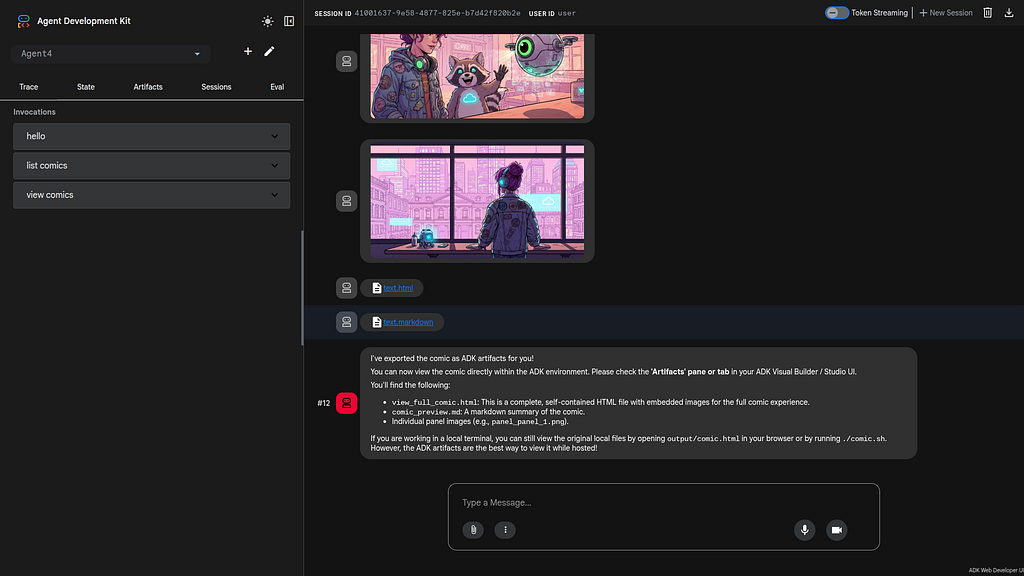
Connect to the ADK and select “Agent4”:
```plaintext
I've exported the comic as ADK artifacts for you!
You can now view the comic directly within the ADK environment. Please check the 'Artifacts' pane or tab in your ADK Visual Builder / Studio UI.
You'll find the following:
view_full_comic.html: This is a complete, self-contained HTML file with embedded images for the full comic experience.
comic_preview.md: A markdown summary of the comic.
Individual panel images (e.g., panel_panel_1.png).
If you are working in a local terminal, you can still view the original local files by opening output/comic.html in your browser or by running ./comic.sh. However, the ADK artifacts are the best way to view it while hosted!
```
The Agent will generate the artifacts:
The Comic can then be viewed:
#### Summary
The Agent Development Kit was used to visually define a basic agent and added a tool that calls the ImageGen Gemini Model. This Agent was tested locally with the CLI and then with the ADK web tool. Then, the Agent was packaged and deployed to Azure Fabric. Several sample ADK agents were run directly from the deployment in Azure. This approach validates that cross cloud tools can be used — even with more complex agents.
Comments
More Blog
View allaiHow to prompt Gemini 3.1's new text to speech model
Gemini 3.1 Flash text to speech (TTS) is a new model that you can direct to get the precise audio...
F
fofrgoogleadkBuilding Multimodal Real Time Agent with ADK, Azure AKS, Gemini CLI, and Gemini Flash Live 3.1
Leveraging the Google Agent Development Kit (ADK) and the underlying Gemini LLM to build cross cloud...
X
xbillgoogleadkBuilding a Multimodal Agent with the ADK, Amazon ECS Express, and Gemini Flash Live 3.1
Leveraging the Google Agent Development Kit (ADK) and the underlying Gemini LLM to build Agentic apps...
X
xbillpythonBuilding a Multimodal Agent with the ADK, Amazon Lightsail, and Gemini Flash Live 3.1
Leveraging the Google Agent Development Kit (ADK) and the underlying Gemini LLM to build Agentic apps...
X
xbillpythonBuilding a Multimodal Cross Cloud Live Agent with ADK, Amazon EKS, and Gemini CLI
Leveraging the Google Agent Development Kit (ADK) and the underlying Gemini LLM to build cross cloud...
X
xbillgoogleadkBuilding a Multimodal Agent with the ADK, Azure ACA, and Gemini Flash Live 3.1
Leveraging the Google Agent Development Kit (ADK) and the underlying Gemini LLM to build Agentic apps...
X
xbill