
Back to Blog ai
ai
 githubactions
 ai
ai antigravity
![[GCP Billing & Vertex AI] Solving Gemini Cost Allocation in a Single Project: Vertex AI Dynamic Billing Labels in Action](https://media2.dev.to/dynamic/image/width=1200,height=627,fit=cover,gravity=auto,format=auto/https%3A%2F%2Fdev-to-uploads.s3.us-east-2.amazonaws.com%2Fuploads%2Farticles%2Fb6yzipcljv2243f1njmh.png) ai
ai ai
ai aie
aie
A Developer's Guide to Understanding Agent Skills: Implementing Progressive Disclosure in Google Apps Script
Tanaike May 6, 2026
0 views
Motivation for Writing As an active researcher and developer in the AI ecosystem, I have...
Motivation for Writing
As an active researcher and developer in the AI ecosystem, I have seamlessly integrated Agent Skills into daily workflows using tools like Claude Code, Gemini CLI, and Antigravity. However, I observed a pervasive tendency in the developer community—and initially within my own practice—to treat these capabilities as opaque black boxes. There is a distinct lack of granular understanding regarding the internal execution steps and the recursive orchestration occurring within Generative AI models when a skill mandates subagent delegation.
To bridge this critical knowledge gap, I conducted a rigorous investigation into the architecture of Agent Skills. Documenting this paradigm shift from rudimentary "tools" to sophisticated "multi-agent workflows" will not only formalize these mechanisms but also provide vital insights for developers constructing scalable, enterprise-grade AI ecosystems.
Abstract
As Large Language Models evolve into autonomous agents, developers frequently encounter Tool Space Interference (TSI)—a context bloat caused by excessive tool availability that degrades model reasoning. This article explores Agent Skills as a robust solution for encapsulating procedural knowledge. Rather than competing with the Model Context Protocol (MCP), Agent Skills complement it by serving as structured operational guidelines. Through a four-level Progressive Disclosure architecture, we optimize token efficiency by dynamically revealing complex instructions and specialized subagents only when required. Furthermore, we demonstrate a scalable, Gemini API-driven workflow using Google Apps Script, highlighting dynamic code execution and a recursive invoke_agent mechanism for autonomous multi-agent orchestration.
Introduction
The explicit objective of this article is to provide a comprehensive, academically rigorous, and highly practical understanding of Agent Skills, with a specific focus on their capacity to orchestrate multiple specialized subagents.
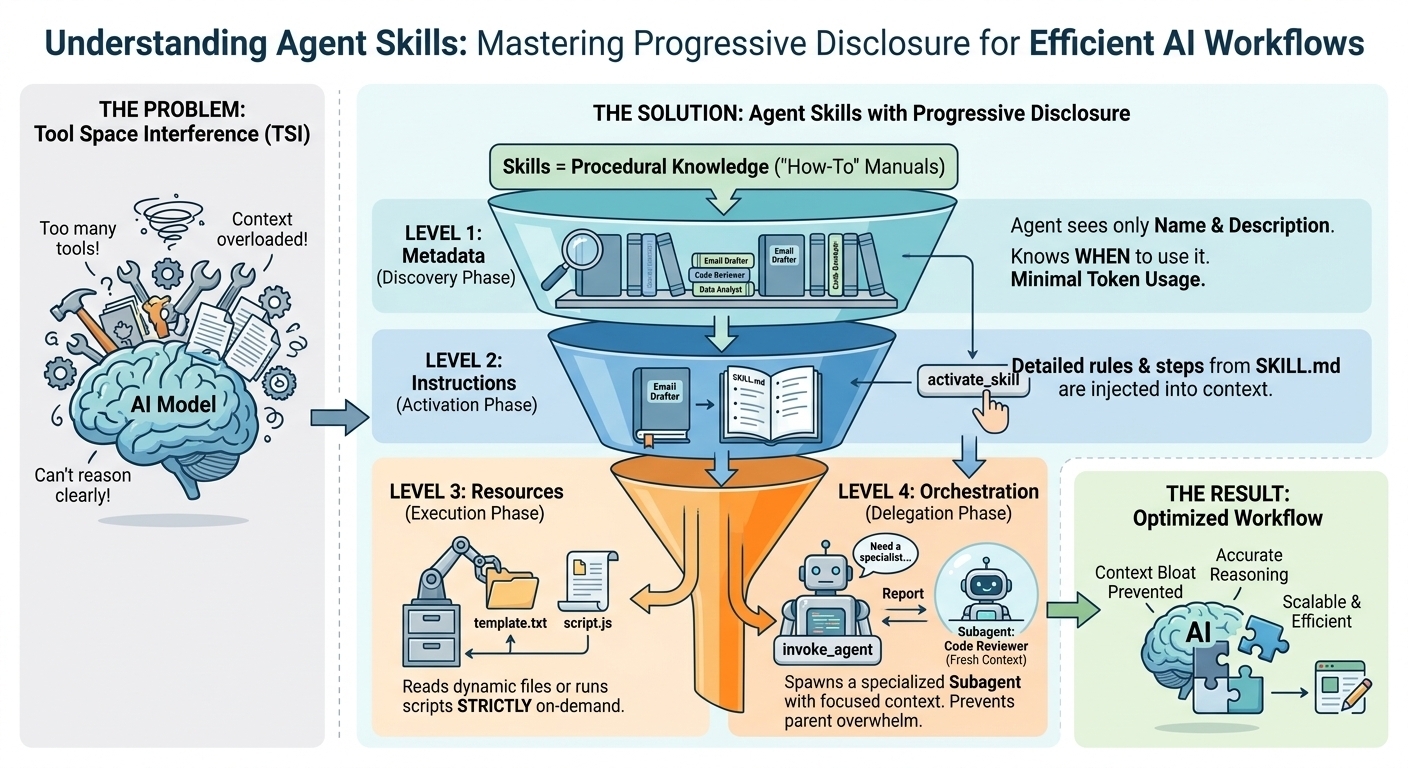
The rapid evolution of Large Language Models (LLMs) has catalyzed their transition from conversational interfaces to autonomous systems. As developers equip these agents with increasingly vast capabilities, a critical bottleneck has emerged: Tool Space Interference (TSI). As delineated in Microsoft's research, front-loading an excessive number of tools leads to attention dilution, context saturation, and heightened tool hallucinations.
To mitigate TSI, Agent Skills were introduced as an open standard paradigm. Anthropic has extensively detailed this ideology in their foundational literature:
Conceptual Boundaries: Prompts, Projects, MCP, and Skills
To architect robust AI ecosystems, it is imperative to delineate the "Procedural Knowledge" layer from other system components:
- Prompts: Transient, interactive instructions designed for isolated, immediate tasks.
- Projects / RAG: The epistemic foundation (What the agent needs to know). Persistent context and background data.
- MCP (Model Context Protocol): The data connectivity layer (Where the data lives). A standardized protocol providing access to external environments and systems.
- Agent Skills: The procedural methodology (How to execute tasks). The codified Procedural Knowledge.
Consider an Agent Skill as a definitive operational manual. While MCP provides the "keys to the filing cabinet," an Agent Skill explicitly defines the methodical steps required to process, analyze, and delegate tasks to sub-specialists in accordance with rigorous standards.
Currently, deploying Agent Skills is recognized as a prevailing best practice. The ecosystem is rapidly standardizing around initiatives such as skills.sh, Anthropic's Skills implementation, and Google's Skills repository. In the subsequent sections, I will elucidate the foundational principles of Agent Skills and demonstrate the implementation of a serverless, multi-agent workflow using Google Apps Script (GAS).
Deep Dive: The Working Principles of Agent Skills
The primary architectural objective of Agent Skills is to eradicate Context Bloat while delivering substantial procedural knowledge. This is achieved through a sophisticated design pattern known as Progressive Disclosure.
The 4 Levels of Progressive Disclosure and Orchestration
A standard Skill implementation relies on a directory containing a SKILL.md file. The systemic intelligence lies in the hierarchical revelation of this data to the model across four distinct strata:
- Level 1 (Metadata): The Discovery Phase. The agent is exposed solely to the
nameanddescription. It discerns when to invoke the skill without expending tokens on premature instructional context. - Level 2 (Instructions): The Activation Phase. Upon triggering
activate_skill, the markdown body ofSKILL.mdis dynamically injected, imposing specific operational rules and constraints. - Level 3 (Resources/Scripts): The Execution Phase. The agent dynamically reads accompanying resources (e.g.,
business_template.txt,sheetCreator.js) strictly on a need-to-know basis, ensuring contextual economy. - Level 4 (Orchestration): The Delegation Phase. If the
SKILL.mdprotocol dictates the necessity of a specialist, the primary agent triggersinvoke_agent. This spawns a Subagent Executor endowed with a pristine, specialized context, effectively insulating the parent agent from technical minutiae and cognitive overload.
Workflow Architecture: From Prompt to Recursive Generation
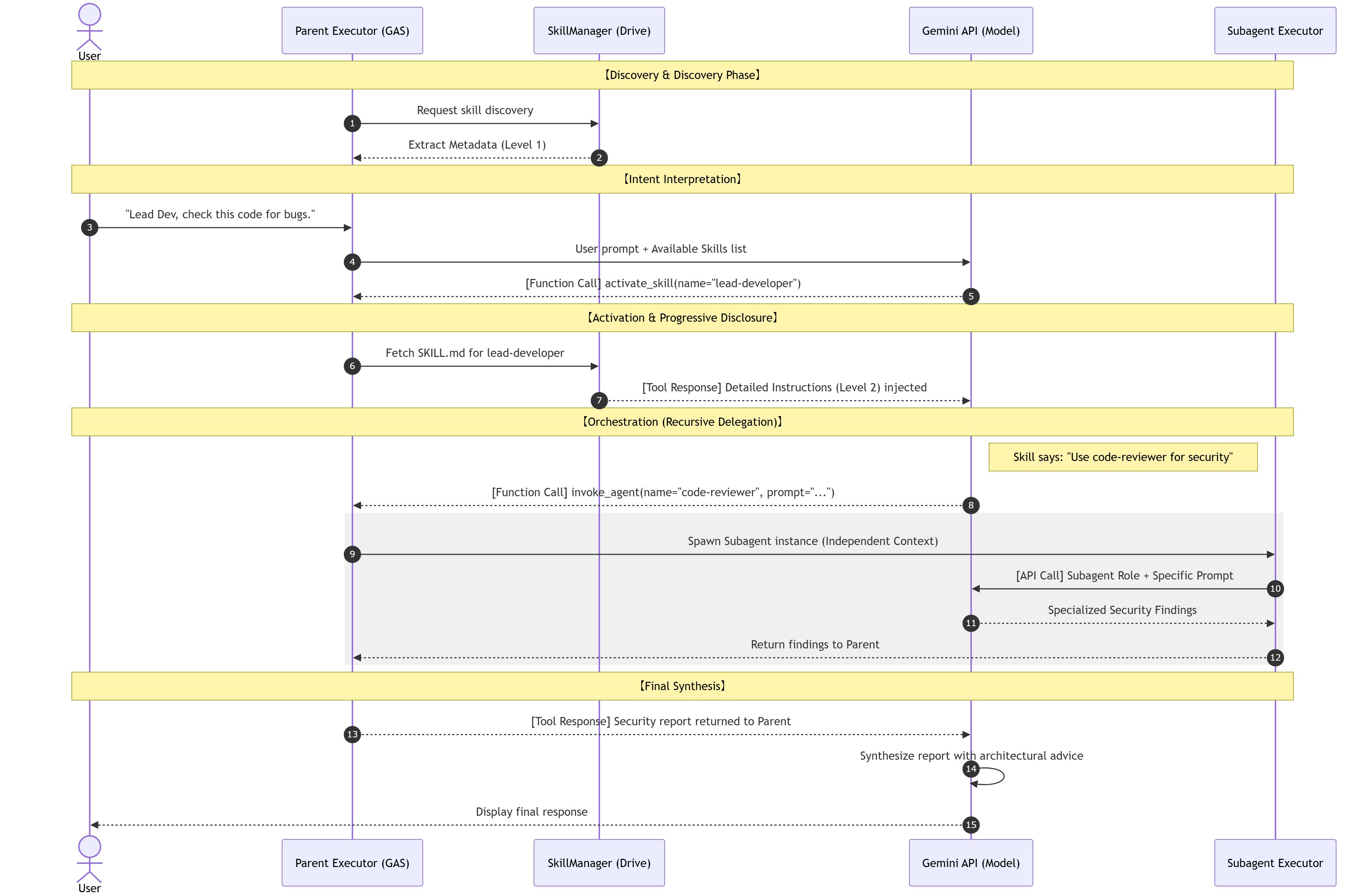
Below is a sequence diagram illustrating the lifecycle of an Agent Skill, mapping the trajectory from initial prompt to the recursive subagent orchestration triggered by instructions within a SKILL.md file.
Implementing Agent Skills in Google Apps Script (GAS)
Leveraging Google Apps Script (GAS) allows developers to construct cloud-native workflows deeply integrated with Google Workspace. The nucleus of this implementation is the GeminiAgent Executor, uniquely designed to support recursive invocations for advanced orchestration.
System Architecture Breakdown
- Automated Provisioning (
setupAllSkillsAndAgents): Dynamically scaffolds 5 specialized skills within Google Drive:email-drafter,json-translator,workspace-automator, and an interacting agent dyad comprisinglead-developer&code-reviewer. - SkillManager: Orchestrates the discovery of
SKILL.mdfiles and facilitates the dynamic reading of resource files or JavaScript payloads from Drive. - Recursive Executor (
GeminiAgent): Manages the conversational loop. Upon the invocation ofinvoke_agent, it instantiates a newGeminiAgentwith a localized sub-role, accurately mirroring the hierarchical subagent behavior observed in the Gemini CLI.
Deep Analysis of Execution Results
The efficacy of this architecture is empirically validated in the provided test execution logs. An analysis of the agent's behavioral dynamics under varying skill constraints reveals the following:
1. Resource Dependency Handling (Basic Skill)
In Test Case 1, the agent was instructed to "Draft an email to Bob."
- Log Trace:
[Action] Executing activate_skill...followed by[Action] Executing read_skill_resource... - Analysis: The model eschewed hallucination. It logically activated the
email-drafterskill, parsed the procedural instructions, and identified the prerequisite forbusiness_template.txt. By fetching the resource from Google Drive and executing placeholder substitution, it generated a structurally sound draft.
2. Autonomous Automation (Dynamic Scripting)
In Test Case 2, the objective was to "Create a Google Sheet."
- Log Trace:
[Action] Executing run_dynamic_script... - Analysis: The AI systematically parsed natural language intent into a structured JSON argument matrix. The GAS runtime subsequently utilized
new Function()to executesheetCreator.js. This mechanism bridges the gap between semantic understanding and tangible world-state alteration ("Actionable AI"), successfully yielding a live Google Sheet URL.
3. Recursive Orchestration (Orchestration Phase)
In Test Case 3, the prompt was "Lead Developer, please check this function."
- Log Trace:
[Action] Executing activate_skill...followed by[Action] Executing invoke_agent... - Analysis: This exemplifies peak architectural sophistication. The parent orchestrator (
lead-developer) activated, processed its constraints, and recognized the mandatory requirement to consult a security specialist. It spawned a subagent (code-reviewer) with an isolated context window. The subagent conducted a rigorous audit (citing CWE-798 and CWE-208), which the parent subsequently synthesized with high-level architectural directives. This paradigm ensures that cognitively demanding specialized tasks are processed within highly focused, uncontaminated context windows.
Sample Code
This implementation targets the gemini-3-flash-preview model and demonstrates the full 4-level disclosure and orchestration flow.
/**
 * ==========================================================================================
 * Gemini CLI Architecture for Google Apps Script (GAS)
 * ==========================================================================================
 *
 * [Description]
 * This script emulates the Gemini CLI's Agent Skills and Subagent Orchestration logic.
 * It supports dynamic skill activation, resource reading, dynamic scripting, and recursive
 * subagent invocation using specialized executors.
 *
 * [Prerequisites]
 * 1. Open Google Apps Script (https://script.new/).
 * 2. Go to Project Settings > Script Properties.
 * 3. Add a property: "GEMINI_API_KEY" = (Your Google AI Studio API Key).
 *
 * [How to Use]
 * 1. Run `setupAllSkillsAndAgents()`: This creates the "Gemini_Skills_Root" folder in Google Drive
 *    and scaffolds 5 specialized skills (including subagents and orchestrators).
 * 2. Run `testComprehensiveAgentFlow()`: This executes a suite of test cases covering
 *    basic skills, dynamic GAS scripting, and multi-agent orchestration.
 *
 *[Model]
 * Uses: gemini-3-flash-preview
 * ==========================================================================================
 */

const GEMINI_MODEL = "gemini-3-flash-preview";

// ==========================================================================
// 1. Setup Phase: Scaffolding all Skills and Agent Instructions
// ==========================================================================

/**
 * Creates folders and SKILL.md files for all 5 specialized skills.
 */
function setupAllSkillsAndAgents() {
  const rootFolderName = "Gemini_Skills_Root";
  const folders = DriveApp.getFoldersByName(rootFolderName);
  const rootFolder = folders.hasNext() ? folders.next() : DriveApp.createFolder(rootFolderName);

  // --- Skill 1: email-drafter (Basic Resource Reading) ---
  const emailFolder = getOrCreateFolder_(rootFolder, "email-drafter");
  const emailMd = `---
name: email-drafter
description: Expert in drafting business emails using standard templates.
---
Instructions:
1. Use "read_skill_resource" to read "business_template.txt".
2. Fill the template placeholders [Subject], [Name],[Body] with user details.
3. Return the polished final draft.`;
  updateFileInFolder_(emailFolder, "SKILL.md", emailMd);
  updateFileInFolder_(emailFolder, "business_template.txt", "Subject: [Subject]\n\nDear [Name],\n\n[Body]\n\nBest regards,\n[Your Name]");

  // --- Skill 2: json-translator (JSON Output Formatting) ---
  const jsonFolder = getOrCreateFolder_(rootFolder, "json-translator");
  const jsonMd = `---
name: json-translator
description: Translates text into specific languages in strict JSON format.
---
Instructions:
1. Use "read_skill_resource" to get "format.json".
2. Translate the input and populate the JSON fields. Output ONLY valid JSON.`;
  updateFileInFolder_(jsonFolder, "SKILL.md", jsonMd);
  updateFileInFolder_(jsonFolder, "format.json", `{\n "status": "success",\n "translated_text": "[Result]"\n}`);

  // --- Skill 3: workspace-automator (Dynamic Script Execution) ---
  const autoFolder = getOrCreateFolder_(rootFolder, "workspace-automator");
  const autoMd = `---
name: workspace-automator
description: Automates Spreadsheet and Document creation via run_dynamic_script.
---
Instructions:
1. Prepare argsJSON for "sheetCreator.js" or "docCreator.js".
2. Use "run_dynamic_script" to execute the automation. Return URLs.`;
  updateFileInFolder_(autoFolder, "SKILL.md", autoMd);
  updateFileInFolder_(autoFolder, "sheetCreator.js", `
    const ss = SpreadsheetApp.create(args.title || "Auto Sheet");
    return "Sheet Created: " + ss.getUrl();
  `);

  // --- Skill 4: code-reviewer (Subagent / Specialized Expert) ---
  const reviewerFolder = getOrCreateFolder_(rootFolder, "code-reviewer");
  const reviewerMd = `---
name: code-reviewer
description: Security expert that reviews code snippets for vulnerabilities.
---
Instructions:
Act as a Senior Security Auditor.
1. Analyze the provided code for hardcoded secrets, injection risks, or bad patterns.
2. Provide a point-by-point security report.`;
  updateFileInFolder_(reviewerFolder, "SKILL.md", reviewerMd);

  // --- Skill 5: lead-developer (Orchestrator / Parent Agent) ---
  const leadFolder = getOrCreateFolder_(rootFolder, "lead-developer");
  const leadMd = `---
name: lead-developer
description: Manages code development and delegates reviews to the code-reviewer subagent.
---
Instructions:
You are the Lead Developer.
1. When asked to evaluate code, FIRST use "invoke_agent" to call "code-reviewer".
2. Combine the reviewer's report with your own architectural advice for the final response.`;
  updateFileInFolder_(leadFolder, "SKILL.md", leadMd);

  PropertiesService.getScriptProperties().setProperty("SKILLS_ROOT_FOLDER_ID", rootFolder.getId());
  CacheService.getScriptCache().remove("agent_skills_metadata");

  console.log("✅ All 5 Skills and Agents have been successfully set up in Drive.");
}

// ==========================================================================
// 2. Comprehensive Test Suite
// ==========================================================================

/**
 * Executes tests for all skill categories: Basic, Dynamic, and Orchestration.
 */
function testComprehensiveAgentFlow() {
  const props = PropertiesService.getScriptProperties();
  const apiKey = props.getProperty("GEMINI_API_KEY");
  const rootId = props.getProperty("SKILLS_ROOT_FOLDER_ID");

  if (!apiKey || !rootId) return console.error("❌ Missing Script Properties (GEMINI_API_KEY or SKILLS_ROOT_FOLDER_ID).");

  const skillManager = new SkillManager(rootId);
  const mainAgent = new GeminiAgent(apiKey, skillManager, GEMINI_MODEL);

  const testPrompts =[
    { type: "Basic Skill", text: "Draft an email to Bob about the server maintenance on Friday." },
    { type: "Dynamic Scripting", text: "Create a Google Sheet titled 'Project X Roadmap'." },
    { type: "Orchestration", text: "Lead Developer, please check this function: 'function auth(pw) { return pw == \"admin123\"; }'" }
  ];

  testPrompts.forEach((prompt, index) => {
    console.log(`\n=================================================`);
    console.log(`TEST CASE ${index + 1}[${prompt.type}]`);
    console.log(`INPUT: ${prompt.text}`);
    console.log(`-------------------------------------------------`);

    const result = mainAgent.chat(prompt.text);

    console.log(`\nRESULT:\n${result.text}`);
    console.log(`\nSKILLS ACTIVATED: ${result.skills.join(", ") || "None"}`);
  });
}

// ==========================================================================
// 3. Core Logic Classes
// ==========================================================================

class SkillManager {
  constructor(rootFolderId) {
    this.rootFolderId = rootFolderId;
  }

  discoverSkills() {
    const cache = CacheService.getScriptCache();
    const cached = cache.get("agent_skills_metadata");
    if (cached) return JSON.parse(cached);

    const root = DriveApp.getFolderById(this.rootFolderId);
    const folders = root.getFolders();
    const skills = {};

    while (folders.hasNext()) {
      const folder = folders.next();
      const files = folder.getFilesByName("SKILL.md");
      if (files.hasNext()) {
        const content = files.next().getBlob().getDataAsString();
        const parsed = this.parseSkillMd_(content);
        if (parsed) {
          skills[parsed.name] = { ...parsed, folderId: folder.getId() };
        }
      }
    }
    cache.put("agent_skills_metadata", JSON.stringify(skills), 3600);
    return skills;
  }

  activateSkill(skillName) {
    const skill = this.discoverSkills()[skillName];
    if (!skill) throw new Error(`Skill ${skillName} not found.`);
    const files =[];
    const fileIter = DriveApp.getFolderById(skill.folderId).getFiles();
    while (fileIter.hasNext()) files.push(fileIter.next().getName());

    return `[SYSTEM: Skill '${skillName}' Activated]\nInstructions:\n${skill.instructions}\n\nFolder Contents: ${files.join(", ")}`;
  }

  readResource(skillName, fileName) {
    const skill = this.discoverSkills()[skillName];
    const files = DriveApp.getFolderById(skill.folderId).getFilesByName(fileName);
    if (!files.hasNext()) throw new Error(`Resource '${fileName}' missing.`);
    return files.next().getBlob().getDataAsString();
  }

  executeScript(skillName, scriptName, argsJSON) {
    const code = this.readResource(skillName, scriptName);
    const args = typeof argsJSON === 'string' ? JSON.parse(argsJSON) : argsJSON;
    const func = new Function("args", code);
    return func(args);
  }

  getToolDeclarations() {
    return[{
      function_declarations:[
        {
          name: "activate_skill",
          description: "Activates a skill and loads its specialized instructions.",
          parameters: { type: "OBJECT", properties: { skillName: { type: "STRING" } }, required: ["skillName"] }
        },
        {
          name: "invoke_agent",
          description: "Delegates a sub-task to a specialized subagent. Returns the response.",
          parameters: {
            type: "OBJECT",
            properties: {
              agent_name: { type: "STRING" },
              prompt: { type: "STRING" }
            },
            required: ["agent_name", "prompt"]
          }
        },
        {
          name: "read_skill_resource",
          description: "Reads a file from the skill's resource folder.",
          parameters: { type: "OBJECT", properties: { skillName: { type: "STRING" }, fileName: { type: "STRING" } }, required: ["skillName", "fileName"] }
        },
        {
          name: "run_dynamic_script",
          description: "Runs a GAS script from resources.",
          parameters: { type: "OBJECT", properties: { skillName: { type: "STRING" }, scriptName: { type: "STRING" }, argsJSON: { type: "STRING" } } }
        }
      ]
    }];
  }

  parseSkillMd_(content) {
    const parts = content.replace(/\r\n/g, "\n").match(/^---\n([\s\S]*?)\n---\n([\s\S]*)$/);
    if (!parts) return null;
    return {
      name: (parts[1].match(/name:\s*(.+)/) || [])[1]?.trim(),
      description: (parts[1].match(/description:\s*(.+)/) || [])[1]?.trim(),
      instructions: parts[2].trim()
    };
  }
}

class GeminiAgent {
  constructor(apiKey, skillManager, model, overrideSystemPrompt = null) {
    this.apiKey = apiKey;
    this.skillManager = skillManager;
    this.model = model;
    this.overrideSystemPrompt = overrideSystemPrompt;
    this.maxLoops = 8;
  }

  chat(message) {
    const skills = this.skillManager.discoverSkills();
    const list = Object.values(skills).map(s => `- ${s.name}: ${s.description}`).join("\n");
    const systemInstruction = this.overrideSystemPrompt ||
      `You are a senior agent. Available skills:\n${list}\n\nRules:\n1. Use 'activate_skill' for specialized tasks.\n2. Use 'invoke_agent' for expert sub-tasks.`;

    let history =[{ role: "user", parts: [{ text: message }] }];
    let activated = new Set();

    for (let i = 0; i < this.maxLoops; i++) {
      const payload = {
        contents: history,
        system_instruction: { parts: [{ text: systemInstruction }] },
        tools: this.skillManager.getToolDeclarations()
      };

      const res = this.callAPI_(payload);
      if (!res.candidates) return { text: "API Error: " + JSON.stringify(res), skills: [] };

      const modelMsg = res.candidates[0].content;
      modelMsg.role = "model";
      history.push(modelMsg);

      const calls = (modelMsg.parts ||[]).filter(p => p.functionCall).map(p => p.functionCall);
      if (calls.length === 0) return { text: modelMsg.parts.map(p => p.text).join("\n"), skills: Array.from(activated) };

      const responses =[];
      for (const call of calls) {
        console.log(`   [Action] Executing ${call.name}...`);
        let out;
        try {
          if (call.name === "activate_skill") {
            activated.add(call.args.skillName);
            out = this.skillManager.activateSkill(call.args.skillName);
          } else if (call.name === "invoke_agent") {
            const subSkill = skills[call.args.agent_name];
            const subAgent = new GeminiAgent(this.apiKey, this.skillManager, this.model, `[SUBAGENT ROLE: ${call.args.agent_name}]\n${subSkill.instructions}`);
            out = subAgent.chat(call.args.prompt).text;
          } else if (call.name === "read_skill_resource") {
            out = this.skillManager.readResource(call.args.skillName, call.args.fileName);
          } else if (call.name === "run_dynamic_script") {
            out = this.skillManager.executeScript(call.args.skillName, call.args.scriptName, call.args.argsJSON);
          }
        } catch (e) {
          out = "Error: " + e.message;
        }
        responses.push({ functionResponse: { name: call.name, response: { result: out } } });
      }
      history.push({ role: "function", parts: responses });
    }
    return { text: "Max loops reached.", skills: Array.from(activated) };
  }

  callAPI_(payload) {
    const url = `https://generativelanguage.googleapis.com/v1beta/models/${this.model}:generateContent?key=${this.apiKey}`;
    return JSON.parse(UrlFetchApp.fetch(url, { method: "post", contentType: "application/json", payload: JSON.stringify(payload), muteHttpExceptions: true }).getContentText());
  }
}

// Helpers
function getOrCreateFolder_(p, n) {
  const f = p.getFoldersByName(n);
  return f.hasNext() ? f.next() : p.createFolder(n);
}

function updateFileInFolder_(f, n, c) {
  const files = f.getFilesByName(n);
  if (files.hasNext()) files.next().setContent(c);
  else f.createFile(n, c);
}
Execution Results
The following log demonstrates the system’s ability to handle basic skills, dynamic automation, and multi-agent orchestration within a single session.
10:58:03	Notice	Execution started
10:58:03	Info
=================================================
10:58:03	Info	TEST CASE 1[Basic Skill]
10:58:03	Info	INPUT: Draft an email to Bob about the server maintenance on Friday.
10:58:03	Info	-------------------------------------------------
10:58:11	Info	   [Action] Executing activate_skill...
10:58:13	Info	   [Action] Executing read_skill_resource...
10:58:16	Info
RESULT:
Subject: Server Maintenance - Friday

Dear Bob,

Please be advised that we have scheduled server maintenance for this coming Friday. We anticipate some brief service interruptions during this time. Please ensure that all critical tasks are completed ahead of schedule to avoid any potential data loss or downtime.

We apologize for any inconvenience this may cause and appreciate your patience. Let us know if you have any questions or concerns.

Best regards,
Senior Agent
10:58:16	Info
SKILLS ACTIVATED: email-drafter
10:58:16	Info
=================================================
10:58:16	Info	TEST CASE 2 [Dynamic Scripting]
10:58:16	Info	INPUT: Create a Google Sheet titled 'Project X Roadmap'.
10:58:16	Info	-------------------------------------------------
10:58:18	Info	   [Action] Executing activate_skill...
10:58:20	Info	   [Action] Executing run_dynamic_script...
10:58:23	Info
RESULT:
The Google Sheet 'Project X Roadmap' has been successfully created. You can access it here: https://docs.google.com/spreadsheets/d/1hF4SOWZp9qZlfKT2wxk1S9fTk0EhPLLwDox6msV_kvQ/edit
10:58:23	Info
SKILLS ACTIVATED: workspace-automator
10:58:23	Info
=================================================
10:58:23	Info	TEST CASE 3[Orchestration]
10:58:23	Info	INPUT: Lead Developer, please check this function: 'function auth(pw) { return pw == "admin123"; }'
10:58:23	Info	-------------------------------------------------
10:58:25	Info	   [Action] Executing activate_skill...
10:58:25	Info[Action] Executing invoke_agent...
10:58:30	Info	   [Action] Executing invoke_agent...
10:58:47	Info
RESULT:
As the Lead Developer, I have reviewed your code and consulted our security expert. This function is highly insecure and should not be used in any environment.

### Security Report & Architectural Review

The code `function auth(pw) { return pw == "admin123"; }` presents several critical risks:

1.  **Hardcoded Credentials (CWE-798):** Storing a password directly in the source code is a major vulnerability. If this is client-side code, anyone can see it; if it's server-side, it is exposed to anyone with repository access.
2.  **Plaintext Comparison:** Passwords must never be stored or compared in plaintext. They should be stored as salted hashes using modern algorithms like Argon2 or bcrypt.
3.  **Timing Attack Vulnerability (CWE-208):** The `==` operator returns `false` immediately upon finding a mismatch. An attacker can measure the time it takes to respond to determine how many characters they guessed correctly.
4.  **No Rate Limiting:** The function allows for infinite, rapid-fire guesses, making it trivial for an automated script to brute-force the password.

### Architectural Recommendations

From a development perspective, we recommend the following shifts in architecture:

*   **Move to the Backend:** Never perform authentication checks on the frontend. Use a secure backend API that interacts with a protected database.
*   **Use Proven Libraries:** Do not write your own authentication logic. Utilize established libraries (like `Passport.js` or `NextAuth`) or Managed Identity Providers (like Auth0, Firebase Auth, or AWS Cognito).
*   **Implement Secrets Management:** Use environment variables or secret management tools (like Vault or AWS Secrets Manager) to handle configuration, never hardcoding values.
*   **Logging and Monitoring:** Implement auditing for failed login attempts to detect and respond to brute-force attacks in real-time.

### Secure Implementation Example (Node.js)
\`\`\`javascript
const argon2 = require('argon2');

// In a real app, this hash is fetched from a database
const SECURE_HASH = process.env.ADMIN_HASH;

async function auth(providedPw) {
    try {
        // Argon2 handles salting and constant-time comparison automatically
        return await argon2.verify(SECURE_HASH, providedPw);
    } catch (err) {
        console.error("Auth error:", err);
        return false;
    }
}
\`\`\`

**Verdict:** The original code must be replaced immediately with a secure hashing implementation and a robust backend architecture.
10:58:47	Info
SKILLS ACTIVATED: lead-developer
10:58:47	Notice	Execution completed
Security Considerations
While executing Level 3 resources dynamically via new Function() within Google Apps Script confers tremendous flexibility, it inherently introduces the severe risk of Arbitrary Code Execution (ACE). If a malicious actor compromises the JavaScript files residing in Google Drive, the agent could unwittingly execute hostile payloads under the user's authenticated scope.
To rigorously mitigate these threat vectors, adherence to the following security postures is non-negotiable:
- Strict Access Control: Ensure the
Gemini_Skills_RootGoogle Drive directory is strictly private or its access is governed by the principle of least privilege, restricted solely to trusted administrators. - Audit Third-Party Skills: Never deploy or execute open-source skills without conducting a comprehensive security audit of the underlying
.jsresource binaries. - Encapsulation: Utilize the
invoke_agentpattern to hermetically seal specialized logic, strictly bounding the subagent's execution scope to its predefined mandate.
Streamlining Agent Skills with GeminiWithFiles
While architecting this progressive disclosure and orchestration framework from fundamental primitives is a profound educational endeavor, it is often superfluous for production-grade deployments. As the creator of GeminiWithFiles, I have modernized the library to natively integrate and support the Agent Skills architecture.
Developers can bypass the boilerplate infrastructure and actualize this robust multi-agent workflow via the following concise implementation:
function runAgentSkills() {
  const apiKey = "YOUR_API_KEY";
  const skillFolderId = "YOUR_AGENT_SKILLS_DRIVE_FOLDER_ID";

  const g = GeminiWithFiles.geminiWithFiles({ apiKey, skillFolderId, temperature: 0.0 });
  const response = g.chat({ q: "Create a Q3 Sales Forecast sheet." });

  console.log("Final Output:\n", response.candidates[0].content.parts.map(p => p.text).join("\n"));
}
Summary
Through this exposition, we have established the following critical paradigms regarding Agent Skills:
- Eradicating Context Bloat: Strategically mitigating Tool Space Interference (TSI) by encapsulating complex instructions and recursive agent logic into self-contained, modular Skills.
- Formalizing Procedural Knowledge: Drawing a definitive conceptual boundary between deterministic data connectivity (MCP) and the operational frameworks that dictate procedural execution (Agent Skills).
- Mastering Progressive Disclosure: Optimizing token utility through the calculated, on-demand revelation of Level 1 (Metadata), Level 2 (Instructions), Level 3 (Resources), and Level 4 (Orchestration) contexts.
- Architecting Cloud-Native Orchestration: Engineering a recursive subagent executor within Google Apps Script, capitalizing on the V8 Engine for dynamic code execution and Google Drive for distributed skill storage.
- Securing Dynamic Workflows: Enforcing stringent access controls and rigorous code audits to neutralize the inherent risks of arbitrary code execution when granting AI models dynamic scripting autonomy.
I sincerely hope that this manuscript has provided you with a deep, practical understanding of Agent Skills, empowering you to build more reliable, secure, and scalable AI ecosystems.
Comments
More Blog
View allgithubactionsAutomated GitHub Code Reviews Using Google Gemini
I Built a Thing! TL;DR — Google Gemini-based Pull Request reviews and Issue Triaging for...
D
Darren "Dazbo" LesteraiStop Your LLMs from Forgetting (Part 2): How a Graph-Anchor Pyramid Cures AI’s Relational Blindspots
Have you ever had a brilliant solution get completely crushed by a single comment on a technical blog...
T
TanaikeantigravityRemote Control Antigravity - Migrating to new Antigravity ecossytem and fully autonomous goals
In my previous post, we explored how to build an AI-powered IDE companion app from scratch using...
M
Marcelo Costaai[GCP Billing & Vertex AI] Solving Gemini Cost Allocation in a Single Project: Vertex AI Dynamic Billing Labels in Action
Pain Point: How to Accurately Allocate Gemini API Costs Within the Same Project? When...
E
Evan LinaiStop Your LLMs from Forgetting: How a 2016 String Algorithm Solves AI's Biggest Memory Loss Problem
Have you ever tried to read a massive pile of reports and summarize them in under 50 words? It’s...
T
TanaikeaieGoogle VP of Technology says he’s given up on coding
In his keynote on Wednesday, Benoit Schillings, vice president of Technology at Google DeepMind and...
I
Iain ThomsonReady-made automations for this
Workflows from the Neura Market marketplace related to this Gemini resource
- AI-Powered Upwork Cover Letter Generator - Pinecone, Groq, Google Gemini, SerpAPIn8n · $14.99 · Related topic
- Automated Reservation System with Telegram, Google Gemini AI, and Google Sheetsn8n · $9.99 · Related topic
- Test Your Data Access Techniques with Progressive Expression Challengesn8n · $24.99 · Related topic
- Process Multiple Media Files in Telegram with Gemini AI & PostgreSQL Databasen8n · $24.99 · Related topic