
Back to Blog ai
ai
 ai
ai aie
aie gemini
 ai
ai aie
aie aie
aie
[Hands-on Gemini 3.5 Live
Evan Lin June 10, 2026
0 views
Brand New API Unveiled: Gemini 3.5 Live Translate On June 9, 2026, Google officially...
Brand New API Unveiled: Gemini 3.5 Live Translate
On June 9, 2026, Google officially released its brand new real-time voice translation model — Gemini 3.5 Live Translate. This marks another significant breakthrough for Google in AI voice translation technology. It is currently available for public preview to developers in Google AI Studio and Gemini Live API, and has been simultaneously integrated into services like Google Translate and Google Meet.
Key features of Gemini 3.5 Live Translate include:
- Fluent and Natural Bidirectional Voice Translation: Supports over 70 languages, automatically detecting the input voice language without manual configuration.
- Continuous Stream Generation (Instead of Single-Sentence Turn-Taking): Unlike previous turn-by-turn systems that required the speaker to finish speaking before translation, Gemini 3.5 Live Translate generates translations in real-time while listening. It strikes a balance between contextual understanding and immediacy, with translations lagging only a few seconds behind the speaker, completely avoiding awkward pauses.
- Preservation of Intonation and Rhythm: The generated voice is not only smooth but also retains the original speaker's tone, intonation, and speaking rhythm.
- Robust Noise Cancellation Capability: Accurately captures and recognizes speech even in noisy or unstable environments.
This article will document how we developed a native macOS application, MeetingTranslator, using Swift, to integrate with this powerful new API and achieve real-time translation of specific app audio into Traditional Chinese voice and subtitles.
System Design and Architecture
Our goal is to develop a Native SwiftUI application that does not require installing virtual sound cards like BlackHole. Instead, it utilizes Apple's official ScreenCaptureKit framework to directly capture the audio stream from a selected application (such as YouTube in Google Chrome or an online meeting) and, through the Gemini Live WebSocket API, achieve ultra-low-latency conversational voice translation.
System Architecture Flow
graph TD
    A[ScreenCaptureKit <br>Capture Application Audio] -->|48kHz Stereo Float32| B[AVAudioConverter <br>Resampling and Channel Conversion]
    B -->|16kHz Mono Int16 PCM| C[Gemini Live API <br>WebSocket Connection]
    C -->|Real-time Subtitle Recognition| D[SwiftUI Subtitle HUD <br>Traditional Chinese Bilingual Subtitles]
    C -->|24kHz Mono Int16 PCM Translated Audio| E[AudioPlaybackManager <br>AVAudioEngine Player]
Core Implementation One: ScreenCaptureKit Capture and Resampling
ScreenCaptureKit, introduced in macOS 13, frees developers from the pain of relying on kernel audio virtual devices, allowing precise filtering and recording of specific application screens and audio.
1. Filter and Select Target App
We use SCShareableContent to get currently running applications on the system and filter out background services without names and system-自带 services:
func fetchShareableApps() async -> [SCRunningApplication] {
    do {
        let content = try await SCShareableContent.current
        return content.applications.filter { app in
            let name = app.applicationName
            guard !name.isEmpty else { return false }
            let bundleId = app.bundleIdentifier
            return !bundleId.hasPrefix("com.apple.system") && bundleId != Bundle.main.bundleIdentifier
        }.sorted { $0.applicationName < $1.applicationName }
    } catch {
        print("無法獲取可共享內容: \(error)")
        return []
    }
}
2. Start Audio Capture Stream
After filtering out the target App (e.g., Google Chrome), we create an SCContentFilter for it and apply it to SCStream:
let appFilter = SCContentFilter(display: content.displays.first!, including: [targetApp], exceptingWindows: [])
let config = SCStreamConfiguration()
config.capturesAudio = true
config.width = 32 // When only capturing audio, set video frame to minimal to save performance
config.height = 32

stream = SCStream(filter: appFilter, configuration: config, delegate: nil)
try stream?.addStreamOutput(self, type: .audio, sampleHandlerQueue: DispatchQueue(label: "com.translator.audioQueue"))
try await stream?.startCapture()
Core Implementation Two: Gemini Live WebSocket Bidirectional Connection
The core of the Gemini Live API lies in using a wss:// connection to transmit microphone/application audio in real-time through a single channel, and simultaneously receive model-generated translated text and translated audio.
In GeminiLiveConnection.swift, we maintain this bidirectional pipeline via URLSessionWebSocketTask. After connecting, a setup control message must be sent immediately to initialize the model configuration.
Major Pitfalls and Solutions
During the process of integrating the system, we encountered three blocking difficulties. Below is our troubleshooting process and solutions:
Pitfall One: Gemini Live Exclusive Model Restrictions
Initially, we tried to use standard REST API model names (e.g., gemini-3.5-flash) in the WebSocket connection, but the server immediately disconnected:
❌ WebSocket 被 Gemini 伺服器關閉 (CloseCode: 1008, 原因: models/gemini-3.5-flash is not found for API version v1beta, or is not supported for bidiGenerateContent.)
【Solution】 Gemini's bidirectional Live API currently only supports specific optimized real-time models. We must restrict the model field to:
gemini-2.0-flash-exp(standard bidirectional conversation)gemini-3.5-live-translate-preview(preview model optimized for real-time translation)
Pitfall Two: Incorrect JSON Payload Field Structure (Hidden Differences Between Documentation and API Versions)
When configuring real-time interpretation, we referred to Google's official documentation and placed the inputAudioTranscription (input speech-to-text) and outputAudioTranscription (output speech-to-text) fields within generationConfig, which resulted in a 1007 error:
❌ WebSocket 被 Gemini 伺服器關閉 (CloseCode: 1007, 原因: Invalid JSON payload received. Unknown name "inputAudioTranscription" at 'setup.generation_config': Cannot find field.)
【Cause Analysis and Solution】 In the official documentation, for v1alpha and client SDKs (e.g., JavaScript / Python SDK), these two fields are wrapped within generationConfig. However, in the current v1beta WebSocket native endpoint: /ws/google.ai.generativelanguage.v1beta.GenerativeService.BidiGenerateContent
These two fields should be located at the root level of the setup object, while the translation-specific translationConfig must be placed under generationConfig. The correct JSON Payload structure is as follows:
setupMessage = [
    "setup": [
        "model": "models/\(modelName)",
        "inputAudioTranscription": [:], // Enable real-time input subtitles, placed at the setup root
        "outputAudioTranscription": [:], // Enable real-time output subtitles, placed at the setup root
        "generationConfig": [
            "responseModalities": ["AUDIO"],
            "translationConfig": [
                "targetLanguageCode": "zh-TW", // Set target translation language to Traditional Chinese
                "echoTargetLanguage": true
            ]
        ]
    ]
]
After this modification, the WebSocket setup finally successfully handshaked and no longer crashed!
Pitfall Three: "Zero-Byte Silence" Caused by Multi-Channel Stereo Capture
After successfully establishing the WebSocket pipeline and starting to push resampled audio, we found that Gemini still had no translation response. Observing the log output, we discovered that the content of the sent audio blocks was all 0 (Silence):
📊 [WebSocket] 已發送 500 個音訊區塊 | 大小: 640 bytes | 是否為靜音(全0): true
【Cause Analysis】 When the captured object (e.g., Google Chrome playing a YouTube video) outputs stereo (2 Channels) or multi-channel audio, our original method for converting CMSampleBuffer to AVAudioPCMBuffer:
// Old method: Directly assumes a single Channel pointer and copies
var audioBufferList = AudioBufferList()
var blockBuffer: CMBlockBuffer?
CMSampleBufferGetAudioBufferListWithRetainedBlockBuffer(..., &audioBufferList, ...)
In a multi-channel environment, this would lead to insufficient memory allocation, causing copy interruption or fill failure, resulting in all subsequent audio resampler (AVAudioConverter) inputs being null values (silence).
【Solution】 It is necessary to use the Double-Call technique to dynamically allocate memory space for AudioBufferList:
- First Call: Pass
nilas the buffer output, used only to precisely query the required physical memory size (bufferListSizeNeededOut) for thatsampleBuffer. - Memory Allocation: Use
UnsafeMutablePointer<AudioBufferList>.allocateto dynamically allocate space based on the queried size. - Second Call: Pass the allocated pointer to safely fill in multi-channel audio data.
- Channel Reassembly: Based on the multi-channel format (Interleaved/Non-Interleaved), precisely use
memcpyto copy the corresponding data segments into a temporary buffer, then send it to the converter for noise reduction and downsampling.
Core code correction:
private func audioBufferFromSampleBuffer(_ sampleBuffer: CMSampleBuffer, asbd: AudioStreamBasicDescription) -> AVAudioPCMBuffer? {
    guard let sourceFormat = sourceFormat else { return nil }

    // 1. Dynamically get the required AudioBufferList memory size
    var bufferListSize = 0
    var status = CMSampleBufferGetAudioBufferListWithRetainedBlockBuffer(
        sampleBuffer,
        bufferListSizeNeededOut: &bufferListSize,
        bufferListOut: nil,
        bufferListSize: 0,
        blockBufferAllocator: nil,
        blockBufferMemoryAllocator: nil,
        flags: 0,
        blockBufferOut: nil
    )

    guard status == noErr else { return nil }

    // 2. Allocate a pointer with sufficient space and fill it
    let bufferListPointer = UnsafeMutablePointer<AudioBufferList>.allocate(capacity: bufferListSize)
    defer { bufferListPointer.deallocate() }

    var blockBuffer: CMBlockBuffer?
    status = CMSampleBufferGetAudioBufferListWithRetainedBlockBuffer(
        sampleBuffer,
        bufferListSizeNeededOut: nil,
        bufferListOut: bufferListPointer,
        bufferListSize: bufferListSize,
        blockBufferAllocator: nil,
        blockBufferMemoryAllocator: nil,
        flags: 0,
        blockBufferOut: &blockBuffer
    )

    guard status == noErr else { return nil }

    // 3. Create an AVAudioPCMBuffer conforming to the source format and safely copy...
    let frameCount = AVAudioFrameCount(CMSampleBufferGetNumSamples(sampleBuffer))
    guard let pcmBuffer = AVAudioPCMBuffer(pcmFormat: sourceFormat, frameCapacity: frameCount) else { return nil }
    pcmBuffer.frameLength = frameCount

    let audioBuffers = UnsafeMutableAudioBufferListPointer(bufferListPointer)
    for (index, audioBuffer) in audioBuffers.enumerated() {
        guard let mData = audioBuffer.mData, index < Int(sourceFormat.channelCount) else { continue }
        // Differentiate between non-interleaved and interleaved formats for copying
        let isNonInterleaved = asbd.mFormatFlags & kAudioFormatFlagIsNonInterleaved != 0
        if isNonInterleaved {
            if let dst = pcmBuffer.int16ChannelData?[index] {
                memcpy(dst, mData, Int(audioBuffer.mDataByteSize))
            }
        } else {
            if let dst = pcmBuffer.int16ChannelData?[0] {
                let offset = index * Int(frameCount)
                memcpy(dst.advanced(by: offset), mData, Int(audioBuffer.mDataByteSize))
            }
        }
    }
    return pcmBuffer
}
After applying this refactoring, when we played a test video on Chrome's YouTube again, the console finally printed: 是否為靜音(全0): false, and we successfully received Gemini's real-time voice feedback!
Results and Benefits
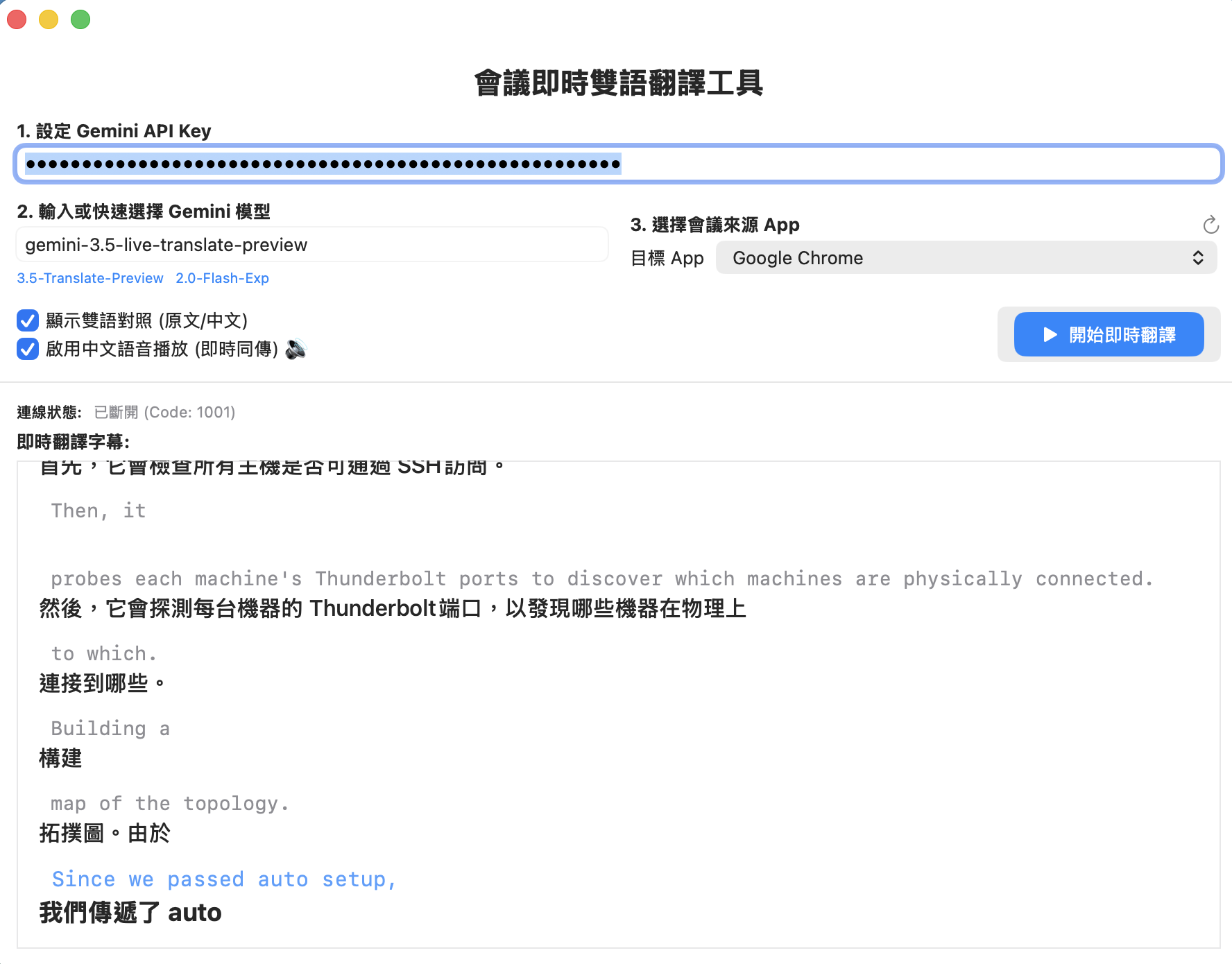
Full development repo: https://github.com/kkdai/gemini-live-translate-macos
Through this architectural upgrade and bug fixes, MeetingTranslator has demonstrated excellent practical value:
- Zero External Device Dependency: No need to set up complex routing like BlackHole or Loopback; it works out of the box.
- Accurate and Real-time Subtitles: The Gemini Live API can complete English to Traditional Chinese translation within hundreds of milliseconds, smoothly displaying the results in a HUD floating window.
- Synchronized Voice Translation Broadcast: Through
AudioPlaybackManager, users can listen to the original meeting while simultaneously hearing high-quality 24kHz Traditional Chinese interpretation in their headphones.
We hope this record of pitfalls encountered with macOS Core Audio / ScreenCaptureKit and the Gemini WebSocket API can provide valuable reference for developers also exploring AI real-time voice applications!
Comments
More Blog
View allaiStop Your LLMs from Forgetting: How a 2016 String Algorithm Solves AI's Biggest Memory Loss Problem
Have you ever tried to read a massive pile of reports and summarize them in under 50 words? It’s...
T
TanaikeaieGoogle VP of Technology says he’s given up on coding
In his keynote on Wednesday, Benoit Schillings, vice president of Technology at Google DeepMind and...
I
Iain ThomsongeminiOmni Flash Preview with Kiro
This article covers the MCP setup and configuration for using Google Omni Preview and underlying...
X
xbillaiHow to Count Gemini Tokens Locally
✨ Overview This article explores how Gemini tokenizes data and demonstrates how to count...
L
Laurent PicardaiePlay today’s game from Issue #2 of The Daily Context!
Yesterday, we kicked off our physical newspaper, The Daily Context, at the AI Engineer World’s Fair...
J
Jess LeeaieNeed a break? Play today's game from The Daily Context.
We (at DEV and MLH) are covering AI Engineer's World Fair by printing a physical newspaper called...
J
Jess LeeReady-made automations for this
Workflows from the Neura Market marketplace related to this Gemini resource
- Auto-translate Blog Articles with Google Translate and Airtable Storagen8n · Free · Related topic
- AI-Powered Auto-translate Google Slides Presentation to Any Language with Geminin8n · Free · Related topic
- Auto-Generate Tech News Blog Posts with NewsAPI & Google Gemini to WordPressn8n · Free · Related topic
- AI-Powered Upwork Cover Letter Generator - Pinecone, Groq, Google Gemini, SerpAPIn8n · Free · Related topic