
Back to Blog ai
ai
 ai
ai aie
aie gemini
 ai
ai aie
aie aie
aie
Skills over System Prompts: Building an Anki Tutor with the Antigravity SDK
Ertuğrul Demir June 19, 2026
0 views
AI has made me a little lazier. Not dramatically lazy. Not "the robots will do everything" lazy....
AI has made me a little lazier.
Not dramatically lazy. Not "the robots will do everything" lazy. More like: once you get used to asking an agent to do boring work, every small manual workflow starts looking suspicious.
Anki is a perfect example.
Anki is great. I use it to remember things I study, subjects I work on, and the weird little decisions hidden inside codebases. Spaced repetition works. The problem is not Anki.
The problem is me.
I can already see the rot setting in. On complex cards, my brain starts negotiating with itself. "Yeah, I basically knew that." "Close enough." "I would have remembered it in context." Then I press Good and move on.
That is not studying. That is self-certified vibes.
What I actually wanted was a study buddy sitting on top of my real Anki collection. Someone to ask the card, wait for my answer, reveal the real answer, compare it honestly, explain the gap, and only then help decide whether it was Again, Hard, Good, or Easy.
AI is annoyingly good for that.
It is also useful when taking over a new project. When I enter a repo, I do not only want a summary. I want to be quizzed later on the key decisions, the architecture, the gotchas, and the "why is it like this?" parts. Anki is great for that too.
But I am still lazy.
I am not going to manually write every card. I am not going to keep every deck updated by hand. And if I am studying from my phone, I am definitely not going to type long answers into a chat just so the agent can grade me. Voice needs to work too.
So the project quickly stopped being "connect Gemini to Anki."
It became a small agent system:
- a terminal tutor for focused review sessions
- a Telegram tutor for studying from my phone, including voice answers
- a deck builder that creates cards from web research or a local codebase
- a watch mode that can notice code changes and create cards while I work
That is a lot of behavior.
My first instinct was the usual one: write a bigger system prompt. Tell the agent how to run a study session. Tell it how to write good flashcards. Tell it how to inspect a codebase and turn architecture into cards. Tell it how to behave differently in Telegram. Tell it not to touch scheduling unless I approve.
That works for about ten minutes.
Then the system prompt becomes a junk drawer.
The hard part was not giving the agent tools.
The hard part was giving it habits.
That is where the Google Antigravity SDK fit really well. It gives you the agent runtime as a Python library: custom tools, reusable skills, lifecycle hooks, safety policies, streaming, triggers, and multiple ways to run the same agent logic from different surfaces.
What the Antigravity SDK Gives You
The Antigravity SDK is not just a wrapper around a chat model.
It gives you programmatic access to the same agent runtime behind Google Antigravity 2.0 and the Antigravity CLI, but from Python.
That matters because a real agent is not only a model call. A real agent needs:
- tools
- memory across turns
- permissions
- hooks
- skills
- streaming
- triggers
- safety around side effects
The SDK puts those behind one main abstraction: Agent.
The smallest useful version really is tiny:
import asyncio
from google.antigravity import Agent, LocalAgentConfig

async def main():
    config = LocalAgentConfig()
    async with Agent(config) as agent:
        response = await agent.chat("What files are in the current directory?")
        print(await response.text())

if __name__ == "__main__":
    asyncio.run(main())
Install it with:
pip install google-antigravity
Then set a Gemini API key from Google AI Studio:
export GEMINI_API_KEY="your-key-here"
That is the hello world.
The useful version starts when you compose the runtime features around a real workflow.
In this project, the Antigravity SDK pieces mapped like this:
| Antigravity SDK capability | Where I used it |
|---|---|
Agent / LocalAgentConfig | the terminal tutor, Telegram tutor, and deck builder all run on the same agent runtime |
| Custom Python tools | AnkiConnect actions like get_due_cards, show_answer, rate_card, and add_notes |
skills_paths | shared review-buddy, plain-cards, and codebase-cards behavior packages |
| Lifecycle hooks | sync on session start/end, deck backup before writes, audit log after scheduling changes, tool-error recovery |
| Safety policies | practice mode blocks rate_card so cram sessions cannot change real scheduling |
| Streaming | the deck builder prints progress while the agent researches and creates cards |
| Triggers | watch mode reacts to .py file changes and asks the agent to card important changes |
| Built-in read-only tools | codebase mode lets the agent inspect a repo without editing it |
That list is the reason this worked better as an SDK project than as one giant prompt around a model call.
Now, the first useful step: give the agent hands.
Giving the Agent Hands: Anki as Python Tools
Anki already has an HTTP API through the AnkiConnect add-on. The entire bridge is basically one POST to localhost:
def invoke(action: str, **params):
    response = requests.post(
        "http://localhost:8765",
        json={"action": action, "version": 6, "params": params},
        timeout=30,
    )
    response.raise_for_status()
    payload = response.json()
    if payload["error"]:
        raise RuntimeError(payload["error"])
    return payload["result"]
From there, the agent tools are just normal Python functions.
A simplified version:
def list_decks() -> str:
    """List all Anki decks with their due counts."""
    decks = invoke("deckNames")
    stats = invoke("getDeckStats", decks=decks)
    return json.dumps(stats)


def get_due_cards(deck: str = "", limit: int = 5) -> str:
    """Return due cards without revealing the answer side."""
    query = f'deck:"{deck}" is:due' if deck else "is:due"
    card_ids = invoke("findCards", query=query)[:limit]
    cards = invoke("cardsInfo", cards=card_ids)
    return json.dumps(cards)


def rate_card(card_id: int, rating: int) -> str:
    """Submit a user-confirmed Anki rating: 1 Again, 2 Hard, 3 Good, 4 Easy."""
    invoke("answerCards", answers=[{"cardId": card_id, "ease": rating}])
    return json.dumps({"rated": card_id, "rating": rating})
Then register them with the SDK:
from google.antigravity import LocalAgentConfig

config = LocalAgentConfig(
    tools=[list_decks, get_due_cards, rate_card],
)
That is one of the nicest parts of the SDK: custom tools do not require a separate server. For this version, I did not need MCP, a framework, a schema generator, or a second process.
The agent can call plain Python.
In the real project I ended up with more tools:
list_decksget_due_cardsshow_answerrate_cardfind_notesadd_noteadd_notesupdate_notesuspend_cardunsuspend_cardundoget_statssync
That was enough to make the tutor useful.
This is the first pattern:
Put capabilities in tools.
Tools are the agent's hands. But hands are not behavior.
For behavior, I used skills.
The Problem with Giant System Prompts
At first, I tried to describe everything in the agent's system instructions.
The tutor needs to know how to run a review session:
- show the question
- wait for my answer
- reveal the answer
- compare my answer
- suggest a rating
- wait for confirmation
- only then update Anki scheduling
It also needs to know how to write good cards:
- one fact per card
- answer-first backs
- no trivia padding
- no vague questions
- no giant essay cards
Then the deck builder needs another workflow:
- research a topic
- extract the important facts
- create cards
- verify they exist in Anki
Then the codebase deck builder needs a different workflow:
- inspect the repo breadth-first
- find key abstractions
- explain responsibilities and data flow
- avoid making cards for random syntax
Then Telegram needs shorter replies because nobody wants a wall of Markdown on a phone.
You can put all of that into one system prompt.
But you should not.
A giant system prompt has three problems:
- It pollutes every task. The agent is thinking about codebase exploration while you are reviewing Spanish verbs.
- It is hard to reuse. The same card-writing rules need to appear in the terminal tutor, Telegram tutor, and deck builder.
- It rots. Every new behavior gets pasted into the same blob until nobody knows which rule controls what.
This is exactly the problem skills solve.
The shape changed from this:
system prompt = tutor rules
              + card-writing rules
              + codebase-exploration rules
              + Telegram style rules
              + safety reminders
              + whatever I forgot last week
Into this:
system prompt  = identity + hard safety floor
review-buddy   = study-session behavior
plain-cards    = card-writing behavior
codebase-cards = repo-exploration behavior
hooks/policies = enforcement and receipts
That is the real pattern behind the title.
Not "make the prompt better."
Make the prompt smaller.
Skills over System Prompts
A skill is a folder with a SKILL.md file inside it.
My project has three:
.agents/skills/
  plain-cards/
    SKILL.md
  review-buddy/
    SKILL.md
  codebase-cards/
    SKILL.md
Each skill starts with a tiny bit of frontmatter.
For example, the review skill begins like this:
---
name: review-buddy
description: Playbook for running an interactive Anki review session — quiz one card at a time, grade recall together, submit ratings, repair noisy or broken cards.
---
That description is not just documentation for humans. It is the lightweight discovery layer. The agent can see what skills exist, then load the full instructions only when the task calls for them.
A skill is not a service. It is not an MCP server. It is not a deployment. It is a behavior package sitting on disk, ready to be pulled into the agent when needed.
Then the SDK loads the skill directory:
config = LocalAgentConfig(
    system_instructions=SYSTEM_INSTRUCTIONS,
    tools=ALL_TOOLS,
    skills_paths=[".agents/skills"],
)
The key idea is simple:
The system prompt says who the agent is. Skills say what job it is currently doing.
For this project, the system prompt stays small. It says the agent is a friendly flashcard tutor working with a real Anki collection.
The details live in skills.
review-buddy: the study session playbook
This skill describes how to run a review session.
It covers the rhythm:
- ask one card at a time
- hide the answer until the user attempts it
- reveal and teach briefly
- suggest a rating
- wait for confirmation
- handle noisy or broken cards
- close with a recap
This is not code. It is behavioral protocol.
That distinction matters. The review flow is not tied to terminal I/O, Telegram messages, or AnkiConnect. It is just the way a good tutor should behave.
plain-cards: the card-writing style guide
This skill handles card quality.
It tells the agent to write cards that are:
- atomic
- answer-first
- lean
- verified
- free of filler
- easy to review months later
A bad flashcard is worse than no flashcard. It creates fake progress. The model can generate ten cards in seconds, but without a style guide it will happily generate ten vague cards that future me will hate.
So card writing became a skill.
codebase-cards: the repo exploration protocol
This one is for turning source code into Anki cards.
The agent is told to inspect the repo breadth-first, identify architecture, data flow, responsibilities, and gotchas, then turn only the useful findings into cards.
That skill powers code mode in the deck builder:
python deck_builder.py "overall architecture" --path ~/my/project --count 6
The focus hint changes, but the exploration protocol stays the same.
This is the second pattern:
Put reusable behavior in skills.
Not in the system prompt. Not duplicated across entrypoints. Not buried in Python conditionals.
A skill is just a file, but it changes the shape of the whole project.
One Behavior Layer, Three Surfaces
Once the behavior lived in skills, adding new surfaces became much easier.
The architecture looked like this:
                         .agents/skills/
                  ┌──────────┼──────────┐
                  │          │          │
           review-buddy  plain-cards  codebase-cards
                  │          │          │
                  └──────────┼──────────┘
                             │
                    LocalAgentConfig
                             │
       ┌─────────────────────┼─────────────────────┐
       │                     │                     │
  terminal tutor        Telegram tutor        deck builder
    tutor.py          telegram_tutor.py      deck_builder.py
The terminal tutor is the simplest surface:
async with Agent(config) as agent:
    await run_interactive_loop(agent)
The Telegram tutor uses the same agent differently:
async def chat_response(agent: Agent, prompt: str) -> str:
    response = await agent.chat(prompt)
    return "".join([token async for token in response])
The deck builder streams output as it works:
response = await agent.chat(message)
async for token in response:
    print(token, end="", flush=True)
Different surfaces. Same runtime. Same skills.
That is the part I liked most. Telegram did not need a copied review prompt. The deck builder did not need its own card-writing manifesto. The codebase mode did not need a separate app-specific doctrine.
They all loaded the same skill directory.
The Terminal Tutor
The terminal version is the baseline.
Start Anki, run the tutor, and ask naturally:
python tutor.py
Then:
quiz me on XYZ
The tutor lists due cards, asks one question, waits for my answer, reveals the real Anki answer, compares, teaches, and suggests a rating.
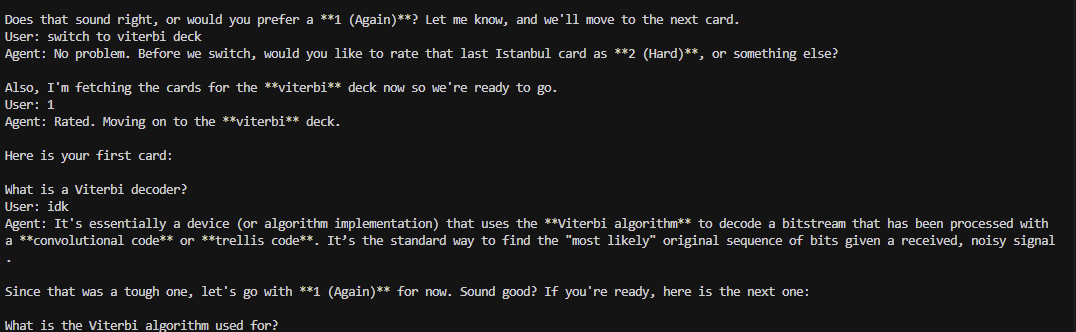
The important part: it does not update scheduling just because the model thinks I got the answer right.
The review loop is human-in-the-loop by design:
Agent: I would rate this Good (3). You had the main idea but missed the date.
User: yes
Agent: rated 3. Next card...
Or I can override it:
Agent: I would rate this Hard (2).
User: actually 1
Agent: rated Again (1). Let's reinforce it.
Spaced repetition is stateful. A bad rating affects the future schedule. So the model can suggest, but I decide.
That is not just a prompt preference. It is the product boundary.
The Telegram Tutor
The second surface was Telegram.
Not because Telegram is fancy. Because the best study app is the one I actually open.
The Telegram bot long-polls the Bot API, sends messages into the same Antigravity agent, and returns the response. It also supports voice notes: speak the answer, transcribe it, and feed the transcript back into the tutor as text.
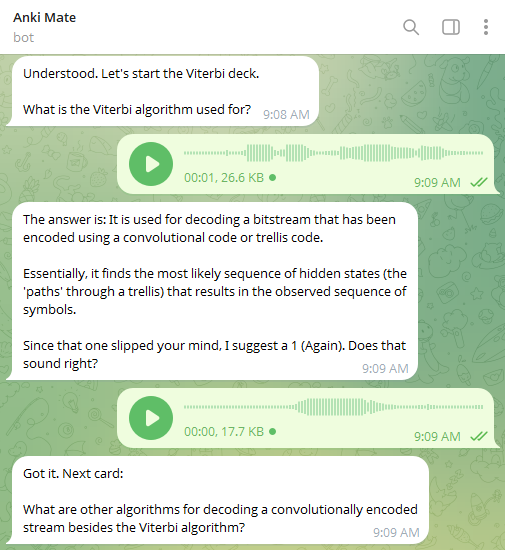
The agent gets a small extra instruction:
TELEGRAM_INSTRUCTIONS = """
You are chatting through Telegram on a phone. Keep replies short and plain
text only — no markdown headers, tables, or code fences. One card per message.
"""
Everything else stays shared.
Same Anki tools. Same hooks. Same skills.
I also added due-card nudges without spending model tokens. Every 30 minutes, plain Python checks Anki deck counts. If cards are waiting, the bot sends a short reminder:
25 cards waiting (X 5, Y 8). Say 'quiz me' to start.
No LLM needed. No reasoning needed. Just deterministic code.
This became a useful design rule:
Do not use the model for work a
forloop can do.
The agent is for tutoring. The nudge is just a counter.
The Deck Builder
The third surface is a deck builder.
It has two modes.
Web mode:
python deck_builder.py "Ottoman Empire" --deck "History" --count 8
Codebase mode:
python deck_builder.py "error handling and edge cases" --path ~/my/project --count 6
Web mode gives the agent a small research toolset: Wikipedia search, Wikipedia read, and URL fetch. Then it asks the agent to create cards using the plain-cards skill.
Codebase mode is more interesting. The SDK can give the agent built-in file tools scoped to a workspace. I enabled read-only access:
from google.antigravity.types import BuiltinTools, CapabilitiesConfig

config = LocalAgentConfig(
    tools=[add_notes, list_decks],
    workspaces=[code_path],
    capabilities=CapabilitiesConfig(
        enabled_tools=BuiltinTools.read_only()
    ),
    skills_paths=[".agents/skills"],
)
That means the agent can inspect the target repo, but not edit it.
For a deck builder, that is the right permission boundary. It needs to read code and create Anki notes. It does not need to modify the project.
This is where codebase-cards activates. The agent explores the repo, identifies the concepts worth remembering, then writes cards through add_notes.
At the end, I do not trust the model's narration. The script queries Anki to verify the cards exist.
def cards_in_anki(deck: str) -> int:
    result = json.loads(find_notes(f'deck:"{deck}" tag:auto-researched', 100))
    return len(result) if isinstance(result, list) else 0
If the model says it created cards but Anki has zero, the script nudges it to try again.
That became another rule:
Trust the system receipt, not the model narration.
Turning It Ambient with Triggers
The SDK also supports triggers: background tasks that react to external events and push messages into the agent.
I used a file-change trigger for codebase card generation.
The idea: while I work on a project, if a Python file changes, the agent can inspect the change and decide whether it introduced something worth remembering.
Simplified:
from google.antigravity.triggers import on_file_change


def make_watch_trigger(path, deck, tag):
    async def on_change(ctx, changes):
        paths = sorted({c.path for c in changes if c.path.endswith(".py")})
        if not paths:
            return

        await ctx.send(
            f"These files changed: {', '.join(paths)}. "
            f"Create cards in deck {deck} if the change is worth remembering."
        )

    return on_file_change(path, on_change)
Run it like this:
python deck_builder.py "as I work" --path ~/my/project --watch
This is where the project started feeling less like a chatbot and more like a sidecar.
I edit code. The trigger wakes the agent. The codebase skill tells it how to inspect the change. The card-writing skill tells it how to write good cards. The Anki tool creates the notes.
No new server. No custom scheduler. No giant prompt.
Just SDK triggers plus skills.
The Part I Refused to Trust to the Model
Skills are guidance.
Policies and hooks are enforcement.
That line is the difference between a fun demo and a tool I can leave connected to my real Anki collection.
The Antigravity SDK has declarative safety policies and lifecycle hooks. I used both.
Practice mode blocks scheduling writes
Sometimes I want to cram without touching Anki scheduling.
A prompt instruction is not enough for that. If the agent forgets and calls rate_card, the schedule changes.
So practice mode denies the tool at the harness level:
from google.antigravity.hooks import policy

policies = policy.confirm_run_command()

if practice_mode:
    policies = policies + [
        policy.deny("rate_card", name="practice_mode")
    ]
Now rate_card is blocked even if the model tries to call it.
That is the kind of safety I want: not vibes, not trust, not "please don't". A runtime boundary.
Hooks sync, back up, audit, and recover
The SDK hook system lets you observe or intervene at lifecycle points.
I used session hooks to sync Anki:
@hooks.on_session_start
async def sync_on_start():
    sync_anki()

@hooks.on_session_end
async def sync_on_end():
    sync_anki()
I used a pre-tool-call Decide hook to back up a deck before note writes:
@hooks.pre_tool_call_decide
async def backup_before_note_writes(tool_call):
    if tool_call.name in ("add_note", "add_notes"):
        backup_deck(tool_call.args["deck"])
    return hooks.HookResult(allow=True)
I used a post-tool-call Inspect hook to audit scheduling changes:
@hooks.post_tool_call
async def audit_scheduling_changes(result):
    if result.name in {"rate_card", "undo", "suspend_card", "unsuspend_card"}:
        append_jsonl("backups/scheduling_audit.jsonl", result)
And I used a Transform hook to turn ugly tool errors into recovery hints the model can act on:
@hooks.on_tool_error
async def recover_from_tool_error(error):
    if isinstance(error, requests.Timeout):
        return "AnkiConnect timed out. Ask the user to check Anki, then retry."
    return None
This is one of the strongest parts of the SDK.
The model does not need to remember to audit itself. The harness does it.
The model does not need to remember to back up a deck before writing. The hook does it.
The model does not get to bypass practice mode. The policy blocks it.
The pattern became clear:
- tools give the agent capabilities
- skills give the agent reusable behavior
- policies define what must never happen
- hooks add system-level guarantees around the agent
That separation is the architecture.
What Worked
A few things worked better than expected.
Plain Python tools were enough
I originally thought I might need to build an MCP server immediately.
I did not.
For one application, custom Python functions were simpler. The SDK already knows how to expose them as tools. That kept the first version small.
MCP is still useful when you want the same tools available across multiple clients. But for an SDK-native app, Python functions are the shortest path.
Skills kept the project from becoming prompt soup
This was the biggest win.
The base system instructions stayed focused. The detailed workflows moved into skills.
When I improved card-writing rules, terminal, Telegram, and deck builder all benefited. I did not need to update three prompts.
Hooks made side effects less scary
Anki is not a toy database. It is my real spaced-repetition schedule.
The hooks gave me a deterministic layer around model behavior:
- sync at session boundaries
- backup before writes
- audit after scheduling changes
- recover from tool failures
That made the agent feel much less like a random chatbot with database access.
Triggers changed the feel of the app
The file watcher was small, but it changed the mental model.
The agent was no longer only something I talked to. It could react to work happening around it.
That is where SDK agents get interesting: not just chat, but event-driven labor.
What Did Not Work Perfectly
A few caveats.
Skills are not hard guarantees
Skills are instructions. They improve behavior, but they are still model-read guidance.
If something must be impossible, use a policy or remove the tool.
That is why practice mode denies rate_card instead of merely asking the model not to call it.
AnkiConnect has sharp edges
AnkiConnect is simple, but it has quirks.
For example, answerCards can return success even for bad card IDs unless you pre-check the card. Some note updates silently fail if the note is open in Anki's browser window. AnkiConnect also runs inside Anki's Qt process, so you should not treat it like a high-concurrency API.
The fix is boring and important: validate inside tools.
Voice was simpler outside the agent loop
The Telegram bot supports voice answers, but I kept transcription outside the agent loop. A direct Gemini transcription call turns the voice note into text, then the transcript goes into the tutor.
That was simpler and more reliable for this build.
The lesson: use the SDK where it makes the architecture cleaner. Do not force every feature through the agent if a direct call is simpler.
How to Build Something Similar
If you want to build your own version of this pattern, I would do it in this order.
1. Start with one real workflow
Do not start with a platform.
Pick one annoying workflow with real state behind it:
- flashcards
- GitHub issues
- CRM updates
- personal knowledge base
- support tickets
- finance records
The state matters. Agents get interesting when they can act on something real.
2. Wrap the system as small Python tools
Keep the tools boring.
def search_items(query: str) -> str:
    """Search the user's records."""
    ...


def create_item(title: str, body: str) -> str:
    """Create a new record after user approval."""
    ...
Register them:
config = LocalAgentConfig(
    tools=[search_items, create_item],
)
Make tools validate inputs. Do not rely on the model to pass perfect IDs.
3. Move task behavior into skills
Create a skill folder:
.agents/skills/my-workflow/SKILL.md
A minimal skill:
---
name: my-workflow
description: Use when helping the user process and update records in this system.
---

# My Workflow

1. Inspect the current record before changing it.
2. Propose the change in plain language.
3. Wait for user confirmation before writing.
4. After writing, verify the record exists.
Then load it:
config = LocalAgentConfig(
    tools=TOOLS,
    skills_paths=[".agents/skills"],
)
This is the move: do not keep growing the system prompt forever.
4. Add policies for non-negotiables
If a tool should never run in a mode, deny it.
policies = [
    policy.deny("delete_record", name="no_deletes"),
]
If shell execution should require confirmation, keep the default guard:
policies = policy.confirm_run_command()
The model can misunderstand a skill. It cannot ignore a denied tool.
5. Add hooks for receipts
Use hooks for things that should happen regardless of whether the model remembers them:
- audit logs
- backups
- sync
- metrics
- sanitization
- error recovery
@hooks.post_tool_call
async def audit(result):
    write_log({
        "tool": result.name,
        "result": result.result,
        "error": result.error,
    })
6. Add another surface only after the behavior is reusable
Once the behavior lives in tools and skills, a second surface becomes much cheaper.
Terminal first. Then Telegram, Slack, web, cron, or file triggers.
The surface should be thin. The agent behavior should not live there.
The Bigger Point
The old way to build an AI feature was to write a large prompt and hope the model followed it.
That is not enough for real agents.
A real agent needs separation of concerns:
Capabilities       → tools
Reusable behavior  → skills
Hard boundaries    → policies
System guarantees  → hooks
External events    → triggers
User interface     → thin surface
This is what the Antigravity SDK made pleasant. I could build one agent runtime and reuse it across terminal, Telegram, and deck generation. I could keep the tutoring behavior in SKILL.md files instead of duplicating it. I could wrap real side effects with policies and hooks instead of trusting the model to behave.
The Anki tutor is just the concrete example.
The pattern generalizes.
A support agent could keep triage behavior in a skill, expose ticket updates as tools, deny destructive writes by policy, and audit every status change by hook.
A code review agent could keep review rubrics in skills, expose GitHub as tools, require approval before comments, and verify every posted review.
A research agent could keep extraction protocols in skills, use file triggers to process new papers, and write structured outputs only after validation.
The skill is the portable behavior module.
The SDK is the harness that lets it act.
Resources
- Google Antigravity SDK GitHub repository
- Google Antigravity
- Antigravity SDK overview
- Google AI Studio API keys
- Anki
Closing
I started this because I was too lazy to open Anki.
That sounds like a joke, but most useful automation starts there. Not with a grand platform vision. With a small workflow that keeps not happening because the friction is just high enough.
The surprising part was not that an LLM could quiz me.
The surprising part was how clean the architecture became.
Tools gave the agent hands. Skills gave it habits. Policies gave it boundaries. Hooks gave it receipts. Triggers made it wake up when something changed.
That is the version of agents I trust more: not one giant prompt pretending to be an application, but a small runtime with clear layers.
The future of agent apps is not monolithic complex systems.
It is smaller prompts, sharper tools, reusable skills, and a harness that refuses to let the model pretend a side effect happened when it did not.
Comments
More Blog
View allaiStop Your LLMs from Forgetting: How a 2016 String Algorithm Solves AI's Biggest Memory Loss Problem
Have you ever tried to read a massive pile of reports and summarize them in under 50 words? It’s...
T
TanaikeaieGoogle VP of Technology says he’s given up on coding
In his keynote on Wednesday, Benoit Schillings, vice president of Technology at Google DeepMind and...
I
Iain ThomsongeminiOmni Flash Preview with Kiro
This article covers the MCP setup and configuration for using Google Omni Preview and underlying...
X
xbillaiHow to Count Gemini Tokens Locally
✨ Overview This article explores how Gemini tokenizes data and demonstrates how to count...
L
Laurent PicardaiePlay today’s game from Issue #2 of The Daily Context!
Yesterday, we kicked off our physical newspaper, The Daily Context, at the AI Engineer World’s Fair...
J
Jess LeeaieNeed a break? Play today's game from The Daily Context.
We (at DEV and MLH) are covering AI Engineer's World Fair by printing a physical newspaper called...
J
Jess LeeReady-made automations for this
Workflows from the Neura Market marketplace related to this Gemini resource
- Automate Your Website Building with N8N: Unsubscribe Workflowmake · $6.62 · Related topic
- Automate Google Sheets Triggered List Building Workflown8n · $9.53 · Related topic
- Building Your First WhatsApp AI Sales Chatbotn8n · $19.99 · Related topic
- Automated Reservation System with Telegram, Google Gemini AI, and Google Sheetsn8n · Free · Related topic