
Back to Blog ai
ai
1. Context Object Generation (
Valid Matcher Profiles (for
1. Hook Script (
2. Configuration (
1. Hook Script (
2. Configuration (
1. Target MCP Server (
2. Server Registry Setup (
3. MCP Interceptor Script (
4. Configuration (
 ai
ai aie
aie gemini
 ai
ai aie
aie aie
aie
A Developer's Guide to Agent Hooks in Antigravity CLI
Tanaike June 26, 2026
0 views
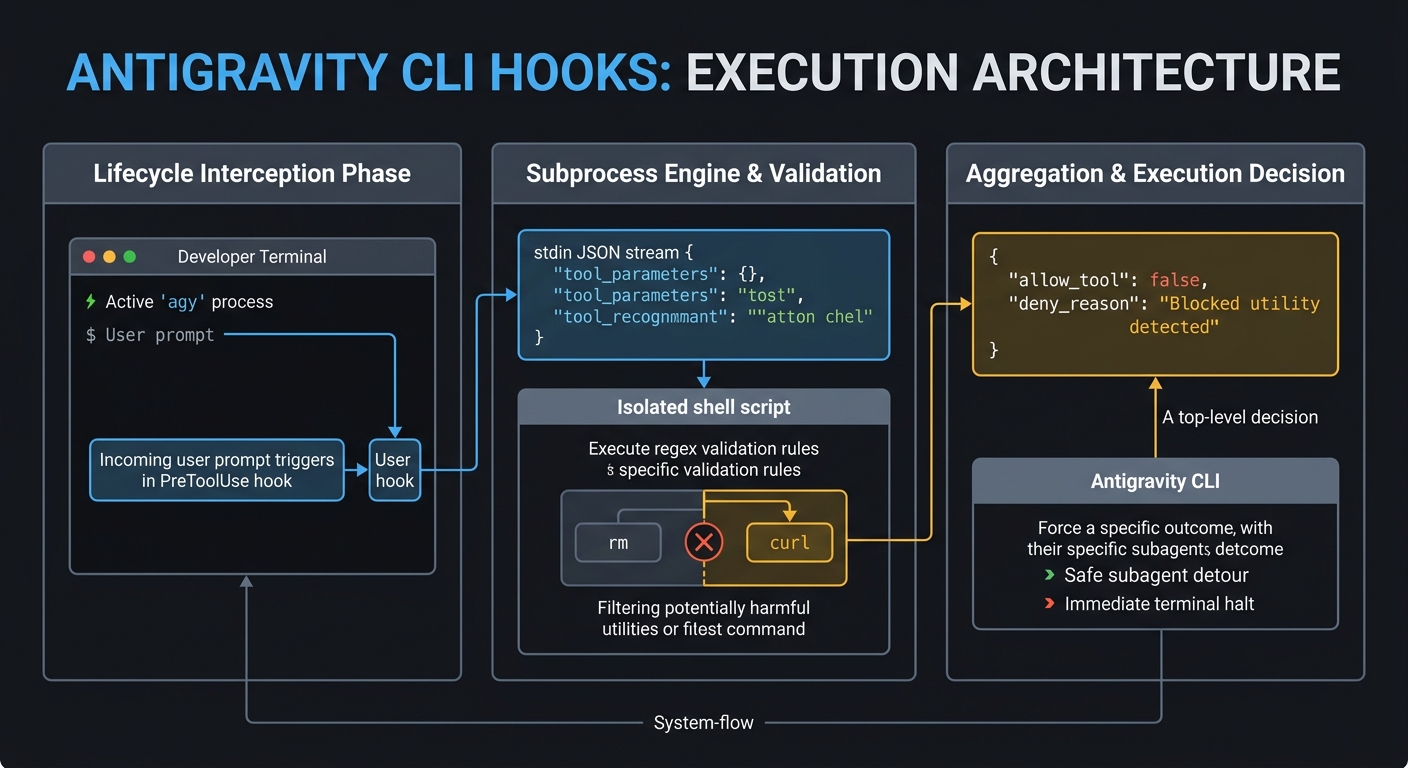
Motivation To be quite honest, "Hooks"—the shell commands we trigger at specific points...
Motivation
To be quite honest, "Hooks"—the shell commands we trigger at specific points when generative AI agents process tasks—were something I used blindly for a long time. Whenever colleagues asked me about them, I realized I lacked any real confidence in explaining how they actually work. However, when I migrated from Gemini CLI to the new Antigravity CLI, I noticed that the hooks system carried over. This felt like the right moment to stop guessing and finally develop a precise, deep understanding of the mechanism. I went back to the basics to analyze exactly how hooks operate under the hood and how we can use them effectively in the Antigravity environment. My goal is to demystify hooks so we can write them with confidence, and if this guide proves useful to your own workflows as well, I would be very glad.
Abstract
As autonomous AI coding agents transition from sandbox environments to production workspaces, establishing robust, deterministic execution guardrails becomes paramount. This paper analyzes the architectural mechanics of agent lifecycle hooks, tracking their execution flow from legacy open-source implementations to the modern Go-based Google Antigravity CLI. We dissect the hook lifecycle, including input generation, regular expression matching, and sequential result aggregation. Furthermore, we provide concrete, production-ready Shell and Node.js implementation patterns for blocking dangerous shell command executions and regulating Model Context Protocol (MCP) tool dispatches, establishing deterministic security guardrails for terminal-first autonomous developers.
Introduction
In the summer of 2025, Anthropic introduced "Hooks" into its terminal agent lifecycle Ref. This development represented a shift from relying on LLM decision-making to using deterministic execution boundaries. Rather than trying to persuade an agent to avoid destructive actions, hooks enforce hard, programmatically defined rules at key lifecycle events.
This technical framework was subsequently adopted and refined by Google within its developer agent ecosystems, culminating in the release of the Go-based Antigravity CLI Ref. To build secure, high-throughput autonomous development workflows, engineers must move away from soft prompting and adopt strict, runtime-level interception. This paper analyzes the internal mechanics of these hook architectures, examines the transition from legacy setups to modern engines, and offers reference implementations for production guardrails.
Architectural Blueprint of Lifecycle Interception: Lessons from Gemini CLI
To construct reliable guardrails, we must first analyze the execution loop of the hook subsystem. By examining the structural designs preserved from the open-source Gemini CLI, we can map the exact routing of context, decision-making, and output aggregation.
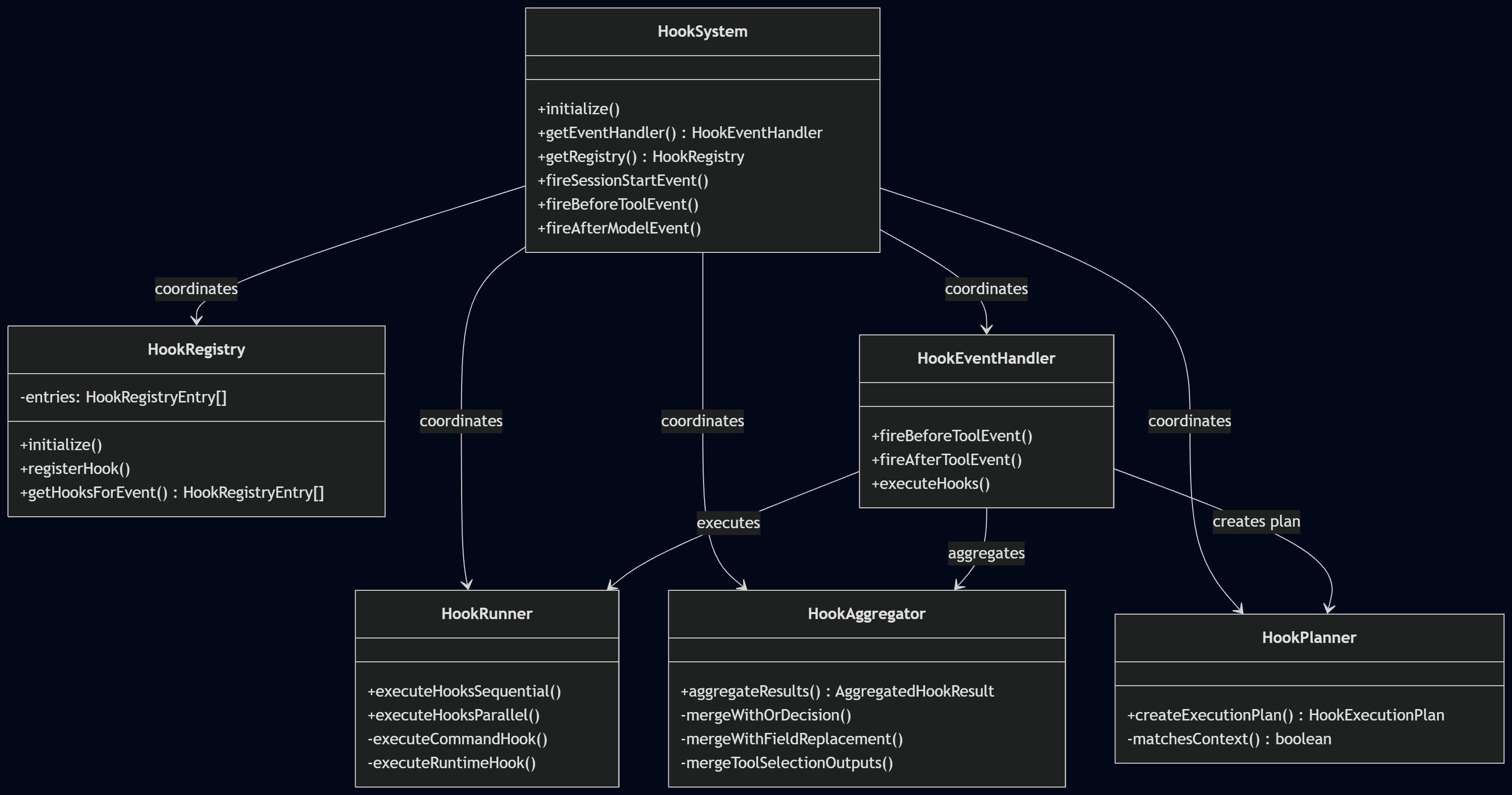
The hook subsystem is split into dedicated, object-oriented modules that isolate registration, matching, running, and aggregation:
| Component | Source File | Responsibility |
|---|---|---|
HookSystem | hookSystem.ts | The main facade acting as the entry point. It exposes high-level event methods and coordinates the lower-level sub-modules. |
HookRegistry | hookRegistry.ts | Discovers, validates, and stores hooks declared in system, user, and project-level settings, maintaining their execution priorities. |
HookPlanner | hookPlanner.ts | Resolves target context against user-defined regular expressions (matchers) to construct a deduplicated, ordered execution plan. |
HookRunner | hookRunner.ts | Executes the resolved plan, spawning out-of-band shell processes (Command Hooks) or executing JS/TS modules (Runtime Hooks). |
HookAggregator | hookAggregator.ts | Merges outcomes from multiple concurrent or serial hooks into a single consolidated decision structure using event-specific logic. |
HookEventHandler | hookEventHandler.ts | Constructs the base context payload (HookInput), manages telemetry, and triggers the orchestrator when agent lifecycle shifts occur. |
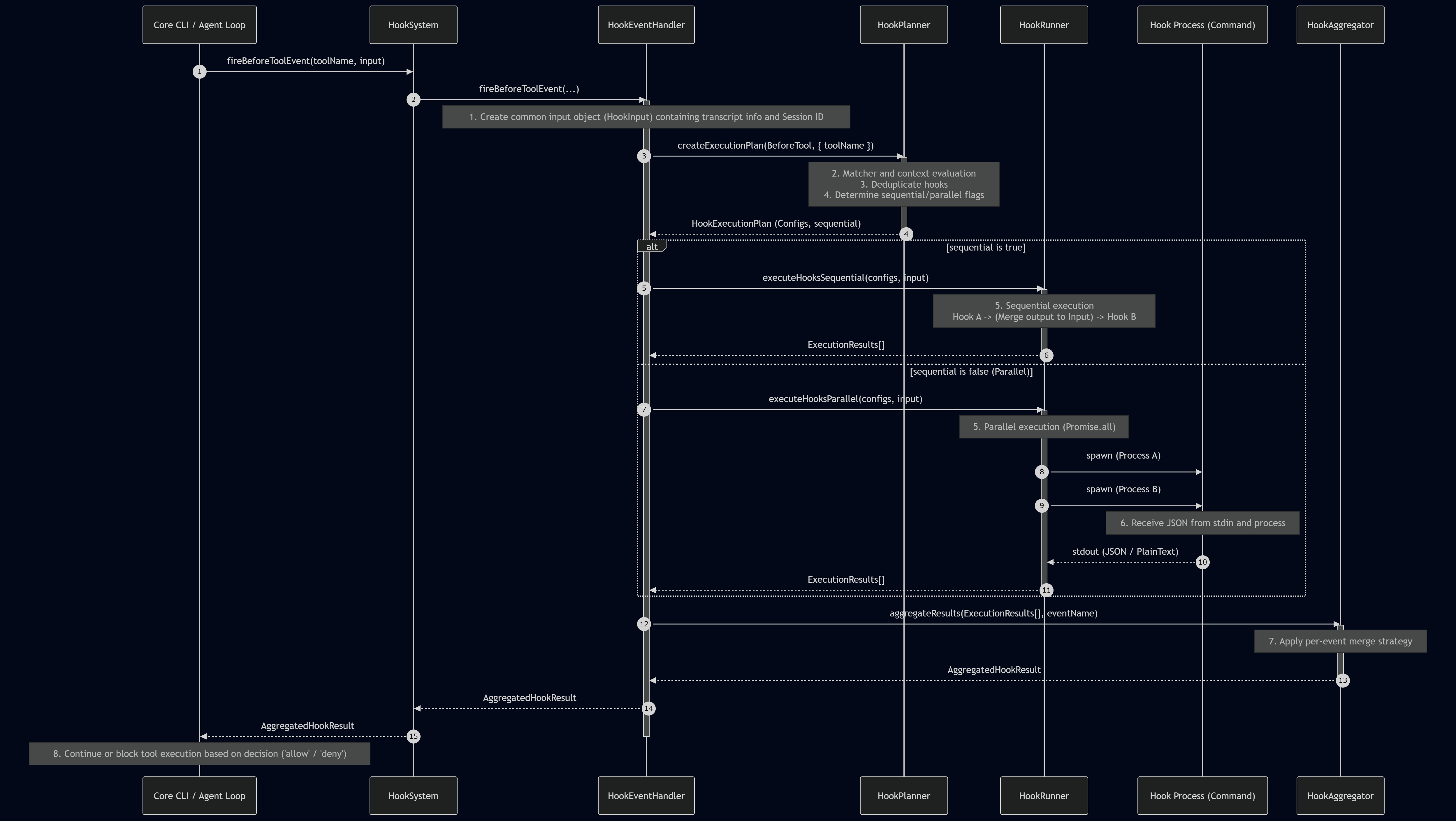
The sequential interaction between these core classes during an interception loop is detailed below:
Detailed Hook Pipeline Mechanics
1. Context Object Generation (HookInput)
Upon event detection, the system initiates HookEventHandler.createBaseInput(), assembling a standardized, environment-aware context payload:
session_id: Unique cryptographic identifier of the current execution session.transcript_path: Absolute file path to the session's active JSON conversation transcript.cwd: The agent's current working directory.timestamp: ISO 8601 representation of the exact event time.hook_event_name: The triggered lifecycle event type.
2. Pattern Matching and Deduplication
HookPlanner evaluates the user's matcher parameters:
- Tool Events: Matchers are treated as regular expressions and compared to the target tool (e.g.,
write_file). - Standard Lifecycle Events: Matchers map to startup or resume triggers.
- Deduplication: Identical command-string definitions are pruned to prevent redundant execution within the same turn.
3. Execution Topology and State Chaining
- Parallel Mode: Spawns concurrent processes via
Promise.allto minimize latency. - Sequential Mode: Executes hooks in serial order. If an upstream hook yields output,
applyHookOutputToInputmerges this feedback directly into the stdin context payload of the next hook down the chain. For example, aBeforeAgenthook can append environment-specific guidelines to the user's prompt before a downstream security analyzer evaluates it.
4. Subprocess Isolation and Output Handling
The runner handles external commands using HookRunner.executeCommandHook() under strict operational parameters:
- Workspace Verification: Local project hooks are ignored unless the workspace directory is explicitly marked as trusted.
- Environment Injection: Exposes host details via dedicated environment variables including
$GEMINI_PROJECT_DIR,$GEMINI_SESSION_ID, and$GEMINI_CWD. - JSON Pipeline: The context payload is piped directly to the subprocess via standard input (
stdin). - Standard Output (
stdout) Parsing Fallbacks: The runner expects a structured JSON response onstdout. If a hook returns non-JSON plain text, the engine executes fallback parsing:- Exit Code 0: Interpreted as
decision: 'allow'. Any printed text is displayed to the user as a system message. - Exit Code 1: Evaluates as
decision: 'allow'but prints a diagnostic warning. - Non-Zero Exit Code: Evaluates as
decision: 'deny', treating the stdout text as the block reason.
- Exit Code 0: Interpreted as
- Subprocess Timeout: If the process exceeds its configured duration (default: 60 seconds), the engine terminates the subprocess using
SIGTERM(ortaskkillon Windows) and aborts the turn.
5. Output Aggregation
HookAggregator processes multiple execution results based on the event context:
- Veto-Power Logic (
BeforeTool,AfterTool,BeforeAgent,AfterAgent,SessionStart): If even a single hook returns a block or deny decision, the entire operation is blocked. Text fields (reason,systemMessage,additionalContext) are joined using newline characters and returned to the core loop. - Last-Write-Wins Logic (
BeforeModel,AfterModel): The output of the last hook in the execution sequence overrides all preceding outputs. - Union Tool Selection (
BeforeToolSelection): Merges all allowed tools across all hooks, taking the union ofallowedFunctionNamesto construct the final tool configurations passed to the model.
A Concrete Execution Scenario: The Lifecycle of a File Write Request
To illustrate these components in action, consider a local agent processing a file modification request under active hook surveillance:
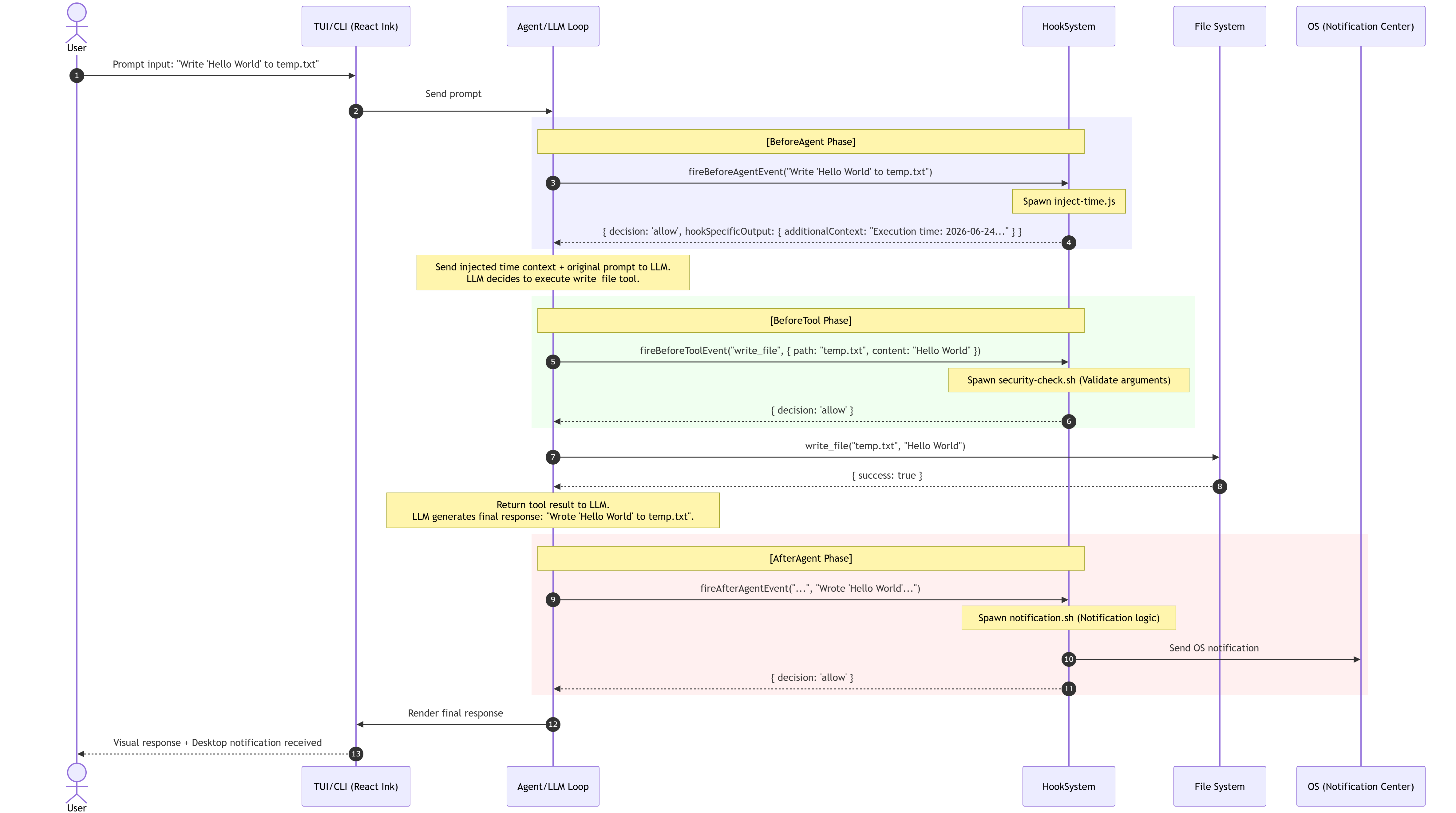
- BeforeAgent Execution: The user's prompt is processed by
inject-time.js. The script outputs the current timestamp viaadditionalContext, which is merged into the LLM prompt. The model processes the instructions and decides to call thewrite_filetool. - BeforeTool Verification: Before the tool runs,
security-check.shreceives the tool argument payload:{ "path": "temp.txt", "content": "Hello World" }. It verifies that the path lies within safe workspace limits and returns{ "decision": "allow" }. - Execution & Finalization: The file write completes. The agent loop processes the tool output, generates a final response, and triggers
notification.shvia theAfterAgentevent. This script issues a desktop alert to notify the developer before the terminal renders the final response.
Lifecycle Hook Events Directory
| Event Name | Timing | Intercept/Block (decision) Support | Purpose and Key Use Cases |
|---|---|---|---|
SessionStart | At session start, resume, or clear | No | Initialize resources, pre-load domain context, display welcome messages. |
SessionEnd | At session close or exit | No | Resource cleanup, session logging, pushing metrics to telemetry endpoints. |
BeforeAgent | Immediately after user input, before planning | Yes | User prompt validation, dynamic injection of active environment context (e.g., git branch, workspace state), blocking malicious prompts. |
AfterAgent | Once the agent loop completes a turn | Yes | Auditing output, forcing retries (decision: 'deny'), or clearing context via clearContext: true. |
BeforeModel | Immediately prior to dispatching an LLM request | Yes | Modifying systemic instructions, replacing models dynamically, mocking responses to bypass API consumption. |
AfterModel | Upon receiving the model response (per stream chunk) | Yes | Content filtering, redacting sensitive parameters, scanning for API tokens before user display. |
BeforeToolSelection | Prior to the LLM determining tool configurations | No (Tool-filtering only) | Dynamically limiting or altering the set of active functions (overwriting toolConfig). |
BeforeTool | Immediately before tool dispatch | Yes | Intercepting execution arguments, blocking high-risk commands, or rewriting input values on-the-fly. |
AfterTool | Immediately post-tool execution | Yes | Modifying tool output streams, hiding error trace logs, or executing auxiliary trailing commands (tailToolCallRequest). |
PreCompress | Immediately before summarizing context history | No | Saving raw history pre-summarization, notifying the developer of context reduction. |
Notification | Triggered by wait-states (e.g., waiting for user permission) | No | Monitoring & Notification Only. Broadcasting active wait status or blocking loops to messaging APIs (Slack, Discord) or desktop notifications. |
Evolutionary Jump: Porting Hooks to the Antigravity CLI
With the transition to the Antigravity CLI (agy), the execution pipeline was optimized for speed and multi-agent coordination Ref. The extensive list of eleven legacy hooks was consolidated into five core, high-efficiency checkpoints.
The Five Antigravity Hook Events
| Event Name | Matcher Support | Description & Trigger Timing |
|---|---|---|
PreToolUse | Yes (Regex supported) | Fires immediately before tool dispatch. Uses the matcher parameter to isolate target commands or APIs (e.g., "run_command"). Primarily used to intercept and block unsafe operations. |
PostToolUse | Yes (Regex supported) | Fires immediately after a tool completes execution. Useful for cleanup, format linting, or telemetry tracking. |
PreInvocation | No | Intercepts execution immediately prior to an LLM invocation. Typically used to append workspace context or security policies to system prompts. |
PostInvocation | No | Evaluates response payloads immediately after receiving data from the model. Useful for auditing or scanning responses for secret leaks. |
Stop | No | Triggers when the agent finishes its plan and prepares to exit the active session. Typically used for workspace cleanup and session logging. |
Valid Matcher Profiles (for PreToolUse and PostToolUse)
For tool-level interception, the matcher setting accepts a regular expression to target specific agent capabilities:
- Catch-All Wildcard:
"*"or""(Matches every tool execution). - Specific Shell Tools:
"run_command": Catches local shell executions. - File Management Tools:
"view_file","write_to_file","replace_file_content","multi_replace_file_content","list_dir","grep_search". - Context & Multi-Agent Operations:
"define_subagent","invoke_subagent","send_message","manage_subagents". - User Permission & Interaction:
"ask_permission","list_permissions","ask_question". - Model Context Protocol (MCP):
"call_mcp_tool": Captures all operations handled by external MCP servers. - Regex Combinations:
"run_command|write_to_file": Captures both shell executions and file modifications.".*_file.*": Matches any tool containing "file" in its identifier.
Environment Configuration and Integration Setup
To use hooks in your development environment, ensure you meet the following prerequisites:
- Google Antigravity CLI (
agy) must be installed and authenticated via your Google account or enterprise GCP project. - The target workspace must be verified and trusted in your client settings.
Configuration Scopes
- Global Config Path:
~/.gemini/antigravity-cli/hooks.json(Applies across all projects and terminal instances). - Project Config Path:
<project_root>/.agents/hooks.json(Restricted to the active codebase workspace).
Note: Project-local configuration files are evaluated at runtime by the agent loop, but they may not appear within the /hooks interactive CLI panel in early releases.
Critical Constraints, Lifecycle Integration, and Failure Modes
When designing hooks for the Antigravity engine, several critical constraints must be addressed to prevent security bypasses or runtime crashes:
1. Scope and Veto Policies
If a hook is declared in both global and project-level scopes, both hooks will run. If any script returns allow_tool: false, the operation is blocked. This veto-power design ensures that global organization-wide security rules cannot be bypassed by project-level settings.
2. Timeout Hazards
While you can customize execution timeouts in the configuration (e.g., "timeout": 30), setting a timeout to 0 will immediately kill the subprocess. This makes the hook fail and can halt agent execution. Always specify a reasonable duration (typically between 15 and 60 seconds).
3. Absolute Path Constraints
The command parameter in hooks.json must use an absolute path (e.g., /home/user/project/.agents/hooks/script.sh). Relative paths resolve against the active working directory of the terminal where agy was launched. If you start a session from a subfolder, relative paths will fail with an exit status 127 (command not found) error, bypassing the security guardrail.
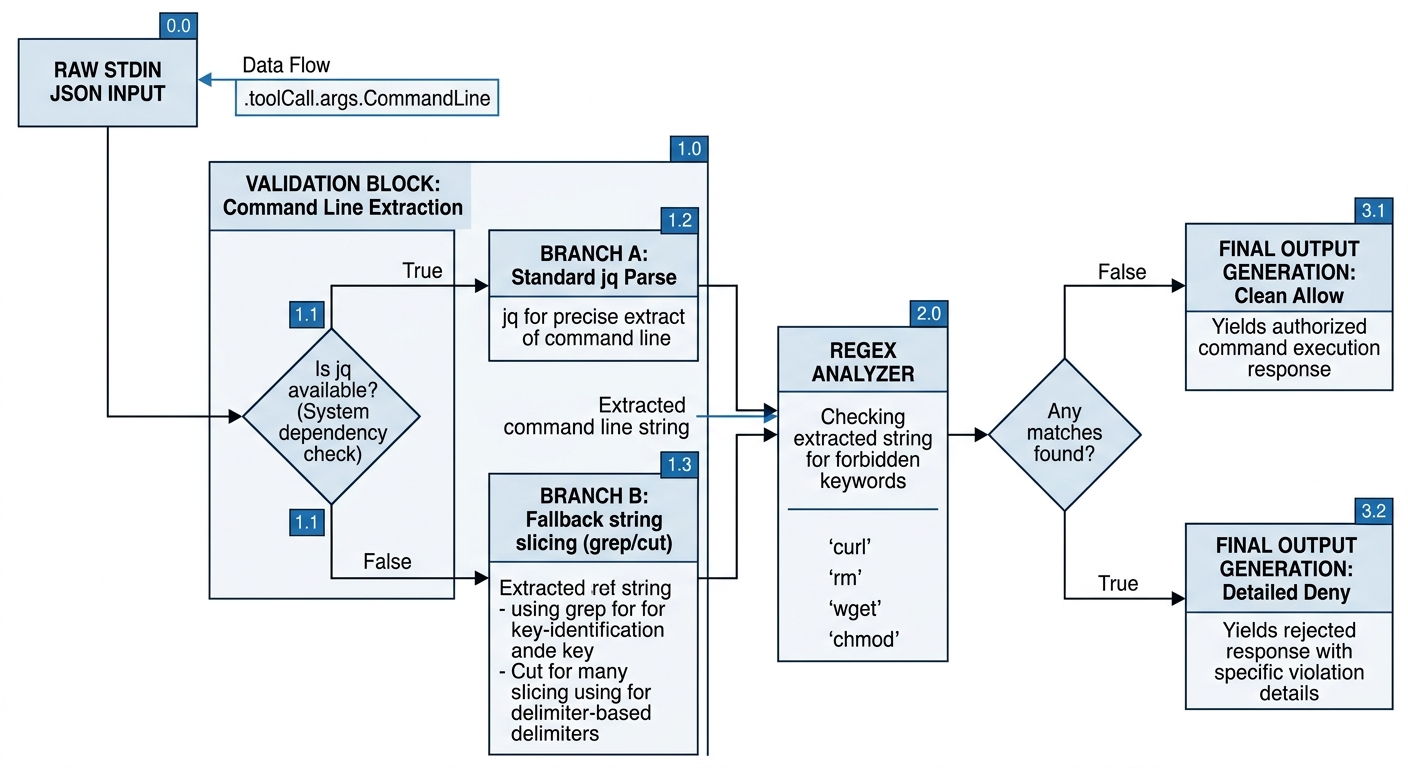
4. JSON Payload Interception in Go
The Go-based agy runtime pipes arguments to standard input (stdin) using a nested structure. For shell command executions, arguments are located under .toolCall.args.CommandLine. Legacy paths like .arguments.CommandLine are incompatible. Additionally:
- If a target host lacks the
jqutility, parsing will fail. Include a fallback parsing mechanism using shell tools likegrepandcutto maintain robust guardrails. - The return payload must be output at the top level of the JSON response (e.g.,
{ "allow_tool": false, "deny_reason": "..." }). Wrapping the output inside legacy structures likehookSpecificOutputwill fail schema validation and cause a parser error. - The script must always return an exit code of
0to indicate a successful validation run, even when rejecting a command. Non-zero exit codes are treated as hook execution failures and may trigger fallback actions or crash the active turn.
Production-Ready Code Blueprint Samples
This section provides concrete, system-tested code blueprints for implementing custom security guardrails using the Google Antigravity hooks engine. These scripts and configuration layouts establish programmatic boundaries around high-risk system calls and Model Context Protocol (MCP) tool integrations.
Sample 1: Restricting Shell Execution with a Static PreToolUse Barrier
This implementation establishes an absolute barrier against executing any shell commands inside the local workspace directory.
1. Hook Script (/absolute/path/to/project/.agents/hooks/deny-run-command.sh)
Create this file and save it within your workspace environment:
#!/bin/bash
# Read standard input to clear the pipeline buffer
input_json=$(cat)

# Emit top-level JSON indicating execution rejection
cat <<EOF
{
  "allow_tool": false,
  "deny_reason": "Executing shell commands is strictly prohibited in this project for security reasons."
}
EOF

# Exit with success status to ensure the decision engine evaluates the JSON
exit 0
Ensure the script is flagged as executable:
chmod +x /absolute/path/to/project/.agents/hooks/deny-run-command.sh
2. Configuration (hooks.json)
Register the script inside your workspace-level hook configuration file (<project_root>/.agents/hooks.json):
{
  "block-run-command": {
    "PreToolUse": [
      {
        "matcher": "run_command",
        "hooks": [
          {
            "type": "command",
            "command": "/absolute/path/to/project/.agents/hooks/deny-run-command.sh",
            "timeout": 30
          }
        ]
      }
    ]
  }
}
3. Operational Testing and Execution Results
To test the barrier, restart the agy session and verify that the hook is active using the /hooks command. Next, issue a prompt that triggers shell command execution.
User Input
Show me the git status of this project using a command.
Engine Action

The agent attempts to call the run_command tool to run git status. The PreToolUse hook intercepts the execution request and passes the event payload to the script. The script returns allow_tool: false.
Terminal Interface (TUI) Output
Error invalid tool call: Tool call denied with reason: Executing shell commands is strictly prohibited in this project for security reasons.
Agent Behavior The agent registers the tool rejection and recognizes that shell command execution is blocked by system policy. It halts further execution attempts and informs the user of the security constraint.
Sample 2: Dynamically Inspecting Execution Lines for Selective Command Filtering
This implementation selectively filters command payloads, blocking dangerous utilities while allowing standard developer queries (like ls or git status).
1. Hook Script (/absolute/path/to/project/.agents/hooks/filter-run-command.sh)
Create this script to inspect command line parameters before execution:
#!/bin/bash
# Read the stdin JSON payload piped from the agent loop
input_json=$(cat)

# Extract execution arguments, falling back to basic parsing if jq is absent
if [ -x /usr/bin/jq ]; then
  command_line=$(echo "$input_json" | /usr/bin/jq -r '.toolCall.args.CommandLine')
elif command -v jq >/dev/null 2>&1; then
  command_line=$(echo "$input_json" | jq -r '.toolCall.args.CommandLine')
else
  # RegEx string-matching fallback
  command_line=$(echo "$input_json" | grep -oE '"CommandLine"\s*:\s*"[^"]*"' | head -n 1 | cut -d'"' -f4)
fi

# Define policy parameters and verify execution strings
is_blocked=false
blocked_reason=""

if echo "$command_line" | grep -qE '\b(rm|curl|wget|shutdown|reboot|poweroff)\b'; then
  is_blocked=true
  blocked_reason="The command contains a restricted utility (rm, curl, wget, shutdown, reboot, or poweroff) which is blocked by security policy."
fi

# Format output based on validation state
if [ "$is_blocked" = true ]; then
  cat <<EOF
{
  "allow_tool": false,
  "deny_reason": "$blocked_reason"
}
EOF
else
  cat <<EOF
{
  "allow_tool": true
}
EOF
fi

exit 0
2. Configuration (hooks.json)
Add the selective command filter to your hooks.json file:
{
  "filter-run-command": {
    "PreToolUse": [
      {
        "matcher": "run_command",
        "hooks": [
          {
            "type": "command",
            "command": "/absolute/path/to/project/.agents/hooks/filter-run-command.sh",
            "timeout": 30
          }
        ]
      }
    ]
  }
}
3. Operational Testing and Execution Results
Case A: Permitted Commands
User Input
Show me the git status of this project using a command.
Engine Action

The agent attempts to execute git status. The hook script checks the input parameters, finds no prohibited patterns, and returns { "allow_tool": true }.
Terminal Interface (TUI) Output The command executes normally, and the repository status is rendered directly in the console.
Case B: Restricted Commands and Agent Pivoting
User Input
Download a test file from http://example.com using a command.
Engine Action
The agent attempts to invoke curl http://example.com. The hook intercepts the command, detects the prohibited keyword curl, and rejects the operation.
Terminal Interface (TUI) Output
⚠ Tool call denied by jsonhook__filter-run-command_PreToolUse_0_0: The command contains a restricted utility (rm, curl, wget, shutdown, reboot, or poweroff) which is blocked by security policy.
Agent Pivoting Behavior
Because the hook returns a specific rejection reason, the agent parses the warning and adapts its strategy. Knowing that curl is blocked, it writes a Python alternative using standard library calls to execute the download safely:
● Bash (python3 -c "import urllib.request; urllib.request.urlretrieve('http://example.com', 'example.html')")
This alternative command bypasses the forbidden tool list and runs successfully.
Sample 3: Regulating Model Context Protocol (MCP) Tool Execution
This implementation applies security policies to external tools integrated via the Model Context Protocol (MCP).
1. Target MCP Server (/absolute/path/to/project/.agents/mcp-server/mcp-server.js)
Create a mock Node.js MCP server that handles basic input and output:
const readline = require("readline");

const rl = readline.createInterface({
  input: process.stdin,
  output: process.stdout,
  terminal: false,
});

rl.on("line", (line) => {
  try {
    const request = JSON.parse(line);

    // Process discovery requests from the agent client
    if (request.method === "tools/list") {
      const response = {
        jsonrpc: "2.0",
        id: request.id,
        result: {
          tools: [
            {
              name: "hello_world",
              description: "A simple hello world tester.",
              inputSchema: {
                type: "object",
                properties: {
                  greeting: { type: "string" },
                },
                required: ["greeting"],
              },
            },
          ],
        },
      };
      console.log(JSON.stringify(response));
    } else if (request.method === "tools/call") {
      // Execute the requested tool action
      const response = {
        jsonrpc: "2.0",
        id: request.id,
        result: {
          content: [
            {
              type: "text",
              text: `Hello, ${request.params.arguments.greeting}!`,
            },
          ],
        },
      };
      console.log(JSON.stringify(response));
    }
  } catch (err) {
    // Gracefully ignore malformed inputs
  }
});
2. Server Registry Setup (mcp_config.json)
Configure your server within the agent's MCP settings file (<project_root>/.agents/mcp_config.json):
{
  "mcpServers": {
    "test-server": {
      "command": "node",
      "args": ["/absolute/path/to/project/.agents/mcp-server/mcp-server.js"]
    }
  }
}
3. MCP Interceptor Script (/absolute/path/to/project/.agents/hooks/deny-mcp-tool.sh)
Create a script to inspect and authorize MCP tool calls:
#!/bin/bash
# Read the piped stdin JSON payload containing the MCP request context
input_json=$(cat)

# Extract the tool name parameter safely
if [ -x /usr/bin/jq ]; then
  tool_name=$(echo "$input_json" | /usr/bin/jq -r '.toolCall.args.ToolName // .toolCall.args.toolName')
elif command -v jq >/dev/null 2>&1; then
  tool_name=$(echo "$input_json" | jq -r '.toolCall.args.ToolName // .toolCall.args.toolName')
else
  // Fallback parameter extraction
  tool_name=$(echo "$input_json" | grep -oE '"[Tt]oolName"\s*:\s*"[^"]*"' | head -n 1 | cut -d'"' -f4)
fi

# Apply security policies to specific MCP tools
if [ "$tool_name" = "hello_world" ]; then
  cat <<EOF
{
  "allow_tool": false,
  "deny_reason": "Execution of the MCP tool 'hello_world' is blocked by project policy."
}
EOF
else
  cat <<EOF
{
  "allow_tool": true
}
EOF
fi

exit 0
4. Configuration (hooks.json)
Register the MCP interceptor by targeting call_mcp_tool in your config file:
{
  "deny-mcp-tool": {
    "PreToolUse": [
      {
        "matcher": "call_mcp_tool",
        "hooks": [
          {
            "type": "command",
            "command": "/absolute/path/to/project/.agents/hooks/deny-mcp-tool.sh",
            "timeout": 30
          }
        ]
      }
    ]
  }
}
5. Operational Testing and Execution Results
User Input
Call the hello_world tool of the test-server MCP server with greeting 'Antigravity'.
Engine Action

The agent attempts to execute the hello_world tool via its registered call_mcp_tool dispatcher. The PreToolUse hook intercepts the execution request, identifies the targeted tool as hello_world, and rejects the operation.
Terminal Interface (TUI) Output
⚠ Tool call denied by jsonhook__deny-mcp-tool_PreToolUse_0_0: Execution of the MCP tool 'hello_world' is blocked by project policy.
Agent Behavior
The agent registers the denial, understands that running the hello_world tool violates local security settings, and notifies the developer that the operation was blocked.
Deepening Control: Advanced Integration and the Evolution of Hooks
As agent environments become more complex, hooks are evolving from simple script execution checkers into distributed validation pipelines.
Multi-Device Approvals and Asynchronous Telemetry
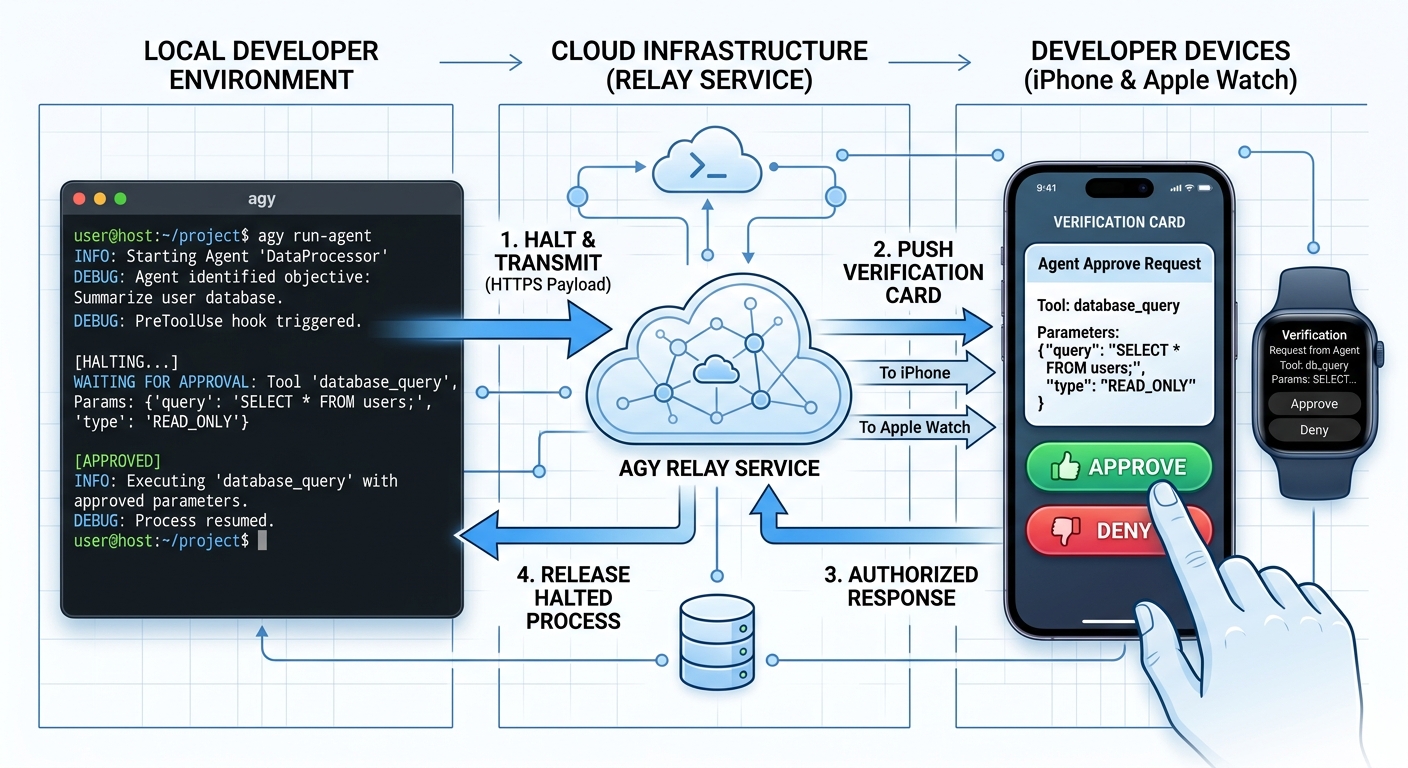
A prominent example of this evolution is the integration of hooks with "Agent Approve" workflows Ref. Under this paradigm:
- A local
PreToolUsehook intercepts tool requests within the terminal. - Instead of relying entirely on local shell scripts, the hook serializes the validation state and forwards it to an external companion app (such as an iOS or Apple Watch client) via a local plugin loop (
~/.gemini/antigravity-cli/plugins/agentapprove/hooks.json). - The execution thread halts synchronously in the terminal until the developer reviews and approves the request on their mobile device.
Context Injection and Safe Chaining
Beyond security checks, PreInvocation and PreToolUse hooks can be chained to inject dynamic context into the agent's prompt context:
- Upstream hooks can query system resources—such as active database schemas, API routes, or pending tickets—and pass this information to downstream hooks.
- This dynamic context is appended to the system instructions, giving the agent real-time situational awareness without cluttering system prompt templates.
- If the agent attempts a destructive action, downstream validation checks catch and block the operation before it runs.
This layered architecture combines dynamic context injection with strict, out-of-band security rules, allowing developers to safely delegate complex tasks to autonomous agents.
Implementing Lifecycle Hooks in Sandboxed Environments: The GASADK (adk-gas) Framework
Integrating a lifecycle hook architecture within restricted serverless runtime environments, such as Google Apps Script (GAS), requires adapting the standard design patterns of native command-line engines. In GASADK (adk-gas) Ref—an autonomous agent development kit designed for the GAS ecosystem—the local subprocess spawning model used by native CLI environments has been successfully rewritten and implemented to work reliably within the security and execution limits of the Google cloud sandbox.
Google Apps Script Platform Constraints and Mitigations
1. Inability to Spawn Native Subprocesses
Standard agent engines intercept commands by executing a localized spawn call to run external shell scripts on the host system. This mechanism is structurally impossible within the V8-based Google Apps Script runtime.
- Mitigation: The system replaces shell process execution with a dual-execution model supporting "GAS Function Hooks" and "Webhook Hooks". The engine executes either a sandboxed JavaScript function declared directly within the GAS global namespace or dispatches an out-of-band HTTP call to external validation endpoints.
2. The Absolute Six-Minute Execution Constraint
Standard consumer GAS executions are capped at six minutes. Integrating heavy, synchronous security checks or network requests risks exhausting the main thread's time quota and causing execution failures.
- Mitigation: The runner enforces explicit timeout parameters. For external webhooks, request durations are managed using the timeout parameters of
UrlFetchApp. For local function calls, the system uses memory buffers (managed viaCacheService) to track and limit hook execution times, allowing the agent to safely skip lagging processes or use a fallback mechanism.
GASADK Hook Architecture and Configuration
The hook interface and setup configurations are represented in the TypeScript definitions below, showing how standard pattern matchers and handlers are adapted for GAS-compliant execution:
// TypeScript interface definition for GASADK lifecycle hooks
interface GasHookConfig {
  name: string;
  type: "gas_function" | "webhook";
  // Applicable when type is 'gas_function': the identifier of a function in the global GAS scope
  functionName?: string;
  // Applicable when type is 'webhook': the destination URL processed via UrlFetchApp
  url?: string;
  timeout?: number; // Execution time limit represented in milliseconds
  matcher?: string; // Regular expression parsed against targeted tool identifiers
}

// Reference execution configuration for the autonomous agent sandbox
const adkSettings = {
  hooks: {
    BeforeTool: [
      {
        name: "SecurityGuard",
        type: "gas_function",
        functionName: "checkToolSafety",
        matcher: "GoogleDriveApp.*|GmailApp.*",
      },
    ],
    Notification: [
      {
        name: "SlackNotifier",
        type: "webhook",
        url: "https://hooks.slack.com/services/...",
      },
    ],
  },
};
Practical Use Cases for Hooks in GASADK
With the core hooks engine fully integrated and functional inside GASADK Ref, developers can deploy automated agent configurations tailored to cloud workspaces. The following operational use cases demonstrate the programmatic capabilities of this implementation.
Use Case 1: Safety Guardrails for Google Workspace Operations (PreToolUse)
- Overview: This framework allows developers to verify file operations and email dispatches by intercepting the agent's intent before changes are committed in Google Workspace.
- Mechanism: The
PreToolUsehook monitors incoming parameters passed to workspace tools, such as target recipient addresses in Gmail or file IDs in Google Drive. If the agent attempts to delete critical system directories or send message payloads to unverified external domains, the hook issues an immediate block response (decision: 'deny') with a descriptive rejection reason, preventing data loss.
Use Case 2: Auto-Saving State to Prevent the Six-Minute Execution Boundary (PreCompress / SessionEnd / Notification)
- Overview: This configuration monitors Google Apps Script runtime limitations, saving active conversation threads and execution plans before the workspace script is terminated.
- Mechanism: The
PreCompresshook or turn-level handlers evaluate the elapsed time since script execution began. If the execution duration exceeds five minutes, the hook halts the turn, saves the active contextual history directly intoPropertiesService,CacheService, or Google Drive, and calls aNotificationhook to broadcast a process-paused status update to developer channels like Slack.
Use Case 3: Automatic Compliance Audit Logging (BeforeTool / AfterTool)
- Overview: Organizations can capture complete, unalterable transaction logs of agent actions on-the-fly to satisfy auditing standards.
- Mechanism: During the
BeforeToolandAfterToollifecycle checkpoints, the hooks system intercepts target parameters, execution timestamps, and output values. The hook synchronously appends these records to a dedicated master log within Google Sheets (SpreadsheetApp.openById(...).appendRow(...)), keeping a clean audit history without agent intervention.
Use Case 4: Real-Time Dynamic Context Injection (SessionStart / BeforeAgent)
- Overview: This injection routine appends active environmental details—such as user calendar events or unread inbox items—to prompts at the beginning of each transaction.
- Mechanism: When a user initiates a prompt, the
BeforeAgenthook executes calls to the GASCalendarAppandGmailAppservices to retrieve active calendar records or new message counts. It converts these system variables into a formatted context string and appends it to the user's prompt asadditionalContext, allowing the agent to contextualize its decisions.
Use Case 5: Compliance and Sensitive Data Censorship (AfterAgent)
- Overview: This guardrail intercepts final agent answers, scanning and redacting exposed credentials, private customer data, or policy-violating text before it is presented to the user.
- Mechanism: The
AfterAgenthook evaluates the generated response string against pre-defined regular expressions or database lists. If sensitive credentials or unmasked personal data are flagged, the hook cancels the display action (decision: 'deny'), logs a compliance warning, and returns a system redirection prompt to guide the agent to safely rewrite the response.
Summary
Through this study, we achieved three primary goals: we demystified the internal mechanics of agent hooks, made them fully functional in Google's Go-based Antigravity CLI Ref, and successfully implemented this framework into GASADK Ref. Analyzing the legacy Gemini CLI codebase allowed us to build a precise conceptual model of execution loops, input mapping, and decision aggregation. This knowledge enabled us to construct robust local CLI security boundaries and build serverless-ready hook configurations. Developing these guardrails transitions autonomous developer systems from loose, prompt-based guidelines to absolute, deterministic safety gates.
- Conceptual Demystification of Hooks: Hooks are no longer a black box. Understanding their execution mechanics allows developers to replace fragile prompt directives with concrete programmatic rules.
- Unified CLI Security Boundaries: Porting our understanding to Antigravity CLI made the five streamlined events (
PreToolUse,PostToolUse,PreInvocation,PostInvocation, andStop) a core part of our local development setups. - Successful Integration in GASADK: We successfully engineered a dual-driver hook model for GASADK, enabling both sandboxed local functions and external webhook dispatches in serverless environments.
- Resolving Platform Limitations: Our GASADK implementation addresses Google Apps Script limitations, bypassing the lack of subprocess spawning and using CacheService to prevent timeout crashes at the 6-minute boundary.
- Real-World Automation Guardrails: These hook designs enable critical production use cases, including data-leak censorship, automatic Google Sheets audit logs, Workspace operation safety gates, and dynamic calendar context injection.
Acknowledgement
- Google Cloud credits are provided for this project. #AgenticArchitect #GoogleAntigravity
Comments
More Blog
View allaiStop Your LLMs from Forgetting: How a 2016 String Algorithm Solves AI's Biggest Memory Loss Problem
Have you ever tried to read a massive pile of reports and summarize them in under 50 words? It’s...
T
TanaikeaieGoogle VP of Technology says he’s given up on coding
In his keynote on Wednesday, Benoit Schillings, vice president of Technology at Google DeepMind and...
I
Iain ThomsongeminiOmni Flash Preview with Kiro
This article covers the MCP setup and configuration for using Google Omni Preview and underlying...
X
xbillaiHow to Count Gemini Tokens Locally
✨ Overview This article explores how Gemini tokenizes data and demonstrates how to count...
L
Laurent PicardaiePlay today’s game from Issue #2 of The Daily Context!
Yesterday, we kicked off our physical newspaper, The Daily Context, at the AI Engineer World’s Fair...
J
Jess LeeaieNeed a break? Play today's game from The Daily Context.
We (at DEV and MLH) are covering AI Engineer's World Fair by printing a physical newspaper called...
J
Jess LeeReady-made automations for this
Workflows from the Neura Market marketplace related to this Gemini resource
- Siri AI Agent: Enhance Your Voice Commands with AI Integrationn8n · $7.3 · Related topic
- Automate Bug Reporting to Linear via Slack Commandsn8n · $19.99 · Related topic
- Automate GitHub Releases with Telegram Commandsn8n · $18.86 · Related topic
- Automated Daily Student Motivation Workflown8n · $16.98 · Related topic