
Back to Blog gemini
 ai
ai aie
aie gemini
 ai
ai aie
aie aie
aie
Automating Accounts Payable with Workspace Studio
Aryan Irani June 29, 2026
0 views
Dealing with vendor invoices usually means someone is sitting there manually opening PDFs and typing...
Dealing with vendor invoices usually means someone is sitting there manually opening PDFs and typing numbers into a ledger. It's slow, error-prone, and a massive waste of time. We wanted to automate our entire Accounts Payable flow, but we definitely didn't want to build a custom tool from scratch to do it.
So, I built a pipeline using Workspace Studio. It basically watches a Google Drive folder for new invoices, uses Gemini to read them, and then automatically logs the data and drafts approval emails based on our business rules. It took the manual work down to zero.
Prefer to watch instead of read? Check out the video version of the guide here.
{% embed https://youtu.be/vd_e7ChVcJI %}
The Architecture
The goal was simple: build a pipeline that ingests a PDF, extracts structured metadata, logs it, and routes it based on business logic.
Here is the stack:
- Ingestion: Google Drive (Trigger)
- Intelligence: Gemini (Semantic parsing and extraction)
- Governance: Decide / Check If nodes (Routing logic)
- Handoff: Google Sheets (Ledger) + Gmail (Escalation)
Let's walk through the actual build.
Step 1: The Trigger (Google Drive)
We started by setting up a When an item is added to a folder starter, pointing it at a dedicated Drive folder named Invoices Drop.
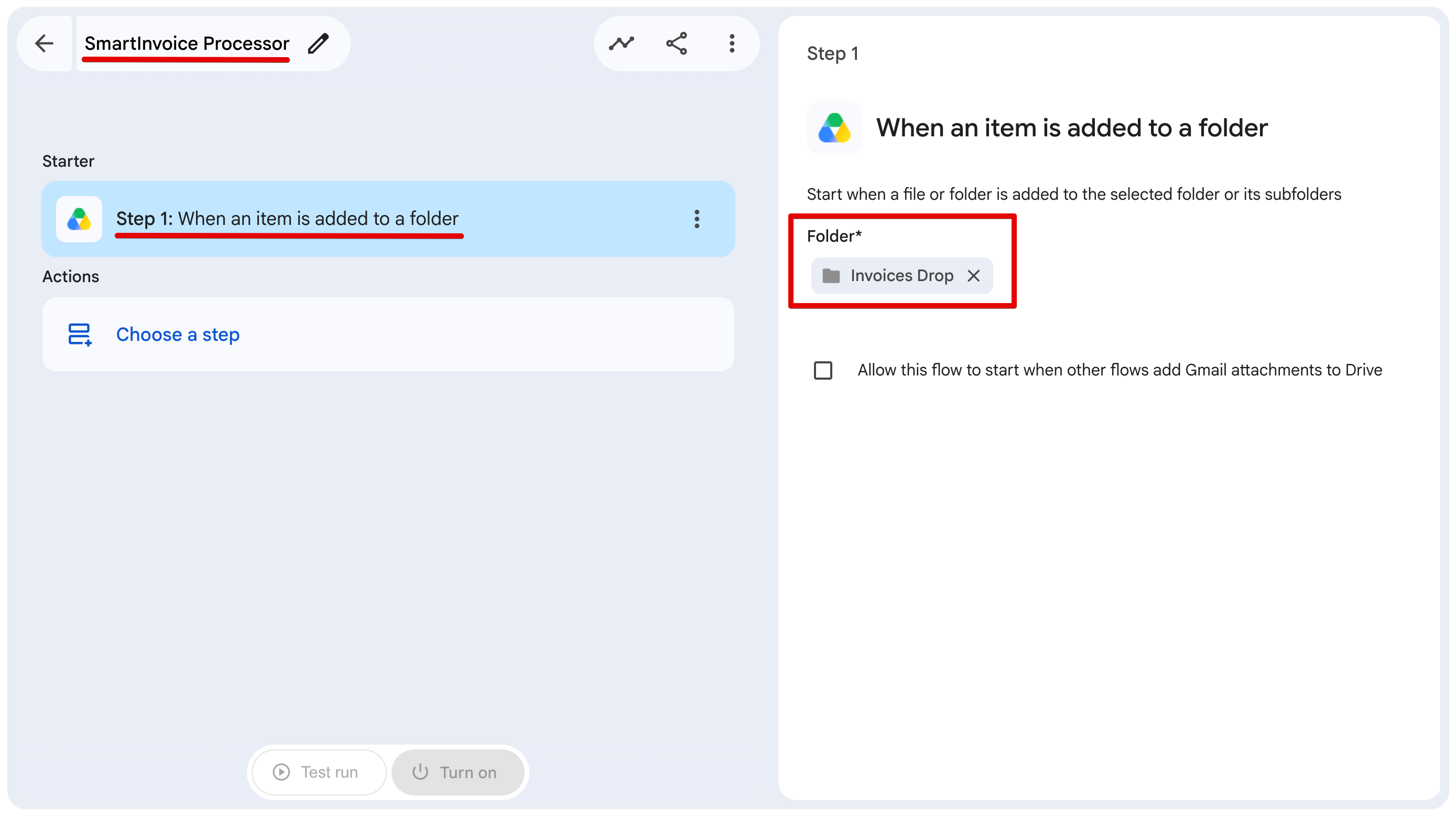
Once done, go ahead and click on Choose a step.
Step 2: Parsing the PDFs (Gemini Extract)
Next, we add an Extract action and pass it the Link to item variable from Step 1.
If you've ever tried to write regex to pull an invoice total out of a PDF, you know it's a nightmare. Vendor layouts change constantly. Instead of dealing with pixel coordinates, we just give Gemini the PDF and define the custom content we want back: Vendor_Name, Invoice_Total, and Due_Date.
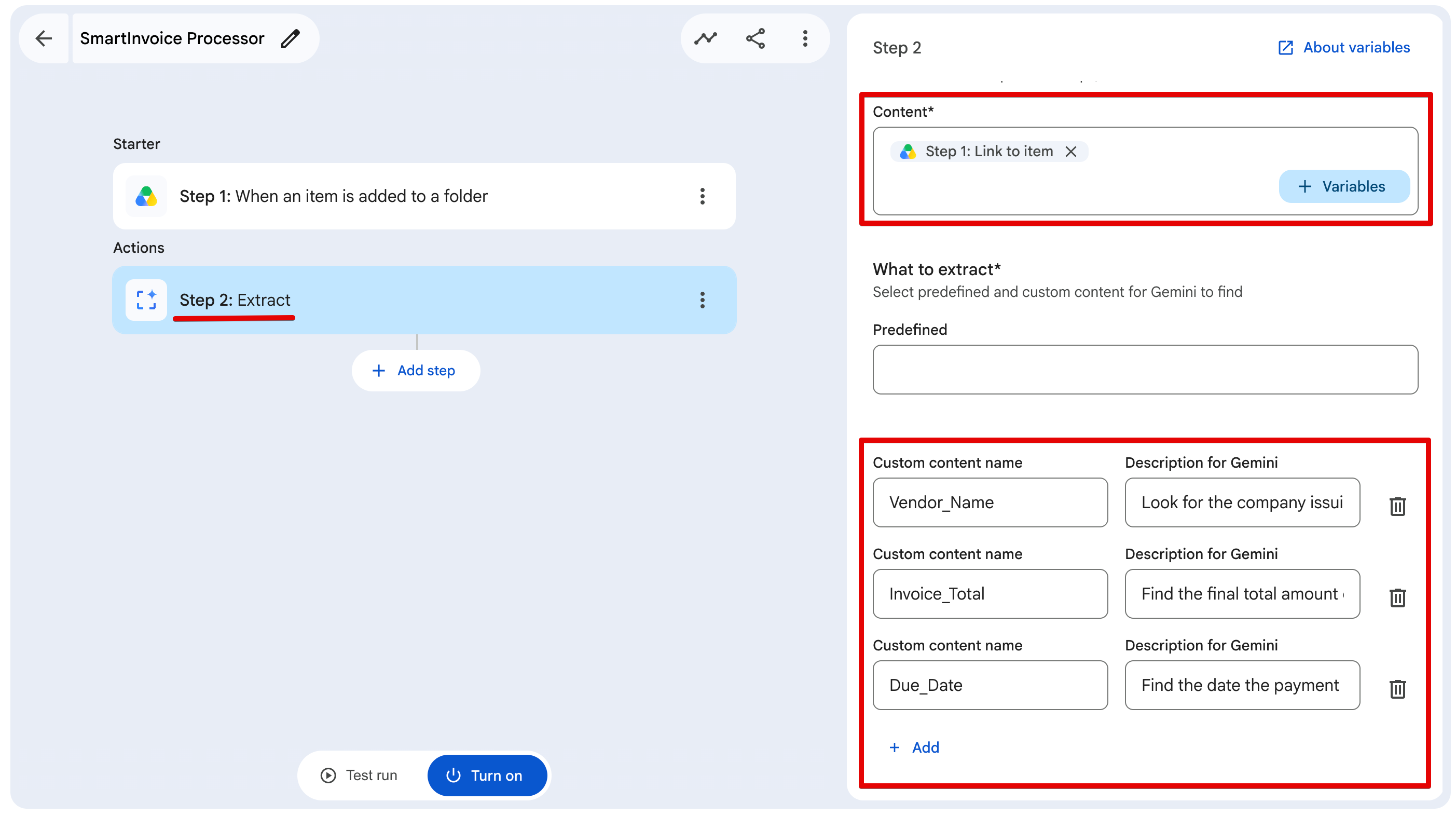
The trick here is providing solid instructions. You need to be extremely specific. Here are the exact descriptions we used for each field:
- Vendor_Name: Look for the company issuing the bill. Do not include LLC or Inc.
- Invoice_Total: Find the final total amount due. Return ONLY the number. Strip out all currency symbols and commas (e.g., return 5000.50, not $5,000.50).
- Due_Date: Find the date the payment is due. Format it exactly as MM/DD/YYYY.
If you don't enforce these rules early on, your routing logic later in the pipeline is going to break. This strict prompt engineering gives us the deterministic data we need for the rest of the flow.
Step 3: Logging to the Ledger (Google Sheets)
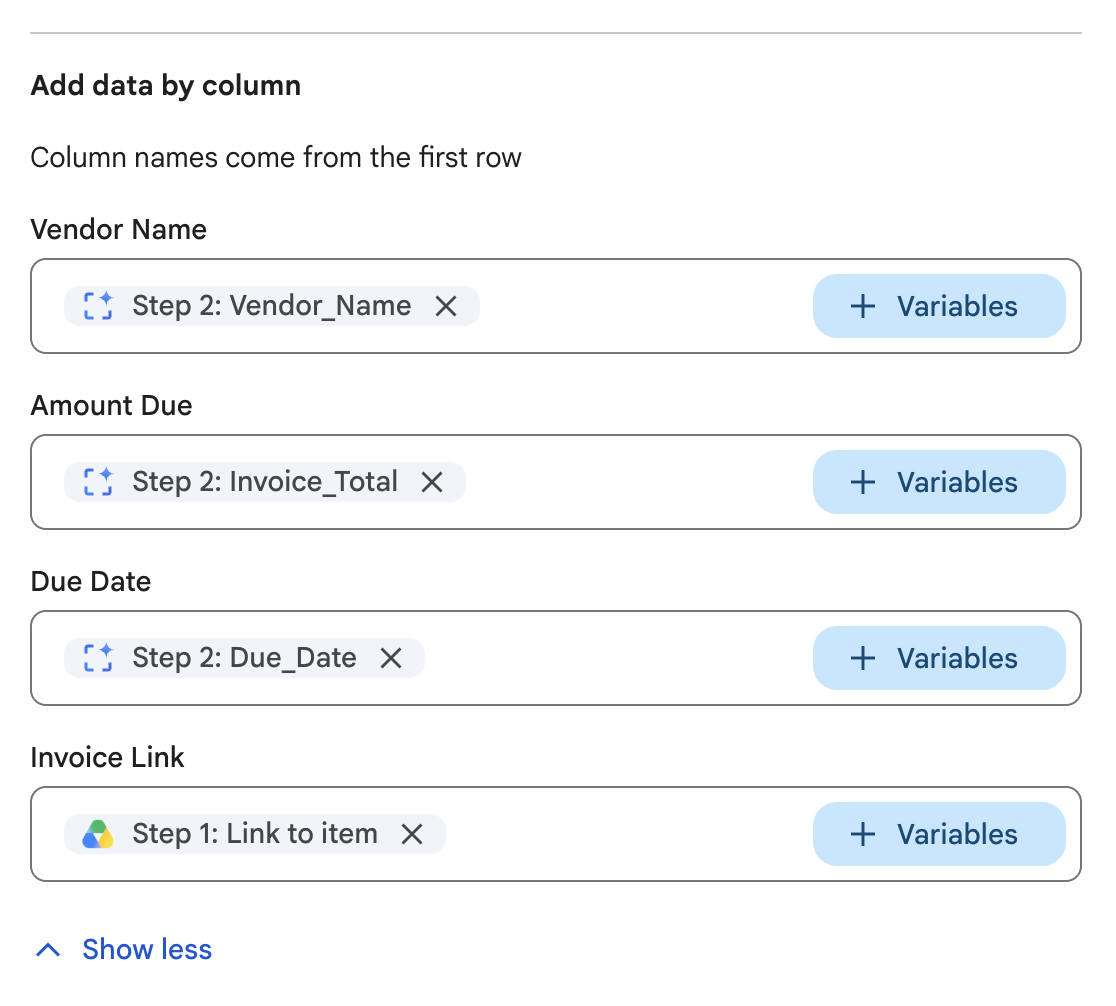
Before doing any complex routing, we want to make sure the data is safely stored. We use the Add a row action to push the extracted data straight into our Accounts Payable Ledger spreadsheet on Sheet1.
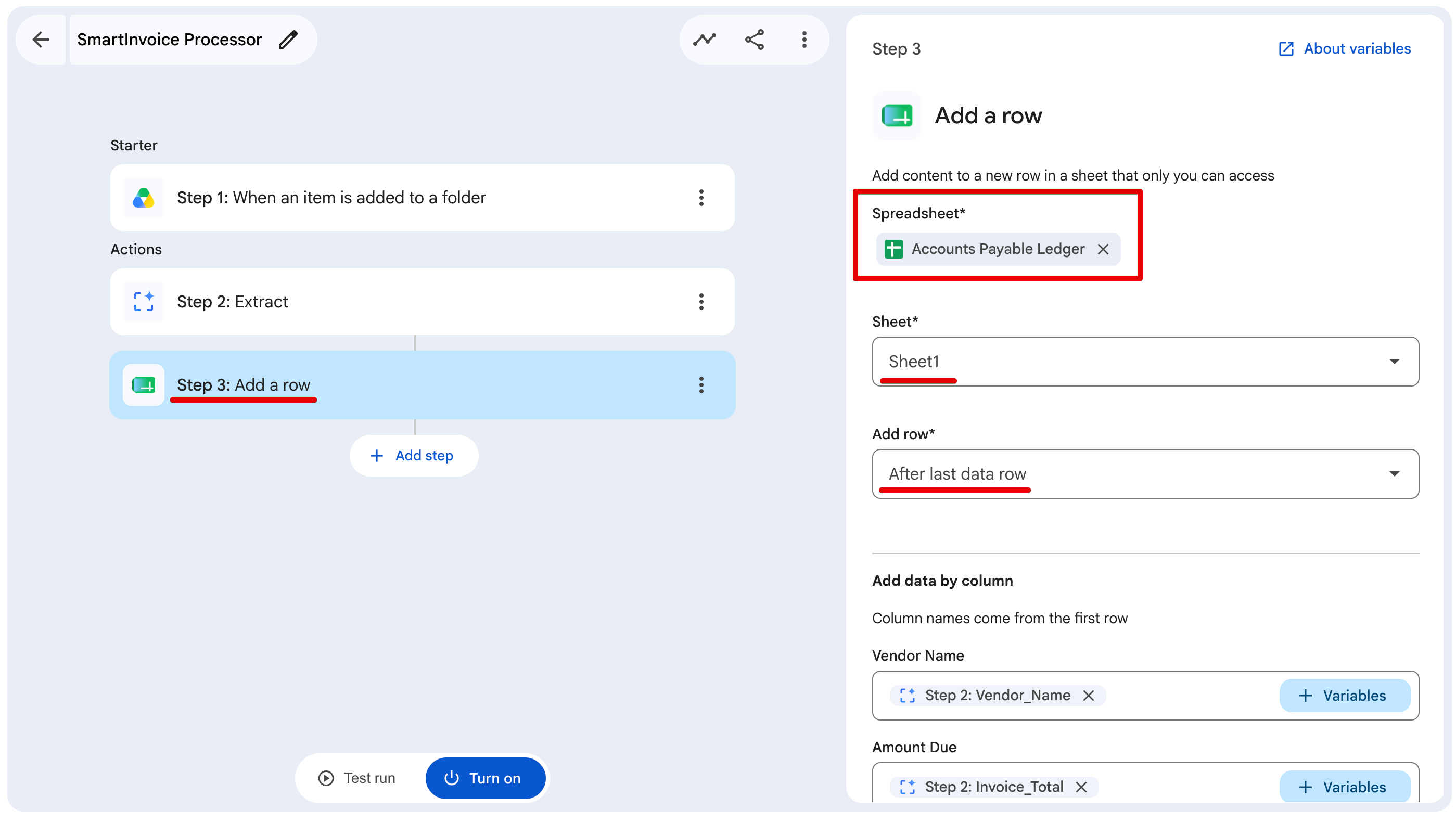
We just map the variables we got from Step 2 directly to our columns: Vendor Name, Amount Due, and Due Date. This instantly gives the finance team a centralized, real-time database of every invoice entering the system, without any manual copy-pasting.
Step 4 & 5: Building the Routing Logic (Decide & Check If)
You obviously don't want massive invoices slipping through the cracks without someone noticing. We needed a way to flag high-value items.
First, we added a Decide node (Step 4) with a specific prompt:
Evaluate if the total amount is strictly greater than 5000. Total Amount: [Step 2: Invoice_Total].
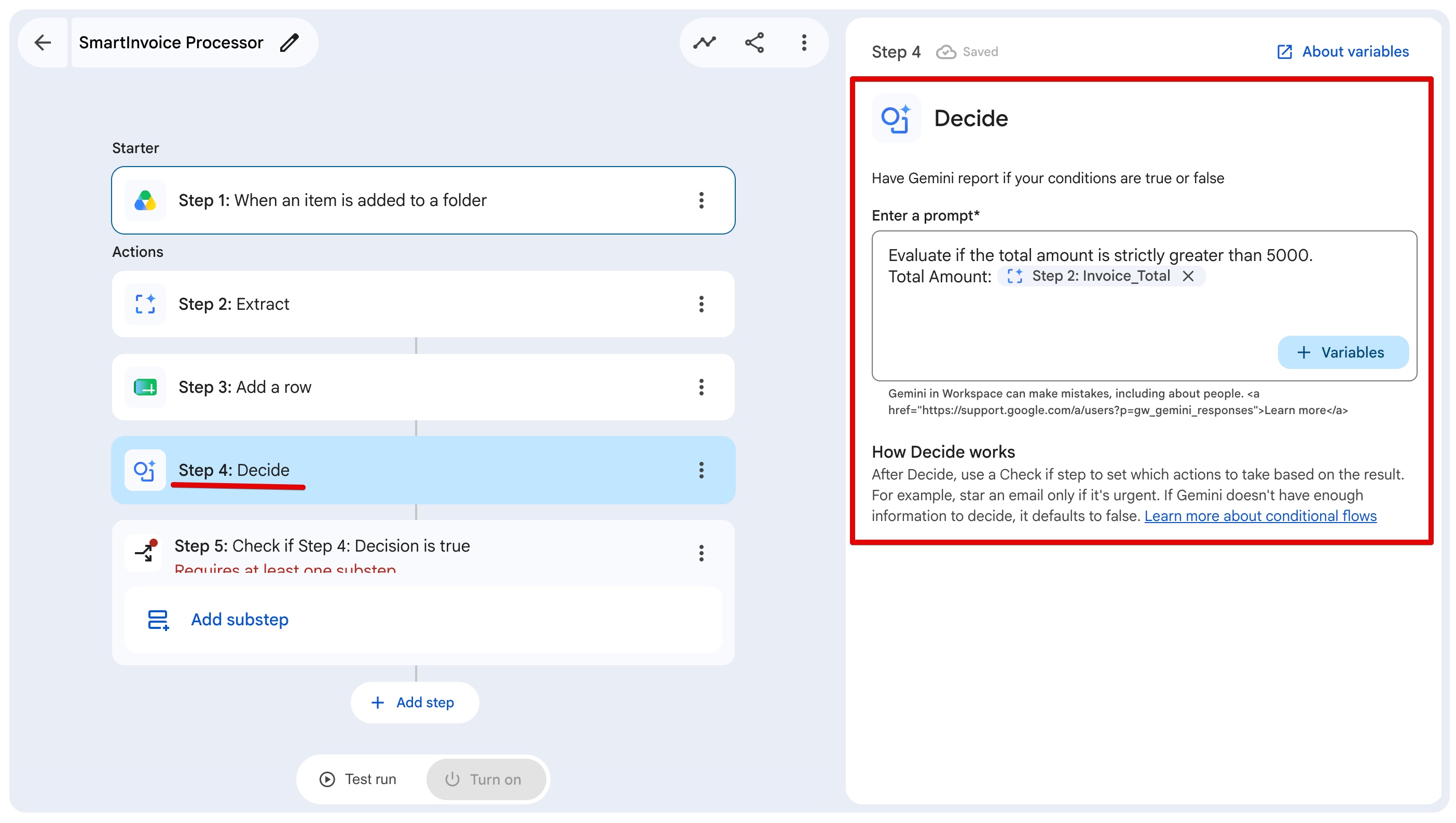
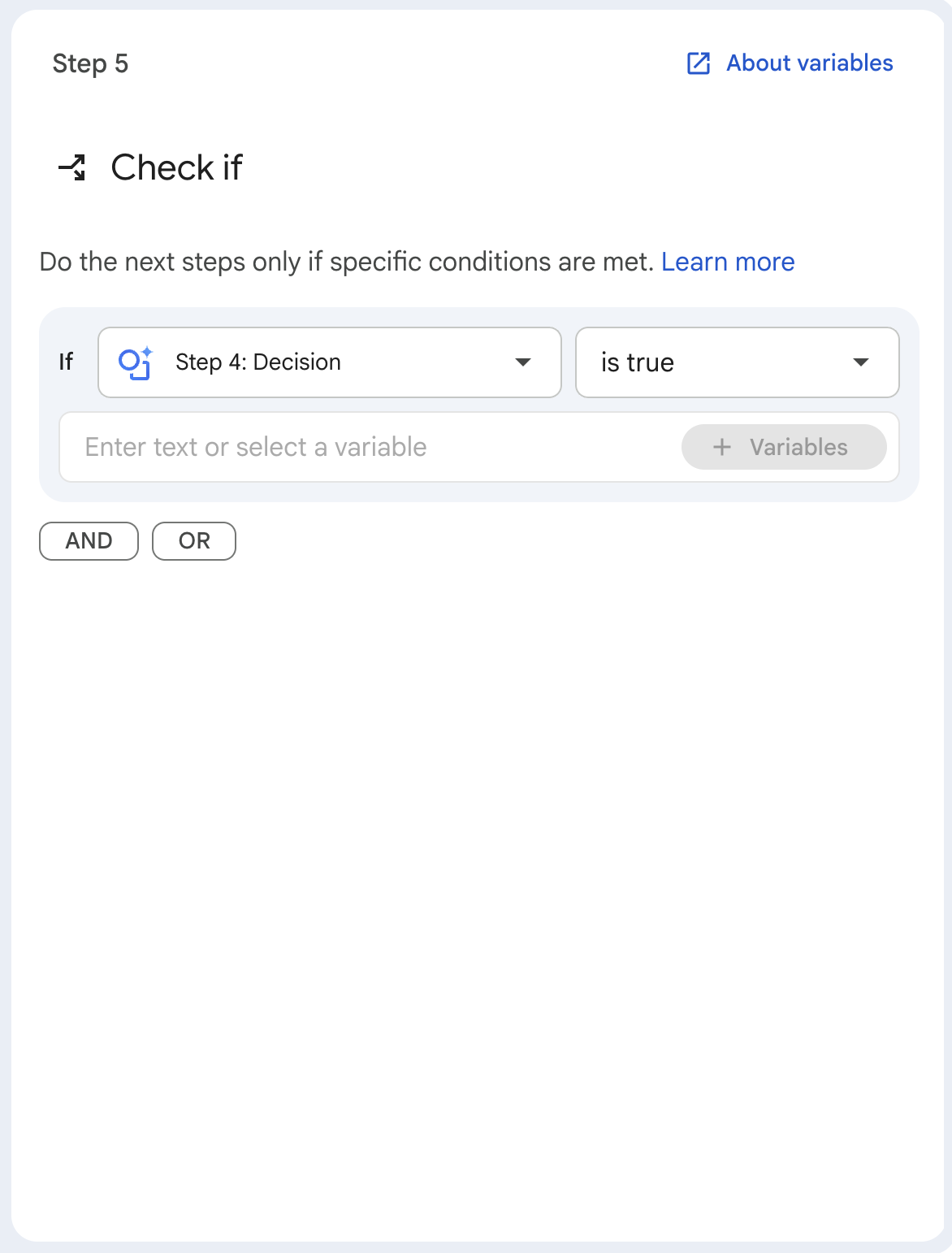
This node evaluates our logic and spits out a simple boolean. Then, we pass that boolean into a Check if node (Step 5). We configure it so that if Step 4: Decision is true, the pipeline executes a specific substep.
Step 6 & 7: Alerts and Email Handoff (Chat & Gmail)
If that invoice threshold condition is met, the pipeline executes Step 6: Notify me in Chat.
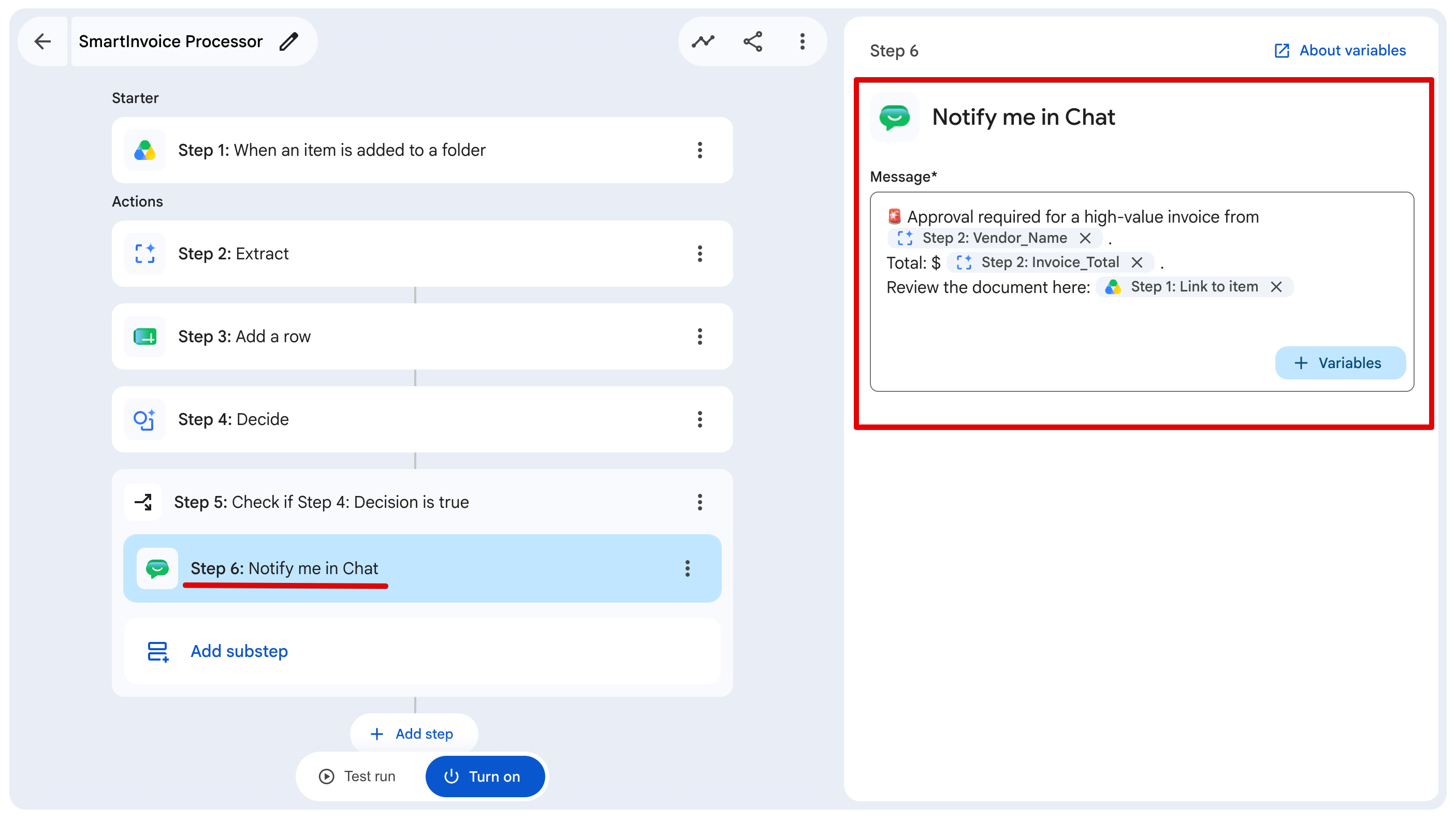
We format the Chat message to be highly actionable, injecting the Vendor_Name, Invoice_Total, and the direct Link to item right into the ping. This fires an instant alert directly to the finance team so they know a massive bill just landed and can open the PDF immediately.
Finally, once the flow drops out of the Check If block, it proceeds to Step 7: Draft an email. We configure this action to prepare the final processing record.
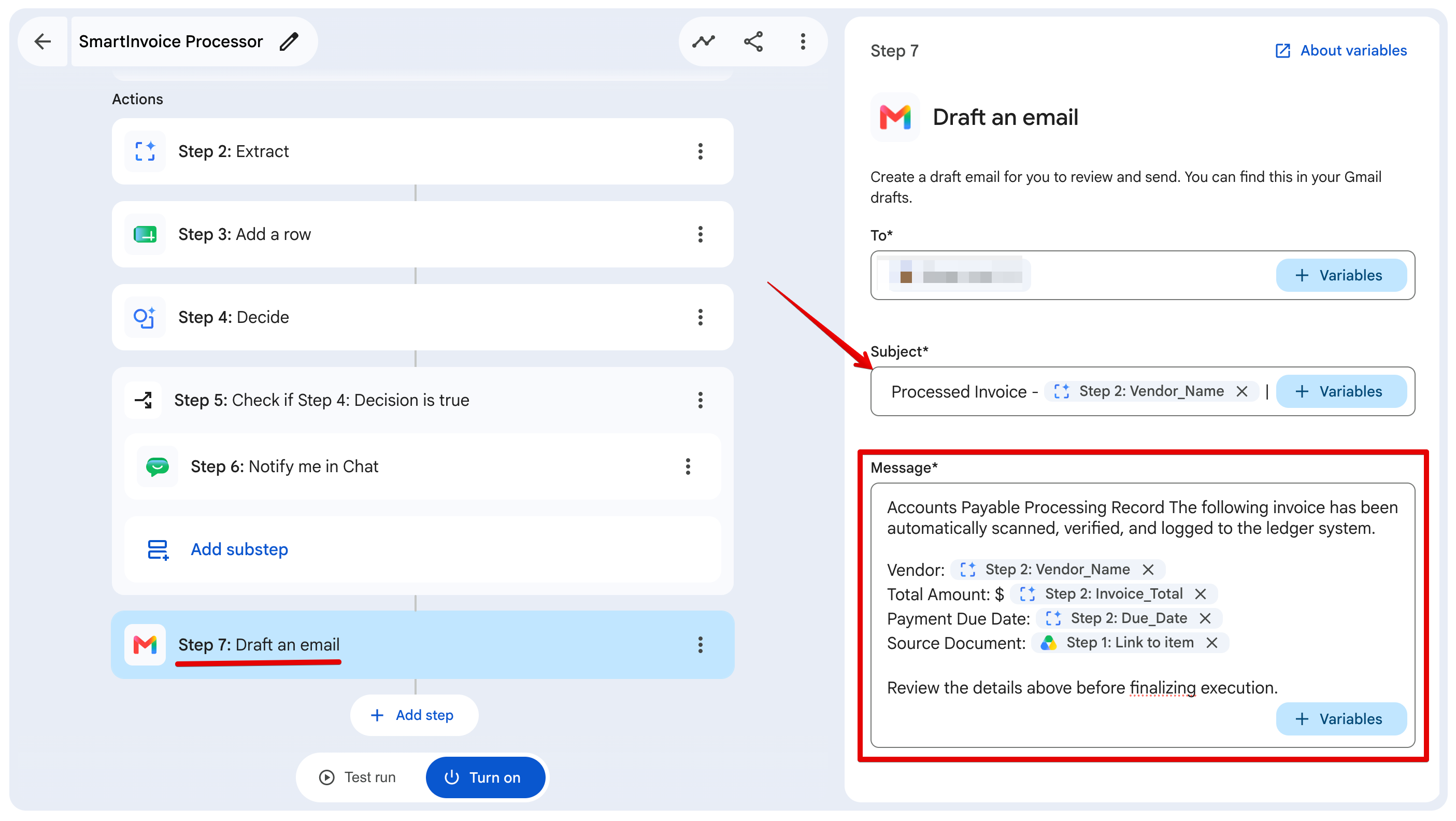
We build a clean email template that pulls in all our extracted variables— Vendor Name, Total, Due Date, and the Drive link. Notice that we draft the email, rather than send it. When you're dealing with financial operations, having a human-in-the-loop is critical.
The automation does 99% of the heavy lifting and data entry, but a human still reviews the drafted email in their inbox and manually hits Send. It's the best way to build trust in a new automated system.
Testing the Flow in Action
Before pushing this live, we need to verify that our routing logic and type enforcement actually work. I threw two completely different PDF layouts into our staging folder.
Test 1: The Standard Invoice (Under $5,000)
First, we drop in a standard invoice from Creative Assets Co. for $850.50.
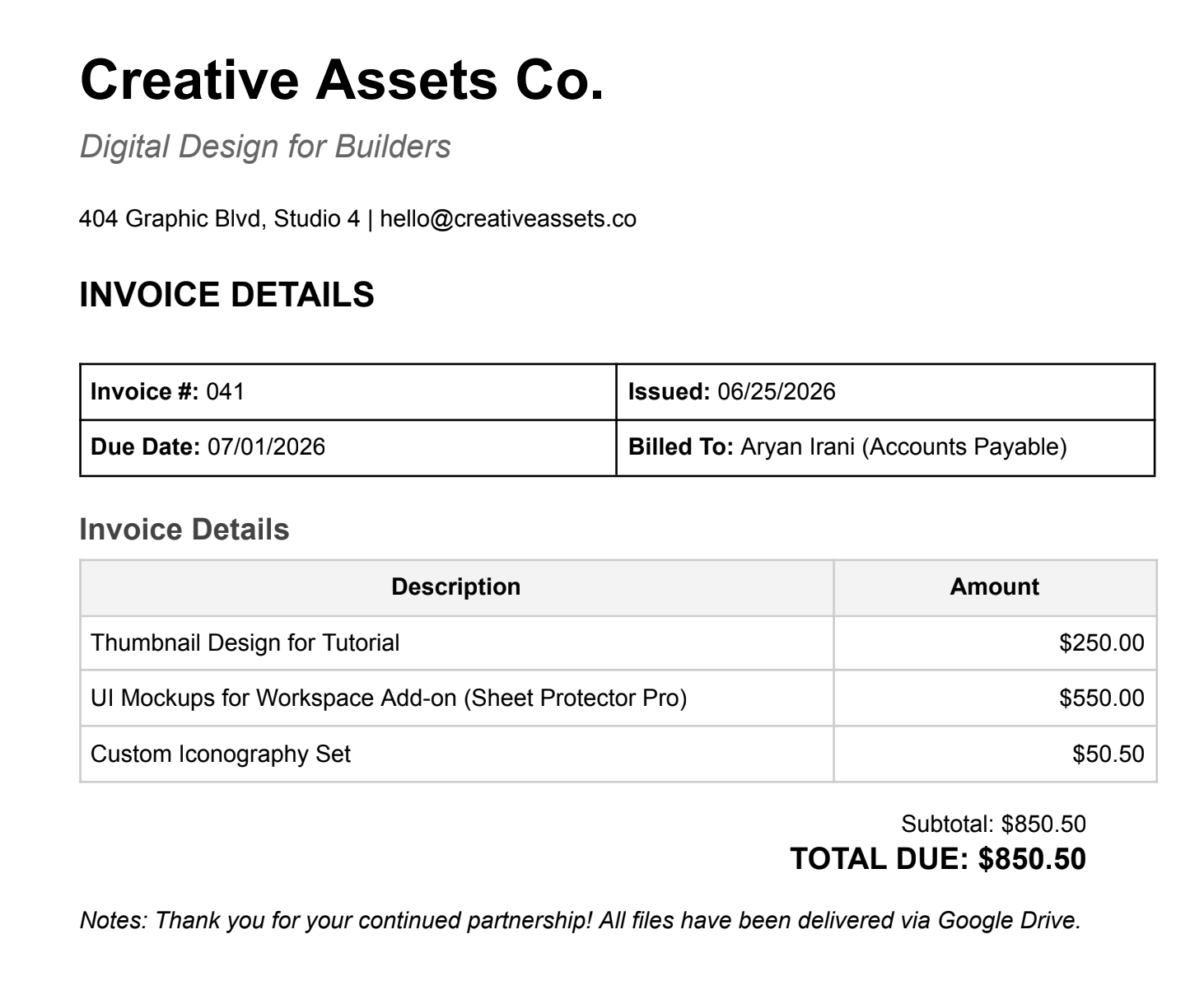
When the flow runs, we can watch the execution logs in real-time: Gemini perfectly extracts the data: Creative Assets Co., 850.50 (notice the clean float), and 07/01/2026.
The row is added to our ledger. The Decide node evaluates to FALSE because 850.50 is not greater than 5,000. The Check If block skips the Chat notification. Finally, it drops straight down to Step 7 and drafts our standard processing email.
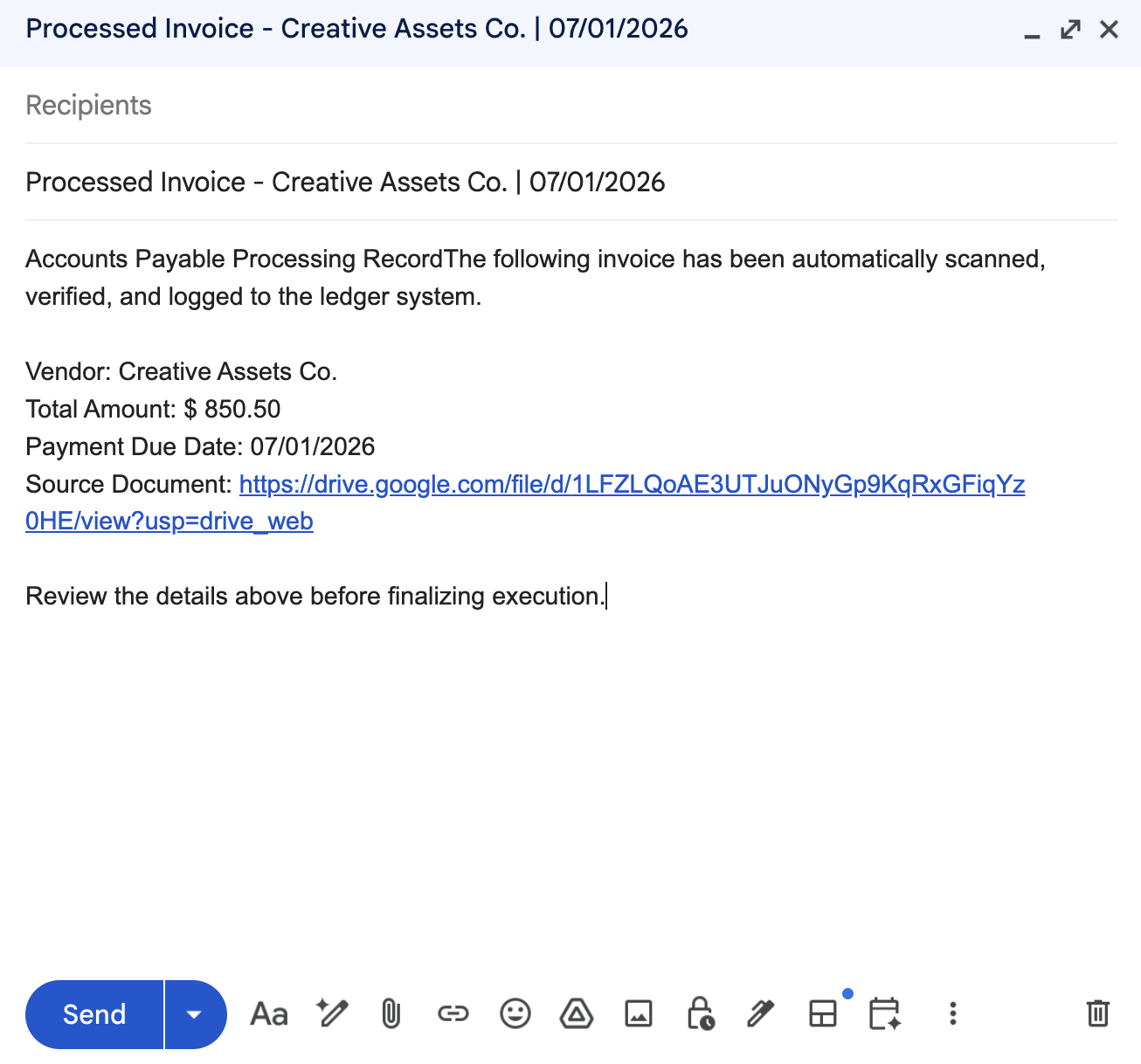
This handles 90% of our daily volume, bypassing the red tape entirely.
Test 2: The High-Value Exception (Over $5,000)
Next, we test the exception path with a massive invoice from Cloud Nexus Enterprise Solutions for $14,500.00.
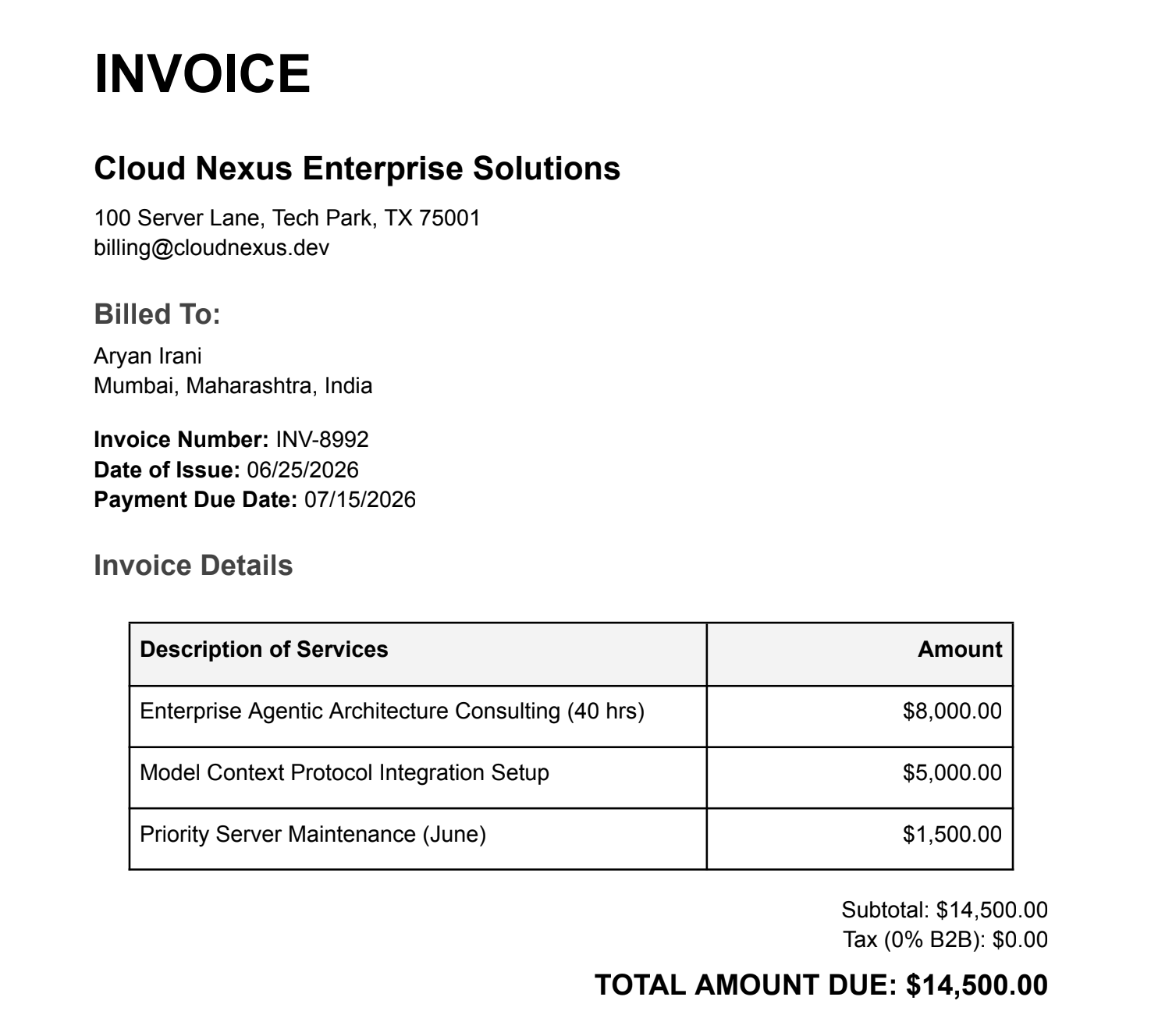
This time, when the Decide node hits the $14,500.00 float, it evaluates to TRUE. The flow immediately dives into the Check If block and fires the alert to Google Chat.
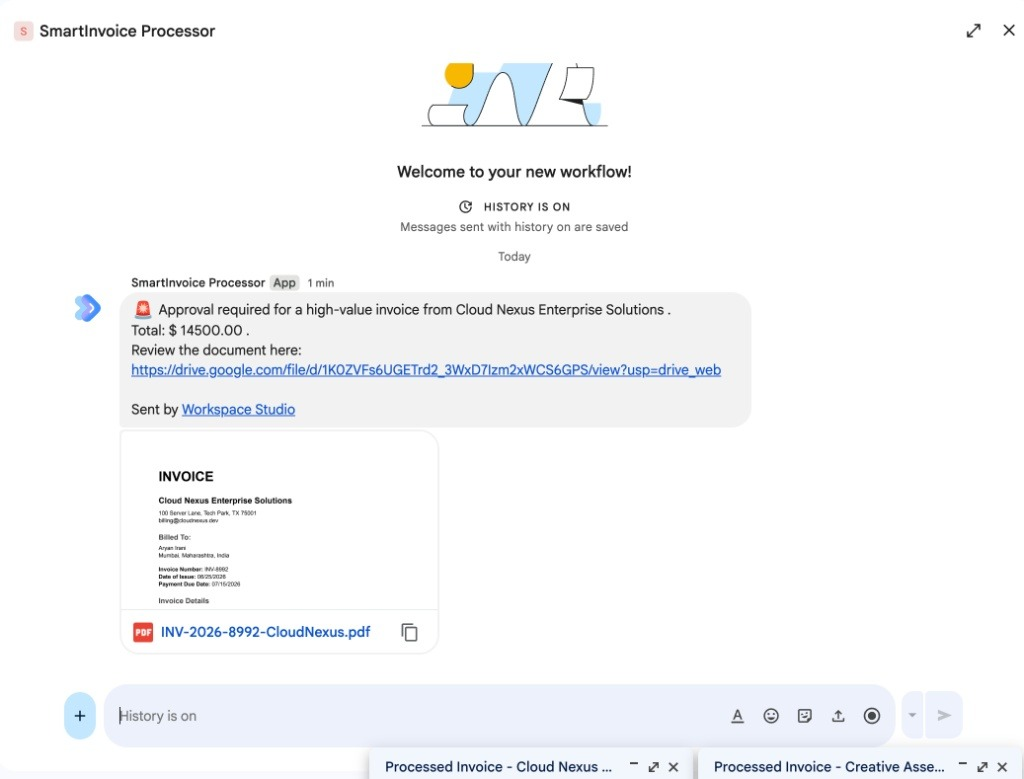
Within seconds of dropping the PDF into Drive, the finance channel gets a high-priority ping, complete with a direct link to the source document for immediate executive review.
Wrapping Up
By building this in Workspace Studio, we avoided writing and maintaining a custom internal app. We got an intelligent pipeline that actually tolerates layout changes, and our finance team got out of the copy-paste business. If you're dealing with similar manual bottlenecks, give it a try.
Work With Me
I run a specialized software consultancy focused on building custom tools, AI integrations, and automation pipelines that help engineering and ops teams move significantly faster.
We just launched our brand new website, and we are currently taking on new clients. My core services include:
- AI & Workspace Automation: Building custom Gemini architectures (like the pipeline above) directly into your business infrastructure.
- Custom Software Development: Architecting scalable web applications and internal tools from the ground up.
- Cloud Architecture: Secure GCP and Firebase infrastructure design.
- Developer Relations & Content: Partnering with tech brands to create high-quality developer tutorials and video series.
If your team is dealing with manual bottlenecks, or if you need an expert to help architect a complex solution, check out my new site and let's get on a call.
Comments
More Blog
View allaiStop Your LLMs from Forgetting: How a 2016 String Algorithm Solves AI's Biggest Memory Loss Problem
Have you ever tried to read a massive pile of reports and summarize them in under 50 words? It’s...
T
TanaikeaieGoogle VP of Technology says he’s given up on coding
In his keynote on Wednesday, Benoit Schillings, vice president of Technology at Google DeepMind and...
I
Iain ThomsongeminiOmni Flash Preview with Kiro
This article covers the MCP setup and configuration for using Google Omni Preview and underlying...
X
xbillaiHow to Count Gemini Tokens Locally
✨ Overview This article explores how Gemini tokenizes data and demonstrates how to count...
L
Laurent PicardaiePlay today’s game from Issue #2 of The Daily Context!
Yesterday, we kicked off our physical newspaper, The Daily Context, at the AI Engineer World’s Fair...
J
Jess LeeaieNeed a break? Play today's game from The Daily Context.
We (at DEV and MLH) are covering AI Engineer's World Fair by printing a physical newspaper called...
J
Jess LeeReady-made automations for this
Workflows from the Neura Market marketplace related to this Gemini resource
- Monitor Twitter Accounts & Generate Intelligence Summaries with Gemini AI & Telegramn8n · Free · Related topic
- Automate CV Screening and Analysis with Telegram, Google Gemini AI, and Google Workspacen8n · Free · Related topic
- Automate Employee Onboarding with Slack, Jira, and Google Workspace Integrationn8n · Free · Related topic
- Generate PDF Invoices with CustomJS APIn8n · Free · Related topic