 Gemini
Back to Blog![[Gemini API in Action] Adding a "Detailed Research Report" Button to a LINE Bot: Using Google Search Grounding to Turn Summaries](https://media2.dev.to/dynamic/image/width=1200,height=627,fit=cover,gravity=auto,format=auto/https%3A%2F%2Fdev-to-uploads.s3.us-east-2.amazonaws.com%2Fuploads%2Farticles%2Fi1383r672tozs1ssoan6.png) ai
ai
![[AI in Practice] Upgrading from Gemini 3.5/3.6 to Gemini 4 Argon: Migration Notes and Pitfalls for LINE Bot Developers](https://media2.dev.to/dynamic/image/width=1200,height=627,fit=cover,gravity=auto,format=auto/https%3A%2F%2Fdev-to-uploads.s3.us-east-2.amazonaws.com%2Fuploads%2Farticles%2Fe3j23dy7fqvu09aob4ob.png) ai
ai googlecloud
 ai
ai ai
ai ai
ai ai
ai
[Gemini API in Action] Adding a "Detailed Research Report" Button to a LINE Bot: Using Google Search Grounding to Turn Summaries
Evan Lin August 17, 2026
1 views
Background My LINE Bot has always had a summary feature: you drop a URL in, it crawls...
Background
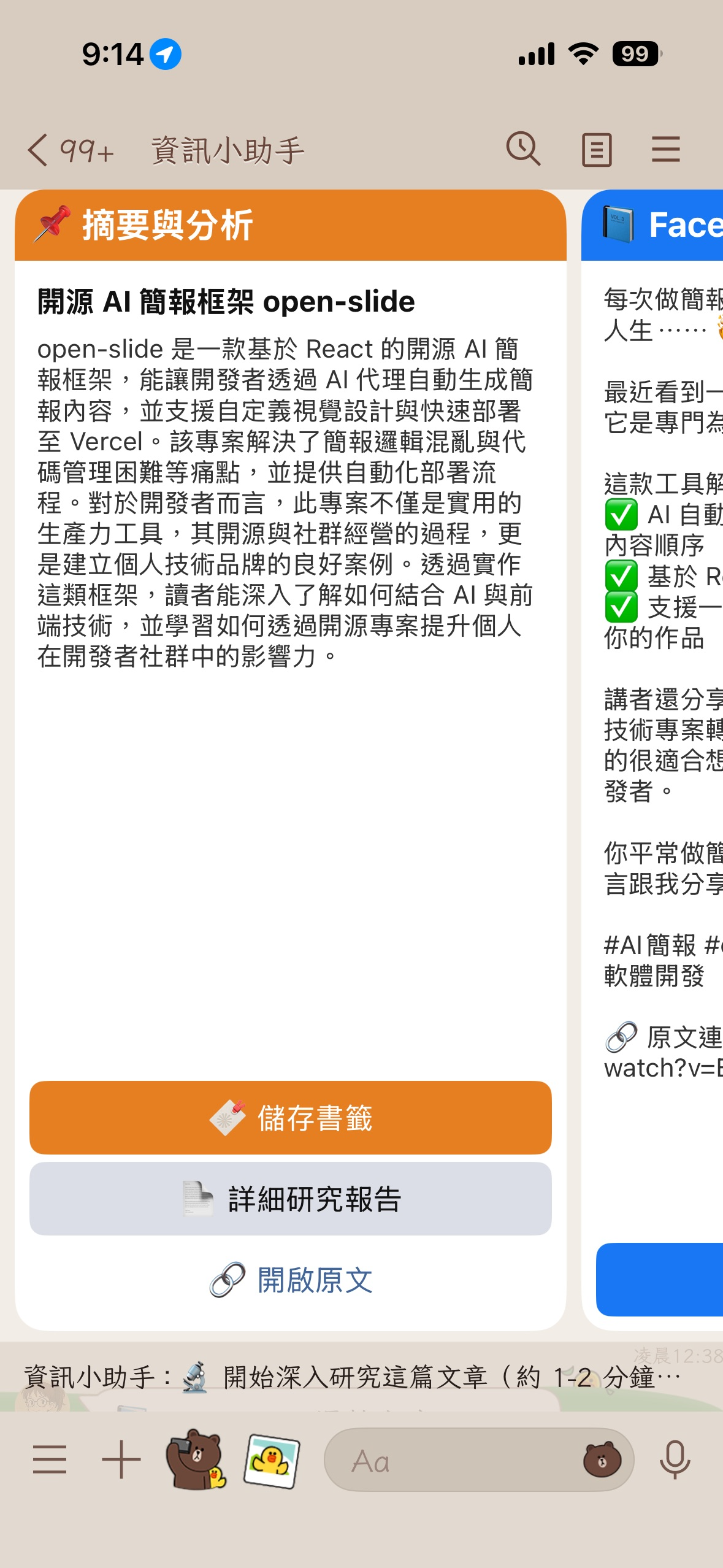
My LINE Bot has always had a summary feature: you drop a URL in, it crawls the content, generates a summary, and attaches a social media post draft along with a button to save it as a bookmark. This feature has been around since 2024, but it has always only solved the "what is this about" problem. I often find myself wanting to know three other things:
What is the background context of the things discussed in this article? Have there been counter-arguments from others? Are the numbers mentioned sourced, or are they just the author's own claims?
Summaries can't answer these because the input for a summary is only the article itself. The model has no other materials; if you ask it for a "critical analysis," it can only circle around the original text or start hallucinating.
Google Search Grounding fills exactly this gap. I used it as a search assistant in a previous article; back then, the purpose was to answer questions. This time, I wanted to try another approach: give an existing article to the model, let it search for information outside the article on its own, and then look back to review the article.
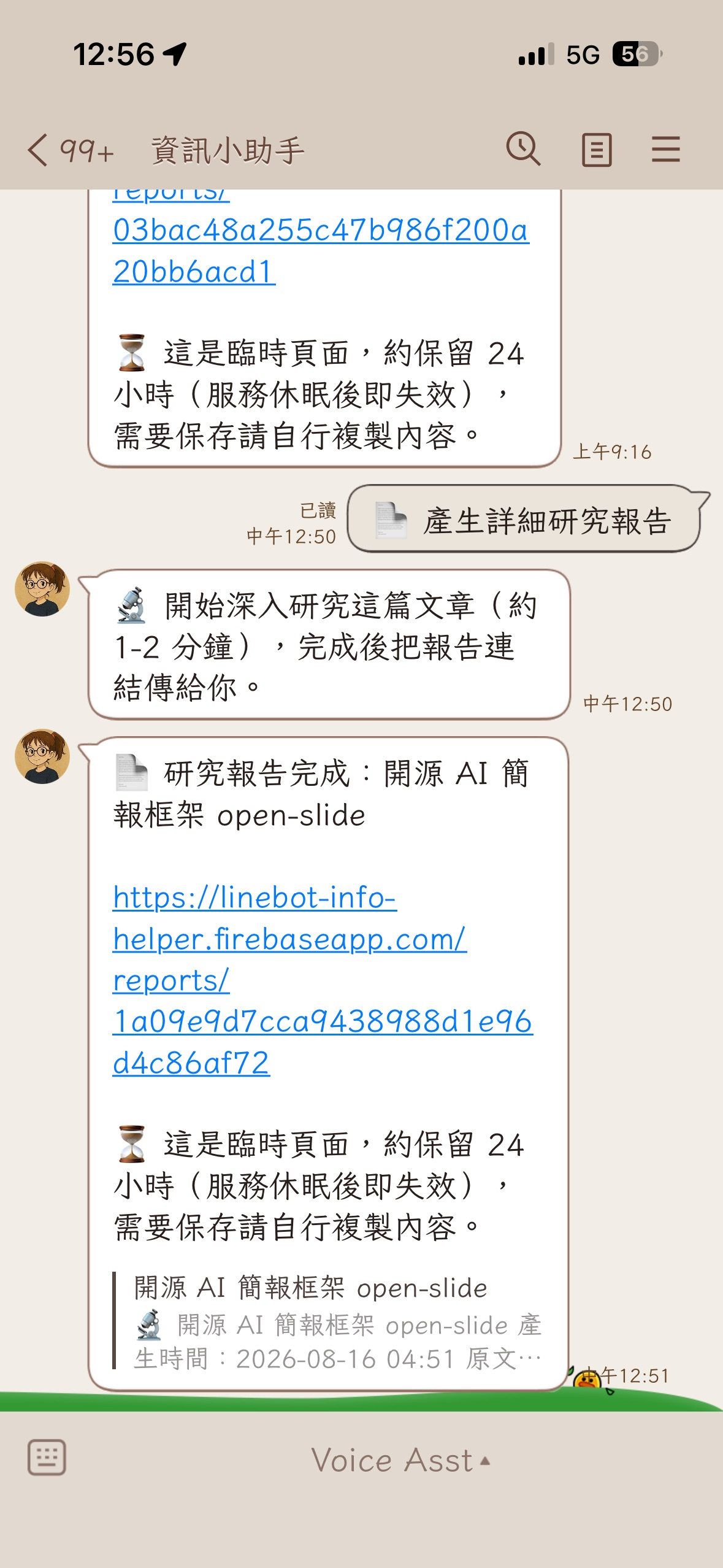
The result is a new "📄 Detailed Research Report" button on the summary card. About one to two minutes after clicking it, the Bot pushes a web link to you.
Main Repo: https://github.com/kkdai/linebot-helper-python
Why Grounding instead of building your own search pipeline
Before Grounding, to let a model read real-time information from the web, you had to build a pipeline yourself: first, ask the model to extract keywords from the article, use those keywords to call a search API, crawl the search result pages one by one, stuff them into the prompt, and then ask the model to summarize. This involves three or more API calls, any of which could fail, and the quality of the extracted keywords directly determines whether the retrieved information is useful.
Grounding integrates this entire process into the model. You simply attach a google_search tool in the GenerateContentConfig, and the model handles the rest: it decides whether to search, what to search for, how many times to search, and judges which results are worth using.
For the "Research Report" topic, the model deciding what to search for is particularly valuable. When writing the prompt, I don't know what article the user will provide, so I naturally can't write the specific keywords to search. But after the model reads the article, it knows; it will look for the context of the topic and check if there are opposing views.
Another advantage I care about is that citations are returned. The grounding_metadata in the model's response contains the actual web pages it referenced, including titles and URLs. This means phrases like "according to other reports" in the report aren't just the model speaking from memory; there are corresponding web pages you can click to verify. For information-based products, this makes a huge difference.
The code to extract sources is in loader/langtools.py, written defensively because these fields don't exist at all if no search was triggered:
def _extract_grounding_sources(response) -> list:
    """Extract citations from grounding metadata (same approach as chat_session)."""
    sources = []
    try:
        if getattr(response, 'candidates', None):
            candidate = response.candidates[0]
            metadata = getattr(candidate, 'grounding_metadata', None)
            chunks = getattr(metadata, 'grounding_chunks', None) if metadata else None
            for chunk in chunks or []:
                web = getattr(chunk, 'web', None)
                if web:
                    sources.append({
                        'title': getattr(web, 'title', '') or '',
                        'uri': getattr(web, 'uri', '') or '',
                    })
    except Exception as e:
        logging.warning(f"Failed to extract grounding sources: {e}")
    return sources
System Architecture
The entire flow starts from the button on the summary card, goes through a re-crawl and a grounding call, and ends with a temporary webpage.
graph TD
    A[User sends URL] -->|Summary Flex Bubble| B[📄 Detailed Research Report Button]
    B -->|Postback with bookmark doc id| C[Verify bookmark ownership]
    C -->|Immediate Reply: Researching| D[LINE Chatroom]
    C -->|Background Task| E[load_url: Re-crawl original text]
    E --> F[Gemini + Google Search Grounding]
    F -->|Markdown + Citations| G[render_report_page to HTML]
    G -->|Store in memory ReportStore| H[Get uuid report_id]
    H -->|Push Link| I[GET /reports/:id Temporary Webpage]
The button carries the bookmark's document ID, not the URL itself. This follows the existing "Save Bookmark" mechanism. The benefit is that using the doc ID allows verifying that the bookmark actually belongs to the user before generating the report. Conversely, if Firestore isn't connected or the doc ID can't be retrieved, this button won't appear.
Core Implementation
1. Generating Research Reports with Grounding
The key to generate_research_report() isn't the code, but the prompt. I explicitly ask the model to search proactively and require it to label which information comes from the search and which comes from the original text:
    prompt = f"""You are a rigorous research analyst. Please write a detailed research report based on the following article content,
in Traditional Chinese (Taiwan usage), Markdown format (starting from ## level, do not include the main article title).

Required Structure:
## Executive Summary (3-5 sentences explaining what this is about and why it matters)
## Background Context (The history and context of this topic, combined with relevant information you searched for)
## Core Arguments & Evidence (Organize the article's claims and supporting evidence point by point, labeling the strength of evidence)
## Data & Fact Summary (Key numbers, dates, people, and organizations from the text, using tables or lists)
## Counter-perspectives & Critique (Search for related reports, compare other viewpoints; point out blind spots, assumptions, or controversies in the article)
## Further Questions (3-5 questions worth investigating further)

Requirements:
- Please proactively search for supplementary background and comparative information outside the article, and label in the text whether the information comes from search or the original text.
- Be specific rather than abstract; clearly label unsupported inferences as "speculation".
- Use full-width punctuation, avoid AI-sounding clichés.

Original URL: {url}

Article Content:
{text}"""
The phrases "label the strength of evidence" and "clearly label unsupported inferences as speculation" are the parts of the prompt I care about most. Without them, every sentence in the report would sound equally confident, and the reader wouldn't be able to distinguish what the article said, what the model added from search results, and what it inferred itself.
The part for attaching the tool is very short; whether tools is provided or not is the difference between having grounding or not:
    def _call(with_grounding: bool):
        client = _get_vertex_client()
        tools = [types.Tool(google_search=types.GoogleSearch())] if with_grounding else None
        return client.models.generate_content(
            model="gemini-3.1-flash-lite",
            contents=prompt,
            config=types.GenerateContentConfig(
                temperature=0.4,
                tools=tools,
                max_output_tokens=16384,
                labels={"client_id": "info_helper"},
            )
        )

    try:
        try:
            response = _call(with_grounding=True)
        except Exception as e:
            logging.warning(
                f"Grounded research call failed, retrying without tools: {e}")
            response = _call(with_grounding=False)
I used two layers of try because grounding involves external searches, so the failure rate is naturally higher than pure text generation. When the tool call fails, instead of returning "Generation failed," it's better to retry once with the same prompt but without the tool. In this case, the user gets a pure article analysis without comparative views or sources, but at least they have something. This degradation is intentional, not an accident.
2. Where to put the report
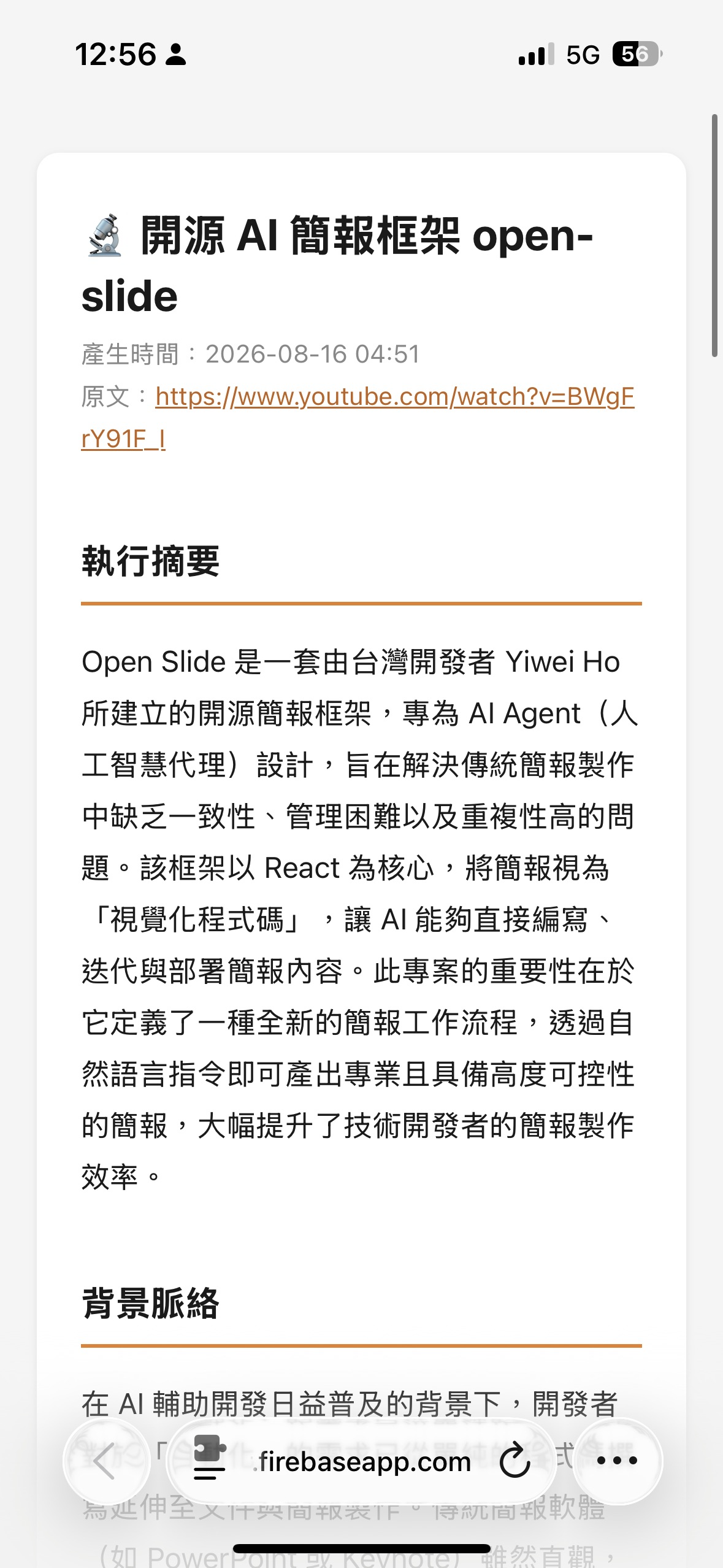
The report is a full Markdown document, often thousands of words long, which can't fit into a LINE message. Making it a Flex Message isn't suitable either because it contains tables and multi-level headings. So, I turned it into a webpage.
But then I had to decide: should these reports be stored in a database?
I chose not to. The reports are only stored in memory and disappear as soon as the Cloud Run instance is recycled:
class ReportStore:
    def __init__ (self, ttl_seconds: float = DEFAULT_REPORT_TTL_SECONDS):
        self.ttl = ttl_seconds
        self._reports: Dict[str, dict] = {}
        self._lock = Lock()

    def put(self, html: str) -> str:
        report_id = uuid.uuid4().hex
        with self._lock:
            self._purge_expired()
            self._reports[report_id] = {
                "html": html,
                "created_at": time.time(),
            }
        return report_id
The report_id uses uuid.uuid4().hex because this URL has no login protection; anyone with the link can open it, so the ID must be unguessable. The page itself also includes <meta name="robots" content="noindex"> to prevent search engines from indexing people's reading history.
3. Expired Pages
Since reports disappear, "link expiration" is not an exception but the normal end for every report. So the route is written like this:
@app.get("/reports/{report_id}")
def serve_research_report(report_id: str):
    """Temporary research report page: returns expired page (404) after expiration or instance restart."""
    html = report_store.get(report_id)
    if html:
        return HTMLResponse(html)
    return HTMLResponse(render_expired_page(), status_code=404)
I also made it clear in the message pushed to the user, not pretending it's a permanent link:
⏳ This is a temporary page, kept for about 24 hours (invalidated after the service sleeps). Please copy the content if you need to save it.
Major Pitfalls and Solutions
Pitfall 1: Grounding tools and response_schema cannot be used together
I encountered this pitfall earlier when building a map restaurant search. At that time, I naturally thought: since I want to get a restaurant list from the model, I'll use structured output, attach response_mime_type="application/json" and response_schema, and get correctly typed data directly to save myself from parsing it.
The result was an immediate API error. The fix then was to remove the schema (commit a2c8745) and instead ask the model to output JSON text, which I then parsed myself.
Reason and Solution
Google Search Grounding and structured output are mutually exclusive. When the model is performing grounding, it needs to freely intersperse searching, thinking, and citing; this process cannot be simultaneously constrained to a fixed JSON schema.
So when making the research report, I abandoned the idea of "returning a structured object" from the start and let the model output Markdown plain text directly, writing the structure into the "Required Structure" section of the prompt instead of the schema.
Looking back, this limitation actually made things simpler. The report is meant to be a long-form text for humans to read; Markdown is its most natural form. If forced into JSON fields, it would just have to be stitched back into an article during rendering anyway. The only fields that truly need a strict structure are the citations, and those can be taken from grounding_metadata, which never needed a schema to begin with.
Pitfall 2: Three-second timeout, plus Gemini is synchronous and blocking
LINE Webhook requires an HTTP 200 response within three seconds, but this feature needs to re-crawl the original text and then wait for the grounding call to finish, which takes one to two minutes in total.
Let's talk about the part fewer people notice. client.models.generate_content() is a synchronous blocking call. Even if you wrap it in an async def, it will still block the entire event loop. While one user is generating a report for those two minutes, messages from other users will also be blocked.
Reason and Solution
Split it into two parts: reply and push, each with its own responsibility:
    url = doc.get("url", "")
    await line_bot_api.reply_message(
        event.reply_token,
        [TextSendMessage(text="🔬 Starting in-depth research on this article (approx. 1-2 mins). I'll send you the report link once finished.")])

    try:
        crawled_text = await load_url(url)
        # Gemini call is synchronous and blocking; offload to a thread to avoid blocking other tasks on the event loop
        result = await asyncio.to_thread(generate_research_report, crawled_text, url)
First, use reply_message to say "Starting research," finishing the webhook request within three seconds. The heavy lifting is moved to the background, and the synchronous Gemini call is offloaded to a thread using asyncio.to_thread. Once finished, use push_message to proactively send the link.
The phrase "approx. 1-2 mins" is also intentional. If a user clicks a button and nothing happens for thirty seconds, they'll start to suspect it's broken and click it again. Explaining how long to wait upfront is cheaper than explaining it afterward.
Pitfall 3: Who can see whose report
The button carries the bookmark's doc ID. If I simply used this ID to query data and generate a report, anyone who could construct a postback could read the content of bookmarks saved by others.
Reason and Solution
Verify ownership during the query. Both parameters for get_bookmark(user_id, doc_id) are required. If not found, treat it as expired without telling the user "this exists but doesn't belong to you":
    doc = svc.get_bookmark(user_id, doc_id) if (doc_id and svc.available) else None
    if not doc:
        await line_bot_api.reply_message(
            event.reply_token,
            [TextSendMessage(text="⚠️ Data has expired. Please send the URL again and try once more.")])
        return
Results and Benefits
In practice, this button changes more than just "making the summary longer."
Summaries and research reports answer different questions. A summary tells you what the piece is about, suitable for quickly deciding whether to read it. A research report tells you if the piece is correct, how others view it, and which numbers are sourced. That's why I made it two layers instead of making the summary longer: the cheap layer runs every time, and the expensive layer is there for when you really want to dive deep.
Citations make the report verifiable. At the bottom of the report is a "📚 References" list, all from grounding_metadata, which are the actual web pages the model read. If you see something in the "Counter-perspectives & Critique" section that differs from the original text, you can click directly to the original report. This is why I think grounding is more worthwhile than building your own search API pipeline: what you save isn't just code, but the traceability of "where did this sentence come from."
There's still something to see even if search fails. After degrading to pure article analysis, the report will lack background context and comparative views, but the executive summary, core arguments, and data organization sections will still be there.
Temporary webpages save more than expected. No need to set up a database, no need to write cleanup schedules, and no need to design a report list page. A dict plus a lock is all it takes, with security maintained by unguessable UUIDs. The trade-off is that links will expire, which I've made clear in the push message. Reading behavior is usually concentrated in the few minutes after receiving a link; I don't think it's worth the overhead of a full persistence system for the few cases where someone wants to save it long-term.
If long-term storage is really needed later, the current architecture isn't hard to change: the ReportStore interface only has put and get methods. Replacing it with a Firestore implementation wouldn't require any changes to the upper layers.
The entire feature adds up to about five hundred lines, a third of which are tests. The code is at kkdai/linebot-helper-python, and the design document is in docs/superpowers/specs/2026-08-15-research-report-design.md. Feel free to check it out if you're interested.
Comments
More Blog
View allai[AI in Practice] Upgrading from Gemini 3.5/3.6 to Gemini 4 Argon: Migration Notes and Pitfalls for LINE Bot Developers
Background I have a LINE Bot that I use every day, linebot-helper-python. I use it daily...
E
Evan LingooglecloudSix Months After Cloud Next ‘26: A Builder’s Tour of the Gemini Enterprise Agent Platform
What actually shipped across Build, Scale, Govern, and Optimize — and what I'd tell a team starting...
J
Jonathan Zhuo 1
aiAlphaEvolve and Gemini: Autonomous Algorithm Discovery for Unified Disaster Prediction
📄 Published Paper (Open Access on Zenodo): Autonomous Discovery of Unified Multi-Hazard Prediction...
T
Tanaike 1
aiLangChainJS and Gemini 4 Argon: What's here and what's coming?
Google has released the latest version in the Gemini family, Gemini 4 Argon, and I was fortunate...
A
Allen FirstenbergaiNobody’s winning the AI race yet
By Ryan Swift Yesterday, Google finally released its Gemini 4 Argon model for public use. It’s...
R
Ryan Swift 1
aiI got Jev to zero mistakes. I'm still using Flash-Lite.
Jev is a brilliant decision model. Gemini Flash-Lite is the model nobody talks about, and it’s fast,...
S
Swift 1
Ready-made automations for this
Workflows from the Neura Market marketplace related to this Gemini resource
- Automate Daily Meeting Summaries with Google Gemini AI and Slackn8n · $9.99 · Related topic
- Automate Daily Gmail Summaries with Google Gemini AIn8n · $4.99 · Related topic
- Monitor Twitter Accounts & Generate Intelligence Summaries with Gemini AI & Telegramn8n · $14.99 · Related topic
- Automate Meeting Notes Summaries with Gemini AI & Slack Notificationsn8n · $14.99 · Related topic