 Grok
GrokBack to Blog react
react ai
ai docker
 opensource
 azurefabric
 googlecloudplatform
 iac
iac
Replacing a Plop React component generator with a Claude Code Skill
Matti Bar-Zeev February 6, 2026
2 views
The challenge in the age of Agentic coding One of the biggest challenges emerging in the...
The challenge in the age of Agentic coding
One of the biggest challenges emerging in the age of agentic coding is determinism and standards-enforcement. In large organizations this becomes even more critical, where many developers are using agentic coding to produce a lot of code modifications, and maintaining standards and good quality becomes nearly impossible without the right tools.
This, however, is not a new issue. Large organizations always struggled with this and automatic tools were created to reduce the friction of standard and quality enforcement, such as ESlint, Prettier, Git commit hooks, tests, to name a few.
One of the tools which helps avoiding misalignment is a generator tool which helps developers scaffold and ramp-up components in a consistent manner, quickly and by given templates.
An example for such a tool is Plop, which is a generator that can rely on templates and developer’s input to scaffold code. I actually wrote an article about creating such a tool for scaffolding a React component, along with tests, Storybook story etc.
But...
Thinking about the agentic coding tools we’re all using, using Plop appeared to be somewhat redundant, and I wondered if I could convert my Plop generator for React components to a Claude Code Skill.
First, let’s be on the same page on what Claude skill is -
Skills extend what Claude can do. …Claude adds it to its toolkit. Claude Code skills follow the Agent Skills open standard, which works across multiple AI tools.
From here
I also understand that Skill is the evolution of Slash Commands, while commands were a simple MD file, Skill is more robust, that can have its own context content, meta data and as the docs say, can be reused in different agents.
For the demonstration here, I will be using VSCode with Claude installed
All the code can be found under my Pedalboard monorepo.
Let’s begin -
Requirements
I would like to have a Skill called /create-react-component.
When using this Skill, the developer will input the desired component’s name and once given, it will create the following files under the the /src/<component-name> directory (in the “components” package):
- Index.tsx - the component main file
- Index.css - the components CSS
- Index.stories.tsx - the component’s Storybook story
- Index.test.tsx - the component’s unit test
These files will be made according to templates for complete result determinism.
Let’s start
I’m going to do this experiment on components packages which reside on my Pedalboard project. This project was manually written until now, so this is the first time I’m introducing agentic coding to it.
The first thing I would do is to initialize the project as a Claude Code project, using the /init command -
Claude goes over the project, inspects it and creates a new CLAUDE.md file. In there it stores all that it found about the project, like that it’s a monorepo, and it runs with Yarn, and uses Jest for testing etc.
Creating a custom Skill
Skills in Claude reside under the ./claude/skills directory.
We can prompt Claude to create a skill
Create a Claude skill called create-react-component
Claude went over the code in the entire monorepo and came up with this skill.md:
---
name: create-react-component
description: Create a new React component in packages/components following established conventions
argument-hint: [ComponentName]
---


Create a new React component in the `packages/components` package following the established conventions.


## Component: $ARGUMENTS


Create a folder `packages/components/src/$ARGUMENTS/` with the following files:


### 1. `index.tsx` — Component implementation
Use the template from [templates/component.tsx](templates/component.tsx):
- Replace `{{ComponentName}}` with `$ARGUMENTS`
- Replace `{{component-name}}` with the kebab-case version


### 2. `index.test.tsx` — Jest unit tests
Use the template from [templates/component.test.tsx](templates/component.test.tsx):
- Replace `{{ComponentName}}` with `$ARGUMENTS`


### 3. `index.stories.tsx` — Storybook story
Use the template from [templates/component.stories.tsx](templates/component.stories.tsx):
- Replace `{{ComponentName}}` with `$ARGUMENTS`


### 4. `index.scss` — Component styles
Use the template from [templates/component.scss](templates/component.scss):
- Replace `{{component-name}}` with the kebab-case version of `$ARGUMENTS`


### 5. Update barrel export
Add a named export to `packages/components/index.ts`:

export {default as $ARGUMENTS} from './src/$ARGUMENTS';

After creating all files, run `yarn test` and `yarn lint` from `packages/components/` to verify everything works.
You might have noticed that the Skill relies on some templates. Claude “saw” that the project used Plop with handlebars templates, it took the templates and created a newer version of them under the .claude/skills/create-react-component/templates path. So what we currently have is this file structure:
.claude/
├── settings.local.json
└── skills/
    └── create-react-component/
        ├── SKILL.md                        # Main instructions with frontmatter
        └── templates/
            ├── component.tsx               # Component template
            ├── component.test.tsx          # Test template
            ├── component.stories.tsx       # Story template
            └── component.scss              # Style template
It appears that unlike Plop, the templates used by the Skill do not have to be Handlebars templates, the Skill can settle with double curly brackets (“{{...}}”) for args placeholders. So we have the Skill instructions and we have the templates ready - it’s time to try it out
Trying it out…
For Claude to register the new Skill we need to restart it, and after we do, we prompt the following:
/create-react-component TestComponent
Hmmm… Claude nicely created 4 files, let’s look at the index file for the component to see what we got:
/**
* Copyright (c) 2025-present, Matti Bar-Zeev.
*
* This source code is licensed under the MIT license found in the
* LICENSE file in the root directory of this source tree.
*/


import React from 'react';
import PropTypes from 'prop-types';
import './index.scss';


export interface TestComponentProps {
   title: string;
}


const TestComponent = (props: TestComponentProps) => {
   const {title} = props;


   return (
       <div className="test-component">
           <span>{title}</span>
       </div>
   );
};


TestComponent.propTypes = {
   title: PropTypes.string,
};


export default TestComponent;
Not bad, but as you can see, Claude took my “legacy” Plop templates, which were meant for JS (and not TypeScript) and simply migrated them, as is, to the Skill’s template. Let’s change them to fit TS, and then use the Skill again to make sure Claude indeed always follows them. Here is my prompt for that:
Take the templates from .claude/skills/create-react-component/templates and convert them to be TypeScript complaint, removing redundant code, like propTypes
And after Claude did some required modifications, let’s run the Skill to create the component again
/**
* Copyright (c) 2025-present, Matti Bar-Zeev.
*
* This source code is licensed under the MIT license found in the
* LICENSE file in the root directory of this source tree.
*/


import React from 'react';
import './index.scss';


export interface TestComponentProps {
   title: string;
}


const TestComponent = ({title}: TestComponentProps) => {
   return (
       <div className="test-component">
           <span>{title}</span>
       </div>
   );
};


export default TestComponent;
Much better :)
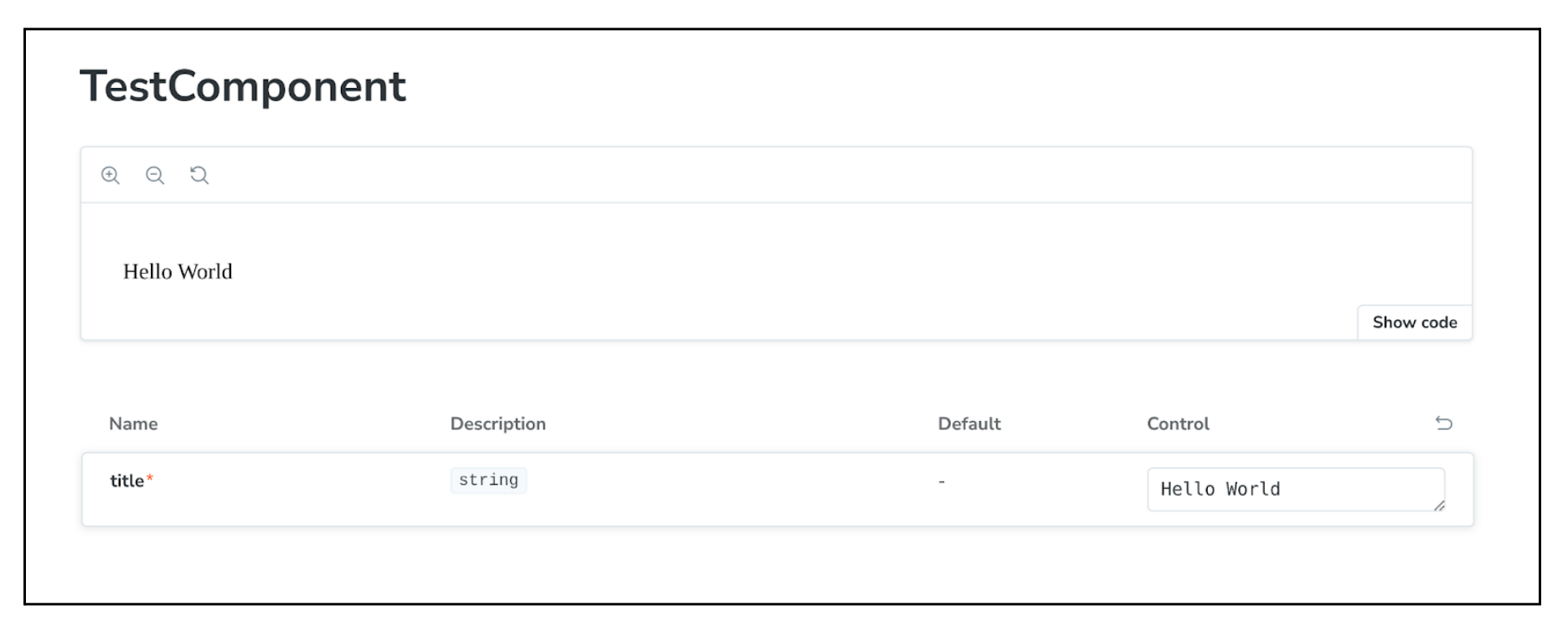
Tests are passing and also Storybook story looks as it should:
Is using template files a good thing?
One of the questions I’ve asked myself is why not having the SKILL.md also contain the templates and be done with it? So having templates as a separated content offers a few advantages: Smaller initial context - The SKILL.md file stays concise with just instructions. The templates are only loaded when the skill actually runs (via Read tool calls). Cleaner separation - Instructions vs. template content are clearly separated, making the skill easier to maintain. On-demand loading - Templates are fetched only when needed, rather than always being present in the skill definition. Templates reuse - other Skills can use templates from another Skill.
That being said, it’s important to note that reading the templates requires a read tool call, which might slow things down a bit, but I think that the overall advantages mentioned above are worth it.
As mentioned about, You can find the new skill markdown and templates in the Pedalboard monorepo on GitHub.
Cheers
<small><small><small>Photo by <a href="https://unsplash.com/@artchicago?utm_source=unsplash&utm_medium=referral&utm_content=creditCopyText">Art Institute of Chicago</a> on <a href="https://unsplash.com/photos/a-painting-of-a-field-of-flowers-and-trees-dynKVvbZ-5Q?utm_source=unsplash&utm_medium=referral&utm_content=creditCopyText">Unsplash</a></small></small></small>
Comments
More Blog
View allaiSkills Are the New CLI
Every developer tool follows the same pattern: parse flags, run logic, print output. git commit -m...
H
Helder Burato Berto 1
dockerDuct tape enough services together and you can cache APT packages
APT repositories are just HTTP file servers, doesn't seem like something that should require a custom piece of software.
D
Devin H 1
opensourceHow We Use AWS CDK to Deploy OpenClaw for Enterprise Teams — API Key Management Without the Chaos
We wanted every employee in the company to use OpenClaw — not just engineers. Product managers...
C
C.K.SunazurefabricMCP Development with Python, and Azure Fabric
Leveraging Gemini CLI and the underlying Gemini LLM to build Model Context Protocol (MCP) AI...
X
xbillgooglecloudplatformMCP Development with Gemini CLI, Python, and Azure Functions
Leveraging Gemini CLI and the underlying Gemini LLM to build Model Context Protocol (MCP) AI...
X
xbilliacMCP Development with Python, and the Azure Container Instance
Leveraging Gemini CLI and the underlying Gemini LLM to build Model Context Protocol (MCP) AI...
X
xbill 2
Ready-made automations for this
Workflows from the Neura Market marketplace related to this Grok resource
- Test Your Data Access Techniques with Progressive Expression Challengesn8n · $24.99 · Related topic
- Comprehensive Research Report Generator with Gemini AI, Web Search, & PDF Deliveryn8n · $24.99 · Related topic
- "ideoGener8r - Complete Ideogram AI Image Generator UI with Google Integration"n8n · $24.99 · Related topic
- AI-Powered Short-Form Video Generator with OpenAI, Flux, Kling, and ElevenLabsn8n · $24.99 · Related topic