 Grok
GrokBack to Blog mcpserver
 ai
ai docker
 opensource
 azurefabric
 googlecloudplatform
 iac
iac
Help Your AI Understand Google: Trying the Developer Knowledge API and MCP Server
Darren "Dazbo" Lester February 7, 2026
0 views
The Developer Knowledge API and its associated MCP Server were released yesterday! Check out the...
title: Help Your AI Understand Google: Trying the Developer Knowledge API and MCP Server published: true date: 2026-02-07 05:21:25 UTC tags: mcpserver, googlecloud, developerknowledgeapi, geminicli canonical_url: https://medium.com/google-cloud/helping-your-agent-understand-google-trying-the-developer-knowledge-api-and-mcp-server-425fc557b455 cover_image: https://cdn-images-1.medium.com/max/1024/1*M63trfdlqDyDYMaqaa8Ajw.png
The Developer Knowledge API and its associated MCP Server were released yesterday! Check out the Google blog here.
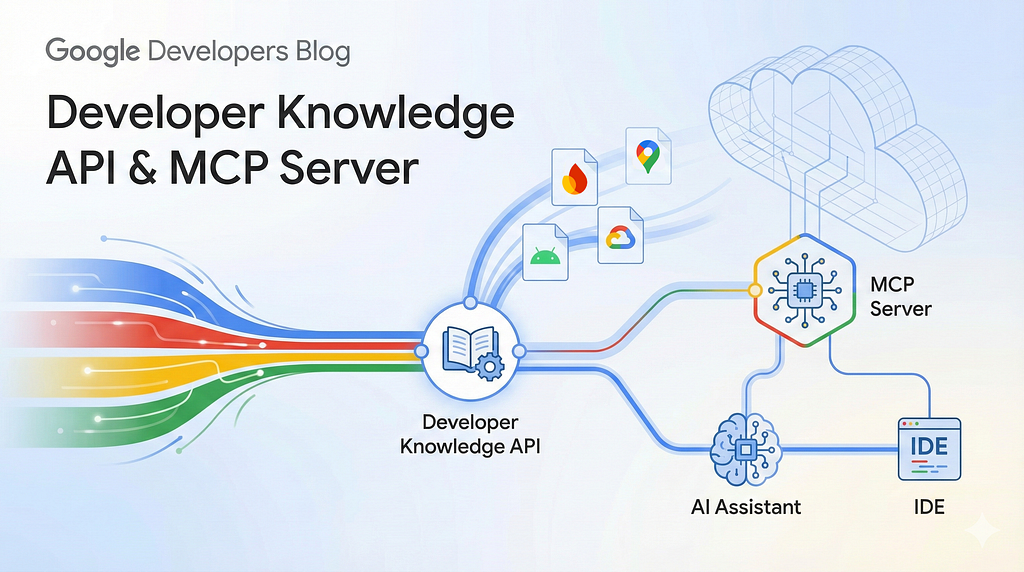
Why is this a big deal? Well, it empowers your AI agents with the ability to find up-to-date information from the huge corpus of available Google developer documentation. What sort of documentation, you ask? Well, at the time of writing, the corpus list looks like this:
- ai.google.dev
- developer.android.com
- developer.chrome.com
- developers.home.google.com
- developers.google.com
- docs.cloud.google.com
- docs.apigee.com
- firebase.google.com
- fuchsia.dev
- web.dev
- www.tensorflow.org
For example, you can install the MCP server into your development agent of choice — e.g. Gemini CLI or Google Antigravity — and then go ahead and ask natural language questions about developing with Google SDKs, APIs and Google Cloud. (If you’re interested, I’ve previously written blogs on empowering agents with this sort of knowledge.)
I figured I’d give this new capabiltiy a whirl!
Test Runs
I decided to test out the API and MCP server in Gemini CLI. (I’ll give you a bit more detail on how I configured it later in this blog.) I’m using Gemini-3-Pro-Preview in all cases. Here was my sample query:
“Provide the key steps for implementing
RagEnginein my application that uses Gemini andGenAISDK”
Run 1 — Without the Developer Knowledge MCP Tool, But…
Gemini CLI responded with…
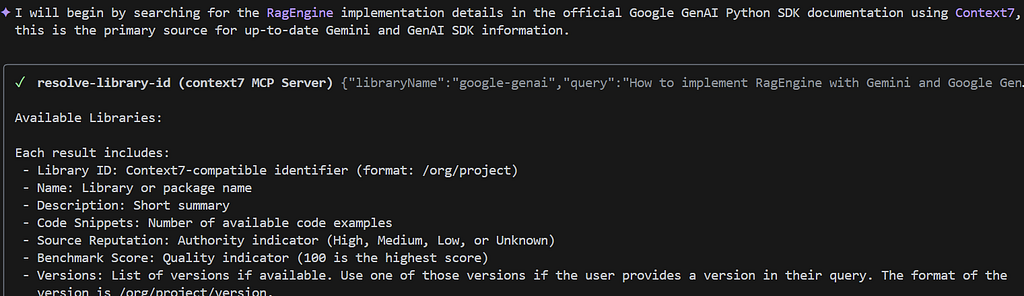
Ah, I forgot I already had the Context7 installed. This is a very cool extension that allows you to customise a set of libraries you want your agent to search on your behalf. For example, mine is configured like this:
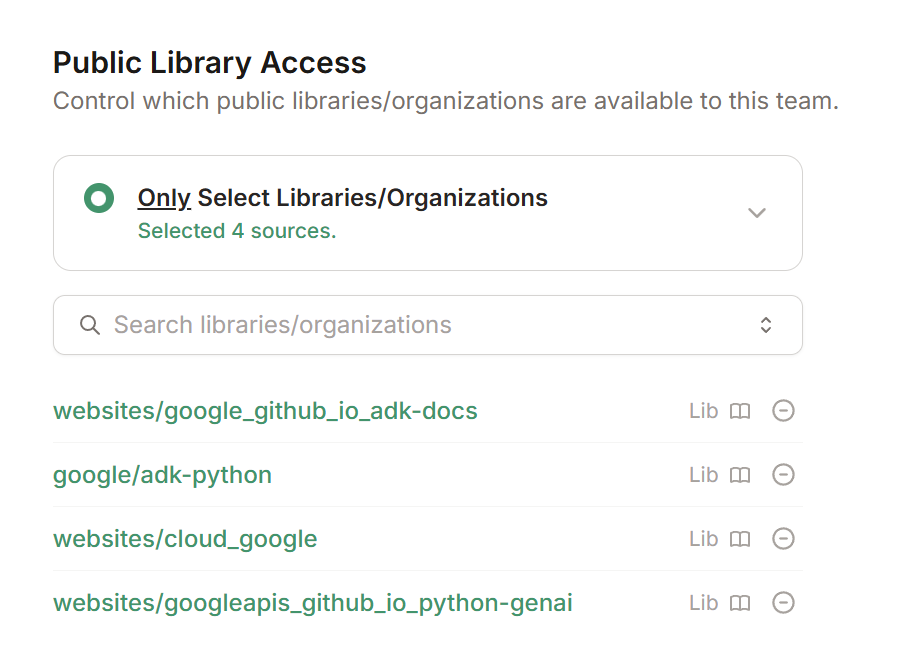
So, my Gemini CLI already knows how to look up current information on specific topics.
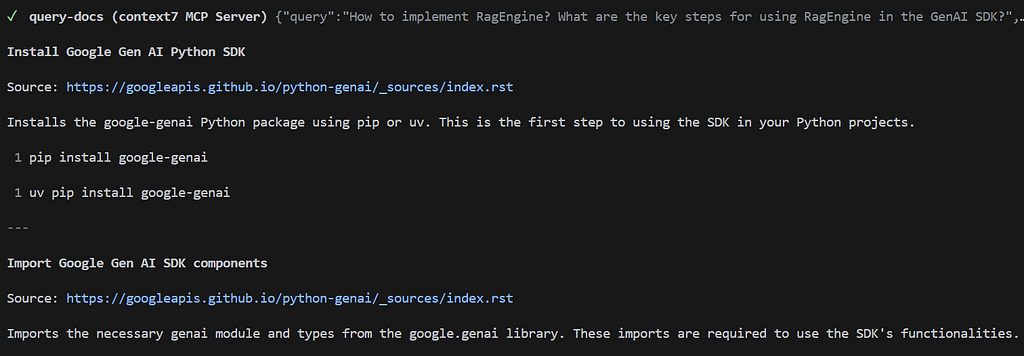
The final output from Gemini CLI looks like this:
The implementation of a `RagEngine` (specifically the Vertex AI RAG Engine) using the Google GenAI SDK and Gemini involves a structured workflow of corpus preparation, data ingestion, and model integration.

### 1. Initialise the GenAI Client

First, ensure you are using the `google-genai` SDK and initialise the client.

"""python
from google import genai
from google.genai import types
client = genai.Client(vertexai=True, project='your-project', location='us-central1')
"""

### 2. Create and Manage the RAG Corpus

The `RagEngine` requires a corpus to store and index your documents.

* **Create a Corpus:** Define a storage space for your data.
"""python
corpus = client.rag.corpora.create(
    display_name="my_documentation_corpus",
    description="Corpus containing technical documentation"
)
"""

* **Upload Data:** Ingest documents (PDFs, text files, etc.) into the corpus.
"""python
rag_file = client.rag.files.upload(
    corpus_name=corpus.name,
    path='path/to/document.pdf',
    display_name='My Document'
)
"""

* **Import from GCS:** For large datasets, import directly from Google Cloud Storage.
"""python
client.rag.files.import_files(
    corpus_name=corpus.name,
    paths=['gs://your-bucket/docs/*.pdf'],
)
"""

### 3. Configure Retrieval and Query the Model

Once the data is indexed, you integrate retrieval as a tool in your Gemini model configuration.

* **Set up the Retrieval Tool:** Define how Gemini should access the corpus.
"""python
rag_tool = types.Tool(
    rag_retrieval=types.RagRetrieval(
        rag_resources=[
            types.RagResource(rag_corpus=corpus.name)
        ]
    )
)
"""

* **Generate Content with Grounding:** Query the model while providing the RAG tool.
"""python
response = client.models.generate_content(
    model='gemini-2.5-flash',
    contents='What does the documentation say about X?',
    config=types.GenerateContentConfig(
        tools=[rag_tool]
    )
)
print(response.text)
"""

### 4. Key Implementation Steps (Summary)

1. **Enable Vertex AI API** : Ensure your GCP project has the required services enabled.
2. **Corpus Definition** : Use `client.rag.corpora.create` to establish your data domain.
3. **Data Ingestion** : Use `client.rag.files.upload` or `import_files` to populate the corpus and trigger the embedding/indexing process.
4. **Tool Registration** : Wrap the corpus in a `types.Tool` with a `RagRetrieval` configuration.
5. **Grounding** : Pass the tool to `client.models.generate_content` to ensure responses are grounded in your private data.
There’s hallucination here! More on this in a minute.
Run 2— No Developer Knowledge MCP Tool, And No Other Help!
This time I’ve disabled the Context7 Gemini CLI extension. Let’s go again…
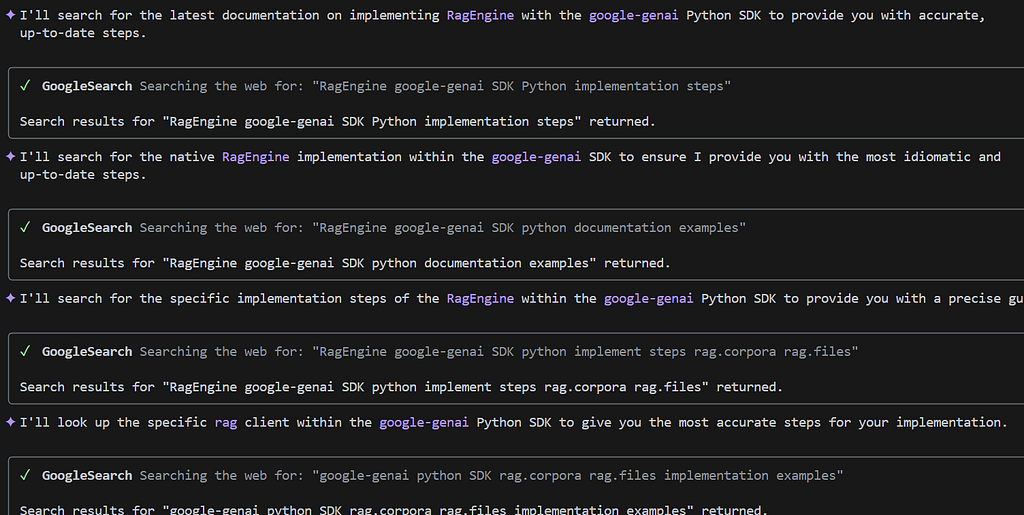
That’s more like what I expected. Gemini doesn’t have the required knowledge, so it resorts to doing a Google Search. And then… Even more Google searches:
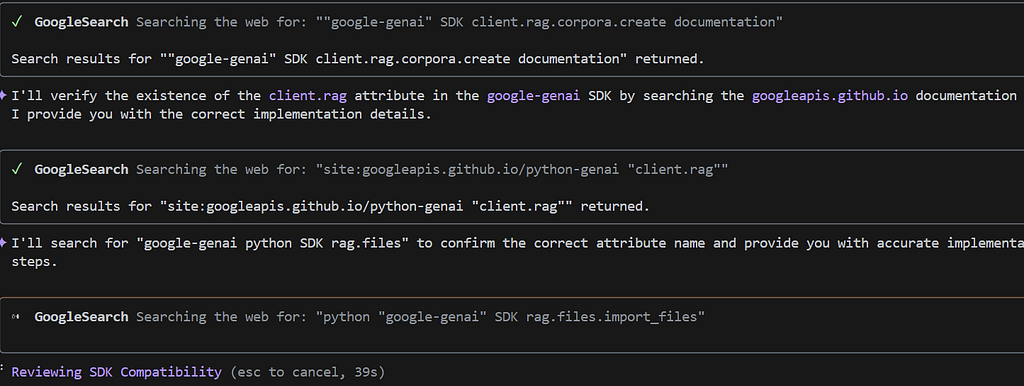
Eventually — after what seems like an eternity of searching — we get this:
Implementing a RAG (Retrieval-Augmented Generation) solution using Gemini and the `google-genai` SDK involves managing your knowledge base through the **Vertex AI RAG Engine** and then integrating that engine as a tool within the GenAI client. Here are the key steps to implement this:

### 1. Setup and Infrastructure

First, ensure you have both the `google-genai` and `google-cloud-aiplatform` (which contains `vertexai.rag`) packages installed. You must initialize Vertex AI with your project details.

"""python
import vertexai
from google import genai
from google.genai import types
PROJECT_ID = "your-project-id"
LOCATION = "us-central1"
vertexai.init(project=PROJECT_ID, location=LOCATION)
client = genai.Client(vertexai=True, project=PROJECT_ID, location=LOCATION)
"""

### 2. Create a RAG Corpus

A `RagCorpus` is the container for your indexed documents. You define it with a specific embedding model (e.g., `text-embedding-005`).

"""python
from vertexai import rag
embedding_config = rag.RagEmbeddingModelConfig(
    vertex_prediction_endpoint=rag.VertexPredictionEndpoint(
        publisher_model="publishers/google/models/text-embedding-005"
    )
)
rag_corpus = rag.create_corpus(
    display_name="my_application_docs",
    backend_config=rag.RagVectorDbConfig(rag_embedding_model_config=embedding_config)
)
"""

### 3. Ingest and Index Data

Import your documents into the corpus. The RAG Engine handles chunking, embedding, and indexing automatically. You can import from Google Cloud Storage, Google Drive, or local paths.

"""python
# Import from GCS
rag.import_files(
    corpus_name=rag_corpus.name,
    paths=["gs://your-bucket/docs/"],
    transformation_config=rag.TransformationConfig(
        chunking_config=rag.ChunkingConfig(chunk_size=512, chunk_overlap=100)
    )
)
"""

### 4. Configure the Retrieval Tool

In the `google-genai` SDK, you define a `Tool` that points to your Vertex RAG Store. This tool tells Gemini how to retrieve context during generation.

"""python
rag_tool = types.Tool(
    vertex_rag_store=types.VertexRagStore(
        rag_resources=[
            types.VertexRagStoreRagResource(rag_corpus=rag_corpus.name)
        ],
        rag_retrieval_config=types.RagRetrievalConfig(top_k=5)
    )
)
"""

### 5. Generate Grounded Content

Finally, call the Gemini model using the `google-genai` client, passing the `rag_tool`. Gemini will automatically retrieve relevant snippets from your corpus to "ground" its response.

"""python
response = client.models.generate_content(
    model="gemini-2.0-flash",
    contents="How do I configure the RagEngine in my app?",
    config=types.GenerateContentConfig(tools=[rag_tool])
)
print(response.text)
"""

### Summary of Workflow

* **Vertex AI RAG Engine** (`vertexai.rag`): Used for **Management** (Creating corpora, importing/indexing files).
* **Google GenAI SDK** (`google.genai`): Used for **Execution** (Configuring the tool and generating the grounded response).
Okay, this was slightly painful. Moving on…
Run 3 — With the Developer Knowledge MCP Tool
Straight away, we see this:
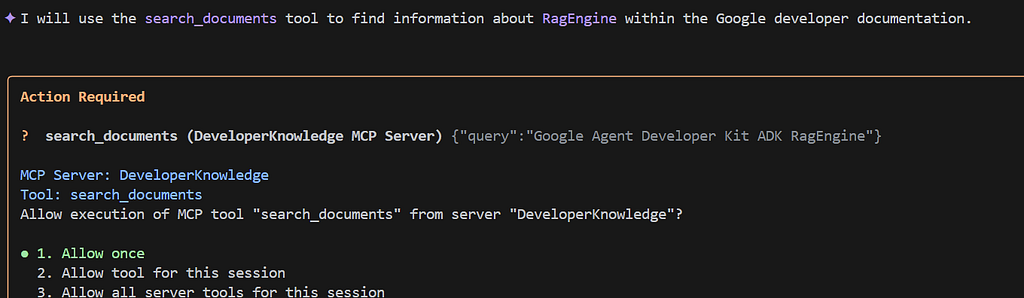
So we know it’s using the new MCP server. And a few seconds later, with no other tools used:
To implement **`RagEngine`** in your application using **Gemini** and the **Google Gen AI SDK** (`google-genai`), follow these key steps. This approach leverages the Vertex AI RAG Engine for managed document retrieval and grounding.

### 1. Environment Setup

Ensure you have the necessary libraries installed and are authenticated with Google Cloud.

* **Install SDKs** : Use `pip install google-genai google-adk`.
* **Authentication** : Run `gcloud auth application-default login` to set up credentials.
* **Project Config** : Ensure the Vertex AI API is enabled in your Google Cloud project.

### 2. Initialize the Gen AI Client

The `google-genai` client must be configured to use Vertex AI for RAG features.

"""python
from google import genai
client = genai.Client(
    vertexai=True,
    project='your-project-id',
    location='us-central1'
)
"""

### 3. Create and Populate a RAG Corpus

You need a "Corpus" to store and index your documents. This can be done via the `vertexai.preview.rag` module or the Google Cloud Console.

* **Create Corpus** : Define a corpus with an embedding model (e.g., `text-embedding-005`).
* **Import Documents** : Upload files to Google Cloud Storage (GCS) and import them into the corpus.
* **Index** : The RAG Engine automatically chunks and generates embeddings for the imported data.

### 4. Define the Retrieval Tool

Configure the `VertexRagStore` to point to your specific corpus. This tells Gemini where to look for private information.

"""python
from google.genai import types

# Define the RAG resource pointing to your corpus
rag_resource = types.VertexRagStoreRagResource(
    rag_corpus='projects/your-project/locations/us-central1/ragCorpora/your-corpus-id'
)

# Create the RagStore tool
rag_store = types.VertexRagStore(
    rag_resources=[rag_resource]
)
"""

### 5. Generate Grounded Content

Pass the RAG tool into your generation request. Gemini will perform a search across your corpus and use the retrieved context to ground its response.

"""python
response = client.models.generate_content(
    model='gemini-2.5-flash',
    contents='What does our internal policy say about remote work?',
    config=types.GenerateContentConfig(
        tools=[types.Tool(retrieval=types.Retrieval(vertex_rag_store=rag_store))]
    )
)
print(response.text)
# The response will include citations if the model used retrieved documents.
"""

### 6. (Optional) Integrate with Gemini Live

For real-time multimodal applications, you can use the same `rag_store` configuration within a `live.connect` session to provide the model with a persistent "memory" or knowledge base during a live conversation.

### 7. Clean Up (Optional)

If you are managing the RAG infrastructure dynamically, use the `rag` module to delete or update corpora and files when they are no longer needed to manage costs and data freshness.
Results
Output 1 — With Context7
Despite being pre-empowered with some lookup knowledge, the output included quite a lot of nonsense. It hallucinated types and methods that don’t actually exist. Good luck implementing this!
- Accuracy: Low. Loads of hallucination regarding the SDK’s schema. It tries to use
rag_retrievalandtypes.RagRetrievalas arguments fortypes.Tool. In thegoogle-genaiSDK, these fields do not exist. - Code Viability: Low. The code will fail. It is fundamentally broken.
- Best Practice: Low. It conflates the RAG tool configuration with the management API.
Output 2 — No Tools
Here the agent took the scenic route. After about a million Google Searches, we ended up with a bit of a Frankenstein’s monster. TLDR: this code won’t run either.
- Accuracy : Medium It correctly identified the separation of concerns. It uses the
vertexai.ragSDK for infrastructure management (creating the corpus) and thegoogle-genaiSDK for the generation task. But it does pick an older model. - Code Viability : Medium. The tool configuration
types.Tool(vertex_rag_store=…)is close to thevertexai(old SDK) pattern. This code won’t run, but it’s not far off. - Best Practice: Medium. It correctly points out that management and execution often span two libraries. But it does not mention ADK.
Output 3 — With Developer Knoweldge API
Hurrah — something that works!
- Accuracy: High. A working implementation using the
google-genaiSDK. It correctly identifies the nested structure:types.Tool(retrieval=types.Retrieval(vertx_rag_store=…). It also correctly usestypes.VertexRagStoreRagResource, which is the exact class name in theGenAISDK. - Code Viability: High. This code will run as-is. And it’s the only response that provides detailed pre-req steps for installing dependencies and setting up
gcloud. - Best Practice: High. It recommends the “unified” approach with the
google-genaiSDK, where the retrieval tool is explicitly defined under theretrievalproperty. And it’s the only answer that suggests using ADK.
Verdict
This is a no-brainer! My complex one-shot prompt only yielded valid, functional output when using the Developer Knowledge API and MCP server. There’s no going back for me. This capability gives me a much better chance of doing things the right way, right from the start. And I’m going to waste far fewer cycles in iteration.

Implementing
This was easy to implement. I basically just read the manual! But in summary, this is what you need to do:
1 — Enable the Developer Knowledge API
Pick a Google Cloud project, and enable the Developer Knowledge API in that project.

2 — Create an API Key
Next, create an API key:
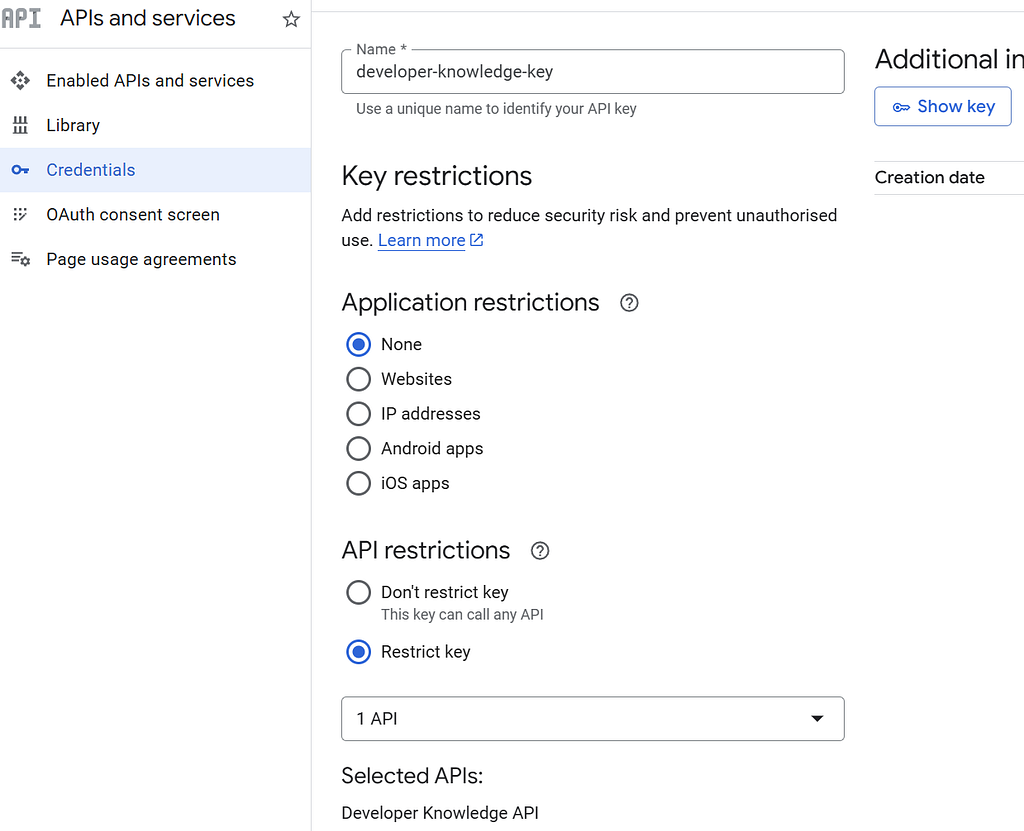
It is strongly recommended to restrict this key to the Developer Knowledge API. (And you can only restrict it in this way if you’ve enabled the API, of course!)
3 — Use the Key
My preferred approach is to create an environment variable in a .env file for my API key. Something like this:
export DEVELOPER_KNOWLEDGE_API_KEY="<my-api-key>"
Of course, make sure you source this .env in your environment of choice.
4 — Configure the MCP Server
This is so easy to do. If you’re using Gemini CLI, you just need to create a file called .gemini/extensions/developerknowledge/gemini-extension.json and make it look like this:
{
  "name": "DeveloperKnowledge",
  "version": "1.0.0",
  "mcpServers": {
    "DeveloperKnowledge": {
      "httpUrl": "https://developerknowledge.googleapis.com/mcp",
      "headers": {
        "X-Goog-Api-Key": "${DEVELOPER_KNOWLEDGE_API_KEY}"
      }
    }
  }
}
(This works in Antigravity too , in the mcp_config.json. Except you need use serverUrl instead of httpUrl, and I had to copy in my API key. I haven’t yet worked out how to get Antigravity to use environment variables in MCP configuration.)
5 — Check It
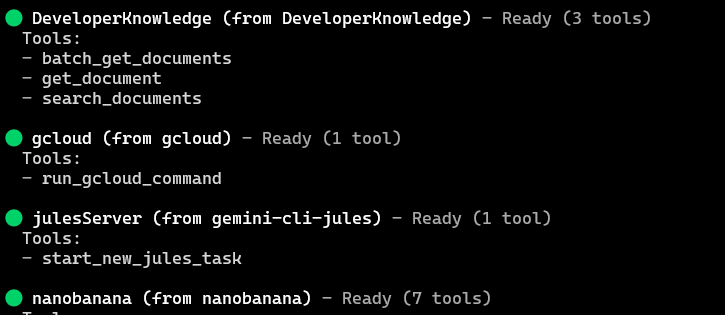
Launch Gemini CLI and view your installed MCP servers using the /mcp command. And with any luck, you’ll see something like this:
6 — Use It
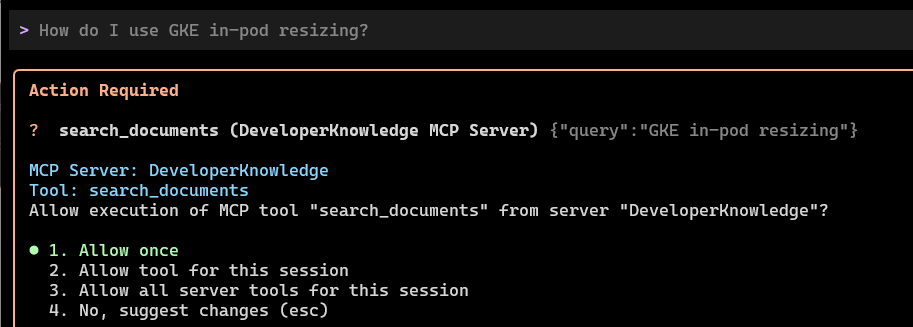
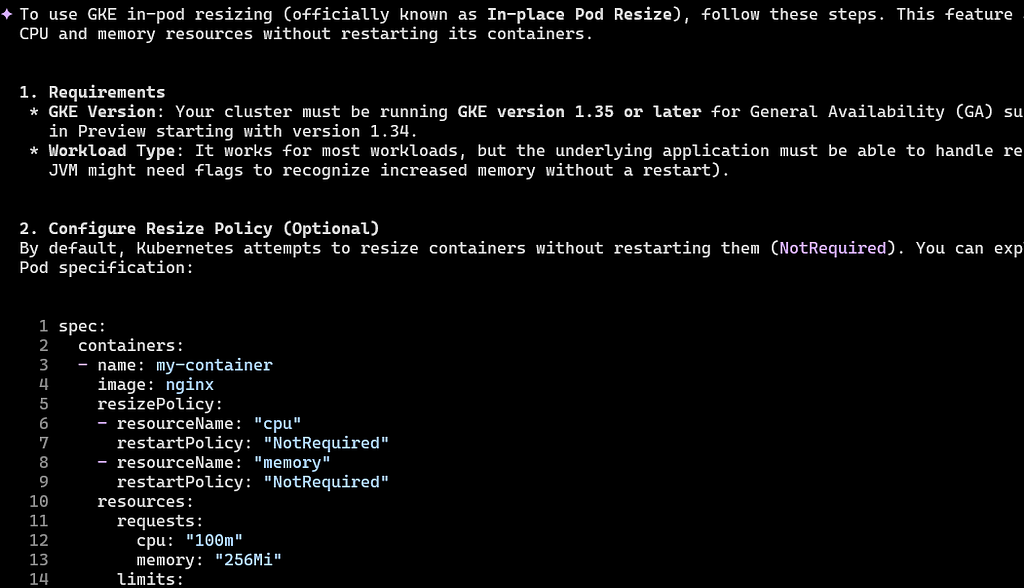
Go ahead and ask a question about Google Cloud or dev, and watch the MCP server do its stuff! E.g. “How do I use GKE in-pod resizing?”
And marvel at the response!
You Know What To Do!
- Please share this with anyone that you think will be interested. It might help them, and it really helps me!
- Please give me many claps! (Just hold down the clap button.)
- Feel free to leave a comment 💬.
- Follow and subscribe, so you don’t miss my content.
Useful Links and References
Comments
More Blog
View allaiSkills Are the New CLI
Every developer tool follows the same pattern: parse flags, run logic, print output. git commit -m...
H
Helder Burato Berto 1
dockerDuct tape enough services together and you can cache APT packages
APT repositories are just HTTP file servers, doesn't seem like something that should require a custom piece of software.
D
Devin H 1
opensourceHow We Use AWS CDK to Deploy OpenClaw for Enterprise Teams — API Key Management Without the Chaos
We wanted every employee in the company to use OpenClaw — not just engineers. Product managers...
C
C.K.SunazurefabricMCP Development with Python, and Azure Fabric
Leveraging Gemini CLI and the underlying Gemini LLM to build Model Context Protocol (MCP) AI...
X
xbillgooglecloudplatformMCP Development with Gemini CLI, Python, and Azure Functions
Leveraging Gemini CLI and the underlying Gemini LLM to build Model Context Protocol (MCP) AI...
X
xbilliacMCP Development with Python, and the Azure Container Instance
Leveraging Gemini CLI and the underlying Gemini LLM to build Model Context Protocol (MCP) AI...
X
xbill 2
Ready-made automations for this
Workflows from the Neura Market marketplace related to this Grok resource
- Generate Visual Summary & Knowledge Graph Insights for Your Emailn8n · $24.99 · Related topic
- Automate Google Drive File Ingestion to Supabase for Knowledge Base Creationn8n · $24.99 · Related topic
- Create a Comprehensive Knowledge Assistant with AI and Google Drive Integrationn8n · $19.99 · Related topic
- Create a Knowledge-Based Chatbot Using Google Drive, OpenAI, and Supabasen8n · $14.99 · Related topic