 Midjourney
Back to Blog![[AI in Practice] Building a Dynamic LINE Group Buying Bot with Edit and Unsend Webhooks](https://media2.dev.to/dynamic/image/width=1200,height=627,fit=cover,gravity=auto,format=auto/https%3A%2F%2Fdev-to-uploads.s3.us-east-2.amazonaws.com%2Fuploads%2Farticles%2F33ax9l8y7x22l8g8c8we.png) api
api gemini
 ai
ai ai
ai devchallenge
 flutter
 discuss
[AI in Practice] Building a Dynamic LINE Group Buying Bot with Edit and Unsend Webhooks
Evan Lin September 2, 2026
0 views
When Messages Can Be Taken Back: Building a "Shapeshifting" LINE Group Buying Bot with Edit...
<iframe width="485" height="862" src="https://www.youtube.com/embed/ldjbkUSKZCs" title="編輯訊息 LINE Bot 測試影片 - 百變店長・單單" frameborder="0" allow="accelerometer; autoplay; clipboard-write; encrypted-media; gyroscope; picture-in-picture; web-share" referrerpolicy="strict-origin-when-cross-origin" allowfullscreen=""></iframe>
When Messages Can Be Taken Back: Building a "Shapeshifting" LINE Group Buying Bot with Edit and Unsend Webhooks
Author: Evan Lin, LINE Taiwan Developer Relations Team Lead
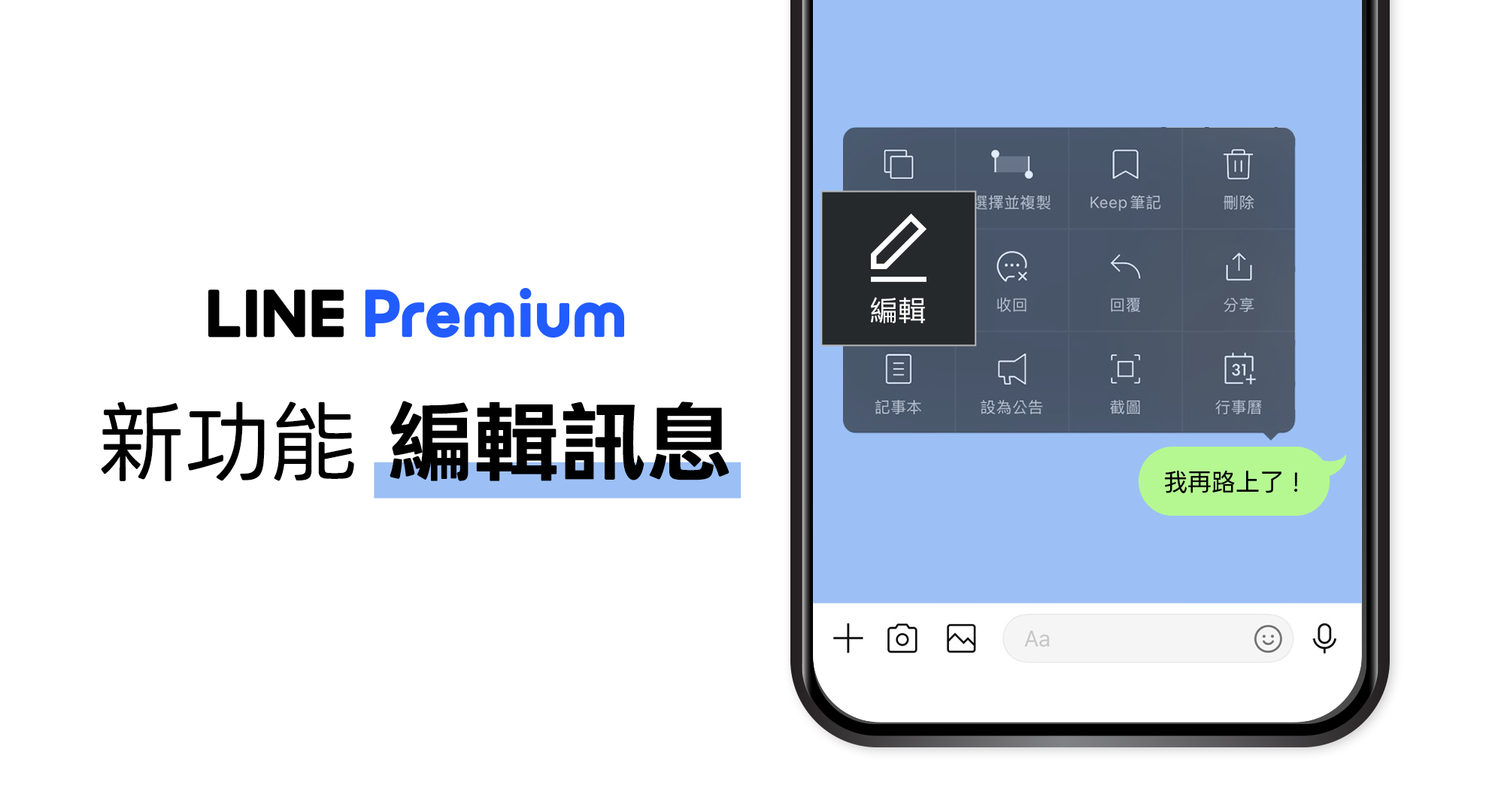
On August 20, 2026, LINE announced the open free trial of the "Edit Message" feature in LINE Labs.
For general users, this is a very intuitive feature: if you find a typo, a wrong date, or want to adjust your tone after sending a message, you no longer need to go through the "Unsend, retype, resend" process. You can simply edit the original text message.
But when I saw this feature, the first thing I thought of was something else:
If a user changes a message that has already been processed by a LINE Bot, does the Bot know?
The answer is: Yes. The LINE Messaging API provides the Edit event; and when a user unsends a message, there is also an Unsend event that can be received.
In this article, I want to share how I turned these two types of webhook events into a LINE Bot Demo with a story, as well as several easily overlooked but very important details during implementation.
The complete sample code is available on GitHub:
https://github.com/kkdai/linebot-edit-unsend
Starting with "Edit Message" in LINE Labs
To try out message editing in LINE Labs currently, you need to meet the following conditions:
- Update the mobile version of LINE to version 26.12.0 or higher.
- Go to "Home → Settings → LINE Labs".
- Enable "Edit Messages".
In standard one-on-one and group chats, text messages can be edited within 15 minutes of being sent; for Keep Notes, it's within 6 days. Photos, videos, voice messages, files, and stickers cannot be edited at this time. After modification, the chat room will display "Edited," but it does not provide a way to view or restore old versions.
There is also a limitation directly related to Bot development: currently, one-on-one chats with LINE Official Accounts do not support message editing. Therefore, to test the Messaging API's Edit event, the Bot must be added to a group chat.
For features and activation methods, please refer to the LINE Taiwan Newsroom Announcement.
From UI Features to Bot Data Consistency
In the past, the common process for a Bot receiving a text message was:
- Receive message webhook.
- Parse the text.
- Write to the database or trigger subsequent processes.
- Reply with the processing result.
If a message cannot be modified after being sent, this model is very simple. But when messages can be edited, the original text is not necessarily the user's final intent.
For example, a user sends:
Pearl Milk Tea / Half Sugar / Less Ice / 1
The Bot has already recorded it as one drink costing 60 TWD. A few seconds later, the user directly edits the original message:
Pearl Milk Tea / Micro Sugar / No Ice / 2
If the Bot does not handle the Edit event, the chat room sees two cups, but the backend still records one cup. The world on the screen and the world inside the Bot become disconnected.
This is the most practical value of the Edit event: it's not just a notification that "the text has changed," but an opportunity for the service to synchronize with the user's latest intent.
Group Buying Transformation: Giving the API Demo a Story
To demonstrate both edit and unsend simultaneously, I set the Bot as "Shapeshifting Store Manager - Dan Dan," responsible for saving the office from low energy at 3:00 PM.
The Demo flow is as follows:
- The group leader enters
Start Group Buy 50 Lan 15:20 Deadline. - Alice enters
Pearl Milk Tea / Half Sugar / Less Ice / 1. - Alice edits the same message to
Pearl Milk Tea / Micro Sugar / No Ice / 2. - The Bot receives the Edit event and updates the quantity, sweetness, ice level, and total amount.
- Bob unsends his message after placing an order.
- The Bot receives the Unsend event, deletes Bob's order, and recalculates.
- Enter
Current Ordersto view the latest summary via Flex Message.
This scenario is perfect for a Demo because everyone knows the two most common things in group buying: changing your mind after ordering, and suddenly not wanting to drink after ordering.
More importantly, the audience can directly see from the quantity and amount whether the webhook actually affected the backend state, rather than the Bot just replying "Edit received."
Structure of the Edit Event
The type of the Edit event is messageEdited, which carries the edited text, timestamp, reply token, and message ID:
{
  "type": "messageEdited",
  "replyToken": "950e63e8f46542ab89f645b4c2a1180a",
  "message": {
    "type": "text",
    "id": "610830548529053697",
    "text": "Pearl Milk Tea / Micro Sugar / No Ice / 2"
  },
  "timestamp": 1776914799524,
  "source": {
    "type": "group",
    "groupId": "Ca56f94637c...",
    "userId": "U4af4980629..."
  }
}
The most critical design point is: the message.id in the edit event is the same as the message ID of the original message event.
Therefore, we can directly use the message ID as the order ID:
case webhook.MessageEvent:
    h.handleMessage(e)
case webhook.MessageEditedEvent:
    h.handleEdit(e)
case webhook.UnsendEvent:
    h.handleUnsend(e)
Add an order when the original message event is received; when MessageEditedEvent is received, use the same message ID to find the order and overwrite the content.
Additionally, the Edit event has its own reply token, which is different from the original message event's reply token, so the Bot can directly reply "Order successfully transformed" to this specific edit.
If your Bot also uses the Mark as Read API, note that the Edit event does not carry a markAsReadToken. You cannot simply apply the standard message event processing flow. These field differences are well-suited for a full test using webhook fixtures after upgrading the SDK.
For complete fields, please refer to Messaging API: Edit event.
The First Trap: Edit Events May Not Arrive in Order
This is the most easily overlooked part of this implementation.
A user might edit the same message multiple times in quick succession, and multiple messageEdited webhooks are not guaranteed to arrive in the order they were edited. Official documentation recommends using the largest timestamp to represent the latest state.
Therefore, you cannot simply adopt the "last received webhook"; you should adopt the "webhook with the latest timestamp":
if timestamp <= current.UpdatedAt {
    return summarize(buy), errStaleEdit
}

current.UpdatedAt = timestamp
buy.Orders[messageID] = current
Assuming the second edit arrives first and the first edit arrives later, this logic prevents old content from overwriting new content.
At the same time, the LINE Platform might resend webhooks, so the example also uses webhookEventId for deduplication. These two mechanisms handle different problems:
webhookEventId: Prevents the same event from being processed twice.timestamp: Prevents different edit events from updating data in the wrong order.
Both need to be handled.
The Second Trap: Edited Content May No Longer Be a Valid Order
Users don't necessarily just change the quantity. They might also change the original order to something like:
I suddenly don't want to drink anymore
In this case, the new message can no longer pass the order format validation. If the backend continues to keep the old order, it will still cause state inconsistency.
The approach in this Demo is: clear the old order content, mark this record as invalid and temporarily remove it from the total, and then ask the user to continue editing to fix it.
parsed, err := parseOrder(text)
if err != nil {
    current.Item = ""
    current.Sugar = ""
    current.Ice = ""
    current.Quantity = 0
    current.UnitPrice = 0
    current.Valid = false
    current.UpdatedAt = timestamp
    buy.Orders[messageID] = current
    return summarize(buy), err
}
Actual products can adopt different strategies, such as putting it into a "waiting for manual confirmation" state; the key is not to silently continue using old content that no longer exists in the chat room.
Unsend Event: Beyond Technology, User Intent
The content of the Unsend event is simpler than the Edit event:
{
  "type": "unsend",
  "source": {
    "type": "group",
    "groupId": "Ca56f94637c...",
    "userId": "U4af4980629..."
  },
  "unsend": {
    "messageId": "610830548529053697"
  }
}
It only tells us which message ID was unsent; it does not re-attach the message content, nor does it have a reply token.
Since we already use the message ID as the order ID, deletion is straightforward:
delete(buy.Orders, messageID)
But what's truly important here is not delete(), but how to respect the user's intent of "I want to take back this content."
Official documentation specifically reminds service providers that after receiving an Unsend event, they should handle it carefully so that the target message cannot be seen or used in the future. Therefore, this Demo will not quote the unsent item, sweetness, or other original text in the Bot's reply, but will only say:
💨 An order has been safely withdrawn, and the saved content has been deleted.
Since the Unsend event has no reply token, if you want to proactively notify the group, you can only use a push message. This means it will count towards message usage, so quota and cost should be considered when designing a formal service.
For full details, please refer to Messaging API: Unsend event.
Making State Changes Visible with Flex Message
While plain text can show results, to make the Demo understandable at a glance, I highly recommend using Flex Message to display the current order.
The card this time includes:
- Store name and deadline
- Group buy status (In progress or Closed)
- Each member's item, sweetness, ice level, quantity, and subtotal
- Total quantity and total amount
- "Refresh Order" button
After every addition, edit, or unsend, the Flex Message is regenerated from the current state. This way, the quantity and amount before and after an edit change immediately, and the line item disappears after an unsend.
To avoid the Flex Message becoming too large, the example displays a maximum of eight orders, with the rest summarized. Formal products can switch to carousels, LIFF pages, or add pagination queries as needed.
SDK and Execution Environment Versions
This example uses:
github.com/line/line-bot-sdk-go/v8 v8.22.0
Go 1.25
Older versions of the SDK may already have UnsendEvent, but they might not include the new MessageEditedEvent type. After upgrading the SDK, you also need to check the required Go version; when upgrading from the old example this time, the Go toolchain and CI workflow both needed adjustment.
This is a common but easily missed upgrade issue: being able to compile locally doesn't mean Cloud Build or GitHub Actions are still using the same version.
State Issues When Deploying to Cloud Run
This Demo is deployed on Google Cloud Run. The channel secret and channel access token are injected via Secret Manager and are not committed to the repository.
To keep the example simple, current orders are stored in the program's memory. This brings two limitations:
- If the instance restarts or scales to zero, orders will disappear.
- When multiple instances exist simultaneously, each instance will have a different order state.
Therefore, the Demo environment sets the maximum instances to 1 to avoid webhooks for the same group buy being split. But this is only suitable for demonstration, not a complete solution for a production environment.
Formal services should use Redis, Firestore, or other shared storage, and further handle:
- Atomic updates and concurrency control
- Webhook idempotency
- Data retention periods
- Cross-system deletion after unsend
- Push Message failure retries
- The boundary between audit logs and privacy requirements
Especially for unsend, if message content has already been sent to search indices, analysis platforms, or other downstream services, deleting only the main database is incomplete. Data flow design should know where content went from the start to be able to truly complete a deletion.
How to Run This Demo
First, please enable webhooks in the LINE Developers Console and allow the Bot to join group chats. Point the webhook URL to the /callback of your deployed service.
Then, enter the following in the group:
Start Group Buy 50 Lan 15:20 Deadline
Pearl Milk Tea / Half Sugar / Less Ice / 1
Current Orders
Then directly edit the second message:
Pearl Milk Tea / Micro Sugar / No Ice / 2
You will see the Bot reply "Order successfully transformed," and the quantity and total amount in the Flex Message will also update.
Finally, unsend that order message, and the Bot will delete the content and show a new order summary.
The menu and prices in the example are fixed Demo data to make amount changes clearly visible. For complete startup instructions, environment variables, and test commands, please refer to the README in the repository:
https://github.com/kkdai/linebot-edit-unsend
What Else Can This Be Applied To?
Group buying is just one easy-to-understand story. The same event model can be extended to:
- Itinerary Bots: Update the itinerary when the meeting time is edited, and cancel the activity when the message is unsent.
- Task Bots: Edit the assignee or deadline, and remove the task when the message is unsent.
- Reservation Bots: Modify the time slot or number of people, and cancel the reservation when the message is unsent.
- Announcement Bots: Update announcement content, and synchronize the removal of copies on other channels after unsend.
- Interactive Story Bots: Rewrite the plot when a choice is edited, and return to the previous node when a message is unsent.
As long as a Bot has ever converted "a message" into some kind of system state, it's worth re-checking: when the message is edited or unsent, should that state also change?
Conclusion
Message editing looks like an improvement to the chat interface, but from a Bot developer's perspective, it actually changes the lifecycle of an event.
A message is no longer just the moment it is "sent." It might be updated, or it might be withdrawn. Backend services need to understand these events, maintain the correct order, and respect the user's latest intent.
This time, I used an afternoon tea group buy story to string together Edit event, Unsend event, Flex Message, and Cloud Run. I hope this small example helps everyone master the new features faster and start thinking about how their own LINE Bots should respond after a message is changed.
Feel free to refer to the code, and I look forward to seeing everyone create more interesting applications:
https://github.com/kkdai/linebot-edit-unsend
References
Comments
More Blog
View allgeminiGemini Agentic Video Isn't Always Cheaper: A 24-Run Benchmark
A controlled Gemini 3.7 Flash benchmark shows why agentic video is excellent for long-form search—but...
J
JimmyLiao 1
aiAI Engineering Is Easy. Changing How We Work Is Hard
AI engineering sounds fancy. New terms are everywhere: agentic development, AI-native engineering,...
U
ujja 1
aiKong AI Gateway 2.0 on Google Cloud: Securing GKE, Cloud Run, and Vertex AI(Agent Platform)
Most teams running on Google Cloud don't pick one compute model and stay there. Some services live...
S
Saurabh Mishra 1
devchallengeJoin our DEV Weekend Challenge: Generosity Edition! $1,000 in Prizes Across FIVE Winners. Submissions Due September 7 at 6:59 AM UTC.
We're back with another DEV Weekend Challenge, a short bite-sized challenge planned to fit into your...
J
JemflutterTaming Flutter Infinite Scroll (Part 2): Turning ScrollController into a Reactive State Machine with CubitSignalMixin
Discover how to eliminate Flutter StatefulWidget boilerplate and overcome Dart's single-inheritance wall by combining ScrollController with CubitSignalMixin and BlocSignalMixin for a 100% StatelessWidget UI.
R
Randal L. Schwartz 1
discussI Built My First AWS Agent Workflow, and the Hardest Part Was Getting It to Stop Assuming Things
TL;DR I recently finished a project from Udacity's Future AWS Agent Engineer Nanodegree Program,...
H
Hemapriya Kanagala 1
Ready-made automations for this
Workflows from the Neura Market marketplace related to this Midjourney resource
- Create a REST API for PDF Digital Signatures with Webhooksn8n · $24.99 · Related topic
- Building a RAG Chatbot for Movie Recommendations with Qdrant and OpenAIn8n · $14.99 · Related topic
- Provide Real-time Updates for Notion Databases via Webhooks with Supabasen8n · $14.99 · Related topic
- Automate Graphic Wallpaper Creation with Midjourney and Canvas APIsn8n · $9.99 · Related topic