 Midjourney
Back to Blog![[Agent Platform in Practice (2)] From Monolithic Cloud Run to Google Cloud Agent Runtime: Refactoring LINE AI Business Card King](https://media2.dev.to/dynamic/image/width=1200,height=627,fit=cover,gravity=auto,format=auto/https%3A%2F%2Fdev-to-uploads.s3.us-east-2.amazonaws.com%2Fuploads%2Farticles%2Fv26ia4v0iyw0egmy64ac.png) agents
agents
1. In-depth Analysis of Google Cloud Agent Platform and the
2. The Seven-Stage Development Lifecycle of
3. Phase 1 Hands-on Breakdown: Transforming an Existing Go Project into an
1. Creating
2. Encapsulating the Standard Root Agent Entry Point:
3. Agent Runtime Standard HTTP Server and A2A Endpoints (Root
(1)
(2) Terminal Nodes Synchronously Write to
5. Multi-binary
 devchallenge
 ai
ai ai
ai claude
 devchallenge
 gemini
[Agent Platform in Practice (2)] From Monolithic Cloud Run to Google Cloud Agent Runtime: Refactoring LINE AI Business Card King
Evan Lin October 18, 2026
0 views
Recap In the previous article, "[Agent Platform in Practice (1)] Building a LINE AI...
Recap
In the previous article, "[Agent Platform in Practice (1)] Building a LINE AI Business Card Assistant with Go and Google ADK 2.0 Graph Workflow", we used Golang (google.golang.org/adk/v2/workflow) and the LINE Messaging API SDK v8 to build line-card-assistant (LINE AI Business Card Assistant) from scratch. We successfully implemented and deployed the four core capabilities of ADK 2.0 Graph Workflow—Deterministic Router, AddFanOut / AddFanIn for parallel background investigation and aggregation, and NewRequestInputEvent for Human-in-the-Loop (HITL) pause and loop correction—to Google Cloud Run.
However, as we evolve this monolithic LINE Bot into a Production-grade Agent Platform, we immediately encounter several architectural questions:
- Where is the cross-instance HITL Session state stored? In the first version, we used
session.InMemoryService()with local SQLite. When Cloud Run switches container instances due to auto-scaling or redeployment, the HITL pause state (Checkpoint) waiting for the user to click "✅ Confirm Save" disappears due to memory reset. - How can this business card Agent be called by other Agents (Agent-to-Agent, A2A)? If the company has another "CRM Sales Assistant Agent" or "Calendar Scheduling Agent" that wants to query contacts in our Business Card Assistant or ask it to write an icebreaker email via a standard A2A protocol, a monolithic server tied to the LINE Webhook
/webhookentry point cannot directly provide a standard Agent interface. - How to systematically evaluate and observe the entire Graph? After changing a line of Prompt or adjusting a node, how do we ensure that OCR accuracy, Fan-Out parallel tool call trajectories (Tool Trajectory), and search quality haven't degraded?
To bridge the gap between "writing an Agent prototype" and "operating an enterprise-grade Agent," Google officially launched a new command-line and skill toolkit—agents-cli (Google Agents CLI), serving as the unified development entry point for the Google Cloud Agent Platform (now integrated as Gemini Enterprise Agent Platform).
In this second episode of the series, we will dive deep into the agents-cli official development guide, answer frequently asked questions about Agent Runtime scaling (Scale-to-Zero) and billing mechanisms, and walk you through how we completed the Phase 1 architecture upgrade (PR #10): refactoring the project into a dual-channel architecture that complies with adk_go + agent_runtime specifications without breaking the original LINE Bot functionality!
1. In-depth Analysis of Google Cloud Agent Platform and the agents-cli Official Guide
Before diving into the code, let's clarify Google's latest technical landscape for the Agent Platform through two core documents: "Getting Started - agents-cli" and "The Lifecycle - agents-cli".
1. Product Terminology Comparison: What are Agent Platform and Agent Runtime?
If you've followed Google Cloud's AI product line over the past year, you might have heard of Vertex AI Agent Engine, Reasoning Engine, Agent Platform, or Gemini Enterprise Agent Platform (GEAP). In the latest agents-cli v1.10+ specifications, the official documentation has clearly converged these terms and underlying resources:
| Common Developer Terms | Google Cloud Official Positioning & Underlying Resources | agents-cli Corresponding Parameter |
|---|---|---|
| Agent Platform / Gemini Platform | Google Cloud's overall platform for hosting enterprise-grade AI Agents (covering Runtime, Sessions, Memory Bank, Agent Gateway, Agent Registry, and Eval) | Unified operation via agents-cli |
| Agent Runtime / Agent Engine | A fully managed container execution environment designed specifically for AI Agents. Underlying GCP resource path: projects/{project}/locations/{location}/reasoningEngines/{id} | --deployment-target agent_runtime |
| Agent Platform Sessions | A cloud-managed conversation and state persistence service (ADK automatically binds VertexAiEngineSessionService) | --session-type agent_platform_sessions |
| Gemini Enterprise / Agent Registry | An enterprise Agent publishing and directory center, allowing deployed Agents to be discovered and called directly in the Gemini Enterprise interface or via A2A | agents-cli publish gemini |
2. The Seven-Stage Development Lifecycle of agents-cli
In the past, we were used to a "write code → go test → gcloud run deploy" workflow. However, in "The Lifecycle" document, agents-cli defines a Seven-Stage Quality Flywheel that integrates Coding Agent Skills (supporting Antigravity CLI, Gemini CLI, Claude Code, etc.):
flowchart LR
    P0["Phase 0-1\nUnderstand & Recipes\n(.agents-cli-spec.md)"] --> P2["Phase 2\nScaffold\n(create / enhance)"]
    P2 --> P3["Phase 3\nBuild & Smoke Test\n(run / playground)"]
    P3 --> P4["Phase 4\nEvaluate\n(eval run Quality Flywheel)"]
    P4 -->|Iterative Correction| P3
    P4 --> P5["Phase 5\nDeploy\n(agent_runtime / cloud_run)"]
    P5 --> P6["Phase 6-7\nPublish & Observe\n(Cloud Trace / BigQuery)"]
- Phase 0 & 1 — Understand & Study Recipes: Before writing a single line of code, document the Agent's core goals, external tools, security boundaries, and deployment targets in the project root's
.agents-cli-spec.mdas the Single Source of Truth for the entire development cycle. - Phase 2 — Scaffold: Use
agents-cli scaffold createor runagents-cli scaffold enhance .on an existing project to automatically generate the directory structure, configuration files (agents-cli-manifest.yaml), A2A endpoints, Session switchers, and OpenTelemetry observation modules that comply with official standards.- Supports two major official built-in templates:
adk(Python) andadk_go(Golang)!
- Supports two major official built-in templates:
- Phase 3 — Build & Playground:
- Go projects only need to focus on implementing and exporting
NewRootAgent(ctx)inapp/agent.go. - During development, you can use
agents-cli run "your test question"for a quick terminal smoke test, or runagents-cli playground(ormake playground) to open a browser-based visual interactive interface for multi-turn conversation testing.
- Go projects only need to focus on implementing and exporting
- Phase 4 — Evaluate (The core of the Quality Flywheel): The official guide emphasizes: "Unit Test (
go test) measures code contracts and type correctness; whileagents-cli evalmeasures Agent behavior quality (Tool Trajectory, response quality, and safety)." - Phase 5 — Deploy: Use
agents-cli deployto package and deploy the project toagent_runtime,cloud_run, orgke, and automatically record the deployed resource ID indeployment_metadata.json. - Phase 6 & 7 — Publish & Observe: Register to the enterprise directory via
agents-cli publish gemini, and combine with OpenTelemetry to automatically export all Graph node latencies, LLM Prompt/Response, and Token consumption to Cloud Trace, Cloud Logging, and BigQuery Agent Analytics.
3. Agent Runtime vs. Cloud Run vs. GKE: Which Deployment Target Should I Choose?
agents-cli supports three containerized deployment targets (all of which build based on the Dockerfile in the project root, making Go a first-class citizen on all three platforms). We have summarized the comparison based on the official Deployment Decision Matrix:
| Evaluation Dimension | Agent Runtime (agent_runtime) | Cloud Run (cloud_run) | GKE (gke) |
|---|---|---|---|
| Infrastructure Management | Fully managed (built for Agents), automatically built from Dockerfile and mounted to reasoningEngines | Containerized serverless hosting, requires manual configuration of network and service parameters | GKE Autopilot, provides full K8s control but with the highest operational complexity |
| Session State Management | Native built-in Agent Platform Sessions (automatically injects GOOGLE_CLOUD_AGENT_ENGINE_ID at runtime and enables cloud persistent Sessions) | In-Memory by default, requires additional Cloud SQL setup or manual connection to managed Sessions | In-Memory by default, requires additional Cloud SQL setup or managed Sessions |
| API & Access Interface | Built-in :query / :streamQuery, Console Playground, and /api/{container_path} HTTP Passthrough and A2A | Native public or IAM-protected HTTPS URL, best for receiving external Webhooks (like LINE / Slack) | Custom K8s Ingress / Gateway |
| Enterprise Integration | Native support for Managed OAuth 2.0 User Consent, Agent Identity, Agent Gateway, and PSC-I Private Networking | Supports VPC Egress, IAP, but does not support managed Agent OAuth flows | Full K8s network control |
| Billing Model | Billed based on actual vCPU-hours + Memory-hours used (no compute fees when scaled to 0) | Billed based on Request duration or Instance seconds | Billed based on K8s Node Pod resources |
4. Key Clarification: Will Instances Moved to Agent Runtime Scale to Zero?
When planning to migrate line-card-assistant to Agent Runtime, a common concern is:
"According to
agents-clispecifications, will instances moved to Agent Runtime never scale to 0 and constantly burn money?"
The answer is: Agent Runtime supports Scale to Zero, and agents-cli adopts a clever dual-mode design: "Scale to 0 by default for development, and pre-warm 1 instance by default for production!"
According to the agents-cli official deployment specifications (Sizing a Deployment):
- When using
agents-cli deploydirectly (Default Scale to Zero):- The CLI's default resource allocation is identical to Cloud Run:
--cpu 1,--memory 4Gi,--concurrency 8,--min-instances 0,--max-instances 10. - This means when there is no traffic to the Agent Runtime, the number of instances will automatically scale down to
0. Since Agent Runtime is billed based on actual vCPU-hours and Memory-hours, no compute fees are generated when idling at 0!
- The CLI's default resource allocation is identical to Cloud Run:
- When using Terraform (
service.tf) for production deployment (Defaultmin_instances = 1):- When you generate Terraform IaC (
deployment/terraform/single-project/service.tf) for a production environment, the template defaultsmin_instancesto1to avoid cold starts for the first user. - If you want to save money in production and can tolerate a few seconds of cold start, you can specify
agents-cli deploy --min-instances 0during deployment or changemin_instancesback to0inservice.tf.
- When you generate Terraform IaC (
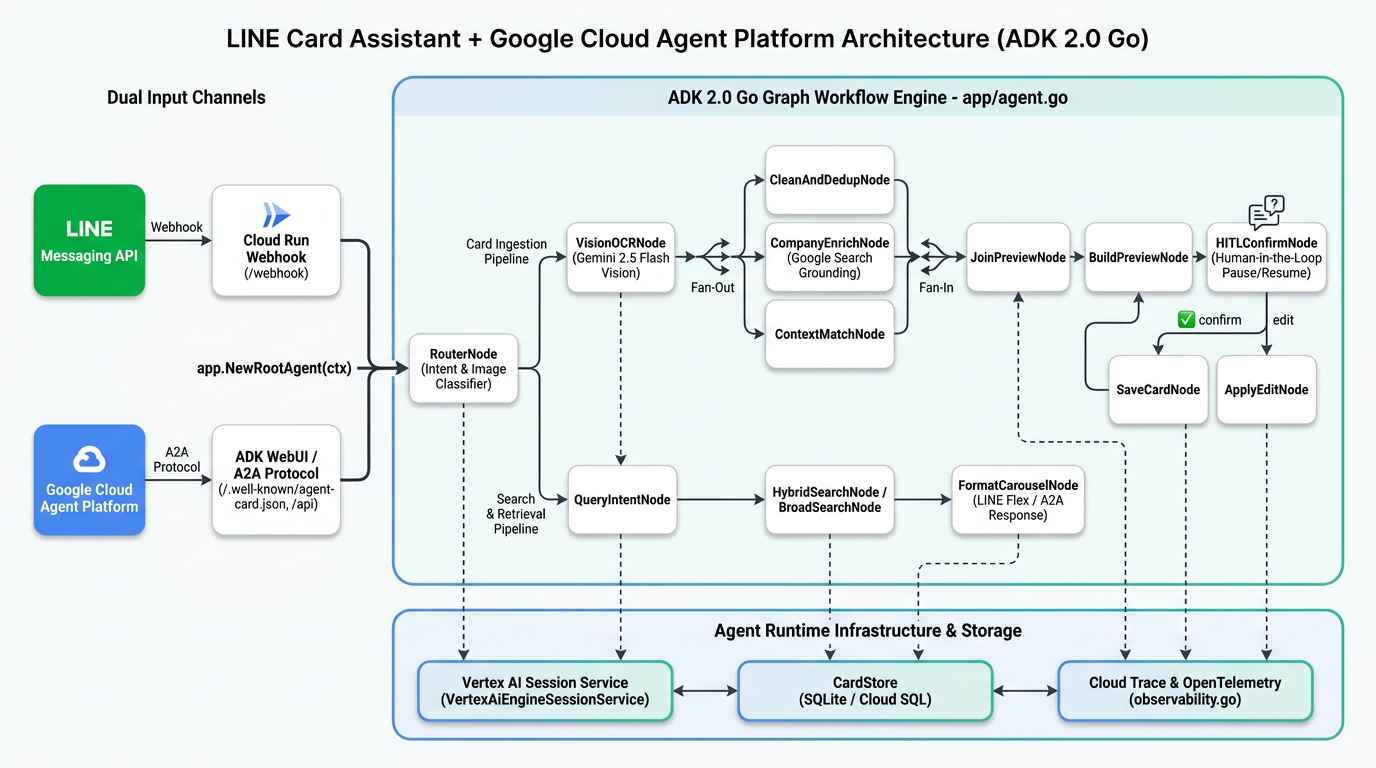
💡 Why is a "Dual-layer Decoupled Architecture" best for a LINE Bot with Agent Runtime?
Understanding the characteristics of Agent Runtime, you'll find that splitting the system into two layers is a perfect match:
- Outer Layer: LINE Webhook Gateway (Cloud Run,
min-instances=0): Since the LINE server sends Webhooks with only anX-Line-SignatureHMAC signature, it cannot carry a Google Cloud IAM OAuth Token to call an IAM-protected Agent Runtime API. Use a lightweight Go Cloud Run service dedicated to "verifying the signature within 1 second, returning HTTP 200, and triggering the LINE loading animation." It scales to 0 when no one is sending business cards. - Inner Layer: Core Brain (Agent Runtime,
min-instances=0): Focuses on running the ADK 2.0 Graph Workflow, managing cloud persistentVertexAiEngineSessionService(ensuring HITL pause states aren't lost across containers!), and simultaneously exposing A2A (/.well-known/agent-card.json) and the Agent Engine Playground to the enterprise!
2. Planning the Migration Blueprint: Creating a 5-Phase Roadmap Using GitHub CLI
To complete this architectural evolution methodically, we used the gh CLI in the GitHub Repository (kkdai/line-card-assistant) to establish 5 Milestones (Phases), 8 implementation Issues, and an overview tracking list Roadmap Issue #9:
- Phase 1:
agents-cliEnvironment andadk_goProject Scaffolding (The focus of this article!)- <input type="checkbox" disabled checked>#1 Upgrade
google-agents-clito 1.10+ and create.agents-cli-spec.mdandagents-cli-manifest.yaml - <input type="checkbox" disabled checked>#2 Introduce
adk_go+agent_runtimestandard launcher architecture (app/agent.go, A2A,/app-info, Sessions, and Observability)
- <input type="checkbox" disabled checked>#1 Upgrade
- Phase 2: ADK Go Graph Workflow Cloud Storage and Persistence Adaptation
- <input type="checkbox" disabled>#3 Deepen ADK Go v2.6+ Graph Workflow and
NewRootAgentstate management - <input type="checkbox" disabled>#4 Integrate Agent Platform Sessions (
session/vertexai) and GCS Artifact Service to support cross-instance HITL pause/resume - <input type="checkbox" disabled>#5 Expand business card database (
CardStore) to support Cloud SQL / Firestore cloud persistent storage
- <input type="checkbox" disabled>#3 Deepen ADK Go v2.6+ Graph Workflow and
- Phase 3: LINE Webhook Gateway and Agent Runtime Decoupled Architecture
- <input type="checkbox" disabled>#6 Implement LINE Webhook Gateway (Cloud Run) and Agent Runtime dual-layer decoupled call architecture
- Phase 4:
agents-cli evalAutomated Evaluation and Benchmarking- <input type="checkbox" disabled>#7 Establish
agents-cli evalevaluation datasets and quality flywheel (OCR, Fan-Out/Fan-In, HITL loops, Hybrid Search)
- <input type="checkbox" disabled>#7 Establish
- Phase 5: Agent Runtime Official Deployment, IaC, and Observability
- <input type="checkbox" disabled>#8 Deploy to Agent Runtime via
agents-cli deployand establish Terraform IaC, CI/CD, and Cloud Trace observability
- <input type="checkbox" disabled>#8 Deploy to Agent Runtime via
3. Phase 1 Hands-on Breakdown: Transforming an Existing Go Project into an adk_go + agent_runtime Dual-Channel Architecture
In Phase 1 (corresponding to the merged PR #10), our goal was to: retain the original cmd/server/main.go independent LINE Webhook server while introducing the standard agents-cli (adk_go + agent_runtime) architecture in the project root, allowing the same codebase to possess both superpowers!
Let's look at the key files changed in this upgrade and the new features they bring:
line-card-assistant/
├── .agents-cli-spec.md # [New] Phase 0 Architecture Spec (Single Source of Truth)
├── agents-cli-manifest.yaml # [New] agents-cli v1.10.0 project config (adk_go + agent_runtime)
├── deployment_metadata.json # [New] Records remote Agent Runtime resource ID and A2A status
├── main.go # [New] Agent Runtime / ADK WebUI / A2A standard HTTP entry point
├── apploader.go # [New] Loader supporting /ui/?app=app and rootAgent.Name() dual aliases
├── appurl.go # [New] Automatically calculates Cloud Run / Agent Runtime public URL (for A2A Card)
├── observability.go # [New] OpenTelemetry Cloud Trace / Logging / Metrics auto-mounting
├── app/
│ ├── agent.go # [New] Standard export interface: NewRootAgent(ctx) returns 12-node Graph Workflow
│ └── agent_test.go # [New] Verifies Root Agent execution and search output directly via ADK Runner
├── appinfo/
│ └── appinfo.go # [New] GET /app-info endpoint, auto-parses Root Workflow and embedded CompanyEnrichAgent
├── sessions/
│ └── sessions.go # [New] Auto-switches between VertexAiEngineSessionService and local InMemoryService
├── cmd/server/main.go # [Retained] Original independent LINE Bot Webhook server
└── internal/workflow/ # [Enhanced] Graph Workflow nodes upgraded to support dual-channel input and streaming Content output
1. Creating agents-cli-manifest.yaml and .agents-cli-spec.md
To make agents-cli recognize a Go project, the key is the agents-cli-manifest.yaml in the root directory:
# Managed by agents-cli. Do not edit manually.
acli_version: "1.10.0"
project_name: "line-card-assistant"
root_agent_name: "line_card_assistant"
base_template: "adk_go"
language: "go"
framework: "google-adk"
deployment_target: "agent_runtime"
agent_directory: "app"
region: "asia-east1"
agent_guidance_filename: "GEMINI.md"
is_a2a: true
prototype: true
generated_at: "2026-10-17T16:12:00Z"
After configuration, running agents-cli info in the project root allows the CLI to immediately identify this as a Go project that supports A2A and targets deployment to the asia-east1 Agent Runtime:
$ agents-cli info
CLI version: 1.10.0
Project root: /Users/evanlin/Documents/line-card-assistant
Project name: line-card-assistant
Root agent name: line_card_assistant
Language: go
Deployment target: agent_runtime
Agent directory: app
Region: asia-east1
A2A: yes
2. Encapsulating the Standard Root Agent Entry Point: app/agent.go
In the adk_go template specification, all Agent logic should be exported via NewRootAgent(ctx context.Context) (agent.Agent, error) under the app package.
Since we already used ADK 2.0's workflowagent.New to encapsulate the 12-node Graph Workflow into a standard agent.Agent in the first article, in app/agent.go, we only need to initialize the underlying CardStore (SQLite or Memory) and model.LLM (auto-detecting Vertex AI ADC or Gemini API Key), then call workflow.NewCardAssistantAgent for a seamless connection!
package app

import (
	"context"
	"log/slog"
	"os"
	"strings"

	"github.com/kkdai/line-card-assistant/internal/config"
	"github.com/kkdai/line-card-assistant/internal/store"
	"github.com/kkdai/line-card-assistant/internal/workflow"
	"google.golang.org/adk/v2/agent"
	"google.golang.org/adk/v2/model"
)

const RootAgentName = workflow.WorkflowName // "line_card_assistant"

// NewRootAgent constructs the root ADK v2 Graph Workflow agent for Agent Runtime,
// ADK WebUI playground, A2A server, and evaluation CLI.
func NewRootAgent(ctx context.Context) (agent.Agent, error) {
	cfg := config.Load()

	var cardStore store.CardStore
	if strings.TrimSpace(cfg.SQLitePath) != "" {
		sqliteStore, err := store.NewSQLiteStore(cfg.SQLitePath)
		if err != nil {
			slog.Warn("failed to open SQLite store, falling back to in-memory store", "err", err)
			cardStore = store.NewMemoryStore()
		} else {
			cardStore = sqliteStore
		}
	} else {
		cardStore = store.NewMemoryStore()
	}

	var llm model.LLM
	if cfg.UseVertexAI || cfg.GoogleAPIKey != "" || os.Getenv("GOOGLE_CLOUD_AGENT_ENGINE_ID") != "" {
		realLLM, err := workflow.NewGeminiModel(ctx, cfg.GeminiModel, cfg.GoogleAPIKey, cfg.UseVertexAI, cfg.GoogleCloudProject, cfg.GoogleCloudLocation)
		if err != nil {
			slog.Warn("failed to initialize Gemini model, falling back to mock LLM", "err", err)
			llm = workflow.NewMockLLM()
		} else {
			llm = realLLM
		}
	} else {
		llm = workflow.NewMockLLM()
	}

	return NewRootAgentWithDeps(cardStore, llm)
}

func NewRootAgentWithDeps(cardStore store.CardStore, llm model.LLM) (agent.Agent, error) {
	return workflow.NewCardAssistantAgent(cardStore, llm)
}
Note a clever detail here: when deployed in Agent Runtime, the system automatically injects the GOOGLE_CLOUD_AGENT_ENGINE_ID environment variable. When running unit tests (go test ./...) without an API Key, it automatically falls back to workflow.NewMockLLM(), ensuring offline tests remain 100% fast and deterministic!
3. Agent Runtime Standard HTTP Server and A2A Endpoints (Root main.go)
Next, let's look at the new main.go in the project root. When the container is deployed to Agent Runtime (or executed locally via make playground), this entry point mounts five standard services:
- OpenTelemetry Observability (
setupObservability): Automatically exports Traces, Logs, and Metrics to Google Cloud Trace and Cloud Logging. - Session Service Auto-switching (
sessions.SessionService()): Insessions/sessions.go, ifVERTEX_AI_SEARCH_ENGINE_ID(Agent Engine ID) is detected, it automatically enables the cloud persistentNewVertexAiEngineSessionService; for local development, it seamlessly usessession.InMemoryService(). - ADK REST API and WebUI (
/api/and/ui/): Directly starts the ADK built-in streaming conversation API and web debugging interface viaapi.NewLauncher()andwebui.NewLauncher(). - A2A (Agent-to-Agent) Protocol Server: Automatically exposes this Agent's capability description card (AgentCard) at
/.well-known/agent-card.jsonand provides a JSON-RPC call endpoint at/a2a/app! - Agent Structure Introspection Endpoint (
GET /app-info): Analyzes the entire Agent Tree viaappinfo/appinfo.go. It not only lists the Root Graph Workflow but also registers theCompanyEnrichAgent(gemini-2.5-flash)—which is embedded inCompanyEnrichNodeand equipped withgeminitool.GoogleSearch{}—into the/app-inforesponse. This allowsagents-cli evaland the Google Cloud Console Playground to clearly see all sub-agents and tools within the system!
4. Key Transformation: Enabling Graph Workflow to Support Both "LINE Webhook" and "ADK WebUI / A2A" Dual Channels!
In the first version, our RouterNode assumed all input came from the LINE Webhook Handler, which pre-filled StateKeyInputType or StateKeyImageBytes into the Session State. Furthermore, terminal nodes (like FormatCarouselNode, BuildPreviewNode, SaveCardNode) only wrote results to StateKeyReplyText and StateKeyFlexCarouselJSON for the LINE Bot to retrieve and call ReplyMessage.
However, when we open the ADK WebUI (make playground), the Agent Engine Console Playground, or talk directly to the Root Agent via agents-cli run "Find someone who does AI for me", the input follows the standard ADK ctx.UserContent() (containing text Part.Text or uploaded image Part.InlineData), and the output is read from ev.Content in the event stream!
Therefore, we made two fully backward-compatible enhancements in internal/workflow/nodes_ingest.go and internal/workflow/nodes_search.go:
(1) RouterNode Automatically Parses Images and Text from ctx.UserContent()
// When uploading a business card image directly from ADK WebUI / A2A / Agent Engine Playground,
// automatically extract InlineData.Data from ctx.UserContent().Parts and direct to RouteIngest!
if len(getBytesState(ctx, StateKeyImageBytes)) == 0 && ctx.UserContent() != nil {
	for _, part := range ctx.UserContent().Parts {
		if part != nil && part.InlineData != nil && len(part.InlineData.Data) > 0 {
			setState(ctx, ev, StateKeyImageBytes, part.InlineData.Data)
			if getStringState(ctx, StateKeyInputType) == "" {
				setState(ctx, ev, StateKeyInputType, RouteIngest)
			}
			break
		}
	}
}

// If it's text input and the input parameter is empty, automatically extract query text or commands from ctx.UserContent().Parts
if inputType == "" {
	sTrim, _ := input.(string)
	sTrim = strings.TrimSpace(sTrim)
	if sTrim == "" && ctx.UserContent() != nil {
		for _, part := range ctx.UserContent().Parts {
			if part != nil && strings.TrimSpace(part.Text) != "" {
				sTrim = strings.TrimSpace(part.Text)
				break
			}
		}
	}
	// Automatically determine if it's searching for a card (RouteSearch) or generating an icebreaker (action=draft_email&card_id=...)
    ...
}
(2) Terminal Nodes Synchronously Write to ev.Content
In BuildPreviewNode, SaveCardNode, FormatCarouselNode, and EmailDraftNode, in addition to writing to StateDelta for the LINE Bot, we added a line:
ev.Content = genai.NewContentFromText(flexJSON, genai.RoleModel)
This way:
- Sending or searching cards from LINE: The LINE Webhook still gets the Flex JSON from
StateDeltato render the beautiful LINE card. - Testing from ADK WebUI (
make playground) or Agent Engine Playground: Without needing a LINE account, you can upload a business card image or type "Find someone I met at Cloud Summit who does AI" directly in the browser. You'll see the full execution trajectory (Graph Node transitions) and the output Flex JSON / icebreaker draft directly in the conversation window!
We also added a TestRootAgentDirectSearchExecution unit test in app/agent_test.go, using the standard ADK runner.Runner to send a genai.Content query to app.NewRootAgent, verifying that the business card Carousel JSON can be obtained directly from the Event Stream without going through the LINE Engine!
5. Multi-binary Dockerfile: One Image for Both Agent Runtime and LINE Webhook
Finally, to allow the same container image to be deployed to Agent Runtime via agents-cli deploy and to Cloud Run as an independent LINE Bot server, we updated the Dockerfile to compile two static executables in a multi-stage build:
# Build the Agent Runtime / ADK WebUI / A2A entrypoint binary (root main.go)
RUN CGO_ENABLED=0 GOOS=linux GOARCH=amd64 go build -ldflags="-s -w" -o /out/agent .

# Also build the standalone LINE Bot Webhook server binary (cmd/server/main.go)
RUN CGO_ENABLED=0 GOOS=linux GOARCH=amd64 go build -ldflags="-s -w" -o /out/line-card-assistant ./cmd/server
- The default
ENTRYPOINT ["/agent"]starts the Agent Runtime standard server (listening on0.0.0.0:8080). - If it needs to run as a monolithic LINE Webhook Server on Cloud Run, simply specify the Container Command as
/bin/line-card-assistant!
4. Summary and Teaser for the Next Step
Through the Phase 1 transformation (PR #10), our LINE AI Business Card Assistant (line-card-assistant) has officially evolved from a simple LINE Bot application into an adk_go Agent that complies with Google Cloud Agent Platform standards:
- Full support for the
agents-cliecosystem: Equipped withagents-cli-manifest.yamland.agents-cli-spec.md. - Dual-channel execution capability: Can interact via LINE chat and directly through the ADK WebUI via
make playground, be called by other Agents via the A2A protocol, or undergo multimodal business card recognition and search testing in the Agent Engine Playground. - Cloud-native ready: Built-in
VertexAiEngineSessionServiceauto-switching and OpenTelemetry Cloud Trace tracking capabilities.
In the next article of this series, we will enter Phase 2 & Phase 3, where we will connect HITL pause states and image artifacts to cloud persistent storage and refactor the system into a dual-layer decoupled architecture of "Cloud Run LINE Webhook Gateway + Agent Runtime Core Brain." Stay tuned!
Reference Resources and Further Reading
- First article in the series: [Agent Platform in Practice (1)] Building a LINE AI Business Card Assistant with Go and Google ADK 2.0 Graph Workflow: From Fan-Out Parallel Retrieval to HITL Pause Loop Correction
- Open source code and Roadmap for this project:
- GitHub Repository: kkdai/line-card-assistant
- Agent Runtime Migration Roadmap: Issue #9
- Phase 1 Implementation Pull Request: PR #10: feat(phase1): scaffold adk_go Agent Runtime project structure and app.NewRootAgent
- Google
agents-cliand Agent Platform official documentation: - Google ADK Graph Workflow official documentation:
Comments
More Blog
View alldevchallengeCongrats to the Hacktoberfest Open-Source AI Challenge Week 2: Side Hustle Winners!
We're excited to announce the winners of the Hacktoberfest Open-Source AI Challenge Week 2: Side...
J
JemaiBuilding a Multimodal, Suggestion-Based AI Writing Coach with Gemini and Google Docs
When we use generative AI to proofread our daily writing—whether technical reports, business...
T
Tanaikeai926 Steps, Two Lobotomies, and Zero Nudges: Flight-Testing the Commitment Machine Across Gemini, Claude, and GPT-OSS
A 2026 Harvard study of 718 companies found that AI agents write 30% more code and close zero additional tickets because review times jump 49%. Here is what happened when I put my 1986 Commitment Machine into live production across Gemini, Claude, and GPT-OSS.
R
Randal L. SchwartzclaudeTwo ways to build with Claude models on Google Cloud!
Choose Claude Models on Google Cloud (Google managed) for in-boundary security, regional data...
J
Jen HarveydevchallengeCongrats to the Sanity Challenge Winners!
We are thrilled to announce the winners of the Sanity Challenge, our partnership with Sanity built...
J
JemgeminiBuilding a Multi-Agent Token Usage Widget in Under 500 KB
How we built a 483 KB zero-WebKit macOS Universal Binary and a single-file Ubuntu HUD with...
J
JimmyLiaoReady-made automations for this
Workflows from the Neura Market marketplace related to this Midjourney resource
- Automate Multi-Platform Social Media Lookup from Google Sheets with Gemini AIn8n · $9.99 · Related topic
- Automate Multi-Platform Blog Publishing from RSS Feedsn8n · $19.99 · Related topic
- Auto-Generate Platform-Specific Marketing Content with GPT-4, Google Sheets & Docsn8n · $14.99 · Related topic
- Auto-Generate Platform-Optimized Social Media Posts from WordPress with Claude & Postizn8n · $14.99 · Related topic