 Midjourney
Back to Blog devchallenge
 devchallenge
 ai
ai ai
ai claude
 devchallenge
 gemini
I Got Tired of Coming Into My Lab To Check the Pressure of My Cryocooler so I Built a Tool To Do It for Me
Paul Horton October 21, 2026
0 views
This is a submission for the Hacktoberfest Open-Source AI Challenge Week 3: Slow and Steady ...
This is a submission for the Hacktoberfest Open-Source AI Challenge Week 3: Slow and Steady
The Backstory
<!-- What does it do, and what effort does it save? Who gets to be a little lazier because of it? -->Hi! I'm Paul and I work as a postdoc in an astrophysics lab as a systems engineer. One of the regular texts I get from my PI is "can you check the pressure on the cryocooler." Our cryocooler, nicknamed Mountain Dewar, is essentially a big cylinder where we test sensitive detectors for space exploration. Our lab moved recently so we're testing Mountain Dewar in a new space after being in retirement for years.
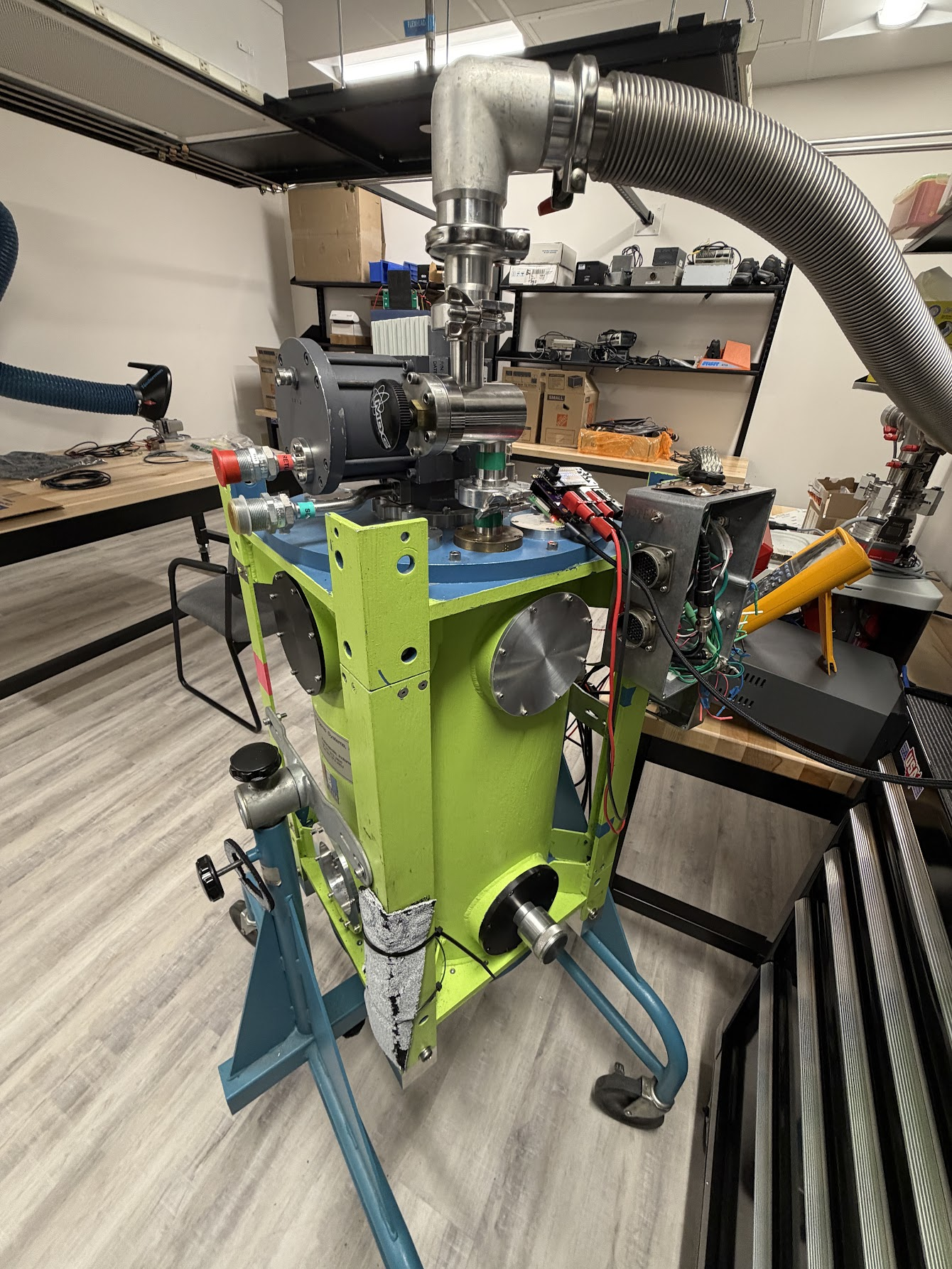
As part of the testing, we got a great deal on a vacuum pump and a bunch of used vacuum parts off eBay that we're trying ensure hold a seal. This means we pump down the cryocooler, taking out all of the air, and then monitor the pressure over time.
Our way of doing this is a multimeter connected to a pressure sensor, where values from 0 to 10V are converted into Torr based on a table in the manual. Because it's just a multimeter, we don't have live pressure data and have to run our tests on a Friday and then check back on Monday to check if it worked.
Myself and a grad student decided to test the capabilities of the lab by building a Voltmeter PCB with a spare Raspberry Pi we had in the lab. He designed a board with a two channel ADC with a voltage differential that we were able to connect to the Pi to give us values from 0 to 12V. We realized that monitoring the pressure wasn't the only thing we had to do in the lab so we made it versatile enough to monitor whatever we wanted.
Once we had a board built and the capabilities of reading voltages, I knew there was more I could do to truly make my life easier.
What I Built
Starting with a clean OS on a Raspberry Pi 4B and our new PCB, I began working on the software. Initially this was a task I planned on giving to a prospective new undergrad in our lab but after they were unable to join the group, I decided to see what GitHub Copilot was able to accomplish for a hardware project. I found an Adafruit OLED bonnet that fit nicely on top of the PCB and gave us the ability to get a quick visual for the channels without needing to pull up a monitor.
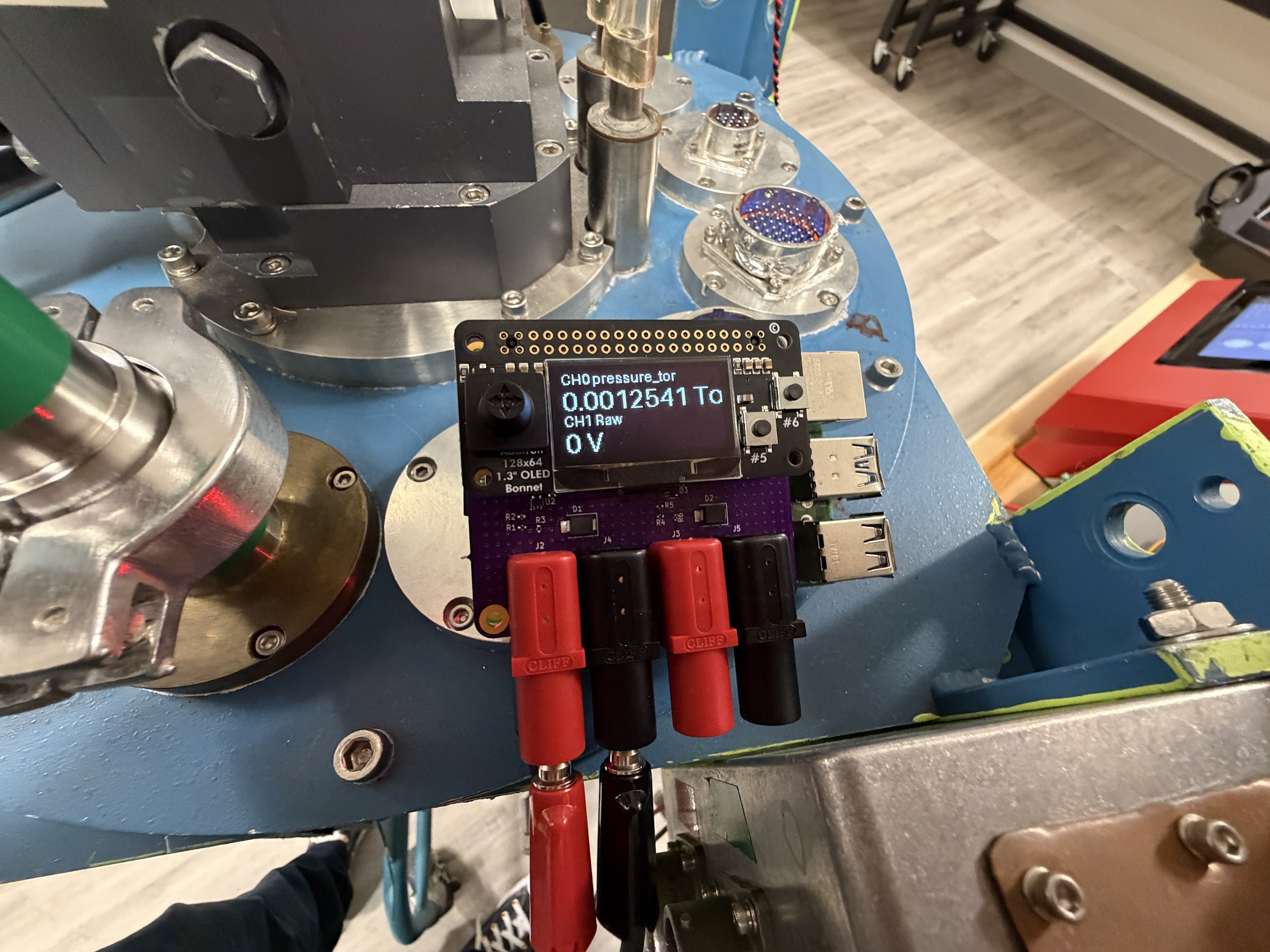
I was absolutely shocked at how quickly Copilot was able to take my test code for reading the ADCs to creating a working UI on the OLED. I began asking it to add a settings menu with the little joystick and buttons and it was able to do it almost flawlessly. At this point, my PI's request to have a gauge on top of the Cryocooler was done but I realized I could go so much further
Making it Live
My test on if this could be accomplished was done but I realized I could go further. TigerData was a tool I was curious about because most of my work revolves around time series data. Given I had a sensor spitting out constant voltages, TimescaleDB, was the obvious choice. TimescaleDB has the ability to natively give me summarization of data so I can more easily query it.
From there, I connected the Pi to the internet and have it stream data from the device to the TigerData Cloud. Given it's a relatively small stream, the free tier is perfect for my use case. I then had Copilot build out a simple web interface for the device. Finally, I hosted it all on Vercel.
Once I got it all up and running, I decided to have some fun with it. Check out some of these easter egg themes
/neoNeo Brutalist with colors matching Mountain Dewar/neonNeon Brutalist/ngeCyber Militaristic in the style of Neon Genesis Evangelleon/98Windows 98 (definitely still needs some work)
Demo with Dummy Data
<!-- Share a deployed link or a video demo. -->{% embed https://pi-voltmeter-demo.vercel.app/ %}
Code
<!-- Show us the code! You can embed a GitHub repo directly into your post. -->{% embed https://github.com/PaHorton/pi_voltmeter %}
How I Built It
<!-- Which open-source AI did you use (open-weight models, agent harnesses, frameworks, local inference), and how is your project built around it? -->This was built with Copilot using a Python application running on a Raspberry Pi to pull data from an ADC, provide a live display on an OLED, and stream data to a TimescaleDB table on TigerData Cloud.
The front end is Flask, FastAPI, and Tailwind CSS for theming. For rendering live data I'm using Chart.js and pulling data from TigerData with the help of their time_bucket and make_interval systems.
Why Does Open Innovation Matter?
<!-- Why does open innovation matter for what you built? What did it make possible that a closed API wouldn't? -->We wanted to make this system open source as other labs can very easily have use cases for this. Our PCB is available by request and all of the code is located on GitHub so anyone can easily deploy this for their own lab.
The Lazy Payoff
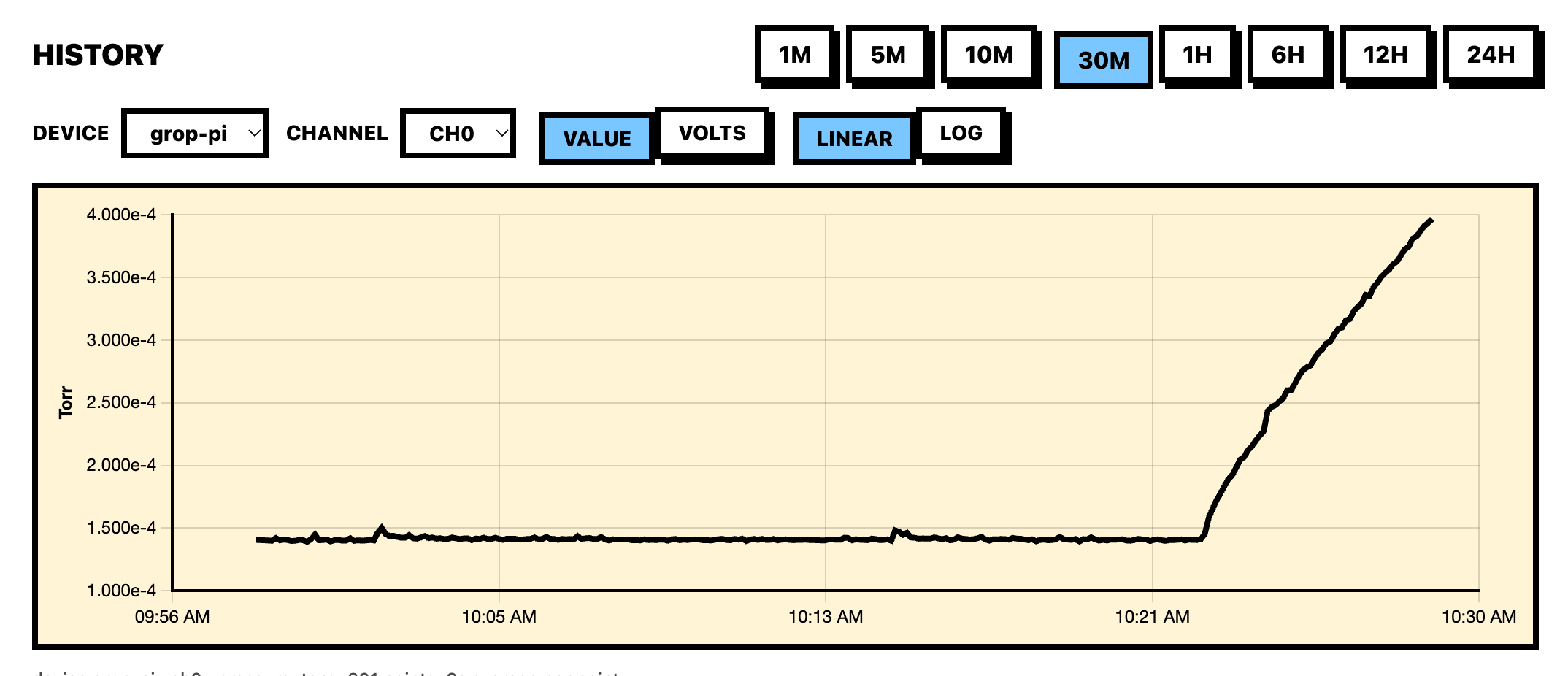
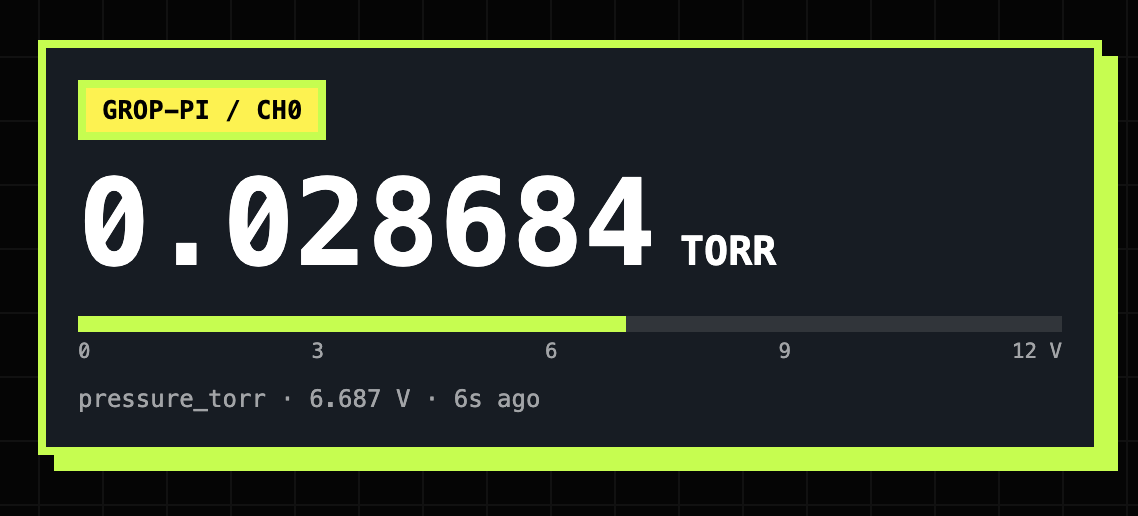
<!-- Optional, but this is where you can make your post stand out. How much time or effort does it actually save? Did you (or someone else) use it this week? If not, remove this section. -->The day after we got it up and running, my PI asked me to turn off the vacuum pump and give him updates on if it's holding pressure. I was able to just share the website with him and he could monitor it himself without me having to go check it every few hours, instantly giving me the freedom to stay at my desk as we watch the pressure increase.
Prize Categories
<!-- Which partner categories are you entering? List every one that applies, or remove this section. -->Best Use of TigerData
A Raspberry Pi continuously reads two channels from an ADS1115 converter on our cryocooler, logging its pressure and temperature. This is append-only, timestamped sensor data that is almost always queried by a time window, which is exactly what TigerData is built for. My project uses:
- Hypertables: the readings table is partitioned by time. The Pi writes to it directly and buffers readings in memory if the network drops.
- time_bucket(): graphs from 1 minute to 24 hours are averaged down to about 300 points, so every zoom level stays fast and readable.
- last(): the live gauges fetch the newest value for each channel in a single query.
- Continuous aggregates: a one-minute rollup serves graphs of 6 hours or longer, and it matches the raw data to within 0.012 V.
- Compression and retention policies: data is compressed after one day and dropped after 90 days.
I store raw voltage and apply the conversion formulas downstream, so correcting a formula never corrupts historical data. The dashboard connects through a read-only role, and a demo mode with simulated data lets me share the site without exposing live readings.
<!-- Thanks for participating! -->Comments
More Blog
View alldevchallengeCongrats to the Hacktoberfest Open-Source AI Challenge Week 2: Side Hustle Winners!
We're excited to announce the winners of the Hacktoberfest Open-Source AI Challenge Week 2: Side...
J
JemaiBuilding a Multimodal, Suggestion-Based AI Writing Coach with Gemini and Google Docs
When we use generative AI to proofread our daily writing—whether technical reports, business...
T
Tanaikeai926 Steps, Two Lobotomies, and Zero Nudges: Flight-Testing the Commitment Machine Across Gemini, Claude, and GPT-OSS
A 2026 Harvard study of 718 companies found that AI agents write 30% more code and close zero additional tickets because review times jump 49%. Here is what happened when I put my 1986 Commitment Machine into live production across Gemini, Claude, and GPT-OSS.
R
Randal L. SchwartzclaudeTwo ways to build with Claude models on Google Cloud!
Choose Claude Models on Google Cloud (Google managed) for in-boundary security, regional data...
J
Jen HarveydevchallengeCongrats to the Sanity Challenge Winners!
We are thrilled to announce the winners of the Sanity Challenge, our partnership with Sanity built...
J
JemgeminiBuilding a Multi-Agent Token Usage Widget in Under 500 KB
How we built a 483 KB zero-WebKit macOS Universal Binary and a single-file Ubuntu HUD with...
J
JimmyLiaoReady-made automations for this
Workflows from the Neura Market marketplace related to this Midjourney resource
- Create Animated Stories Using GPT-4o-mini, Midjourney, Kling, and Creatomate APIn8n · $24.99 · Related topic
- Automate LinkedIn Profile Discovery and Outreach via Form Submissionn8n · $14.99 · Related topic
- Automate Midjourney Image Creation and Upscaling via Telegramn8n · $14.99 · Related topic
- Automate Graphic Wallpaper Creation with Midjourney and Canvas APIsn8n · $9.99 · Related topic