

Letterbook
FreemiumAuto-resolve support tickets using your data and playbooks.
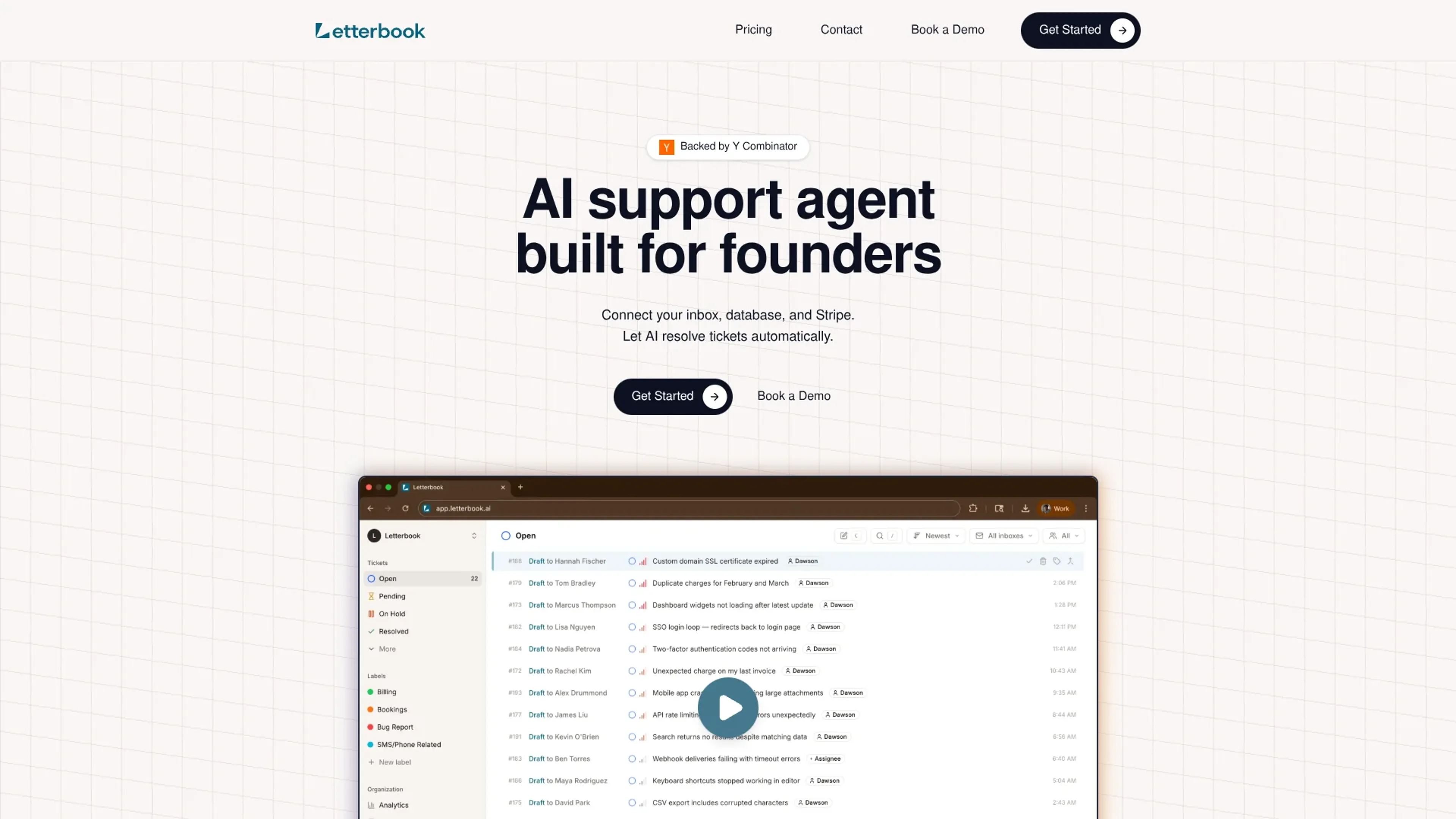
About Letterbook
Letterbook is an AI-native customer support tool aimed at founders and lean teams. It connects to a company’s inbox, product database, and Stripe account, then uses large language models guided by custom “scenarios” to draft and often fully resolve support tickets. Instead of hiring and training a traditional support team, founders define playbooks for common situations such as refunds, login issues, password changes, or bug reports, and review AI-generated replies from a modern contact center interface.
Key Features
- AI Ticket Resolution Engine: Automatically drafts replies for each ticket by combining scenario instructions with live customer data from connected systems, so responses can reference real orders, subscriptions, and account details.
- Scenario-based Playbooks: Teams define support scenarios that spell out how different request types should be handled. The AI follows these rules closely and improves as it receives feedback on its drafts.
- Database and Stripe Integrations: Read access to databases and Stripe lets the AI look up key records directly, reducing back-and-forth and allowing it to answer billing and account questions with specific details.
- Modern Contact Center UI: A fast, keyboard-friendly interface helps human agents review AI drafts, make edits, and send replies quickly when manual oversight is needed.
- Smart Knowledge Base & Auto-updating Scenarios: Support scenarios and internal knowledge are updated as tickets are solved, keeping the AI aligned with the latest policies and product changes.
- Built-in Analytics: Dashboards track metrics such as resolution time, automation rate, and customer satisfaction so teams can see how much work the AI is handling and where to refine scenarios.
Pros
- Founder-centric setup: Designed so a small team can connect tools, define scenarios, and have the AI solving real tickets in minutes rather than weeks.
- High automation potential: Routine, repetitive requests can be handled end to end by the AI, freeing humans to focus on complex or high-touch cases.
- Low management overhead: Less time spent hiring, coaching, and scheduling agents, since the AI agent scales with ticket volume.
- Improving quality over time: Feedback on each draft response trains the system, so support quality can steadily rise as more tickets pass through it.
- Modern alternative to legacy helpdesks: Provides core helpdesk functions with an interface built around AI from day one rather than bolted-on automation.
Cons
- Data access requirements: Granting read access to production databases and Stripe may raise security and compliance questions for some organizations.
- Best for repeatable workflows: Works strongest where support can be expressed as clear scenarios; highly novel or sensitive cases still need careful human handling.
- Younger tool ecosystem: Has fewer long-standing integrations and community resources than older platforms like Zendesk or Intercom.
Use Cases
- Early-stage SaaS startups: Using the tool to answer billing and account questions without hiring a full-time support team.
- Product-led B2B companies: Automating common “how do I” questions and account updates for self-serve customers.
- Consumer subscription apps and marketplaces: Handling refunds, subscription changes, and order lookups at scale with AI-driven replies.
- YC-backed and high-growth teams: Replacing a patchwork of older helpdesk tools with a single AI-first contact center.
- Uncommon Use Cases: Utilized by small internal IT or operations teams to route and answer employee requests; adopted by solo founders running multiple micro SaaS products who want one AI agent covering all brands.
Pricing
Starter: $30 per month. Includes 3 seats, 300 tickets per month, database and Stripe integration, and a unified inbox for all your channels. Growth: $200 per month for 1,000 tickets per month. Includes 10 seats, 1,000 tickets per month, all channels and integrations, and priority support. Enterprise: Custom pricing. Includes custom seats, 3,000+ tickets per month, SSO and SAML, and a dedicated account manager. Disclaimer: Please note that pricing information may not be up to date. For the most accurate and current pricing details, refer to the official Letterbook website.
What Makes It Unique
Letterbook stands out by treating the AI support agent as the primary worker rather than a minor add-on to human queues. Direct access to databases and Stripe means the AI can answer concrete questions about orders and subscriptions instead of giving vague, generic replies. Scenario-based playbooks give founders tight control over tone, policies, and edge cases, while auto-updating scenarios and analytics help them refine support operations as their product evolves. The result is a support stack that feels purpose-built for modern, product-led software businesses.
Ratings
Accuracy and Reliability: 4.2/5 Ease of Use: 4.6/5 Functionality and Features: 4.1/5 Performance and Speed: 4.5/5 Customization and Flexibility: 4.0/5 Data Privacy and Security: 3.9/5 Support and Resources: 4.3/5 Cost-Efficiency: 4.4/5 Integration Capabilities: 3.8/5 Overall Score: 4.2/5
Key Features
Pros & Cons
- Founder-centric setup: Designed so a small team can connect tools, define scenarios, and have the AI solving real tickets in minutes rather than weeks.
- High automation potential: Routine, repetitive requests can be handled end to end by the AI, freeing humans to focus on complex or high-touch cases.
- Low management overhead: Less time spent hiring, coaching, and scheduling agents, since the AI agent scales with ticket volume.
- Improving quality over time: Feedback on each draft response trains the system, so support quality can steadily rise as more tickets pass through it.
- Modern alternative to legacy helpdesks: Provides core helpdesk functions with an interface built around AI from day one rather than bolted-on automation.
- Data access requirements: Granting read access to production databases and Stripe may raise security and compliance questions for some organizations.
- Best for repeatable workflows: Works strongest where support can be expressed as clear scenarios; highly novel or sensitive cases still need careful human handling.
- Younger tool ecosystem: Has fewer long-standing integrations and community resources than older platforms like Zendesk or Intercom.
Best For
Alternatives to Letterbook
Eddy AI
Automate Your Sales and Support with Eddy AI's 24/7 Chatbot.
Chatsimple
Revolutionize Your Customer Support with Chatsimple AI Chatbot
ChatShape
Enhance Your Website with Custom AI Chatbots
ParentMate
Personalized, evidence-based parenting guidance—built on child psychology and tailored to your family.
Ultimate
Streamline Your Customer Support with Ultimate
Wallu
Automate Discord support with Wallu—multilingual AI answers, image OCR, and ticket bot integration.