

ToolSpend
FreemiumUnify AI/SaaS spend, catch waste, avoid bill shocks.
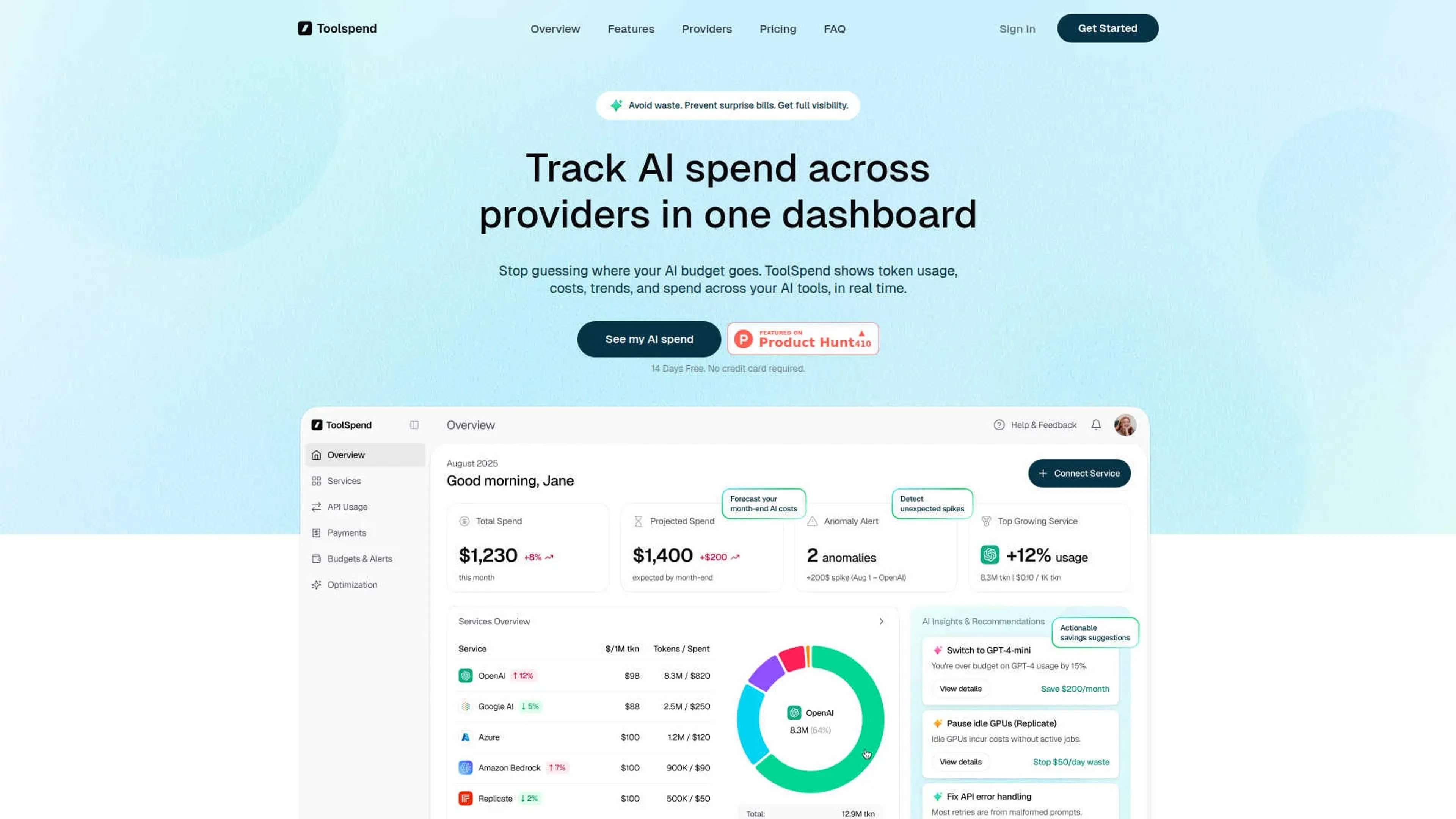
About ToolSpend
ToolSpend focuses on one core question: where is AI and SaaS money actually going. It connects AI providers and SaaS tools with banking or card data to reveal true spend, map it to teams and projects, and highlight waste. Using AI-driven analytics, it tracks token usage, subscription costs, and spend anomalies across providers like OpenAI, Google AI, Azure, and Amazon Bedrock. Finance, engineering, and product teams get a shared dashboard that replaces scattered spreadsheets and guesswork, so budgets for LLMs and SaaS stay under control instead of spiraling quietly in the background.
Key Features
- Unified AI and SaaS Spend Dashboard: Aggregates costs, usage, and subscriptions across multiple AI providers and general SaaS tools into a single view, down to model, project, or API key.
- Real-Time Cost Tracking and Forecasting: Updates spend continuously and projects month‑end bills based on current usage, helping teams avoid surprise invoices from high‑volume LLM workloads.
- Usage, Seat, and Duplicate Detection: Surfaces underutilized licenses, “ghost” seats, and overlapping tools across teams so organizations can consolidate vendors and trim bloat.
- Anomaly and Spike Alerts: Uses analytics to spot retry storms, broken prompts, runaway jobs, or unusual spend patterns and alerts teams early enough to intervene.
- AI Cost-Saving Recommendations: Suggests cheaper model alternatives, flags inefficient usage, and can point to idle compute (such as unused GPUs) that should be paused.
- Security-First Architecture: Operates with read‑only connections to providers and financial data, with encryption and SOC 2 Type II practices aimed at “bank-level” reassurance.
Pros
- Clear AI and SaaS Visibility: Gives finance, engineering, and leadership a shared, granular picture of where AI and SaaS money goes.
- Practical Cost Reduction: Identifying idle seats, redundant tools, and wasteful usage can quickly reclaim meaningful budget.
- Early-Warning System: Real‑time alerts and forecasts reduce the odds of bill shock from rapid LLM adoption.
- Good Fit for Multi-Provider Teams: Particularly helpful for organizations juggling several AI vendors, models, and internal teams.
- Security Posture: Read‑only access and strong security practices suit risk‑sensitive companies that still want detailed analytics.
Cons
- Young Product: Recently launched, so some edges and missing “nice to have” refinements are likely as the team ships updates.
- Integration Coverage Still Growing: While major AI providers are supported, smaller or niche tools may not yet plug in automatically.
- Overkill for Light Users: Individuals or very small teams with only one or two AI tools may not get full value from the depth of analytics.
Use Cases
- Finance and FP&A Teams: Using it as a command center for AI and SaaS spending, improving forecasting and controlling software creep.
- Engineering and Platform Teams: Tracking model usage, token burn, and anomalies across services to keep infrastructure‑adjacent costs in check.
- AI Product and Data Science Teams: Monitoring experimental and production LLM workloads to spot waste and justify model choices.
- Procurement and Operations Leaders: Coordinating renewals, spotting duplicate vendors, and preparing negotiations with data instead of rough estimates.
- Uncommon Use Cases: Adopted by AI consultancies to track client‑specific tool costs; used by startup founders to consolidate personal, side‑project, and company AI subscriptions in one place.
Pricing
Free Trial: A 14‑day free trial with access to core features and limits on connected services and tracked tokens. Pro Plan: $14.99 per month; includes connection to up to 10 services, full history and trends, projected month-end spend, anomaly alerts (spike detection), AI insights and savings tips, export-ready reporting view. Disclaimer: Please note that pricing information may not be up to date. For the most accurate and current pricing details, refer to the official ToolSpend website.
What Makes It Unique
ToolSpend does not just list tools and invoices; it correlates real provider usage data with actual financial transactions. That bridge between engineering metrics and finance records is where it shines. Teams can see, for example, which specific LLM model or API key is driving a card charge and whether a cheaper alternative would have done the job. The focus on both AI services and general SaaS, plus security practices suitable for serious spend, makes it feel like a purpose‑built AI spend cockpit rather than a generic expense tracker with some AI buzzwords sprinkled on top.
Ratings
Accuracy and Reliability: 4.6/5 Ease of Use: 4.2/5 Functionality and Features: 4.4/5 Performance and Speed: 4.5/5 Customization and Flexibility: 4.0/5 Data Privacy and Security: 4.7/5 Support and Resources: 4.0/5 Cost-Efficiency: 4.5/5 Integration Capabilities: 4.2/5 Overall Score: 4.3/5
Key Features
Pros & Cons
- Clear AI and SaaS Visibility: Gives finance, engineering, and leadership a shared, granular picture of where AI and SaaS money goes.
- Practical Cost Reduction: Identifying idle seats, redundant tools, and wasteful usage can quickly reclaim meaningful budget.
- Early-Warning System: Real‑time alerts and forecasts reduce the odds of bill shock from rapid LLM adoption.
- Good Fit for Multi-Provider Teams: Particularly helpful for organizations juggling several AI vendors, models, and internal teams.
- Security Posture: Read‑only access and strong security practices suit risk‑sensitive companies that still want detailed analytics.
- Young Product: Recently launched, so some edges and missing “nice to have” refinements are likely as the team ships updates.
- Integration Coverage Still Growing: While major AI providers are supported, smaller or niche tools may not yet plug in automatically.
- Overkill for Light Users: Individuals or very small teams with only one or two AI tools may not get full value from the depth of analytics.
Best For
Alternatives to ToolSpend
Glean.ai
Streamline data extraction and analysis, automate coding, and optimize spending decisions for higher ROI.
Stocked AI
Empower Your Investments with AI-Driven Predictions from Stocked AI.
QuickBooks
Generate tax reports, automate invoicing, monitor financial performance with a powerful mobile app.
HypeIndex
Monitor Stock Market Buzz Using HypeIndex
Tonkean InvoicesGPT
Extract fields from PDF/invoice files, ensure compliance, and provide spend visibility across vendors and departments.
Pluto
Personal Investment AI and Real-Time Data Analysis with Pluto