
Reshot AI
FreemiumAI-enhanced photo editor for professional headshots and thumbnails.
About Reshot AI
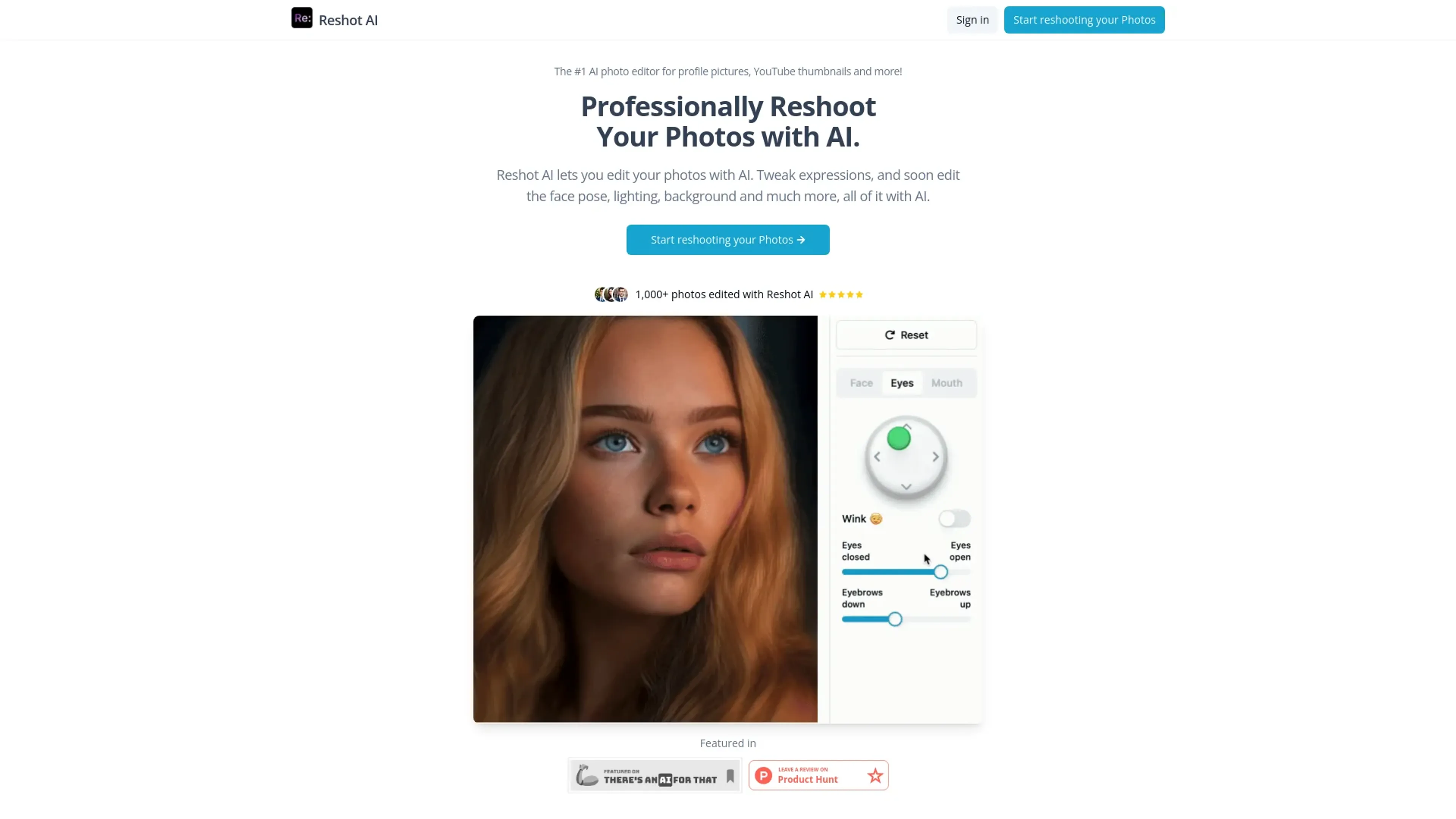
Reshot AI is an advanced AI-powered photo editor specifically designed for professional headshots, YouTube thumbnails, and much more. This tool leverages cutting-edge artificial intelligence to enhance and reshoot your photos, making it an essential resource for individuals and professionals aiming to improve their online presence. With the ability to tweak expressions, edit face poses, adjust lighting, and even change backgrounds, Reshot AI offers a comprehensive suite of features to create stunning, high-quality images effortlessly.
Key Features
- AI-Powered Edits: Utilize advanced AI algorithms to enhance and reshoot photos with precision.
- Expression Tweaks: Modify facial expressions to better suit your desired look.
- Pose and Lighting Adjustments: Soon-to-be-released features will allow for editing face poses and lighting conditions.
- Background Editing: Easily change the background of your photos for a more professional appearance.
- Quick Processing: Generate multiple edited versions of your photo in under 30 seconds.
- Full Ownership Rights: You retain full commercial rights to all edited photos.
Pros
- Time Efficiency: Quickly edit photos in under 30 seconds, saving hours compared to manual editing.
- Professional Quality: AI trained on thousands of high-quality images ensures professional-grade results.
- User-Friendly Interface: Intuitive design makes it accessible even for users with minimal technical skills.
- Versatile Applications: Ideal for profile pictures, social media posts, YouTube thumbnails, and more.
Cons
- Subscription Limitations: The number of photos you can edit is capped based on your subscription plan.
- Customization Limits: While the AI generates high-quality edits, customization options are somewhat limited.
Use Cases
- Content Creators: Perfect for YouTubers and influencers needing high-quality thumbnails and social media posts.
- Professional Photographers: Helps streamline the editing process for professional headshots and portraits.
- Marketing Professionals: Useful for creating visually appealing campaign content.
- Freelancers: Ideal for those needing to quickly and effectively edit client photos.
- Uncommon Use Cases: Utilized in educational institutions for teaching courses on digital marketing and photography; employed by freelance photographers for efficient and quick photo editing workflows.
Pricing
Monthly Plan: $19 per month. Edit 250 photos per month. Yearly Plan: $9 per month ($108 per year). Edit 250 photos per month, offering a 50% discount compared to the monthly plan. Disclaimer: Please note that pricing information may not be up to date. For the most accurate and current pricing details, refer to the official Reshot AI website.
What Makes It Unique
Reshot AI stands out with its ability to deliver professional-quality edits in a matter of seconds. Its unique feature of tweaking facial expressions and the upcoming capabilities to adjust face poses and lighting set it apart from other photo editing tools. The AI's training on thousands of high-quality images ensures that the edits are not only quick but also exceptionally polished and professional.
Ratings
Accuracy and Reliability: 4.8/5 Ease of Use: 4.7/5 Functionality and Features: 4.6/5 Performance and Speed: 4.9/5 Customization and Flexibility: 4.3/5 Data Privacy and Security: 4.5/5 Support and Resources: 4.4/5 Cost-Efficiency: 4.6/5 Integration Capabilities: 4.2/5 Overall Score: 4.6/5
Key Features
Pros & Cons
- Time Efficiency: Quickly edit photos in under 30 seconds, saving hours compared to manual editing.
- Professional Quality: AI trained on thousands of high-quality images ensures professional-grade results.
- User-Friendly Interface: Intuitive design makes it accessible even for users with minimal technical skills.
- Versatile Applications: Ideal for profile pictures, social media posts, YouTube thumbnails, and more.
- Subscription Limitations: The number of photos you can edit is capped based on your subscription plan.
- Customization Limits: While the AI generates high-quality edits, customization options are somewhat limited.
Best For
Alternatives to Reshot AI
WatermarkRemover IO
Are you looking for an AI tool that removes image watermarks easily? Have a look at WatermarkerRemover.io, with multiple formats and API access.
Recraft
Generate Flawless AI-Created Images for Free Using Recraft
Ai Art Generator, AI Art Maker
Generate custom artwork from text, customize it with colors and shapes, add text and layers for unique designs.
Decoherance
Decohere's Revolutionary AI Tools: Image & Video Generation and Beyond!
Midjourney
AI image generation via Discord
PuppiesAI
Generate adorable puppy images with advanced AI