

StreamAlive
FreemiumTurn live chat into polls, games, insights.
About StreamAlive
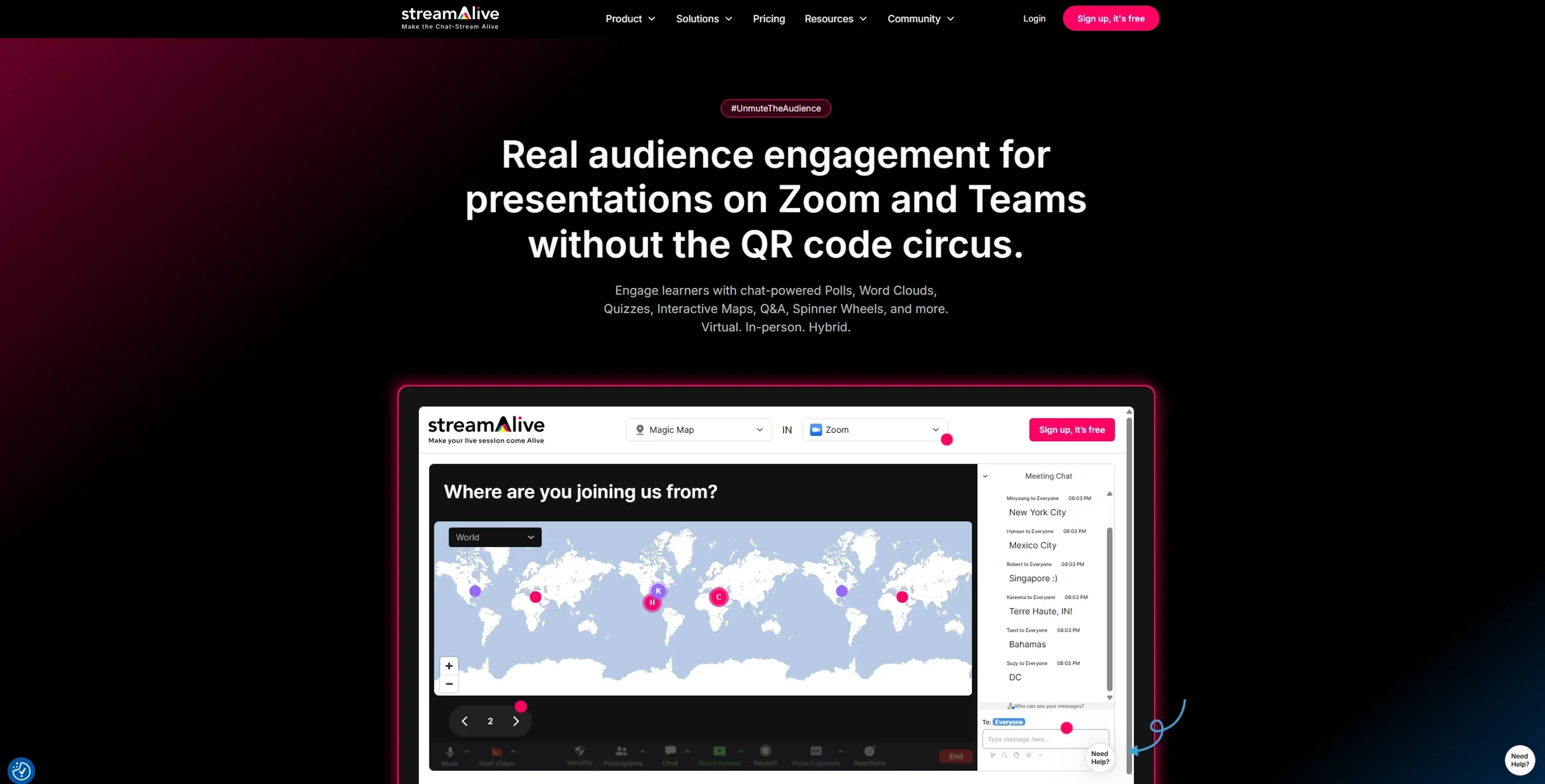
StreamAlive is a chat-first audience interaction tool for live sessions across Zoom, Teams, Google Meet, YouTube Live, Twitch, and in-person events. It uses AI to turn chat into polls, word clouds, maps, wheels, Q&A, and reports without sending people to separate apps.
Key Features
- Chat-powered visuals: Polls, word clouds, Magic Maps, rating bars, spinner wheels, emojis, and tiles transform simple chat messages into live visuals.
- AI Interaction Generator and templates: Upload a deck or describe the topic and the tool proposes ready-to-run polls, questions, and activities from 1,700+ templates.
- Chat intelligence and analytics: Automatically captures questions, builds leaderboards, extracts links, summarizes busy chats, and produces shareable reports after each session.
- Integrations and presentation builder: Works with PowerPoint, Google Slides, Zoom, Teams, Google Meet, YouTube Live, Twitch, and a browser-based builder for full slide-plus-interaction sessions.
Pros
- Low-friction for participants: Attendees answer in the existing meeting chat, avoiding QR codes, extra links, and separate apps.
- Visually rich sessions: Maps, wheels, word clouds, and emoji effects keep attention on the content instead of background multitasking.
- Time savings for hosts: AI-generated questions and summaries reduce preparation time and make reporting to stakeholders easier.
- Training-focused design: Use cases, templates, and copy are tuned for instructor-led training, corporate learning, and webinars.
Cons
- Live-first orientation: Strongest for real-time sessions and less useful today for fully self-paced or on-demand courses.
- Host learning curve: Presenters must learn how to connect meetings, manage the app window, and time interactions confidently.
- Pricing jump after free tier: Free use covers only small groups, so some solo trainers may feel the cost step-up.
Use Cases
- Corporate L&D and training teams: Using it to make compliance, sales, and onboarding sessions more interactive and measurable.
- Universities and schools: Supporting virtual lectures, review classes, and large cohorts where chat normally moves too fast to follow.
- Consultants, coaches, and facilitators: Running client workshops and masterminds with live polls, Q&A, and visual feedback.
- Marketers and event organizers: Turning webinars, launches, and community calls into two-way conversations instead of slide monologues.
- Uncommon Use Cases: Used by religious and spirituality groups for participatory sermons and study circles; Adopted by gaming communities for viewer-controlled challenges and live stunts.
Pricing
Free: Includes up to 3 presentations, unlimited sessions, 1 collaborator (edit/moderate only), 7-day reporting history, and 1,000 total AI credits. Starter: $40 per month; includes up to 3 themes, 30 presentations, hybrid sessions, 60-day reporting history, and 2,000 monthly AI credits. Pro: $100 per month; includes all Starter features plus branding, up to 2 collaborators, 180-day reporting history, and 6,000 monthly AI credits. Enterprise: Custom pricing; includes all Pro features plus personalized onboarding, SSO for members and participants, team roles (coming soon), adjustable data-keeping policy, and unlimited AI credits. Book a demo with the sales team to see all pricing options. Disclaimer: Please note that pricing information may not be up to date. For the most accurate and current pricing details, refer to the official StreamAlive website.
What Makes It Unique
Most polling tools send participants to external pages; StreamAlive instead treats chat as the primary input, turning messages into data, visuals, or games. Combined with AI creation, AI summaries, and a large bank of training templates, it suits teams that want lively learning with minimal setup effort.
Ratings
Accuracy and Reliability: 4.4/5 Ease of Use: 4.3/5 Functionality and Features: 4.7/5 Performance and Speed: 4.6/5 Customization and Flexibility: 4.2/5 Data Privacy and Security: 4.3/5 Support and Resources: 4.5/5 Cost-Efficiency: 4.1/5 Integration Capabilities: 4.6/5 Overall Score: 4.4/5
Key Features
Pros & Cons
- Low-friction for participants: Attendees answer in the existing meeting chat, avoiding QR codes, extra links, and separate apps.
- Visually rich sessions: Maps, wheels, word clouds, and emoji effects keep attention on the content instead of background multitasking.
- Time savings for hosts: AI-generated questions and summaries reduce preparation time and make reporting to stakeholders easier.
- Training-focused design: Use cases, templates, and copy are tuned for instructor-led training, corporate learning, and webinars.
- Live-first orientation: Strongest for real-time sessions and less useful today for fully self-paced or on-demand courses.
- Host learning curve: Presenters must learn how to connect meetings, manage the app window, and time interactions confidently.
- Pricing jump after free tier: Free use covers only small groups, so some solo trainers may feel the cost step-up.
Best For
Alternatives to StreamAlive
ChatBA
Revolutionize Your Slide Creation with ChatBA AI!
Smallppt
Effortless AI-Powered Presentation and Mind Map Creation.
PresentationGPT
Revolutionize Your Presentation Creation with AI Power.
AutoSlide
Transform ideas into polished AI-generated presentations in seconds with AutoSlide.

HireAra
Revolutionize recruitment with AI-driven CV formatting and enhanced presentation.

Sessions
Transform meetings with AI, HD video, interactive tools, analytics.