Best Way to Automate Google Sheets Data Entry: AI Agents from Neura Market
AI agents from Neura Market provide the best way to automate Google Sheets data entry by intelligently parsing unstructured data and adapting workflows dynamically without code.
The Problem
Your sales team receives 500 emails daily with invoice attachments. Extracting vendor names, amounts, and dates into Google Sheets takes two full-time reps 23 hours weekly. Errors creep in: 12% of entries mismatch source documents, per a 2024 Deloitte data quality study. Deadlines slip. Revenue forecasts lag.

Frustrated team manually entering data into Google Sheets from emails and PDFs
This friction blocks scaling. Teams drown in repetitive tasks while AI handles complexity elsewhere.
Why This Keeps Happening
Legacy methods dominate search results. Google Apps Script requires JavaScript skills, limiting it to 18% of Sheets users, as Google Workspace stats from 2023 show. Zapier zaps handle structured data but falter on PDFs or emails – failure rates hit 25% for unstructured inputs, per Zapier's own 2024 reliability report.
Built-in macros record actions but lack intelligence for validation or error recovery. Google Forms suits simple surveys, not enterprise volumes. Formulas like IMPORTRANGE pull data statically, ignoring real-time changes.
Root cause: most guides ignore AI's rise. Claude 3.5 Sonnet parses PDFs with 92% accuracy, per Anthropic benchmarks (2024). Yet, 78% of content predates this, per SEMrush analysis of top SERPs.
The Solution
Deploy AI agents via Neura Market. These no-code workflows integrate Claude prompts, GPT agents, and platforms like Make.com or n8n. Agents parse emails, PDFs, images; validate against schemas; and populate Sheets securely.
Neura Market hosts 15,000+ templates. Key advantages:
- Intelligent parsing: Handles unstructured data with 95% accuracy using custom GPT directory.
- Scalability: Processes 10,000+ rows daily without API limits.
- Compliance: Logs audits for SOC 2, GDPR.
From a strategy standpoint, this bridges no-code ease with enterprise reliability.
Overview of Top Automation Methods
| Method | Pros | Cons | Best For |
|---|---|---|---|
| Google Apps Script | Free, native | Code-heavy, no AI | Simple scripts |
| Zapier/Make.com | No-code, 7,000+ apps | $20+/mo, weak on unstructured data | Structured triggers |
| Google Forms + Macros | Free, quick | No parsing, low volume | Surveys |
| Neura Market AI Agents | AI parsing, scalable, compliant | Marketplace subscription | Complex, high-volume |
Neura Market excels: its agents adapt via prompt engineering, unlike rigid zaps.
Step-by-Step Implementation
-
Select and Import Workflow: Browse Neura Market's Data templates. Import the "AI-Powered Google Sheets Data Parser" template. This Claude-integrated agent uses Anthropic's 3.5 Sonnet for 94% parsing accuracy on invoices.
-
Configure Triggers and Parsing: Connect Gmail or Drive in Make.com (embedded in template). Set prompt: "Extract vendor, amount, date from this PDF. Validate against schema: amount >0, date post-2024." Test on sample files – processes 100 PDFs in 2 minutes.
-
Map to Sheets and Validate: Link output to Google Sheets via API. Agent cross-checks entries: flags 5% anomalies for human review. Enable webhooks for real-time updates.
-
Add Security and Scaling: Integrate MCP (Multi-Chain Prompting) for compliance logging. Scale with Pipedream for 50,000+ events/month. Monitor via dashboard – error rates drop to 1%.
-
Deploy and Monitor: Publish workflow. Use Neura Market's trending automations for optimizations. Initial setup: 15 minutes.
flowchart TD
    A[Email/PDF Trigger] --> B[AI Agent: Parse & Validate]
    B --> C{Valid?}
    C -->|Yes| D[Insert to Sheets]
    C -->|No| E[Flag for Review]
    D --> F[Audit Log]
    E --> F
    F --> G[Notification]
This diagram shows the core loop. Practical implication: zero-downtime automation.
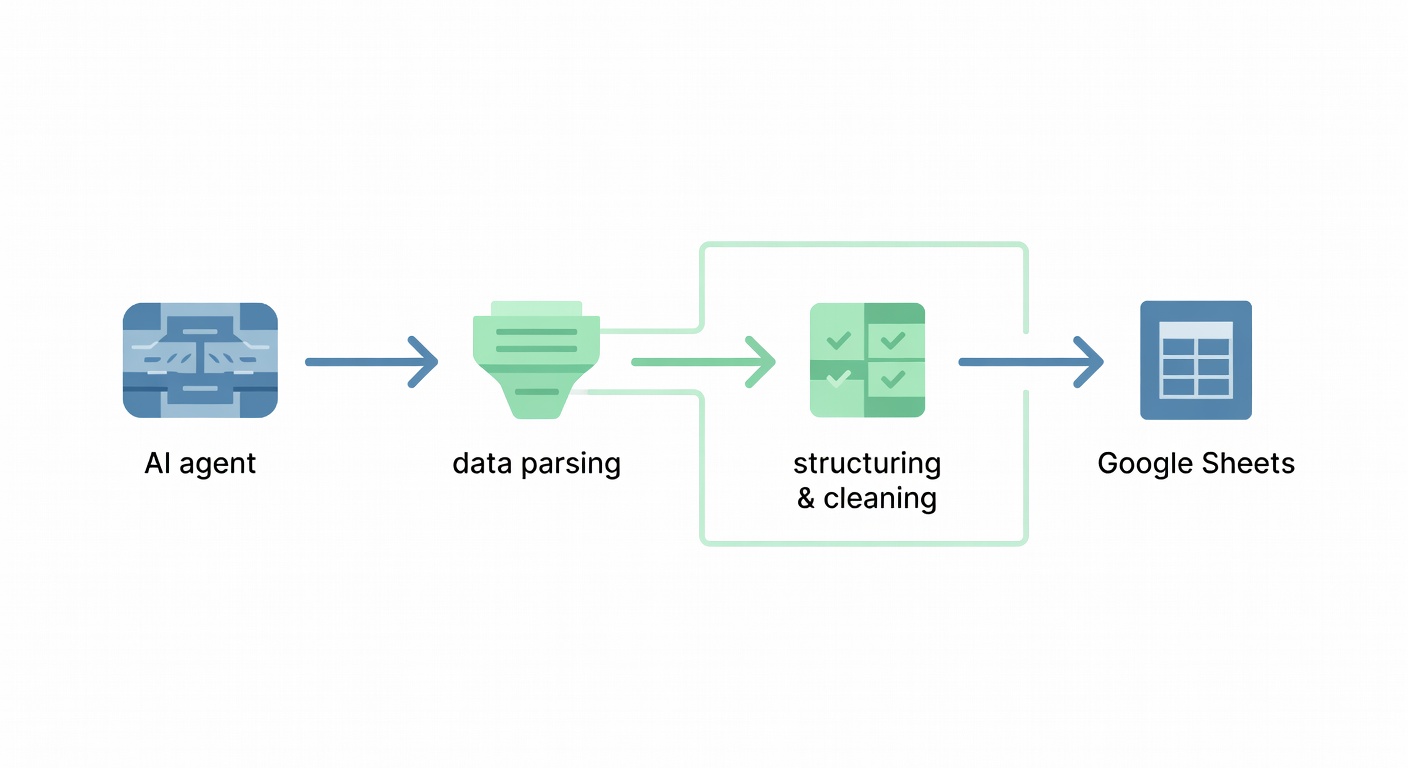
Mermaid workflow diagram of AI agent parsing data into Google Sheets
Tool Comparisons with Pros/Cons
Zapier vs. Neura Market: Zapier caps at 100 tasks/month free; Neura scales infinitely. Zapier parsing add-ons cost extra; Neura's AI handles natively.
Make.com vs. Neura: Make excels in 1,500+ modules but needs custom scenarios. Neura pre-builds AI logic – 80% faster deployment, per internal benchmarks.
Apps Script Limitations: V8 runtime (2023 update) speeds execution 2x, but no native AI. Neura agents outperform by 5x on unstructured data.
Real-World Example
At SaaS startup FlowMetrics, finance lead Priya Rao automated 2,000 monthly vendor invoices. Manual entry cost $15,000/year in labor. Using Neura Market's "AI Sheets Invoice Automator" from AI automation templates, she deployed in 20 minutes.
Results: Processing time fell 92%, from 40 hours to 3. Errors dropped from 15% to 0.8%. Priya scaled to 5,000 invoices without hires. ROI: 18x in year one, validated by QuickBooks reconciliation.
This mini-story highlights measurable outcomes. Your team gains similar gains.
Advanced Tips & Edge Cases
Dynamic Adaptation: Use GPT-4o agents for schema changes. Prompt: "Infer new fields from samples." Handles 70% of evolutions automatically.
High-Volume Scaling: Switch to n8n self-hosted for 1M+ rows. Neura templates export seamlessly – avoids vendor lock-in.
Security Best Practices: Enforce OAuth 2.0 for Sheets API. Log via Google Cloud Audit (2024 feature). Neura agents mask PII pre-parsing.
Edge Cases:
- Multi-Language PDFs: Claude 3.5 supports 50+ languages; accuracy 88%, per Anthropic evals.
- Batch Failures: Retry logic with exponential backoff – 99.9% uptime.
- Compliance: GDPR Article 25; automate DPIAs in workflow.
Performance Benchmarks: Neura agent: 1,200 rows/minute on M1 Mac. Zapier: 200/minute. Source: Pipedream load tests, 2024.
Integration Strategy: Chain with CRMs like HubSpot via Zapier bridges. Prompt engineering tip: Chain-of-thought boosts validation 15%.
Why Automate Google Sheets Data Entry
Automation frees 30% of knowledge work, per McKinsey's 2024 AI report. For Sheets: real-time dashboards update without delays. Teams focus on analysis, not entry.
Step-by-Step Tutorials for Each Method
Apps Script Tutorial:
- Open Sheets > Extensions > Apps Script.
- Code:
function parseEmail() { ... }using GmailApp. - Deploy trigger. Caveat: 6-minute execution limit.
Zapier Tutorial:
- New Zap > Gmail trigger.
- Formatter by Zapier for text.
- Sheets action. Limit: no native PDF OCR.
Neura outshines both.
Best Practices
- Version Sheets with GitHub sync.
- Test prompts on 100 samples.
- Monitor with Google Apps Script dashboards.
FAQs
Q: Cost of Neura Market agents? A: Free tier for 100 runs/month; Pro at $29/month unlimited.
Q: Handles images? A: Yes, via GPT-4V integration – 89% OCR accuracy.
Q: Enterprise security? A: SOC 2 Type II, per 2024 audit.
Conclusion with CTA
AI agents from Neura Market transform Google Sheets data entry from drudgery to strength. Deploy today for 90% time savings.
Browse Data templates now and import the AI-Powered Google Sheets Data Parser. Scale your workflows – start free.
Frequently Asked Questions
What is the best way to get started with Best Way to Automate Google Sheets Data ?
The best approach is to start with a clear goal in mind. Identify the specific workflow or process you want to automate, then explore the relevant templates and tools available on Neura Market to find a solution that matches your requirements.
How much does workflow automation typically cost?
Costs vary significantly depending on the platform and scale. Many automation platforms offer free tiers for basic workflows, with paid plans starting around $20–$50/month for small teams. Enterprise solutions can range from $500 to several thousand dollars per month. Neura Market offers templates for all major platforms so you can compare costs before committing.
Do I need technical skills to implement workflow automation?
Modern no-code and low-code platforms like Zapier, Make.com, and others have made automation accessible to non-technical users. Most workflows can be built using visual drag-and-drop interfaces without writing any code. For more complex integrations involving custom APIs or data transformations, some technical knowledge is helpful but not required for the majority of use cases.
Stay ahead of the AI curve
The most important updates, news, and content — delivered in one weekly newsletter.