 CoPilot
Back to Blog gemma
gemma
 opensource
![[Dev Log][Python] Create short videos from photos and clips with Gemini 3.7 Flash: ReelCraft](https://media2.dev.to/dynamic/image/width=1200,height=627,fit=cover,gravity=auto,format=auto/https%3A%2F%2Fdev-to-uploads.s3.us-east-2.amazonaws.com%2Fuploads%2Farticles%2F7mbo2bfkglblo44jev8w.png) ai
ai flutter
 aws
aws discuss
 ai
ai
Latency vs. Tokens: What I Learned Optimizing an Agent with Gemma (and What Didn't Work)
leslysandra August 12, 2026
0 views
I'd been waiting for more than 30 minutes. The terminal just sat there, blinking, without returning a...
I'd been waiting for more than 30 minutes. The terminal just sat there, blinking, without returning a single word. I'd launched Gemma2 in its 9-billion-parameter version on my laptop (a regular Mac, the kind any professor or student would use) and the model simply wasn't responding.
It wasn't a bug. It was the most honest answer the experiment could have given me.
That frustrating wait ended up being, without exaggeration, the most interesting finding of the whole process. Because the question that brought me there wasn't "how big can a model get?" — it was a much more practical one: what actually happens when an agent you built in a tutorial has to survive in production?
I've been working with Gemma as a case study to understand that jump — from an educational prototype to something that can hold up under long conversations, limited hardware, and real users. This post is the honest summary of that process: what worked convincingly, what didn't work the way I expected, and why that "didn't work" turned out to be more useful than a clean result would have been.
The real problem: why tutorials are a little dishonest
Almost every conversational agent tutorial does the same thing, without saying so out loud: on every turn, it sends the model the entire previous history, all over again.
Imagine that every time you added a sentence to a conversation, you had to repeat everything said before it — every message, every reply — before you could say the new one. At first you don't notice. But if the conversation runs 30 or 50 turns, you're repeating an entire novel just to add one sentence.
This pattern is called linear context stacking, and it causes three concrete problems:
- Memory saturation — every call to the model processes an increasingly large context.
- Risk of hitting the token limit — every model has a maximum context window; sooner or later, you hit it.
- Quality degradation — there's a documented phenomenon in NLP literature called "lost in the middle": when context gets very long, models pay less attention to information sitting in the middle of it, versus the beginning or end. In other words, it's not just slower — it gets worse.
This problem isn't unique to any one model, but it weighs differently depending on context. If you're using a closed API with a massive context window and pay-per-token billing, the cost of this problem is financial — you just pay more. But if you're running an open model locally, as is common in universities and research labs across Latin America, the cost is infrastructure: limited RAM, no dedicated GPU, no room to "just pay for more compute." An unbounded context isn't a minor optimization detail there — it's the difference between the agent working at all or not.
The experiment: design and decisions
To avoid staying purely theoretical, I ran a simple but controlled comparative experiment using Gemma 2 (2B), running locally with Ollama — no dependency on any paid external API.
The idea: simulate a typical technical conversation (a microservice troubleshooting case, where each turn adds new information) and run it against two different architectures:
- Pipeline A (Naive): accumulates the entire history with no compression at all. This is, literally, what a tutorial-style agent looks like.
- Pipeline B (Optimized): applies history pruning — instead of sending the whole conversation, it sends a compact summary of the latest state.
# Pipeline A — accumulates everything, no pruning
conversation_history += f"\nPrevious text {i+1}: {chunk}\n"
full_prompt = f"{conversation_history}\n{TASK_PROMPT}\n{chunk}"

# Pipeline B — only a compact summary of the latest state
full_prompt = f"Previous compact context: {compact_context}\n{TASK_PROMPT}\n{chunk}"
Three methodological decisions I almost overlooked, and which turned out to be key to making the results trustworthy:
1. The "cold start" nearly ruined everything. In my first run, the first step of each pipeline came out suspiciously slower than the ones after it — several seconds off. It wasn't the prompt size: it was the cost of loading the model into memory the first time it's called. The fix was adding a throwaway "warm-up" call before starting to measure each pipeline, so both started on equal footing.
2. Real tokens, not estimated ones.
At first I was estimating tokens by counting words and applying an approximate conversion factor — a completely avoidable loss of precision. Ollama returns the real, exact count in every response (prompt_eval_count). Switching to that number made the charts far more defensible.
3. A single run isn't enough. I ran each pipeline 3 times and averaged the results, with error bars included in the charts. This is what honestly revealed that one of my early results wasn't as solid as it first looked — more on that below.
Results: what held up cleanly, and what didn't
Tokens: the result that actually holds
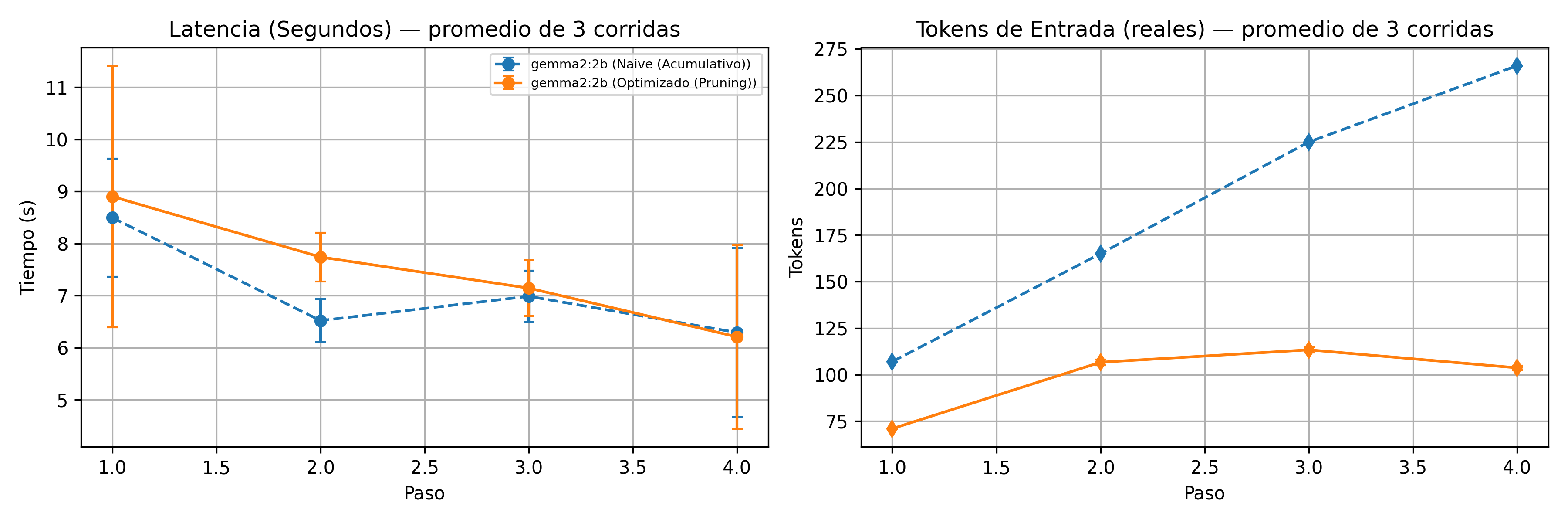
The token pattern was consistent across all 3 runs, with no ambiguity. The naive pipeline grows linearly — from 107 to 266 tokens in just 4 steps, nearly tripling. The optimized pipeline flattens into a plateau, around 104 tokens.
That's a 61% reduction in input tokens by the final step. Active context management delivers exactly what it promises: it keeps the conversation's memory footprint from growing unchecked.
Latency: the result that forced me to rethink the hypothesis
This is where the experiment got genuinely interesting. The intuition says: fewer input tokens, faster response. The real data didn't back that up — at least not clearly. The error bars for the naive and optimized pipelines overlap in almost every step.
Why? Because with a 2B model, on relatively short conversations, total response time is dominated by how much the model has to generate as output — not by how much it has to read as input. Shrinking the context doesn't automatically speed up the generation of the response.
It's a "negative" result in the sense that it doesn't confirm the initial hypothesis, but it's honestly the most valuable finding of the whole experiment: context management and latency are related problems, but they're not the same problem, and optimizing one doesn't guarantee improving the other.
The failed attempt with Gemma2 9B (and why I'm not hiding it)
I wanted to push one step further and repeat the comparison with Gemma2's 9B version, to see whether a larger model would show a clearer latency advantage — the hypothesis being that processing a long prompt weighs more when the model itself is bigger.
I never got that data. Over 30 minutes running on my laptop, without a single complete response. I had to cancel it.
I could have left this out of the post. But it's a relevant data point in its own right, and honestly the one closest to my reality as a researcher in the region of Latin America: the barrier to experimenting with larger models isn't just a software optimization problem, it's a hardware access problem. If I, with intent and dedicated time, struggle to run a 9B model on a consumer laptop, that's exactly why this kind of work — optimizing efficient agents with small, accessible models — matters for universities, labs, and teams in the region that don't have dedicated GPUs on hand.
What this means in practice
If you're building, or thinking about building, an agent on a local open model, here's what I'm taking away from this experiment:
- Measure before you optimize. My initial intuition about latency was not the correct one, and I only found out because I measured rigorously (3 runs, warm-up, real tokens) instead of trusting a single run.
- Saving tokens doesn't automatically buy you latency. Depending on model size and conversation length, the real bottleneck might be somewhere else entirely.
- Context pruning has trade-offs — it's not magic. My current implementation trims by length, not semantic relevance, which means there's real risk of losing important historical information. That's a limitation I'm naming, not hiding.
- A failed experiment on real hardware is data, not a failure. I couldn't run 9B on my laptop. That data point ends up being as useful to the argument of this work as any chart.
Wrap-up
This experiment started from a simple question — how do you take a tutorial-style agent and make it survive production? — and ended up giving me a more nuanced answer than I expected: context management matters, a lot, but it doesn't solve every performance problem on its own, and hardware constraints are a legitimate part of the technical conversation, not just a logistics footnote.
All the code is available in the repository for anyone who wants to reproduce or adapt it — including both the successful results with Gemma2 (2B) and the documented limitation with the 9B model, because I believe transparency about what didn't work is as valuable as what did.
If you're working with open models in the region, I'd genuinely love to hear about your experience — what hardware you're running, what you've hit, what context management strategies have worked for you. Reach out on LinkedIn.
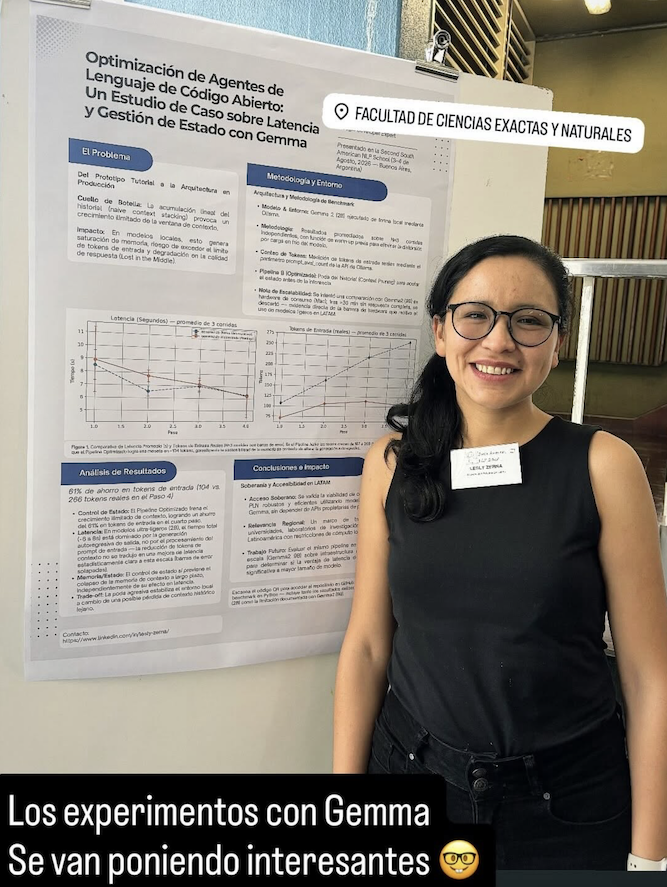
This work was also presented as a poster at the Second South American NLP School (Buenos Aires, August 2026).
Comments
More Blog
View allopensourceReviving Open Source Giants: How I Brought Weave Scope Back with Multi-Platform Docker Support in One Afternoon Using Antigravity
How to rescue abandoned open-source projects, modernize build systems, and generate multi-architecture Docker images (x86_64, ARM64) in a single afternoon with Antigravity.
M
Mario Ezquerroai[Dev Log][Python] Create short videos from photos and clips with Gemini 3.7 Flash: ReelCraft
Preface: It all started with a misunderstanding. I noticed a new page in the Gemini API...
E
Evan LinflutterDart 3.13 Primary Constructors + BlocSignal: Boilerplate-Free Reactive Architecture
Discover how Dart 3.13 primary constructors, 'this' constructor bodies, and constructor shorthands transform BlocSignal into the cleanest state management architecture in Flutter.
R
Randal L. SchwartzawsRunning Gemma 4 on EC2 G5g: Graviton2 AMD with NVIDIA GPU
A field report on serving Gemma 4 E2B under vLLM on AWS G5g — the only aarch64 + SM 7.5 hardware there is. No published build covers that combination, AWS quietly solves half of it, and the thing that actually blocks you is 64 KiB of shared memory.
X
xbilldiscussMy (not so pretty) journey in tech
Ever since I joined the platform, I wanted to post about a topic I was really passionate about....
I
isha singhaiI Stopped Trusting AI Agents With Tools. So I Built a Gatekeeper.
Update 08/15 0.2.0 Released github.com/deghosal-2026/agent-tooltrust · pip install agent-tooltrust...
D
Debashish GhosalReady-made automations for this
Workflows from the Neura Market marketplace related to this CoPilot resource
- Multi-service Terminal: Access Gmail, IRC, Telegram & News with Gemini AIn8n · $9.99 · Related topic
- Auto-Publish Content to 9 Social Platforms with Blotato & Airtablen8n · $24.99 · Related topic
- Extract Text from Images & PDFs via Telegram with Mistral OCR to Markdownn8n · $24.99 · Related topic
- AI-Powered Cold Call Machine with LinkedIn, OpenAI & Sales Navigatorn8n · $24.99 · Related topic