 CoPilot
Back to Blog ai
ai
 opensource
![[Dev Log][Python] Create short videos from photos and clips with Gemini 3.7 Flash: ReelCraft](https://media2.dev.to/dynamic/image/width=1200,height=627,fit=cover,gravity=auto,format=auto/https%3A%2F%2Fdev-to-uploads.s3.us-east-2.amazonaws.com%2Fuploads%2Farticles%2F7mbo2bfkglblo44jev8w.png) ai
ai flutter
 aws
aws discuss
 ai
ai
Preventing Quota Crashes via Antigravity CLI Agent Hooks
Tanaike August 12, 2026
0 views
Solving the LLM quota monitoring paradox with zero-overhead local Connect RPC agent...
Solving the LLM quota monitoring paradox with zero-overhead local Connect RPC agent hooks.
Abstract
Google Antigravity CLI users using Google OAuth face abrupt task failures when API quota hits 0%, while account switching triggers unrecoverable signature errors. Querying quota via LLM tool calls creates a paradox by consuming the very tokens being monitored. We resolve this with antigravity-cli-check-usage-plugin, a CLI Agent Hook running outside the LLM execution turn. Directly querying local Connect RPC endpoints, it monitors quota with zero token overhead and injects proactive warning banners when threshold limits are reached.
1. Introduction
Developers relying on Google Antigravity CLI for autonomous pair programming frequently encounter a frustrating barrier: running out of API quota mid-session. When using Google OAuth authentication, your quota can silently hit 0%, causing task execution to halt abruptly with an unrecoverable quota error:
⚠ Individual quota reached. Please upgrade your subscription to increase your limits. Resets in 1h00m00s.
Error ID: 49a81c0f
To bypass this roadblock, developers often attempt to log out and switch to a paid Google Cloud project billing account. However, in Antigravity CLI v1.1.12, attempting to resume an active agent session after switching accounts triggers a critical signature mismatch failure:
⚠ Invalid thought signature.
Error ID: e2901f4c
This error prevents the session from continuing, forcing you to wait until the quota resets. While future CLI updates may resolve this session state issue, waiting for a patch is not a viable strategy when shipping code today.
The architectural divergence between standard tool-based monitoring and our agent hook model is illustrated in Figure 1. While developers can manually run the /usage slash command to view quota, AI agents executing multi-step autonomous tasks cannot trigger /usage programmatically. In traditional CLI workflows, invoking quota checks via LLM tool calls requires passing context back and forth through the inference API, depleting active model tokens. Conversely, the zero-overhead agent hook interceptor executes locally prior to prompt dispatch, querying the process socket silently and injecting status alerts only when remaining quota breaches configured safety bounds.
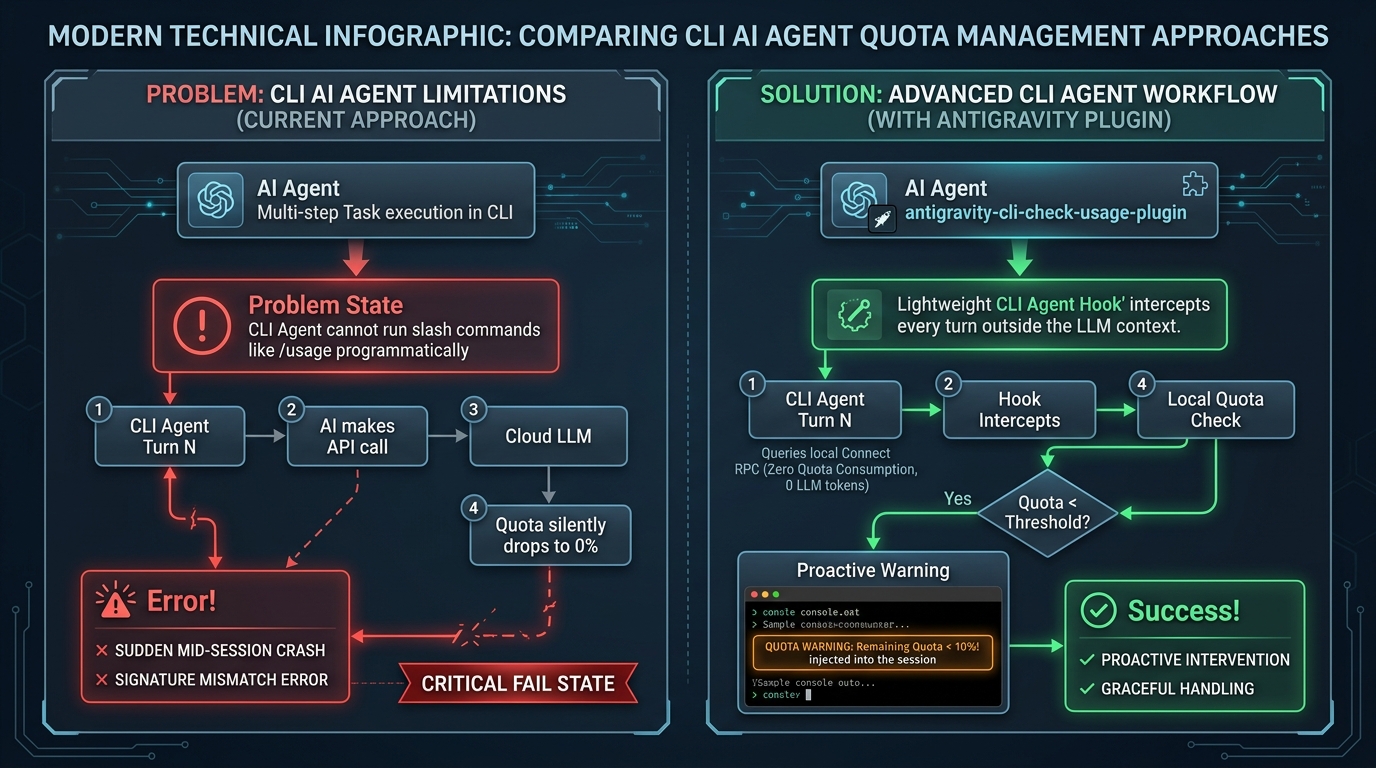
In this article, to overcome the limitation of agents being unable to trigger /usage, we walk through the engineering journey of building antigravity-cli-check-usage-plugin. By combining local Connect RPC inspection with proactive lifecycle hooks, this plugin automatically performs external quota checks with Zero Quota Consumption (0 LLM tokens), completely preventing mid-session crashes.
2. Repository
The plugin developed and discussed in this article is open-sourced and available on GitHub:
- GitHub Repository: tanaikech/antigravity-cli-check-usage-plugin
This repository contains the dual-runner entrypoint (entrypoint.sh), Python script (check_quota.py), pure Bash fallback script (check_quota.sh), lifecycle hook manifest (hooks.json), and default threshold configuration (config.json), allowing instant one-command installation as an Antigravity CLI plugin across any developer environment.
3. Core Motivation
While Antigravity CLI provides the /usage slash command for developers to manually inspect quota limits, AI agents executing autonomous task loops cannot invoke /usage programmatically.
If we attempted to solve this by equipping the AI agent with a custom tool to query the internal RPC endpoint (/exa.language_server_pb.LanguageServerService/GetUserStatus), the tool invocation and context turns would consume LLM API tokens. This creates a fundamental paradox: using LLM context tokens to check remaining quota consumes the very quota you are trying to preserve.
In addressing this challenge, the solution built upon our previously published article, A Developer’s Guide to Agent Hooks in Antigravity CLI. Recalling the out-of-band execution mechanics of CLI Agent Hooks explored in that guide, we leveraged lifecycle events (PreInvocation and PostInvocation) to run local process checks completely outside the LLM inference turn—guaranteeing zero API token quota overhead.
- Zero Token Overhead: During normal operation, quota checking runs entirely outside the LLM context (via local Python/Bash scripts) without invoking LLM tool calls.
- Local RPC Interception: It automatically queries the CLI's internal status endpoint on
127.0.0.1without external network calls. - Proactive Threshold Alerting: It notifies both the developer and the AI agent before quota hits 0%, preventing session corruption and hard crashes.
4. Connect RPC
Through reverse-engineering the Antigravity CLI local process architecture (originally explored in the antigravity-usage repository by skainguyen1412), we discovered that the running agy process hosts a local HTTPS server using the gRPC / Connect Protocol on 127.0.0.1.
By querying the internal endpoint /exa.language_server_pb.LanguageServerService/GetUserStatus, we can retrieve real-time model quota fractions and reset timestamps directly from the local process.
Because the agy process may open multiple listening sockets on 127.0.0.1 for IPC and WebSockets, a shell loop that probes each detected port until it receives a valid userStatus response is required:
# Scan listening sockets for the active 'agy' process on loopback (127.0.0.1)
for PORT in $(ss -tulpn 2>/dev/null | grep agy | awk -F'127.0.0.1:' '{print $2}' | awk '{print $1}' | sort -u); do
  # Post a Connect Protocol request to the internal GetUserStatus RPC endpoint
  RES=$(curl -k -s -X POST https://127.0.0.1:${PORT}/exa.language_server_pb.LanguageServerService/GetUserStatus \
    -H "Content-Type: application/json" \
    -H "Connect-Protocol-Version: 1" \
    -d '{"metadata":{"ideName":"antigravity","extensionName":"antigravity","locale":"en"}}')

  # Verify if the response contains the userStatus JSON key
  if echo "$RES" | grep -q "userStatus"; then
    echo "$RES" | jq .
    break
  fi
done
To execute this logic seamlessly and rapidly inside an agent hook outside the LLM invocation turn, we implemented a Python script using standard library components, alongside a pure Bash fallback script (check_quota.sh) and an entrypoint runner (entrypoint.sh) that automatically selects Python when available or Bash on systems without Python installed.
[!IMPORTANT]
Note on Scope: TheGetUserStatusendpoint returns the Five Hour Limit Remaining fraction (remainingFraction) and ISO reset timestamp (resetTime) for active model pools. The long-term Weekly Limit Remaining is not exposed through this RPC endpoint.
5. Complete Agent Hook Workflow
Building upon the lifecycle concepts detailed in A Developer’s Guide to Agent Hooks in Antigravity CLI, the plugin integrates into the Antigravity CLI by registering PreInvocation and PostInvocation agent hooks in hooks.json. Because PreInvocation fires after the user submits input but before the prompt payload is dispatched to the LLM backend, it inspects local process state and dynamically injects steps prior to model inference.
As detailed in Figure 2, the final agent hook operates under two distinct execution patterns based on the configured warning threshold (default: 20%):
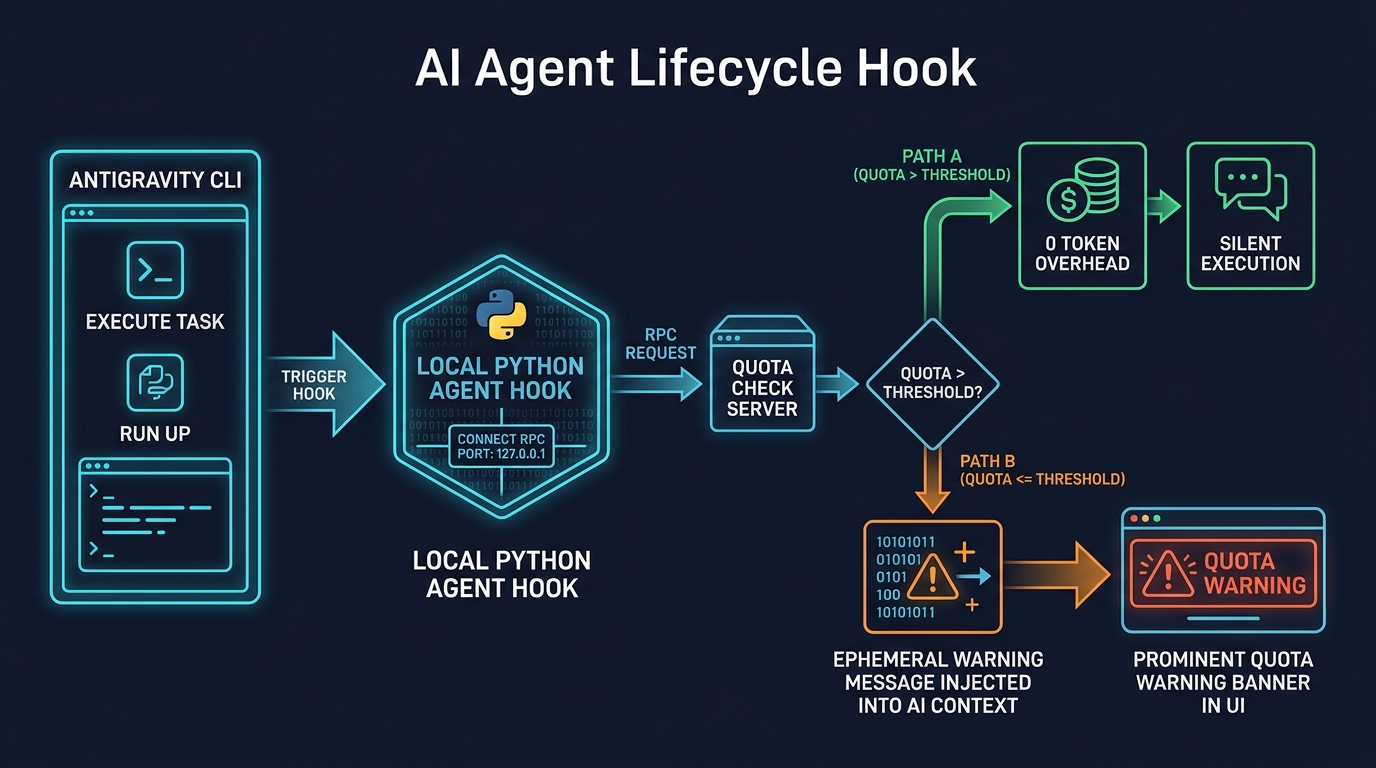
Pattern A: Normal Operation (Quota > Threshold)
When remaining quota is above the warning threshold, the hook outputs an empty step injection payload:
{
  "injectSteps": []
}
- Impact: Zero Quota Consumption (0 Token Overhead). The hook executes silently in less than 50 milliseconds. No messages or extra context are injected into the LLM session, consuming absolutely zero model quota.
Pattern B: Warning State (Quota <= Threshold)
When remaining quota drops to or below the threshold, the hook injects a transient system message with mandatory agent directives:
{
  "injectSteps": [
    {
      "ephemeralMessage": "⚠️ [SYSTEM QUOTA WARNING] Model quota is below threshold (20%) (Active: gemini-3.6-flash-medium):\n - GEMINI Models [ACTIVE MODEL]: 20.0% remaining (Refreshes in 3h 00m)\n\n[MANDATORY INSTRUCTION FOR AGENT]: The model quota has dropped below the threshold. You MUST display a prominent Quota Warning banner at the very top of your response for THIS TURN ONLY! Do NOT display a warning banner on subsequent turns unless another quota warning is explicitly injected. In the warning banner, you MUST also inform the user that they can run the '/usage' command at any time to inspect detailed quota status."
    }
  ]
}
- Impact: The AI agent immediately prepends a prominent Quota Warning banner to its response, advising the developer to run
/usageor pause heavy multi-step automation before encountering a hard crash.
6. Installation & Dual Runtime
The complete implementation is published as an open-source Antigravity CLI plugin: antigravity-cli-check-usage-plugin.
Installation
Install the plugin directly via the Antigravity CLI:
agy plugin install https://github.com/tanaikech/antigravity-cli-check-usage-plugin
Dual Runtime Architecture: Python Primary + Pure Bash Fallback
The plugin features a multi-environment entrypoint (entrypoint.sh) producing 100% identical JSON outputs across both runtimes. The engineering rationale behind this dual design includes:
- Python (Primary Runner): Requires zero external dependencies like
jq, absorbs OS-specific syntax differences across Linux, macOS, and Windows, and guarantees type-safe date math. - Pure Bash (Fallback Safety Net): Ensures instant execution in minimal or containerized environments where Python is not pre-installed.
Configuration and Disabling
You can customize or completely disable the warning threshold (default: 20.0%) using environment variables, configuration files, or hook arguments.
Set Custom Threshold (e.g., 25%):
export QUOTA_THRESHOLD=25.0
Disable Quota Check Completely:
Setting QUOTA_THRESHOLD to -1 instructs the hook to skip all RPC queries immediately:
export QUOTA_THRESHOLD=-1
7. Real-World Testing & Verification
After installing the plugin, setting export QUOTA_THRESHOLD=80.0 and executing a live session test in Antigravity CLI v1.1.12 demonstrates the hook in action, as captured in Figure 3:
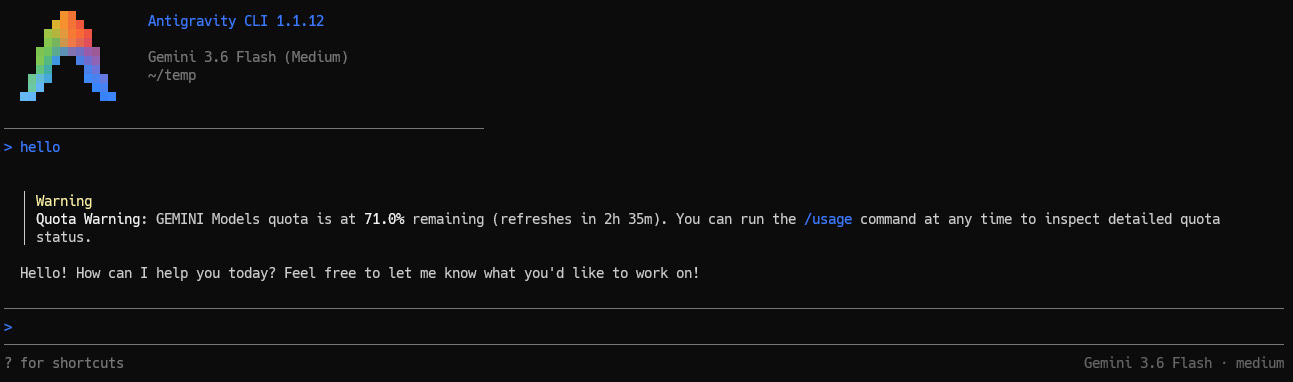
When the user enters a simple greeting (hello), the agent hook instantly detects that the active model's remaining quota (71.0%) has dropped below the configured threshold (80.0%). A prominent yellow Warning banner (Quota Warning: GEMINI Models quota is at 71.0% remaining...) is dynamically prepended at the top of the AI's response, alerting the developer and providing a reminder to inspect detailed limits via /usage.
8. Updating & Uninstalling
To update the plugin to the latest version or remove it from your environment:
- Check installed plugins:
agy plugin list - Uninstall the plugin:
agy plugin uninstall antigravity-cli-check-usage-plugin - Reinstall the updated version:
agy plugin install https://github.com/tanaikech/antigravity-cli-check-usage-plugin
Summary
In this article, we presented a zero-overhead solution to eliminate mid-session quota crashes and account-switching signature errors in Google Antigravity CLI. Drawing upon foundational concepts from A Developer’s Guide to Agent Hooks in Antigravity CLI and resolving the paradox where using LLM tool calls to query internal RPC endpoints consumes quota, we built native CLI Agent Hooks (PreInvocation / PostInvocation) running completely outside the LLM execution turn. Featuring a dual Python primary and pure Bash fallback architecture, the hook probes internal local Connect RPC endpoints with absolute zero token consumption during normal operation. By proactively injecting warning banners and /usage reminders when quota drops below threshold, it guarantees universal environment compatibility and eliminates task interruptions cleanly at the root.
Comments
More Blog
View allopensourceReviving Open Source Giants: How I Brought Weave Scope Back with Multi-Platform Docker Support in One Afternoon Using Antigravity
How to rescue abandoned open-source projects, modernize build systems, and generate multi-architecture Docker images (x86_64, ARM64) in a single afternoon with Antigravity.
M
Mario Ezquerroai[Dev Log][Python] Create short videos from photos and clips with Gemini 3.7 Flash: ReelCraft
Preface: It all started with a misunderstanding. I noticed a new page in the Gemini API...
E
Evan LinflutterDart 3.13 Primary Constructors + BlocSignal: Boilerplate-Free Reactive Architecture
Discover how Dart 3.13 primary constructors, 'this' constructor bodies, and constructor shorthands transform BlocSignal into the cleanest state management architecture in Flutter.
R
Randal L. SchwartzawsRunning Gemma 4 on EC2 G5g: Graviton2 AMD with NVIDIA GPU
A field report on serving Gemma 4 E2B under vLLM on AWS G5g — the only aarch64 + SM 7.5 hardware there is. No published build covers that combination, AWS quietly solves half of it, and the thing that actually blocks you is 64 KiB of shared memory.
X
xbilldiscussMy (not so pretty) journey in tech
Ever since I joined the platform, I wanted to post about a topic I was really passionate about....
I
isha singhaiI Stopped Trusting AI Agents With Tools. So I Built a Gatekeeper.
Update 08/15 0.2.0 Released github.com/deghosal-2026/agent-tooltrust · pip install agent-tooltrust...
D
Debashish GhosalReady-made automations for this
Workflows from the Neura Market marketplace related to this CoPilot resource
- Automate Local Event Monitoring and Analysis with Bright Data and OpenAIn8n · $14.99 · Related topic
- AI-Powered Information Monitoring with OpenAI, Google Sheets, Jina AI, and Slackn8n · $24.99 · Related topic
- Competitor Price Monitoring with Web Scraping, Google Sheets & Telegramn8n · $14.99 · Related topic
- Automated Dynamic Pricing with AI: Competitor Monitoring & Revenue Optimizationn8n · $14.99 · Related topic