 CoPilot
Back to Blog cloudrun
 opensource
![[Dev Log][Python] Create short videos from photos and clips with Gemini 3.7 Flash: ReelCraft](https://media2.dev.to/dynamic/image/width=1200,height=627,fit=cover,gravity=auto,format=auto/https%3A%2F%2Fdev-to-uploads.s3.us-east-2.amazonaws.com%2Fuploads%2Farticles%2F7mbo2bfkglblo44jev8w.png) ai
ai flutter
 aws
aws discuss
 ai
ai
Managed Inference on Google Cloud: Pairing the Gemini Enterprise Agent Platform with Cloud Run
Caleb Duff August 12, 2026
0 views
Learn how to run managed AI inference on Google Cloud by pairing the Gemini Enterprise Agent Platform with Cloud Run — with architecture, code, deployment, and security explained step by step.
description: "Learn how to run managed AI inference on Google Cloud by pairing the Gemini Enterprise Agent Platform with Cloud Run — with architecture, code, deployment, and security explained step by step."
If you have ever wanted to ship an AI-powered application without managing GPUs, model servers, or scaling infrastructure yourself, this guide is for you.
Managed inference simply means letting a cloud provider run the AI model for you: you send a request, the platform handles the compute, and you get a response back. On Google Cloud, the cleanest way to do this today is to pair the Gemini Enterprise Agent Platform (formerly Vertex AI) with Google Cloud Run, dividing responsibilities between the two services. The Agent Platform serves as the orchestration and intelligence engine, while Cloud Run hosts your custom application logic, front-end UIs, or Model Context Protocol (MCP) servers.
By the end of this article, you will be able to:
- Explain the hybrid architecture and why each layer exists
- Define an AI agent in code using the Agent Development Kit (ADK)
- Deploy your app layer to Cloud Run with a single command
- Choose between online and batch inference for your workload
- Secure and monitor the whole setup in production
New to the underlying concept? Start with Google Cloud's primer: What is AI inference?
Prerequisites
To follow along hands-on, you will need:
- A Google Cloud project with billing enabled
- The
gcloudCLI installed and authenticated - Python 3.10+ and the ADK installed (
pip install google-adk)
You can also read this purely as an architecture walkthrough; every step is explained, not just shown.
1. The Architectural Blueprint
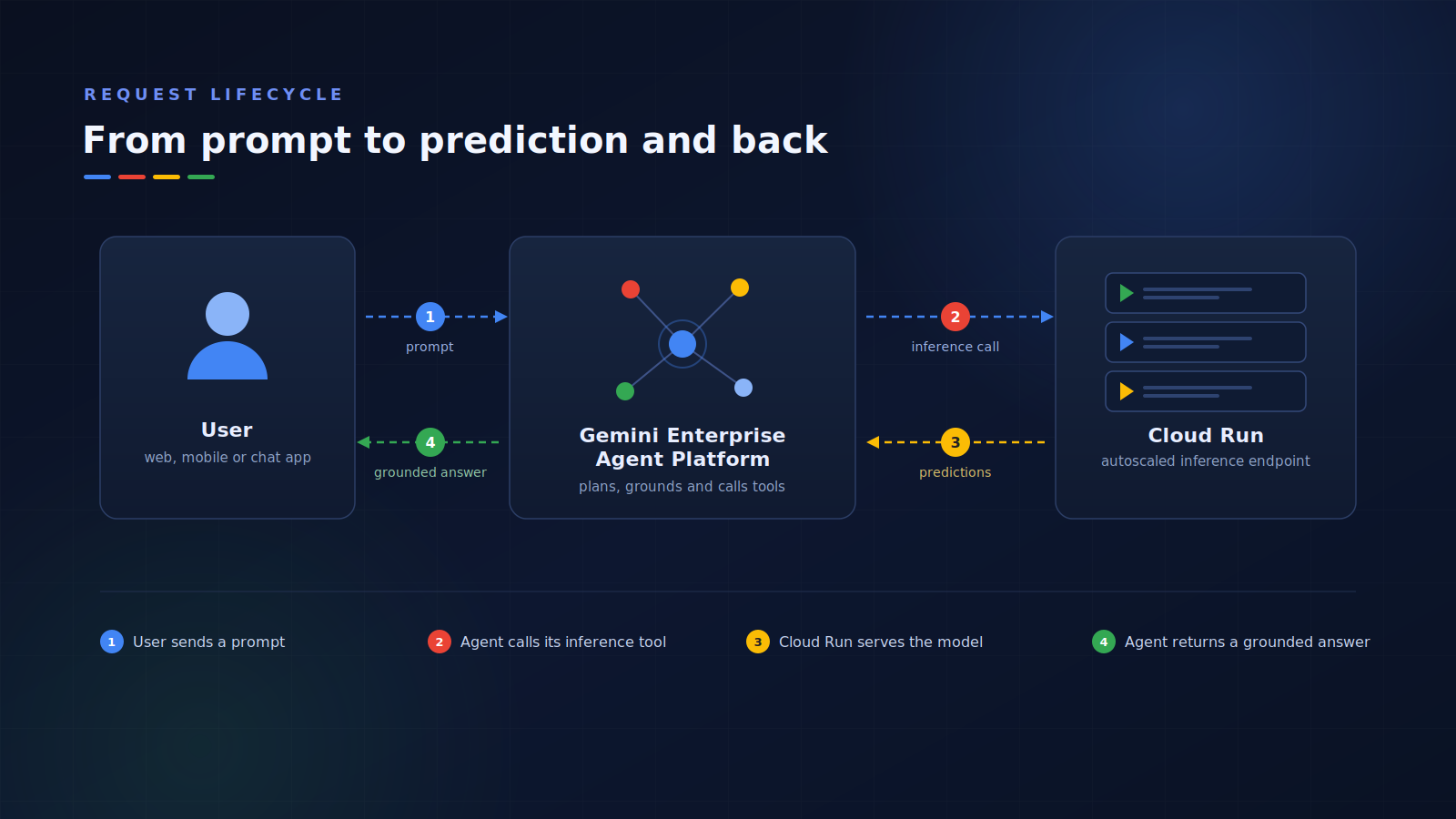
This pattern splits your system into independent, auto-scaling tiers:
[ Client / Web UI ] ──> [ Cloud Run Service ] (App Logic / Tool Front End)
                                │
                                ▼
        [ Gemini Enterprise Agent Platform — Agent Runtime ]
            (Orchestration, Intent Analysis, Memory)
                                │
                                ▼
              [ Managed Inference / Model Garden ]
                 (Gemini 3.x Pro / Flash models)
Why split it this way? Each tier scales independently and fails independently. Your web front end can handle a traffic spike without touching the model layer, and you can swap models without redeploying your application code. It also creates a clean security boundary, clients only ever talk to Cloud Run, never directly to the model.
Here is what each layer actually does:
- Cloud Run runs your specialized business logic, secures client-facing endpoints with Identity-Aware Proxy (IAP), and hosts external tools, MCP servers, and APIs. Think of it as everything you build.
- The Agent Platform (Agent Runtime) manages active agent state, long-term memory, and the model's reasoning steps in a centralized, fully managed runtime. Think of it as everything Google runs for you.
2. Build Your Agent Code with the ADK
Use the open-source Agent Development Kit (ADK) to define your agent's behavior in code and bind it to a model. The key idea to understand: tools are plain Python functions. The ADK reads each function's docstring to decide when and how to call it; so a clear docstring is not documentation nicety, it is part of your agent's logic.
# agent.py
from google.adk.agents import Agent

def call_internal_business_system(query: str) -> str:
    """Invokes secure business workflows deployed on Cloud Run."""
    # Logic to securely call your Cloud Run service URL
    return "Data retrieved from secure internal backend."

# Define an agent that targets a current Gemini model
root_agent = Agent(
    name="enterprise_inference_agent",
    model="gemini-3.5-flash",  # Or another current model from Model Garden
    instruction="You are a data processing assistant using managed inference.",
    tools=[call_internal_business_system],
)
Breaking down the four fields:
name— an identifier for your agent, used in logs and traces.model— which Gemini model handles the reasoning. Flash models are faster and cheaper; Pro models handle more complex reasoning.instruction— the agent's system prompt, shaping its behavior on every request.tools— the Python functions the model is allowed to call. When a user request matches a tool's docstring, the model invokes it.
Note: Gemini 1.0 and 1.5 models (including
gemini-1.5-pro) have been retired and now return errors. Always target a currently supported model, such asgemini-3.5-flash,gemini-3.6-flash, or a Gemini 3.x Pro release from Model Garden.
3. Containerize and Deploy the App Layer to Cloud Run
When deploying your orchestration backend or front-end dashboard, the tooling can package and push the container for you. Two small steps get you there.
Step A: Configure Service Account Permissions
In Google Cloud, services do not trust each other by default, your Cloud Run instance needs explicit permission to invoke Agent Platform endpoints. This command grants its service account that permission:
gcloud projects add-iam-policy-binding YOUR_PROJECT_ID \
    --member="serviceAccount:YOUR_RUN_SA@YOUR_PROJECT_ID.iam.gserviceaccount.com" \
    --role="roles/aiplatform.user"
In plain terms: "let this Cloud Run service call the AI platform." This is the step people most often forget; if your deployed service returns permission errors, come back here first.
Step B: Build and Deploy
The ADK ships with a one-command deployment path. Under the hood, it does three things: builds your container image, pushes it to Artifact Registry, and creates (or updates) the Cloud Run service.
# Deploys your custom agent or tool layer directly to Cloud Run
adk deploy cloud_run \
    --project="YOUR_PROJECT_ID" \
    --region="us-central1" \
    --service_name="agent-inference-backend" \
    path/to/your/agent
Alternatively, the Agents CLI (agents-cli) can scaffold the deployment configuration for a Cloud Run target. For example, agents-cli scaffold enhance --deployment-target cloud_run and works from inside your preferred AI coding tool. Either route wires up your environment variables, including model targets and the public service URL.
4. Online and Batch Inference Routines
Once the plumbing is in place, there are two primary ways to trigger managed inference. Choosing correctly comes down to one question: does a human need the answer right now?
- Online inference (low-latency UI): Make synchronous API calls from your Cloud Run front end directly to the deployed agent endpoint for real-time chat, tool calls, or step-by-step reasoning. Example: a customer support chatbot where every second of latency matters.
- Batch inference (high-volume data): For large data processing jobs, submit an asynchronous batch prediction job through the Agent Platform SDK. The platform provisions dedicated compute, runs the inference tasks, writes results and logs to Cloud Storage, and tears down the compute automatically when the job completes. Example: classifying 100,000 support tickets overnight; nobody is waiting on a single response, so throughput and cost matter more than latency.
Batch jobs are typically much cheaper per request, so a good rule of thumb is the "Now vs Later" latency and volume test: if you need a prediction in under 2 seconds(quickly) to serve a live user, use online inference; if you have a large volume of data that can wait minutes or hours, use batch inference.
5. Secure and Monitor the Architecture
A demo can skip this section. Production cannot.
- Secure the ingress: Wrap your Cloud Run endpoints in Identity-Aware Proxy (IAP) to protect human-in-the-loop dashboards, IAP checks the user's Google identity before traffic ever reaches your code. For agent-to-tool traffic, Agent Gateway can give each agent a unique identity with end-to-end mTLS (mutual TLS, where both sides verify each other) when calling MCP servers on Cloud Run.
- Centralize trace logging: Enable the platform's built-in OpenTelemetry tracing (Cloud Trace is on by default for CLI-based deployments). You can visually inspect directed acyclic graphs (DAGs) of execution, a step-by-step map of every reasoning step, model call, and tool invocation — to see exactly how your Gemini models and Cloud Run tools collaborated on an inference task. When an agent gives a strange answer, this trace is how you find out why.
Key Takeaways
- Split the responsibilities: Cloud Run for your code, the Agent Platform for orchestration and models. Each tier scales and fails independently.
- Tools are just functions: the ADK turns well-documented Python functions into capabilities your agent can call.
- Permissions before deployment: grant
roles/aiplatform.userto your Cloud Run service account, or nothing else will work. - Match inference mode to workload: online for interactive experiences, batch for high-volume processing.
- Secure and trace from day one: IAP at the edge, mTLS between services, OpenTelemetry for visibility.
Where to Go Next
Try the smallest possible version: define a one-tool agent with the ADK, run adk deploy cloud_run, and send it a request. Once that works, everything else in this article is an incremental addition.
Have you tried pairing the Agent Platform with Cloud Run, or are you still on a self-managed inference setup? I would love to hear what your architecture looks like in the comments.
Comments
More Blog
View allopensourceReviving Open Source Giants: How I Brought Weave Scope Back with Multi-Platform Docker Support in One Afternoon Using Antigravity
How to rescue abandoned open-source projects, modernize build systems, and generate multi-architecture Docker images (x86_64, ARM64) in a single afternoon with Antigravity.
M
Mario Ezquerroai[Dev Log][Python] Create short videos from photos and clips with Gemini 3.7 Flash: ReelCraft
Preface: It all started with a misunderstanding. I noticed a new page in the Gemini API...
E
Evan LinflutterDart 3.13 Primary Constructors + BlocSignal: Boilerplate-Free Reactive Architecture
Discover how Dart 3.13 primary constructors, 'this' constructor bodies, and constructor shorthands transform BlocSignal into the cleanest state management architecture in Flutter.
R
Randal L. SchwartzawsRunning Gemma 4 on EC2 G5g: Graviton2 AMD with NVIDIA GPU
A field report on serving Gemma 4 E2B under vLLM on AWS G5g — the only aarch64 + SM 7.5 hardware there is. No published build covers that combination, AWS quietly solves half of it, and the thing that actually blocks you is 64 KiB of shared memory.
X
xbilldiscussMy (not so pretty) journey in tech
Ever since I joined the platform, I wanted to post about a topic I was really passionate about....
I
isha singhaiI Stopped Trusting AI Agents With Tools. So I Built a Gatekeeper.
Update 08/15 0.2.0 Released github.com/deghosal-2026/agent-tooltrust · pip install agent-tooltrust...
D
Debashish GhosalReady-made automations for this
Workflows from the Neura Market marketplace related to this CoPilot resource
- Intelligent AI-Powered PostgreSQL Query Assistant with Dual-Agent Architecturen8n · $14.99 · Related topic
- Build AI Agents with Think-Plan-Act Architecture Using Llama-4 Reasoningn8n · $24.99 · Related topic
- High-Speed AI Chat with OpenAI's GPT-oss-120B Model via Cerebras Inferencen8n · $4.99 · Related topic
- Automate Docker Immich Deployment for WHMCS/WISECP with n8nn8n · $19.99 · Related topic