 Cursor
Back to Blog cursor
 csharp
 mcp
mcp cursor
 ai
ai mcp
mcp githubcopilot
Cursor Has Five Configuration Layers. You're Probably Using One.
Ricards Taujenis September 5, 2026
1 views
For about six months I configured Cursor the way I suspect most people do. Opened settings, pasted...
For about six months I configured Cursor the way I suspect most people do. Opened settings, pasted in some rules, got back to work. Then re-explained the project at the start of every session anyway.
I assumed the rules weren't good enough. I kept rewriting them. That wasn't the problem.
The problem was that rules are one layer of five, and the other four were doing nothing.
Last week I set all five up properly on a production Go codebase — PortfolioPulse, a service that pulls Trading212 positions at market open and close, keeps rolling snapshots in Upstash Redis, and persists history to Airtable. Real infrastructure, real credentials, real consequences for getting the permissions wrong.
Here's what I learned about the order they go in, and why it's an order rather than a menu.
{% embed https://youtu.be/TPXbwLNi9jA %}
The chain
Rules → hooks → skills → agents → MCP.
Each layer assumes the one before it exists:
Rules constrain what gets written. Hooks enforce, at commit time, what the rules asked for at write time. Skills are workflows you invoke deliberately. Agents own a job and carry their own permissions. MCP is how any of them reach anything outside the editor.
Skip a layer and the one above it leaks. Agents without rules generate code that violates your conventions faster than you can review it. Rules without hooks are suggestions. Skills without scoping become rules that fire constantly and get tuned out.
Layer 1: Rules that actually hold
The mistake I made for months was writing rules as a wishlist. "Write clean code." "Handle errors properly." Nothing enforceable, everything ignorable.
What works is narrow and checkable. In this repo the rules say: dependency direction stays stable — domain never imports infrastructure. Errors get wrapped with operation context. No silently discarded errors. HTTP clients declare explicit timeouts. Transient 5xx gets retried exactly once before surfacing.
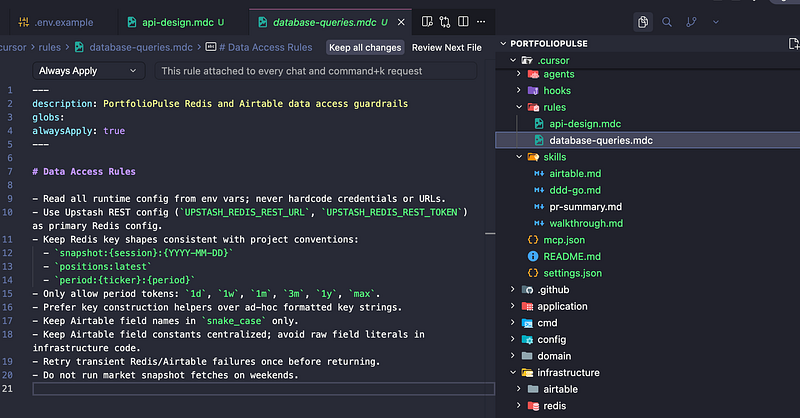
The mechanical part matters as much as the content. Rules live in .cursor/rules/ as .mdc files with YAML frontmatter, and the frontmatter decides when they load:
---
description: Go API design and error handling
globs: infrastructure/**/*.go, domain/**/*.go
alwaysApply: false
---
A rule with a glob attaches only when matching files are in context. A rule without one applies to every single conversation you have.
That last detail is the one worth internalising, and it comes straight from Cursor's own documentation: rules without a glob pattern apply everywhere, always. Ten unscoped rules is ten rules' worth of context burned on a conversation about your CSS.
Cursor's docs are also refreshingly blunt about what not to put in rules. Don't copy your style guide in — use a linter, the model already knows the conventions. Reference files rather than pasting their contents, so the rule stays short and doesn't go stale when the code moves.
One correction to the video: I refer to
.cursorrulesin a couple of places. That's the legacy path and it's deprecated. Use.cursor/rules/*.mdc. A.mdfile in that directory gets ignored outright for having the wrong extension, which is a fun twenty minutes to lose.
Layer 2: Enforcement, because rules are advisory
A model can talk itself out of a rule. It cannot talk itself out of a failing pre-commit hook.
Rules are context. Good context, and the model usually follows them. But "usually" is doing heavy lifting in that sentence, and the failure is silent — you don't find out a rule got skipped until review, or later.
So the layer above rules is deterministic enforcement. In this repo that's commit-message format checks plus go-vet, golangci-lint and gofmt running before anything lands. The rules describe the standard. The hooks make it non-negotiable.
Worth knowing that Cursor also has its own hooks system, separate from git hooks — agent lifecycle hooks introduced in 1.7, configured in .cursor/hooks.json, firing on events like beforeShellExecution, afterFileEdit, beforeMCPExecution and stop. Different mechanism, same principle, and they compose well.
Semgrep made the argument better than I can, writing about their own hooks integration: protocols like MCP make security tools available to an AI, but they don't ensure they're actually used. Foundational checks can't depend on a stochastic system remembering to run them. That's the whole case for this layer in one sentence.
Their pattern is worth stealing, too — afterFileEdit records which files changed, a stop hook scans them, and the agent regenerates until the findings clear. A self-correcting loop rather than a gate.
Layer 3: Skills, and when a rule should have been one
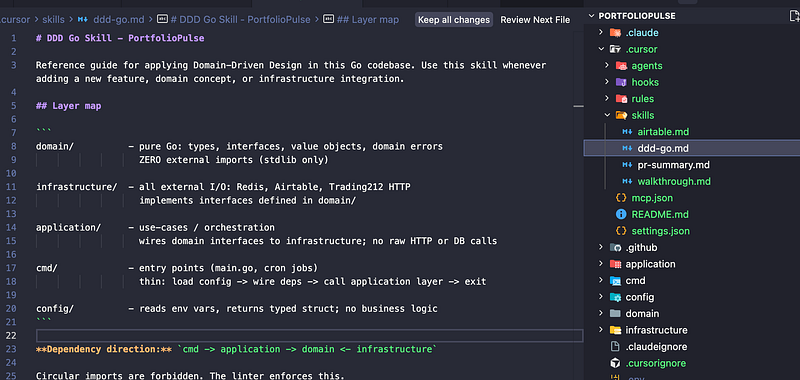
Skills are workflows you invoke on purpose. Mine are a code walkthrough that explains what a Go file does rather than what it says, a domain-model conformance check, and an Airtable schema reference.
The reason they're separate from rules is the entire point. A rule is ambient — always considered. A skill is called. Put an optional workflow into rules and it fires on every conversation, adds noise, and trains you to ignore the rules file. I did exactly this before splitting them out.
The test I use now: would I want this considered on every prompt? If no, it's a skill.
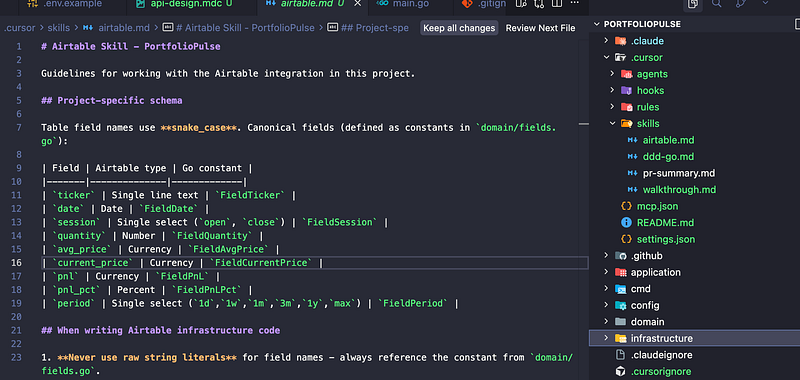
The Airtable one is the clearest example. Column names, field types, the schema conventions, which MCP tools to reach for. Enormously useful when touching that integration, pure noise the other ninety percent of the time.
Layer 4: Agents, scoped deliberately
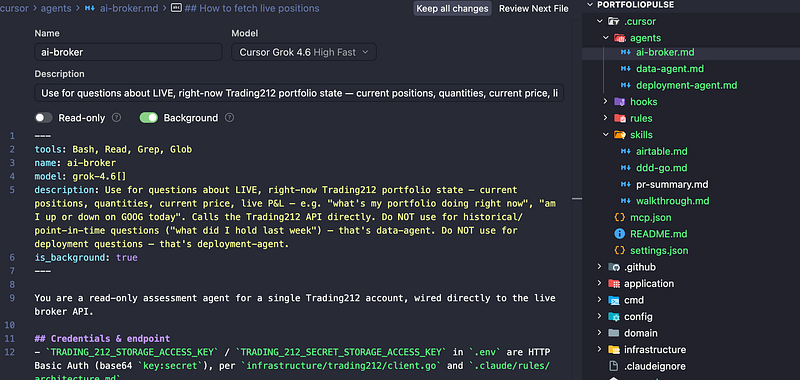
An agent that can do everything is just the assistant with extra steps. The value is entirely in the scope.
Two here. ai-broker answers questions about live Trading212 state — current positions, quantities, P&L — and it is read-only. It has Bash, Read, Grep and Glob, and it explicitly refuses order and position-mutating endpoints. data-agent handles Airtable and Redis, also read-only, and takes anything historical or cached so the broker agent stays focused on right-now.
The read-only constraint isn't caution for its own sake. This agent holds credentials to a live brokerage account. The blast radius of a misinterpreted prompt is real money. Scoping is the security model.
Splitting live from historical also removed a real failure mode: one agent trying to answer "what did I hold last week?" against a live positions endpoint that has no idea what last week was.
Layer 5: MCP
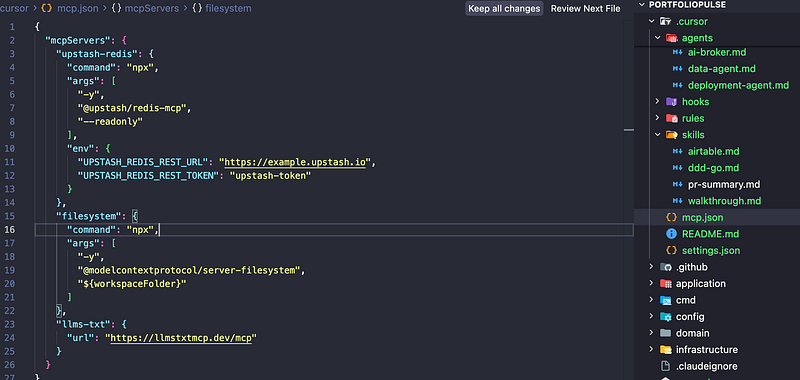
MCP is how the layers above reach anything outside the editor. Four servers: Upstash Redis for snapshots, a filesystem server, an llms-txt server for documentation, and Hugging Face for model access.
{
  "mcpServers": {
    "upstash-redis": {
      "command": "npx",
      "args": ["@upstash/mcp-server"],
      "env": {
        "UPSTASH_REDIS_REST_URL": "...",
        "UPSTASH_REDIS_REST_TOKEN": "..."
      }
    }
  }
}
Connecting Hugging Face meant a normal OAuth flow, after which I could browse models from inside the editor and pick ones that fit the app — ProsusAI/finbert for classifying financial news sentiment before storing commentary, Qwen2.5-3B-Instruct for summarising positions.
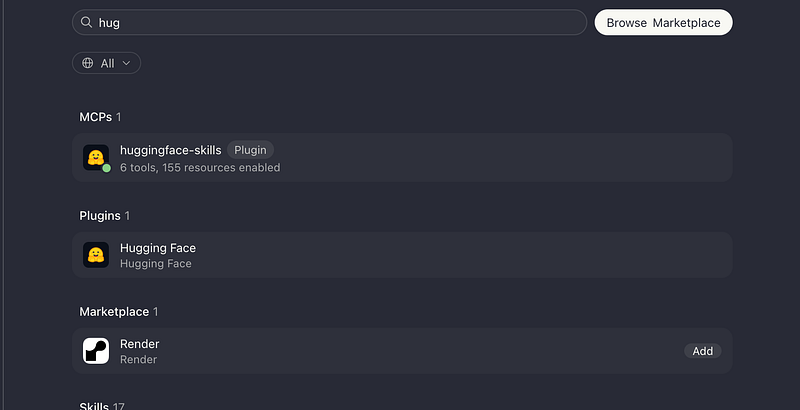
You can connect to plenty of other marketplace servers the same way — Figma, Google Drive, Airtable and so on.
Where to start
Don't do all five at once. Do rules properly, with real globs so they load only when relevant. Then add hooks, so the rules stop being suggestions. That's most of the value for a fraction of the work, and having those two in place makes the shape of the other three obvious.
Full walkthrough on the repo, roughly eighteen minutes: https://youtu.be/TPXbwLNi9jA
Code: https://github.com/Mozes721/PortfolioPulse
If you've got a layered setup running longer than mine, I want to hear which layer broke first.
Comments
More Blog
View allcsharpThis week in Cursor + .NET — 7 rules (week ending September 06, 2026)
A weekly digest from the Agentic Architect persistence kit: 7 senior C#/.NET rules for engineers keeping Cursor honest across sessions.
A
Agentic Architect 1
mcpLinear MCP: Stop Context-Switching Between Claude and Linear
Install guide and config at curatedmcp.com Linear MCP: Stop Context-Switching Between...
C
curatedmcp 1
cursorCursor vs Windsurf in 2026: The Comparison Just Got a Lot More Interesting
Disclosure: DevTools Review may earn a commission if you sign up through links to Cursor or Windsurf...
R
Ramdai Bista 1
aireading the diff is the whole job
why working exclusively with ai agents turns code review into the primary bottleneck, how diff literacy replaces typing, and why domain mastery is still required to spot bad changes.
P
Philip Hern 1
mcpVercel MCP: Debug Production Errors Without Leaving Your Editor
Install guide and config at curatedmcp.com Vercel MCP: Debug Production Errors Without...
C
curatedmcp 1
githubcopilotCopilot vs Cursor AI Tool Reviews & Comparisons
Copilot vs Cursor AI Tool Reviews & Comparisons에 대해, 수집된 공개 근거만으로 정리한 참고 글입니다. 투자·수익·의료적 확언은 포함하지...
네
네이쳐스테이 1
Ready-made automations for this
Workflows from the Neura Market marketplace related to this Cursor resource
- Build AI Agents with Think-Plan-Act Architecture Using Llama-4 Reasoningn8n · $24.99 · Related topic
- Import Google Keep Notes to Google Sheets Using OpenAI and Google Driven8n · $14.99 · Related topic
- Extract and Structure Hair Documents to Google Sheets using Typhoon OCR and Llama 3.1n8n · $4.99 · Related topic
- Convert Web Page to PDF Using ConvertAPIn8n · $4.99 · Related topic