
Back to Blog api
api
 gemma
gemma community
 ai
ai ai
ai githubactions
 ai
ai
Rewriting My First NUnit API Tests: Cleaner, Faster, Better
Alicia Marianne 🇧🇷 January 26, 2026
0 views
Have you ever caught yourself thinking: “What am I even doing?” Well, that’s exactly how I feel right...
Have you ever caught yourself thinking: “What am I even doing?” Well, that’s exactly how I feel right now. I was looking back at my previous tutorials and thought: “Why not review them, critique them, and make a better version?” And here we are. In this first article, I’ll revisit my initial tutorial: NUNit and C# - Tutorial to automate your API Tests from scratch.
I remember this project was born out of a real need at work. We had a lot of APIs with Postman tests, and we decided to migrate them to NUnit and C#. Now, looking back after over two years, I see many ways to improve it.
Review of the tests that will be automated and the project
Starting from the tests that will be done. For this new project, we will use the https://dummyjson.com/ just to test some concepts, since the API are simple, and after that, we will refactor the tests for NASA API Tests. For the new endpoint we will automate the following tests:
| Endpoint | Test | Expected results |
|---|---|---|
| /users | Get all users | Should return status 200 and a list with user information |
| /users/add | Create a new user | Should return status 200 and user data information |
The main goal is to make the project more robust, easier to replicate across scenarios, improve request handling, make it reusable for different projects, enable future CI/CD integration, and ensure sensitive data are protected.
Creating the automated tests
The first major improvement is how we set up API requests. In my first article, I had a separate method for each API request. Now, I’ve made them more abstract and maintainable:
using RestSharp;

namespace ApiTestsWithNUnit.Common;

public class Requests(string baseUrl)
{
    private readonly RestClient _client = new(baseUrl);

    public async Task<RestResponse<T>> GetAsync<T>(
        string endpoint,
        Dictionary<string, string>? headers = null)
    {
        var request = new RestRequest(endpoint, Method.Get);

        if (headers != null)
        {
            foreach (var header in headers)
                request.AddHeader(header.Key, header.Value);
        }

        return await _client.ExecuteAsync<T>(request);
    }

    public async Task<RestResponse<T>> PostAsync<T>(
        string endpoint,
        object? body = null,
        Dictionary<string, string>? headers = null)
    {
        var request = new RestRequest(endpoint, Method.Post);

        if (body != null)
            request.AddJsonBody(body);

        if (headers != null)
        {
            foreach (var header in headers)
                request.AddHeader(header.Key, header.Value);
        }

        return await _client.ExecuteAsync<T>(request);
    }
}
And for the tests, they will be used in the following way:
using System.Net;
using ApiTestsWithNUnit.Entities;
using FluentAssertions;
using NUnit.Framework;
using RestSharp;

namespace ApiTestsWithNUnit.Tests;

public class Users
{
    private Common.Requests _api;
    private Dictionary<string, string> _headers;

    [SetUp]
    public void Setup()
    {
        _api = new Common.Requests("https://dummyjson.com");
        _headers  = new Dictionary<string, string>
        {
            { "Content-Type", "application/json" }
        };
    }

    [Test]
    public async Task GetAllUsers()
    {
        var response = await _api.GetAsync<object>("/users");
        response.Should().NotBeNull();
        response.StatusCode.Should().Be(HttpStatusCode.OK);
        var users = response.Content;
        users.Should().NotBeNull();
    }

    [Test]
    public async Task CreateNewUser()
    {
        var bodyRequest = new UsersRequestBody
        {
            firstName = "John",
            lastName = "Doe",
            email = "john.do@example.com",
            age = 20
        };

        var response = await _api.PostAsync<object>("/users/add", bodyRequest, _headers);
        response.Should().NotBeNull();
        response.StatusCode.Should().Be(HttpStatusCode.Created);
        var users = response.Content;
        users.Should().Contain(bodyRequest.firstName);
        users.Should().Contain(bodyRequest.lastName);
        users.Should().Contain(bodyRequest.email);
    }

}
Updating the NASA API tests, we will make two changes, first, move all the validations to a new class called CheckBodyResponse.cs:
using FluentAssertions;
using LearningNUnit.BackEnd.Entities;

namespace ApiTestsWithNUnit.Common;

public class CheckBodyResponse
{
    public void CheckBodyResponseNasaApi(NasaApiEntity response)
    {
        response.Date.Should().NotBeNullOrEmpty();
        response.Explanation.Should().NotBeNullOrEmpty();
        response.Media_type.Should().NotBeNullOrEmpty();
        response.Service_version.Should().NotBeNullOrEmpty();
        response.Title.Should().NotBeNullOrEmpty();
        response.Url.Should().NotBeNullOrEmpty();
    }

}
And refactoring our tests, they will look like:
using System.Net;
using System.Text.Json;
using ApiTestsWithNUnit.Common;
using ApiTestsWithNUnit.Config;
using ApiTestsWithNUnit.Entities;
using FluentAssertions;
using LearningNUnit.BackEnd.Entities;
using NUnit.Framework;
using RestSharp.Serializers;

namespace ApiTestsWithNUnit.Tests;

public class NasaApiTest
{
    private Common.Requests _api;
    private Dictionary<string, string> _headers;
    private string _api_key;
    private CheckBodyResponse CheckBodyResponse = new();

    [SetUp]
    public void Setup()
        {
        _headers  = new Dictionary<string, string>
        {
            { "Content-Type", "application/json" }
        };
        _config = TestConfig.GetConfig();
        string nasa_url= "https://api.nasa.gov";
        _api = new Common.Requests(nasa_url);
        _api_key = $"api_key=API_KEY";
    }

    [Test]
    public async Task SearchApodSucess()
    {
        var response = await _api.GetAsync<string>($"/planetary/apod?{_api_key}", _headers);
        response.StatusCode.Should().Be(HttpStatusCode.OK);
        if (response.Content != null)
        {
            var data = JsonSerializer.Deserialize<NasaApiEntity>(
                response.Content,
                new JsonSerializerOptions { PropertyNameCaseInsensitive = true }
            );
            CheckBodyResponse.CheckBodyResponseNasaApi(data);
        }
    }
    [Test]
    public async Task SearchApodWithDate()
    {
            var queryParameters = "date=2023-05-01";
            var response = await _api.GetAsync<string>($"/planetary/apod?{_api_key}&{queryParameters}", _headers);
            response.StatusCode.Should().Be(HttpStatusCode.OK);
            if (response.Content != null)
            {
                var data = JsonSerializer.Deserialize<NasaApiEntity>(
                    response.Content,
                    new JsonSerializerOptions { PropertyNameCaseInsensitive = true }
                );
                CheckBodyResponse.CheckBodyResponseNasaApi(data);
            }
    }

    [Test]
    public async Task SearchApodWithDateWrongFormat()
    {
        var queryParameters = "date=2023/05/01";
        var response = await _api.GetAsync<string>($"/planetary/apod?{_api_key}&{queryParameters}", _headers);
        response.StatusCode.Should().Be(HttpStatusCode.BadRequest);
    }

    [Test]
    public async Task SearchApodWithStartDateEndDate()
    {
        const string startDate = "2023-05-01";
        const string endDate = "2023-06-01";
        var queryParameters = $"start_date={startDate}&end_date={endDate}";
        var response = await _api.GetAsync<string>($"/planetary/apod?{_api_key}&{queryParameters}", _headers);
        response.StatusCode.Should().Be(HttpStatusCode.OK);
    }

    [Test]
    public async Task SearchApodWithStartDateBiggerThanEndDate()
    {
        const string startDate = "2023-12-01";
        const string endDate = "2023-11-01";
        var queryParameters = $"start_date={startDate}&end_date={endDate}";
        var response = await _api.GetAsync<string>($"/planetary/apod?{_api_key}&{queryParameters}", _headers);
        response.StatusCode.Should().Be(HttpStatusCode.BadRequest);
    }
    [Test]
    public async Task SearchApodWithInvalidToken()
    {
        var token = "invalidToken";
        var response = await _api.GetAsync<string>($"/planetary/apod?{token}", _headers);
        response.StatusCode.Should().Be(HttpStatusCode.Forbidden);
    }
}
Improvements in This Version:
- Setup notation: Makes tests cleaner and avoids repeating variables.
- Abstract requests: One method for multiple endpoints instead of duplicating code.
- Easier maintenance: The tests are more readable and modular.
- Making the tests asyncronos.
Beware of sensitive data
Testing user data safely is always tricky. Here, we’ll leverage Rider/Visual Studio’s .runsettings file:
.runsettingsis an XML file that allows you to configure test parameters, environments, timeouts, and other TestRunner behaviors in Visual Studio or dotnet test.
<?xml version="1.0" encoding="utf-8"?>
<RunSettings>
  <TestRunParameters>
    <Parameter name="BaseUrl" value="https://dummyjson.com" />
    <Parameter name="UserName" value="John" />
    <Parameter name="LastName" value="do" />
    <Parameter name="Email" value="john.do@example.com" />
    <Parameter name="ApiToken" value="YOUR_API_KEY" />
    <Parameter name="NasaBaseUrl" value="https://api.nasa.gov" />
  </TestRunParameters>
  <RunConfiguration>
    <TargetFrameworkVersion>net7.0</TargetFrameworkVersion>
    <ResultsDirectory>TestResults</ResultsDirectory>
  </RunConfiguration>
</RunSettings>
⚠️ Do not commit this file to version control! Include it in
.gitignore.
We can then create a config class to handle local vs. CI environments:
using NUnit.Framework;

namespace ApiTestsWithNUnit.Config;

public class Config
{
    public string BaseUrl { get; set; } = string.Empty;
    public string UserName { get; set; } = string.Empty;
    public string LastName { get; set; } = string.Empty;
    public string Email { get; set; } = string.Empty;
    public string ApiToken { get; set; } = string.Empty;
    public string NasaBaseUrl { get; set; } = string.Empty;
}

public class TestConfig
{
    public static Config GetConfig()
    {
        // Check if it is running in the CI
        bool isCi = Environment.GetEnvironmentVariable("GITHUB_ACTIONS") == "true";

        if (isCi)
        {
            return new Config
            {
                BaseUrl = Environment.GetEnvironmentVariable("BASE_URL")
                          ?? throw new Exception("BASE_URL not found in the CI"),
                UserName = Environment.GetEnvironmentVariable("API_KEY")
                           ?? throw new Exception("USER_NAME not found in the  CI"),
                LastName = Environment.GetEnvironmentVariable("LAST_NAME")
                           ?? throw new Exception("LAST_NAME not found in the  CI"),
                Email = Environment.GetEnvironmentVariable("LAST_NAME")
                           ?? throw new Exception("EMAIL not found in the  CI"),
                ApiToken = Environment.GetEnvironmentVariable("API_TOKEN")
                           ?? throw new Exception("API_TOKEN not found in the  CI"),
                NasaBaseUrl = Environment.GetEnvironmentVariable("NASA_BASE_URL")
                           ?? throw new Exception("NASA_BASE_URL not found in the  CI")
            };
        }
        return new Config
        {
            BaseUrl = TestContext.Parameters["BaseUrl"] ?? "",
            UserName = TestContext.Parameters["UserName"] ?? "",
            LastName = TestContext.Parameters["LastName"] ?? "",
            Email = TestContext.Parameters["Email"] ?? "",
            ApiToken = TestContext.Parameters["ApiToken"] ?? "",
            NasaBaseUrl = TestContext.Parameters["NasaBaseUrl"] ?? ""
        };
    }
}
This lets us run the same tests locally or in CI/CD pipelines seamlessly.
Updating our tests, they will look like this:
{}

namespace ApiTestsWithNUnit.Tests;

public class NasaApiTest
{
    private Common.Requests _api;
    private Dictionary<string, string> _headers;
    private Config.Config _config;
    private string _api_key;
    private CheckBodyResponse CheckBodyResponse = new();

    [SetUp]
    public void Setup()
    {
        _headers  = new Dictionary<string, string>
        {
            { "Content-Type", "application/json" }
        };
        _config = TestConfig.GetConfig();
        _api = new Common.Requests(_config.NasaBaseUrl);
        _api_key = $"api_key={_config.ApiToken}";
    }

    [Test]
    public async Task SearchApodSucess()
    {
        var response = await _api.GetAsync<string>($"/planetary/apod?{_api_key}", _headers);
        response.StatusCode.Should().Be(HttpStatusCode.OK);
        if (response.Content != null)
        {
            var data = JsonSerializer.Deserialize<NasaApiEntity>(
                response.Content,
                new JsonSerializerOptions { PropertyNameCaseInsensitive = true }
            );
            CheckBodyResponse.CheckBodyResponseNasaApi(data);
        }
    }

 }
To use the runsettings file in Rider, you need to:
- File / Settings → Build, Execution, Deployment → Unit Testing → Test Runner
- Go to Use specific .runconfig/.testsettings settings file and select your
.runsettingsfile.
In the Visual Studio you go to:
- Go to Test → Configure Run Settings and check if Visual Studio is using the
.runsettingsfile.
Adding Allure report to the tests
We will be using the Allure report to see the results of our tests, you can check how to install here - Allure install.
To add Allure to the project, is pretty simple. You can go directly through Nuget Packages management of your IDE and Search for Allure and install the latest version, or you can run:
dotnet add ⟨PATH TO PROJECT⟩ package Allure.NUnit
Now let's start to add some notations to our project:
- Let's add to our test class the notation
[AllureNunit]so we can use the features of allure.
Here are some notations that will be useful for this example:
| Notation | Description |
|---|---|
| AllureSeverity | The severity of the test |
| AllureOwner | The responsible for the test |
| AllureFeature | The feature that will be tested |
| AllureBefore | Setup that is made before the test |
This are some of notations that can make the report more clear, so the tests will looks like:
{}

[TestFixture]
[AllureNUnit]
[AllureFeature("Nasa API Tests")]
public class NasaApiTest
{
    private Common.Requests _api;
    private Dictionary<string, string> _headers;
    private Config.Config _config;
    private string _api_key;
    private CheckBodyResponse CheckBodyResponse = new();

    [SetUp]
    [AllureBefore("Loading the test variables")]
    public void Setup()
    {
        _headers  = new Dictionary<string, string>
        {
            { "Content-Type", "application/json" }
        };
        _config = TestConfig.GetConfig();
        _api = new Common.Requests(_config.NasaBaseUrl);
        _api_key = $"api_key={_config.ApiToken}";
    }

    [Test]
    [AllureOwner("@m4rri4nne")]
    [AllureSeverity(SeverityLevel.critical)]
    [AllureDescription("Search for APOD")]
    public async Task SearchApodSucess()
    {
        var response = await _api.GetAsync<string>($"/planetary/apod?{_api_key}", _headers);
        response.StatusCode.Should().Be(HttpStatusCode.OK);
        if (response.Content != null)
        {
            var data = JsonSerializer.Deserialize<NasaApiEntity>(
                response.Content,
                new JsonSerializerOptions { PropertyNameCaseInsensitive = true }
            );
            CheckBodyResponse.CheckBodyResponseNasaApi(data);
        }
    }
  }
To configure the allure we will need to add a few steps before run again the tests. First, we will create an json file, with the minimal information needed for Allure:
{
  "allure": {
    "directory": "allure-results"
  }
}
This file should be created on the root of the project. And after that, add to the .csproj the follwing information:
<ItemGroup>
  <None Update="allureConfig.json">
    <CopyToOutputDirectory>PreserveNewest</CopyToOutputDirectory>
  </None>
</ItemGroup>
And create a global setup to always register the executions, in a AllureConfig.cs file:
using NUnit.Framework;
using Allure.Net.Commons;

[SetUpFixture]
public class AllureSetup
{
    [OneTimeSetUp]
    public void GlobalSetup()
    {
        AllureLifecycle.Instance.CleanupResultDirectory();
    }
}
After that, remember to: Clean, restore and build your project before run the tests. After running the tests you can see the results using this command:
allure serve ./bin/Debug/net8.0/allure-results
And there is our report:
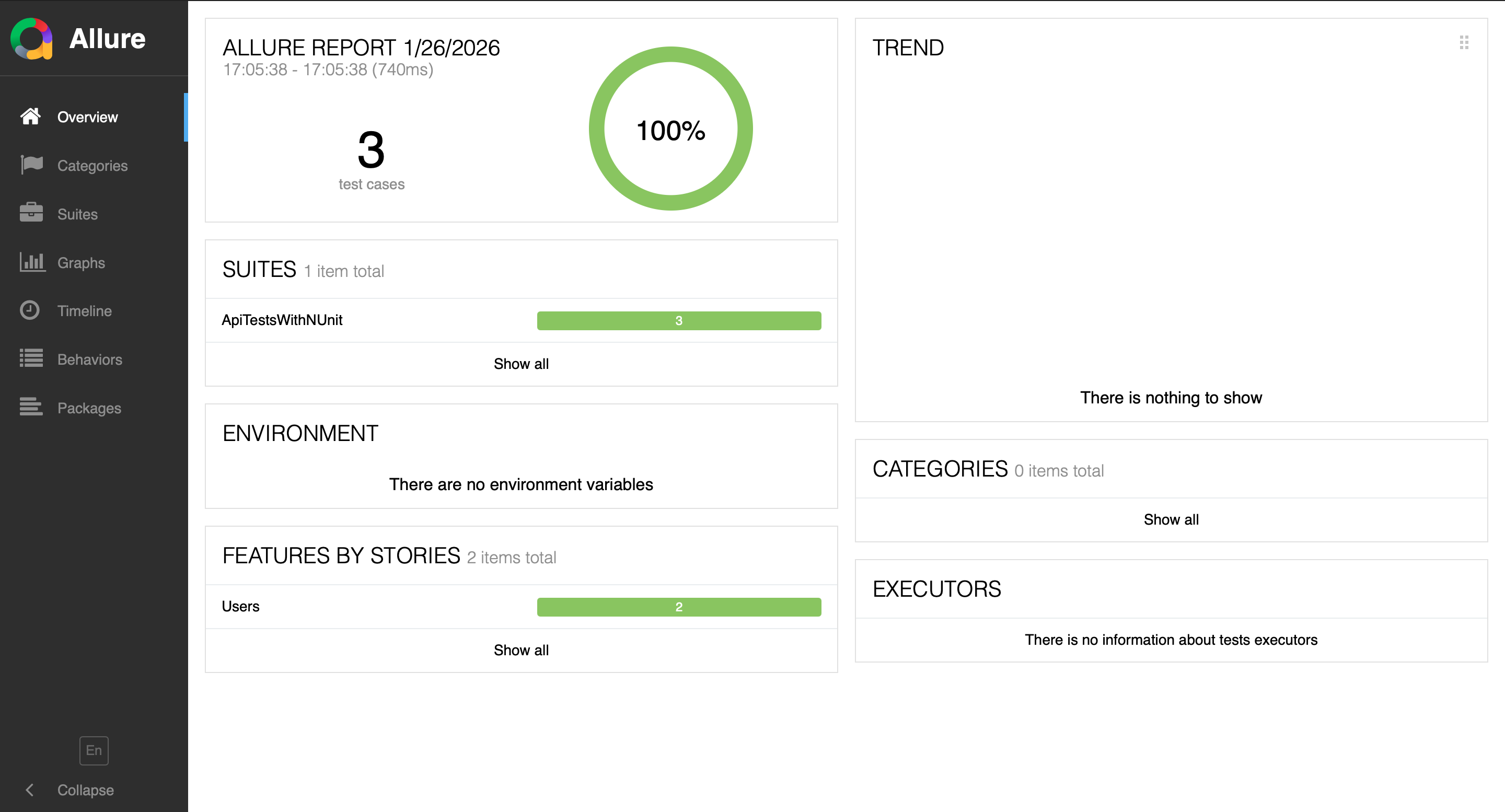
You can check the notations from allure to add more that can be useful in your context.
Final thoughts
It was fun revisiting a project I built a few years ago. There are more improvements I could make, but I’ve focused on clarity, maintainability, and introducing Allure reports.
One key takeaway: .runsettings for environment variables is great, but for large projects, managing many variables can get tricky. A future improvement could be to orchestrate credentials via JSON files and add to CI/CD workflow.
You can explore the complete solution in my Git repository.
Comments
More Blog
View allgemmaFive Gemma-4 models, one accelerator: what porting E2B 31B to AWS Inferentia2 taught me
I ported the whole Gemma-4 family — E2B, E4B, 12B, 31B, and the 26B-A4B MoE — to run on...
X
xbillcommunityHey DEV, I'm Tobore. Let's actually connect.
Hey DEV, I'm Tobore. Let's actually connect. I've been on here for a while now, mostly writing and...
L
Laurina AyarahaiI burned through thousands of AI tokens. Then a friend did it for free
(yep, kinda clickbait, just for the funsies 😊) At the beginning of the year, I relaunched my...
P
Paulo HenriqueaiClaude might be saturating your machine
My laptop was sitting idle with the fan at full tilt. Nothing was running that I knew of. The culprit...
S
Sidhant PandagithubactionsAutomated GitHub Code Reviews Using Google Gemini
I Built a Thing! TL;DR — Google Gemini-based Pull Request reviews and Issue Triaging for...
D
Darren "Dazbo" LesteraiWhat is an "agentic harness," actually?
I've been hearing the word "harness" thrown around a lot lately. I assumed it just meant "the IDE" or...
T
Tilde A. ThuriumReady-made automations for this
Workflows from the Neura Market marketplace related to this DeepSeek resource
- Automate Blog Content Creation with Notion MCP, DeepSeek AI, and WordPressn8n · $9.99 · Related topic
- Generate AI Videos from Scripts with DeepSeek, Synthesia, and Together.ain8n · $24.99 · Related topic
- Compare Multi-Period Financial Data from Google Sheets with DeepSeek AI Analysisn8n · $14.99 · Related topic
- PostgreSQL Conversational Agent with Claude & DeepSeek (Multi-KPI, Secure)n8n · $14.99 · Related topic