Automate Blog Content Creation with Notion MCP, DeepSeek AI, and WordPress
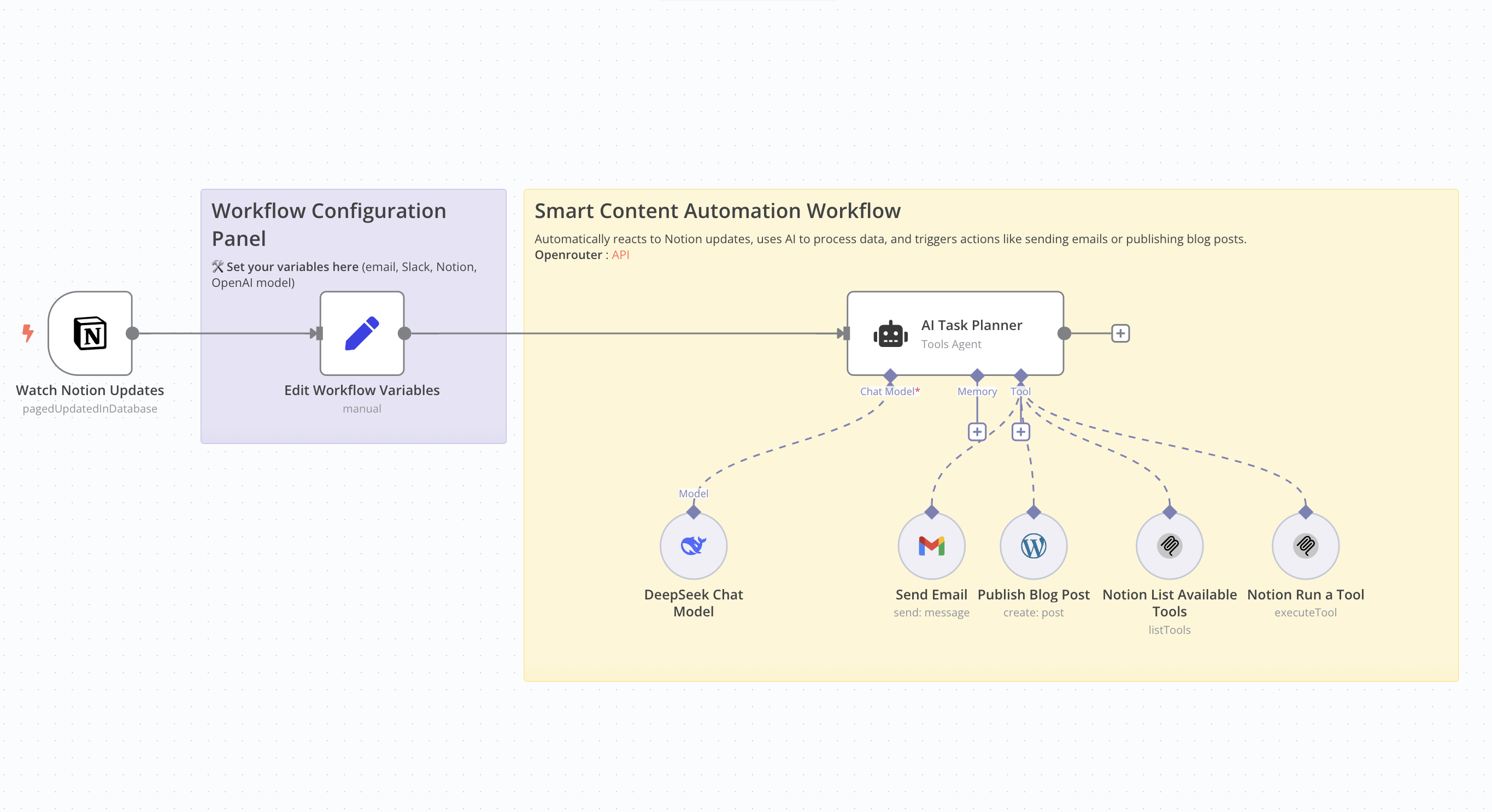 # Who Is This For This workflow is ideal for content creators, bloggers, marketers, and professionals seeking to automate the creation and publication of SEO-optimized articles. It's particularly beneficial for those utilizing Notion for content management and WordPress for publishing. # What Problem Does This Workflow Solve Manually creating SEO-friendly articles is time-consuming and requires consistent effort. This workflow streamlines the entire process—from detecting updates in Notion to publishing on WordPress—by leveraging AI for content generation, thereby reducing the time and effort involved. # What This Workflow Does - Monitor Notion Updates: Detects changes in a specified Notion database. - AI Content Generation: Utilizes an AI model to produce an SEO-optimized article based on Notion data. - Publish to WordPress: Automatically posts the generated article to a WordPress site. - Email Notification: Sends an email containing the article's title and URL. Update Notion Database: Updates the corresponding entry in the Notion database with the article details. # Setup Guide ## Prerequisites - WordPress account with API access. - API key for the AI model used. - Notion integration with the relevant database ID. - Credentials for the email service used (e.g., Gmail). Community Node Requirement: This workflow utilizes the n8n-nodes-mcp community node, which is only compatible with self-hosted instances of n8n. For more information on installing and managing community nodes, refer to the n8n documentation. n8n Docs ## Steps 1. Import the workflow into your self-hosted n8n instance. 2. Install the required community node (n8n-nodes-mcp). 3. Configure API credentials for WordPress, the AI service, Notion, and the email service. 4. Define necessary variables, such as the notification email address and Notion database IDs. 5. Activate the workflow to automate the process. # How to Customize This Workflow - AI Prompt: Adjust the prompt used for content generation to align with your preferred tone and style. - Article Structure: Modify the structure of the generated article by tweaking settings in the content generation node. - Notifications: Customize the content and recipients of the emails sent post-publication. - Notion Updates: Tailor the fields updated in Notion to suit your specific requirements.

Who Is This For
This workflow is ideal for content creators, bloggers, marketers, and professionals seeking to automate the creation and publication of SEO-optimized articles. It's particularly beneficial for those utilizing Notion for content management and WordPress for publishing.
What Problem Does This Workflow Solve
Manually creating SEO-friendly articles is time-consuming and requires consistent effort. This workflow streamlines the entire process—from detecting updates in Notion to publishing on WordPress—by leveraging AI for content generation, thereby reducing the time and effort involved.
What This Workflow Does
- Monitor Notion Updates: Detects changes in a specified Notion database.
- AI Content Generation: Utilizes an AI model to produce an SEO-optimized article based on Notion data.
- Publish to WordPress: Automatically posts the generated article to a WordPress site.
- Email Notification: Sends an email containing the article's title and URL.
Update Notion Database: Updates the corresponding entry in the Notion database with the article details.
Setup Guide
Prerequisites
- WordPress account with API access.
- API key for the AI model used.
- Notion integration with the relevant database ID.
- Credentials for the email service used (e.g., Gmail).
Community Node Requirement: This workflow utilizes the n8n-nodes-mcp community node, which is only compatible with self-hosted instances of n8n. For more information on installing and managing community nodes, refer to the n8n documentation. n8n Docs
Steps
- Import the workflow into your self-hosted n8n instance.
- Install the required community node (n8n-nodes-mcp).
- Configure API credentials for WordPress, the AI service, Notion, and the email service.
- Define necessary variables, such as the notification email address and Notion database IDs.
- Activate the workflow to automate the process.
How to Customize This Workflow
- AI Prompt: Adjust the prompt used for content generation to align with your preferred tone and style.
- Article Structure: Modify the structure of the generated article by tweaking settings in the content generation node.
- Notifications: Customize the content and recipients of the emails sent post-publication.
- Notion Updates: Tailor the fields updated in Notion to suit your specific requirements.
New buyers can create an account from the cart to unlock a controlled $10 first-purchase credit on eligible orders of $25+.
Related bundle
Content Repurposing Engine
8 hand-picked workflows for $29.00.
That is $3.63 each, vs $9.99 for this one alone.
View bundleSecure checkout powered by Stripe
Support
How to import this workflow into n8n
- 1Purchase or download the workflow to get the n8n workflow JSON file.
- 2In your n8n instance, open Workflows and choose "Import from File" (or paste the JSON with Ctrl+V on the canvas).
- 3Open each node marked with a credential warning and connect your own accounts and API keys.
- 4Run the workflow once manually to verify the data flow, then toggle it to Active.
Related AI workflows
- Launch Your First AI-Powered Chatbot with Actionable Tools$9.99
- Build a WhatsApp Assistant with Memory, Google Suite, Multi-AI, Research, and Imaging$24.99
- Automate AI Video Creation and YouTube Upload with Google Sheets$14.99
- Automate Blog Post Creation and Publishing with GPT, Leonardo AI, and WordPress$14.99
- Automate SEO Keyword Generation with ChatGPT from Google Sheets$3.99
- Email Agent$500.99
More from Dr. Firas
Need this deployed? We'll set it up for you.
Our automation experts deploy this workflow in your stack, connect your accounts, and verify it works — or build a custom solution from scratch.