Generating AI Videos with VEO3 and Distributing with Blotato Across Multiple Platforms
This workflow contains community nodes that are only compatible with the self-hosted version of n8n. 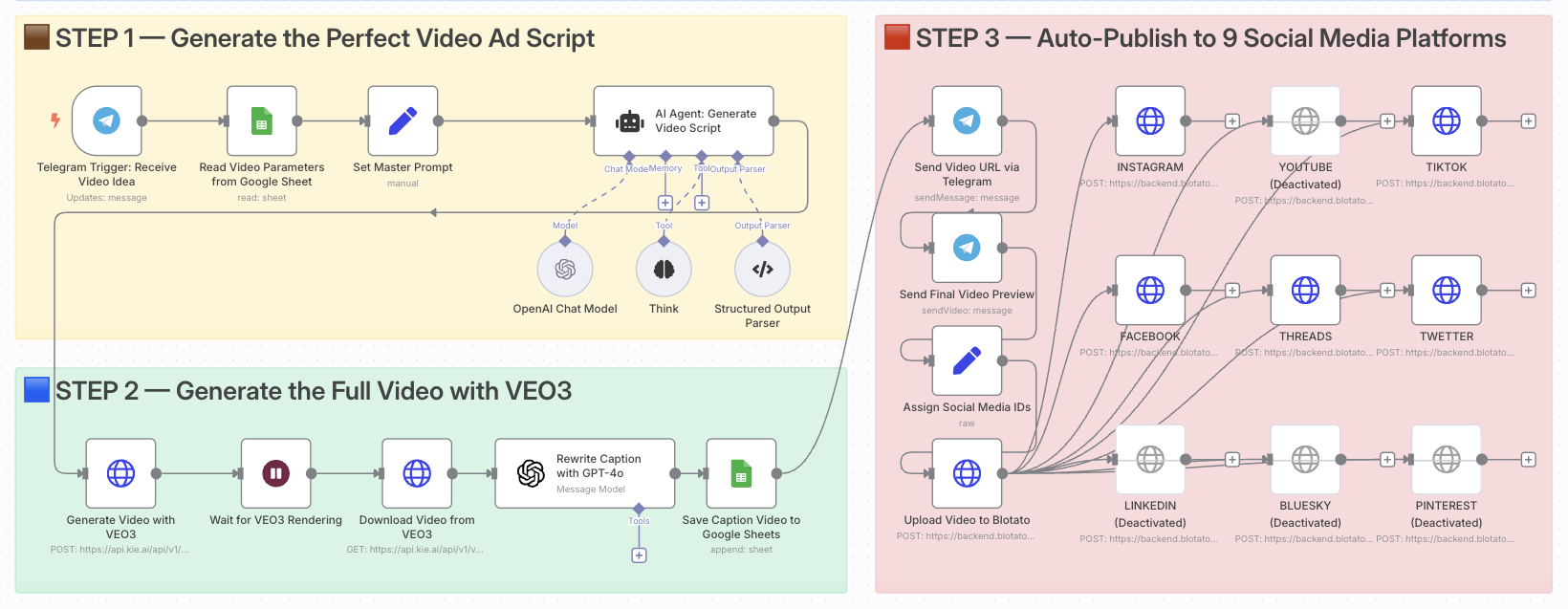 # Create and Auto-Post Viral AI Videos with VEO3 and Blotato to 9 Platforms ### Who is this for? This template is ideal for content creators, growth marketers, e-commerce entrepreneurs, and video-first brands who want to automate the creation and multi-platform distribution of viral short-form ads using AI. If you're looking to scale video production without editing tools or posting manually, this is for you. ### What problem is this workflow solving? Creating high-converting video content is time-consuming. You need to: - Come up with ideas - Write compelling scripts - Generate visuals - Adapt content for each platform - Manually publish and track results This workflow automates that entire process and turns a single idea into a ready-to-publish video campaign across 9 platforms. ### What this workflow does 1. **Triggers** via Telegram when a new video idea is submitted 2. **Fetches parameters** (style, tone, duration) from Google Sheets 3. **Generates the video script** using GPT-4 and a master AI prompt 4. **Creates the video** using Google's VEO3 video generation model 5. **Downloads the final video** once rendering is complete 6. **Rewrites the caption** with GPT-4 for platform-optimized posting 7. **Logs the result** in Google Sheets for tracking 8. **Sends preview links** to Telegram for review 9. **Auto-posts** the video to 9 platforms using Blotato (TikTok, YouTube, Instagram, Threads, Facebook, X, LinkedIn, Pinterest, Bluesky) ### Setup 1. Install **n8n (self-hosted)** with Community Nodes enabled 2. Connect your **Telegram Bot Token** to the trigger node 3. Add your **OpenAI API Key** for GPT-4 and GPT-4 models 4. Configure your **VEO3 API access** (Google AI Studio) 5. Set up **Blotato** with your platform tokens & IDs 6. Link your **Google Sheets** and set the expected column structure (idea, style, caption, etc.) 7. Adjust the Telegram trigger format (e.g., `idea: ...`) to your team's input style ### How to customize this workflow to your needs - Edit the **master prompt** to match your brand voice or industry - Replace the **caption prompt** to generate more marketing-style hooks - Modify the **platform list** if you only publish to a few specific channels - Add approval steps (Slack, email, Telegram) before publishing - Integrate tracking by pushing published URLs to your analytics or CRM **Documentation**: [Notion Guide](https://automatisation.notion.site/Create-and-Auto-Post-Viral-AI-Videos-with-VEO3-and-Blotato-to-9-Platforms-23f3d6550fd98037ab1ee9f803400666?source=copy_link) --- ### Need help customizing? Contact me for consulting and support: [LinkedIn](https://www.linkedin.com/in/dr-firas/) / [YouTube](https://www.youtube.com/@DRFIRASS)
This workflow contains community nodes that are only compatible with the self-hosted version of n8n.

Create and Auto-Post Viral AI Videos with VEO3 and Blotato to 9 Platforms
Who is this for?
This template is ideal for content creators, growth marketers, e-commerce entrepreneurs, and video-first brands who want to automate the creation and multi-platform distribution of viral short-form ads using AI.
If you're looking to scale video production without editing tools or posting manually, this is for you.
What problem is this workflow solving?
Creating high-converting video content is time-consuming. You need to:
- Come up with ideas
- Write compelling scripts
- Generate visuals
- Adapt content for each platform
- Manually publish and track results
This workflow automates that entire process and turns a single idea into a ready-to-publish video campaign across 9 platforms.
What this workflow does
- Triggers via Telegram when a new video idea is submitted
- Fetches parameters (style, tone, duration) from Google Sheets
- Generates the video script using GPT-4 and a master AI prompt
- Creates the video using Google's VEO3 video generation model
- Downloads the final video once rendering is complete
- Rewrites the caption with GPT-4 for platform-optimized posting
- Logs the result in Google Sheets for tracking
- Sends preview links to Telegram for review
- Auto-posts the video to 9 platforms using Blotato (TikTok, YouTube, Instagram, Threads, Facebook, X, LinkedIn, Pinterest, Bluesky)
Setup
- Install n8n (self-hosted) with Community Nodes enabled
- Connect your Telegram Bot Token to the trigger node
- Add your OpenAI API Key for GPT-4 and GPT-4 models
- Configure your VEO3 API access (Google AI Studio)
- Set up Blotato with your platform tokens & IDs
- Link your Google Sheets and set the expected column structure (idea, style, caption, etc.)
- Adjust the Telegram trigger format (e.g.,
idea: ...) to your team's input style
How to customize this workflow to your needs
- Edit the master prompt to match your brand voice or industry
- Replace the caption prompt to generate more marketing-style hooks
- Modify the platform list if you only publish to a few specific channels
- Add approval steps (Slack, email, Telegram) before publishing
- Integrate tracking by pushing published URLs to your analytics or CRM
Documentation: Notion Guide
Need help customizing?
New buyers can create an account from the cart to unlock a controlled $10 first-purchase credit on eligible orders of $25+.
Related bundle
Content Repurposing Engine
8 hand-picked workflows for $29.00.
That is $3.63 each, vs $14.99 for this one alone.
View bundleSecure checkout powered by Stripe
Support
How to import this workflow into n8n
- 1Purchase or download the workflow to get the n8n workflow JSON file.
- 2In your n8n instance, open Workflows and choose "Import from File" (or paste the JSON with Ctrl+V on the canvas).
- 3Open each node marked with a credential warning and connect your own accounts and API keys.
- 4Run the workflow once manually to verify the data flow, then toggle it to Active.
Related Media & Entertainment workflows
- Automate AI Video Creation and Social Media Publishing$24.99
- Automate AI-Driven YouTube Shorts with VEO3 and Google Gemini$9.99
- Automate Cinematic Video Creation from Story Ideas via Slack$19.99
- Automate ASMR YouTube Shorts Creation with AI and Seamless Publishing$19.99
- Automate Video Downloads to Google Drive Using RapidAPI$14.99
- Transform Podcasts into Viral TikTok Clips with Gemini+ Multi-Platform Posting$24.99
More from Dr. Firas
Need this deployed? We'll set it up for you.
Our automation experts deploy this workflow in your stack, connect your accounts, and verify it works — or build a custom solution from scratch.