Media & Entertainment Workflows
Media production and entertainment
Automate AI Video Creation and Social Media Publishing
This workflow automates the creation of AI-generated videos using Seedance and Blotato, and publishes them on platforms like TikTok, YouTube, and Instagram. It streamlines the entire process from idea generation to social media distribution.
n8n$24.99Automate AI-Driven YouTube Shorts with VEO3 and Google Gemini
This workflow leverages VEO3 and Google Gemini to generate and publish cinematic AI videos to YouTube Shorts, automating your channel growth at a reduced cost.
n8n$9.99Automate Cinematic Video Creation from Story Ideas via Slack
Transform your story ideas into cinematic videos using AI tools integrated with Slack. This workflow automates the process from story generation to video delivery.
n8n$19.99Automate ASMR YouTube Shorts Creation with AI and Seamless Publishing
This workflow automates the creation and publishing of ASMR-style YouTube Shorts using AI for ideation, video, and sound generation, and seamless integration with YouTube for publishing.
n8n$19.99Automate Video Downloads to Google Drive Using RapidAPI
This n8n workflow automates downloading videos from platforms like LinkedIn, Facebook, or Instagram using RapidAPI, then uploads them to Google Drive and logs any errors in Google Sheets.
n8n$14.99Transform Podcasts into Viral TikTok Clips with Gemini+ Multi-Platform Posting
# Automatically Create and Post Engaging Clips (with Audience Retention Videos) from Podcasts Using AI! Effortlessly transform long-form podcast content into highly engaging, viral-ready clips with this end-to-end automation template. Designed for content creators already monetizing on TikTok/YouTube/Instagram/Twitter and those looking to start earning from the platform, this workflow streamlines the process of extracting highlights, editing clips, and posting to all your social media, allowing you to maximize reach while minimizing manual effort. ## Key Features ### **AI-Powered Podcast Highlight Extraction** Automatically identifies the best moments from any podcast video, ensuring each clip is engaging and shareable. ### **Smart Video Editing & Captioning** Combines podcast highlights with a copyright-free attention retainer video (e.g., Minecraft parkour, GTA 5 gameplay) for increased audience retention. Auto-generated captions make clips more dynamic and accessible. ### **Automated Title Generation** A Large Language Model (LLM) analyzes the clips to generate compelling titles, optimized for TikTok/YouTube/Instagram/Twitter's algorithm. ### **Hands-Free Multi-Platform Posting** Seamlessly schedules and automatically posts clips to your Social Media accounts at defined intervals, keeping your audience engaged without manual uploads. ### **Fully Automated Workflow** From video download to content publishing 100% FREE, this template eliminates the need for time-consuming video editing, helping you scale your content strategy effortlessly, without having to pay for multiple subscriptions tediously. Simply find a podcast you like and a cool Minecraft parkour (or any engaging) video, send their YouTube URLs, and let the automation handle everything—from video downloading and audio processing to highlight extraction, editing, captions, and publishing. ## How It Works (Step-by-Step Guide) ### 1. Provide the YouTube URLs - One for the main podcast video (where highlights will be extracted). - One for the background attention retainer video (e.g., Minecraft parkour, GTA 5 gameplay). ### 2. Automation Downloads and Processes the Videos - Downloads both videos. - Extracts audio from the podcast for analysis. ### 3. AI Analyzes and Extracts Key Highlights - Detects the most engaging moments from the podcast. ### 4. Creates Fully Edited Clips - Merges podcast highlights with the attention retainer video. - Generates captions automatically. ### 5. Optimizes for Social Media - Uses AI to generate a compelling title for each clip. ### 6. Posts to your Social Media Channels Automatically - Uploads clips at your preferred intervals with zero manual effort. ## Who Is This For? - Content creators already making money on TikTok/YouTube/Instagram/Twitter - People looking to start earning with TikTok/YouTube/Instagram/Twitter - Podcasters wanting to repurpose content into bite-sized, viral clips ## Get Started Today! This AI-driven automation is perfect for scaling your TikTok/YouTube/Instagram/Twitter content effortlessly. To use this workflow, you'll just need free accounts on Assembly, Andynocode, and Upload-Posts.
n8n$24.99Automate AI News Video Creation and Publishing with HeyGen and Blotato
This workflow automates the creation and publishing of AI news avatar videos. It gathers trending news, generates scripts, and produces videos using HeyGen, then uploads them for distribution via Blotato.
n8n$14.99Fully Automated AI Video Generation & Multi-Platform Publishing
## Description This comprehensive n8n automation template orchestrates a complete end-to-end workflow for generating engaging short-form Point-of-View (POV) style videos using multiple AI services and automatically publishing them across major social media platforms. It takes ideas from a Google Sheet and transforms them into finished videos with captions, voiceovers, and platform-specific descriptions, ready for distribution. ### Who Is This For? - **Content Creators & Agencies:** Mass-produce unique short-form video content for various clients or channels with minimal manual effort. - **Digital Marketers:** Automate video content pipelines to boost online presence and engagement across multiple platforms simultaneously. - **Social Media Managers:** Schedule and distribute consistent video content efficiently without juggling multiple tools and manual uploads. - **Businesses:** Leverage AI to create branded video content for marketing, reducing production time and costs. ### What Problem Does This Workflow Solve? Creating and distributing high-quality short-form video content consistently across multiple social networks is incredibly time-consuming and resource-intensive. This workflow tackles these challenges by: - **Automating Idea-to-Video Pipeline:** Generates video concepts, image prompts, scripts, images, video clips, and voiceovers using AI. - **Streamlining Video Assembly:** Automatically combines generated assets into a final video using a template. - **Generating Platform-Optimized Descriptions:** Creates relevant descriptions for posts by transcribing the final video audio. - **Automating Multi-Platform Publishing:** Uploads the final video and description to TikTok, Instagram, YouTube, Facebook, and LinkedIn simultaneously. - **Reducing Manual Workload:** Drastically cuts down the time and effort required for video production and distribution. - **Centralized Tracking:** Updates a Google Sheet with results, costs, and status for easy monitoring. ### How It Works 1. **Trigger & Input:** Runs on a daily schedule (configurable) and fetches new video ideas from a designated Google Sheet. 2. **AI Content Generation:** - Uses OpenAI to generate video captions and image prompts based on the idea. - Uses PiAPI (Flux) to generate images from prompts. - Uses PiAPI (Kling) to generate video clips from the images (Image-to-Video). - Uses OpenAI to generate a voiceover script based on the captions. - Uses ElevenLabs to generate voiceover audio from the script and uploads it to Google Drive. 3. **Video Assembly:** Combines the generated video clips, captions, and voiceover audio using a Creatomate template to render the final video. 4. **Description Generation:** Uploads the final video to Google Drive, extracts the audio using OpenAI (Whisper), and generates a social media description using OpenAI (GPT). 5. **Multi-Platform Distribution:** Uses upload-post.com to upload the final video and generated description to TikTok, Instagram, YouTube, Facebook, and LinkedIn. 6. **Tracking & Notification:** Updates the original Google Sheet row with output details (video link, costs, tokens used) and sends a completion notification via Discord. ### Setup 1. **Accounts & API Keys:** Obtain accounts and generate API keys/credentials for: - n8n - Google Cloud Platform (for Google Sheets & Google Drive APIs + OAuth Credentials) - OpenAI - PiAPI - ElevenLabs - Creatomate - upload-post.com - Discord (Webhook URL) 2. **Google Sheet:** Make a copy of the provided [Google Sheet template](https://docs.google.com/spreadsheets/d/1cjd8p_yx-M-3gWLEd5argtoB35cW-3y66AONMQrrM/edit?usp=sharing) and connect it in the `Load Google Sheet` node. 3. **Creatomate Template:** Set up a video template in Creatomate (use the [provided JSON source code](https://pastebin.com/c7aMeLK) as a base) and note its template ID. 4. **Configure Nodes:** - Enter all API Keys/Credentials in the `Set API Keys` node and other relevant credential sections (Google nodes, upload-post nodes, etc.). - Configure Google Drive nodes (Folder IDs, Permissions). - Configure the `upload-post.com` nodes with your user identifier and necessary platform details (e.g., Facebook Page ID). - Customize AI prompts within the OpenAI nodes (`Generate Video Captions`, `Generate Image Prompts`, `Generate Script`, `Generate Description...`) if desired. - Set the Discord Webhook URL in the `Notify me on Discord` node. 5. **Enable Google APIs:** Ensure Google Drive API and Google Sheets API are enabled in your Google Cloud Project. ### Requirements - **Accounts:** n8n, Google (Sheets, Drive, Cloud Platform), OpenAI, PiAPI, ElevenLabs, Creatomate, upload-post.com, Discord. - **API Keys & Credentials:** API Keys for OpenAI, PiAPI, ElevenLabs, Creatomate, upload-post.com. Google Cloud OAuth 2.0 Credentials. Discord Webhook URL.
n8n$24.99Automate Video Creation from Voice Notes with HeyGen and n8n
Transform voice notes into AI-generated videos and publish them across multiple platforms automatically using HeyGen, GPT-5, and n8n.
n8n$19.99Convert YouTube Videos to MP4 & MP3 with RapidAPI and Google Sheets Logging
### YouTube to MP4 Downloader This n8n workflow allows users to submit a YouTube video URL, automatically fetches multiple MP4 and MP3 download links using **[YouTube Video Downloader Fast API](https://rapidapi.com/skdeveloper/api/youtube-video-downloader-fast)**. It logs all links into Google Sheets for easy access and tracking. With **YouTube Video Downloader Fast API**, users can securely download videos in different resolutions without manual tools. --- ## Node-by-Node Explanation ### 1. **On Form Submission** - Displays a form to collect the YouTube video URL. - Triggers the workflow when a URL is submitted for processing. ### 2. **HTTP Request** - Sends the provided URL to [**YouTube Video Downloader Fast API**](https://rapidapi.com/skdeveloper/api/youtube-video-downloader-fast) via RapidAPI. - Retrieves downloadable links for multiple resolutions (360p, 720p, 1080p) and MP3 format. - Ensures the download process is fast and secure with [**YouTube Video Downloader Fast API**](https://rapidapi.com/skdeveloper/api/youtube-video-downloader-fast). ### 3. **If Node** - Checks if the API response from [**YouTube Video Downloader Fast API**](https://rapidapi.com/skdeveloper/api/youtube-video-downloader-fast) is successful. - Proceeds only if valid downloadable links are available. ### 4. **Google Sheets** - Saves the original YouTube URL and all MP4/MP3 download links in Google Sheets. - Provides a permanent log for future access and tracking. --- ## Use Cases - Content managers can bulk-download YouTube videos in different formats. - Educators/trainers can easily organize video links for offline teaching. - Marketing agencies can prepare high-quality video assets for campaigns. - Developers can customize the workflow to integrate with other storage solutions. --- ## Benefits - Fully automated video downloading process with [**YouTube Video Downloader Fast API**](https://rapidapi.com/skdeveloper/api/youtube-video-downloader-fast). - Multiple resolutions and MP3 download options. - Centralized, structured download logs in Google Sheets. - Saves time, secure, and customizable for different needs. --- ## Problem Solved - Eliminates the need for unsafe third-party downloaders. - Provides fast and secure YouTube downloads using [**YouTube Video Downloader Fast API**](https://rapidapi.com/skdeveloper/api/youtube-video-downloader-fast). - Offers multiple video/audio formats without manual extraction. - Ensures easy tracking and future accessibility of downloaded content.
n8n$9.99Automate YouTube Video Metadata Generation and Update
Streamline your YouTube content management by automatically generating and updating video metadata including timestamps, tags, and descriptions using Apify and n8n.
n8n$14.99Auto-Generate Social Media Videos with GPT-5 and Publish via Blotato
# Auto-Generate Social Media Videos with GPT-5 and Publish via Blotato > **Disclaimer**: This workflow uses Community Nodes (Blotato) and requires a self-hosted n8n instance with Verified Community Nodes enabled. --- ### Who is this for? This workflow is perfect for: - Content creators and influencers who post regularly on social media - Marketing teams that want to scale branded video production - Solo entrepreneurs looking to automate their video marketing - Agencies managing multi-client social media publishing --- ### What problem is this workflow solving? Creating high-quality video content and publishing consistently on multiple platforms is time-consuming. You often need to: - Write compelling captions and titles - Adapt content to fit each platform's requirements - Publish manually or across disconnected tools This workflow automates the entire process - from idea to publishing - so you can focus on growth and creativity, not logistics. --- ### What this workflow does 1. Receives a video idea via **Telegram** 2. Saves metadata to **Google Sheets** 3. Transcribes the video using **OpenAI Whisper** 4. Generates a catchy **title and caption** using **GPT-5** 5. Uploads the final media to **Blotato** 6. Publishes the video automatically to: - TikTok - Instagram - YouTube Shorts - Facebook - X (Twitter) - Threads - LinkedIn - Pinterest - Bluesky 7. Updates the post status in **Google Sheets** 8. Sends confirmation via **Telegram** --- ### Setup Before launching the workflow, make sure to: 1. Create a **Blotato Pro** account and generate your API Key 2. Enable **Verified Community Nodes** in the n8n Admin Panel 3. Install the **Blotato** community node in n8n 4. Create your **Blotato credential** using the API key 5. Make a copy of this [Google Sheet template](https://docs.google.com/spreadsheets/d/1zrfxthPoUhbf1Ae3cKsDrJKw-Stri7uM-d3-eO9CgA4/edit?usp=sharing) 6. Ensure your **Google Drive folder** with videos is shared publicly (viewable by anyone with the link) 7. Link your **Telegram Bot** and configure the trigger node 8. Follow the **sticky note instructions** inside the workflow --- ### How to customize this workflow - Modify the GPT-5 prompt to reflect your brand voice or campaign tone - Add/remove social platforms depending on your strategy - Include additional AI modules (e.g., for voiceover or thumbnails) - Insert review/approval steps (via Slack, email, or Telegram) - Connect Airtable, Notion, or your CRM to track results --- This is your all-in-one **AI video publishing engine**, built for automation, scale, and growth across the social web. --- **Documentation**: [Notion Guide](https://automatisation.notion.site/Blotato-2473d6550fd980e19983f69611a80a0d?source=copy_link) --- ### Need help customizing? Contact me for consulting and support: [LinkedIn](https://www.linkedin.com/in/dr-firas/) / [YouTube](https://www.youtube.com/@DRFIRASS)
n8n$24.99Automate Blog Creation & Publishing with Gemini, Ideogram AI, and WordPress
## **Overview:** This n8n workflow automates the complete blog publishing process from topic research to WordPress publication. It researches topics, writes SEO-optimized content, generates images, publishes posts, and notifies teams—all automatically from Google Sheets input. ## **How It Works:** **Step 1: Client Management & Scheduling** - **Client Data Retrieval:** Scans master Google Sheet for clients with Active project status and Automation blog publishing setting. - **Publishing Schedule Validation:** Checks if the current day matches clients' weekly frequency (Mon, Tue, Wed, Thu, Fri, Sat, Sun) or if set to Daily. - **Content Source Access:** Connects to client-specific Google Sheet using stored document ID and sheet name. **Step 2: Content Planning & Selection** - **Topic Filtering:** Retrieves rows where Status for Approval = Approved and Live Link = Pending. - **Content Validation:** Ensures the Focus Keyword field is populated before proceeding. - **Single Topic Processing:** Selects the first available topic to maintain quality and prevent API rate limits. **Step 3: AI-Powered Research & Writing** - **Comprehensive Research:** Google Gemini analyzes search intent, competitor content, audience needs, trending subtopics, and LSI keywords. - **Content Generation:** Creates 800-1000 word articles with natural keyword integration, internal linking, and conversational tone optimized for Indian investors. - **Quality Assessment:** Evaluates content for human-like writing, conversational tone, readability, and engagement factors. - **Content Optimization:** Automatically fixes grammar, punctuation, sentence flow, and readability issues while maintaining HTML structure. **Step 4: Visual Content Creation** - **Image Prompt Generation:** OpenAI creates detailed prompts based on blog title and content for professional visuals. - **Image Generation:** Ideogram AI produces 1248x832 resolution images with realistic styling and professional appearance. - **Binary Processing:** Downloads and converts generated images to binary format for WordPress upload. **Step 5: WordPress Publication** - **Media Upload:** Uploads generated image to WordPress media library with proper filename and headers. - **Content Publishing:** Creates a new WordPress post with title, optimized content, and embedded image. - **Featured Image Assignment:** Sets uploaded image as the post's featured thumbnail for proper display. - **Category Assignment:** Automatically assigns posts to a predefined category. **Step 6: Tracking & Communication** - **Status Updates:** Updates Google Sheet with live blog URL in the Live Link column using S.No. as an identifier. - **Team Notification:** Sends a Discord message to the designated channel with the published blog link and review request. - **Process Completion:** Triggers the next iteration or workflow conclusion based on remaining topics. ## **Setup Steps:** **Estimated Setup Time:** 45-60 minutes **Required API Credentials:** **1. Google Sheets API** - Service account with sheets access. - OAuth2 credentials for client-specific sheets. - Proper sharing permissions for all target sheets. **2. Google Gemini API** - Active API key with sufficient quota. - Access to Gemini Pro model for content generation. - Rate limiting considerations for bulk processing. **3. OpenAI API** - GPT-4 access for creative prompt generation. - Sufficient token allocation for daily operations. - Fallback handling for API unavailability. **4. Ideogram AI API** - Premium account for quality image generation. - API key with generation permissions. - Understanding of rate limits and pricing. **5. WordPress REST API** - Application passwords for each client site. - Basic authentication setup with proper encoding. - REST API enabled in WordPress settings. - User permissions for post creation and media upload. **6. Discord Bot API** - Bot token with message sending permissions. - Channel ID for notifications. - Guild access and proper bot roles. ## **Master Sheet Configuration:** **Document Structure:** Create a primary tracking sheet with columns - **Client Name:** Business identifier. - **Project Status:** Active/Inactive/Paused. - **Blog Publishing:** Automation/Manual/Disabled. - **Website URL:** Full WordPress site URL with trailing slash. - **Blog Posting Auth Code:** Base64 encoded username: password. - **On Page Sheet:** Google Sheets document ID for content planning. - **Weekly Frequency:** Daily/Mon/Tue/Wed/Thu/Fri/Sat/Sun. - **Discord Channel:** Channel ID for notifications. ## **Content Planning Sheet Structure:** **Required Columns** (exact naming required): - **S.No.:** Unique identifier for tracking. - **Focus Keyword:** Primary SEO keyword. - **Content Topic:** Article title/subject. - **Target Page:** Internal linking target. - **Words:** Target word count. - **Brief URL:** Content brief reference. - **Content URL:** Draft content location. - **Status for Approval:** Pending/Approved/Rejected. - **Live Link:** Published URL (auto-populated). ## **WordPress Config**
n8n$24.99Automate YouTube Video Conversion to Shorts and Multi-Platform Posting
Effortlessly convert YouTube videos into viral-ready shorts using Klap and automate their posting across multiple social media platforms with Blotato.
n8n$19.99Generating AI Videos with VEO3 and Distributing with Blotato Across Multiple Platforms
This workflow contains community nodes that are only compatible with the self-hosted version of n8n. 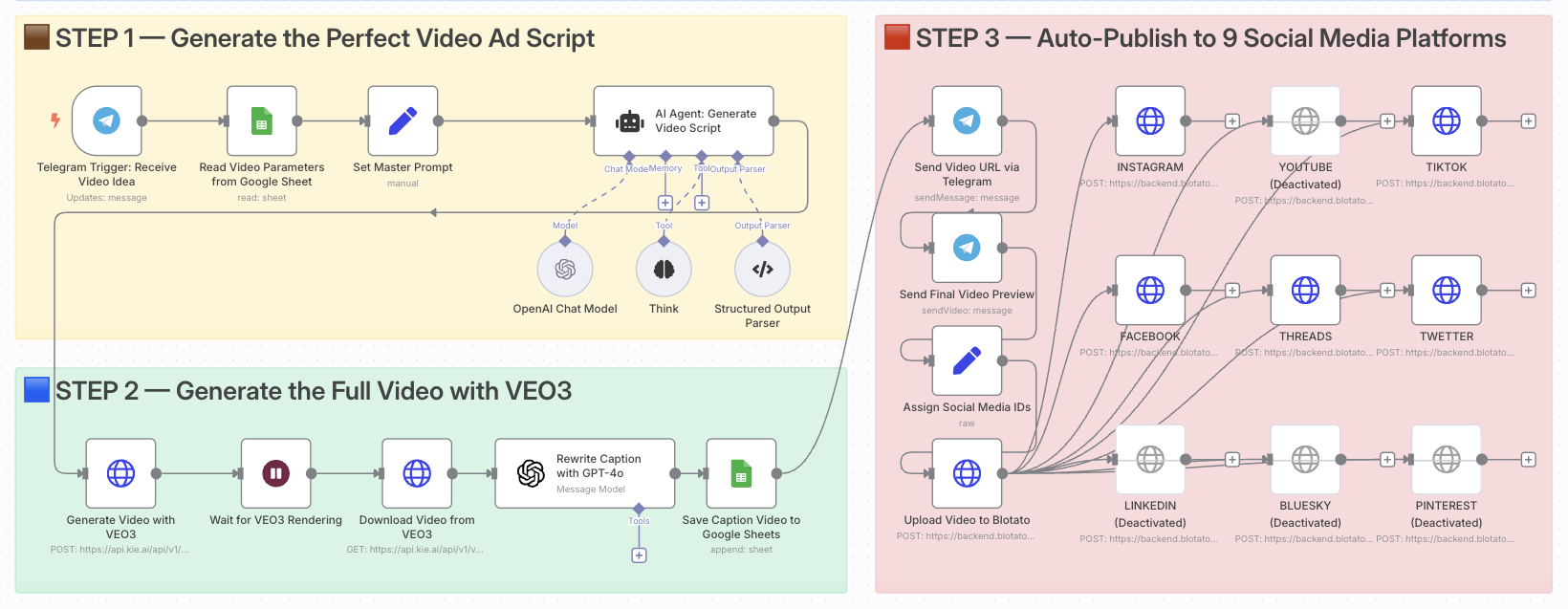 # Create and Auto-Post Viral AI Videos with VEO3 and Blotato to 9 Platforms ### Who is this for? This template is ideal for content creators, growth marketers, e-commerce entrepreneurs, and video-first brands who want to automate the creation and multi-platform distribution of viral short-form ads using AI. If you're looking to scale video production without editing tools or posting manually, this is for you. ### What problem is this workflow solving? Creating high-converting video content is time-consuming. You need to: - Come up with ideas - Write compelling scripts - Generate visuals - Adapt content for each platform - Manually publish and track results This workflow automates that entire process and turns a single idea into a ready-to-publish video campaign across 9 platforms. ### What this workflow does 1. **Triggers** via Telegram when a new video idea is submitted 2. **Fetches parameters** (style, tone, duration) from Google Sheets 3. **Generates the video script** using GPT-4 and a master AI prompt 4. **Creates the video** using Google's VEO3 video generation model 5. **Downloads the final video** once rendering is complete 6. **Rewrites the caption** with GPT-4 for platform-optimized posting 7. **Logs the result** in Google Sheets for tracking 8. **Sends preview links** to Telegram for review 9. **Auto-posts** the video to 9 platforms using Blotato (TikTok, YouTube, Instagram, Threads, Facebook, X, LinkedIn, Pinterest, Bluesky) ### Setup 1. Install **n8n (self-hosted)** with Community Nodes enabled 2. Connect your **Telegram Bot Token** to the trigger node 3. Add your **OpenAI API Key** for GPT-4 and GPT-4 models 4. Configure your **VEO3 API access** (Google AI Studio) 5. Set up **Blotato** with your platform tokens & IDs 6. Link your **Google Sheets** and set the expected column structure (idea, style, caption, etc.) 7. Adjust the Telegram trigger format (e.g., `idea: ...`) to your team's input style ### How to customize this workflow to your needs - Edit the **master prompt** to match your brand voice or industry - Replace the **caption prompt** to generate more marketing-style hooks - Modify the **platform list** if you only publish to a few specific channels - Add approval steps (Slack, email, Telegram) before publishing - Integrate tracking by pushing published URLs to your analytics or CRM **Documentation**: [Notion Guide](https://automatisation.notion.site/Create-and-Auto-Post-Viral-AI-Videos-with-VEO3-and-Blotato-to-9-Platforms-23f3d6550fd98037ab1ee9f803400666?source=copy_link) --- ### Need help customizing? Contact me for consulting and support: [LinkedIn](https://www.linkedin.com/in/dr-firas/) / [YouTube](https://www.youtube.com/@DRFIRASS)
n8n$14.99Automate AI News Video Creation and Social Media Distribution
Streamline the process of creating AI-generated news videos and distributing them on social media platforms like Instagram, Facebook, and YouTube using HeyGen and Postiz.
n8n$19.99Automate AI-Driven Product Visualization and Social Media Publishing
This workflow leverages AI to seamlessly integrate products into real-world spaces, generating captivating videos for automatic publication on social media platforms like TikTok, Instagram Reels, and YouTube Shorts.
n8n$14.99Automate Cinematic Video Creation from Text Prompts Using n8n, OpenAI, and Fal.AI
This n8n workflow transforms text prompts into multi-scene cinematic videos using OpenAI and Fal.AI. Ideal for content creators and educators, it automates the generation of AI-driven videos with ambient sound, ready for platforms like YouTube.
n8n$24.99Automate YouTube to MP3 Conversion and Delivery via Email
This n8n workflow automates the conversion of YouTube videos to MP3 format using RapidAPI, uploads the files to Google Drive, and emails the download link to users.
n8n$9.99Automated YouTube Video Scheduling & AI Metadata Generation
## ☀ Who Is This For? Content creators, marketing teams, and channel managers who need to streamline video publishing with optimized metadata and scheduled releases across multiple videos. ## 🌐 What Problem Does This Solve? Manual YouTube video publishing is time-consuming and often results in inconsistent descriptions, tags, and scheduling. This workflow fully automates: * Extracting video transcripts via Apify for metadata generation * Creating SEO-optimized descriptions and tags for each video * Setting videos to private during initial upload (critical for scheduling) * Implementing scheduled publishing at strategic times * Maintaining consistent branding and formatting across all content ## ➡ Node-by-Node Breakdown | Step | Node Purpose | |------|--------------| | 1 | Every Day (Scheduler) | Trigger workflow on a regular schedule | | 2 | Get Videos to Harmonize | Retrieve videos requiring metadata enhancement | | 3 | Get Video IDs (Unpublished) | Filter for videos that need publishing | | 4 | Loop over Video IDs | Process each video individually | | 5 | Get Video Data | Retrieve metadata for the current video | | 6 | Loop over Videos with Parameter IDs | Set parameters for processing | | 7 | Set Videos to Private | Ensure videos are private (required for scheduling) | | 8 | Apify: Get Transcript | Extract video transcript via Apify | | 9 | Fetch Latest Videos | Get most recent channel content | | 10 | Loop Over Items | Process each video item | | 11 | Generate Description, Tags, etc. | Create optimized metadata from transcript | | 12 | API Clean ID | Format identifiers | | 13 | Retrieve Generated Data | Collect the enhanced metadata | | 14 | Adjust Transcript Format | Format transcript for better processing | | 15 | Update Videos Metadata | Apply generated description and tags to video | ## ℹ Pre-conditions / Requirements * n8n with YouTube API credentials configured * Apify account with API access for transcript extraction * YouTube channel with upload permissions * Master templates for description formatting * Videos must be initially set to private for scheduling to work ## ℹ Setup Instructions 1. Import this workflow into your n8n instance. 2. Configure YouTube API credentials with proper channel access. 3. Set up Apify integration with appropriate actor for transcript extraction. 4. Define scheduling parameters in the Every Day node. 5. Configure description templates with placeholders for dynamic content. 6. Set default tags and customize tag generation rules. 7. Test with a single video before batch processing. ## How to Customize * Adjust prompt templates for description generation to match your brand voice. * Modify tag selection algorithms based on your channel's SEO strategy. * Create multiple publishing schedules for different content categories. * Integrate with analytics tools to optimize publishing times. * Add notification nodes to alert when videos are successfully scheduled. ## ❗ Important Notes * Videos MUST be uploaded as private initially - the Publish At logic only works for private videos that haven't been published before. * Publishing schedules require videos to remain private until their scheduled time. * Transcript quality affects metadata generation results. * Consider YouTube API quotas when scheduling large batches of videos. ## ⚠ Security and Privacy * API credentials are stored securely within n8n. * Transcripts are processed temporarily and not stored permanently. * Webhook URLs should be protected to prevent unauthorized triggering. * Access to the workflow should be limited to authorized team members only.
n8n$24.99Automate YouTube Shorts Creation with yt-dlp and FFmpeg
This workflow automates the creation of YouTube Shorts by downloading videos and music using yt-dlp, merging them with dynamic text overlays, and uploading them to YouTube. It tracks all activities in Google Sheets to prevent duplicate processing.
n8n$24.99Auto-Generate Tech News Blog Posts with NewsAPI & Google Gemini to WordPress
## WordPress Daily News Digest Generator **Overview:** This automation automatically fetches trending tech news every morning, uses AI to create engaging blog posts from each article, and publishes them directly to your WordPress site. **What it does:** - Fetches top 10 US technology news stories every day at 8 AM via NewsAPI - Splits articles into individual items for processing - Processes each article through a loop system - AI creates expanded, engaging blog posts (600-800 words) from each news article - Parses AI response to extract clean titles and content - Publishes individual blog posts to WordPress automatically **Setup Required:** 1. **NewsAPI Configuration** - Get a free API key from newsapi.org (1,000 requests/day free) - Replace `YOUR_API_KEY` in the HTTP Request URL with your actual key - Customize country/category parameters in URL if needed 2. **WordPress Connection** - Configure WordPress credentials in the Publish to WordPress node - Enter your WordPress site URL, username, and password/app password 3. **AI Configuration** - Set up Google Gemini API credentials - Connect the Gemini model to the AI News Summarizer node 4. **Customization Options** - Publishing Schedule: Modify schedule trigger (default: daily at 8 AM) - News Sources: Change country, category, or pageSize in NewsAPI URL - Content Style: Adjust AI system message for different writing tones - Post Status: Change from publish to draft for manual review 5. **Testing** - Run workflow manually to test all connections - Verify news articles are fetched correctly - Check that blog posts appear properly on your WordPress site **Features:** - Automatic daily content creation - AI-generated unique titles and expanded content - Loop processing for multiple articles per day - Duplicate content filtering (removes incomplete articles) - SEO-optimized blog post formatting - Automatic tagging and categorization **Customization:** - Change news categories (technology, business, science, etc.) - Adjust posting frequency (hourly, twice daily, etc.) - Modify AI prompts for different writing styles - Add custom categories and tags - Change article limits (currently 5 articles max) **Need Help?** For [n8n coaching or one-on-one consultation](mailto:david@daexai.com)
n8n$9.99Automate Content Creation and Publishing on WordPress
This n8n workflow automates content generation, image selection, and scheduled publishing to a self-hosted WordPress site, ideal for bloggers and marketers.
n8n$14.99Automate Weekly Hollywood Film Briefings with Tavily and Google Gemini
This n8n workflow automates the creation of a weekly Hollywood film industry briefing using Tavily for real-time data retrieval and Google Gemini for summarization. It compiles movie releases, box office results, industry news, and must-watch recommendations into a formatted email sent every Thursday.
n8n$14.99
Related categories
Custom AI Systems & Services
Our team of experienced AI builders will help build custom AI systems, workflows, and solutions.
Request Custom Work