Communication Workflows
Messaging and collaboration tools
Automate Outbound Calls with Ultravox AI and Twilio
This workflow enables automated outbound calls by integrating Ultravox AI voice agents with Twilio's telephony service, allowing AI-driven conversations over the phone.
n8n$4.99Automate Intelligent Email Classification with AI in Gmail
This workflow automates the classification of incoming Gmail messages using AI, applying intelligent labels for better organization and prioritization.
n8n$4.99Generate AI videos and carousels with Blotato for Instagram and TikTok
# Generate AI videos and carousels with Blotato and publish to Instagram & TikTok 📄 **Documentation**: [Notion Guide](https://automatisation.notion.site/Turn-AI-Videos-Carousels-Into-Income-with-n8n-Fully-Automated-x-Blotato-30c3d6550fd9804b999ede955fdf409d?source=copy_link) 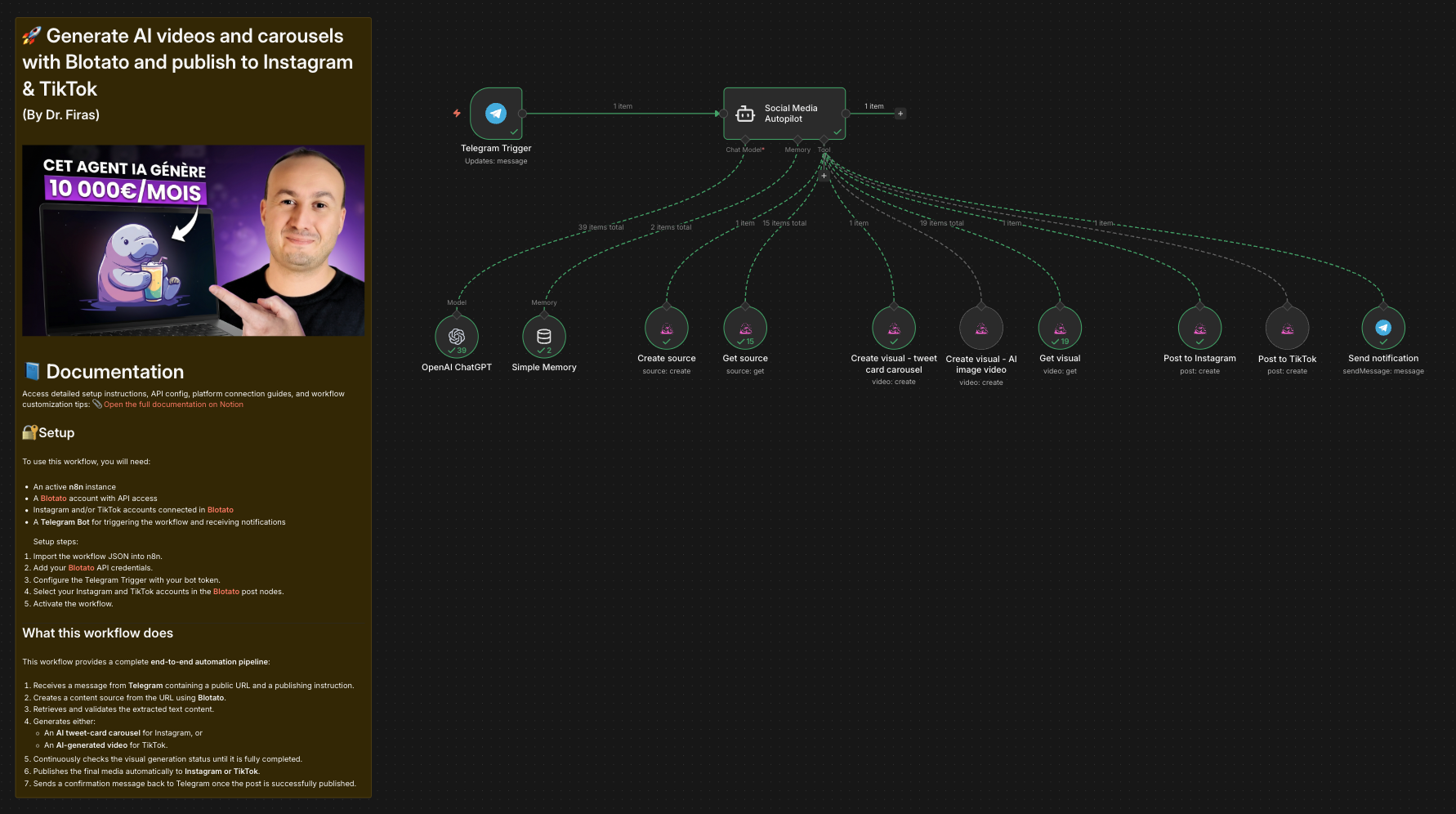 ### Who is this for? This workflow is designed for **content creators, marketers, solopreneurs, and automation enthusiasts** who want to generate and publish short-form content on **Instagram and TikTok** automatically. It is ideal for users looking to combine **AI-generated videos and carousels** with **Blotato** and orchestrate everything using **n8n**. --- ### What this workflow does This workflow provides a complete **end-to-end automation pipeline**: 1. Receives a message from **Telegram** containing a public URL and a publishing instruction. 2. Creates a content source from the URL using **Blotato**. 3. Retrieves and validates the extracted text content. 4. Generates either: - An **AI tweet-card carousel** for Instagram, or - An **AI-generated video** for TikTok. 5. Continuously checks the visual generation status until it is fully completed. 6. Publishes the final media automatically to **Instagram or TikTok**. 7. Sends a confirmation message back to Telegram once the post is successfully published. --- ### Setup To use this workflow, you will need: - An active **n8n** instance - A **[Blotato](https://blotato.com/?ref=firas)** account with API access - Instagram and/or TikTok accounts connected in **[Blotato](https://blotato.com/?ref=firas)** - A **Telegram Bot** for triggering the workflow and receiving notifications Setup steps: 1. Import the workflow JSON into n8n. 2. Add your **[Blotato](https://blotato.com/?ref=firas)** API credentials. 3. Configure the Telegram Trigger with your bot token. 4. Select your Instagram and TikTok accounts in the **[Blotato](https://blotato.com/?ref=firas)** post nodes. 5. Activate the workflow. --- ### How to customize this workflow to your needs You can customize this workflow by: - Changing the visual templates used in Blotato. - Adjusting AI prompts to control tone, format, or content style. - Adding additional publishing platforms after the posting step. - Modifying polling behavior or adding timeouts for long visual renders. - Replacing Telegram with another trigger such as Webhooks or Slack. The workflow is modular and easy to extend, making it suitable for a wide range of content automation use cases. ### 🎥 [Watch This Tutorial](https://youtu.be/HaYFevp7KsU)  --- ### 👋 Need help or want to customize this? 📩 Contact: [LinkedIn](https://www.linkedin.com/in/dr-firas/) 📺 YouTube: [@DRFIRASS](https://www.youtube.com/@DRFIRASS) 🚀 Workshops: [Mes Ateliers n8n](https://hotm.art/formation-n8n) ### Need help customizing? Contact me for consulting and support : [Linkedin](https://www.linkedin.com/in/dr-firas/) / [Youtube](https://www.youtube.com/channel/UCriIQI8uaoEro5FEnOpeidQ) / [🚀 Mes Ateliers n8n ](https://hotm.art/formation-n8n)
n8n$9.99Automating WhatsApp Replies Using GoHighLevel with Redis and Anthropic
# Automating WhatsApp replies in Go High Level with Redis and Anthropic ## Description Integrates GHL + Wazzap with Redis and an AI Agent using ClientInfo to process messages, generate accurate replies, and send them via a custom field trigger. --- ## Who's it for This workflow is for businesses using **GoHighLevel (GHL)**, including the **Wazzap** plugin for WhatsApp, who want to automate inbound SMS/WhatsApp replies with AI. It's ideal for teams that need accurate, data-driven responses from a predefined **ClientInfo** source and want to send them back to customers without paying for extra inbound automations. --- ## How it works / What it does 1. **Receive message** in n8n via Webhook from GHL (**Customer Replied (SMS)** automation). WhatsApp messages arrive the same way using the **Wazzap** plugin. 2. **Filter message type**: * If audio — skip processing and send fallback asking for text. * If text — sanitize by fixing escaped quotes, escaping line breaks/carriage returns/tabs, and removing invalid fields. 3. **Buffer messages** in Redis to group multiple messages sent in a short window. 4. **Run AI Agent** using the **ClientInfo** tool to answer only with accurate service/branch data. 5. **Sanitize AI output** before sending back. 6. **Update GHL contact** custom field (**IA_answer**) with the AI's response. 7. **Send SMS reply** automatically via GHL's outbound automation triggered by the updated custom field. --- ## How to set up 1. In **GHL**, create: * **Inbound automation**: Trigger on *Customer Replied (SMS)* — Send to your n8n Webhook. * **Outbound automation**: Trigger when **IA_answer** is updated — Send SMS to the contact. * Create a custom field named **IA_answer**. 2. Connect **Wazzap** in GHL to handle WhatsApp messages. 3. Configure **Redis** in n8n (host, port, DB index, password). 4. Add your **AI model** credentials (Anthropic, OpenAI, etc.) in n8n. 5. (Optional) Set up the **Google Drive Excel Merge** sub-workflow to enrich ClientInfo with external data. --- ## Requirements * **GoHighLevel sub-account API key**. * **Anthropic (Claude)** API key or another supported LLM provider. * **Redis database** for temporary message storage. * **GHL automations**: one for inbound messages to n8n, one for outbound replies when **IA_answer** is updated. * **GHL custom field**: **IA_answer** to store and trigger replies. * **Wazzap plugin** in GHL for WhatsApp message handling. --- ## How to customize the workflow * Add more context or business-specific data to the **AI Agent prompt** so replies match your brand tone and policies. * Expand the **ClientInfo** dataset with additional services, branches, or product details. * Adjust the **Redis wait time** to control how long the workflow buffers messages before replying.
n8n$24.99Automate Gmail Email Labeling with AI for Enhanced Organization
This workflow uses AI to analyze and categorize incoming Gmail messages by applying relevant labels, streamlining your inbox management and reducing manual sorting.
n8n$14.99Automate Email Summarization and Logging with AI and Google Sheets
This workflow automatically processes incoming emails, generates AI-powered summaries, and logs them into Google Sheets for easy tracking and analysis.
n8n$9.99Automate Daily Telegram Group Summaries with Google Gemini AI
This workflow automates the creation of a daily digest for Telegram groups using Google Gemini AI, summarizing conversations to keep members informed without the need to scroll through numerous messages.
n8n$9.99Automate Personalized Email Responses with AI, Gmail, and Google Sheets
Streamline your email outreach by automatically generating and sending personalized responses using AI, Gmail, and Google Sheets. This workflow enhances engagement by crafting context-aware emails tailored to each inquiry.
n8n$9.99Automate Email Responses with Spam Filtering and AI-Powered FAQ Lookup
This n8n workflow streamlines email management by filtering out spam, consulting a Pinecone-based FAQ database, and crafting AI-generated replies using GPT-4 mini, all within Gmail.
n8n$9.99Telegram Bot Inline Keyboard with Dynamic Menus & Rating System
**Telegram Bot with Dynamic Menus & Rating System** **What It Does** This n8n workflow creates an interactive Telegram bot with: - Dynamic inline keyboards that respond to user clicks - 5-star rating system for collecting feedback - Personalized responses using the user's actual name - Multi-level menu navigation (Main → Settings → Profile, etc.) - Real-time message updates when buttons are clicked **How It Works** 1. Receives messages via Telegram webhook trigger node 2. Extracts user data (name, ID, message type) 3. Builds dynamic menus based on user actions 4. Sends/updates messages with inline keyboards 5. Handles button clicks without page refresh **Setup Instructions** 1. Get Your Bot Credentials 2. Configure Workflow - Open Set Bot Token node - Replace token with yours - Save and activate workflow (Active) 3. Test Your Bot - Message your bot on Telegram - Click the buttons to navigate menus - Try the rating system on Feature 1 **Customization Guide** Add New Menu Items In the Prepare Response Function node, add new cases: ```plaintext case your_feature: responseText = Your feature description; keyboard = [ [{ text: "Button 1", callback_data: action1 }], [{ text: "← Back", callback_data: main }] ]; break; ``` **Modify Rating Options** Change star buttons to numbers or emojis: ```plaintext // Current: ★★★ // Alternative: 1️⃣ 2️⃣ 3️⃣ or ☀️ ☀️☀️ ``` **Change Bot Responses** - Edit responseText for message content - Modify keyboard arrays for button layout - Add HTML formatting: `<b>bold</b>`, `<i>italic</i>` **Key Features Demonstrated** - HTTP Request workaround for dynamic keyboards (n8n Telegram node limitation) - Callback query handling to prevent loading animations - Message editing vs sending new messages - User data extraction from Telegram API - Switch-case menu routing for scalable navigation **Important Notes** - Limitation: n8n's native Telegram node doesn't support dynamic inline keyboards, this is why we need to use HTTP nodes. - Solution demonstrated: Use HTTP Request node with Telegram Bot API directly
n8n$9.99Automate YouTube Video Alerts to Slack
This workflow checks your YouTube channel's RSS feed every 30 minutes and posts a notification to Slack when a new video is published. It includes the video title, a description snippet, the publish date, and a direct 'Watch Now' button.
n8n$4.99Automate Gmail Emails from New Google Sheets Rows
Automatically send emails via Gmail whenever a new row is added to your Google Sheets. This workflow streamlines communication by using specified columns for email details.
Make$2.99Check Suspicious Links via Telegram with GPT-4 Analysis of VirusTotal & urlscan.io Results
# **Workflow Purpose** The workflow is designed to scan submitted URLs using urlscan.io and Virustotal, combine the results into a single structured summary, and send the report via Telegram. I built this workflow for people who primarily work from their phones and receive a constant stream of emails throughout the day. If a user gets an email asking them to sign a document, review a report, or take any action where the link looks suspicious, they can simply open the Telegram bot and quickly check whether the URL is safe before clicking it. ## Key Components **1. Input / Trigger** - Accepts URLs that need to be checked. - Initiates requests to Virustotal and urlscan.io. **2. Virustotal Scan** - Always returns results if the URL is reachable. - Provides reputation, malicious/clean flags, and scan metadata. **3. urlscan.io Scan** - Returns details on how the URL behaves when loaded (domains, requests, resources, etc.). - Sometimes fails due to blocks or restrictions. **4. Error Handling with Code Node** - Checks whether urlscan.io responded successfully. - Ensures the workflow always produces a summary, even if urlscan.io fails. **5. Summary Generation** - If both scans succeed — summarize combined findings from Virustotal + urlscan.io. - If urlscan.io fails — state clearly in the summary "urlscan.io scan was blocked/failed. Relying on Virustotal results." - Ensures the user still gets a complete security report. **6. Telegram Output** - The final formatted summary is delivered to a Telegram chat via the bot. - Chat ID issue was fixed after the Code Node restructuring. ### Outcome - The workflow now guarantees a consistent, user-friendly summary regardless of urlscan.io failures. - It leverages Virustotal as the fallback source of truth. - The Telegram bot provides real-time alerts with clear indications of scan success/failure. #### Prerequisites **Telegram** - In Telegram, start a chat with @BotFather. - Send /newbot, pick a name and a unique username. - Copy the HTTP API token BotFather returns (store securely). - Start a DM with your bot and send any message. - Call getUpdates and read the chat.id **urlscan.io** - Create/log into your urlscan.io account. - Go to Settings & API — New API key and generate a key. - (Recommended) In Settings & API, set Default Scan Visibility to Unlisted to avoid exposing PII in public scans. - Save the key securely (env var or n8n Credentials). - Rate limits note: urlscan.io enforces per-minute/hour/day quotas; exceeding them returns HTTP 429. You can view your personal quotas on their dashboard/quotas endpoint. **Virustotal** - Sign up / sign in to Virustotal Community. - Open My API key (Profile menu) and copy your Public API key. - Store it securely (env var or n8n Credentials). - For a more reliable connection with Virustotal and improved scanning results, enable the Header section in the node settings. Add a header parameter with a clear name (e.g., x-apikey), and then paste your API key into the Value field. - Rate limits (Public API): 4 requests/minute, 500/day; not for commercial workflows. Consider Premium if you'll exceed this. ##### How to Customize the Workflow This workflow is designed to be highly customizable, allowing users to adapt it to their specific needs and use cases. For example, additional malicious website scanners can be integrated through HTTP Request nodes. To make this work, the user simply needs to update the Merge node so that all information flows correctly through the workflow. In addition, users can connect either Gmail or Outlook nodes to automatically test URLs, binary attachments, and other types of information received via email—helping them evaluate data before opening it. Users can also customize how they receive reports. For instance, results can be sent through Telegram (as in the default setup), Slack, Microsoft Teams, or even saved to Google Drive or a Google Sheet for recordkeeping and audit purposes. For consulting and support, or if you have questions, please feel free to connect with me on [Linkedin](www.linkedin.com/in/michael-gullo-46b3b7274) or [via email](michael.gullo@outlook.com).
n8n$9.99Automated Severe Weather Alerts via SMS with OpenWeather and Twilio
This workflow automates the process of monitoring weather conditions using the OpenWeather API and sends SMS alerts through Twilio when severe weather is detected. Ideal for keeping teams, families, or field workers informed about extreme weather conditions.
n8n$9.99Automate Email Responses with AI-Powered Categorization and Calendar Integration
Enhance your email management by automatically categorizing incoming emails and generating AI-driven responses. This workflow uses Google's Gemini 2.0 AI model to classify emails and integrates with Google Calendar to streamline meeting scheduling.
n8n$9.99Automate Error Logging and Notifications with Google Sheets and Gmail
This workflow automates error monitoring for your n8n instance by capturing workflow failures, logging them to Google Sheets, and sending email alerts via Gmail.
n8n$4.99Automate WhatsApp Booking with AI and SMS Reminders
Streamline your appointment scheduling with an AI-powered WhatsApp assistant, Cal.com integration, and automated SMS reminders.
n8n$14.99Automate RSS News Alerts with AI Analysis and Slack Notifications
This workflow automates the process of fetching RSS feed articles, analyzing them with AI for relevance, and sending curated alerts to Slack. It ensures you receive only the most pertinent news updates.
n8n$9.99Automate Restaurant Orders and Delivery via WhatsApp with AI and Supabase
This workflow automates restaurant order management and delivery through WhatsApp, leveraging AI for customer interaction and Supabase for data storage. It processes multimedia messages, verifies payments, and sends order details to staff, enhancing efficiency and customer service.
n8n$24.99N8N workflow 24/7 Ai assistant
24/7 AI Receptionist Workflow (n8n + Any AI Voice Agent) This workflow functions as a fully automated 24/7 AI receptionist by integrating an AI-powered voice agent—such as Retell AI or any other voice AI platform—with n8n’s automation engine. Incoming calls are immediately answered by the AI agent, which can greet callers, understand their requests, provide information, and collect essential details like names, inquiries, service needs, appointment preferences, or contact info. All gathered data is seamlessly passed to n8n, where it’s automatically processed—logged into your CRM, forwarded to your team via email or WhatsApp, scheduled into your calendar, or used to trigger additional workflows. The system operates around the clock with zero manual oversight, ensuring every caller receives fast, polite, and accurate assistance anytime. Ideal for businesses seeking a dependable, always-on receptionist that never misses a call and works with whichever voice AI tool is available or preferred.
n8n$7Auto-Categorize Outlook Emails into Color Categories with GPT-4o
This workflow fetches recent emails from Outlook and uses OpenAI to assign a category (e.g., **Red**, **Yellow**, **Green**). It then updates each message's category in Outlook. --- ## Setup Instructions ### 1. Set Up Outlook Connection 1. In n8n, go to **Credentials > New > Microsoft Outlook OAuth2 API**. 2. Log in with your Outlook account & approve access. 3. Attach this credential to the **Get Messages from Outlook** and **Update Category** nodes in the workflow. 4. (Optional) Adjust the **limit** field in **Get Messages from Outlook** if you want more/less than 5 results. --- ### 2. Set Up OpenAI Connection 1. Go to the **[OpenAI Platform](https://platform.openai.com/api-keys)**. 2. Navigate to **[OpenAI Billing](https://platform.openai.com/settings/organization/billing/overview)**. 3. Add funds to your billing account. 4. Copy your API key into the **OpenAI** credentials in n8n and select it on the **OpenAI Chat Model** and **Categorizing Agent** nodes. --- ## Notes - The agent reads `subject` + `bodyPreview` and returns a JSON category. - The **Update Category** node writes that category back to Outlook. - You can tweak the category names or logic in the **Categorizing Agent** system message. --- ## Contact Need help customizing the categorization rules or routing categories to folders? - **robert@ynteractive.com** - **[Robert Breen](https://www.linkedin.com/in/robert-breen-29429625/)** - **[ynteractive.com](https://ynteractive.com)**
n8n$9.99Generate Weekly Document Digests from Google Docs with GPT-4 and Email Delivery
# AI Summarize Weekly Google Docs Updates - Send Email This workflow automatically reviews selected **Google Docs** every week, checks for updates, and generates a **professional weekly summary email** using AI. It's perfect for keeping your team or leadership informed without manually digging through multiple documents. --- ## How It Works 1. **Weekly Monday 9 AM Trigger** - A **Cron node** runs every Monday at 9 AM (adjustable). - Ensures summaries arrive at the start of the workweek. 2. **Prepare Docs List** - A **Code node** defines which Google Docs to monitor. - Includes doc IDs, names, and categories (e.g., Projects, Meetings, Updates). - Sets a 7-day date range for updates. 3. **Fetch Google Docs & Metadata** - Retrieves document content and metadata (last modified, user, version). - Filters only docs that have been updated in the past week. 4. **Process Doc Data** - Extracts plain text content from Google Docs. - Cleans and normalizes text for summarization. - Collects key details: word count, modified by, last updated date. 5. **Aggregate Updated Docs** - Gathers all updated docs into one combined content block. - Prepares context for the AI model to create a weekly digest. 6. **Generate AI Summary** - Uses **GPT-4** to generate a **business-style weekly summary**. - Includes: - Executive summary - Key updates by document - Important changes - Action items - Next week's focus 7. **Prepare Email Content** - Formats the AI response into both plain text and HTML email. - Adds a list of updated documents with last modified info. 8. **Send Summary Email** - Sends the final summary to the configured team emails via Gmail. - Subject line includes the date range for easy reference. --- ## Setup Steps ### 1. Google Docs Setup - Add document IDs in the **Prepare Docs List** node. - Enable the **Google Drive API** in your Google account. - Connect Google OAuth credentials in n8n. ### 2. OpenAI API Key - Get your key from [platform.openai.com](https://platform.openai.com). - Add it to your n8n credentials. - Uses **GPT-4** for high-quality summaries. ### 3. Email Recipients - Update the **Gmail node** with your team's email addresses. - Customize the subject line and template if needed. ### 4. Schedule - Default: Every **Monday at 9 AM**. - Adjust the **Cron node** if you prefer a different time. --- ## Example Output **Subject:** AI Weekly Document Updates Summary - 08/22/2025 - 08/29/2025 **Body (excerpt):** Dear team, Here's your weekly document updates summary: Executive Summary: - Project Status Doc updated with new timelines. - Meeting Notes highlight three key decisions from leadership. - Team Updates document includes two new hires and onboarding tasks. Key Updates by Document: - Project Status Doc (Projects) - Updated by Alice on 08/27 - Meeting Notes (Meetings) - Updated by Bob on 08/28 - Team Updates (Updates) - Updated by Sarah on 08/29 Action Items: - Confirm revised project deadlines. - Follow up on onboarding checklist. This summary was automatically generated by your n8n workflow. --- With this workflow, you'll never miss important document changes - your team gets a clear, AI-generated weekly digest straight in their inbox.
n8n$9.99Automate Email Management: Delete Marketing Emails and Generate AI Replies
This workflow automates your email management by identifying and deleting marketing emails while generating AI-crafted replies for genuine emails. It logs all actions in Google Sheets for easy tracking.
n8n$9.99Automate Gmail Labeling with AI-Powered Classification
This workflow automates the organization of your Gmail inbox by using AI to analyze email content and apply appropriate labels. It fetches recent emails, classifies them using OpenAI's model, and labels them based on predefined categories.
n8n$9.99
Related categories
Custom AI Systems & Services
Our team of experienced AI builders will help build custom AI systems, workflows, and solutions.
Request Custom Work