Generate AI videos and carousels with Blotato for Instagram and TikTok
# Generate AI videos and carousels with Blotato and publish to Instagram & TikTok 📄 **Documentation**: [Notion Guide](https://automatisation.notion.site/Turn-AI-Videos-Carousels-Into-Income-with-n8n-Fully-Automated-x-Blotato-30c3d6550fd9804b999ede955fdf409d?source=copy_link) 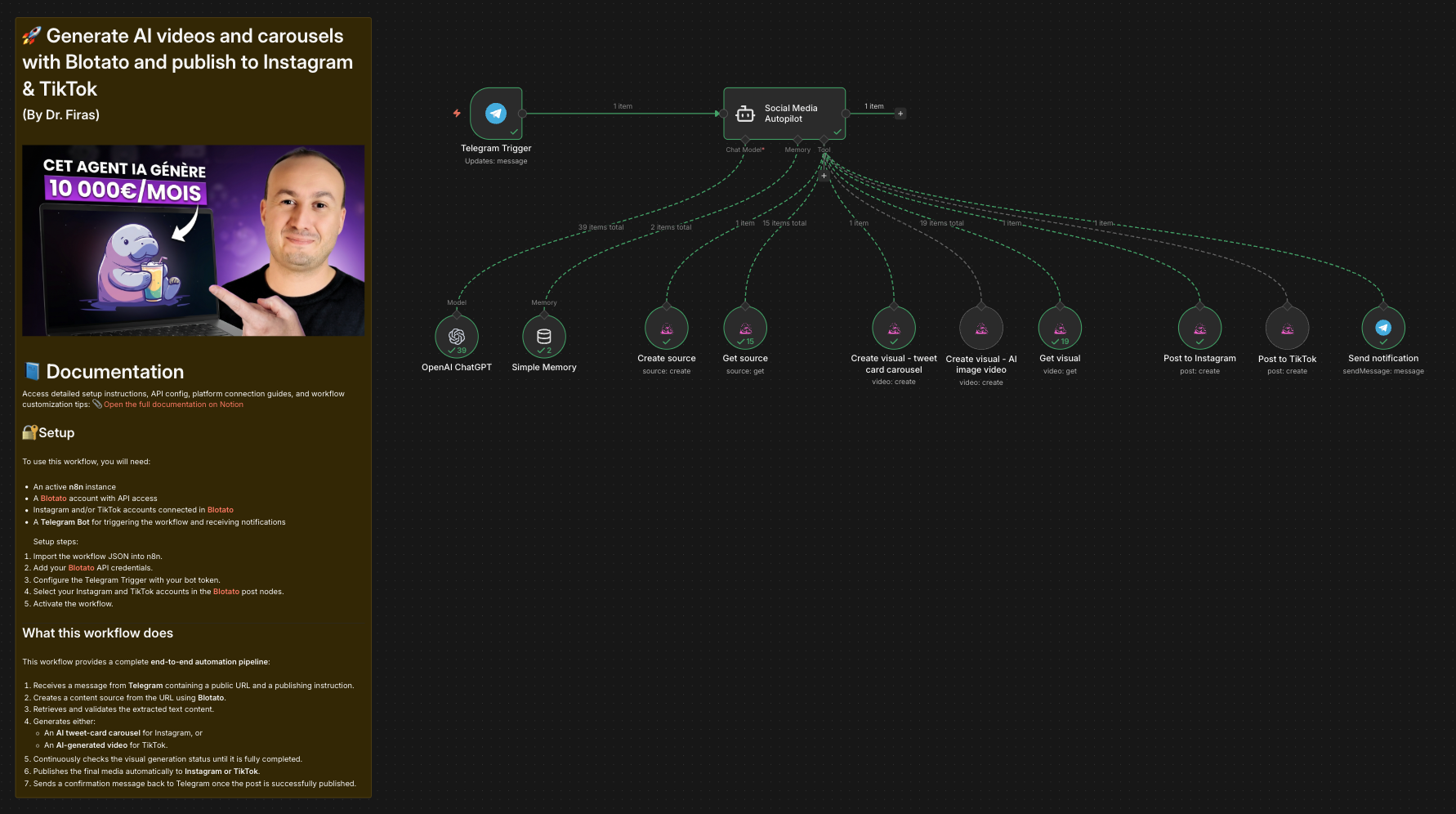 ### Who is this for? This workflow is designed for **content creators, marketers, solopreneurs, and automation enthusiasts** who want to generate and publish short-form content on **Instagram and TikTok** automatically. It is ideal for users looking to combine **AI-generated videos and carousels** with **Blotato** and orchestrate everything using **n8n**. --- ### What this workflow does This workflow provides a complete **end-to-end automation pipeline**: 1. Receives a message from **Telegram** containing a public URL and a publishing instruction. 2. Creates a content source from the URL using **Blotato**. 3. Retrieves and validates the extracted text content. 4. Generates either: - An **AI tweet-card carousel** for Instagram, or - An **AI-generated video** for TikTok. 5. Continuously checks the visual generation status until it is fully completed. 6. Publishes the final media automatically to **Instagram or TikTok**. 7. Sends a confirmation message back to Telegram once the post is successfully published. --- ### Setup To use this workflow, you will need: - An active **n8n** instance - A **[Blotato](https://blotato.com/?ref=firas)** account with API access - Instagram and/or TikTok accounts connected in **[Blotato](https://blotato.com/?ref=firas)** - A **Telegram Bot** for triggering the workflow and receiving notifications Setup steps: 1. Import the workflow JSON into n8n. 2. Add your **[Blotato](https://blotato.com/?ref=firas)** API credentials. 3. Configure the Telegram Trigger with your bot token. 4. Select your Instagram and TikTok accounts in the **[Blotato](https://blotato.com/?ref=firas)** post nodes. 5. Activate the workflow. --- ### How to customize this workflow to your needs You can customize this workflow by: - Changing the visual templates used in Blotato. - Adjusting AI prompts to control tone, format, or content style. - Adding additional publishing platforms after the posting step. - Modifying polling behavior or adding timeouts for long visual renders. - Replacing Telegram with another trigger such as Webhooks or Slack. The workflow is modular and easy to extend, making it suitable for a wide range of content automation use cases. ### 🎥 [Watch This Tutorial](https://youtu.be/HaYFevp7KsU)  --- ### 👋 Need help or want to customize this? 📩 Contact: [LinkedIn](https://www.linkedin.com/in/dr-firas/) 📺 YouTube: [@DRFIRASS](https://www.youtube.com/@DRFIRASS) 🚀 Workshops: [Mes Ateliers n8n](https://hotm.art/formation-n8n) ### Need help customizing? Contact me for consulting and support : [Linkedin](https://www.linkedin.com/in/dr-firas/) / [Youtube](https://www.youtube.com/channel/UCriIQI8uaoEro5FEnOpeidQ) / [🚀 Mes Ateliers n8n ](https://hotm.art/formation-n8n)
Generate AI videos and carousels with Blotato and publish to Instagram & TikTok
📄 Documentation: Notion Guide

Who is this for?
This workflow is designed for content creators, marketers, solopreneurs, and automation enthusiasts who want to generate and publish short-form content on Instagram and TikTok automatically.
It is ideal for users looking to combine AI-generated videos and carousels with Blotato and orchestrate everything using n8n.
What this workflow does
This workflow provides a complete end-to-end automation pipeline:
- Receives a message from Telegram containing a public URL and a publishing instruction.
- Creates a content source from the URL using Blotato.
- Retrieves and validates the extracted text content.
- Generates either:
- An AI tweet-card carousel for Instagram, or
- An AI-generated video for TikTok.
- Continuously checks the visual generation status until it is fully completed.
- Publishes the final media automatically to Instagram or TikTok.
- Sends a confirmation message back to Telegram once the post is successfully published.
Setup
To use this workflow, you will need:
- An active n8n instance
- A Blotato account with API access
- Instagram and/or TikTok accounts connected in Blotato
- A Telegram Bot for triggering the workflow and receiving notifications
Setup steps:
- Import the workflow JSON into n8n.
- Add your Blotato API credentials.
- Configure the Telegram Trigger with your bot token.
- Select your Instagram and TikTok accounts in the Blotato post nodes.
- Activate the workflow.
How to customize this workflow to your needs
You can customize this workflow by:
- Changing the visual templates used in Blotato.
- Adjusting AI prompts to control tone, format, or content style.
- Adding additional publishing platforms after the posting step.
- Modifying polling behavior or adding timeouts for long visual renders.
- Replacing Telegram with another trigger such as Webhooks or Slack.
The workflow is modular and easy to extend, making it suitable for a wide range of content automation use cases.
🎥 Watch This Tutorial

👋 Need help or want to customize this?
📩 Contact: LinkedIn
📺 YouTube: @DRFIRASS
🚀 Workshops: Mes Ateliers n8n
Need help customizing?
Contact me for consulting and support : Linkedin / Youtube / 🚀 Mes Ateliers n8n
New buyers can create an account from the cart to unlock a controlled $10 first-purchase credit on eligible orders of $25+.
Related bundle
Customer Support Automation Suite
8 hand-picked workflows for $39.00.
That is $4.88 each, vs $9.99 for this one alone.
View bundleSecure checkout powered by Stripe
Support
How to import this workflow into n8n
- 1Purchase or download the workflow to get the n8n workflow JSON file.
- 2In your n8n instance, open Workflows and choose "Import from File" (or paste the JSON with Ctrl+V on the canvas).
- 3Open each node marked with a credential warning and connect your own accounts and API keys.
- 4Run the workflow once manually to verify the data flow, then toggle it to Active.
Related Communication workflows
- Automate Outbound Calls with Ultravox AI and Twilio$4.99
- Automate Intelligent Email Classification with AI in Gmail$4.99
- Automating WhatsApp Replies Using GoHighLevel with Redis and Anthropic$24.99
- Automate Gmail Email Labeling with AI for Enhanced Organization$14.99
- Automate Email Summarization and Logging with AI and Google Sheets$9.99
- Automate Daily Telegram Group Summaries with Google Gemini AI$9.99
More from Tomas Fahmy
Need this deployed? We'll set it up for you.
Our automation experts deploy this workflow in your stack, connect your accounts, and verify it works — or build a custom solution from scratch.