Scrape Business Leads from Google Maps Using OpenAI and Google Sheets
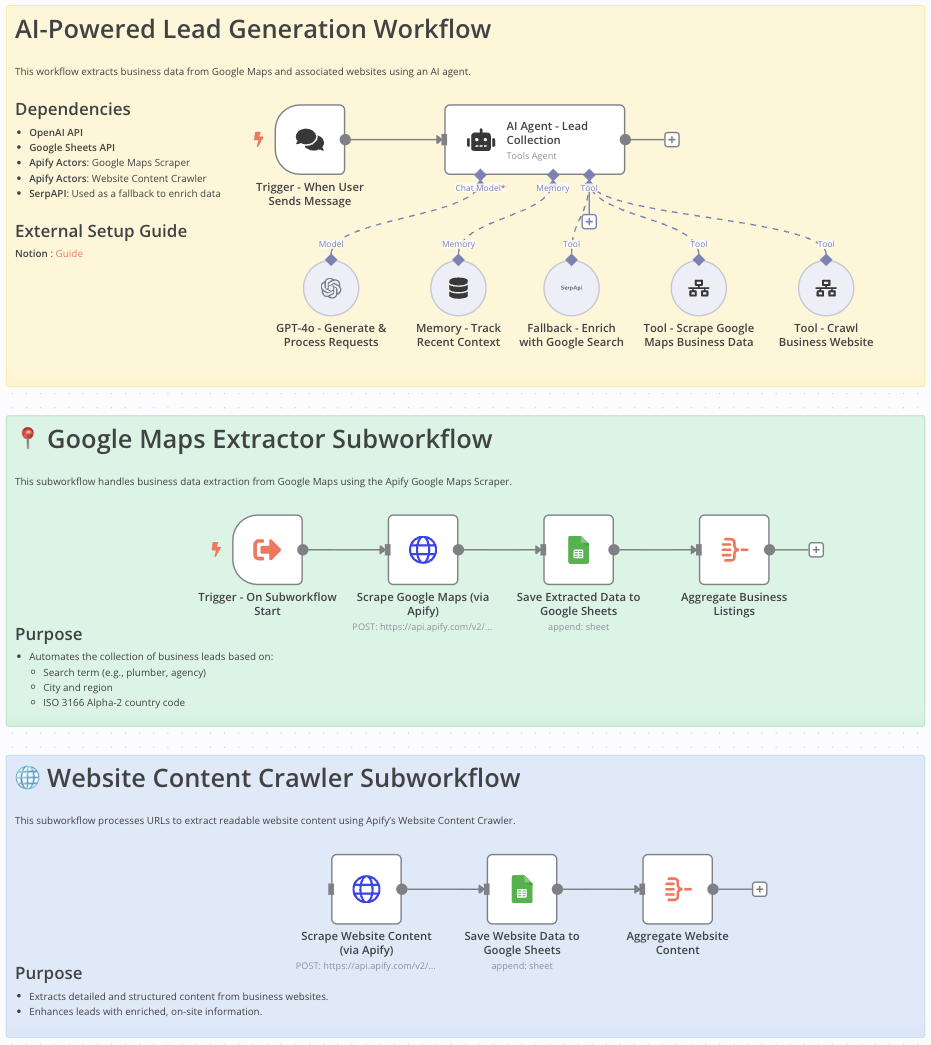 # Google Maps Data Extraction Workflow for Lead Generation This workflow is ideal for **sales teams, marketers, entrepreneurs, and researchers** looking to efficiently gather detailed business information from Google Maps for: - Lead generation - Market analysis - Competitive research --- # Who Is This Workflow For? - **Sales professionals** aiming to build targeted contact lists - **Marketers** looking for localized business data - **Researchers** needing organized, comprehensive business information --- # Problem This Workflow Solves Manually gathering business contact details from Google Maps is: - Tedious - Error-prone - Time-consuming This workflow **automates** data extraction to **increase efficiency, accuracy, and productivity**. --- # What This Workflow Does - Automates extraction of business data (name, address, phone, email, website) from **Google Maps** - Crawls and extracts **additional website content** - Integrates **OpenAI** to enhance data processing - Stores structured results in **Google Sheets** for easy access and analysis - Uses **Google Search API** to fill in missing information --- # Setup 1. **Import** the provided n8n workflow JSON into your **n8n instance**. 2. Set your **OpenAI** and **Google Sheets API** credentials. 3. Provide your **Google Maps Scraper** and **Website Content Crawler** API keys. 4. Ensure **SerpAPI** is configured to enhance data completeness. --- # Customizing This Workflow to Your Needs - Adjust scraping parameters: - Location - Business category - Country code - Customize **Google Sheets output format** to fit your current data structure - Integrate additional **AI processing steps or APIs** for richer data enrichment --- # Final Notes This structured approach ensures: - **Accurate and compliant data extraction** from Google Maps - Streamlined **lead generation** - Actionable and well-organized data ready for business use ➜ **Documentation**: [Notion Guide](https://automatisation.notion.site/GOOGLE-MAPS-SCRAPER-1cc3d6550fd98005a99cea02986e7b05?pvs=4) ## Demo Video Watch the full tutorial here: [YouTube Demo](https://www.youtube.com/watch?v=DoBRufiwElU)

Google Maps Data Extraction Workflow for Lead Generation
This workflow is ideal for sales teams, marketers, entrepreneurs, and researchers looking to efficiently gather detailed business information from Google Maps for:
- Lead generation
- Market analysis
- Competitive research
Who Is This Workflow For?
- Sales professionals aiming to build targeted contact lists
- Marketers looking for localized business data
- Researchers needing organized, comprehensive business information
Problem This Workflow Solves
Manually gathering business contact details from Google Maps is:
- Tedious
- Error-prone
- Time-consuming
This workflow automates data extraction to increase efficiency, accuracy, and productivity.
What This Workflow Does
- Automates extraction of business data (name, address, phone, email, website) from Google Maps
- Crawls and extracts additional website content
- Integrates OpenAI to enhance data processing
- Stores structured results in Google Sheets for easy access and analysis
- Uses Google Search API to fill in missing information
Setup
- Import the provided n8n workflow JSON into your n8n instance.
- Set your OpenAI and Google Sheets API credentials.
- Provide your Google Maps Scraper and Website Content Crawler API keys.
- Ensure SerpAPI is configured to enhance data completeness.
Customizing This Workflow to Your Needs
- Adjust scraping parameters:
- Location
- Business category
- Country code
- Customize Google Sheets output format to fit your current data structure
- Integrate additional AI processing steps or APIs for richer data enrichment
Final Notes
This structured approach ensures:
- Accurate and compliant data extraction from Google Maps
- Streamlined lead generation
- Actionable and well-organized data ready for business use
➜ Documentation: Notion Guide
Demo Video
Watch the full tutorial here: YouTube Demo
New buyers can create an account from the cart to unlock a controlled $10 first-purchase credit on eligible orders of $25+.
Related bundle
Web Scraping & Research Engine
8 hand-picked workflows for $59.00.
That is $7.38 each, vs $14.99 for this one alone.
View bundleSecure checkout powered by Stripe
Tags
Support
How to import this workflow into n8n
- 1Purchase or download the workflow to get the n8n workflow JSON file.
- 2In your n8n instance, open Workflows and choose "Import from File" (or paste the JSON with Ctrl+V on the canvas).
- 3Open each node marked with a credential warning and connect your own accounts and API keys.
- 4Run the workflow once manually to verify the data flow, then toggle it to Active.
Related Data & Analytics workflows
- Generate AI viral videos with VEO 3 and upload to TikTok$14.99
- Generate a daily multi-asset market report with TwelveData, Groq and Google Sheets$14.99
- Build an OpenAI RAG system with document upload, semantic search and caching$24.99
- Add webhook data to a Google Sheet$2.99
- Automate Website Content Scraping and SEO Keyword Extraction with GPT-4o-mini and Airtable$14.99
- Process Contact Form Submissions with Validation and MongoDB Storage$14.99
More from Dr. Firas
Need this deployed? We'll set it up for you.
Our automation experts deploy this workflow in your stack, connect your accounts, and verify it works — or build a custom solution from scratch.