Generate AI viral videos with VEO 3 and upload to TikTok
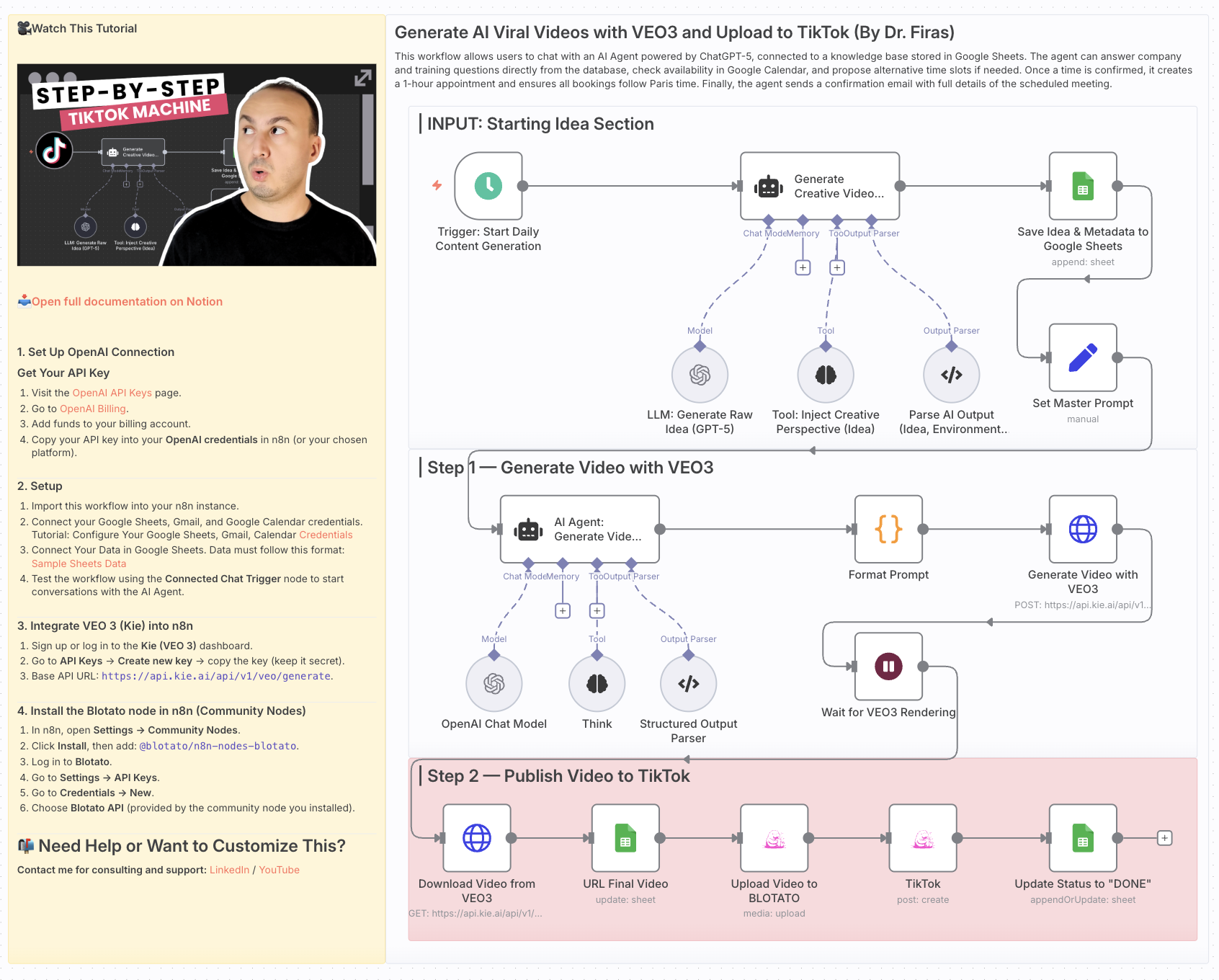 # Generate AI Viral Videos with VEO3 and Auto-Publish to TikTok ### Who is this for? This workflow is for **content creators, marketers, and social media managers** who want to consistently produce **viral-style short videos** and publish them automatically to TikTok — without manual editing or uploading. ### What problem is this workflow solving? / Use case Creating short-form video content that stands out takes time: ideation, scriptwriting, video generation, and publishing. This workflow automates the **entire pipeline** — from idea generation to TikTok upload — enabling you to scale your content strategy and focus on creativity rather than repetitive tasks. ### What this workflow does - **Generates viral video ideas** daily using GPT-5 - **Creates structured prompts** for before/after transformation videos - **Renders cinematic vertical videos** with VEO3 (9:16 format) - **Saves ideas and metadata** into Google Sheets for tracking - **Uploads videos automatically to TikTok** via Blotato integration - **Updates status in Google Sheets** once the video is live The result: a fully automated daily viral video publishing system. ### Setup 1. **Google Sheets** - Connect your Google Sheets account. - Create a sheet with columns for idea, caption, environment, sound, production, and final_output. 2. **OpenAI** - Add your OpenAI API credentials (for GPT-5 mini / GPT-4.1 mini). 3. **VEO3 (Kie API)** - Set up your API key in the HTTP Request node (`Generate Video with VEO3`). 4. **Blotato** - Connect your Blotato account for TikTok publishing. 5. **Schedule Trigger** - Adjust the `Start Daily Content Generation` node to fit your preferred posting frequency. ### How to customize this workflow to your needs - **Platforms**: Extend publishing to YouTube Shorts or Instagram Reels by duplicating the TikTok step. - **Frequency**: Change the Schedule Trigger to post multiple times per day or only a few times per week. - **Creative Style**: Modify the system prompts to align with your brand’s style (cinematic, minimalist, neon, etc.). - **Tracking**: Enhance the Google Sheets logging with engagement metrics by pulling TikTok analytics via Blotato. --- This workflow helps you build a **hands-free AI-powered content engine**, turning raw ideas into published viral videos every day. --- 📄 **🎥 Watch This Tutorial**: [Step by Step](https://youtu.be/E-_8KZ_FSeY) --- 📄 **Documentation**: [Notion Guide](https://automatisation.notion.site/Generate-AI-Viral-Videos-with-VEO3-and-Upload-to-TikTok-2703d6550fd980aa9ea1dd7867c1cccf?source=copy_link) --- ### Need help customizing? Contact me for consulting and support : [Linkedin](https://www.linkedin.com/in/dr-firas/) / [Youtube](https:/https://www.youtube.com/@DRFIRASS)

Generate AI Viral Videos with VEO3 and Auto-Publish to TikTok
Who is this for?
This workflow is for content creators, marketers, and social media managers who want to consistently produce viral-style short videos and publish them automatically to TikTok — without manual editing or uploading.
What problem is this workflow solving? / Use case
Creating short-form video content that stands out takes time: ideation, scriptwriting, video generation, and publishing. This workflow automates the entire pipeline — from idea generation to TikTok upload — enabling you to scale your content strategy and focus on creativity rather than repetitive tasks.
What this workflow does
- Generates viral video ideas daily using GPT-5
- Creates structured prompts for before/after transformation videos
- Renders cinematic vertical videos with VEO3 (9:16 format)
- Saves ideas and metadata into Google Sheets for tracking
- Uploads videos automatically to TikTok via Blotato integration
- Updates status in Google Sheets once the video is live
The result: a fully automated daily viral video publishing system.
Setup
- Google Sheets
- Connect your Google Sheets account.
- Create a sheet with columns for idea, caption, environment, sound, production, and final_output.
- OpenAI
- Add your OpenAI API credentials (for GPT-5 mini / GPT-4.1 mini).
- VEO3 (Kie API)
- Set up your API key in the HTTP Request node (
Generate Video with VEO3).
- Set up your API key in the HTTP Request node (
- Blotato
- Connect your Blotato account for TikTok publishing.
- Schedule Trigger
- Adjust the
Start Daily Content Generationnode to fit your preferred posting frequency.
- Adjust the
How to customize this workflow to your needs
- Platforms: Extend publishing to YouTube Shorts or Instagram Reels by duplicating the TikTok step.
- Frequency: Change the Schedule Trigger to post multiple times per day or only a few times per week.
- Creative Style: Modify the system prompts to align with your brand’s style (cinematic, minimalist, neon, etc.).
- Tracking: Enhance the Google Sheets logging with engagement metrics by pulling TikTok analytics via Blotato.
This workflow helps you build a hands-free AI-powered content engine, turning raw ideas into published viral videos every day.
📄 🎥 Watch This Tutorial: Step by Step
📄 Documentation: Notion Guide
Need help customizing?
New buyers can create an account from the cart to unlock a controlled $10 first-purchase credit on eligible orders of $25+.
Part of a bundle
AI Video Production Line
This workflow is one of 7 in the bundle — $69.00 for all of them.
That is $9.86 each, vs $14.99 for this one alone.
View bundleSecure checkout powered by Stripe
Tags
Support
How to import this workflow into n8n
- 1Purchase or download the workflow to get the n8n workflow JSON file.
- 2In your n8n instance, open Workflows and choose "Import from File" (or paste the JSON with Ctrl+V on the canvas).
- 3Open each node marked with a credential warning and connect your own accounts and API keys.
- 4Run the workflow once manually to verify the data flow, then toggle it to Active.
Related Data & Analytics workflows
- Generate a daily multi-asset market report with TwelveData, Groq and Google Sheets$14.99
- Build an OpenAI RAG system with document upload, semantic search and caching$24.99
- Automate Website Content Scraping and SEO Keyword Extraction with GPT-4o-mini and Airtable$14.99
- Process Contact Form Submissions with Validation and MongoDB Storage$14.99
- Add webhook data to a Google Sheet$2.99
- Scrape Business Leads from Google Maps Using OpenAI and Google Sheets$14.99
More from Karim Sharma
Need this deployed? We'll set it up for you.
Our automation experts deploy this workflow in your stack, connect your accounts, and verify it works — or build a custom solution from scratch.