
Back to Blog mongodb
 ai
ai ai
ai ai
ai go
go playwright
 cli
cli
What If Vector Search with Voyage AI and MongoDB Was Just... Simple?
Michael Lynn February 3, 2026
0 views
Embed, rerank, store, search, benchmark models, and bulk-ingest documents into MongoDB Atlas Vector Search — from the terminal or a visual playground. No Python required.
---
title: "What If Vector Search with Voyage AI and MongoDB Was Just... Simple?"
published: true
description: "Embed, rerank, store, search, benchmark models, and bulk-ingest documents into MongoDB Atlas Vector Search — from the terminal or a visual playground. No Python required."
tags: mongodb, ai, vectorsearch, cli
series:
canonical_url:
cover_image: https://raw.githubusercontent.com/mrlynn/voyageai-cli/main/voyageai-cli.png
---

> New to Voyage AI? here's a quick background... Voyage AI builds some of the highest-performing embedding and reranking models in the industry. Embedding models convert text into numerical vectors that capture meaning... so a search for "how do I speed up my queries" can match a document about index optimization, even though they share zero words. Reranking models take it a step further, reading your query and each candidate result together to re-score them for precision. Earlier this year, MongoDB acquired Voyage AI and integrated these models directly into Atlas, meaning you can generate embeddings through the same platform where your data already lives. One bill, one dashboard, no extra infrastructure. That's the context... now let's talk about the tool.
I did not set out to build a CLI for Voyage AI... I was trying to answer a question I kept hearing from smart, capable developers who already understood databases and already understood AI. They were not confused. They were exhausted... in the same way I was exhausted when I first started building solutions for and with AI.
The question always showed up at the same moment. Right after embeddings made sense on paper. Right after Atlas Vector Search started to look promising. Right about this moment, 9 out of 10 times, one of the bright developers would as the same question.
“How do I get from here to something working?”
I vividly remember hitting this same wall. I had the models. I had the cluster. I had a terminal open and a notebook full of code that, frankly I did not want to maintain. Every step felt reasonable on its own. Together, they felt heavy. So we've got to 1. Embed text. 2. Store vectors. 3. Create an index. 4. Query. 5. Optionally Rerank. Then debug everything and rerun the whole flow.
What bothered me was not the complexity. Each of the steps were simple in and of themselves... It was the friction. This was work I needed to do over and over, and every time it pulled me out of the problem I actually wanted to solve.
At some point I stopped asking how to explain the process better and started asking a different question.
Why is this not a one-liner?
`vai` came out of that moment. Not as a product idea, but as a convenience I wanted for myself. A way to stay in the terminal, move fast, and get from raw text to a meaningful search result without building a small app every time.
That is the reason this tool exists.
This post covers every feature. It's long on purpose — consider it the reference guide I wish existed when I started building with vector search.
> **Disclaimer:** `vai` (voyageai-cli) is an independent community tool. It is **not** an official product of MongoDB, Inc. or Voyage AI. For official docs, visit [mongodb.com/docs/voyageai](https://www.mongodb.com/docs/voyageai/).
## Install and Setup
Ok, if you're like me... you're chomping at the bit - let's see some software. We'll start with installation and then I'll walk you through use cases.
```bash
npm install -g voyageai-cli
```

That gives you the `vai` binary. Node.js 18+ required. No Python, no native modules, no build step.
> 🎸 I chose "vai" because it's short, stands for Voyage AI, and has no copyright issues — but I just love that every time I invoke it, it makes me think of one of my all-time favorite guitar players, [Steve Vai](https://en.wikipedia.org/wiki/Steve_Vai).
In order to use this thing, you will need two things:
1. **A Voyage AI API key** (required for all commands)
2. **A MongoDB connection string** (only for commands that touch your database: `store`, `search`, `index`, `ingest`)
### Two Endpoints, Two Keys
There are two ways to access the exact same Voyage AI models — and each has its own key format:
| | MongoDB Atlas | Voyage AI Platform |
|---|---|---|
| **Endpoint** | `https://ai.mongodb.com/v1/` | `https://api.voyageai.com/v1/` |
| **Key prefix** | `al-` (Atlas) | `pa-` (Platform) |
| **Where to get it** | Atlas → AI Models → Create Model API Key | [dash.voyageai.com](https://dash.voyageai.com) → API Keys |
| **Billing** | Through your Atlas invoice | Through Voyage AI directly |
| **Free tier** | 200M tokens, no credit card | 200M tokens, no credit card |
| **Models** | Same models, same quality | Same models, same quality |
**Which should you use?** If you're already on Atlas (and you probably are if you're building software with AI and vector search), the Atlas endpoint keeps everything on one bill and one dashboard. If you want to use Voyage AI models without Atlas, the platform endpoint works standalone.
`vai` defaults to the Atlas endpoint. To switch:
```bash
# Use Voyage AI platform endpoint instead
vai config set base-url https://api.voyageai.com/v1/
```
**The key must match the endpoint.** An `al-` key only works on `ai.mongodb.com`. A `pa-` key only works on `api.voyageai.com`. If you get a 403 or 401, this mismatch is almost always the reason — `vai` will show a hint when it detects this.
### Setting Credentials
```bash
# Environment variables (simplest)
export VOYAGE_API_KEY="al-your-atlas-key"
export MONGODB_URI="mongodb+srv://user:[email protected]/"
# Or a .env file in your project
echo 'VOYAGE_API_KEY=al-your-atlas-key' >> .env
echo 'MONGODB_URI=mongodb+srv://...' >> .env
# Or the built-in config store (chmod 600, secrets masked)
echo "al-your-atlas-key" | vai config set api-key --stdin
vai config set mongodb-uri "mongodb+srv://..."
```
Credentials resolve in order: environment variable → `.env` file → `~/.vai/config.json`. Higher priority wins.
Verify everything works:
```bash
vai ping
```
Link the ping you know and love from the command line, `vai ping` hits the Voyage AI API and (if `MONGODB_URI` is set) your Atlas cluster. Green checkmarks mean you're good.
Oh, and btw, if you're curious about some of the basics of Voyage AI, embedding, reranking, etc... try `vai explain`. For example:
Run `vai explain api-access` for the full deep-dive on endpoint differences.
## The Commands
Here's a list of the minimal commands I've created as convenience methods for developers working with Voyage AI and MongoDB.
### `vai embed` — Generate Embeddings
The most fundamental operation. Takes text, returns a vector.
```bash
# Single text
vai embed "What is MongoDB Atlas?"
# Specify model and dimensions
vai embed "search query" --model voyage-4-large --dimensions 512
# From a file
vai embed --file document.txt --input-type document
# Bulk from stdin (one text per line)
cat texts.txt | vai embed
# Just the raw array (for piping to other tools)
vai embed "hello" --output-format array
```
**Input types matter.** When embedding for retrieval, use `--input-type query` for search queries and `--input-type document` for corpus text. The model internally optimizes the embedding differently for each — queries are short and specific, documents are long and contextual. Mixing them up won't break anything, but matching them improves relevance.
**Dimensions are flexible.** Voyage 4 models default to 1024 dimensions but support 256–2048 via Matryoshka representation learning. Lower dimensions = cheaper storage and faster search, at some cost to accuracy. For most workloads, 1024 is the sweet spot.
```bash
# JSON output for scripting
vai embed "test" --json | jq '.data[0].embedding | length'
# → 1024
```
---
### `vai rerank` — Rerank Documents by Relevance
Reranking is the step most search implementations skip — and it's the one that makes the biggest difference.
Embedding models encode queries and documents *independently*. A reranker reads the query and each document *together* using cross-attention. It's slower (50–200ms for a batch) but dramatically more accurate.
```bash
# Inline documents
vai rerank --query "database performance tuning" \
--documents \
"MongoDB Atlas provides a fully managed cloud database" \
"Index optimization can improve query performance by 100x" \
"Voyage AI offers embedding models for text retrieval"
# From a file (JSON array of strings)
vai rerank --query "best database" --documents-file candidates.json --top-k 3
# Lighter model for speed
vai rerank --query "query" --documents "doc1" "doc2" --model rerank-2.5-lite
```
The output shows each document with a relevance score from 0 to 1, sorted by relevance. The `rerank-2.5` model supports natural language instructions in the query — "Find documents about performance, not pricing" — which lets you steer relevance beyond just semantic similarity.
**When reranking shines:** RAG pipelines. The quality of an LLM's answer is bounded by the quality of the context you feed it. Retrieve 100 candidates with embedding search, rerank to the top 5, feed those to the LLM. Night and day difference.
---
### `vai store` — Embed and Insert a Document
One command to embed text and store the result in Atlas:
```bash
vai store --db myapp --collection articles --field embedding \
--text "MongoDB Atlas is a fully managed cloud database" \
--metadata '{"title": "Atlas Overview", "category": "product"}'
```
This:
1. Sends the text to Voyage AI for embedding
2. Inserts a document into `myapp.articles` with the original text, the embedding in the `embedding` field, and your metadata
You can also store from a file or batch from JSONL:
```bash
# From a file
vai store --db myapp --collection articles --field embedding --file article.txt
# Batch from JSONL (one {"text": "...", ...} per line)
vai store --db myapp --collection articles --field embedding --file documents.jsonl
```
`vai store` is great for individual documents or small batches. For serious bulk work, use `vai ingest` (covered below).
---
### `vai ingest` — Bulk Import with Progress
This is the "I have 10,000 documents and need them in Atlas Vector Search" command.
```bash
# JSONL (one JSON object per line, each with a "text" field)
vai ingest --file corpus.jsonl --db myapp --collection articles --field embedding
# JSON array
vai ingest --file documents.json --db myapp --collection articles --field embedding
# CSV (specify which column to embed)
vai ingest --file data.csv --db myapp --collection articles --field embedding \
--text-column content
# Plain text (one document per line)
vai ingest --file lines.txt --db myapp --collection articles --field embedding
```
`vai ingest` auto-detects the file format from the extension (or content). It splits documents into batches (default 50, max 128 per Voyage API limits), embeds each batch in a single API call, and inserts via `insertMany`. You get a real-time progress bar:
```
████████████░░░░░░░░ 600/1000 (60%) | Batch 12/20 | 3,421 tokens
```
And a summary on completion:
```
✓ Ingested 1000 documents into myapp.articles
Batches: 20
Tokens: 17,234
Model: voyage-4-large
Duration: 12.3s
Rate: 81.3 docs/sec
```
**Dry run** validates your file without spending API credits:
```bash
vai ingest --file corpus.jsonl --db myapp --collection articles --field embedding --dry-run
```
This parses the file, counts documents, estimates tokens, and reports stats — without calling the API or touching MongoDB.
**Key options:**
| Flag | Default | Description |
|------|---------|-------------|
| `--batch-size` | 50 | Documents per API call (max 128) |
| `--model` | voyage-4-large | Embedding model |
| `--input-type` | document | `query` or `document` |
| `--dimensions` | 1024 | Output dimensions (256–2048) |
| `--text-field` | text | JSON field containing the text to embed |
| `--text-column` | — | CSV column to embed (required for CSV) |
| `--strict` | false | Abort on first batch error |
| `--dry-run` | false | Validate only, no API calls |
For JSONL and JSON inputs, all fields from the source document are preserved — the embedding gets added alongside your existing data. For CSV, every column becomes a document field.
---
### `vai search` — Vector Similarity Search
Query Atlas Vector Search from the terminal:
```bash
vai search --query "how to optimize database queries" \
--db myapp --collection articles \
--index article_search --field embedding \
--limit 5
```
Output:
```
Query: "how to optimize database queries"
Results: 3
── Result 1 (score: 0.7430) ──
Index optimization can improve query performance by 100x
_id: 6981d51c4be7fb9a8e224548
── Result 2 (score: 0.6967) ──
MongoDB Atlas is a fully managed cloud database service
_id: 6981d51a5401362b217ce83a
```
**Pre-filters** let you scope the search before the vector comparison happens:
```bash
vai search --query "performance" \
--db myapp --collection articles \
--index article_search --field embedding \
--filter '{"category": "guides"}'
```
This is powerful for multi-tenant applications — filter by `tenantId` so users only see their own data, then vector-search within that subset.
```bash
# JSON for scripting
vai search --query "test" --db myapp --collection articles \
--index article_search --field embedding --json | jq '.[0].score'
```
---
### `vai similarity` — Compare Texts Directly
Sometimes you just want to know how similar two texts are without touching a database:
```bash
# Two texts
vai similarity "MongoDB is a document database" "MongoDB Atlas is a cloud database"
# One text against many
vai similarity "database performance" \
--against "MongoDB is fast" "PostgreSQL is relational" "Redis is an in-memory store"
# From files
vai similarity --file1 doc1.txt --file2 doc2.txt
```
Returns cosine similarity scores (0 to 1). Useful for sanity-checking embeddings, comparing document versions, or quick clustering experiments.
---
### `vai index` — Manage Atlas Vector Search Indexes
Create, list, and delete vector search indexes without leaving the terminal:
```bash
# Create an index
vai index create --db myapp --collection articles --field embedding \
--dimensions 1024 --similarity cosine --index-name article_search
# List indexes on a collection
vai index list --db myapp --collection articles
# Delete an index
vai index delete --db myapp --collection articles --index-name article_search
```
**Similarity functions:**
- `cosine` — Best default for text embeddings. Measures direction, ignores magnitude.
- `dotProduct` — Equivalent to cosine for normalized vectors. Slightly faster on some hardware.
- `euclidean` — Measures straight-line distance. Better for spatial data.
New indexes take about 60 seconds to build on small collections. The `vai demo` command handles this wait for you automatically.
---
### `vai models` — List Available Models
```bash
# All models
vai models
# Just embedding models
vai models --type embedding
# Just rerankers
vai models --type reranking
```
Quick reference:
| Model | Type | Dimensions | $/1M tokens | Best for |
|-------|------|-----------|-------------|----------|
| voyage-4-large | embedding | 1024 (256–2048) | $0.12 | Best quality |
| voyage-4 | embedding | 1024 (256–2048) | $0.06 | Balanced |
| voyage-4-lite | embedding | 1024 (256–2048) | $0.02 | Budget / query-time |
| voyage-code-3 | embedding | 1024 (256–2048) | $0.18 | Code search |
| voyage-finance-2 | embedding | 1024 | $0.12 | Financial text |
| voyage-law-2 | embedding | 1024 | $0.12 | Legal documents |
| voyage-multimodal-3.5 | embedding | 1024 (256–2048) | $0.12 + pixels | Text + images |
| rerank-2.5 | reranking | — | $0.05 | Best reranking |
| rerank-2.5-lite | reranking | — | $0.02 | Fast reranking |
**Free tier:** 200M tokens across most models, no credit card required. That's roughly 150,000 pages of text.
**Cost optimization trick:** All Voyage 4 series models share the same embedding space. Embed your documents once with `voyage-4-large` for maximum quality, then use `voyage-4-lite` at query time (6× cheaper) with no degradation in search accuracy.
---
### `vai ping` — Test Connectivity
```bash
vai ping
```
Checks the Voyage AI API (and MongoDB if `MONGODB_URI` is set). Shows green checkmarks or red X's with error details. Always start here when debugging.
```bash
# Machine-readable
vai ping --json
```
---
### `vai config` — Manage Persistent Configuration
```bash
# Set values (stored in ~/.vai/config.json, chmod 600)
vai config set api-key "pa-your-key"
vai config set mongodb-uri "mongodb+srv://..."
vai config set base-url "https://ai.mongodb.com/v1/"
# Secure input (avoids shell history)
echo "pa-your-key" | vai config set api-key --stdin
# View current config (secrets masked)
vai config get
# Remove a value
vai config delete api-key
# Show config file path
vai config path
# Reset everything
vai config reset
```
The config file is plaintext (like `~/.aws/credentials` or `~/.npmrc`). Permissions are set to 600 (owner read/write only) on creation.
---
### `vai demo` — Interactive Walkthrough
New to vector search? `vai demo` runs a guided 5-step walkthrough: embed text, store documents, create an index, run a search, and rerank results. It uses a temporary collection and cleans up after itself.
```bash
vai demo
# Non-interactive (no pauses between steps)
vai demo --no-pause
# Skip the full pipeline if you just want to see embed + rerank
vai demo --skip-pipeline
# Keep the demo data afterward
vai demo --keep
```
Great for onboarding, workshops, or just getting a feel for the tool.
---
### `vai explain` — Built-in Learning
```bash
vai explain
```
Lists 12 educational topics you can read right in the terminal:
| Topic | What you'll learn |
|-------|-------------------|
| `embeddings` | What vectors are and how they encode meaning |
| `reranking` | Why cross-attention beats independent encoding |
| `vector-search` | How Atlas `$vectorSearch` works under the hood |
| `rag` | Retrieval-Augmented Generation patterns |
| `cosine-similarity` | Measuring vector distance (cosine vs dot product vs euclidean) |
| `two-stage-retrieval` | The embed → search → rerank pipeline |
| `input-type` | Why `query` vs `document` matters |
| `models` | Choosing the right model for your use case |
| `api-keys` | Creating and managing Model API keys in Atlas |
| `api-access` | MongoDB Atlas vs. Voyage AI platform endpoints |
| `batch-processing` | Strategies for embedding large datasets |
| `benchmarking` | How to choose the right model for your use case |
```bash
vai explain rag
vai explain two-stage-retrieval
vai explain api-access
```
Each topic includes explanations, key points, try-it commands, and links to official docs. Aliases work too — `vai explain auth`, `vai explain cosine`, `vai explain vectors` all resolve correctly.
---
### `vai benchmark` — Choose the Right Model
Picking between `voyage-4-large`, `voyage-4`, and `voyage-4-lite` isn't obvious from a spec sheet. `vai benchmark` lets you test with real API calls on your actual data.
```bash
# Compare embedding model latency (default: 3 models × 5 rounds)
vai benchmark embed
# Custom text, specific models
vai benchmark embed --models voyage-4-large,voyage-4-lite --rounds 3 \
--input "your domain-specific text here"
# Compare reranking models with ranking quality analysis
vai benchmark rerank --query "how to scale a database" \
--documents-file candidates.json
# See if expensive and cheap models rank your data the same
vai benchmark similarity --query "your search query" --file corpus.txt
# Project monthly costs at scale
vai benchmark cost --tokens 500 --volumes 100,1000,10000,100000
# Find optimal batch size for ingestion pipelines
vai benchmark batch --batch-sizes 1,5,10,25,50
```
The latency benchmark gives you avg/p50/p95 timings, token counts, and cost per model — with a ⚡ badge on the fastest:
```
Model Avg p50 p95 Dims Tokens $/1M tok
──────────────────────────────────────────────────────────────────────
voyage-4-lite 174ms 167ms 207ms 1024 7 $0.02 ⚡
voyage-4 181ms 172ms 216ms 1024 7 $0.06
voyage-4-large 256ms 262ms 355ms 1024 7 $0.12
```
The ranking comparison tells you whether the cheaper model is *actually* good enough for your data — it embeds a query + corpus with each model and shows side-by-side top-K rankings. If the models agree, save your money. If they diverge, the premium model is catching nuance the lite one misses.
Use `--save` to export results to JSON and track performance over time. Use `--json` for CI integration.
---
### `vai playground` — Interactive Web UI
Not everyone lives in the terminal. `vai playground` launches a local web UI at `http://localhost:3333` with everything you can do from the CLI, plus visual tools you can't:
```bash
vai playground
```
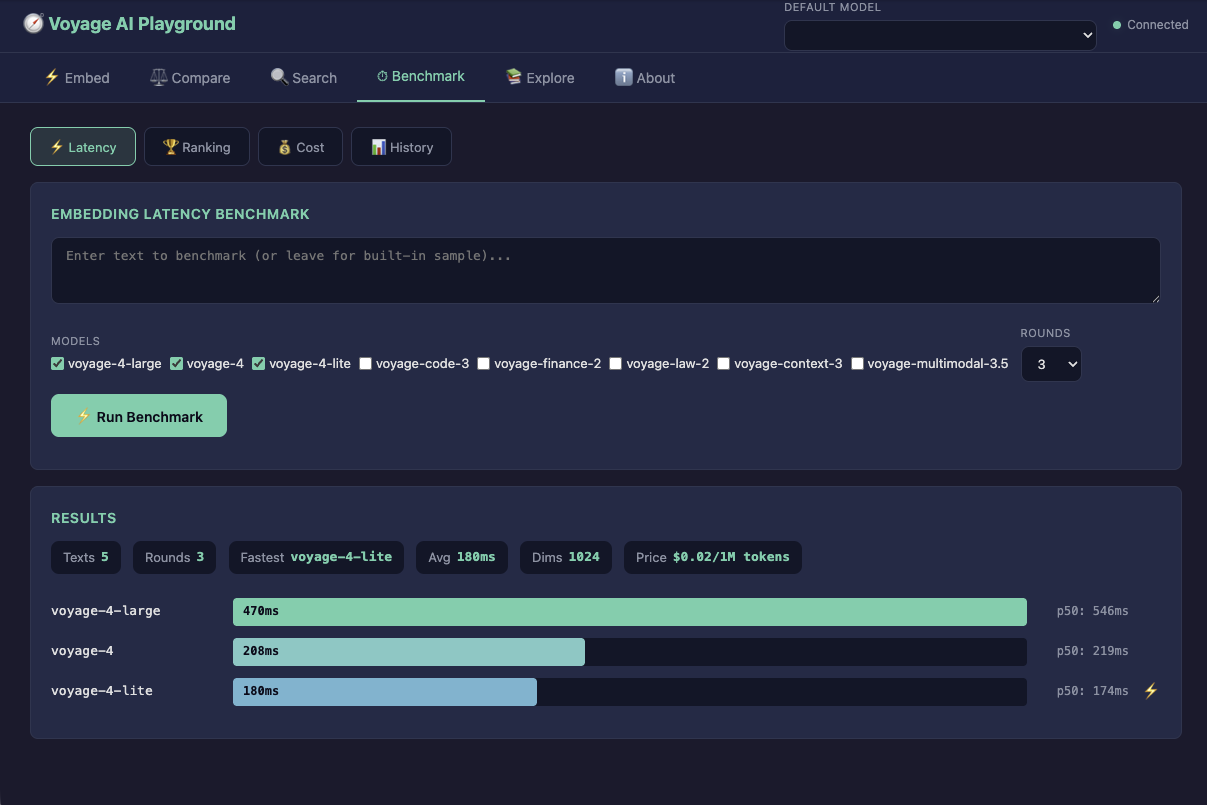
**Five tabs:**
- **⚡ Embed** — Paste text, pick a model, see the vector and a heatmap visualization
- **⚖️ Compare** — Enter two texts and get a big cosine similarity score with a visual bar
- **🔍 Search** — Semantic search with optional reranking, side-by-side result comparison
- **⏱ Benchmark** — Visual latency bars, ranking comparisons, interactive cost calculator with sliders, and a history chart of past runs
- **📚 Explore** — All 12 educational topics from `vai explain`, searchable, with links and try-it examples
The benchmark tab is particularly useful — drag the "queries per day" slider to 100K and watch the cost table update live. It makes the price/performance tradeoff visceral in a way that numbers on a screen don't.
The playground runs entirely locally. Your API key never leaves your machine. No data is sent anywhere except the Voyage AI API for actual embedding/reranking calls.
---
### `vai about` — Who Built This
```bash
vai about
```
Shows project info, author details, feature list, and the community disclaimer. Also available as the **ℹ️ About** tab in the playground, complete with a proper avatar and links.
---
## Full Pipeline: Start to Finish
Here's the whole thing, start to finish. Five minutes to a working semantic search system.
```bash
# 1. Set credentials
export VOYAGE_API_KEY="pa-your-key"
export MONGODB_URI="mongodb+srv://user:[email protected]/"
# 2. Verify connectivity
vai ping
# 3. Bulk-ingest a corpus
vai ingest --file articles.jsonl --db myapp --collection articles --field embedding \
--model voyage-4-large --input-type document
# 4. Create a vector search index
vai index create --db myapp --collection articles --field embedding \
--dimensions 1024 --similarity cosine --index-name article_search
# 5. Wait ~60s for the index to build, then search
vai search --query "how to scale a database" \
--db myapp --collection articles \
--index article_search --field embedding --limit 10
# 6. Rerank the top results for precision
vai rerank --query "how to scale a database" \
--documents-file top_results.json --top-k 5
```
If you don't have a corpus handy, `vai demo` builds one for you.
---
## Scripting and Automation
Every command supports `--json` for machine-readable output and `--quiet` to suppress spinners and decorative output. This makes `vai` composable with `jq`, shell scripts, and CI pipelines.
```bash
# Embed and extract just the vector
VECTOR=$(vai embed "test query" --json | jq -c '.data[0].embedding')
# Search and get the top score
vai search --query "test" --db myapp --collection articles \
--index article_search --field embedding --json | jq '.[0].score'
# Dry-run ingest in CI to validate data format
vai ingest --file data.jsonl --db myapp --collection articles \
--field embedding --dry-run --json
```
---
## What I Didn't Build (Yet)
`vai` is pretty spartan at the moment - I haven't spent much time on it. Here's a few things on the roadmap... if you have suggestions, I'm all ears:
- **Multimodal embedding** — `voyage-multimodal-3.5` can embed images and text in the same space. The API endpoint for this isn't live on `ai.mongodb.com/v1` yet, but when it is, `vai` will support it.
- **Contextualized chunks** — `voyage-context-3` embeds chunks while considering the surrounding document. Same story — waiting on the endpoint.
- **Hybrid search** — Combine vector search with Atlas full-text search for the best of both worlds.
---
## The Repository
Please fork, star, clone, open issues, let me know what you think.
- **npm:** `npm install -g voyageai-cli`
- **GitHub:** [github.com/mrlynn/voyageai-cli](https://github.com/mrlynn/voyageai-cli)
- **License:** MIT
193 tests. CI on Node 18 and 20. Contributions welcome.
---
*Michael Lynn is a Principal Staff Developer Advocate at MongoDB. `vai` is an independent community tool — not an official MongoDB or Voyage AI product.*
<img src="https://trwr.link/kPdAwENK" width="1" height="1" alt="" style="position:absolute;left:-9999px" />

Comments
More Blog
View allaiHow I'm using ASTs and Gemini to solve the "Codebase Onboarding" problem 🧠
Hi everyone! 👋 I’m Tara, a Senior Software Engineer and Consultant. Over the years, I've jumped...
T
tworrellaiLocal AI Will Save Us All (The Math Says So, Trust Me)
Every few weeks a take goes viral in tech circles making the case for ditching cloud AI and running...
S
Sebastian SchürmannaiLost in the AI Hype, I Started Small
And it helped me get back into tech without drowning TL;DR at the end Coming back to...
R
Rohini GaonkargoBuilding a Replay-Tested Interactive Brokers Client in Go
I wanted an IBKR library that felt like Go and had testing I could trust. So I wrote one.
T
Thomas MarcelisplaywrightPlaywright in Pictures: Fully Parallel Mode
Playwright’s fullyParallel mode is often treated as a simple performance switch. In practice, it...
V
Vitaliy PotapovcliDesigning a CLI for Both Humans and Agents
Learn how Alpic designed its CLI for both human developers and AI agents — covering tradeoffs like polling, context windows, interactivity, and statelessness.
J
Julien Vallini