
Back to Blog programming
 gemma
gemma community
 ai
ai ai
ai githubactions
 ai
ai
🦖 Image Manipulation on a Budget: Bounding Boxes and Transparency with Gemini 3.0 Flash and NanoBanana Pro
Paige Bailey February 4, 2026
0 views
Hey friends! 👋 Let’s talk about something that used to be a total headache: Computer Vision...
Hey friends! 👋
Let’s talk about something that used to be a total headache: Computer Vision pipelines. Usually, if you wanted to generate an asset, remove a background, and then detect specific objects with bounding boxes, you were looking at a complex stack. You’d need a generation model, a separate segmentation model (like SAM), and maybe some custom OpenCV scripts you had to write yourself.
But the game has changed!
I recently played around with NanoBanana Pro and the new Gemini 3.0 Flash with High thinking Code Execution enabled, and my jaw hit the floor. We are talking about an end-to-end workflow that generates, processes, and analyzes images using a sandboxed Python environment... all for fractions of a penny. You can test it out today for free in Google AI Studio.
Let’s dive into how we can turn a T-Rex and some LEGO bricks into production-ready assets without writing a single line of image processing code ourselves.
Tech Stack
Here is the dynamic duo (plus one) we are using today:
- NanoBanana Pro: To generate our initial complex images with clean backgrounds.
- Gemini 3.0 Flash: The speedster of the Gemini family, with
HighThinking enabled. But you can also experiment with lower thinking settings! - Code Execution: This is the killer feature. Gemini doesn't just "guess" where the pixels are; it writes and runs Python code in a secure sandbox to manipulate the image mathematically.
Use Case 1: The Transparent T-Rex 🕶️🦖
First, I used NanoBanana Pro to conjure up a "Dinosaur with sunglasses on a white background.", based on an initial input image. It did a great job, but for web design, we usually need a transparent PNG, not a white JPEG.
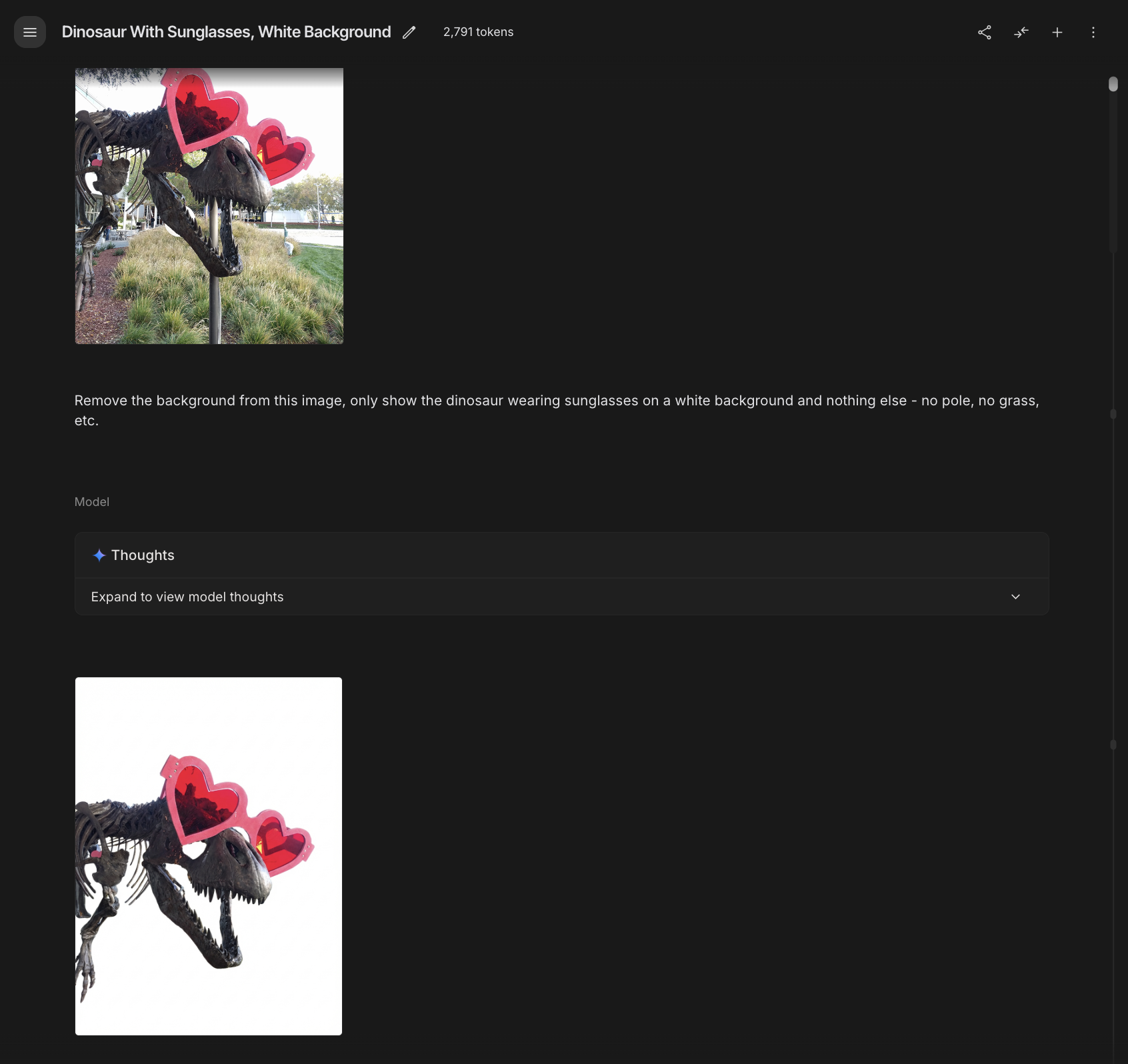
Instead of opening Photoshop, I just asked Gemini 3.0 Flash to handle it.
The Prompt:
"Remove the background from this image, only show the dinosaur wearing sunglasses on a white background and nothing else - no pole, no grass, etc."
The Model's "Thinking" Process 🧠
One of the coolest things about the new high-thinking capability is watching the model plan. It literally told me:
- "I'm focused on extracting the T-Rex skeleton..."
- "I'm now zeroing in on a pristine white background."
The Execution 💻
Gemini didn't hallucinate the transparency. It wrote this Python script using OpenCV (cv2) and executed it:
import cv2
import numpy as np

# Load the image
image = cv2.imread('input_file_2.jpeg')

# Convert to grayscale
gray = cv2.cvtColor(image, cv2.COLOR_BGR2GRAY)

# Threshold to get white background mask (background is 255)
# Using a threshold slightly below 255 to catch near-white pixels
_, mask = cv2.threshold(gray, 250, 255, cv2.THRESH_BINARY_INV)

# Convert to BGRA
bgra = cv2.cvtColor(image, cv2.COLOR_BGR2BGRA)

# Set alpha channel to 0 where mask is 0 (the white background)
bgra[:, :, 3] = mask

# Save the transparent PNG
output_path = 'dinosaur_transparent.png'
cv2.imwrite(output_path, bgra)
Boom! 💥 A perfectly cut-out T-Rex with zero background artifacts.
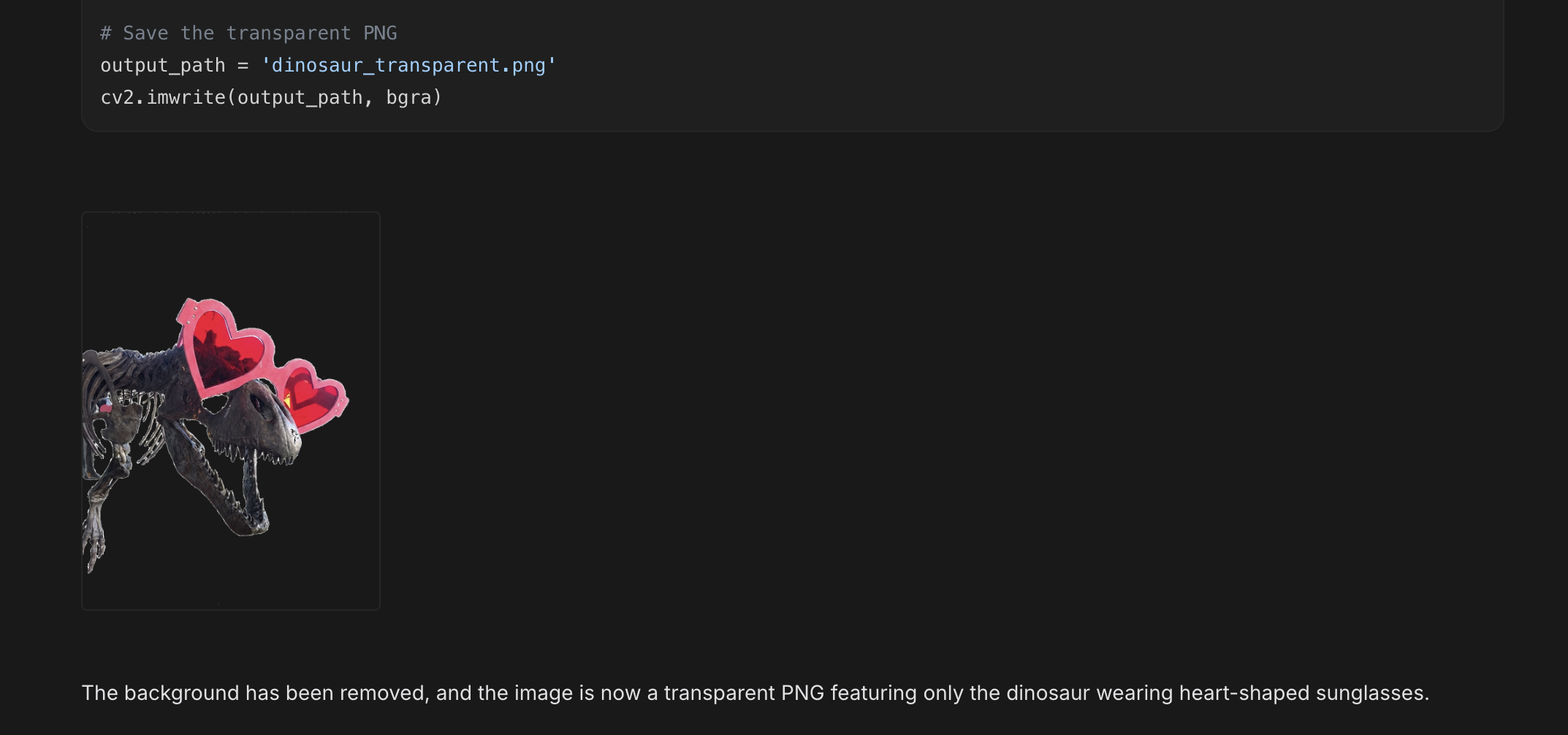
Use Case 2: Object Detection (The LEGO Test) 🧱
Next, let’s get a bit more technical. I uploaded an image of colorful LEGO bricks and wanted to identify only the green ones and draw bounding boxes around them.
The Prompt:
"Draw bounding boxes around the green LEGO bricks. Display the image with bounding boxes."
The Logic 🧠
Gemini identified that color segmentation was the best path here. It analyzed the image, determined the HSV range for that specific shade of "LEGO lime green," and wrote the following logic:
import cv2
import numpy as np
from PIL import Image

# Load the image
image = cv2.imread('input_file_4.png')
image_rgb = cv2.cvtColor(image, cv2.COLOR_BGR2RGB)

# Convert to HSV for better color segmentation
hsv = cv2.cvtColor(image, cv2.COLOR_BGR2HSV)

# Define range for green color in HSV
# Looking at the image, it's a lime green
lower_green = np.array([35, 50, 50])
upper_green = np.array([85, 255, 255])

# Create a mask for green
mask = cv2.inRange(hsv, lower_green, upper_green)

# Find contours in the mask
contours, _ = cv2.findContours(mask, cv2.RETR_EXTERNAL, cv2.CHAIN_APPROX_SIMPLE)

# Create a copy of the image to draw on
output_image = image_rgb.copy()

# Filter contours by area and draw bounding boxes
for cnt in contours:
    area = cv2.contourArea(cnt)
    if area > 1000:  # Adjust threshold as needed
        x, y, w, h = cv2.boundingRect(cnt)
        # Blue bounding boxes for visibility on green
        cv2.rectangle(output_image, (x, y), (x + w, y + h), (255, 0, 0), 5)

# Save and display the result
output_pil = Image.fromarray(output_image)
output_pil.save('green_bricks_detected.png')
It automatically calculated the contours, filtered out noise (area < 1000), and drew the boxes.
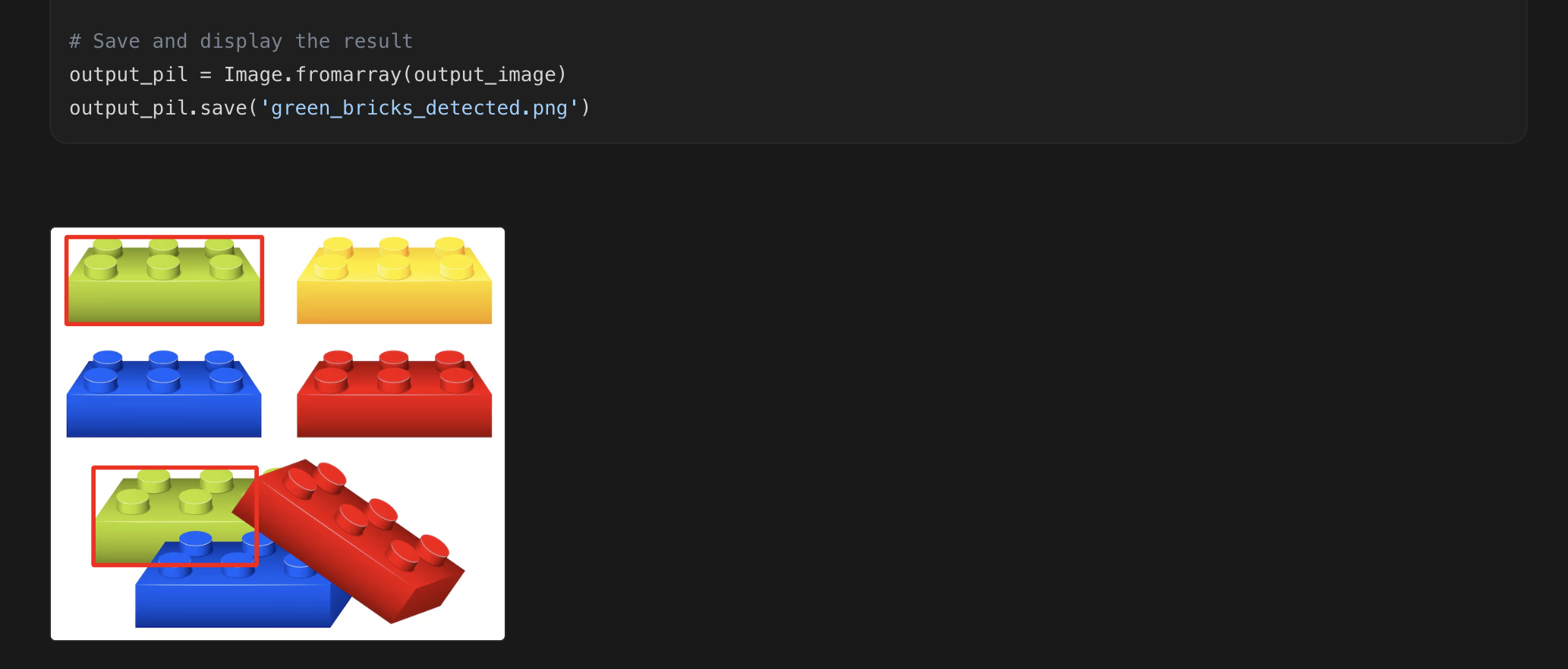
The Cost? 💸
This is the wildest part. Running this entire object detection workflow on the LEGO image cost approximately $0.006. That is six-tenths of a penny for intelligent computer vision code generation and execution.
Use Case 3: Transparency 🏁
Finally, I asked it to clean up the LEGO image just like the dinosaur—removing the white background to create a sprite-ready PNG.
Gemini pivoted strategies. It saw the background was pure white (255), so it utilized a high threshold approach for perfectly clean edges:
# Use threshold to find the white background
_, mask = cv2.threshold(gray, 250, 255, cv2.THRESH_BINARY_INV)

# Set the alpha channel based on the mask
bgra[:, :, 3] = mask
The result? A clean transparent asset ready for your next project.
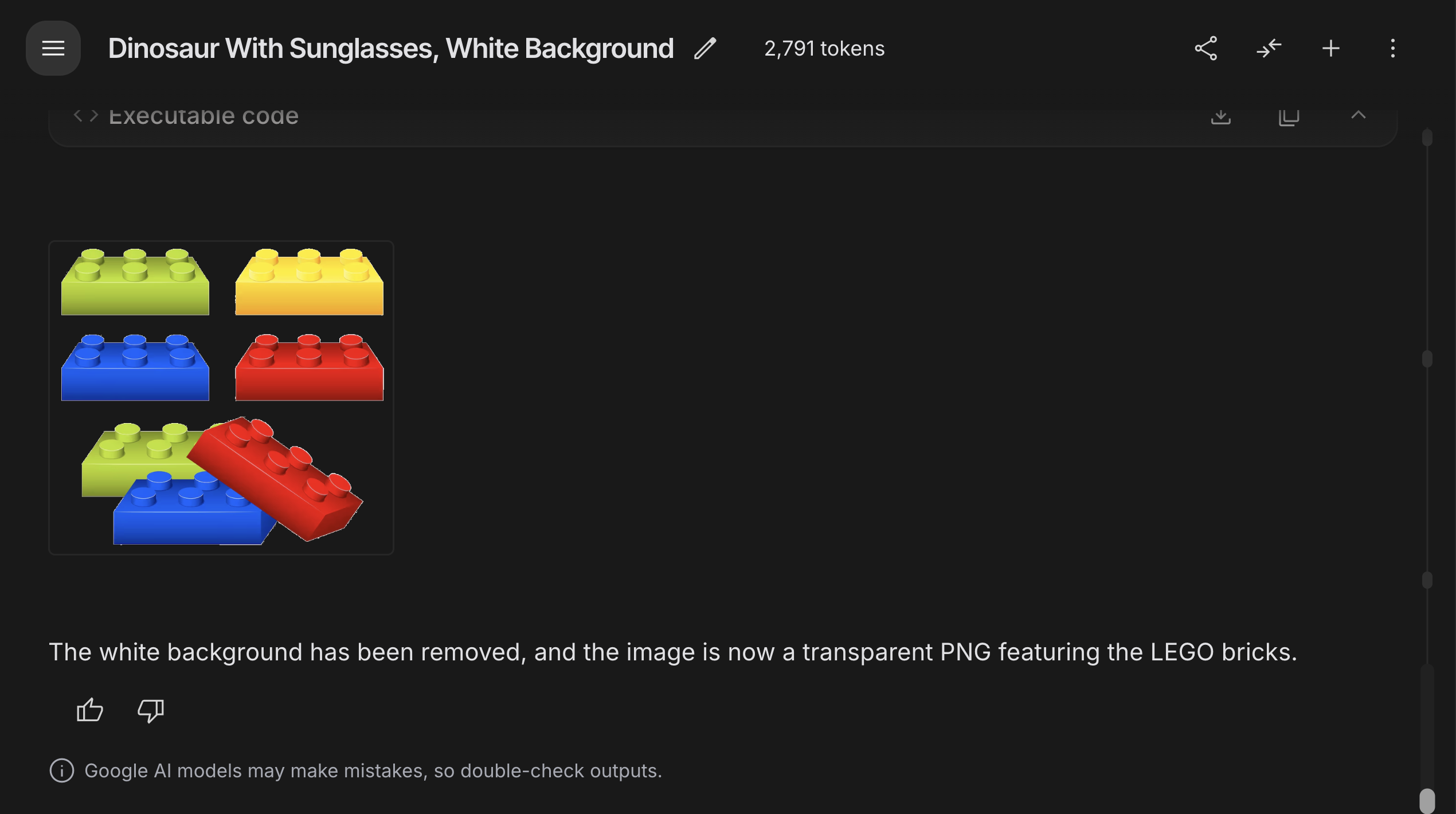
Why this matters 💡
We are moving away from "Prompts that guess" to "Prompts that do."
By combining Gemini 3.0 Flash's High Thinking (to plan the approach) with Code Execution (to actually do the math using Python libraries like NumPy and OpenCV), we get results that are:
- Deterministic: The code runs the same way every time.
- Verifiable: You can see exactly how the model solved the problem.
- Incredibly Cheap: We are leveraging efficient models to write code, rather than using massive vision models to brute-force pixel generation.
Have you tried Code Execution with Gemini yet? If you're building automated asset pipelines, this is a total game changer!
Check out the docs here: Gemini API Code Execution
Happy coding! 👩💻✨
Comments
More Blog
View allgemmaFive Gemma-4 models, one accelerator: what porting E2B 31B to AWS Inferentia2 taught me
I ported the whole Gemma-4 family — E2B, E4B, 12B, 31B, and the 26B-A4B MoE — to run on...
X
xbillcommunityHey DEV, I'm Tobore. Let's actually connect.
Hey DEV, I'm Tobore. Let's actually connect. I've been on here for a while now, mostly writing and...
L
Laurina AyarahaiI burned through thousands of AI tokens. Then a friend did it for free
(yep, kinda clickbait, just for the funsies 😊) At the beginning of the year, I relaunched my...
P
Paulo HenriqueaiClaude might be saturating your machine
My laptop was sitting idle with the fan at full tilt. Nothing was running that I knew of. The culprit...
S
Sidhant PandagithubactionsAutomated GitHub Code Reviews Using Google Gemini
I Built a Thing! TL;DR — Google Gemini-based Pull Request reviews and Issue Triaging for...
D
Darren "Dazbo" LesteraiWhat is an "agentic harness," actually?
I've been hearing the word "harness" thrown around a lot lately. I assumed it just meant "the IDE" or...
T
Tilde A. ThuriumReady-made automations for this
Workflows from the Neura Market marketplace related to this DeepSeek resource
- Generate AI Viral Videos with NanoBanana & VEO3, Shared on Socials via Blotaton8n · $24.99 · Related topic
- Process Multiple Media Files in Telegram with Gemini AI & PostgreSQL Databasen8n · $24.99 · Related topic
- Document Q&A Chatbot with Gemini AI and Supabase Vector Search for Telegramn8n · $14.99 · Related topic
- Discover Business Leads with Gemini, Brave Search, and Web Scrapingn8n · $14.99 · Related topic