
Back to Blog claudecode
 gemma
gemma community
 ai
ai ai
ai githubactions
 ai
ai
Building a Local GitHub-style Review Interface for Claude Code Plans
Eduard Maghakyan March 4, 2026
0 views
GitHub PR Review UI for Claude Code Plans
title: Building a Local GitHub-style Review Interface for Claude Code Plans published: true description: GitHub PR Review UI for Claude Code Plans tags: #claudecode #ai #programming
Use a ratio of 100:42 for best results.
published_at: 2026-03-03 23:54 +0000
Plan mode in Claude Code feels like reviewing a pull request with no comments, no diff, and no history.
Claude thinks for a moment (well much longer than a "moment"), then dumps a wall of text into your terminal - It then asks for approval with many variations of "Yes, ...."
Then I open the Markdown file, start taking notes while reading through it. After doing this for a while I felt there should be a better way.
So I built IPE.
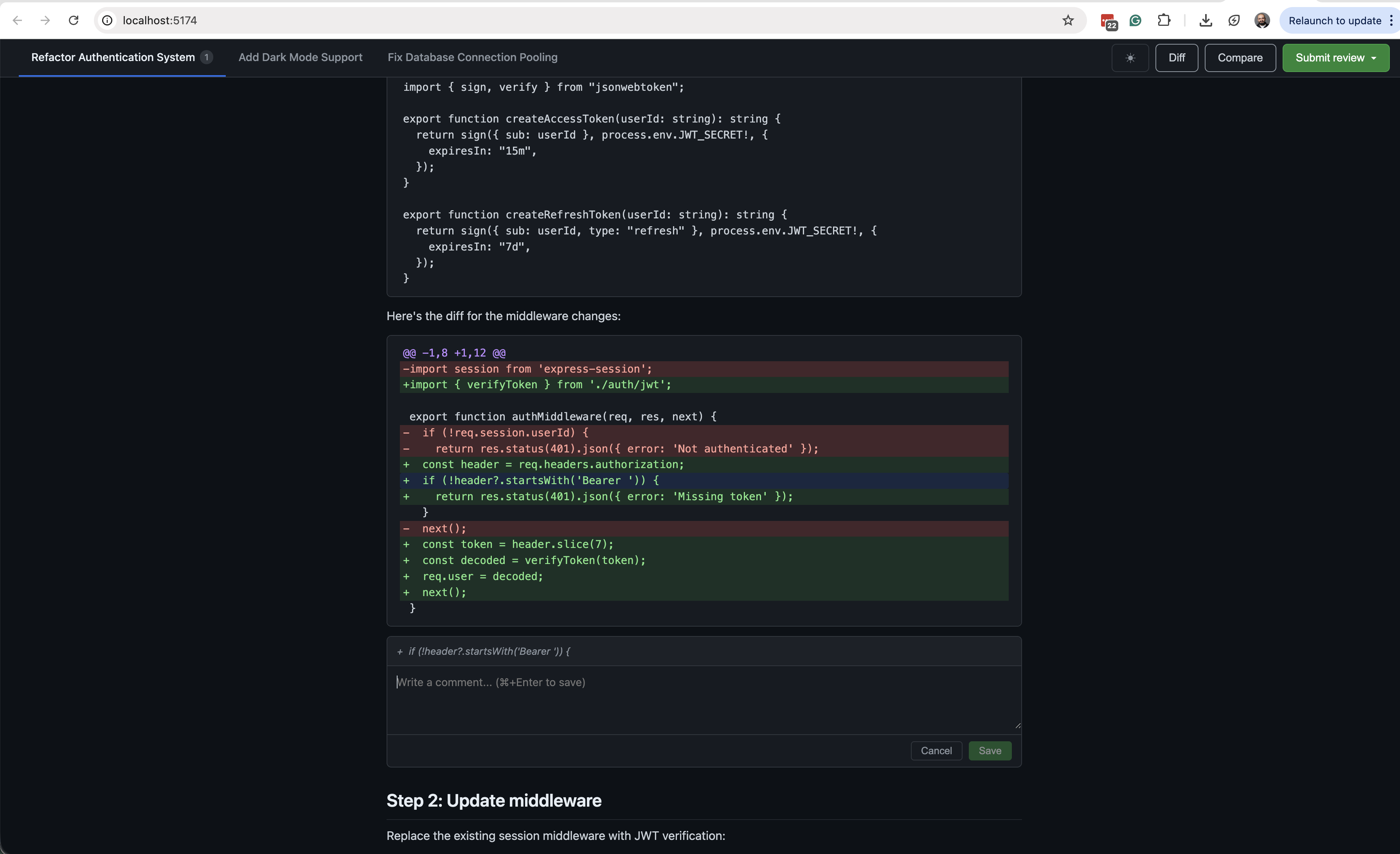
What is IPE?
IPE intercepts Claude Code's ExitPlanMode hook and opens a browser tab showing the plan in a GitHub-style code review interface. You can:
- Add inline comments on any block or text selection — just like leaving a review comment on a PR
- Click any file reference (e.g.
`src/index.ts`) to pop open a syntax-highlighted side drawer showing the actual file contents - Compare plan versions side-by-side when Claude revises after your feedback
- Switch between sessions if you're running multiple Claude Code instances at once
- Approve or request changes — clicking "Request Changes" bundles your inline comments and sends them back to Claude
The Problems I wanted to fix
You can't annotate. If step 3 looks wrong and step 8 is fine but needs a tweak, you're writing one blob of feedback hoping Claude parses it all correctly.
You lose context across revisions. Claude revises the plan based on your feedback - but there's no diff. Did it actually address your concern? You're re-reading the whole thing from scratch.
How It Works
IPE registers itself as a Claude Code hook on PermissionRequest with the ExitPlanMode matcher. When Claude finishes planning and tries to proceed, the hook fires.
The binary spins up a local HTTP server, opens your browser, and blocks - Claude is sitting there waiting for your response. You review at your own pace (the timeout is 4 days, so no rush). When you approve or request changes, the server sends the response back to the hook and the browser tab closes automatically.
The whole thing is a self-contained binary built with Bun.
Install in One Line
macOS / Linux:
curl -fsSL https://raw.githubusercontent.com/eduardmaghakyan/ipe/main/install.sh | bash
Windows (PowerShell):
irm https://raw.githubusercontent.com/eduardmaghakyan/ipe/main/install.ps1 | iex
That's it. The script downloads the binary and registers the hook in your Claude Code settings automatically. Run it again to update.
Verify it's wired up by running /hooks inside Claude Code — you should see the ExitPlanMode hook listed.
The Workflow in Practice
- Work with Claude Code as normal
- Claude generates a plan and calls
ExitPlanMode - Your browser opens with the plan displayed
- Read through it, click file references to inspect code, leave inline comments where needed
- Hit Accept → Claude proceeds
- Hit Request Changes → your comments go back to Claude, it revises, you review the diff
Try It Out
The project is open source: github.com/EduardMaghakyan/ipe
If you use Claude Code in plan mode regularly, give it a spin and let me know what you think. Issues and PRs welcome - there's a lot of room to grow this (comment threads, keyboard shortcuts, plan history persistence...).
Comments
More Blog
View allgemmaFive Gemma-4 models, one accelerator: what porting E2B 31B to AWS Inferentia2 taught me
I ported the whole Gemma-4 family — E2B, E4B, 12B, 31B, and the 26B-A4B MoE — to run on...
X
xbillcommunityHey DEV, I'm Tobore. Let's actually connect.
Hey DEV, I'm Tobore. Let's actually connect. I've been on here for a while now, mostly writing and...
L
Laurina AyarahaiI burned through thousands of AI tokens. Then a friend did it for free
(yep, kinda clickbait, just for the funsies 😊) At the beginning of the year, I relaunched my...
P
Paulo HenriqueaiClaude might be saturating your machine
My laptop was sitting idle with the fan at full tilt. Nothing was running that I knew of. The culprit...
S
Sidhant PandagithubactionsAutomated GitHub Code Reviews Using Google Gemini
I Built a Thing! TL;DR — Google Gemini-based Pull Request reviews and Issue Triaging for...
D
Darren "Dazbo" LesteraiWhat is an "agentic harness," actually?
I've been hearing the word "harness" thrown around a lot lately. I assumed it just meant "the IDE" or...
T
Tilde A. ThuriumReady-made automations for this
Workflows from the Neura Market marketplace related to this DeepSeek resource
- Deploy Code to GitHub with Natural Language via Slack & Claude 3.5n8n · $14.99 · Related topic
- PostgreSQL Conversational Agent with Claude & DeepSeek (Multi-KPI, Secure)n8n · $14.99 · Related topic
- Automate Blog Content Creation with Notion MCP, DeepSeek AI, and WordPressn8n · $9.99 · Related topic
- Automate Blog Updates via Discord with GitHub and Gemini AIn8n · $9.99 · Related topic