
Back to Blog aws
aws
 gemma
gemma community
 ai
ai ai
ai githubactions
 ai
ai
Securing CI/CD Access to AWS
Warren Parad March 4, 2026
0 views
I've seen a lot of complex tooling in my experience, but by far the worst case is designing just one...
title: Securing CI/CD Access to AWS published: true date: 2026-03-03 00:00:00 UTC tags: aws, gitlab, github, cicd cover_image: https://dev-to-uploads.s3.amazonaws.com/uploads/articles/szy1mhwalprqc3o3jt15.png canonical_url: https://authress.io/knowledge-base/articles/2026/03/03/securing-aws-accounts-access
I've seen a lot of complex tooling in my experience, but by far the worst case is designing just one more tool to do something. Especially in the age where software is free, we become burdened by just one more tool. We know at Authress that increased complexity => increased failure rate.
The solution is to utilize the tools we already have, just a little bit better. In this case — "just a little bit better" — is adding a trivial amount to your existing AWS built-in technologies, and doing it in a way that you won't even need to add extra management overhead.
For help understanding this article or how you can implement auth
 and similar security architectures in your services, feel free to
reach out to us via the community server.
{% cta https://authress.io/community %} Join the community {% endcta %}
❌ The Wrong Way
There are lots of ways this could have gone wrong. In fact, if you ask any of the "Reasoning LLMs", and are unlucky enough not be told IDK , you will find out things like:
- Deploy a Lambda Function to every account is the right option - Don't do that.
- List all the accounts in a CFN template mapping - You will run out of template space, you are limited, especially if you have more than a couple of AWS Accounts or GitHub/GitLab accounts. Often requires a complex
Fn::Or, chunked chain to fit it in the template in the first place. Assuming you don't hit the 200 key mapping limit. - Using a CloudFormation Parameter - You aren't going to know the AWS Account up front any way, I don't even know how this was going to work, assuming you don't have the 4096 character limit for parameter values.
- Creating a CloudFormation Macro - And for a moment a Macro sounds like a good answer, until you realize that OU Stack Sets aren't allowed to use Transforms which are required.
- Using a CFN Module - I'm actually surprised none of the LLMs came up with this solution, but the problem is that it will still deploy a lambda function into every account.
At least the lambda function in every account would work, but it isn't clean, you'll get a lambda in every account, and potentially also region, which comes with at least one IAM role, a CloudWatch Logs Group, and who knows what else.
Someone out there is probably saying "Why aren't you using OpenTofu for that", I'll leave that as a challenge for the reader to answer.
The Complete Design
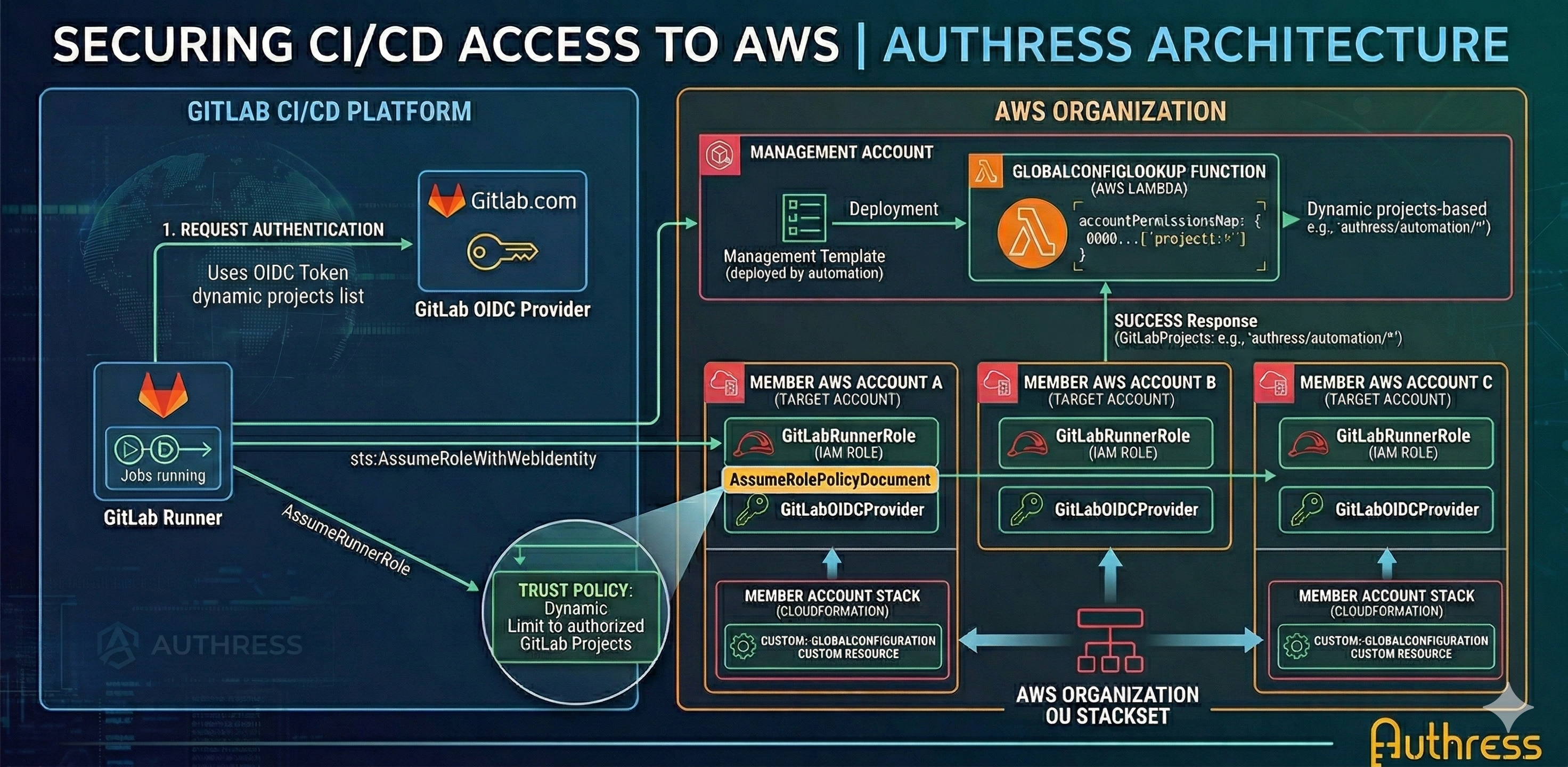
The design is quite straightforward.
- Deploy a Lambda Function to the AWS Management Account which contains the list of permissions for each account.
- Deploy an OU StackSet which uses a Custom Resource to call the lambda function in the management account, to fetch the list.
- The list is persisted in a GitLab assumable IAM Role
- GitLab assumes the role at deployment
🔒 AWS Account Permissions Lambda Function
Let's do the easy part first. Of course we want to define the permissions somewhere. Since we are using GitLab, what we actually want to do is define for each AWS account, which GitLab projects (and their branches can be used to access that AWS account). At the top here, we'll define the permissions. And at the bottom, we'll receive the account ID from the caller and use that pull the correct permissions out of the map.
Permissioning Lambda Function
const accountPermissionsMap = {
  000000000000: ['project_path:authress/automation/*:ref_type:*:ref:*']
  111111111111: ['project_path:side-projects/*:ref_type:*:ref:*']
};

const sendResponse = (event, context, status, data, reason) => {
  const body = JSON.stringify({
      Status: status,
      Reason: reason || '',
      PhysicalResourceId: context.logStreamName,
      StackId: event.StackId,
      RequestId: event.RequestId,
      LogicalResourceId: event.LogicalResourceId,
      Data: data
  });

  return await fetch(event.ResponseURL, {
    method: "PUT",
    headers: {
    "Content-Type": "", 'Content-Length': body.length },
    body });
};

exports.handler = async (event, context) => {
  if (event.RequestType === 'Delete') {
    return sendResponse(event, context, 'SUCCESS', {});
  }

  try {
    const accountId = event.ResourceProperties.AccountId;
    const permissions = accountPermissionsMap[accountId] || [];
    return sendResponse(event, context, 'SUCCESS', {
      GitLabProjects: permissions.join(',')
    });
  } catch (err) {
    console.error('Event:', JSON.stringify(event),
      'Error:', err);
    return sendResponse(event, context, 'FAILED', {},
      err.message);
  }
};
🟢 Deploying the Lambda Function
Management Account: CloudFormation Template
// First load the lambda function from the lambda function const handlerCode = await fs.readFile(path.join(__dirname, './fetchPermissionsLambdaFunction.js'), 'utf8');

return {
  AWSTemplateFormatVersion: '2010-09-09',
  Parameters: {
    OrganizationId: {
      Type: 'String',
      Description: 'The organization'
    }
  },
  Resources: {
    GlobalConfigLookupRole: {
      Type: 'AWS::IAM::Role',
      Properties: {
        RoleName: 'OU-StackSet-GlobalConfigLookup',
        AssumeRolePolicyDocument: {
          Version: '2012-10-17',
          Statement: [
            {
              Effect: 'Allow',
              Principal: {
                Service: 'lambda.amazonaws.com' },
              Action: 'sts:AssumeRole'
            }
          ]
        },
        ManagedPolicyArns:
          ['arn:aws:iam::aws:policy/service-role/
           AWSLambdaBasicExecutionRole']
      }
    },
    GlobalConfigLookupLogGroup: {
      Type: 'AWS::Logs::LogGroup',
      Properties: {
        LogGroupName: '/aws/lambda/OU-StackSet-GlobalConfigLookup',
        RetentionInDays: 30
      }
    },

    GlobalConfigLookupFunction: {
      Type: 'AWS::Lambda::Function',
      Properties: {
        FunctionName: 'OU-StackSet-GlobalConfigLookup',
        Runtime: 'nodejs24.x',
        Handler: 'index.handler',
        Role: { 'Fn::GetAtt': [
          'GlobalConfigLookupRole', 'Arn'] },
        MemorySize: 1769,
        Timeout: 30,
        Code: {
          ZipFile: handlerCode
        },
        LoggingConfig: {
          LogFormat: 'Text',
          LogGroup: { Ref: 'GlobalConfigLookupLogGroup' }
        }
      }
    },
    GlobalConfigLambdaPermission: {
      Type: 'AWS::Lambda::Permission',
      Properties: {
        FunctionName: {
          Ref: 'GlobalConfigLookupFunction' },
        Action: 'lambda:InvokeFunction',
        Principal: '*',
        PrincipalOrgID: { Ref: 'OrganizationId' }
      }
    }
  },
  Outputs: {
    GlobalConfigLookupFunction: {
      Value: {
        'Fn::GetAtt': ['GlobalConfigLookupFunction', 'Arn']
      },
      Export: {
        Name: 'GlobalConfigLookupLambdaArn'
      }
    }
  }
}
▶️ Utilize the Lambda Function
Then we update the member stack to utilize this lambda function, and create the correct IAM Role.
OU StackSet Member Account: CloudFormation Template
{
  // Pull the values in the Lambda Function
  GlobalConfiguration: {
    Type: 'Custom::GlobalConfiguration',
    Properties: {
      ServiceToken: { Ref: 'globalConfigurationLambdaArn' },
      AccountId: { Ref: 'AWS::AccountId' }
    }
  },

  // The IAM Role for GitHub to utilize
  GitLabRunnerRole: {
    Type: 'AWS::IAM::Role',
    Properties: {
      RoleName: { 'Fn::Sub': 'GitLabRunnerRole' },
      MaxSessionDuration: 3600,
      AssumeRolePolicyDocument: {
        Version: '2012-10-17',
        Statement: [{
          Effect: 'Allow',
          Principal: {
            Federated: { 'Fn::Sub':
    'arn:aws:iam::${AWS::AccountId}:oidc-provider/gitlab.com' }
          },
          Action: 'sts:AssumeRoleWithWebIdentity',
          Condition: {
            StringEquals: {
    'gitlab.com:aud': 'https://gitlab.com' },
            StringLike: {
              'gitlab.com:sub': {
                'Fn::Split':
[',', { 'Fn::GetAtt': ['GlobalConfiguration', 'GitLabProjects'] }]
              }
            }
          }
        }]
      }
    }
  },

  // Then register the GitLab OIDC Provider to
  //   allow GitLab to actually assume the role
  GitLabOIDCProvider: {
    Type: 'AWS::IAM::OIDCProvider',
    Properties: {
      ClientIdList: ['https://gitlab.com'],
      Url: 'https://gitlab.com'
    }
  },
  // ...
}
🏁 Run the Deployment
One hidden piece of information that might not be so obvious is how we are going to actually deploy that Member Account CloudFormation Template to all the AWS accounts we have in our AWS Organization. For that, we use an AWS Organization OU Stack Set. The stack set automatically deploys the template for every AWS account in the OU, for every region.
Deploy OU StackSet
import { OrganizationsClient, DescribeOrganizationCommand }
    from '@aws-sdk/client-organizations';
import AwsArchitect from 'aws-architect';

const client = new OrganizationsClient({ region: 'us-east-1' });
const { Organization } = await client.send(
  new DescribeOrganizationCommand({}));
const parameters = { organizationId: Organization.Id };

const awsArchitect = new AwsArchitect(packageMetadata, {});
const deploymentResult = await
  awsArchitect.deployTemplate(globalConfigurationTemplate,
    stackConfiguration,
    parameters);

const GlobalConfigurationLambdaArn =
  deploymentResult.Outputs.find(o =>
    o.ExportName === 'GlobalConfigLookupLambdaArn')
    .OutputValue;
const memberParameters = {  GlobalConfigurationLambdaArn  };
await awsArchitect.configureStackSetForAwsOrganization(
  memberAccountTemplate,
  orgStackConfiguration,
  memberParameters);
And the best part of this is that the lambda function is extensible, so you can include a full configuration in S3 or anything else that you might want to persist in the management account's git repository.
For help understanding this article or how you can implement auth
 and similar security architectures in your services, feel free to
reach out to us via the community server.
{% cta https://authress.io/community %} Join the community {% endcta %}
Comments
More Blog
View allgemmaFive Gemma-4 models, one accelerator: what porting E2B 31B to AWS Inferentia2 taught me
I ported the whole Gemma-4 family — E2B, E4B, 12B, 31B, and the 26B-A4B MoE — to run on...
X
xbillcommunityHey DEV, I'm Tobore. Let's actually connect.
Hey DEV, I'm Tobore. Let's actually connect. I've been on here for a while now, mostly writing and...
L
Laurina AyarahaiI burned through thousands of AI tokens. Then a friend did it for free
(yep, kinda clickbait, just for the funsies 😊) At the beginning of the year, I relaunched my...
P
Paulo HenriqueaiClaude might be saturating your machine
My laptop was sitting idle with the fan at full tilt. Nothing was running that I knew of. The culprit...
S
Sidhant PandagithubactionsAutomated GitHub Code Reviews Using Google Gemini
I Built a Thing! TL;DR — Google Gemini-based Pull Request reviews and Issue Triaging for...
D
Darren "Dazbo" LesteraiWhat is an "agentic harness," actually?
I've been hearing the word "harness" thrown around a lot lately. I assumed it just meant "the IDE" or...
T
Tilde A. ThuriumReady-made automations for this
Workflows from the Neura Market marketplace related to this DeepSeek resource
- Automate Blog Content Creation with Notion MCP, DeepSeek AI, and WordPressn8n · $9.99 · Related topic
- Generate AI Videos from Scripts with DeepSeek, Synthesia, and Together.ain8n · $24.99 · Related topic
- Compare Multi-Period Financial Data from Google Sheets with DeepSeek AI Analysisn8n · $14.99 · Related topic
- PostgreSQL Conversational Agent with Claude & DeepSeek (Multi-KPI, Secure)n8n · $14.99 · Related topic