
Back to Blog devchallenge
 ai
ai ai
ai ai
ai go
go playwright
 cli
cli
Full Circle: Giving My AI's Knowledge Graph a Notion Interface using MCP
Juan David Gómez March 17, 2026
0 views
This is a submission for the Notion MCP Challenge When I started building AI tools for my wife, it...
*This is a submission for the [Notion MCP Challenge](https://dev.to/challenges/notion-2026-03-04)*
When I started building AI tools for my wife, it was because she had outgrown Notion.
She uses LLMs as a life coach, therapist, and sounding board. To give the AI context, she maintained a massive 35,000-token "Master Prompt" in a Notion page detailing her life, medical history, and goals. She had to manually copy-paste this wall of text into every new chat.
To automate this, I built [**Synapse**](https://synapse-chat.juandago.dev/), a system that replaces that manual prompt with a Temporal Knowledge Graph (Neo4j + Graphiti). As she chats, the AI quietly extracts entities and relationships in the background, building a continuous memory.
It worked perfectly. But then I hit a UX wall.
I built a visualizer of the actual knowledge graph so she could explore her AI's memory. I thought it was beautiful. To me, it was fascinating to watch the graph grow and see new connections form over time. But to her, it was just overwhelming. The sheer amount of nodes and floating edges was too much to process, so she ended up completely ignoring that section of the app.
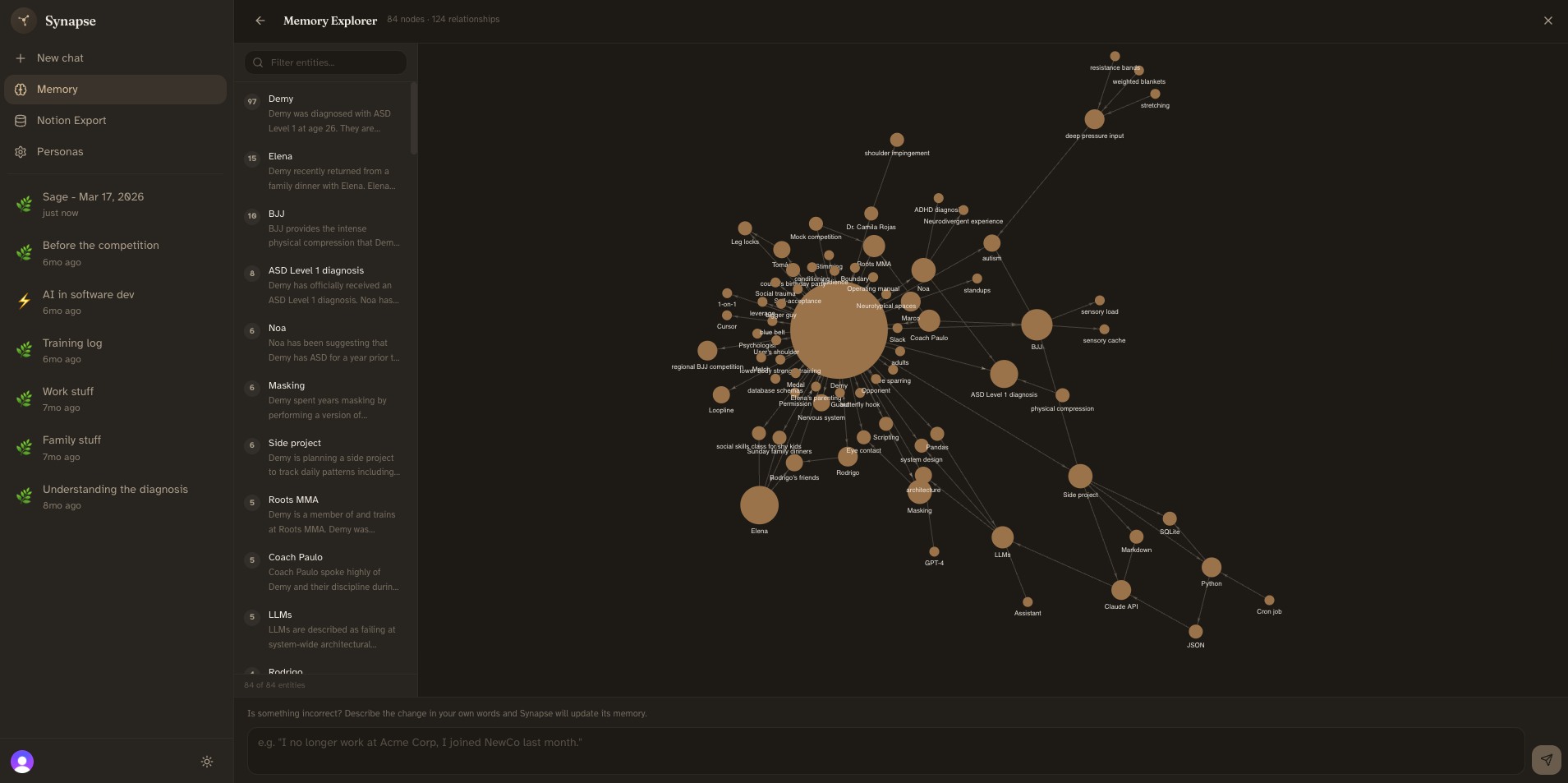
It turns out that while the *concept* of a graph is great for understanding relationships, navigating a massive raw graph view is for machines, not humans. She missed Notion. She missed structured tables, clear properties, and the simple ability to just click and type to fix a mistake.
So, I brought the project full circle. I used the new Notion MCP to turn Notion back into the ultimate Human-Machine interface for her AI's brain.
## What I Built
I built a **bidirectional, human-in-the-loop sync** between a Neo4j Knowledge Graph and Notion.
This isn't just a one-way "AI appending text to a page" script. It is a dynamic two-way pipeline:
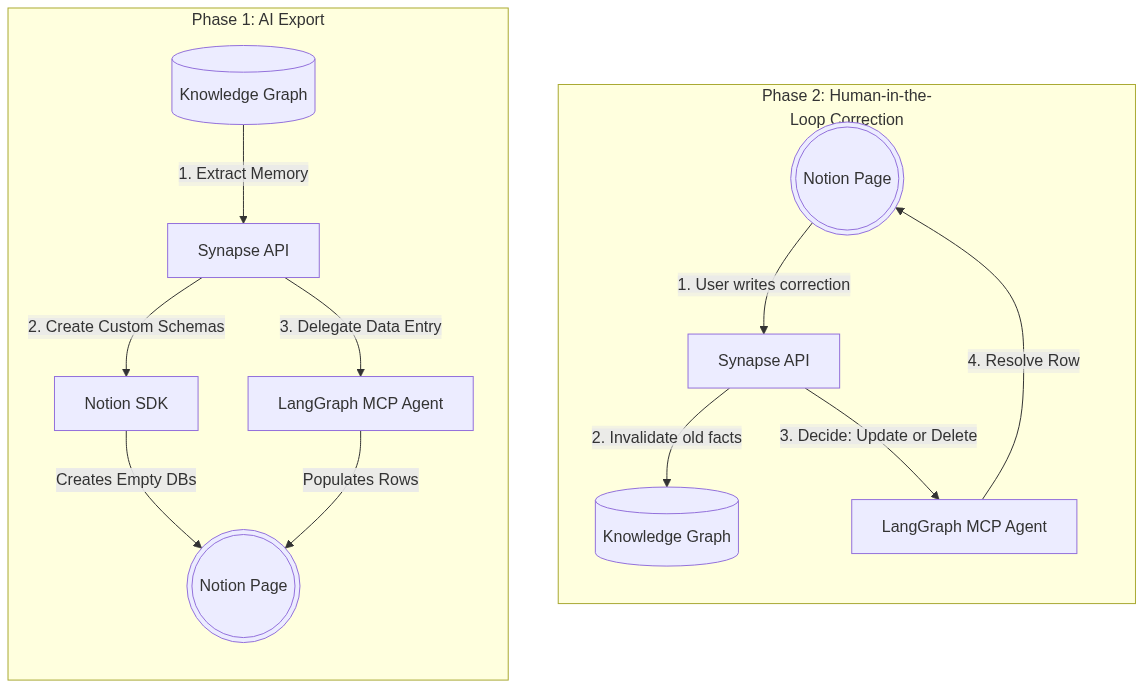
1. **The Export (AI Designs the UI):** Instead of using hardcoded Notion templates, Synapse compiles the user's graph and asks Gemini to *design* a custom database schema. If the user talks a lot about their health, the AI creates a "Medications" database with "Active/Suspended" select tags. If they talk about code, it creates a "Projects" database with tech stacks. No two exports look the same.
2. **The Import (Human-in-the-Loop):** AI memory systems hallucinate. To fix this, every AI-generated Notion database gets a `Needs Review` checkbox and a `Correction Notes` column. If the AI misunderstood something, my wife just checks the box, types the correction in Notion, and hits sync. The system updates the Knowledge Graph (invalidating the old facts) and automatically patches the Notion row.
## Video Demo
{% embed https://youtu.be/AXeioxrrht0?si=9hbHowjAqF8pGGv6 %}
## Show us the code
The entire architecture is open source:
* **Backend (Synapse Cortex):** https://github.com/juandastic/synapse-cortex
* **Frontend (Synapse Chat):** https://github.com/juandastic/synapse-chat-ai
{% embed https://github.com/juandastic/synapse-cortex %}
However, to see the actual backend code that implements the Notion integration, you can check the [Export feature commit](https://github.com/juandastic/synapse-cortex/commit/7e61868c8e27b180f0e83ea18e13784d5266a8ab) and the [Correction commit](https://github.com/juandastic/synapse-cortex/commit/66cee1fdd48a55136af3b0e503b523e724e1e831).
The [UI work](https://github.com/juandastic/synapse-chat-ai/commit/926d68050807d64bd3d5fecba9082d7bf199345e) here was minimal since Notion will be the actual UI, but I decided to have a simple interface to set the Notion config (for simplicity, I did not implement a full OAuth flow) and trigger the export and sync corrections
## How I Used Notion MCP
Integrating AI with rigid APIs is usually a nightmare of mapping schemas, formatting JSON, and handling edge cases. MCP fundamentally changes this. I no longer write rigid ETL pipelines; I just give tools to reasoning engines.
### 1. SDK for Structure, MCP for Intelligence
I split my architecture into two phases.
First, I use the standard Notion SDK to create the empty databases. This is a rigid, structural operation.
Second, I use the `@notionhq/notion-mcp-server` combined with **LangGraph** (a ReAct agent) to actually populate the data and process corrections.
When a row is flagged for correction, I don't write complex if/else logic to figure out how to update Notion. I just pass the user's correction and the updated graph data to the LangGraph agent equipped with the Notion MCP tools. **The agent autonomously decides** whether to use `API-patch-page` (to update the specific properties) or `API-delete-block` (if the fact is completely invalidated and the row should be archived).
### 2. The Engineering Deep Dive: Node.js in a Python World
My backend is written in Python (FastAPI). The official Notion MCP server is written in Node.js.
Because Synapse is a multi-tenant system (each user has their own independent Notion OAuth token), I couldn't just leave a single global MCP server running. I needed a way to securely isolate connections and ensure low latency between my Python agent and the MCP tools.
I decided to run the official Node.js MCP server as a **subprocess (`stdio`)** directly inside my FastAPI backend.
This created some fun lifecycle management challenges:
1. **Docker adjustments:** I had to modify my Python `Dockerfile` to install Node.js so the environment could execute `npx @notionhq/notion-mcp-server`.
2. **Context Management:** I built an asynchronous context manager (`_NotionAgentContext`) in Python. When an export or correction job starts, it spins up the Node subprocess, passes the specific user's `NOTION_TOKEN` securely via environment variables, initializes the LangGraph agent, processes the batches of data, and gracefully shuts down the subprocess when the job is done.
```python
class _NotionAgentContext:
async def __aenter__(self):
# 1. Start the Node.js MCP subprocess via stdio
self._stdio_cm = stdio_client(server_params)
read, write = await self._stdio_cm.__aenter__()
# 2. Initialize session and load Notion tools
self._session_cm = ClientSession(read, write)
session = await self._session_cm.__aenter__()
await session.initialize()
tools = await load_mcp_tools(session)
# 3. Return a LangGraph autonomous agent equipped with Notion MCP
return create_react_agent(llm, tools)
async def __aexit__(self, exc_type, exc_val, exc_tb):
# Gracefully shut down the subprocess to prevent zombie Node processes
await self._session_cm.__aexit__(exc_type, exc_val, exc_tb)
await self._stdio_cm.__aexit__(exc_type, exc_val, exc_tb)
```
By running it via `stdio` instead of SSE, the communication between the LangGraph reasoning loop and the Notion MCP server is lightning fast, localized, and securely scoped to the current user's job.
Notion MCP allowed me to stop writing fragile API wrappers and focus on what actually matters: building a system that lets a human seamlessly collaborate with their AI's memory.
## Conclusion
This project has been incredibly rewarding. My wife absolutely loves the result; she finally has her AI's brain in a format she can actually read, organize, and correct without feeling overwhelmed.
I also have to acknowledge that this Notion MCP Challenge was perfectly timed. I already knew my graph visualizer wasn't working for her, but this contest provided the exact motivation and the right technology (MCP) to bring this bidirectional integration to life. It’s a great feeling when a new tool perfectly aligns with a real-world problem you are trying to solve.
If you are curious about the rest of the Synapse architecture—like why I chose Knowledge Graphs over standard Vector RAG, or how I handled the backend scaling challenges of processing massive context windows—you can check out my previous articles on my DEV profile.
Synapse is live in https://synapse-chat.juandago.dev/ if you want to check it out
Building software is fun, but seeing it come alive and solve actual problems for the people you care about is magical.
I'd love to hear your thoughts on this approach or how you are using MCP in your own projects. Let's continue the conversation on [X](https://x.com/juandastic) or connect on [LinkedIn](https://www.linkedin.com/in/juandastic/).
Comments
More Blog
View allaiHow I'm using ASTs and Gemini to solve the "Codebase Onboarding" problem 🧠
Hi everyone! 👋 I’m Tara, a Senior Software Engineer and Consultant. Over the years, I've jumped...
T
tworrellaiLocal AI Will Save Us All (The Math Says So, Trust Me)
Every few weeks a take goes viral in tech circles making the case for ditching cloud AI and running...
S
Sebastian SchürmannaiLost in the AI Hype, I Started Small
And it helped me get back into tech without drowning TL;DR at the end Coming back to...
R
Rohini GaonkargoBuilding a Replay-Tested Interactive Brokers Client in Go
I wanted an IBKR library that felt like Go and had testing I could trust. So I wrote one.
T
Thomas MarcelisplaywrightPlaywright in Pictures: Fully Parallel Mode
Playwright’s fullyParallel mode is often treated as a simple performance switch. In practice, it...
V
Vitaliy PotapovcliDesigning a CLI for Both Humans and Agents
Learn how Alpic designed its CLI for both human developers and AI agents — covering tradeoffs like polling, context windows, interactivity, and statelessness.
J
Julien Vallini