
Back to Blog webdev
 ai
ai ai
ai ai
ai go
go playwright
 cli
cli
I Tried Vite+ and Replaced My Entire Frontend Toolchain
Erik Hanchett March 19, 2026
0 views
If you're a frontend developer in 2026, you've probably had to deal with a lot of different tooling....
If you're a frontend developer in 2026, you've probably had to deal with a lot of different tooling. Package managers, linters, formatters, pre-commit hooks, test runners. The list goes on. And every team has opinions on which ones to use.
I've worked on apps where hours if not days went into tweaking, upgrading, and swapping out tooling. And the [bikeshedding](https://en.wikipedia.org/wiki/Law_of_triviality) when someone proposes something new in a meeting? Don't get me started. Earlier in my career I remember spending over an hour debating whether we should add Vitest or keep the old test runner. We ended up not changing anything.
That's why I really like [Vite+](https://viteplus.dev/). Vite+ is a unified toolchain that acts as an entrypoint for web development. It comes out of the team from [VoidZero](https://voidzero.dev/), the company founded by Evan You, the creator of Vite and Vue. You can think of it like a ShamWow for your toolchain. One tool that replaces your linter, formatter, test runner, bundler, and package manager all at once.
__I also made a full video walkthrough where I set up a Vue project from scratch, run into the Nuxt issues in real time, and show the formatting and testing in action. If you'd rather watch than read, check it out below!__
{% embed https://www.youtube.com/watch?v=2C1HkBrz5Wc %}
## Table of Contents
- [What's inside Vite+](#whats-inside-vite)
- [A few caveats](#a-few-caveats)
- [Getting started](#getting-started)
- [Creating your first app](#creating-your-first-app)
- [Important commands](#important-commands)
- [Checking and linting](#checking-and-linting)
- [Formatting](#formatting)
- [Testing](#testing)
- [Caching with vp run](#caching-with-vp-run)
- [Managing Node.js with vp env](#managing-nodejs-with-vp-env)
- [Conclusion](#conclusion)
## What's inside Vite+
Instead of having to worry about building, installing, adding every tool you need when building an app, and dealing with configurations in 10 different files, you can now rely on one Vite powered toolchain. In essence, Vite+ combines all of these tools into one.
* [Vite](https://vite.dev/) as your build tool, now even faster with [Vite 8](https://vite.dev/blog/announcing-vite8)
* [Vitest](https://vitest.dev/) for testing
* [Oxlint](https://oxc.rs/docs/guide/usage/linter.html) for linting, replacing ESLint
* [Oxfmt](https://oxc.rs/docs/guide/usage/formatter.html) for formatting, replacing Prettier and Biome
* [Rolldown](https://rolldown.rs/) for bundling, replacing ESBuild
* [tsdown](https://tsdown.dev/) for library bundling
* [Node.js](https://nodejs.org/) runtime and package manager built in
Since many of these tools are written in Rust, the performance gains are real. According to [VoidZero's announcement](https://voidzero.dev/posts/announcing-vite-plus-alpha), Oxlint runs 50 to 100x faster than ESLint, Oxfmt formats up to 30x faster than Prettier, and production builds with Vite 8 and Rolldown are 1.6x to 7.7x faster than Vite 7. I had to test this out in my own projects, and using the `vp check` command was finishing in under a second on fairly large code bases.
## A few caveats
While having everything in one tool helps, it does have some DX papercuts at this point. For example, while they do support most package managers (pnpm, npm, yarn), they are missing [bun](https://bun.sh/). There is also some more work to be done with the vite.config.ts on Nuxt and TanStack Start since the tooling for each aren't quite there yet. Nevertheless it's early days in Vite+, and it's still in alpha, so I'm sure the updates are happening soon.
I'd imagine if you are not sold on the Vite ecosystem, or using toolchains in general, this probably isn't the tool for you. I, like many other developers, have opinions, and often when I create apps I have very bespoke patterns I use. In my case, I use [`npm create vue@latest`](https://github.com/vuejs/create-vue) for every Vue app, and `npm create nuxt@latest` for Nuxt apps. The Vue scaffolder does let you opt into ESLint, Prettier, and Vitest during setup, which is nice. But each one gets its own config file, you still have to make sure they play well together, and things like pre-commit hooks are on you to wire up with husky or lint-staged. It adds up. I also have a very specific set of skills and markdown files I use with [Kiro](https://kiro.dev), to help me code.
With Vite+, all of that comes out of the box. One `vp create vue` and I have linting, formatting, testing, and pre-commit hooks ready to go in a single `vite.config.ts`. That's what sold me on it.
Let's take a look at how to set it up.
## Getting started
As described in the [Vite+](https://viteplus.dev/guide/) setup guide you can install it on your macOS/Linux with a simple curl command.
```bash
curl -fsSL https://vite.plus | bash
```
That should be it!
> During the install you'll be asked a few questions around how Vite+ should manage your global Node.js runtime and package manager. You can opt-out of this, and use `nvm` or whatever else you'd like. However, I actually think this is really nice feature. With Vite+ you can use the `vp env` command to switch between environments really easily.
From here you can either start creating apps, or migrate existing Vite apps over. I've only really tested the creating apps options, so we'll look at that. I have seen a few people using the `vp migrate` command to do migration. It seems to work OK, but still requires manual intervention. One cool thing from the [Vite+ announcement](https://voidzero.dev/posts/announcing-vite-plus-alpha) is that they provide a migration prompt you can paste directly into your AI coding agent. So if you're using [Kiro](https://kiro.dev) or [kiro-cli](https://kiro.dev/cli/), you could have it handle the migration for you and just review the changes after. Here's the prompt:
> **Migration prompt:** Migrate this project to Vite+. Run `vp help` to understand Vite+'s capabilities. Migrations can be run using `vp migrate`. Run `vp help migrate` for options. After the migration, verify the changes and make sure that type checking, linting, formatting, and tests pass. High-five your human when you are done.
## Creating your first app
After installation you can then create a new app using the `vp create` command. This will then ask a few quick questions on what kind of application you'd like and it will then scaffold it all for you.
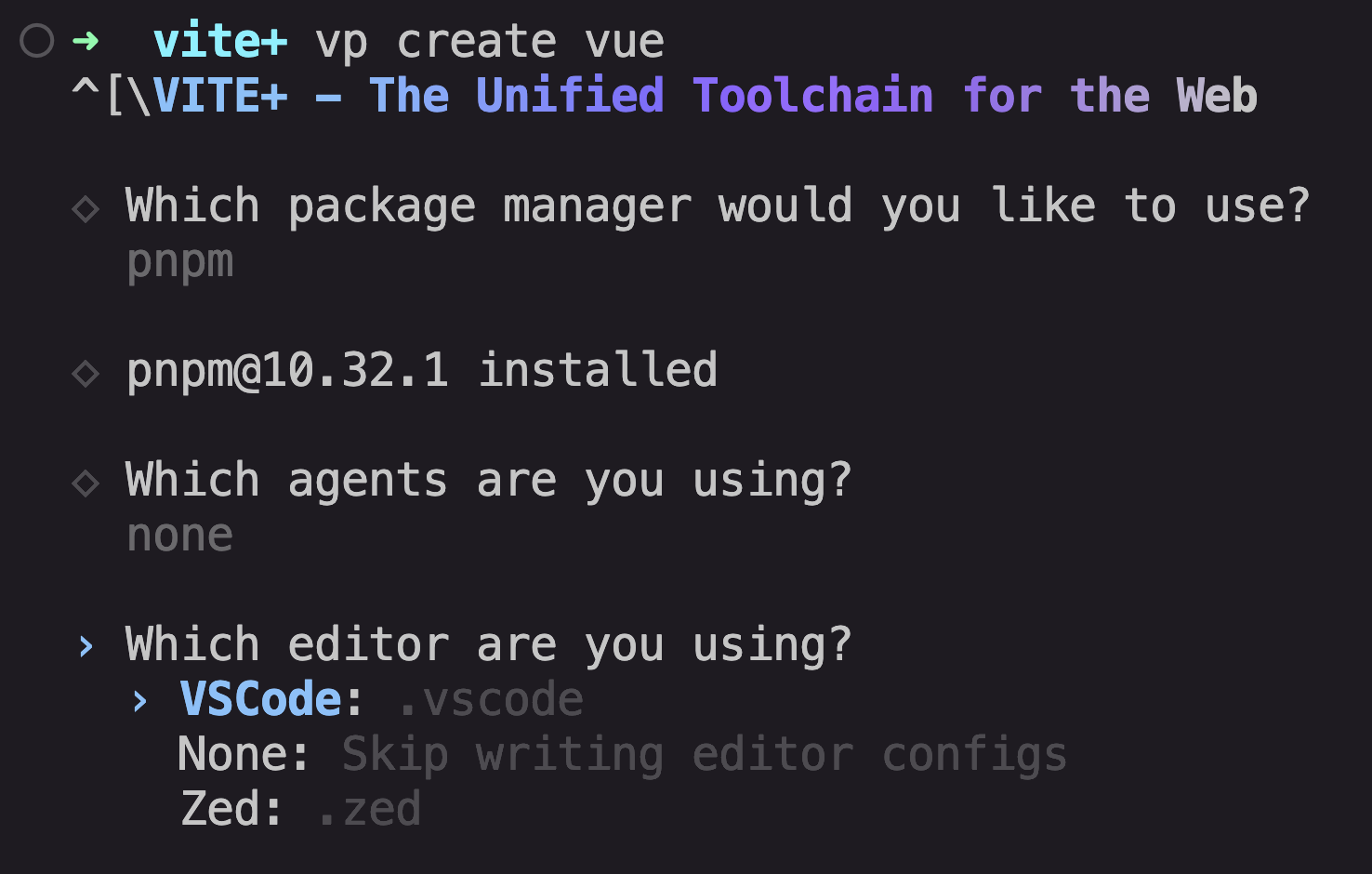
As of this blog post it defaults to a non JS Framework solution. While this is fine for a demo, I don't really get it, because I don't think many people today create websites without some sort of framework or library. Instead you can use this command.
```bash
vp create <template>
```
Right now it supports, `vite`, `@tanstack/start`, `svelte`, `next-app`, `nuxt`, `react-router` and `vue`. As I mentioned earlier with `Nuxt` they have not combined the `nuxt.config.ts` and the `vite.config.ts` together, so while you can use it, it's not quite ready yet. I also had issues with the `next-app`. I wasn't sure if it was trying to use a Vite-based Next app or the standard one. Either way it wasn't quite working.
After adding a template name it will then setup your app. It should look familiar if you're using something like `npm create vite`.
After install you'll then have a unified vite.config.ts file that you can then enter all your configurations for linting, formatting and testing. This worked surprisingly well and I was happy not having to worry about where to add each file.
Since Vite+ uses the [Oxc](https://oxc.rs/) set of tools, I added in the official Oxc extension for formatting and linting. This made it even easier so that my IDE was aware of these tools.
## Important commands
Beyond `vp create` you have a number of interesting commands you can run with `vp`. Here are a few I've found useful. Although, if you'd like a full list please check out the official [guide](https://viteplus.dev/guide/).
### Checking and linting
```bash
vp check
```
The vp check is the default command for fast static checks in Vite+. It combines both the formatting with Oxfmt and the linting with Oxlint, and the TypeScript type checks via [tsgolint](https://github.com/oxc-project/tsgolint). Combined this is an extremely fast static checker.
> Under the hood, tsgolint is powered by [tsgo](https://github.com/microsoft/typescript-go), the official Go port of the TypeScript compiler from Microsoft. This means your type checking is running at native speed, not through Node.js. It's a big reason why `vp check` feels so fast.
If you like you can have it try to fix the issues.
```bash
vp check --fix
```
In my tests, this still takes a lot of manual intervention as expected. What's nice is that a competent AI coding tool, like [Kiro](https://kiro.dev), can knock these type errors out in no time.
> Vite+ also has built in pre-commit hook support. When you scaffold a project with `vp create`, it can set up hooks for you automatically. You can also run `vp prepare` to install them later, and configure what runs on staged files right in your `vite.config.ts`. No more husky or lint-staged setup.
### Formatting
```bash
vp fmt
```
This will run the [Oxfmt](https://oxc.rs/docs/guide/usage/formatter.html) formatter. It has full [Prettier](https://prettier.io/) compatibility and is designed as a drop-in replacement for Prettier.
Personally, I love prettier, but it does have its quirks. What's really nice is you can just go into the `vite.config.ts` file and add any rules you need.
```typescript
import { defineConfig } from 'vite-plus';
export default defineConfig({
fmt: {
singleQuote: true,
},
});
```
When I first setup my app using `vp create vue` it asked me if I'd like to update the `.vscode/settings.json`. I'd highly recommend this so if you're using the Oxfmt extension it can find your formatting settings. Otherwise you can manually add it.
```json
{
"oxc.fmt.configPath": "./vite.config.ts"
}
```
### Testing
I love testing, so running tests with [Vitest](https://vitest.dev/) is great.
```bash
vp test
```
This will kickoff the vitest test runner in your project. There is also a `watch` and a `run --coverage` command. And like all the other commands you can edit the configuration in the `vite.config.ts` file.
```typescript
import { defineConfig } from 'vite-plus';
export default defineConfig({
test: {
include: ['src/**/*.test.ts'],
},
});
```
> One quick annoyance with running the `vp` commands is that they do override your package.json scripts. So to run anything in your scripts you must run `vp run <command>`. Otherwise it will run the built in commands. I was watching a live stream with Theo Browne from [T3](https://t3.gg/) and he hated this. I'm on the fence, but maybe they'll change it in the future.
### Caching with vp run
Another nice feature is caching.
```bash
vp run --cache build
```
This will cache the build and if nothing changes the output is replayed on the next run. I have not used this command personally but anything to speed up builds I'm all for.
### Managing Node.js with vp env
Another really neat feature is the `vp env` command.
```bash
vp env <command>
```
vp env manages Node.js versions globally and per project. By default, Vite+ runs in managed mode, meaning it controls which Node.js version is used. It stores the runtime and related files in ~/.vite-plus (you can override this with VITE_PLUS_HOME).
If you don't want Vite+ managing your Node.js, you can switch to system-first mode:
```bash
vp env off
```
This tells the shims to prefer your system Node.js and only fall back to the Vite+ managed runtime when needed. If you ever want to switch back, just run:
```bash
vp env on
```
You can also pin a certain Node.js version in the current directory with:
```bash
vp env pin
```
Or install an entirely new version.
```bash
vp env install
```
I really liked all this flexibility with the package manager. I personally use `nvm` but I like the idea of this being handled by Vite+. One less thing to worry about.
While I haven't tried it, I'm curious to see how well this works in a CI environment. It looks like you can easily set this up in your GitHub actions and run all the checks you need.
```yaml
- uses: voidzero-dev/setup-vp@v1
with:
node-version: '22'
cache: true
- run: vp install
- run: vp check
- run: vp test
- run: vp build
```
## Conclusion
I could definitely see Vite+ saving me time when I create a new application. Having one configuration file to put everything in, and not having to think about which linter, formatter, or test runner to install, is a nice change. The `vp` commands are straightforward and the whole thing just works.
With that said, this project is still in alpha, and we'll see how much it catches on. With so much of the frontend ecosystem already using Vite, it makes sense for a tool like Vite+ to exist. Let me know if you would use something like this. I think it's very interesting. Thanks!
Comments
More Blog
View allaiHow I'm using ASTs and Gemini to solve the "Codebase Onboarding" problem 🧠
Hi everyone! 👋 I’m Tara, a Senior Software Engineer and Consultant. Over the years, I've jumped...
T
tworrellaiLocal AI Will Save Us All (The Math Says So, Trust Me)
Every few weeks a take goes viral in tech circles making the case for ditching cloud AI and running...
S
Sebastian SchürmannaiLost in the AI Hype, I Started Small
And it helped me get back into tech without drowning TL;DR at the end Coming back to...
R
Rohini GaonkargoBuilding a Replay-Tested Interactive Brokers Client in Go
I wanted an IBKR library that felt like Go and had testing I could trust. So I wrote one.
T
Thomas MarcelisplaywrightPlaywright in Pictures: Fully Parallel Mode
Playwright’s fullyParallel mode is often treated as a simple performance switch. In practice, it...
V
Vitaliy PotapovcliDesigning a CLI for Both Humans and Agents
Learn how Alpic designed its CLI for both human developers and AI agents — covering tradeoffs like polling, context windows, interactivity, and statelessness.
J
Julien Vallini