
Back to Blog webdev
 ai
ai ai
ai ai
ai go
go playwright
 cli
cli
Vandalizing My Own Wikipedia Experience: A 90s Cyberpunk GeoCities Makeover
Paige Bailey March 20, 2026
0 views
Wikipedia is a marvel. It is the Library of Alexandria of our time, a meticulously curated repository...
Wikipedia is a marvel. It is the Library of Alexandria of our time, a meticulously curated repository of human knowledge, wrapped in a user interface so ruthlessly utilitarian it makes a hospital corridor look like a rave.
But sometimes, when I am deep in a Wikipedia rabbit hole reading about [List of animals with fraudulent diplomas](https://en.wikipedia.org/wiki/List_of_animals_with_fraudulent_diplomas) at 2:00 AM, the sterile white background feels... insufficient. I don't want brutalist minimalism. I want the web the way the ancients intended: dripping in neon pink, plastered in Comic Sans, and crawling with pixelated cats.
So, I decided to write a custom Wikipedia `User Script` to turn the site into a 1998 GeoCities cyberpunk fever dream.
Instead of writing this from scratch, I wanted to see how well modern LLMs could handle writing niche MediaWiki API scripts. Here is a field report on how I built this abomination using Gemini 3.1 Pro Preview.
---
### Grounding Gemini with Wikipedia-specific syntax
LLMs are great at writing vanilla JavaScript, but Wikipedia user scripts rely on specific, slightly archaic MediaWiki globals (like `mw.loader.using` and `mw.util.addCSS`). If you just blindly ask an LLM to "make Wikipedia pink," it usually hallucinates browser extensions or generic Tampermonkey scripts.
To bypass this, I jumped into **Google AI Studio** and loaded up the `Gemini 3.1 Pro Preview` model.
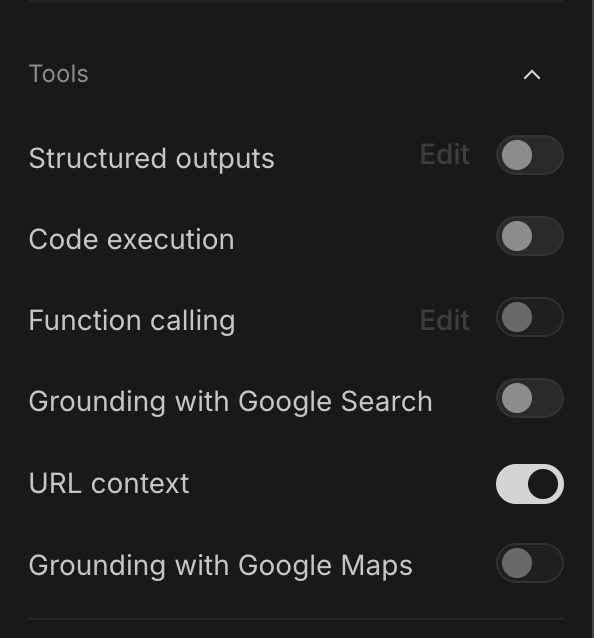
The secret sauce here was using the [URL Context feature](https://ai.google.dev/gemini-api/docs/url-context). I toggled URL Context on and pasted in the URL for Wikipedia's custom scripting documentation:
`https://en.wikipedia.org/wiki/Wikipedia:User_scripts`
My prompt was simple but unhinged:
> *"Using the provided documentation on Wikipedia User Scripts, write a script for my Special:MyPage/common.js that makes my Wikipedia viewing experience look like a 90s cyberpunk GeoCities page. I want a pink/cyan grid background, glowing Comic Sans headers, a massive scrolling `<marquee>` for the article title, a giant glowing sparkle mouse trail, and a squad of animated cats walking across the top of my screen."*
Because Gemini 3.1 Pro Preview had the actual documentation in its context window, it knew exactly how to inject CSS securely via MediaWiki's utility functions, and it gave me a plug-and-play script.
---
### Breaking down the script
The resulting script is a beautiful combination of modern DOM manipulation and deeply offensive 90s aesthetics.
#### 1. The Marquee Title
If we are going to read about the [Emu War](https://en.wikipedia.org/wiki/Emu_War), that title needs to *move*. The script grabs the `#firstHeading` element and violently wraps its inner HTML in a `<marquee>` tag.
```javascript
var $title = $('#firstHeading');
var titleText = $title.html();
$title.html('<marquee scrollamount="15" behavior="alternate">' + titleText + '</marquee>');
```
*Note: The fact that modern browsers in 2026 still parse and execute the `<marquee>` tag is a testament to the web’s unbreakable backwards compatibility. It is the digital equivalent of a vestigial tail.*
#### 2. The Sparkle Trail (A Lesson in Throttling)
To create the mouse trail, the script listens to the `mousemove` event and appends absolutely-positioned `<span>` elements containing cyberpunk symbols (`✦`, `★`, `✨`) to the DOM.
To prevent this from immediately melting my GPU (a very real threat when generating hundreds of DOM nodes a second), the model smartly implemented a timestamp throttle:
```javascript
var now = Date.now();
if (now - lastSparkleTime < 40) return; // Only spawn a sparkle every 40ms
lastSparkleTime = now;
```
It then applies a CSS `@keyframes` animation to each sparkle so they slowly drift downward, rotate 180 degrees, and fade to `opacity: 0` before being garbage-collected by a `setTimeout` a second later.
#### 3. The Mathematics of Walking Cats
Instead of using a clunky JS `setInterval` to move the cats, Gemini 3.1 leaned into pure, hardware-accelerated CSS animations.
It created a fixed header container (`pointer-events: none` so I can still click the search bar through the cats' ethereal bodies). Then, it applied two separate animations.
The first animation slides the whole squad from `100vw` (off-screen right) to `-100%` (off-screen left).
The second animation creates the "walking" illusion. If you think about the geometry of a walking pixel cat, it's essentially a sine wave. To achieve this, the script applies a 10px vertical bounce to each cat (`transform: translateY(-10px)`).
To make it look like a chaotic squad rather than a synchronized military parade, the script uses the `nth-child(even)` pseudo-class to offset the animation delay of every other cat:
```css
.walking-cat {
animation: catBounce 0.4s alternate infinite ease-in-out;
}
.walking-cat:nth-child(even) {
animation-delay: 0.2s; /* Phase offset for the bounce! */
}
```
We are essentially phase-shifting the vertical oscillation of our felines to simulate independent locomotion.
---
### The final results
I pasted the code into my `Special:MyPage/common.js`, hit publish, and bypassed my cache.
The result is staggering.
I am currently reading the deeply serious, heavily cited Wikipedia article for [Maximilien Robespierre](https://en.wikipedia.org/wiki/Maximilien_Robespierre). The background is a dark void overlaid with a neon pink laser grid. The header "**MAXIMILIEN ROBESPIERRE**" is glowing in hot pink Comic Sans, aggressively bouncing off the edges of my monitor.
{% embed https://x.com/DynamicWebPaige/status/2035009322531660256 %}
Every time I move my mouse to hover over a citation, a massive explosion of 45-pixel-wide cyan stars erupts across the text. And above it all, a squad of five neon cats marches endlessly toward the left side of my screen, oblivious to the Reign of Terror occurring in the text below them.
It is awful. I am never turning it off.
***
*If you want to ruin your own Wikipedia experience, you can find the complete script in the replies below. Just remember to log in, navigate to `Special:MyPage/common.js` and `Special:MyPage/common.css`, and let the 90s flow through you.*
Comments
More Blog
View allaiHow I'm using ASTs and Gemini to solve the "Codebase Onboarding" problem 🧠
Hi everyone! 👋 I’m Tara, a Senior Software Engineer and Consultant. Over the years, I've jumped...
T
tworrellaiLocal AI Will Save Us All (The Math Says So, Trust Me)
Every few weeks a take goes viral in tech circles making the case for ditching cloud AI and running...
S
Sebastian SchürmannaiLost in the AI Hype, I Started Small
And it helped me get back into tech without drowning TL;DR at the end Coming back to...
R
Rohini GaonkargoBuilding a Replay-Tested Interactive Brokers Client in Go
I wanted an IBKR library that felt like Go and had testing I could trust. So I wrote one.
T
Thomas MarcelisplaywrightPlaywright in Pictures: Fully Parallel Mode
Playwright’s fullyParallel mode is often treated as a simple performance switch. In practice, it...
V
Vitaliy PotapovcliDesigning a CLI for Both Humans and Agents
Learn how Alpic designed its CLI for both human developers and AI agents — covering tradeoffs like polling, context windows, interactivity, and statelessness.
J
Julien Vallini