
Back to Blog webcomponents
 gemma
gemma community
 ai
ai ai
ai githubactions
 ai
ai
Kigumi: Same components, any stack
Mischa March 24, 2026
0 views
What if the same button component worked in React, Vue, Angular, and Svelte without changing a single...
What if the same button component worked in React, Vue, Angular, and Svelte without changing a single line? Most UI libraries and tools don’t let you do that. They’re tied to one framework, and the moment you switch, you start over.
Kigumi takes a different approach. It’s built on Web Awesome, a library of 70+ production-ready web components powered by Lit. These are real HTML custom elements that the browser understands natively. Web Awesome also ships with an excellent design token system and layout CSS classes, built entirely on CSS custom properties, giving you full control over colors, spacing, typography, and more.
The problem is that raw web components still have friction inside frameworks. React 18 requires manual event listener setup for custom elements. React 19 improved this significantly, but depending on the component library, you may still run into edge cases with event naming and TypeScript support. Vue needs shim types and extra work for proper slot and event handling. That’s where Kigumi comes in.
Getting started with Kigumi
Kigumi is a CLI that generates idiomatic framework wrappers around Web Awesome components. It takes Web Awesome’s excellent component library and token system and makes them easy to use, customize, and share across your projects.
You don’t need to install anything globally. Just run:
# Initialize a new Kigumi project
npx kigumi init

# Display all available CLI commands
npx kigumi --help
Kigumi detects your framework, your TypeScript setup, and your package manager. It configures the CSS layers, registers the web components, and generates the type declarations your editor needs. Just follow the instructions of the CLI.
Then you add components as you need them:
npx kigumi add button input dialog
Each command generates a proper wrapper for your framework. A React project gets a .tsx file with correct prop types, forwarded refs, and event listeners with proper cleanup. A Vue project gets a .vue single-file component. TypeScript types and accessibility features are included out of the box.
Once generated, the code lives in your repository. You own it. You can edit it, extend it, or strip out the parts you don’t need.
React is fully supported today. Vue support is available and getting closer to full parity. Angular and Svelte are on the roadmap, along with additional framework targets.
CSS that works with the platform, not against it
Kigumi’s theming is built on two native CSS features: custom properties and cascade layers.
Custom properties are how you theme your components. Web Awesome exposes its entire design language as CSS variables. You override them in a single file, and every component picks up the change. No JavaScript theme providers. No context wrappers. Just CSS doing what CSS was designed to do.
/* theme.css */
:root {
  --wa-color-primary-600: #4f46e5;
  --wa-font-sans: 'Inter', system-ui, sans-serif;
  --wa-border-radius-medium: 6px;
}
Cascade layers solve the specificity wars. Kigumi wraps Web Awesome’s base styles in a @layer, so your overrides always win without needing !important. The generated layers.css handles the ordering automatically. Base styles sit below your theme. You don't have to think about it.
/* layers.css */
@import "@awesome.me/webawesome/dist/styles/webawesome.css" layer(base);
@import "./theme.css" layer(theme);
The theme.css file is yours. Kigumi creates it during init and never overwrites it.
Side note: Kigumi is fully compatible with Tailwind CSS. You can use utility classes alongside your components. Depending on your Tailwind configuration, you may need to rename Kigumi’s base layer to avoid a conflict with Tailwind's own base layer. But we're excited about what CSS custom properties and cascade layers enable natively, so that's where our focus is.
Kigumi Studio: design your theme visually
Not everyone wants to write CSS variables by hand. Kigumi Studio is a visual theme editor that lets you customize colors, typography, spacing, and more in real time. You see your changes reflected instantly on live component previews.
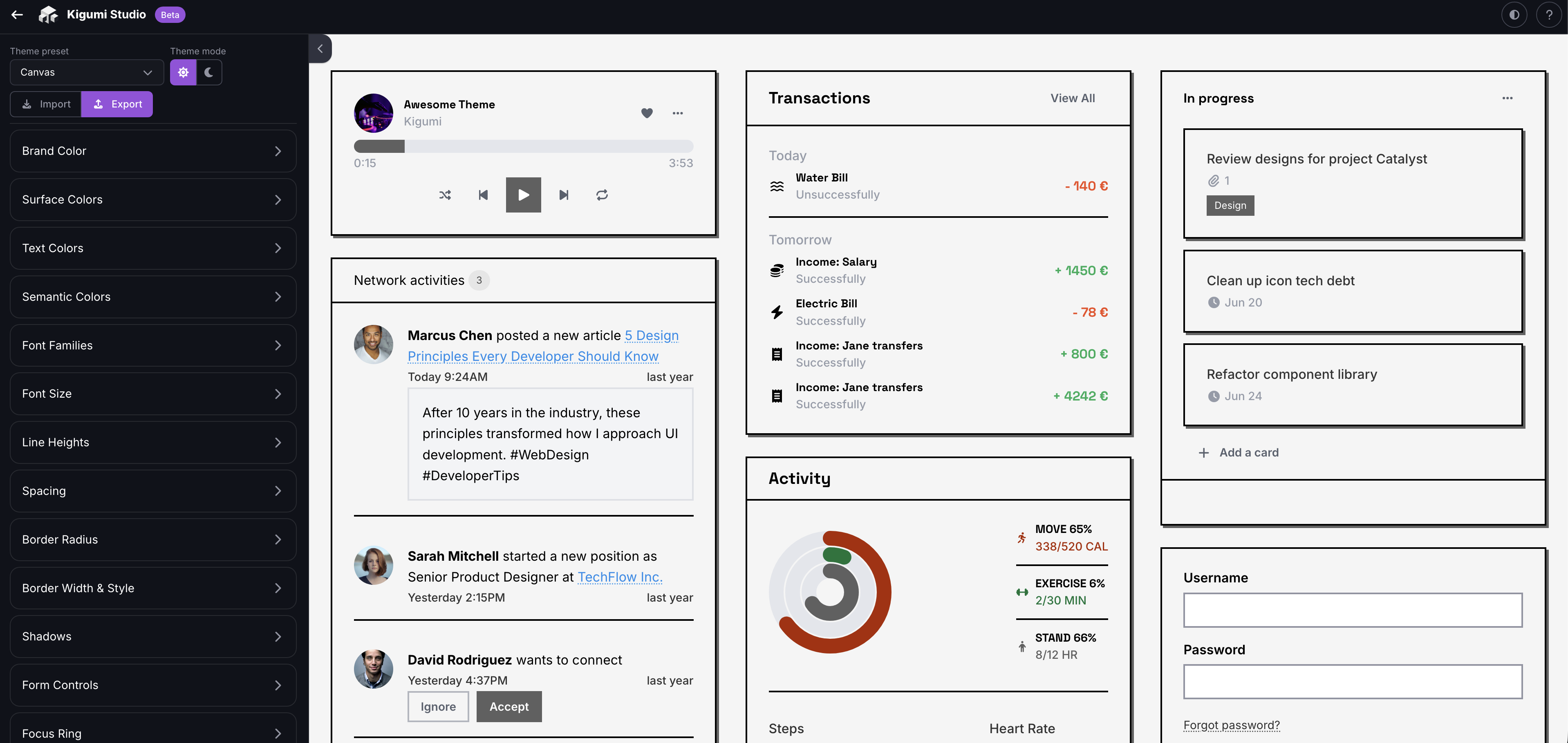
When you’re happy with the result, export the generated CSS into your theme.css file. You can also publish your theme to a registry so your entire team, or the community, can use it.
The registry: share components and themes across teams
Beyond the built-in component set, Kigumi has a community registry system. Any team can publish their own set of components and themes, and anyone else can install from it.
Creating a registry takes one command:
npx kigumi registry init
This scaffolds a registry.json that describes your components and themes. Add your files, push to GitHub, and your registry is live.
Consuming a registry is just as simple. Add it once, then install from it by name:
# Add the registry source
npx kigumi registry connect https://github.com/your-org/ui-registry --name design-system

# Install components from it
npx kigumi add card --from design-system
npx kigumi add hero-section --from design-system
Kigumi fetches the files from GitHub, resolves dependencies automatically, and tracks the source of each component in your project config. If your card component depends on a badge, Kigumi installs that too.
Combined with Kigumi Studio, the workflow becomes powerful: design a theme visually, export it, add it to your registry, and every project that connects to your registry gets access to it.
Built for AI agents
Kigumi ships with a set of agent skills for tools like Claude Code and Cursor. These aren’t just documentation. They teach your AI assistant how to build complete features using Kigumi components.
npx skills add https://kigumi.style/skills/kigumi
The skills cover individual component conversion (Web Awesome HTML to React or Vue), but they go further than that. There are composition skills that let your agent build entire features: forms with validation and error handling, page layouts using Web Awesome’s utility classes, modals and drawers with correct state patterns, or data tables with loading and empty states. The skills are combinable, so asking your agent for “a form inside a dialog” just works.
Theme customization is covered too. Your agent can work directly with the design token system to adjust colors, typography, spacing, and dark mode.
We’re also working on something we’re particularly excited about: a Pencil file that brings design into the AI workflow. The idea is to let agents work across both design and engineering, so that going from a design concept to a fully implemented, themed component becomes a single continuous process rather than a handoff between tools.
What’s next
React support is stable and covers 73 components today. Vue is in beta and getting closer to full parity. Angular and Svelte wrappers are in early development, with more framework targets to follow.
On top of that, the AI integration is a big focus. We want agents to understand the full Kigumi ecosystem: components, themes, registries, and design. The Pencil file is a first step toward that vision.
The beauty of building on Web Components is that the underlying wa-* elements don't change between frameworks. When Angular support ships, running npx kigumi add button in an Angular project will produce the same quality of output that React and Vue projects already get.
Same components. Any stack. Whether you type the commands yourself or let an agent do it.
Get started at kigumi.style or run npx kigumi init in your project.
Comments
More Blog
View allgemmaFive Gemma-4 models, one accelerator: what porting E2B 31B to AWS Inferentia2 taught me
I ported the whole Gemma-4 family — E2B, E4B, 12B, 31B, and the 26B-A4B MoE — to run on...
X
xbillcommunityHey DEV, I'm Tobore. Let's actually connect.
Hey DEV, I'm Tobore. Let's actually connect. I've been on here for a while now, mostly writing and...
L
Laurina AyarahaiI burned through thousands of AI tokens. Then a friend did it for free
(yep, kinda clickbait, just for the funsies 😊) At the beginning of the year, I relaunched my...
P
Paulo HenriqueaiClaude might be saturating your machine
My laptop was sitting idle with the fan at full tilt. Nothing was running that I knew of. The culprit...
S
Sidhant PandagithubactionsAutomated GitHub Code Reviews Using Google Gemini
I Built a Thing! TL;DR — Google Gemini-based Pull Request reviews and Issue Triaging for...
D
Darren "Dazbo" LesteraiWhat is an "agentic harness," actually?
I've been hearing the word "harness" thrown around a lot lately. I assumed it just meant "the IDE" or...
T
Tilde A. ThuriumReady-made automations for this
Workflows from the Neura Market marketplace related to this DeepSeek resource
- Automate Blog Content Creation with Notion MCP, DeepSeek AI, and WordPressn8n · $9.99 · Related topic
- Generate AI Videos from Scripts with DeepSeek, Synthesia, and Together.ain8n · $24.99 · Related topic
- Compare Multi-Period Financial Data from Google Sheets with DeepSeek AI Analysisn8n · $14.99 · Related topic
- PostgreSQL Conversational Agent with Claude & DeepSeek (Multi-KPI, Secure)n8n · $14.99 · Related topic