
Back to Blog webdev
 ai
ai ai
ai ai
ai go
go playwright
 cli
cli
How to use Timberborn 🦫 (yes, the beaver city-building game) as a database 💾
Pascal Thormeier March 28, 2026
0 views
So, one of my favourite games lately, Timberborn, has released its 1.0 version and finally left early...
So, one of my favourite games lately, [Timberborn](https://store.steampowered.com/app/1062090/Timberborn/), has released its 1.0 version and finally left early access.
For those who don't know it, Timberborn is a city-building strategy game. In this game, the player takes over the role of a ruler of a beaver colony - after humans (or hoomans, as they're called in-game) vanished from the face of the planet, the beavers took over. There's resource gathering, taking care of your beavers' different needs, building complex water-based power networks, factories, transportation, etc., etc.
Or, a database, in my case.
There are 3D water physics, different seasons such as droughts, where you need to retain water and bad tides, where new water entering the map is polluted and harmful to beavers.
Since the initial release in 2021, many features have been added.
And the latest update broke the game for me a bit. Because they added automation features. These automation features include various sensors for detecting bad tides, water flow, etc. They even added logic gates and HTTP levers.
## Oh no
Oh no indeed. I _had_ to play around with these. This is what they look like in-game:
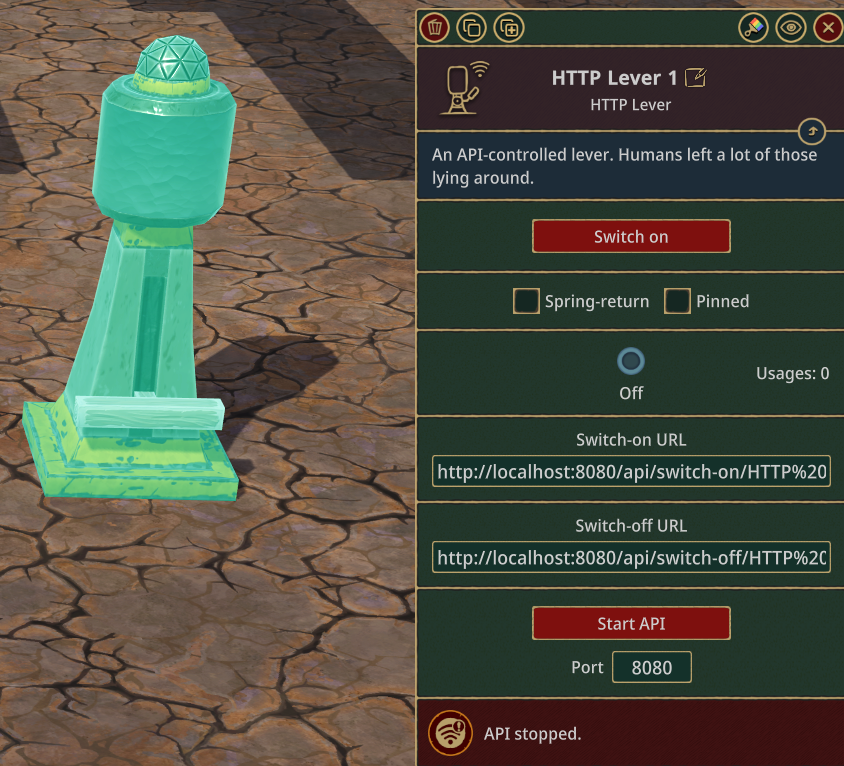
As you can see, they have a name (in this case “HTTP Lever 1”), a “Switch-on URL” and a “Switch-off URL”.
The idea behind these is that streamers can hook these up to other services, for example, Twitch webhooks. If someone leaves a like, fireworks go off, stuff like that.
But: Who says you can only use one of them?
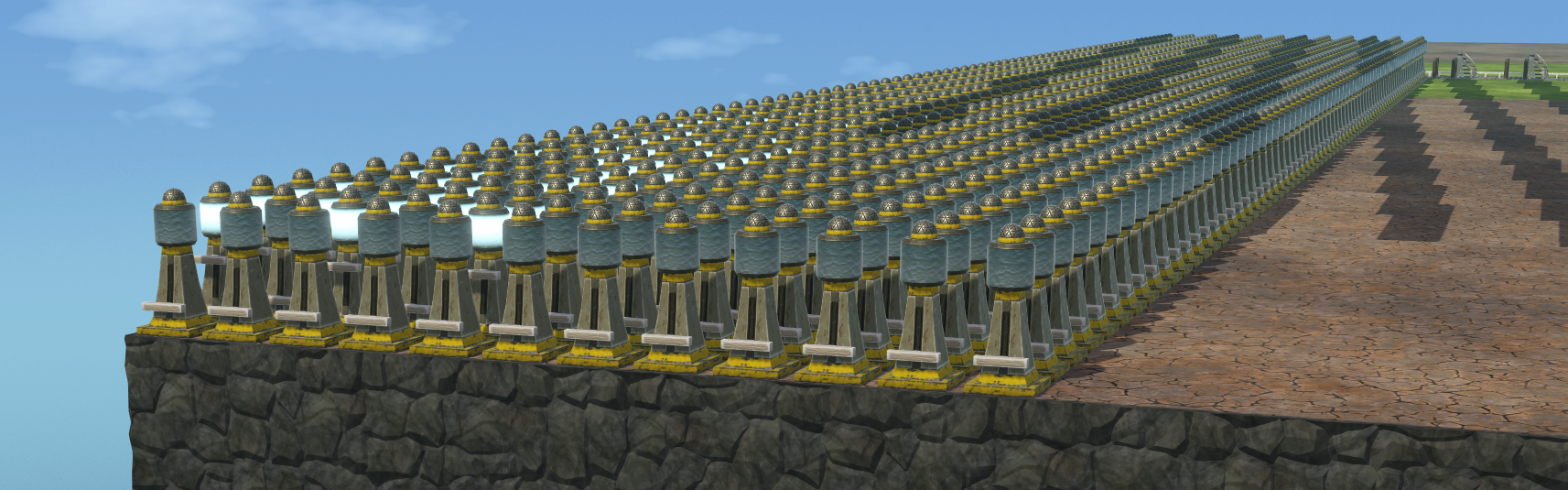
Do you see where I'm going with this?
## Oh _no_
Oh yes. The game can work with around 1000 of them for some time. Windows said it "had some issues with the system" twice while I was experimenting, so from the very start, this isn't very practical. It doesn't have to be, though.
For every lever, there is one endpoint that turns it on and one that turns it off. No batch processing, sadly, but perhaps there's a mod. Another endpoint returns the state of each lever on the current map. The data looks kind of like this:
```json
[
{
"name": "HTTP Lever 829",
"state": false,
"springReturn": false
},
{
"name": "HTTP Lever 154",
"state": true,
"springReturn": false
},
{
"name": "HTTP Lever 839",
"state": false,
"springReturn": false
},
{
"name": "HTTP Lever 164",
"state": true,
"springReturn": false
}
]
```
With two states, such an HTTP Lever can be thought of as a single bit.
All that is needed is a way to read from and write to them.
### The Timberborn web interface: How it works
The idea is that we’re going to convert some user input to JSON, convert that to binary using ASCII encoding and flip each bit one by one. When reading, we read all the lever states at once, rearrange them into a bit sequence, split it into 8-bit chunks, decode them back into characters, and parse the resulting JSON. And voila: A read/write data storage.
Let’s start with a little HTML:
```html
<form method="POST" id="form">
<div>
<input type="text" id="title">
</div>
<div>
<textarea id="text"></textarea>
</div>
<button type="submit">Store in Timberborn</button>
</form>
<button type="button" id="load">
Load data from Timberborn
</button>
```
Now comes the fun part. We start with a bit of scaffolding JS:
```javascript
const title = document.querySelector('#title')
const text = document.querySelector('#text')
const form = document.querySelector('#form')
const load = document.querySelector('#load')
const chunkSize = 8 // We need this to later split the bits
const numberOfLevers = 1000 // This needs to be the exact number of levers in-game, otherwise it won't work reliably.
```
Next, we listen to a form submit and build a JSON string from the two fields:
```javascript
form.addEventListener('submit', async (event) => {
event.preventDefault();
const data = {
title: title.value,
text: text.value,
}
const json = JSON.stringify(data)
// ...
})
```
Once we have this, we can transform this into a series of binary strings:
```javascript
form.addEventListener('submit', async (event) => {
// ...
const json = JSON.stringify(data)
const asciiEncoded = json.split('')
.map(c => c.charCodeAt(0))
const binary = asciiEncoded.map(
num => num.toString(2).padStart(chunkSize, '0')
)
// ...
})
```
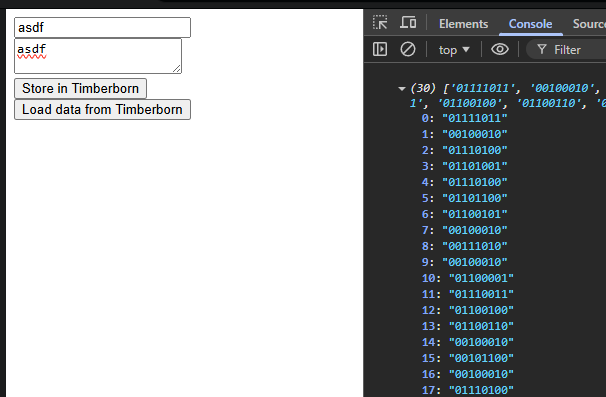
This gives us an array of 8-bit long strings with 0s and 1s:
We next need to join these up and build the large final bit string. We translate those bits into booleans and then API URLs, which we can then call with `fetch`:
```javascript
form.addEventListener('submit', async (event) => {
// ...
const bits = binary.join('')
// So there's no leftover data in the registry
// at the end of the current data
.padEnd(numberOfLevers, '0')
.split('')
.map(b => b === '1')
const allUrls = bits.map((bit, key) =>
`http://localhost:8080/api/switch-${bit ? 'on' : 'off'}/HTTP Lever ${key + 1}`
)
await Promise.all(allUrls.map(url => fetch(url)))
console.log('done!')
})
```
When saving, this will trigger a total of 1000 HTTP requests to the game's endpoint. No wonder it doesn't like it.
But: It works!
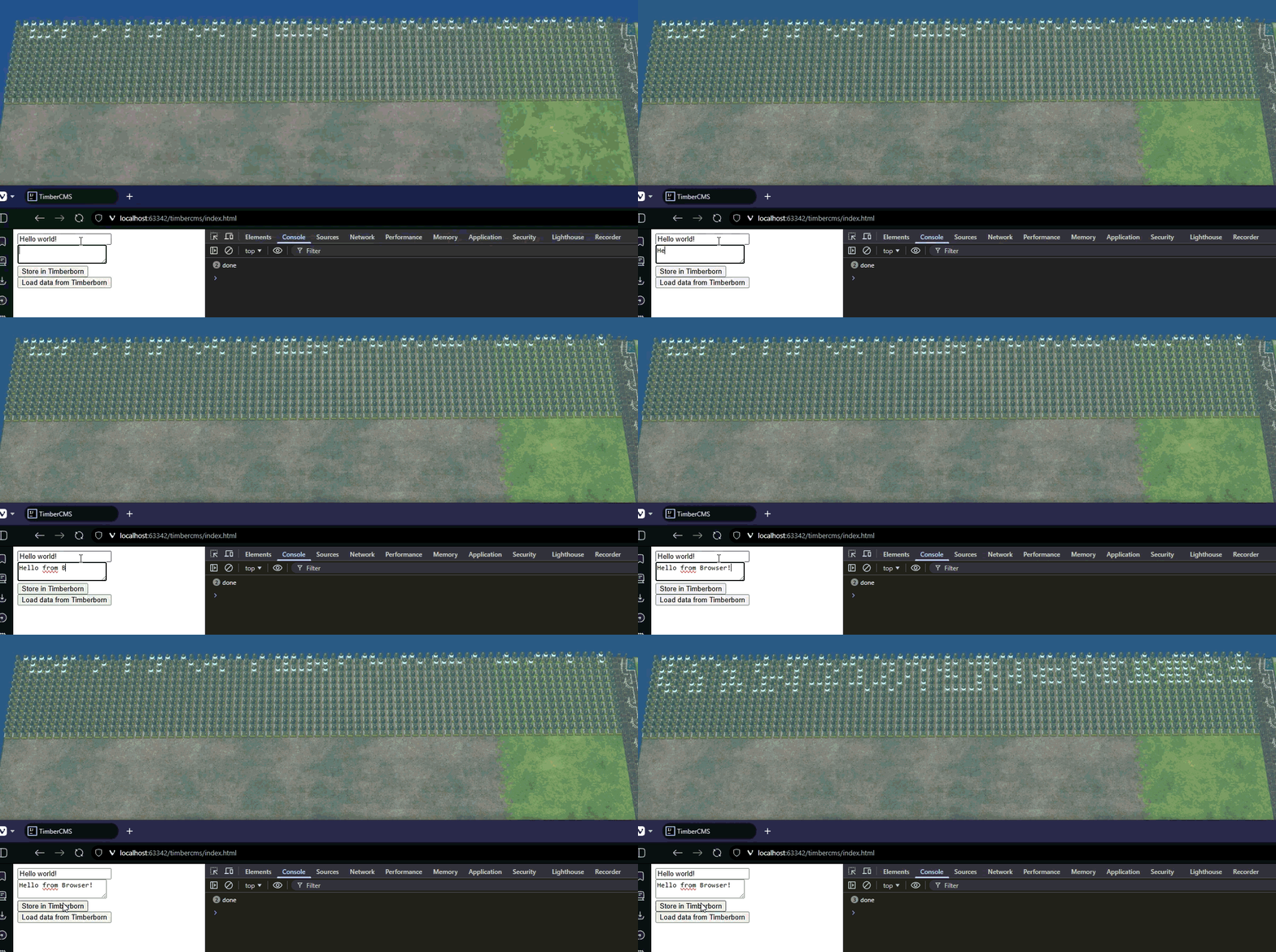
(There's a gif, it may take a few seconds to load...)
## Reading data from Timberborn
Next, we need to read data. As we've seen in the example, the lever states can be fetched all at once, but their order is all scrambled up. We can fix that by first loading everything and then sorting. We then translate everything back into a bit string, chunk that up and decode that into ASCII again:
```javascript
load.addEventListener('click', async () => {
const response = await fetch('http://localhost:8080/api/levers')
const json = await response.json()
const sorted = json.sort((a, b) => {
const aNumber = Number(a.name.replace('HTTP Lever ', ''))
const bNumber = Number(b.name.replace('HTTP Lever ', ''))
return aNumber - bNumber
})
const bitString = sorted.map(l => l.state ? '1' : '0')
const chunks = []
for (let i = 0; i < bitString.length; i += chunkSize) {
chunks.push(bitString.slice(i, i + chunkSize).join(''))
}
const numbers = chunks.map(c => Number.parseInt(c, 2))
// We filter out everything that's only 0s, because that's likely garbage-data
.filter(n => n > 0)
const letters = numbers.map(n => String.fromCharCode(n))
const data = JSON.parse(letters.join(''))
title.value = data.title
text.value = data.text
})
```
And that's it!
Technically, this can be considered a cloud storage now. Since Steam uploads save games to the cloud and Timberborn treats HTTP levers as stateful (i.e. it saves their state when saving the game), everything's persistent.
Whoever manages to get more than a measly kilobit of data into Timberborn, please hit me up, I'm pretty certain we can make a Drupal database adapter for this _somehow_.
(PS: Sorry, not sorry for the AI image. I had to try it eventually!)
(PPS: This post is not sponsored. But Timberborn devs, if you read this, I'm up for way more shenanigans using the automation features :D)
---
*I hope you enjoyed reading this article as much as I enjoyed writing it! If so, leave a* ❤️*! I write tech articles in my free time and like to drink coffee every once in a while.*
*If you want to support my efforts,* [*you can offer me a coffee* ☕](http://buymeacoffee.com/pthormeier)*! You can also support me directly via [Paypal](https://www.paypal.me/pthormeier)!* Or follow me on [*Bluesky* 🦋](https://bsky.app/profile/thormeier.dev)!
[](http://buymeacoffee.com/pthormeier)
Comments
More Blog
View allaiHow I'm using ASTs and Gemini to solve the "Codebase Onboarding" problem 🧠
Hi everyone! 👋 I’m Tara, a Senior Software Engineer and Consultant. Over the years, I've jumped...
T
tworrellaiLocal AI Will Save Us All (The Math Says So, Trust Me)
Every few weeks a take goes viral in tech circles making the case for ditching cloud AI and running...
S
Sebastian SchürmannaiLost in the AI Hype, I Started Small
And it helped me get back into tech without drowning TL;DR at the end Coming back to...
R
Rohini GaonkargoBuilding a Replay-Tested Interactive Brokers Client in Go
I wanted an IBKR library that felt like Go and had testing I could trust. So I wrote one.
T
Thomas MarcelisplaywrightPlaywright in Pictures: Fully Parallel Mode
Playwright’s fullyParallel mode is often treated as a simple performance switch. In practice, it...
V
Vitaliy PotapovcliDesigning a CLI for Both Humans and Agents
Learn how Alpic designed its CLI for both human developers and AI agents — covering tradeoffs like polling, context windows, interactivity, and statelessness.
J
Julien Vallini