 DeepSeek
Back to Blog webdev
 flutter
 googleappsscript
 flutter
 kubernetes
 kubernetes
 ai
ai
Synchronous vs Asynchronous JavaScript
Ritam Saha April 2, 2026
0 views
Introduction Hey there, fellow coders! Imagine this: You’re at your favorite café,...
Introduction
Hey there, fellow coders! Imagine this: You’re at your favorite café, ordering a latte. The barista takes your order, but instead of starting on your drink right away, they stand there staring at the espresso machine until it’s done… while the entire line behind you grows restless. Annoying, right?!
That’s exactly what happens when JavaScript runs synchronously.
But what if the barista could take your order, hand it off to the machine, and immediately start helping the next customer? That’s asynchronous JavaScript in action — and it’s what makes modern web apps feel lightning-fast instead of painfully frozen.
Today, we’re diving deep into synchronous vs asynchronous JavaScript. No boring textbook jargon — just clear, visual explanations, real-world analogies, and practical examples that will finally make the concepts click (Though in my previous blog I have discussed in detail about how event loop works, how non-blocking I/O operations works internally in NodeJS, here the blog link).
By the end, you’ll understand why async isn’t just a “nice-to-have”… it’s the secret that keeps browsers responsive and your apps delightful. Let’s brew some knowledge!
What Synchronous Code Means (The “One Thing at a Time” Way)
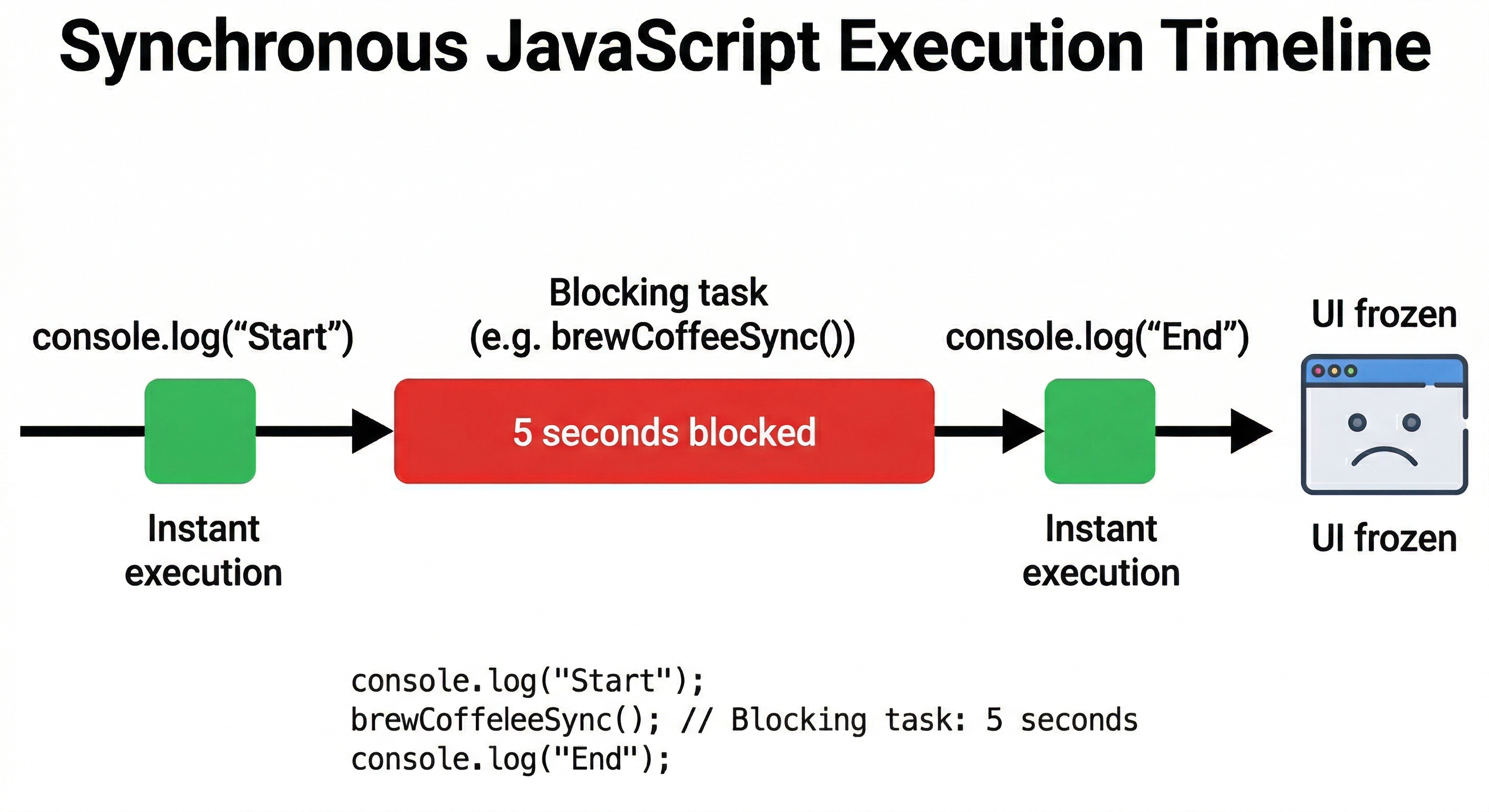
Synchronous JavaScript is just like single handedly doing all the household works one after another maintaining the sequence order. Code executes step by step, line by line. Each line must finish completely before the next one even starts.
Here’s a super simple example:
console.log("Step 1: Start brewing coffee");
const coffee = brewCoffeeSync();  // This takes 5 seconds
console.log("Step 2: Coffee is ready!");
console.log("Step 3: Enjoy your drink");
What happens?
- The browser (or Node.js) runs Step 1 instantly.
- Then it hits
brewCoffeeSync()and… freezes everything for 5 full seconds. - Only after those 5 seconds does it move to Step 2 and Step 3.
This is called blocking code because it blocks the entire execution thread. Nothing else can happen until the current task finishes.
What Asynchronous Code Means (The “Multitasking Ninja” Way)
Asynchronous (async) code is the opposite: it’s non-blocking. JavaScript doesn’t wait around. It says, “Hey, I’ll come back to this later,” and keeps moving.
Same example, but async:
console.log("Step 1: Start brewing coffee");
brewCoffeeAsync()  // Takes 5 seconds, but doesn't block!
    .then(coffee => console.log("Step 2: Coffee is ready! ☕"));
console.log("Step 3: Meanwhile, I'm checking my phone");
What happens?
- Step 1 runs instantly.
brewCoffeeAsync()is “outsourced” to thread-pool (more on that in a minute).- Step 3 runs immediately — no waiting!
- When the coffee is finally ready, the
.then()callback quietly sneaks back in.
This is non-blocking code in action. The main thread stays free to handle clicks, scrolls, animations, or anything else the user wants to do.
Everyday Analogy
Think of ordering food delivery:
- Synchronous = You stand at the restaurant waiting until your meal is cooked (everything else in your life is on pause).
- Asynchronous = You place the order, go back to work, and the delivery guy knocks when it’s ready. Life continues!
Why JavaScript Needs Asynchronous Behavior
JavaScript was designed to run in browsers. Browsers are single-threaded — they have only one main thread to handle everything: rendering UI, running your code, responding to clicks, etc.
If JavaScript were purely synchronous, every API call, file read, or timer would freeze the entire page. Imagine trying to scroll X while it’s waiting for a server response… nightmare!
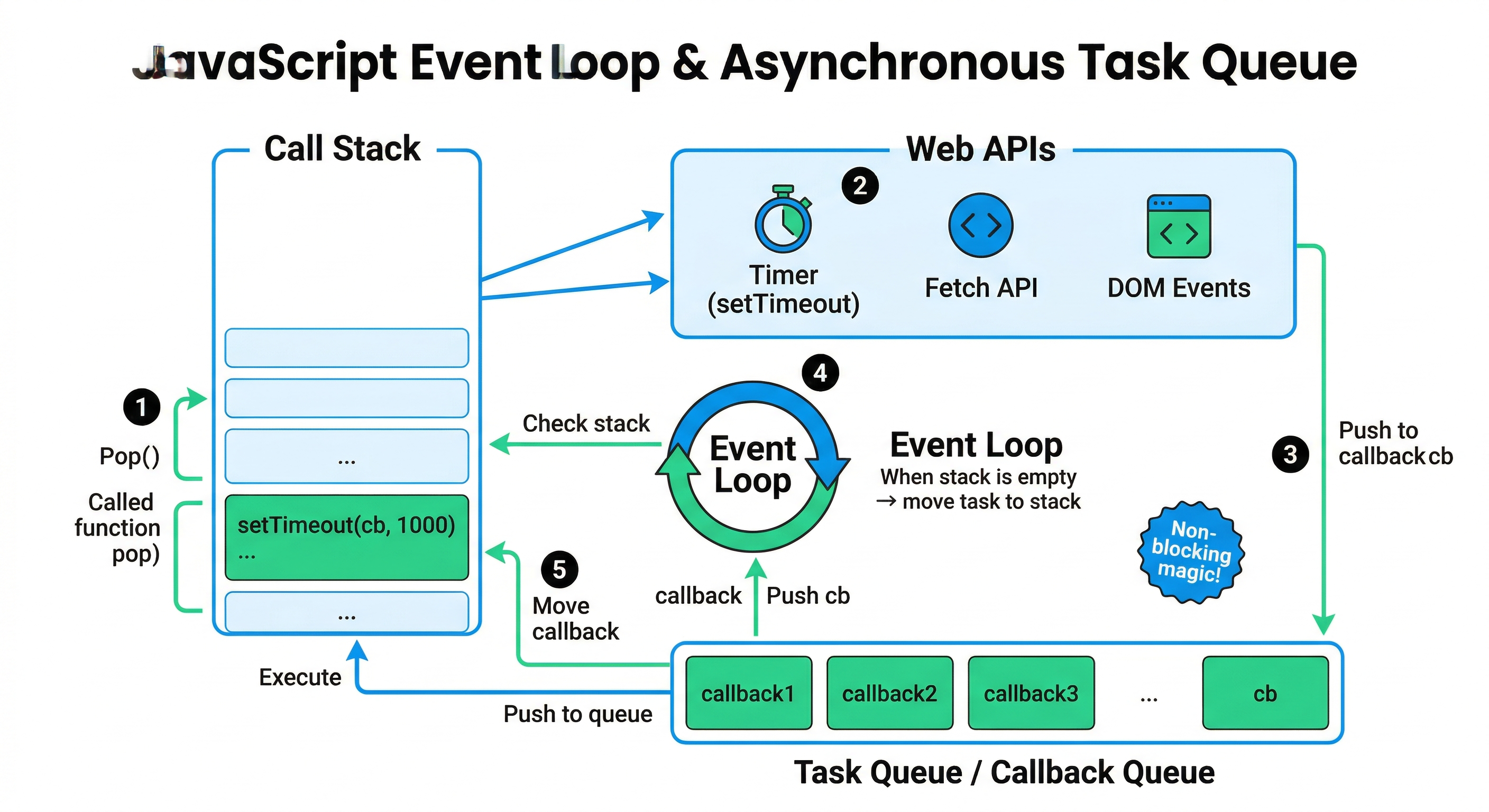
That’s why JavaScript invented the Event Loop — a clever system that lets it handle heavy tasks without blocking the main thread. It’s the reason modern web apps feel snappy even when they’re talking to servers halfway across the world.
Outsourcing Examples: API Calls, Timers & More
JavaScript “outsources” time-consuming work to the browser’s Web APIs (or NodeJS APIs). Here are the classics:
setTimeout()/setInterval()— Timersfetch()orXMLHttpRequest— API calls (getting data from servers)file readingin Node.js- Database queries, image processing, etc.
Example with a real API call:
console.log("1. Page loaded");

fetch("https://api.example.com/weather")
    .then(response => response.json())
    .then(data => console.log("3. Weather data received:", data));

console.log("2. User can still scroll and click!");
The fetch call gets handed off to the browser’s networking engine which is responsible for the explicit API calls. Your code keeps running. When the data finally arrives, it goes into the queue and the event loop brings it back to the call stack when the stack is empty.
Problems That Occur with Blocking (Synchronous) Code
Let’s be real — blocking code causes real pain:
- Frozen UI: Users can’t click buttons, scroll, or even see animations.
- Poor User Experience: “Why is this page stuck?!” moments.
- Slow Performance: One slow operation ruins the entire app.
- Bad scalability: In Node.js servers, blocking code means fewer users can be served at once.
Real-world horror story: Back in the early days of JavaScript, a single long-running loop could make the whole tab unresponsive. Developers had to get creative with setTimeout hacks just to keep things smooth!
Wrapping It Up: Async Is Your Superpower
Synchronous code is simple and predictable — great for quick calculations. But asynchronous code is what makes JavaScript powerful, responsive, and production-ready in the real world.
Understanding the difference (and mastering tools like async/await, Promises, and the event loop) is what separates beginners from confident developers. The next time your app feels sluggish, ask yourself: “Am I blocking the main thread?”
Pro tip: Start using async/await today — it makes asynchronous code read almost like synchronous code, but without the freezing!
async function getWeather() {
    console.log("Fetching...");
    const data = await fetch("https://api.example.com/weather").then(r => r.json());
    console.log("Got it!", data);  // Still non-blocking magic!
}
You’ve got this! Drop your favorite async trick in the comments — I’d love to hear how you’re using non-blocking JavaScript to build smoother apps.
Happy coding, and may your event loops always stay smooth! 🚀
Comments
More Blog
View allflutterOvercoming Dart's Single Inheritance Wall: Composable CubitSignalMixin & BlocSignalMixin in Flutter
Discover how CubitSignalMixin and BlocSignalMixin allow any existing Flutter controller, domain repository, or enterprise class to gain full reactive state container capabilities without occupying its single inheritance slot.
R
Randal L. SchwartzgoogleappsscriptTaking Advantage of Gemini Managed Agents with Google Apps Script
Breaking the Limits of GAS with Direct Cloud-to-Cloud Streaming in Persistent Linux...
T
Tanaike 2
flutterGrand Central Station: Why BLoC, Riverpod, and BlocSignal Are Now True Peers
Discover why Flutter state management is no longer an all-or-nothing choice. Explore how BlocSignal, Classic BLoC, and Riverpod now operate as first-class bidirectional peers at the Grand Central State Terminal.
R
Randal L. SchwartzkubernetesUnlocking workload rightsizing visibility on GKE: How VPA decision logs bring observability to autoscaling
Learn how to troubleshoot and audit GKE Vertical Pod Autoscaler actions with structured decision logs in Cloud Logging.
O
Olivier BourgeoiskubernetesAccelerating JVM startup on GKE: How VPA CPU startup boost eliminates ongoing resource waste
Learn how GKE VerticalPodAutoscaler (VPA) CPU Startup Boost cuts JVM cold starts and eliminates ongoing CPU waste using in-place Pod resizing.
O
Olivier Bourgeois 2
aiWhy AI Websites All Look the Same and How to Build Something Different
If you've built a website with AI recently, there is a good chance it looks familiar. Maybe you have...
M
Mfonobong UmondiaReady-made automations for this
Workflows from the Neura Market marketplace related to this DeepSeek resource
- Asynchronous Bulk Web Scraping with Bright Data & Webhook Notificationsn8n · $14.99 · Related topic
- Automate Employee Data Tracking & Reminders for HR with JavaScriptn8n · $14.99 · Related topic
- Learn JavaScript Data Processing with CodeNode: Filtering, Analysis, & Export Examplesn8n · $9.99 · Related topic
- Learn JavaScript Coding with an Interactive RPG-Style Tutorial Gamen8n · $9.99 · Related topic