
Back to Blog ai
ai ai
ai ai
ai ai
ai go
go playwright
 cli
cli
Beyond Prompts: How Git Hooks Steer AI Coding Agents in Production
Lenvin Gonsalves April 5, 2026
0 views
TLDR: At Fleek, both engineers and non-engineers build internal tools using AI coding agents. We...
**TLDR:** At Fleek, both engineers and non-engineers build internal tools using AI coding agents. We found that instruction files alone aren't enough - the AI follows them most of the time, but not always. Git hooks gave us a deterministic enforcement layer on top. This post walks through how we designed them and why the error messages matter more than you think.
---
## The Problem
We run an internal tools platform - a monorepo with 10+ sub-applications. The people building on it range from senior engineers to business team members who have never written code before and use Claude Code as their primary development tool.
In a traditional engineering team, you enforce standards through code reviews and tribal knowledge. An engineer sees a failing hook and thinks: "Ah right, I need to fix that." They have context. They know the codebase.
An AI agent has none of that. It doesn't know your conventions. And even if you spell everything out in an instruction file - it might still get it wrong.
## Heuristic vs Deterministic
There are two ways to enforce rules in an AI-assisted codebase: you can tell the AI what to do (heuristic), or you can make it impossible to do the wrong thing (deterministic).
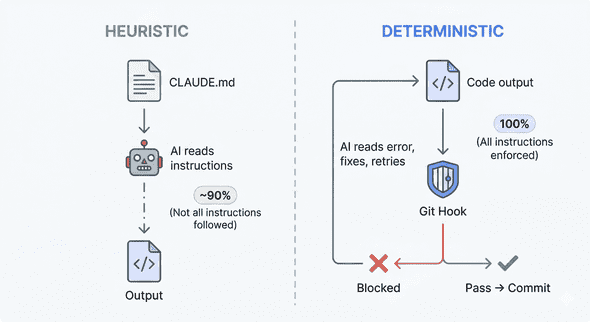
When you write a rule in CLAUDE.md like "use @fleekit/logger instead of console.log", you're giving the AI a strong suggestion. But it's heuristic. The AI will follow it most of the time - maybe 90%, maybe 95%. But in a complex enough codebase, with enough contributors, it will eventually skip it.
A pre-commit hook that scans staged files for `console.log` and blocks the commit is deterministic. It fires every time. It doesn't forget. It doesn't make exceptions. The AI's code simply cannot reach the repository without passing the check.
> **CLAUDE.md** = "Here's how we do things" (guidelines)
> **Git hooks** = "You literally cannot do it any other way" (enforcement)
You need both. The instruction file teaches the AI the right way. The hook catches it when it forgets.
## Hook Errors Are Prompts
Here's something nobody talks about: **the error message IS the prompt engineering.**
When a hook blocks a commit, the AI reads the error output and uses it to fix the problem. That means the quality of your error message directly determines whether the AI self-corrects or spirals into wrong fixes.
Traditional hooks are designed for humans. They output something like:
```javascript
Error: console.log not allowed
```
A human thinks: "Oh right, we use a custom logger." They bring their own context.
An AI sees that and has no idea what to do. It might remove the log entirely. It might replace it with `process.stdout.write`. It might ask the user for help.
Now look at how we designed our hook output:
```typescript
╔══════════════════════════════════════════════════════════════╗
║ console.log DETECTED — commit blocked ║
╚══════════════════════════════════════════════════════════════╝
Found console.* calls in app code:
apps/large-buyer/fe/pages/index.tsx:42: console.log(data)
RULE: Use @fleekit/logger instead of console.* in app code.
import { createLogger } from "@fleekit/logger";
const log = createLogger("my-tool");
log.info({ key: "value" }, "Message here");
```
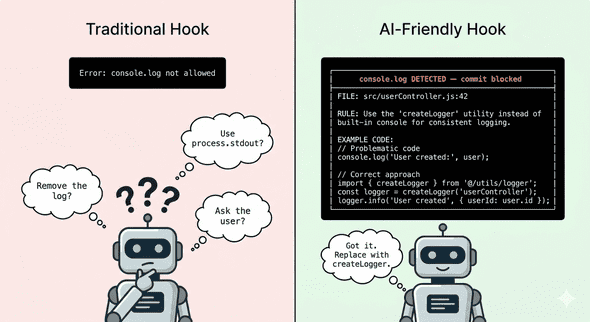
Three things happen here:
1. **States the rule** - use @fleekit/logger
2. **Shows exactly where the violation is** - file, line number, content
3. **Gives the replacement code** - import, initialization, usage
The AI reads this error, understands the constraint, and fixes it correctly on the first retry. No human needed. The hook error became the prompt.
This changes how you design hooks. You're not writing error messages for engineers anymore. You're writing them for an AI that will parse the output, extract the rule, and apply the fix. Be explicit. Be complete. Show the solution, not just the problem.
## Keeping Documentation Alive
Hooks can enforce more than just code quality - they can keep your AI's own context accurate.
Every app in our monorepo has a CLAUDE.md - a file that describes the tool's purpose, data model, business logic, and gotchas. This is what gives the AI context when it works on a tool.
The problem: documentation rots. In every codebase I've worked on, docs start strong and then drift. Code changes, but the docs don't update. Six months later, the docs are actively misleading.
We wrote a pre-commit hook that checks: if you changed code in an app, did you also update the app's CLAUDE.md?
If the CLAUDE.md doesn't exist at all, the commit is blocked:
```plaintext
╔══════════════════════════════════════════════════════════════╗
║ MISSING CLAUDE.md — commit blocked ║
╚══════════════════════════════════════════════════════════════╝
The following app(s) have code changes but no CLAUDE.md:
• apps/large-buyer/
Every app must have a CLAUDE.md describing its purpose,
data sources, business logic, and gotchas.
TO FIX: Create apps/large-buyer/CLAUDE.md before committing.
```
If it exists but wasn't updated alongside code changes, you get a warning:
```plaintext
⚠ CLAUDE.md not updated for:
• apps/large-buyer/CLAUDE.md
Consider updating it if your changes affect the tool's behavior.
```
This creates a feedback loop:
1. AI reads CLAUDE.md to understand the tool
2. AI makes code changes
3. Hook asks: "Did you update the docs?"
4. AI updates CLAUDE.md
5. Next AI session reads the updated CLAUDE.md
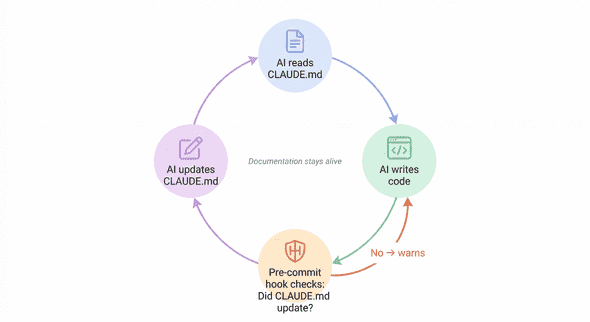
Documentation stays alive because the system demands it at commit time. Not through discipline, not through code review reminders - through deterministic enforcement.
This is the highest-ROI hook we built. A few lines of bash, and every tool's context file stays accurate. It works for AI sessions. It works for human engineers. It works for the business team member who used Claude to add a button and now has to at least acknowledge that the tool's docs might need an update.
## Why Not Use Claude Code's Built-in Hooks?
Claude Code has its own hooks - PreToolUse, PostToolUse, and others - that intercept the AI's actions in real-time. So why not use those?
**Scope.** Claude Code hooks see individual tool calls - this file is being edited, this command is being run. Git hooks see the changeset - the aggregate of everything that happened.
A Claude Code hook can't answer: "Did this branch touch multiple apps?" or "Did code change but documentation didn't?" Those questions require comparing all staged files against branch history. That's a git-level concern.
More importantly, git hooks apply to everyone - every engineer, every AI tool, every CI system. They're universal.
The right approach is to use both. Claude Code hooks for real-time guidance. Git hooks for deterministic enforcement on the output.
## What We Learned
- **Error messages are prompts.** The better your error output, the fewer retries the AI needs. State the rule, show the violation, provide the fix command.
- **Block, don't warn.** We initially made some hooks advisory. The AI ignored every single warning. If it's important enough to check, block the commit.
- **Every hook needs a bypass.** We use `SKIP_{CHECK_NAME}=1` environment variables. Sometimes humans know better, and a hook shouldn't become an obstacle for someone who understands the tradeoff.
- **The documentation hook has the highest ROI.** It costs almost nothing and keeps context files accurate for every future session - human or AI.
We run 9 hooks total across pre-commit, commit-msg, and pre-push. They enforce branch naming, prevent secret leaks, ensure one app per branch, validate commit message format, check repo structure, and more. Not all of them are interesting enough to write about - but together, they form a deterministic layer that makes AI contributions reliable at scale.
**If your team is using AI coding agents, your git hooks are now part of your AI strategy.** The instruction file teaches the AI your conventions. The hooks enforce them. Treat them accordingly.
---
*Originally published at [lenvingonsalves.com](https://lenvingonsalves.com/git-hooks-ai-coding-agents/)*
Comments
More Blog
View allaiHow I'm using ASTs and Gemini to solve the "Codebase Onboarding" problem 🧠
Hi everyone! 👋 I’m Tara, a Senior Software Engineer and Consultant. Over the years, I've jumped...
T
tworrellaiLocal AI Will Save Us All (The Math Says So, Trust Me)
Every few weeks a take goes viral in tech circles making the case for ditching cloud AI and running...
S
Sebastian SchürmannaiLost in the AI Hype, I Started Small
And it helped me get back into tech without drowning TL;DR at the end Coming back to...
R
Rohini GaonkargoBuilding a Replay-Tested Interactive Brokers Client in Go
I wanted an IBKR library that felt like Go and had testing I could trust. So I wrote one.
T
Thomas MarcelisplaywrightPlaywright in Pictures: Fully Parallel Mode
Playwright’s fullyParallel mode is often treated as a simple performance switch. In practice, it...
V
Vitaliy PotapovcliDesigning a CLI for Both Humans and Agents
Learn how Alpic designed its CLI for both human developers and AI agents — covering tradeoffs like polling, context windows, interactivity, and statelessness.
J
Julien Vallini