
Back to Blog ai
ai ai
ai ai
ai ai
ai go
go playwright
 cli
cli
Building a Scalable RAG Backend with Cloud Run Jobs and AlloyDB
Remigiusz Samborski April 13, 2026
0 views
Building a Retrieval-Augmented Generation (RAG) sounds easy with all the available tutorials. You...
Building a Retrieval-Augmented Generation (RAG) sounds easy with all the available tutorials. You take a few hundred products, run them through an embedding model, and store them in a vector database. It works beautifully on your machine or staging environment.
The friction starts at production scale. When your dataset jumps from a few hundred to millions of products, that simple Python loop you wrote to generate embeddings hits a wall. Between network latency and hitting API rate limits every few seconds, what was a five-minute task quickly spirals into a multi-hour ordeal that blocks your entire pipeline.
Scaling effectively means moving past sequential processing. In this post, we’ll explore how to build an industrial-strength RAG backend using [BigQuery](https://docs.cloud.google.com/bigquery/docs/introduction?utm_campaign=CDR_0x87fa8d40_default_b499342314&utm_medium=external&utm_source=blog), [Cloud Run Jobs](https://docs.cloud.google.com/run/docs/create-jobs?utm_campaign=CDR_0x87fa8d40_default_b499342314&utm_medium=external&utm_source=blog), [Vertex AI](https://docs.cloud.google.com/vertex-ai/generative-ai/docs/embeddings?utm_campaign=CDR_0x87fa8d40_default_b499342314&utm_medium=external&utm_source=blog), and [AlloyDB for PostgreSQL](https://docs.cloud.google.com/alloydb/docs/overview?utm_campaign=CDR_0x87fa8d40_default_b499342314&utm_medium=external&utm_source=blog).
You will learn how to:
* Provision infrastructure with [Terraform](https://www.terraform.io/)
* Parallelize embedding generation using [Cloud Run Jobs](https://cloud.google.com/run/docs/managing/jobs?utm_campaign=CDR_0x87fa8d40_default_b499342314&utm_medium=external&utm_source=blog)
* Use the `google-genai` SDK for Vertex AI `text-embedding-005` model
* Store and query vectors in [AlloyDB for PostgreSQL](https://cloud.google.com/alloydb/docs/overview?utm_campaign=CDR_0x87fa8d40_default_b499342314&utm_medium=external&utm_source=blog) using `pgvector`
*Note: I decided to use AlloyDB in this example, but any other [PostgreSQL](https://www.postgresql.org/) database with [pgvector extension](https://github.com/pgvector/pgvector) could work too, for example you may consider leveraging [Cloud SQL for PostgreSQL](https://docs.cloud.google.com/sql/docs/postgres?utm_campaign=CDR_0x87fa8d40_default_b499342314&utm_medium=external&utm_source=blog).*
Before we dive into the code, let's briefly discuss the core components that power this serverless AI solution.
## The Industrial-Strength Architecture
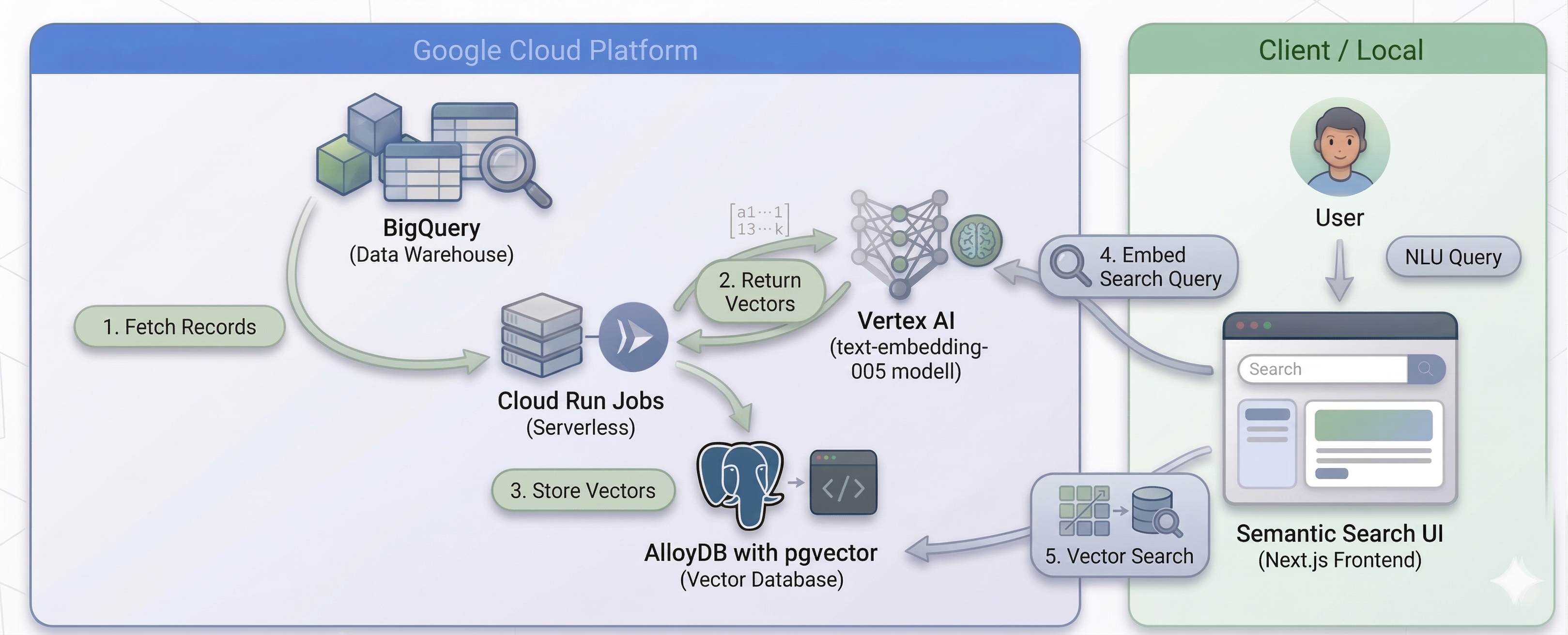
Our pipeline is designed for massive scale and serverless efficiency. We leverage the following Google Cloud services:
* **BigQuery:** Our source of truth, containing millions of product records.
* **Cloud Run Jobs:** A serverless compute platform that allows us to run hundreds of parallel tasks.
* **Vertex AI (`text-embedding-005`):** The latest state-of-the-art embedding model from Google.
* **AlloyDB for PostgreSQL:** An enterprise-grade database with built-in `pgvector` support for high-performance vector search.
The diagram below illustrates the high-level architecture of our RAG pipeline:
## **Implementation**
Let's walk through the setup and execution process step-by-step. All the code for this project is available in the [RAG Migration Repository](https://github.com/rsamborski/rag-migration/tree/main/01-generation).
### Prepare the environment
First, let's configure the [gcloud CLI](https://cloud.google.com/sdk/docs/install-sdk?utm_campaign=CDR_0x87fa8d40_default_b499342314&utm_medium=external&utm_source=blog), clone the repository and create a virtual environment with dependencies.
* Step 1 \- set your default project:
```shell
gcloud config set project YOUR_PROJECT_ID
```
* Step 2 \- configure the default region for Cloud Run:
```shell
gcloud config set run/region europe-central2
```
* Step 3 \- clone the code repository
```shell
git clone https://github.com/rsamborski/rag-migration.git
cd rag-migration/01-generation
```
* Step 4 \- create a virtual environment and install dependencies
```shell
uv init
uv sync
```
### Infrastructure with Terraform
We use Terraform to provision the AlloyDB cluster, the Artifact Registry, and the Cloud Run Job. Navigate to `01-generation/infra/terraform` and apply the configuration:
```shell
terraform init
terraform plan -var="project_id=YOUR_PROJECT_ID" -var="db_password=YOUR_SECURE_PASSWORD" -out tfplan
terraform apply tfplan
```
*Note: The `-out tfplan` flag saves the plan to a file named `tfplan`, and `terraform apply tfplan` applies that specific plan. This is a best practice for ensuring that the plan and apply operations are consistent.*
### Connecting to AlloyDB
To interact with AlloyDB, the application needs to establish a secure connection. Depending on where you are running the code, the approach differs:
* **Local Development:** For running scripts or testing queries from your local machine, use the [AlloyDB Auth Proxy](https://cloud.google.com/alloydb/docs/auth-proxy/overview?utm_campaign=CDR_0x87fa8d40_default_b499342314&utm_medium=external&utm_source=blog). It provides secure access to your instance without authorizing your local IP to the AlloyDB instance.
* **Cloud Run Jobs:** When running in Cloud Run, the job connects to the AlloyDB instance over the private network (VPC). For this setup, we pass the database password via an environment variable to the Cloud Run Job configuration.
*Note: For production workloads, it is highly recommended to use Google Cloud Secret Manager to handle sensitive data like database passwords, rather than passing them as plain text environment variables.*
### Embedding logic
The worker script (`01-generation/main.py`) is designed to run as an individual task within a Cloud Run Job. It uses the `CLOUD_RUN_TASK_INDEX` environment variable to calculate its specific shard of data.
```py
# Cloud Run Job environment variables
task_index = int(os.environ.get("CLOUD_RUN_TASK_INDEX", 0))
batch_size = int(os.environ.get("BATCH_SIZE", 100))
# Calculate offset
offset = task_index * batch_size
```
The embedding generation logic (`01-generation/src/embedder.py`) uses the `google-genai` SDK:
```py
import os
from google import genai
from google.genai.types import EmbedContentConfig
def generate_embeddings(texts: list[str]) -> list[list[float]]:
"""
Generates embeddings for a list of texts using the text-embedding-005 model.
Uses the new google-genai SDK to avoid deprecation warnings.
"""
if not texts:
return []
project_id = os.environ.get("GOOGLE_CLOUD_PROJECT", "rsamborski-rag")
location = os.environ.get("GOOGLE_CLOUD_REGION", "europe-central2")
# Initialize the Gen AI client for Vertex AI
client = genai.Client(vertexai=True, project=project_id, location=location)
# The dimensionality of the output embeddings for text-embedding-005.
dimensionality = 768
task = "RETRIEVAL_DOCUMENT" # standard task for documents in RAG
response = client.models.embed_content(
model="text-embedding-005",
contents=texts,
config=EmbedContentConfig(
task_type=task,
output_dimensionality=dimensionality
)
)
return [embedding.values for embedding in response.embeddings]
```
### Build and deploy
We containerize the application using the provided `Dockerfile` and deploy it as a Cloud Run Job. The `deploy.sh` script automates this process, you can run it by executing:
```shell
./infra/scripts/deploy.sh
```
Once finished you should see:
```shell
---------------------------------------------------------
✅ Deployment Finished
---------------------------------------------------------
```
### Run and monitor
Now you can start the orchestrator by running:
```shell
uv run orchestrator.py
```
The orchestrator provides real-time feedback on the job status, which you can also monitor in the [Google Cloud Console](https://console.cloud.google.com/run/jobs?utm_campaign=CDR_0x87fa8d40_default_b499342314&utm_medium=external&utm_source=blog).
Congratulations 🎉 You have successfully built and run a parallelized embedding pipeline\!
For production environment I recommend to [create a ScaNN index](https://docs.cloud.google.com/alloydb/docs/ai/create-scann-index?utm_campaign=CDR_0x87fa8d40_default_b499342314&utm_medium=external&utm_source=blog) to improve the speed of your queries. Please refer to the linked documentation to learn more about it.
## **Testing with the Semantic Search UI**
To see the embeddings in action, you can spin up the Next.js semantic search UI locally.
### Run the UI
1. Navigate to the UI directory and configure the environment:
```shell
cd ../02-ui
cp .env.template .env
```
Edit the `.env` file to include your Google Cloud `PROJECT_ID` and the AlloyDB `DB_PASSWORD` you used during the Terraform deployment. Set `DB_HOST=127.0.0.1` to route queries through the AlloyDB Auth Proxy.
2. Install dependencies:
```shell
npm install
```
3. Start the AlloyDB Auth Proxy (in a separate terminal window):
```shell
# Make sure you have downloaded the alloydb-auth-proxy binary
./alloydb-auth-proxy projects/YOUR_PROJECT_ID/locations/europe-central2/clusters/rag-migration-cluster/instances/rag-migration-instance
```
4. Start the development server:
```shell
npm run dev
```
Navigate to `http://localhost:3000` to interact with the search portal. You can now run natural language queries directly against your product catalog\!
### See it in action
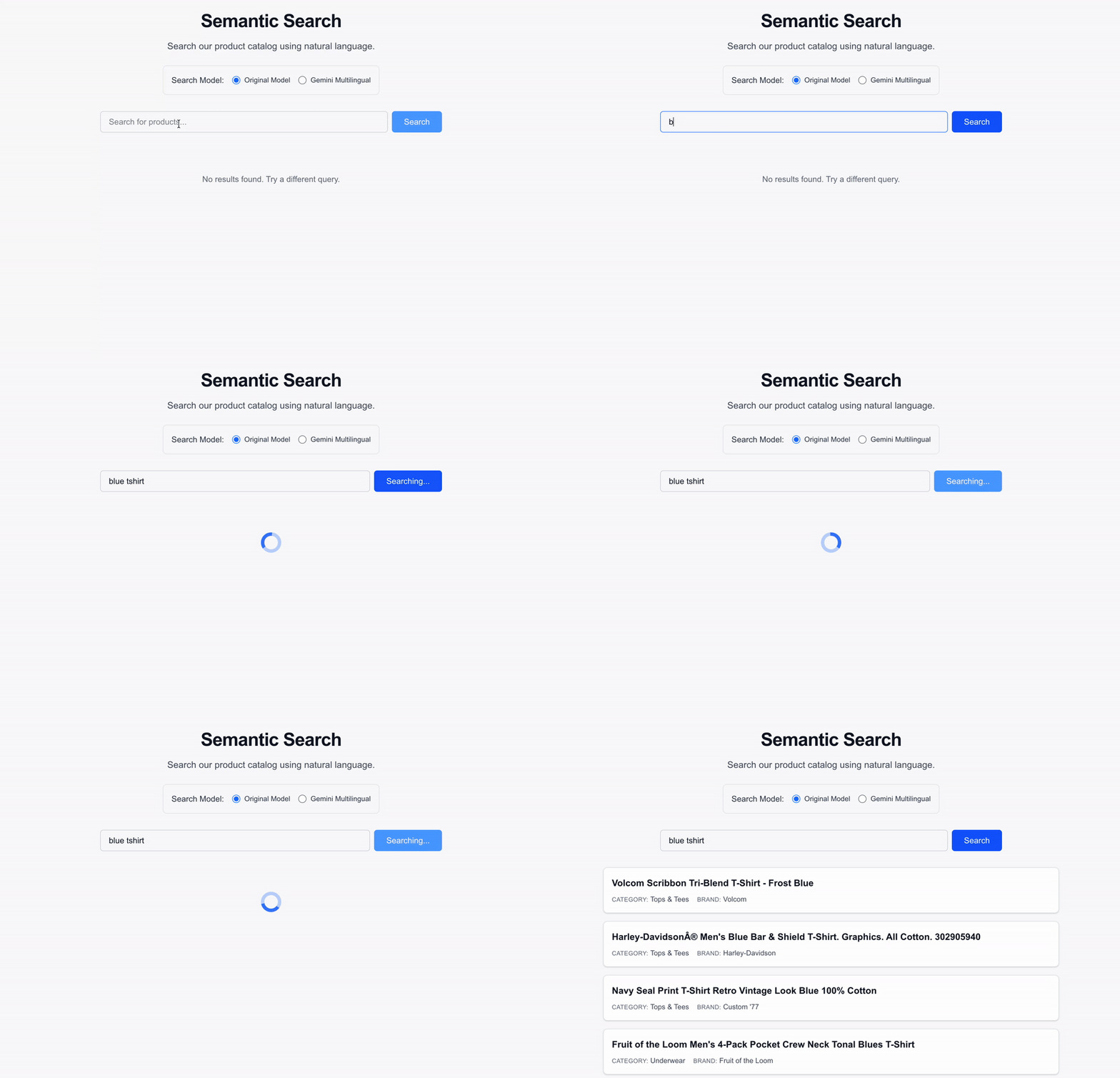
*Watch as natural language queries return highly relevant results mapped via the `text-embedding-005` model in real-time.*
## **Summary**
You now have a scalable, serverless foundation for your RAG system. By using Cloud Run Jobs, you've transformed a bottleneck into a highly parallelized process capable of handling millions of records.
Ready to take it further?
* Check out the [full source code on GitHub](https://github.com/rsamborski/rag-migration).
* [Learn more about Cloud Run Jobs](https://docs.cloud.google.com/run/docs/create-jobs?utm_campaign=CDR_0x87fa8d40_default_b499342314&utm_medium=external&utm_source=blog).
* [Learn more about AlloyDB and pgvector](https://docs.cloud.google.com/alloydb/docs/pgvector?utm_campaign=CDR_0x87fa8d40_default_b499342314&utm_medium=external&utm_source=blog).
* [Learn how to create a ScaNN index](https://docs.cloud.google.com/alloydb/docs/ai/create-scann-index?utm_campaign=CDR_0x87fa8d40_default_b499342314&utm_medium=external&utm_source=blog) for your embeddings.
* [Learn more about Embeddings APIs on VertexAI](https://docs.cloud.google.com/vertex-ai/generative-ai/docs/embeddings?utm_campaign=CDR_0x87fa8d40_default_b499342314&utm_medium=external&utm_source=blog).
In the next post, we’ll dive into Zero-Downtime Embedding Migration \- how to upgrade your vector models without taking your search offline.
## **Thanks for reading**
If you found this article helpful, please consider adding 50 claps to this post by pressing and holding the clap button 👏 This will help others find it. You can also share it with your friends on socials.
I'm always eager to share my learnings or chat with fellow developers and AI enthusiasts, so feel free to follow me on [LinkedIn](https://www.linkedin.com/in/remigiusz-samborski/), [X](https://x.com/RemikSamborski) or [Bluesky](https://bsky.app/profile/rsamborski.bsky.social).
Comments
More Blog
View allaiHow I'm using ASTs and Gemini to solve the "Codebase Onboarding" problem 🧠
Hi everyone! 👋 I’m Tara, a Senior Software Engineer and Consultant. Over the years, I've jumped...
T
tworrellaiLocal AI Will Save Us All (The Math Says So, Trust Me)
Every few weeks a take goes viral in tech circles making the case for ditching cloud AI and running...
S
Sebastian SchürmannaiLost in the AI Hype, I Started Small
And it helped me get back into tech without drowning TL;DR at the end Coming back to...
R
Rohini GaonkargoBuilding a Replay-Tested Interactive Brokers Client in Go
I wanted an IBKR library that felt like Go and had testing I could trust. So I wrote one.
T
Thomas MarcelisplaywrightPlaywright in Pictures: Fully Parallel Mode
Playwright’s fullyParallel mode is often treated as a simple performance switch. In practice, it...
V
Vitaliy PotapovcliDesigning a CLI for Both Humans and Agents
Learn how Alpic designed its CLI for both human developers and AI agents — covering tradeoffs like polling, context windows, interactivity, and statelessness.
J
Julien Vallini